ECO mode AUDI TT ROADSTER 2017 User Guide
[x] Cancel search | Manufacturer: AUDI, Model Year: 2017, Model line: TT ROADSTER, Model: AUDI TT ROADSTER 2017Pages: 314, PDF Size: 76.54 MB
Page 69 of 314
co
co
.... N
" N .... 0
" "' c:o
Starting on a hill
"' Set the parking brake .
"'With the driving gear selected, press the accel
erator pedal carefully. The parking brake will
release automatically if your safety belt is fas
tened .
Under certain circumstances, such as driving in
the mountains, it may be useful to switch tempo
rarily to the manual shift program in order to
manually adjust the gears to the driving condi
tions ¢
page 68.
When parking on a level surface, simply place the
selector lever in the P position. On inclines, acti
vate the parking brake first and then move the selector lever to the P position ¢
page 62. This
prevents the locking mechanism from being
loaded too heavily and will make it easier to
move the selector lever out of the P position .
.8, WARNING
- The vehicle can roll even when the engine is
switched off.
- Unintended vehicle movement can lead to
serious injuries.
- Never leave your vehicle with the engine
running while in gear.
If you must leave
your vehicle when the engine is running, set
the parking brake and move the selector lev
er to the P position.
- Power is still transferred to the wheels
when the engine is running at idle. To pre
vent the vehicle from "creeping", you must keep your foot on the brake when the en
gine is running and the selector lever is in
the D, Sor R position or "tiptronic" mode is
selected.
- Do not inadvertently press the accelerator
pedal when the vehicle is stationary. Other
wise the vehicle will start to move immedi ately, even if the parking brake is set. This
could result in a crash.
- Do not press the accelerator pedal when
changing the selector lever position while
the vehicle is stationary and the engine is running .
Driving
-Never engage the R or P selector level posi
tions while driving. It could cause a crash.
- Before driving down a steep slope, reduce
your speed and shift into a lower gear with "ti ptronic".
- Do not ride the brakes or press the brake
pedal too often or too long when driving
downhill. Constant braking causes the brakes to overheat and substantially re
duces braking performance, increases brak
ing distance or causes complete failure of
the brake system.
- If you must stop on an incline, always hold
the vehicle in place with the foot brake or
parking brake to prevent it from rolling
back .
- Never hold the vehicle on an incline with a
slipping clutch. The clutch opens automati
cally when it becomes too hot from the
overload. The
mJ indicator light turns on
and a message appears ¢
page 70 when
the clutch is overloaded.
- If the engine must run while you are work
ing in the engine compartment with the
hood open, make sure a gear is not engag
ed. The selector lever must be firmly in the
P position and locked in place and the park
ing brake must be set ¢
page 235. Other
wise, the vehicle could begin moving when
increasing the engine speed, even with the
parking brake set .
(!) Note
- When stopping on an incline, do not try to
hold the vehicle in place by pressing the ac
celerator pedal while a driving gear is se
lected. This can cause the automatic trans
mission to overheat and can damage it. Set
the parking brake or press the brake pedal
to prevent the vehicle from rolling.
- Allowing the vehicle to roll when the engine
is stopped and the selector lever is in the N
position will damage the automatic trans
mission because it is not lubricated under
those circumstances.
67
Page 71 of 314
co
co
.... N
" N .... 0
" "' c:o
~ To shift down one gear, tap the shift paddle 0-
If the sh ift paddles are tapped while in the D/S
selecto r lever posit io n, automatic mode switches
off briefly . To switch from manually shifting back
to a utomatic shifting immediately, tap the shift
paddle
G) ¢ fig . 74 for 1 second .
To keep shifting using the shift paddles, move
the sele ctor lever to the right out of the D/S posi
tion into the t ipt ronic shift gate.
The transm ission automatically shifts up o r down
befo re critical engine speed is reached.
The transm ission only a llows manual sh ift ing
when the engine speed is within the permitted
range.
(D Tips
- If you sh ift to the next lowest gear, the
transm ission w ill only shift if the engine w ill
not be over-revved.
- With kick-down, the transmission shifts to a
l ower gear, depending on vehicle speed and
engine speed.
- tiptronic does not wo rk if the t ransmiss ion
i s r unning in emergency mode.
Kick-down
Kick-down enables maximum acceleration.
When you press the accelerator pedal down be
yond the resistance point , the automatic trans
m iss ion downshifts into a lower gear and the en
g ine utilizes its fu ll power , depend ing on veh icle
speed and engine R PM.
It shifts up into t he next
h igher gea r once the maximum spec ified engine
RP M is reached.
A WARNING
Please note that the wheels could spin on
slick or slippery roads when kick-down is ac
tive.
-
l ) T he ESC lig ht turn s on continuous ly and the mess age S ta·
b ili za tion co ntro l (E SC): sport. Warn ing! Red uced st abi l·
ity appe ars te mporar ily in th e I nfotainment syste m to in
di cate tha t the syste m wa s deact ivate d.
D riv ing
Launch Control-Program
The Launch Control Program enables maximum
acceleration .
Requirement: the engine must be at operating
temperature and the steering wheel must not be
turned .
~ With the engine running, press the l1' 0FF I but
ton briefly one t ime
l ).
~ Pull the selector lever back out of the D/S posi
tion briefly to select the S position, or press it
toward the r ight into the tiptron ic position or
select the
Dynamic dr iving mode in dr ive se
lect*
¢ page 79.
~ Press the brake pedal fi rm ly w ith your left foo t
and hold it all the way down for at least 1 sec
ond.
~ At the same time, p ress the gas peda l all the
way down with your right foot until the eng ine
reaches and stays at a high RPM level.
~ Remove your left foot from the brake.
A WARNING
- Always adapt your driving to the t raff ic flow.
- Only use Launch Control when road and traf-
f ic conditions allow it and other drivers will
not be endange red or impacted by your dr iv
ing and the vehicle's acceleration.
- Please note that the d rive wheels can spin
and the vehicle can b reak away when spo rt
mode is switched on, especially when the
road is slippery.
- Once the vehicle has started mov ing, press
the
! .P-O FF I button briefly to turn the spo rt
mode off.
(D Tips
- The transmission temperature may increase
significant ly after using the launch control
prog ram. If that happens, the prog ram may
no t be ava ilable for a few minutes.
It will be
avai lab le again afte r a cool -down period. ..,.
69
Page 72 of 314
Driving
-When acce lerating using the launch control
program, all vehicle parts are subject to
heavy loads . Th is can lead to increased
wear.
Emergency mode
In the event of a system malfunction, there is on
emergency program.
If all of the se lecto r lever posit ions are h ighlight
ed wit h a light background in the Infotainment
d isp lay, there is a system malfunction and the S
tron ic transmiss ion is running in the emergency
program . The vehicle can still be driven in emer
gency mode, but only with reduced speed and not in a ll gears . In some cases, the vehicle
can
not drive in rever se.
(D Note
If the transmission runs in emergency mode,
drive to an aut ho rized Aud i deale r or a uthor
ized Aud i Service Fac ility immediately to have
the malfunction corrected.
Transmission malfunction
• Tran smis sion: malfun ction! Please stop ve
hicle and shift to P
There is a malfunc tion in the transmiss ion. Pa rk
the vehicle se curely and do not continue driving.
See an autho rized Au di dea ler o r autho rized Aud i
Serv ice Facility for assistance .
• Transmission: too hot . Please stop vehicle
The transm ission is too hot and can become dam
aged . Stop and let the transm ission cool with the
engine run ning (at id le) in t he P selector leve r po
sition. Then the indicato r ligh t an d the message
tur n off, drive to an a uthorized Aud i dea le r or au
t hor ized Audi Se rvice Facility immed iate ly to have
the ma lfunction co rrected . If the ind icator light
and the driver message do not turn off, do not
continue dr iv ing. See an authorized A udi d ealer
or author ized Audi Se rvice Facility for assistance .
[O] Transmission: malfunction! You can contin
ue driv ing. See owner' s manual
70
Drive to an au thori zed A udi dealer or authori zed
Audi Se rvice Facility immediate ly to have the
malfunction cor rected.
[O] Tran smission: malfunction! You may contin
ue dr iving. No reverse gear
Drive to an authorized A udi dealer or au thorized
Audi Se rvice Fa cility immed iate ly to have the
malfunc tion cor rec ted .
ml Tran smiss ion: malfunction! You may contin
ue driving in D until engine off
Drive the vehicle away from mov ing traff ic and
park . See an author ized Audi dealer or author ized
Audi Se rvice Facility for assis tance.
ml Transmission: too hot . Please adapt driving
style
Continu e driving moderate ly. When the indicator
li ght turns off, you can cont inue driving norma l
l y.
ml Tran smission: Plea se press brake pedal and
select gear again
I f the transm iss ion m alfu nct io ns bec ause the
temperat ure is too high, a message appe ars
when the t ransmission is cooled .
Page 75 of 314
co
co
.... N
" N .... 0
" "' c:o
speed and the distance between your vehi
cle and other vehicles.
- For safety reasons, cruise control should not
be used in the city, in stop-and-go traffic, on
winding roads and when road conditions are
poor (such as ice, fog, gravel, heavy rain and
hydroplaning), because this increases the
risk of a n accident.
- Switch the cruise control off temporarily
when driving in turning lanes, highway exits
or in construction zones.
- Please note that unconsciously "resting"
your foot on the accelerator pedal prevents
the cruise control from braking. This is be
cause pressing the accelerator pedal over
rides the cruise control system.
- If a brake system malfunction such as over
heating occurs when the cruise control sys
tem is switched on, the braking function in
the system may be switched off . The rest of
the cruise control system functions remain
active as long as the
@;\1)~14 (USA models) I
ill (Canada models) indicator light is on.
@ Tips
The brake lights turn on when the brakes are
app lied automatica lly.
Changing speed
Applies to: veh icles with c ruise control system
.. To increase/decrease the speed in increments,
briefly
tap the lever toward 010 Q page 72,
fig. 77 up/down to the first level.
.. To increase or decrease the speed in incre
ments,
tap the lever toward 010 Q page 72,
fig. 77 up/down to the second level.
.. To increase or decrease the speed quickly ,
hold
the leve r in the 0 / 0 direction until the de
sired speed is reached .
Overriding the speed
Applies to: veh icles with c ruise control system
You can press the accelerator pedal down to in
crease your speed, for example if you want to
pass someone. The speed you set earlier wi ll re-
Assist
sume as soon as you release the acce lerator ped
al.
However, if you are exceeding the stored speed
by a considerable amount for a long time, the
cruise contro l system will temporarily switch off.
The
(ff;ji )~i4 (USA mode ls) Iii (Canada mode ls) in
dicator light in the instrument cluster turns off
and the stored speed is maintained.
Preselecting the speed
Applies to : vehicles with cruise control system
You can pre-select your desired speed when the
vehicle is stationary.
.. Switch on the ignition.
.. Pull the lever into position (!)
Q page 72,
fig. 77.
.. To increase or decrease the speed, tap the lever
toward
0 10 .
This function makes it possible, for example, to
save the speed you want before driving on the
highway . Once you are on the expressway, acti
vate the cruise control system by pulling the lev
er into position (!).
Switching off
Applies to: vehicles with cruise control system
Temporary deactivation
.. Press the brake pedal, or
.. Press the lever toward@(not locked into
place)
Q page 72, fig. 77.
Switching off completely
.. Press the lever into position @(clicked into
place), or
.. Switch the ignit ion off .
The speed you stored will be maintained if the cruise control has been switched off temporarily .
To resume the stored speed, release the brake or
clutch pedal and pull the lever to position (!).
Switching the ignition off will erase the stored
speed .
73
Page 82 of 314
Ass is t
_& WARNING
Using Audi drive select incorrectly can lead to
collisions, other accidents and serious inju
ries.
Description
App lies to: ve hicles w ith Aud i d rive select
The vehicle setup in each mode depends on the
veh icle's features . However, the engine and
steer ing are always affe cted.
E ngine and automatic tr an smi ssi on
Depending on the mode, the engine and auto
matic transmiss ion respond more qu ickly or in a
more balanced manner to accelerator pedal
movements .
Adaptive damper s (Audi m agnetic ride )*
The adaptive dampers use sensors to record in
formation regarding steering movements, brak
ing and accelerat ion operat ions by the driver,
road surface, driving speed, and load. With dr ive
select, you can adjust the adaptive dampers to
sporty (dynamic), comfortable (comfort) or ba l
a nced (auto).
Stee ring
The power steer ing adapts . Indirect steering that
moves eas ily as in comfort mode is especially
suited to long drives on a highway. The dynam ic
mode provides sporty, direct steering.
Torque distribution
The sport d ifferent ial d istr ibutes the dr ive power
to the rear axle based on the situation . The distri
bution of power varies depend ing on the selected
mode from mode rate
( Comfort ) to sporty ( D y
nami c). The goal is a high leve l of agility and ab il
ity to acce lerate o n curves . The vehicle is very re
sponsive to steering.
Engine sound *
The engine sound adapts to the current mode
and can be subtle to sporty.
80
@ Tips
In some models, the maximum vehicle speed
can only be reached in the auto and dynamic
modes.
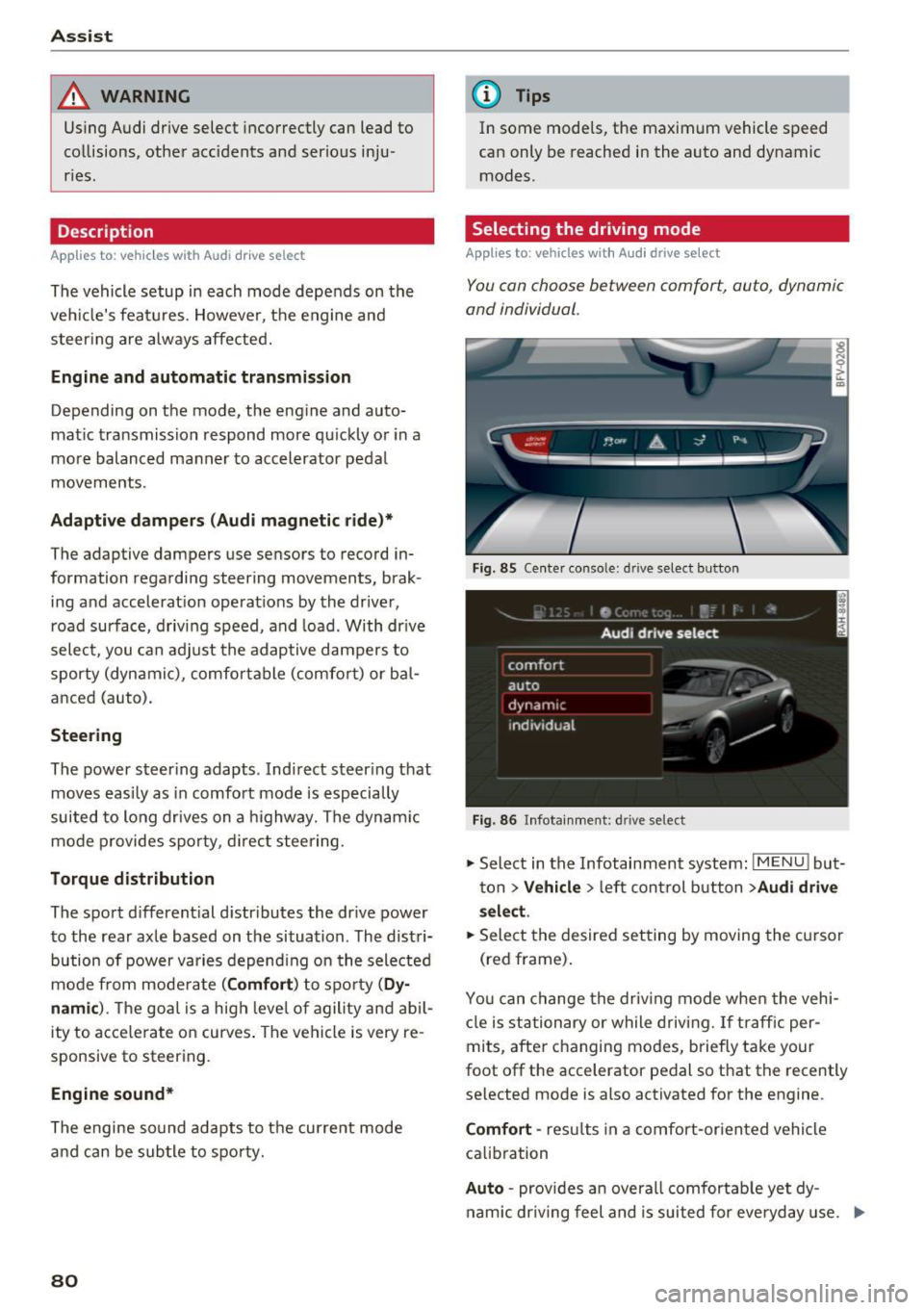
Selecting the driving mode
App lies to : vehicles with A udi drive se lect
You can choose between comfort, auto , dynamic
and individual.
Fig. 85 Center conso le: drive select button
Fig. 86 Infotainment: driv e select
., Select in the Infotainment system : IMENU! but
ton
> V ehicle > left control button > Audi drive
sel ec t.
.. Select the desired setting by moving the cursor
(red frame) .
You can change the dr iv ing mode whe n the vehi
cle is st ationary or while driving. If traff ic per
mits, after changing modes, b riefly take your
foot off the accelerator pedal so that the recently
selected mode is also activated for the engine .
Comfort -res ults in a comfort-or ien ted vehicle
calib ration
Auto -provides an overa ll comfortab le yet dy
nam ic dr iv ing feel and is suited for everyday use. ..,.
Page 94 of 314
Intelligent Technology
snow and ice. Always read and follow safety pre
cautions
¢ & .
Winter tires
By using all wheel drive, your vehicle has good
forward motion with standard tires in winter con
ditions. However, in winter we recommend using
winter or all season tires on
all four wheels, be
cause this will improve the
broking effect.
Snow chains
If there are snow chain laws, snow chains must
also be used on vehicles with all wheel drive
¢ page 261, Snow chains.
Replacing tires
For vehicles with all wheel drive, only whee ls with
the same rolling circumference should be used .
Avoid using tires with different tread depths
¢ page 2 53, New tires or wheels.
Offroad vehicle?
Your Aud i is not an offroad vehicle - there is not
enough ground clearance. For this reason, avoid
difficult terrain.
_&. WARNING
-Also, in vehicles with all wheel drive, adapt
your driv ing style to the current road and
t ra ffic conditions. Do not let the increased
safety provided tempt you into taking risks,
because this increases the r isk of an acci
dent.
- The braking ability of your vehicle is limited
to the traction of the wheels. In this way, it
is not different from a two wheel drive vehi
cle. Do not be tempted to accelerate to a
high speed when the road is slippery, be
cause this increases the risk of an accident.
- Note that on wet streets, the front wheels
can "hydroplane" if driving at speeds that
are too high. Unlike front whee l drive
vehicles, the eng ine does not rev highe r sud
denly when the vehicle begins hydroplaning.
For this reason, pay attention to the road
conditions regardless o f your speed.
92
Rear spoiler
Appl ies to: vehicles with retractable rear spoile r
The extendoble rear spoiler increases driving sta
bility.
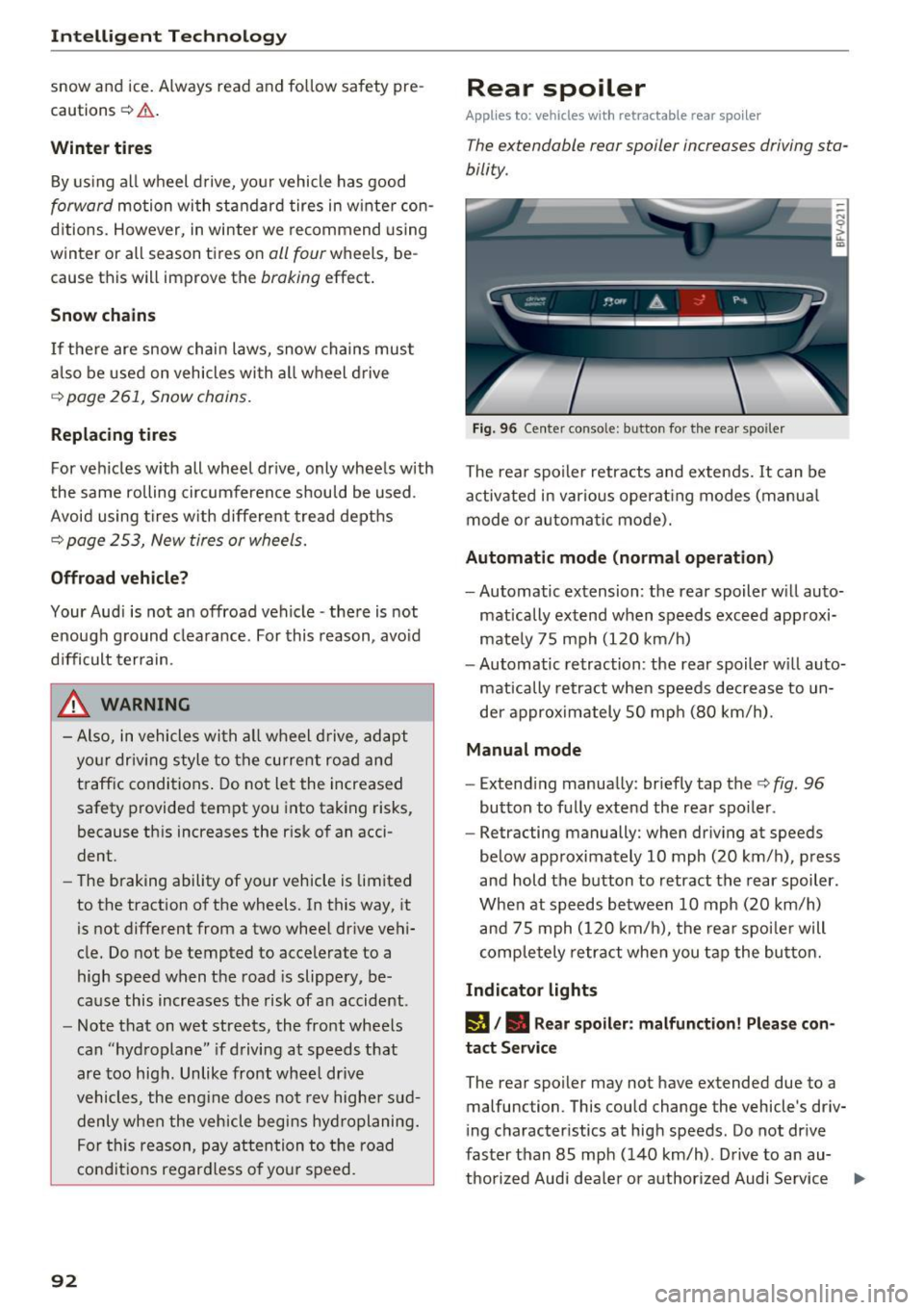
Fig. 96 Center conso le: button for the rear spoiler
The rear spoiler retracts and extends. It can be
activated in various operat ing modes (manua l
mode or automatic mode).
Automatic mode (normal operation)
- Automatic extension: the rear spoiler w ill auto-
mat ically extend when speeds exceed approxi
mately 75 mph (120 km/h)
- Automatic retraction: the rear spoiler w ill auto
matically retract when speeds decrease to un
der approximately 50 mph (80 km/h).
Manual mode
-Extend ing manually : briefly tap the¢ fig. 96
button to fully extend the rear spoiler .
- Retracting manually: when driving at speeds
below approximately 10 mph (20 km/h), press
and hold the b utton to retract the rear spoiler .
When at speeds be tween 10 mph (20 km/h)
and 75 mph (120 km/h), the rea r spoi ler will
completely retract when you tap the button.
Indicator lights
IJ,. Rear spoiler: malfunction! Please con
tact Service
The rear spoiler may not have extended due to a
malfunction. This could change the vehicle's driv
ing characteristics at high speeds. Do not drive
faster than 85 mph (140 km/h) . Drive to an au-
thorized Audi dea ler or authorized Audi Service ..,.
Page 135 of 314
co
co
.... N
" N .... 0
" "' c:o
-It is only safe to use tablets, laptops, mo
bile devices and other similar devices when
the vehicle is stationary because, like all loose objects, they could be thrown around
the inside of the vehicle in a crash and cause
serious injuries. Store these types of devices
securely while driving.
- Do not use any wireless devices on the front
seats within range of the airbags while driv
ing. Also read the warnings in the chapter
¢page 196.
- Do not use any Wi-Fi devices within range of
the airbags while driving. Also read the
warnings in the chapter
¢page 196.
{[) Note
You are responsible for all precautions taken
for data protection , anti-virus protection and
protection against loss of data on mobile de
vices that are used to access the Internet
through the Wi-Fi hotspot .
@ Tips
-For more information on roaming fees, con
tact Audi connect customer service at 1
(877) SOS-AUDI (2834).
- The speed of the data connection may vary
depending on the vehicle location , the cov
erage area of your cell phone service provid
er and if the recommended provider is used
or not .
- A data connection cannot be established if
incorrect data is entered in the connection
settings.
- For more information on roaming charges,
contact your cell phone service provider .
- The Wi-Fi hotspot reception quality depends
on the signal strength and the availability of
the mobile network. For more information,
contact your current network provider.
- For additional information, visit
www.audiusa.com/connect.
Audi connect
About Audi connect
Audi connect services
Applies to : vehicles wit h Audi connect
(D Tips
- Audi connect services are only available with
an existing or separate cell phone contract
and only within the mobile network cover
age area. Depending on your cell phone
rates, there may be additional costs when
connecting to the Internet using data pack
ets, particularly with international service.
Based on the high data volume, using a flat
rate data plan is highly recommended.
- You can only use services supported by Audi
connect if you have the optional MMI Navi
gation plus equipment with MMI touch and
Audi connect.
- Use of the LTE* mobile network standard is
not available in every country . Contact your
authorized Audi dealer or authorized Audi
Service Facility or your cell phone service
provider for additional information .
- Using Audi connect services requires a mini
SIM card with data options and, when using
LTE*, it also requires LTE options.
- Usage of Audi connect services depends on
the availability of services through third par
ty providers.
- Also note the information in the chapter
¢page 114, Telephone.
-Audi connect is designed for use only with
the provided SIM card . Receiving data pack
ets from the Internet will quickly increase
the volume of data used. For more informa
tion, contact Audi connect customer service
at 1 (877) SOS-AUDI (2834).
- The Audi connect services are available in
the USA. Audi connect services are currently
not available in Canada or in Mexico.
- Availability, scope, providers, screen display
and costs of services may vary depending on
the country, model, model year, end device and rates . Additional information can be
found under
www.audiusa.com/audicon
nect .
133
Page 178 of 314
System settings
Individual speech training (on ly when the vehi
cle is stationary): yo u can adapt the voice recog
n ition system to yo ur voice or pro nunciat ion in
order to improve the system's ability to recogni ze
your speech. Individua l train ing is comprised of
20 speech e ntries that cons ist of commands and
sequences o f num bers . You can dele te the p ro
g ramm ed vo ice tra ining w ith the
Reset individu·
al spee ch training
func tion.
Factory settings
The fo llow ing funct ions can be reset to the facto
ry default set tings :
-Sound settings
- Rad io
- Media settings
-Jukebox *
- Directory *
- Telephone*
- Bluetooth and Wi-Fi *
- Navigation sett ings *
- Navigation and online memory*
- Voice recognition system*
- Message settings*
-Apps *
- Tool tips
- Audi connect *
You can select the desi red functions individually
or all at once with the
Select all entries option.
Select and confirm
Restore factory settings .
@ Tips
-Make su re that not only t he settings we re
d eleted but also the stored data, if ap plica
bl e.
- If you reset the
Navigation and online
memory* or Audi connect*
to t he factory
default settings, the system automatically
r estarts afte r approximate ly 20 seconds.
The I nfota inme nt system display will be
b lack for several m inu tes when r estart ing.
- Please note t hat the vo ice recog nit io n sys
t e m* is not availabl e in Cabr io le ts t hat do
not hav e a factory- insta lled safety bel t mi
crophone.
176
Connection manager
' Introduction
The connection manager gives you an overview
of your connected devices and their network sta
tus.
"' Select: !ME NUI button> Settings > left control
button
> MMI settings > Conne ction manager .
"'Select and confirm a menu i tem .
If a mobile device was already connected and you
se lect and co nfirm the corresponding menu item,
the dev ice name and co nnect ion mode a re dis
played under the men u item.
You can individ ually
connect (~) or disconnect
(0) a pa ired device.
' Using the telephone
App lies to : vehicles wit h te lepho ne
- Connect new device: search for and con nect a
cell p ho ne.
- List of devices already paired : select your ce ll
phone from t he list of all th e dev ices tha t are
already paired .
Second telephone
Applies to : vehicles wi th telepho ne
- Connect new device : search for and co nnect a
c ell p hone.
- List of device s already paired : sele ct yo ur cell
ph one fr om t he list of all the dev ices tha t ar e
a lready paired .
Data connection
Applies to : vehicles wi th Audi connec t
-Connect new device: search for and con nect a
mob ile dev ice (such as a smart pho ne).
- List of devices already paired : select yo ur ce ll
phone from t he list of all the dev ices that a re
already paired.
Or: insert a m ini SIM ca rd into
the SIM card
reader *¢page 127.
Page 213 of 314
co
co
.... N
" N .... 0
" "' c:o
-Never install seat covers or replacement
upholstery over the front seatbacks that
have not been specifically approved by
Audi.
- Never use additional seat cushions that
cover the areas where the side airbags in
flate.
- Damage to the original seat covers or to
the seam in the area of the side airbag module must always be repaired immedi
ately by an authorized Audi dealer.
- The airbag system can deploy only once. Af
ter an airbag has been deployed, it must be
replaced with new replacement parts de
signed and approved especially for your
Audi model version. Replacement of com plete airbag systems or airbag components
must be performed by qualified workshops
only. Make sure that any airbag service ac
tion is entered in your Audi Warranty
&
Maintenance booklet under AIRBAG RE
PLACEMENT RECORD.
- For safety reasons in severe accidents, the
alternator and starter are separated from
the vehicle battery with a pyrotechnic circuit interrupter.
- Work on the pyrotechnic circuit interrupt
er must only be performed by a qualified
technicians who have the experience, in
formation and special tools necessary to
perform the work safely.
- If the vehicle or the circuit interrupter is
scrapped, all applicable safety precautions must be followed.
@ For the sake of the environment
Undeployed airbag modules and pretension
ers might be classified as Perchlorate Materi
al -special handling may apply, see
www.dtsc.ca.gov/hazardouswaste/perchlo
rate. When the vehicle or parts of the re
straint system including airbag modules and
safety belts with pretensioners are scrapped,
all applicable laws and regulations must be
observed. Your authorized Audi dealer is fa
miliar with these requirements and we recom
mend that you have your dealer perform this
service for you.
Airbag system
Other things that can affect Advanced
Airbag performance
Changing the vehicle's suspension system can
change the way that the Advanced Airbag System
performs in a crash. For example, using tire-rim
combinations not approved by Audi, lowering the
vehicle, changing the stiffness of the suspension, including the springs, suspension struts, shock
absorbers etc . can change the forces that are
measured by the airbag sensors and sent to the
electronic control unit. Some suspension changes
can, for example, increase the force levels meas
ured by the sensors and make the airbag system
deploy in crashes in which it would not deploy if
the changes had not been made. Other kinds of
changes may reduce the force levels measured by
the sensors and prevent the airbag from deploy ing when it should.
A WARNING
-Changing the vehicle's suspension including use of unapproved tire-rim combinations can
change Advanced Airbag performance and in
crease the risk of serious personal injury in a
crash.
- Never install suspension components that
do not have the same performance charac
teristics as the components originally instal
led on your vehicle.
- Never use tire-rim combinations that have
not been approved by Audi.
211
Page 222 of 314
Child safety
Advanced front airbag system and children
Your vehicle is equipped with a front "Advanced
Airbag System" in compliance with United States Federal Motor Vehicle Safety Standard (FMVSS)
208 as applicable at the time your vehicle was
manufactured.
The Advanced Airbag system in your vehicle has
been certified to meet the "low-risk" require
ments for 3- and 6-year old children on the pas
senger side and small adults on the driver side.
The low risk deployment criteria are intended to
reduce the risk of injury through interaction with
the airbag that can occur, for example, by being
too close to the steering wheel and instrument panel when the airbag inflates. In addition, the
system has been certified to comply with the
"suppression" requirements of the Safety Stand
ard, to turn off the front airbag for infants up to
12 months who are restrained on the front pas
senger seat in child restraints that are listed in
the Standard .
Even though your vehicle is equipped with an Ad
vanced Airbag system, a child should always ride
in the seat properly restrained for its age and
size . The airbag on the passenger side makes the
front seat a potentially dangerous place for a
child to ride. The front seat is not the safest place
for a child in a forward-facing child safety seat. It
can be a very dangerous place for an infant or a larger child in a rearward-facing seat .
The vehicle's Advanced Airbag System has a ca pacitive passenger detection system in the front
passenger seat cushion that can detect the pres
ence of a baby or a child in a child restraint sys
tem on this seat.
The capacitive passenger detection system regis
ters the changes that result in an electrical field
when a ch ild, a child restraint, and a baby blanket
are on the front passenger seat. The change in
the measured capacitance due to the presence of
a child, a child restraint, and a baby blanket on
the front passenger seat is related to the child
restraint system resting on the seat. The meas
ured capacitance of a child restraint system var ies depending on the type of system and specific
make and model.
220
The electrical capacitance of the various types, makes, and models of child restraints specified
by the U.5 .National Highway Traffic Safety Ad
ministration (NHTSA) in the relevant safety
standard are stored in the Advanced Airbag Sys
tem control unit together with the capacitances
typical of infants and a 1-year old child . When a
child restraint is used on the front passenger
seat with a typical 1 year-old infant, the Ad
vanced Airbag System compares the capacitance
measured by the capacitive passenger detection
system with the data stored in the electronic con
trol unit.
Child restraints and Advanced front airbag
system
Regardless of the child restraint that you use,
make sure that it has been certified to meet Unit
ed States Federal Motor Vehicle Safety Standards
and has been certified by its manufacturer for
use with an airbag. If in exceptional circumstan
ces you must use it on the front passenger seat,
carefully read all of the information on child safe
ty and Advanced Airbags and heed all of the ap
plicable WARNINGS. Make certain that the child
and child restraint are correctly recognized by the
capacitive passenger detection system in the
front passenger seat, that the front passenger
airbag is turned off, and that the airbag status is
always correctly signaled by the
PASSENGER AIR
BAG OFF~;
light.
Many types and models of child restraints have
been available over the years, new models are in
troduced regularly incorporating new and im
proved designs and older models are taken out of
production. Child restraints are not standardized.
Child restraints of the same type typically have
different weights and sizes and different "foot
prints", the size and shape of the bottom of the
child restraint that sits on the seat, when they
are installed on a vehicle seat. These differences
make it virtually impossible to certify compliance
with the requirements for advanced airbags with each and every child restraint that has ever been
sold in the past or will be sold over the course of
the useful life of your vehicle. ..,.