display AUDI TT ROADSTER 2017 User Guide
[x] Cancel search | Manufacturer: AUDI, Model Year: 2017, Model line: TT ROADSTER, Model: AUDI TT ROADSTER 2017Pages: 314, PDF Size: 76.54 MB
Page 63 of 314
CD
CD
.... N
" N ...... 0 r--. V, co
have the malfunction corrected. To start the en
gine, press and hold the
! START ENGINE STOPI
button.
DJ R emot e control key : hold b ack of key
again st the d esignated are a. See owner's man
ual
This message appea rs if the re is no convenie nce
key inside the vehicle or if the system does not
recognize the key . The conven ience key may not
be recognized, for example, if it is cove red by an
object that
disrupts the signal (such as a brief
case), or if the key battery is weak. Electronic de
vices such as cell phones can also interfere with
the signal.
To still be able to start or stop the eng ine, see
c:::> page 61, Starting the engine when there is a
malfunction .
Ill Remote control key : key not recogn ized . Is
the ke y still in th e vehi cle?
The Ill ind icator light turns on and this message
appears if the conve nience key was removed from
the vehicle when the engine was running.
If the
conven ience key is no longer in the vehicle, you
cannot switch the ign ition on or start the engine
once you stop it. You a lso cannot lock the vehicle
from the outside .
Please press brake p edal
This message appears if you do not press the
brake pedal when starting the eng ine.
Please pr ess clut ch p edal
This message appea rs in vehicles w it h manual
transmissions if you do not press the clutch pedal
when sta rting the engine . The engine can on ly be
started when t he clu tch pedal is pressed.
Pl ease select N or P
This message appea rs when starting or stopping
the eng ine if the selector lever is not in the Nor P
position . The engine will not start/stop.
Shift to P , otherw ise vehi cle can roll awa y.
Doors can be lo cked i n P only
This message appears for safety reasons a long
with a warning tone. It appears if the selector
lever for the automatic transmission is not in the
D rivi ng
P position when switch ing the ignit ion off w ith
the
I START ENGINE STOPI b utton. P lace these
l ector lever in the P position. The veh icle cou ld
roll if the lever is not in P. You also cannot lock
the vehicle using the locking sensor on the door handle or using the conven ience key .
Starting the engine when there is a
malfunction
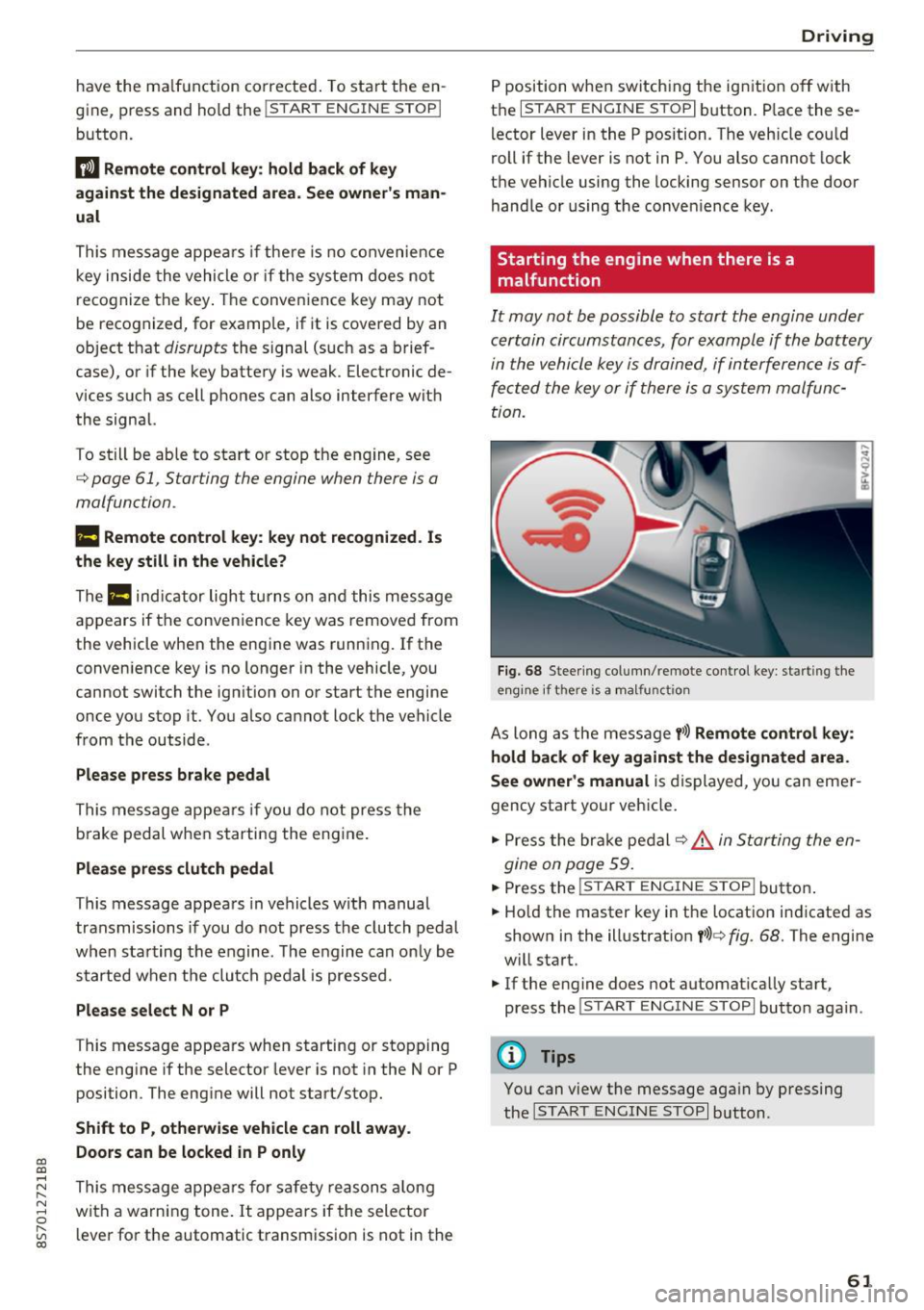
It may not be possible to start the engine under
certain circumstances, for example if th e battery
in the vehicle key is drained, if interference is af
fected the key or if there is a system malfunc
tion.
F ig. 68 Steering column/ remote control key: starting the
e n g in e if there is
a m alfunct ion
As long as the message y >l) Remote control key :
hold back of key against the designated are a.
See owner's manual
is displayed, you can emer
gency start your vehicle.
.. Press the brake pedal
c:::> .&. in Starting the en
gine on page 59.
... Press the ~I s=T ~A ~ R~ T~ E_N _G _I _N =E - S~ T= o- P~I button .
.,. Ho ld the master key in the location ind icated as
shown in the illustrat ion
y >l) c:::, fig. 68. The engine
w ill start.
.. If the engine does not automat ica lly start,
press the
! S TART ENGINE STOPI butto n again .
(D Tips
You can view the message aga in by pressing
the
I S TA RT ENGINE S TOP I button.
61
Page 64 of 314
Driving
Electromechanical
parking brake
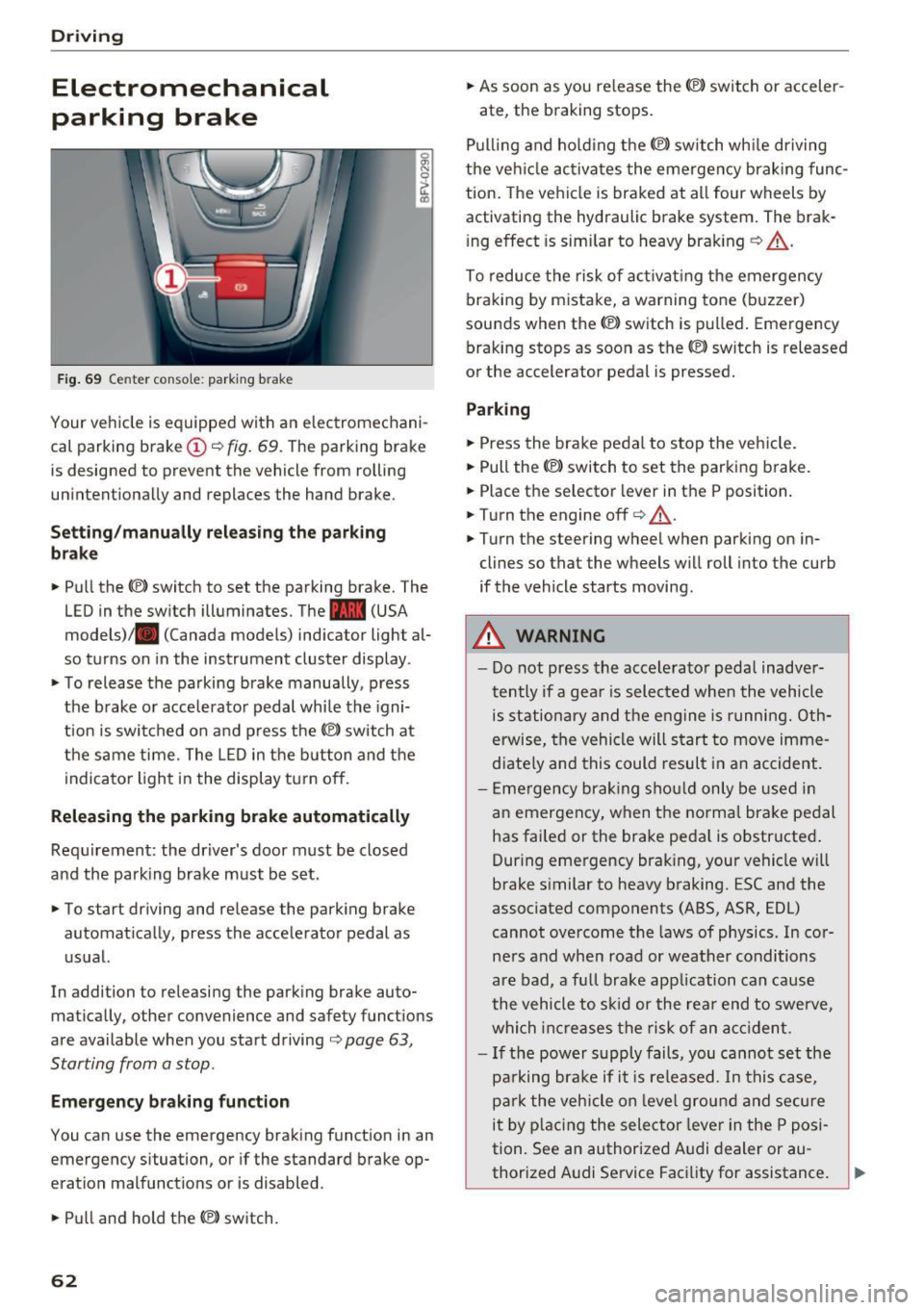
Fig . 69 Center conso le: par king brake
Your vehicle is equipped with an electromechani
cal parking brake
(D o fig. 69. The parking brake
is designed to prevent the vehicle from rolling
unintentionally and replaces the hand brake.
Setting /manuall y re le asing the parking
bra ke
.. Pull the(®) switch to set the parking brake. The
LED in the switch illuminates. The -(USA
models)/ . (Canada models) indicator light al
so turns on in the instrument cluster display .
.. To release the parking brake manua lly, press
the brake o r acce lerato r pedal while the igni
tion is swi tched on a nd p ress the
«el) switch at
the same time. The L ED in the b utton and the
indicator light in the display t urn off.
Releasing the parking brake automatically
Req uirement: the driver's door must be closed
and the park ing brake must be set.
.. To start driving and release the park ing brake
automat ically, press the accelerator pedal as
u su al.
In addition to releasing the park ing brake auto
mat ica lly, other convenience and safety functions
are available when you start driving
o page 63,
Starting from a stop .
Emergency braking function
You can use the emergency brak ing function in an
emergency situation, or if the standard brake op
eration mal functions or is disabled .
.. Pull and hold th e®> switch.
62
.. As soon as you re lease the (®) switch or acceler-
ate, the braking stops.
P ulli ng and ho ld ing the®) switch wh ile driving
the ve hicle ac tiva tes the emerge ncy braking func
tion . The vehi cle is braked at a ll four wheels by
activating the hydraulic brake system . The brak
i ng effect is sim ilar to heavy brak ing
o ,A .
To reduce the risk of act ivat ing the emergency
braking by mistake, a warning tone (buzzer)
sou nds when the© switch is pulled . Emergency
bra king stops as soon as the®) switch is released
or the accelerator pedal is pressed.
Parking
.. Press the bra ke pedal to stop the veh icle.
.. Pull the®> switch to set the parking brake.
.. Place the selector lever in t he P position .
.. Turn the engine off
cc> ,A.
.. Turn the steering wheel when parking on in
cl ines so that the wheels w ill roll into the curb
if the vehicle starts moving.
.&. WARNING
- Do not press the acce lera to r pedal inadve r
tently if a gea r is selec ted whe n the vehicle
is st ation ary and the e ngine is runni ng. Oth
erwise, the vehi cle will s tart to move imme
diate ly and this could result i n an accident.
- E mergency brak ing sho uld only be used i n
an emergency, when the norma l bra ke pe dal
has failed or the brake peda l is o bstr ucted .
During emergency brak ing, your vehicle will
brake s imilar to heavy braking. ESC and the
associated components (ABS, ASR, EDL)
cannot ove rcome the laws of physics. In co r
ners and when road or weather conditions
are bad, a fu ll brake application can cause
the vehicle to s kid or the rea r end to swe rve,
whi ch in crease s the risk of an ac cident.
- I f the power supply fails, you cannot set the
pa rking bra ke if it is released. In this ca se,
p ar k the vehicle on leve l grou nd and secure
it by plac ing the sele ctor lever in the P pos i
tion. See an authorized A udi dealer or au -
thorized A udi Service Facil ity for assistance.
~
Page 66 of 314
Driving
vehicle to accelerate without a noticeable
interruption in traction.
The transm ission upshifts o r downshifts auto
mat ica lly . T he driving sty le con tinuo usly influen
ces the selection of the driving program.
W hen a
moderate driving style is used , the
t ra nsmission se lects the most e conomical d riving
mode. The t ransm iss io n upshifts a t a lower RPM
and downshifts at a higher RPM to improve fuel
efficiency.
The transm ission switches to a spo rty mode after
a ki ck-down or when the drive r uses a
sp o rty
dri ving sty le
character ized by quick accelerator
pedal movements, heavy acce leration, frequent
changes in speed and traveling at the ma ximum
speed.
I f desired, the driver can a lso select the gears
manually ( tiptronic mode ).
Selector lever positions
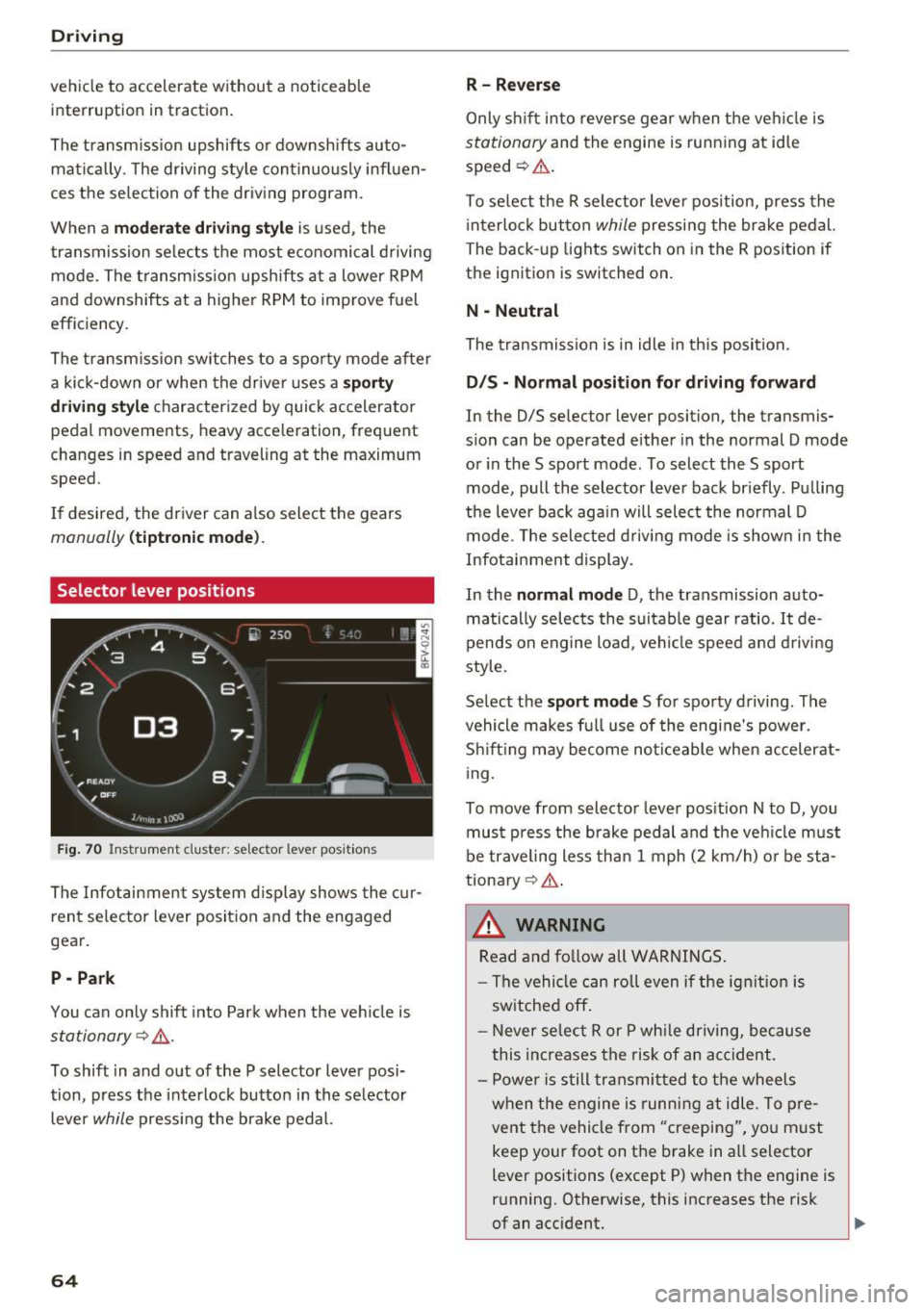
Fig. 70 Inst rument clus te r: s ele ctor leve r pos it io n s
The Infot ainment system d isplay shows the c ur
ren t selecto r lever position and the engaged
gear.
P -Park
You can only shift in to Par k when the ve hicle is
stationary ~,&. .
To shift in and out of the P selector lever posi
tion, press the inte rlock butto n in the se lector
lever
while pressi ng the brake pedal.
64
R- Reverse
Only s hift into reverse gear w hen the ve hicle is
stationary and the engine is runn ing at idle
speed ~&. .
To se lect t he R sele ctor leve r pos ition, press the
i nterlo ck button
while p ressi ng the bra ke pedal.
The back -up lights switch on in the R pos ition if
the ignit ion is switched on.
N -Neutral
The tra nsmission is in idle in th is position.
D IS -Normal position for driving forward
In the D/S se lector lever position, the transmis
s ion can be operated either in the normal D mode
or in the S sport mode. To select the S sport
mode, pull the selector lever bac k br iefly . Pu lling
the leve r bac k aga in will select the normal D
mode. The selec ted drivi ng mode is show n in t he
Infotai nment display.
In the
normal mode D , the transmission auto
matically sele cts the s uitable gear ratio.
It de
pends on engine load , vehi cle speed a nd driving
style.
Se lect the
sport mode S fo r spo rty d riving . The
vehicle makes f ull use of the engine's power.
Sh ift ing may become no ticeable whe n acceler at
i ng.
To move from selector leve r pos it ion N to D, you
mus t press the brake pedal and the veh icle m ust
be traveling less th an 1 mph (2 km/h) o r be sta
tiona ry ¢ ,&. .
&_ WARNING
Read and fo llow all WARNINGS .
- The vehi cle can roll even if the ig nitio n is
sw itched off .
- Never se lec t R or P whi le dr iving, because
this increases the risk of an ac cident .
- P owe r is still transmi tted to the wheels
w hen t he engine is runn ing at idle . To pre
vent the vehicle from "creeping", yo u m ust
keep your foot on the brake in a ll selector
lever positions (except P) when the engine is
r u nning. Otherwise, this increases the risk
of an accident.
Page 67 of 314
CD
CD
.... N
" N ...... 0 r--. V, co
-Do not inadvertently press the accelerator
pedal when the vehicle is stopped if a gear is
engaged. Otherwise the vehicle will start to
move immediately, even if the parking brake
is set . This could result in a crash .
- Do not press the accelerator pedal when
changing the selector lever position while
the vehicle is stationary and the engine is
running.
- Never leave your vehicle with the engine running while in gear.
If you must leave
your vehicle when the engine is running, set
the parking brake and move the selector lev
er to the P position .
- To decrease the risk of an accident, these
lector lever must be in the P position and
the parking brake must be set before open
ing the hood and working on a running en
gine. Always read and follow the applicable
warnings¢
page 235, Working in the en
gine compartment.
{[) Note
Never let the vehicle roll downhill with engine
off and the selector lever in the
N position,
because this could damage the automatic
transmission and catalytic converter.
@ Tips
- Drive select: sporty shifting characteristics
can be selected using the
Dynamic driving
mode. The Infotainment display shows 5 as
the selector lever position instead of D.
- If you accidentally select N while driving,
take your foot off the accelerator pedal im
mediately and wait for the engine to slow
down to idle before selecting Dor 5 .
- If there is a power failure, the selector lever
will not move out of the P position. The
emergency release can be used if this hap
pens. Left-hand drive vehicles
q page 71.
Driving
Selector lever lock
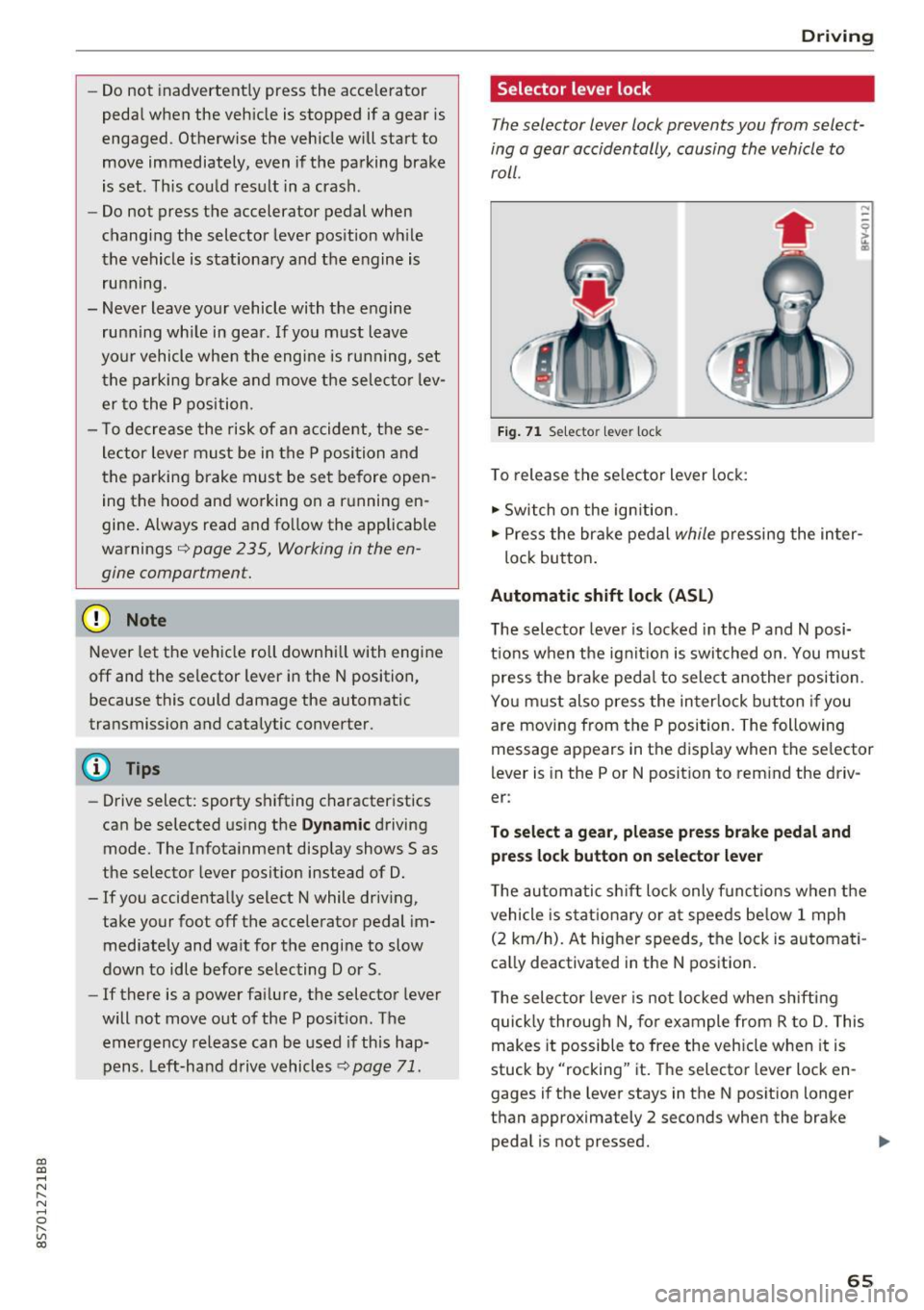
The selector lever lock prevents you from select
ing a gear accidentally, causing the vehicle to
roll.
Fig. 71 Selecto r lever lock
To release the selector lever lock:
.,. Switch on the ignition.
.,. Press the brake pedal
while pressing the inter-
lock button.
Automatic shift lock (ASL)
The selector lever is locked in the P and N posi
tions when the ignition is switched on. You must press the brake pedal to select another position.
You must also press the interlock button if you
are moving from the
P position. The following
message appears in the display when the selector
lever is in the P or
N position to remind the driv
er:
To select a gear, please press brake pedal and press lock button on selector lever
The automatic shift lock only functions when the
vehicle is stationary or at speeds below 1 mph
(2 km/h). At higher speeds, the lock is automati
cally deactivated in the N position.
The selector lever is not locked when shifting
quickly through N, for example from R to D. This
makes it possible to free the vehicle when it is
stuck by "rocking" it. The selector lever lock en
gages if the lever stays in the N position longer
than approximately 2 seconds when the brake
pedal is not pressed.
II>-
65
Page 70 of 314
Driving - The transmission can overheat and be dam
aged under certain driving and traffic condi
tions such as frequent starts, creeping for a
long time, or stop -and-go traffic. When the
@] or. indicator light turns on, stop the
vehicle at the next opportunity and let the
transmission cool
r=;, page 70 .
-Allowing the vehicle to roll when the engine
is stopped will damage the S tronic trans
mission because it is not lubricated
¢ page 286, Towing with a tow truck.
@ Tips
For safety reasons, the parking brake is re
leased automatically only when the driver's
safety belt is engaged in the buckle.
Hill descent control
The hill descent control system assists the driver
when driving down hills .
Hill descent control is ac tivated when the selec
tor lever is in the Dor S position and you press
the brake pedal. The transmission automatically
selects a gear that is suitable for the hill. Hill de
scent control tries to maintain the speed ach
ieved at the time of braking, within physical and
technical limitations.
If may still be necessary to
adjust the speed with the brakes. Because hill de
scent control cannot shift down farther than 3rd
gear, it may be necessary to shift into tiptronic
mode in very steep areas. In this case, shift man
ually into 1st or 2nd gear in tiptronic mode to
use the engine's braking force to relieve the
brakes .
Hill descent control switches off once the hill lev
els out or you press the accelerator pedal.
On vehicles with a cruise control system*
¢ page 72, hill descent control is also activated
when the speed is set.
A WARNING
Hill descent control cannot overcome physical
limitations, so it may not be able to maintain
a constant speed under all conditions. Always
be ready to apply the brakes.
68
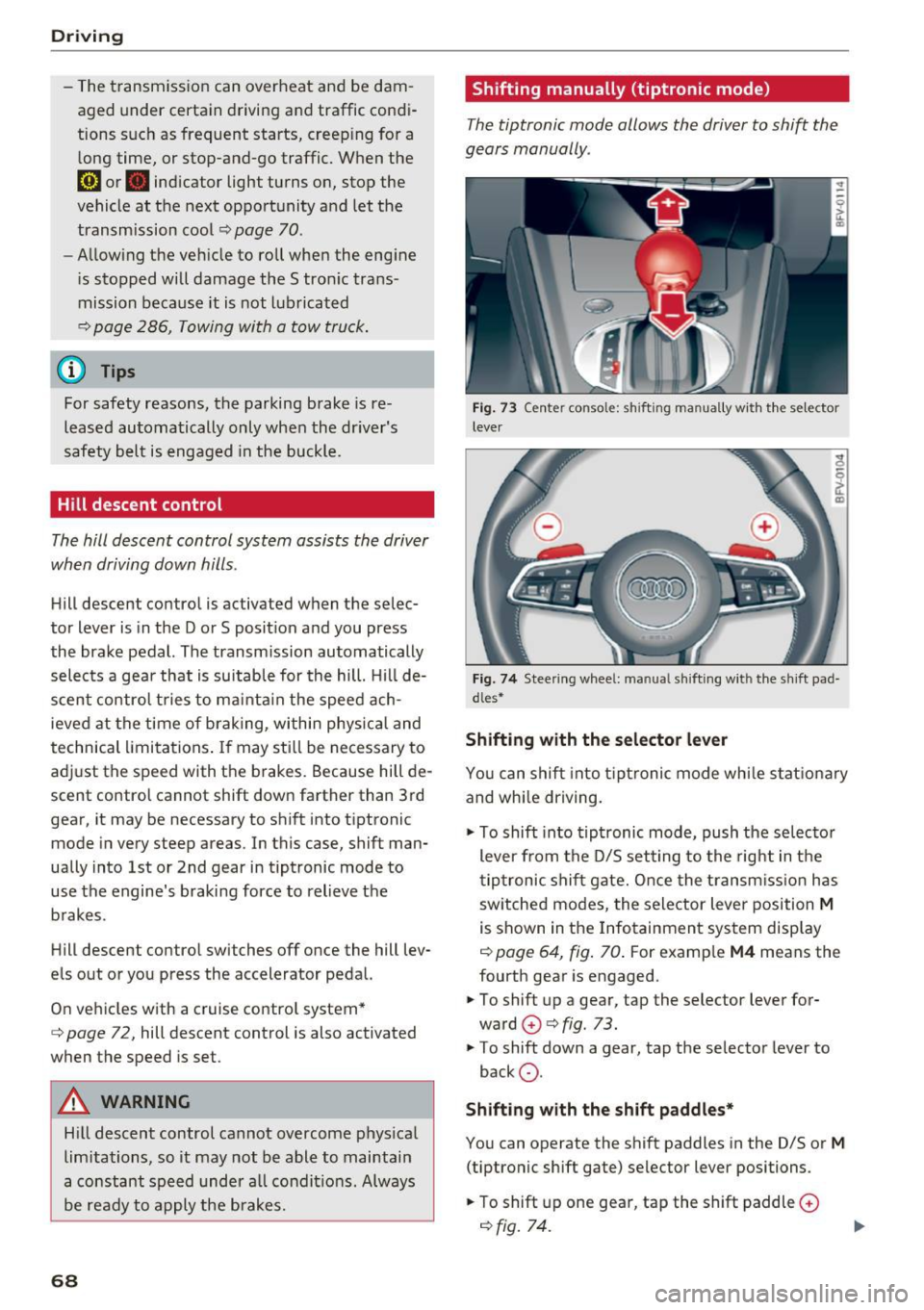
Shifting manually (tiptronic mode)
The tiptronic mode allows the driver to shi~ the
gears manually .
Fig. 73 C enter conso le: sh ift ing ma nuall y wi th the selecto r
lever
Fig. 74 Steering whee l: ma nual shifting wit h the shift pad
dles•
Shifting with the selector lever
You can shift into tiptronic mode while stationary
and whi le driving.
.,. To shift into tiptronic mode, push the selector
lever from the D/S setting to the right in the
tiptronic shift gate. Once the transmission has
sw itched modes, the selector lever position
M
is shown in the Infotainment system display
r=;, page 64, fig. 70 . For example M4 means the
fourth gear is engaged .
.,. To shift up a gear, tap the selector lever for
ward
G) ¢ fig. 73.
.,. To shift down a gear, tap the selector lever to
back
0 .
Shifting with the shift paddles*
You can operate the shift paddles in the D/S or
M
(tiptronic shift gate) selector lever positions.
.,. To shift up one gear, tap the shift paddle
0
r=;, fig. 7 4.
Page 77 of 314
CD
CD
.... N
" N ...... 0 r--. V, co
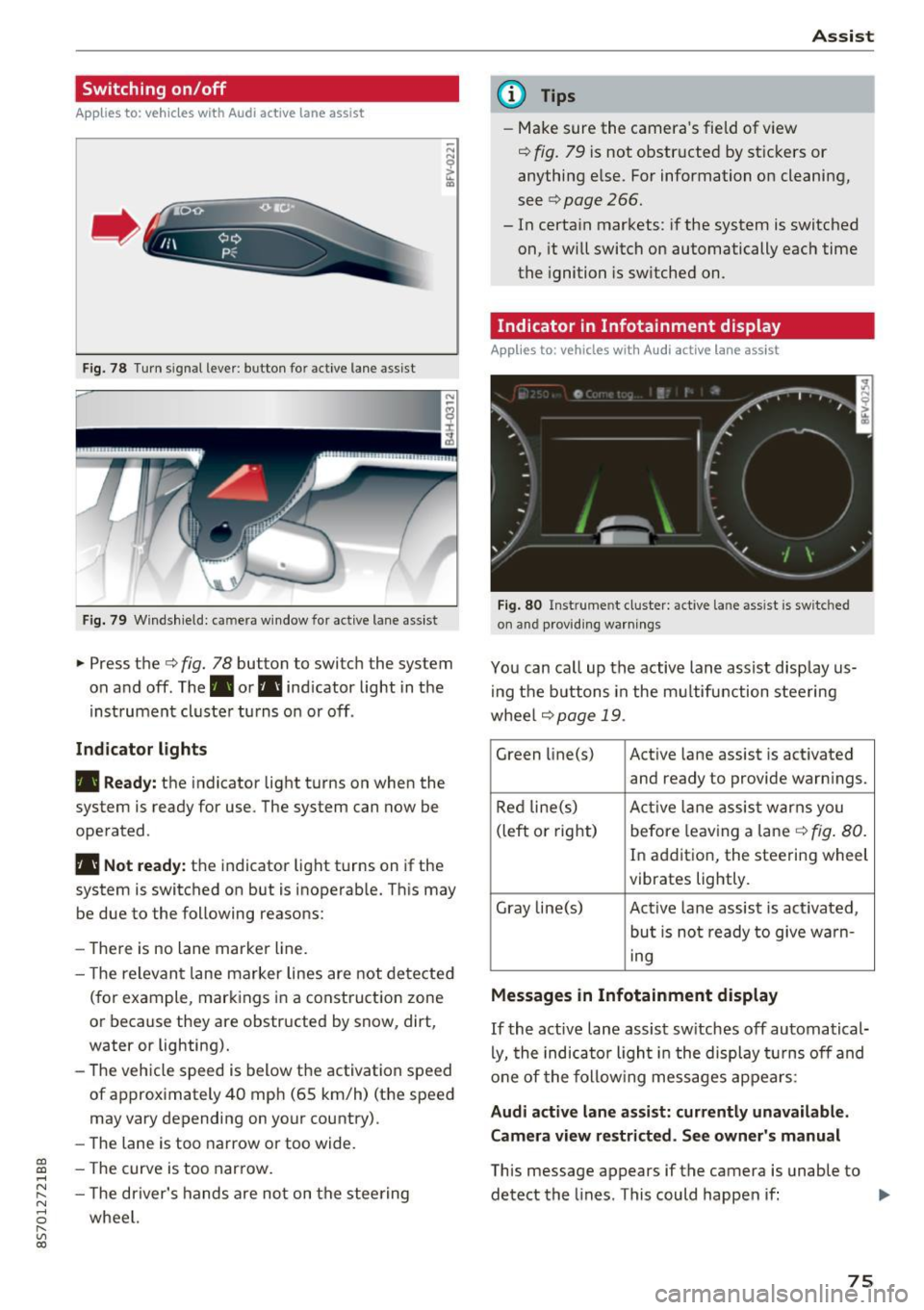
Switching on/off
A ppl ies to: ve hicles with Audi active lane assist
Fig. 78 T urn s ignal lever: button for active lane assist
F ig. 79 Windsh ield: camera w indow for active lane assist
... Press the c:> fig. 78 button to switch the system
on and off . The . or. indicator light in the
inst rument cluster turns on or off .
Indicator lights
• Ready:
the indicator light turns on when the
system is ready for use. The system can now be
operated .
• Not ready: the indicator light turns on if the
system is switched on but is inoperab le. Th is may
be due to the following reasons:
- There is no lane marker line.
- T he relevant lane marker lines are not detected
(for example, markings in a construction zone
or because they are obstructed by snow, dirt,
water or lighting).
- The vehicle speed is below the activation speed
of approximately 40 mph (65 km/h) (the speed
may vary depending on your country).
- The lane is too narrow or too wide.
- T he curve is too narrow.
- The driver's hands are not on the steering
wheel.
Assist
(D Tips
- Make sure the camera 's field of view
¢ fig. 79 is not obstructed by st ickers or
anything else. For information on cleaning,
see
c:> page 266.
- In certain markets: if the system is switched
on, it wi ll switch on automatically each time
the ignition is switched on.
Indicator in Infotainment di splay
App lies to : vehicles wit h Audi active la ne ass ist
Fi g. 80 Inst rume nt cluster: active la n e ass ist is switc hed
on and providing warnings
You can call up the active lane assist disp lay us
in g the butt ons in the multifunction steering
wheel
c> page 19 .
Green li ne(s) Act ive lane assist is activated
and ready to provide warn ings.
Red line(s) Active lan e assist warns you
(left or right) before leav ing a lane
c:> fig. 80.
In addition, the steering wheel
vibrates lightly.
Gray line(s) Active lane assist is act ivated,
but is not ready to give warn-
ing
Messages in Infotainment display
If the active lane assist sw itches off automatical
ly, the indicato r ligh t in the display turns off and
one of the following messages appears :
Audi active lane assist: currently unavailable.
Camera view restricted. See owner's manual
This message appears if the camera is unable to
detect the lines . This could happen if: ..,
75
Page 78 of 314
Assist
-The camera field of view~ page 75, fig. 79 is
dirty or covered in ice. Clean this area on the
windshield.
- The camera field of view is fogged over. Wait
until the fog has cleared before switching the
active lane assist on again.
- The system has been unable to detect the lanes
for an extended period of time due to road con
ditions. Switch active lane assist back on when
the lines are more visible.
Audi active lane assist : currently unavailable.
See owner's manual
There is a temporary active lane assist malfunc
tion. Try switching the active lane assist on aga in
later .
Audi active lane assist : malfunction! See own
er's manual
Drive to an authorized Aud i dea ler or authorized
Audi Service Facility immediately to have the
malfunct io n corrected.
Audi active lane assist: Please take over steer
ing!
This message appears if you are not steering by
yourse lf. If th is is the case, active lane assist does
not switch off, but it is "not ready " to provide a
warn ing . The system can he lp you keep the veh i
cle in the lane. However, you are responsible for
driving the vehicle and must steer it yourself .
Adjusting the steering time and vibration
warning
Applies to: vehicles with Audi active lane assist
You can adjust individual active lane assis t set
tings in the Infotainment system.
Select in the Infotainment system: I MENU ! but
ton>
Vehicle > left control button >Driver assis
tance
> Audi active lane assist
1l The correct ive steer ing fu nctio n is not available in all mar
kets.
76
Steering time1>
Early: in this setting, the corrective steering hap
pens continuously to help keep the veh icle in the
center of the lane.
Late : in this setting, the system provides correc
tive steering just before a vehicle wheel touches a
detected lane marker line .
Vibration warning
You can switch the add itional vibrat ion warn ing
i n the steering wheel on or off.
(D Tips
In certain markets: your settings are stored
a ut omat ically and assigned to the remote
control key in use.
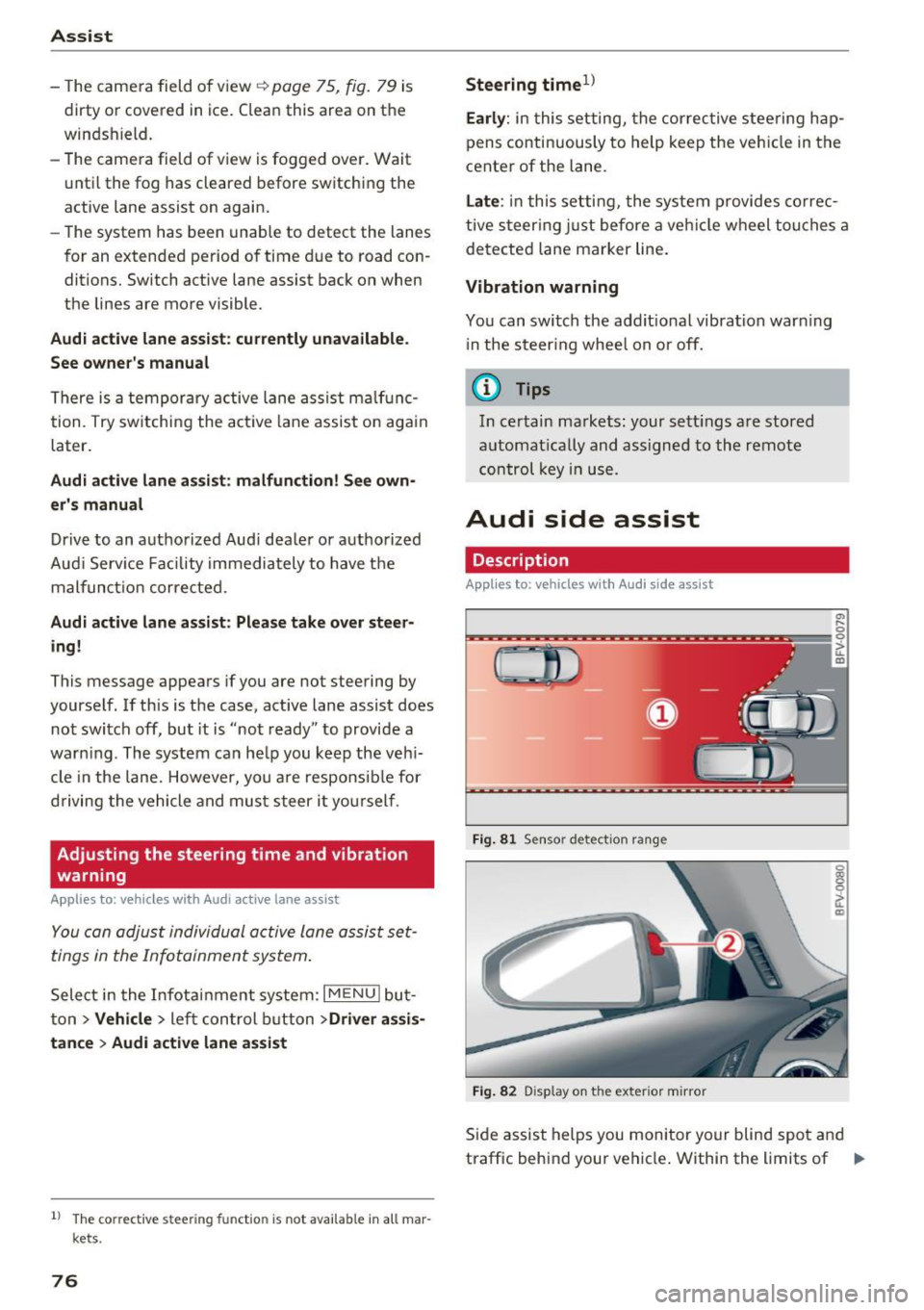
Audi side assist
Description
Applies to: vehicles with Audi side assist
Fig. 81 Sensor detec tion rang e
Fig. 82 Display on the exterior mirror
Side assist helps you monitor your blind spot and
traffic behind your vehicle . Within the limits of .,.
Page 79 of 314
CD
CD
.... N
" N ...... 0
" V, co
the system, it warns you about vehicles that are
coming closer or that are traveling with you with
in sensor range(!)¢
fig. 81: if a lane change is
classified as critical, the display @ in the exter ior
mirror
¢ fig . 82 turns on.
The display in the left exterior mirror provides as
sistance when making a lane change to the left,
while the d isp lay in the right exterior mirror pro
vides assistance when mak ing a lane change to
the r ight.
Information stage
As long as you do not activate the turn signal,
side assist
informs you about vehicles that are
detected and classified as crit ical. The display in
the m irror turns on, but is dim.
The display remains dim in the information stage
so that your view toward the front is not distur
bed.
Warning stage
If you activate the turn signal, side assist warns
you about vehicles that are detected and classi
fied as critical. The display in the respective mir
ror blinks brightly . If this happens, check traffic
by glancing in the exterior mirrors and over your
shoulder¢ .&
in General information on
page 78.
@ Tips
You can adjust the brightness on of the dis
play on the rearview mirror ¢
page 79.
Assist
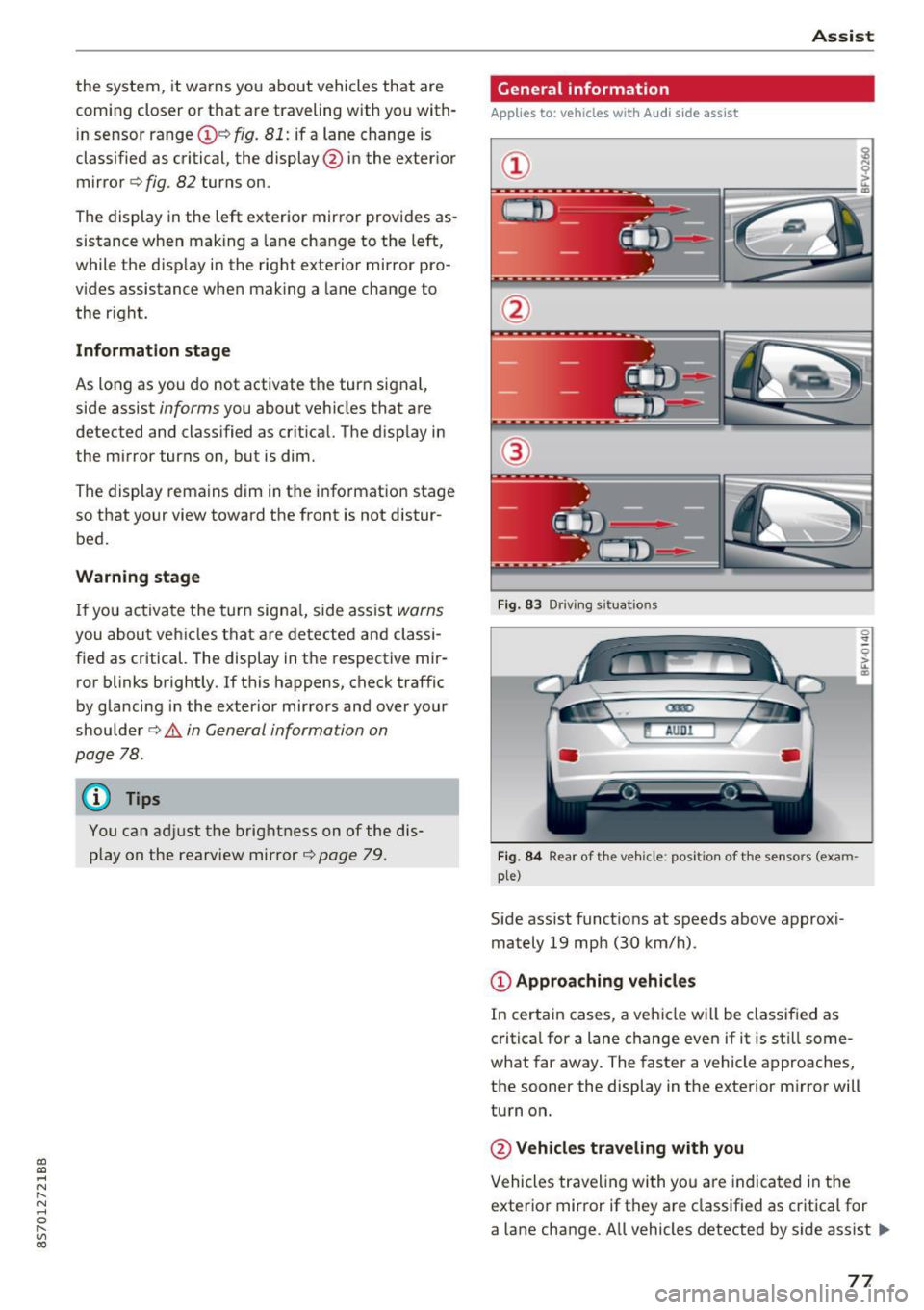
General information
Applies to : veh icles w it h Aud i s ide ass ist
Fig . 83 Driv ing s ituat ions
Fig. 84 Rear of t he ve hicle: positio n of the sensors (exam
ple)
S id e assist funct ions at speeds above approxi
mately 19 mph (30 km/h).
@ Approaching vehicles
In certain cases, a vehicle will be classified as
critical for a lane change even if it is still some
what far away. The faster a vehicle approaches,
the sooner the display in the exterior m irror will
turn on.
@ Vehicles traveling with you
Vehicles traveling with yo u are indicated in the
exterior mirror if they are classified as critica l for
a lane change. All vehicles detected by side assist
lli>-
77
Page 80 of 314
Ass is t
are indicated by the time they enter your "blind
spot", at the latest .
@Vehicles you are passing
If you slowly pass a veh icle that side assist has
detected (the d ifference in speed be twee n the
veh icle and your veh icle is less t han 9 mph (15
km/h)), the d isplay in the exterior mirror turns
on as soon as the vehicle enters your blind spot .
The display will not tu rn o n if you quick ly pass a
veh icle tha t side assist has detected (the differ
ence in speed is greate r than 9 mph ( 15 km/h)).
Functional limitations
The rada r senso rs a re designed to detect the left
and right adjacen t lanes when the road lanes a re
the normal wid th . In some s ituat ions, the d isplay
in the exter ior mirror may tur n on even tho ugh
there is no vehicle located in the area that is criti
cal for a lane change. For example:
- If the lanes a re nar row o r if yo ur are dr iving on
the edge of your lane. If this is the case, the system may have detected the vehicle in anoth
er lane t hat is
not adjacent to your current lane.
- If you are dr iv ing t hrough a curve. Side assis t
may react to a vehicle that is one lane over
from the adjacent lane.
- If side assist reacts to other objects (such as high or displaced guard rails) .
- In poor weather condit ions . The side assis t
functions are limited.
Do not cove r the radar sensors¢
fig. 84 w ith
s tick ers, deposits, bicycle whee ls o r othe r ob
jects, beca use they w ill impa ir the f unction . For
information on cleaning, see¢
page 266.
A WARNING
-Always pay attention to traffic and to the
area aro und your vehicle. Side assist cannot
rep lace a dr iver's attention. The drive r alone
is a lways responsible for lane changes and
similar driving maneuvers.
- In some situat io ns, the system may not
function or its funct ion may be limited . For
example:
78
-
- If vehicles are app roaching or being left
behind very q uickly. The disp lay may not
turn on in time.
- In poor weathe r cond it ions such as heavy
r ain, snow or heavy mist.
- On very wide lanes, in tight curves, or if
the re is a r ise in the road surface. Veh icles
i n the adjacent lane may not be detected
because they are outside of the sensor
r ange.
- Aud i side assist can not detect all ve hicles
under all conditions, which can inc rease the
r is k of acciden ts.
- Please note that s ide ass ist only d isp lays ap
proach ing vehicles or veh icles in your blind
spot if your veh icle is traveling a t least
19 mph (30 km/h).
- In ce rtain s ituations, t he sys tem may not
wo rk or its funct ion may be limited. For ex
ample:
- The disp lay may not turn on at the r ight
time if vehicles are approaching or pass ing
very quickly.
- In poor weathe r con ditions, such as heavy
r ain, snow or fog.
- In very wide lanes, in tight c urves o r whe n
the re are slopes in the roadway, vehicles
i n the ne ighboring lanes may not be de
tected because they a re outside of the
senso r range.
(D Note
The sensors can be d isplaced by impacts or
damage to the bumper, wheel housing and underbody. This can impair the system. Have
an authorized Audi dealer or author ized Audi
Service Fac ility check the ir f unct io n.
(D Tips
- If the w indow glass i n the dr iver's door or
front passenger's door has been tinted, the display in t he exterior mirro r may be inco r
rect.
- For an ex planat ion on co nfo rm ity w ith the
FCC reg ulations in the Un ited States and the
In dust ry Can ada regulat io ns, see
¢page 296.
Page 81 of 314
co
co
.... N
" N .... 0
" "' c:o
Switching on and off
Applies to: vehicles with Audi side assist
The system ca n be switched on/off in the Info
t a in men t system.
"' Select in the Info tainment sys tem:
iM ENUI but
ton
> Vehicle > left contro l butto n >Driver as
sistan ce > Audi side assist
If the system is activated, the displays in the ex
ter io r mir rors wi ll turn o n briefly when the ig ni
tion is sw itched on.
Adjusting the display brightness
Applies to: vehicles with Audi side assist
The display brightness can be adjusted in the In
fotainm ent system.
"' Se lect in the Infotainment system: i MENU I but
ton
> Vehicle > left contro l butto n >Driver as
sistance > Audi side assist
The display b rightness ad justs automat ica lly to
the br ightness of the s urrou ndings, both in the
in fo rmat ion and in the warning stage . In very
da rk or ve ry br igh t sur ro u ndings, the a utomat ic
ad ju st men t will se t th e d isp lay to the mini mum
or maxim um level. In s uch cases , you m ay no tice
no change w hen adjus ting t he br ightness, o r th e
change may on ly be no tic eable o nce the su r
ro undings change .
A dju st the br ightn ess to a level where the d isp lay
i n the inform ation stage wi ll no t di srupt your
v iew ahead. If you change the brightness, the dis
p lay in the exter ior mir ror will briefly show the
b rightness level i n the information stage . The
b rightness of the warning stage is linked to the
b rightness in t he info rmat ion stage and is ad just
ed along w ith the information stage .
- Side assist is not active wh ile you are ma k
i ng the ad justment.
- Your settings are automatically stored and ass igned to the remote cont rol key being
used.
Assist
Messages
Applies to: vehicles with Audi side assist
I f the s ide ass is t swi tches off automat ically, a
mess age app ear s in t he In fota in men t sys tem dis
play.
@j Audi side assist: currently unavailable.
Sensor vision restricted due to surroundings.
See owner 's manual
The radar sensors ' v is ion is affected. Do not cover
the a rea in front of the sensors with bike whee ls,
stickers, dirt or other objects. Clean the area in
front of the sensors, if necessary
q page 77,
fig. 84.
@j Audi side a ssist: currently unavailable.
See owner's manual
S ide assist cannot be switched on at this time be
ca use there is a ma lfu nction ( for example, the
battery c harge leve l may be too low) .
@j Audi side assist: malfunction! Please
contact Service
The system cannot guarantee that it will detect
vehicles cor rect ly and it has switc hed off. The
senso rs have been move d or are fa ulty. Have the
syste m chec ked by an au tho riz ed Au di deale r or
a uthor iz e d Au di S ervice Faci lity s oon.
Audi drive select (drive
settings)
Introduction
Applies to: vehicles with Audi drive select
Dr ive select ma kes it possib le to e xper ience dif
fere nt types of ve hicl e sett ings in one ve hicle.
T he driver can sele ct from th ree mo des,
Comfort ,
Auto
and Dynamic , using the r.~;\,1 bu tton in the
center console o r by using the Infotainment sys
tem. This allows you to switch between a sporty
and a comfo rtable driv ing mode, fo r example. In
t h e
Individual mode, the sett ings can be ad just
ed to yo ur persona l pre ferences . This makes it
poss ible to com bine settings such as a sporty en-
gine sett ing wi th light s teer ing. .,._
79