warning lights AUDI TT ROADSTER 2017 Owner's Manual
[x] Cancel search | Manufacturer: AUDI, Model Year: 2017, Model line: TT ROADSTER, Model: AUDI TT ROADSTER 2017Pages: 314, PDF Size: 76.54 MB
Page 60 of 314
Driving
Avoid full acc ele ra tion
You sho uld rare ly travel at the maximum vehicle
speed . High speeds cause a disp roportionately
high increase in fuel consumption, emissions and
traffic noise . Slower driving saves fuel.
Reduce idling time
It pays off to stop the engi ne, for examp le when
at rai lro ad crossings or tr affic lights with longer
red lights . Stopping the engine for 30 -40 sec
onds already saves more fuel than the amount of
extra fuel needed to resta rt the engine.
It t akes a very long time in idle to wa rm the en
g ine up to operating tempe ra ture . Wear and
emissions are especially high in the warm-up
p hase . Therefore, yo u should begin driving im
mediately after starting the engine. Avoid high
RPMs while do ing th is.
Have ma intenanc e performed r egularly
By having maintenance performed regular ly on
your vehicle, yo u can help to reduce f uel con
sumpt ion before you even start to dr ive. The
maintenance condition of your vehicle not only
affects traffic safety and long-term value but a l
so impacts
fuel consumpt ion .
A poorly maintained engine can lead to fuel con
sumpt ion that is 10% higher than normal.
A lso check the
oil le vel when refueling . The o il
consumption
depends large ly on the engine load
and speed. It is normal for the oil consumpt ion
of a new eng ine to reach its lowest point only af
ter a certain amount of use. Therefore, the oil
consumption can o nly be properly judged after
approx imately 3,000 m i (S,000 km) have been
d riven.
Avoid short trips
The engine and exhaust cleaning system must
reach the ir opt imal
operating temperature to ef
fectively red uce consumption and em iss ions.
A co ld engine uses a disproportionately h igh
amount of fuel. The engine reaches operating
temperature and consumpt io n normalizes only
afte r approximately
four kilometers.
58
(D Note
Do not leave engine idling unattended after
starting. If warning lights sho uld come on to
i ndicate imprope r operation, they would go
unheeded. Extended idling also produces
h eat, which could result in overheating or
other damage to the vehicle o r other proper
ty.
(D Note
- Have your ve hicle ma intained properly and
in accordance with the service recommenda
t ions i n your Warranty
& M aintenance book
let. La ck of prope r mai nte na nce as we ll as
imp roper use o f the ve hicle will impa ir the
func tion of the emission cont ro l sys tem and
cou ld lead to damage.
- Do not alte r or remove any compone nt of
the Emission Contro l System unless ap
proved by the man ufacturer.
- Do not alte r or remove any dev ice, such as
heat shields, switches, ig nition w ires,
valves, which are designed to protect your
vehicle's Emission Contro l System and other
important veh icle components.
(D Tips
The cons umption estimates as publishe d by
ENVIRONMENTAL PROTECTION AGENCY
(EPA) and Transport Canada may not corre
spond to your actual consumption on the r oad, which wi ll vary depending upon vehicle
l oad and speed, road a nd wea ther conditions,
tr ip length, etc.
Page 62 of 314
Driving
-Never turn off the engine before the vehicle
has come to a complete stop.
- The brake booster and power steering only
work when the engine is running. If the en
gine is
off, you have to use more force when
steering or braking. Because you cannot
steer and brake as you usually would, this
could lead to accidents and serious injuries.
(D Note
Avoid high engine speed, full throttle, and
heavy engine load if the engine has not
reached operating temperature yet. You could
damage the engine.
@ For the sake of the environment
Do not let the engine run while parked to
warm up. Begin driving immediately . This re
duces unnecessary emissions.
{D) Tips
-Some noise after starting the engine is nor
mal and is no cause for concern.
- If you leave the vehicle with the ignition
switched on, the ignition will switch
off af
ter a certain amount of time . Make sure that
electrical equipment such as the exterior
lights are switched
off.
Stopping the engine
.,. Bring the vehicle to a full stop.
.,. Move the selector lever into the P position .
... Press the
I START ENGINE STOPI button
¢ page 59, fig. 67.
Emergency off function*
If it is absolutely necessary, the engine can also
be turned
off while driving at speeds starting at
4 mph (7 km/h). To switch the engine
off, press
the
! START ENGINE STOPI button twice in a row
briefly or press and hold for longer than two sec
onds.
_&. WARNING
- Never turn off the engine before the vehicle
has come to a complete stop.
60
- Please note that the brake booster and pow
er steering only work when the engine is
running. When the engine
off, you must use
more force to steer or brake the vehicle. Be
cause the usual steering and braking capa
bility is not available, the risk of accidents or
. . . . mJunes increases.
- For safety reasons, always park the vehicle
with the selector lever in the P position.
Otherwise, there is the risk that the vehicle
could roll.
- After the engine has been switched off, the
radiator fan can continue to run for up to 10
minutes -even with the ignition switched
off. It can also switch on again after some
time if the coolant temperature rises as the
result of heat buildup or if the engine is al
ready warm and the engine compartment is
also heated by the sun's rays.
(D Note
If the engine has been under heavy load for
an extended period of time, heat builds up in
the engine compartment after th@ engine is
switched
off and there is a risk of damaging
the engine . For this reason, let the engine run
at idle for approximately two minutes before
shutting it
off.
Messages
Turn off ignition before leaving vehicle. Battery
is discharging
This message appears and a warning tone sounds
if you open the driver's door when the ignition is
switched on. Switch the ignition
off so that the
battery will not discharge.
Pressing start/stop button again will switch off
engine.
This message appears when you press the
I START ENGIN E STOP ! button while driving.
Engine start system: malfunction! Please con
tact Service
The engine automatic start system has a mal
function. Drive to an authorized Audi dealer or
autho rized Audi Service Facility immediately to
IJlo-
Page 66 of 314
Driving
vehicle to accelerate without a noticeable
interruption in traction.
The transm ission upshifts o r downshifts auto
mat ica lly . T he driving sty le con tinuo usly influen
ces the selection of the driving program.
W hen a
moderate driving style is used , the
t ra nsmission se lects the most e conomical d riving
mode. The t ransm iss io n upshifts a t a lower RPM
and downshifts at a higher RPM to improve fuel
efficiency.
The transm ission switches to a spo rty mode after
a ki ck-down or when the drive r uses a
sp o rty
dri ving sty le
character ized by quick accelerator
pedal movements, heavy acce leration, frequent
changes in speed and traveling at the ma ximum
speed.
I f desired, the driver can a lso select the gears
manually ( tiptronic mode ).
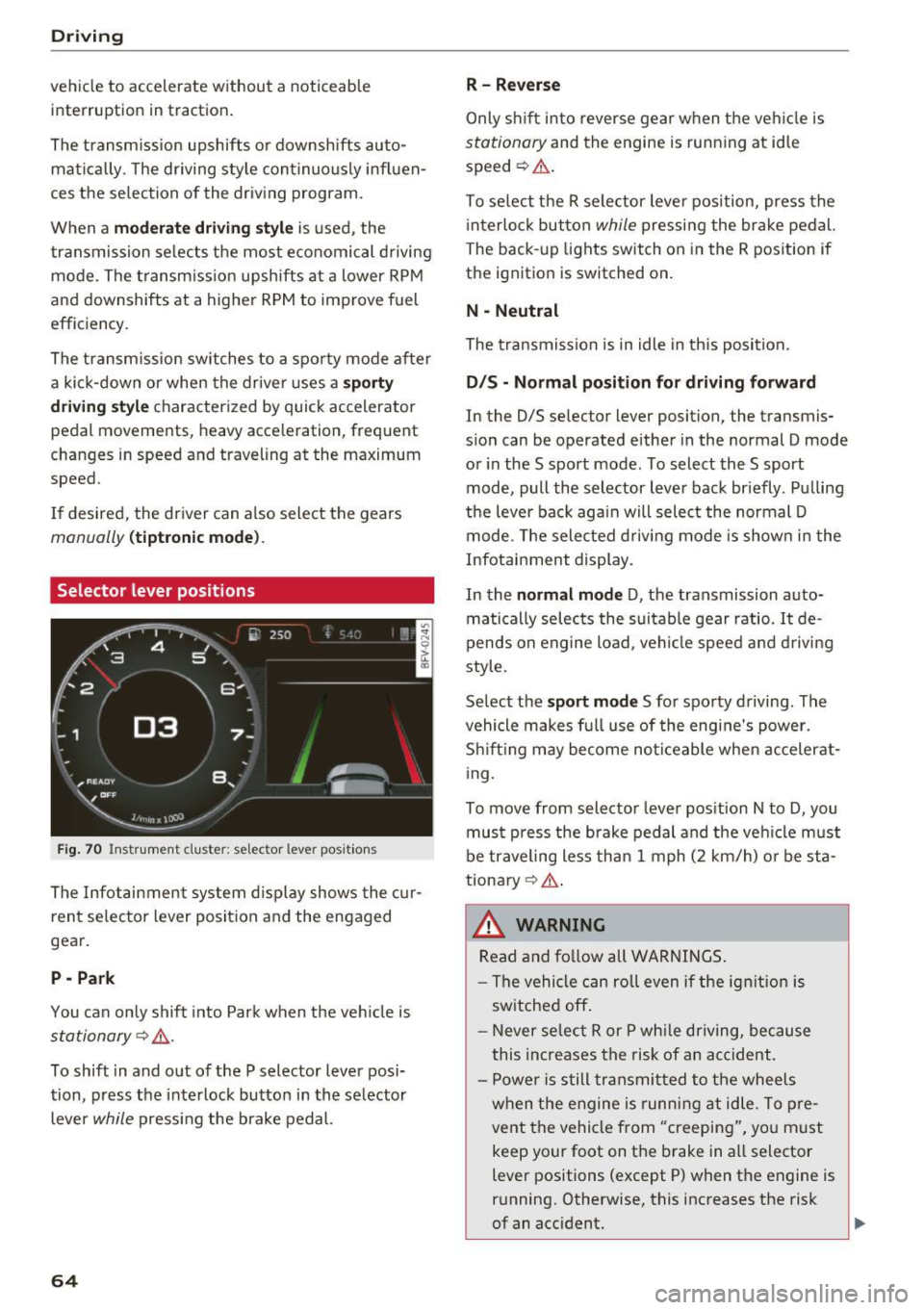
Selector lever positions
Fig. 70 Inst rument clus te r: s ele ctor leve r pos it io n s
The Infot ainment system d isplay shows the c ur
ren t selecto r lever position and the engaged
gear.
P -Park
You can only shift in to Par k when the ve hicle is
stationary ~,&. .
To shift in and out of the P selector lever posi
tion, press the inte rlock butto n in the se lector
lever
while pressi ng the brake pedal.
64
R- Reverse
Only s hift into reverse gear w hen the ve hicle is
stationary and the engine is runn ing at idle
speed ~&. .
To se lect t he R sele ctor leve r pos ition, press the
i nterlo ck button
while p ressi ng the bra ke pedal.
The back -up lights switch on in the R pos ition if
the ignit ion is switched on.
N -Neutral
The tra nsmission is in idle in th is position.
D IS -Normal position for driving forward
In the D/S se lector lever position, the transmis
s ion can be operated either in the normal D mode
or in the S sport mode. To select the S sport
mode, pull the selector lever bac k br iefly . Pu lling
the leve r bac k aga in will select the normal D
mode. The selec ted drivi ng mode is show n in t he
Infotai nment display.
In the
normal mode D , the transmission auto
matically sele cts the s uitable gear ratio.
It de
pends on engine load , vehi cle speed a nd driving
style.
Se lect the
sport mode S fo r spo rty d riving . The
vehicle makes f ull use of the engine's power.
Sh ift ing may become no ticeable whe n acceler at
i ng.
To move from selector leve r pos it ion N to D, you
mus t press the brake pedal and the veh icle m ust
be traveling less th an 1 mph (2 km/h) o r be sta
tiona ry ¢ ,&. .
&_ WARNING
Read and fo llow all WARNINGS .
- The vehi cle can roll even if the ig nitio n is
sw itched off .
- Never se lec t R or P whi le dr iving, because
this increases the risk of an ac cident .
- P owe r is still transmi tted to the wheels
w hen t he engine is runn ing at idle . To pre
vent the vehicle from "creeping", yo u m ust
keep your foot on the brake in a ll selector
lever positions (except P) when the engine is
r u nning. Otherwise, this increases the risk
of an accident.
Page 68 of 314
Driving
Interlock button
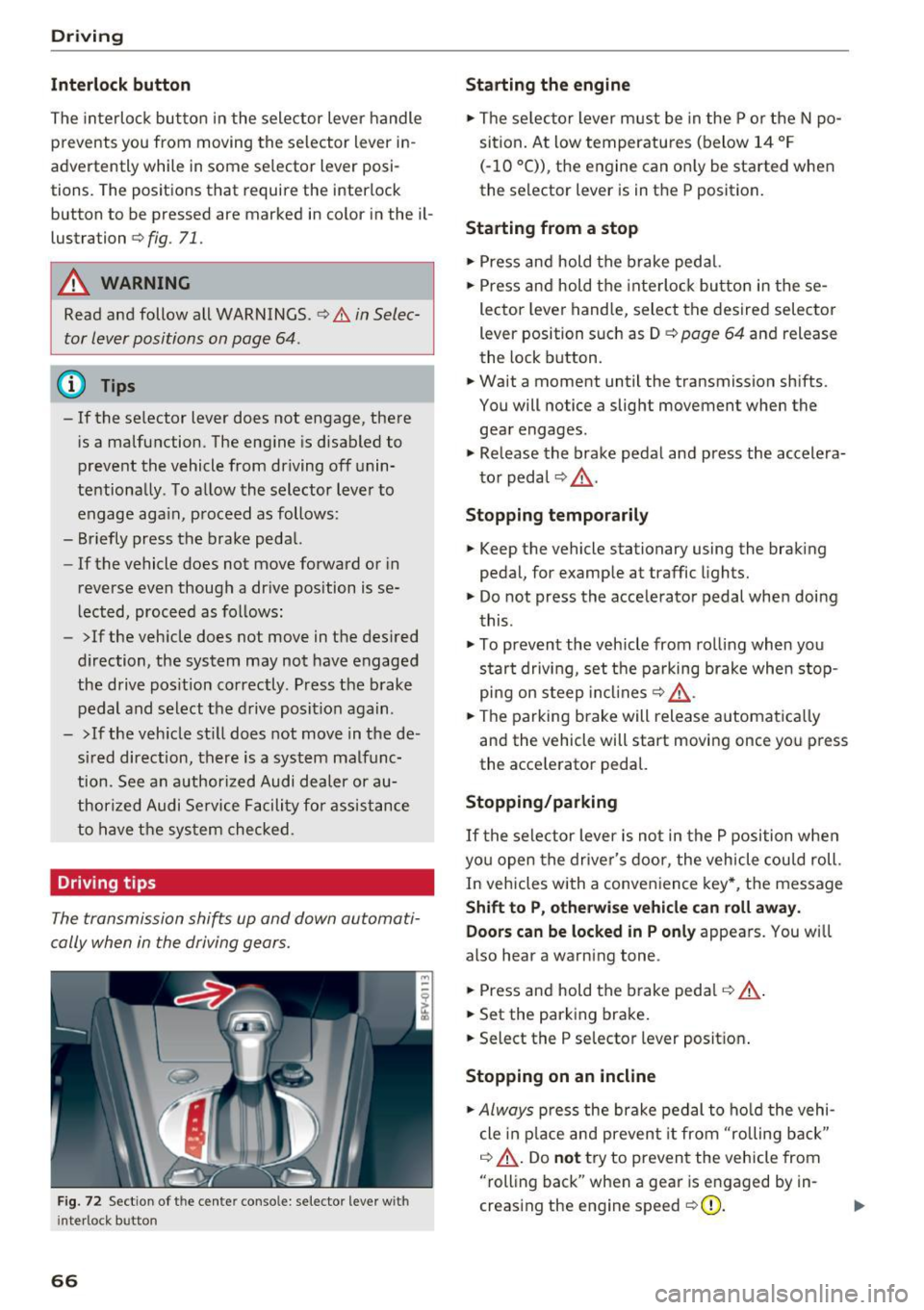
The interloc k but to n in the selector lever handle
prevents you from moving the selector lever i n
advertently while in some se lector lever posi
tions. The posit ions that require the interlock
button to be pressed a re marked in co lor in the il
lustration
c> fig. 71.
A WARNING
Read and follow all WARNINGS.¢.&. in Selec
tor lever positions on page 64 .
(D Tips
- If the selector lever does not engage, there
is a malfunction . The eng ine is disabled to
prevent the vehicle from driving off unin
te ntionally . To a llow the selector lever to
engage aga in , proceed as follows :
- Briefly press the b rake pedal.
- If the vehicle does not move forward or in
reverse even though a dr ive pos ition is se
l ected, procee d as follows :
- >If the veh icle does not move in the des ired
direction, the system may not have engaged
the drive pos ition correctly . P ress the b rake
pedal and sel ect t he d rive posit ion again .
- >If the veh icle st ill does not move in the de
s ir ed direction, there is a system malfunc
tion. See a n authori zed Audi dea ler or au
thori zed Audi Service Facili ty for assistance
to have t he sys te m c hecked.
Driving tips
The transmission shifts up and down automati
cally when in the driving gear s.
F ig . 7 2 Sect io n of the cente r conso le: se lecto r lever w it h
i nte rlock b utton
66
Starting the engine
.. The se lec to r lever m ust be in the P o r the N po
si tion. At low temperatu res (below 14 ° F
(- 10 °C)), the e ngine can o nly be sta rted when
the selector lever is in t he P position .
Starting from a stop
.. Press and hold the b rake peda l.
.. Press an d hold the inte rlo ck button in these
lector leve r handle, select the desired selector
lever position such as D
c> page 64 and release
th e lock button.
.. Wait a moment until the transmission sh ifts.
You will notice a slight movement when the gea r engages .
.. Re lease the brake pedal and press the accelera
t o r pedal
c> ,& .
Stopping temporarily
.. Keep the vehicle stationary using the braking
pedal, for examp le at traffic lights.
.. Do not press the acce lerator pedal whe n doi ng
t his .
.. To prevent the vehicle from ro lling when you
s tar t drivi ng, set t he pa rking brake when stop
pi ng on s teep in cli ne s
c:> ,& .
.. The pa rking brake will release a utomat ic all y
and the vehicle will start moving once yo u press
the acce le rator pedal.
Stopping /parking
If the sele ctor lever is not in the P position w he n
yo u open the drive r's door, the vehicle cou ld roll.
In vehicles with a conve nience key*, the message
Shift to P, otherwi se vehicle can roll away.
Doors can be locked in P only
appea rs. You wi ll
also hear a warning tone .
.. Press and hold the brake peda l
c:> .&, .
.. Set the parking brake .
.. Select the P selector lever posit io n.
Stopping on an incline
.. Always press the brake pedal to ho ld the vehi
cle in p lace and preven t it from "rolling back"
c:> .&, . Do not try to preven t the vehicle from
"rolling back" when a gea r is e ngaged by in
creas ing the eng ine speed
c> (D .
Page 77 of 314
CD
CD
.... N
" N ...... 0 r--. V, co
Switching on/off
A ppl ies to: ve hicles with Audi active lane assist
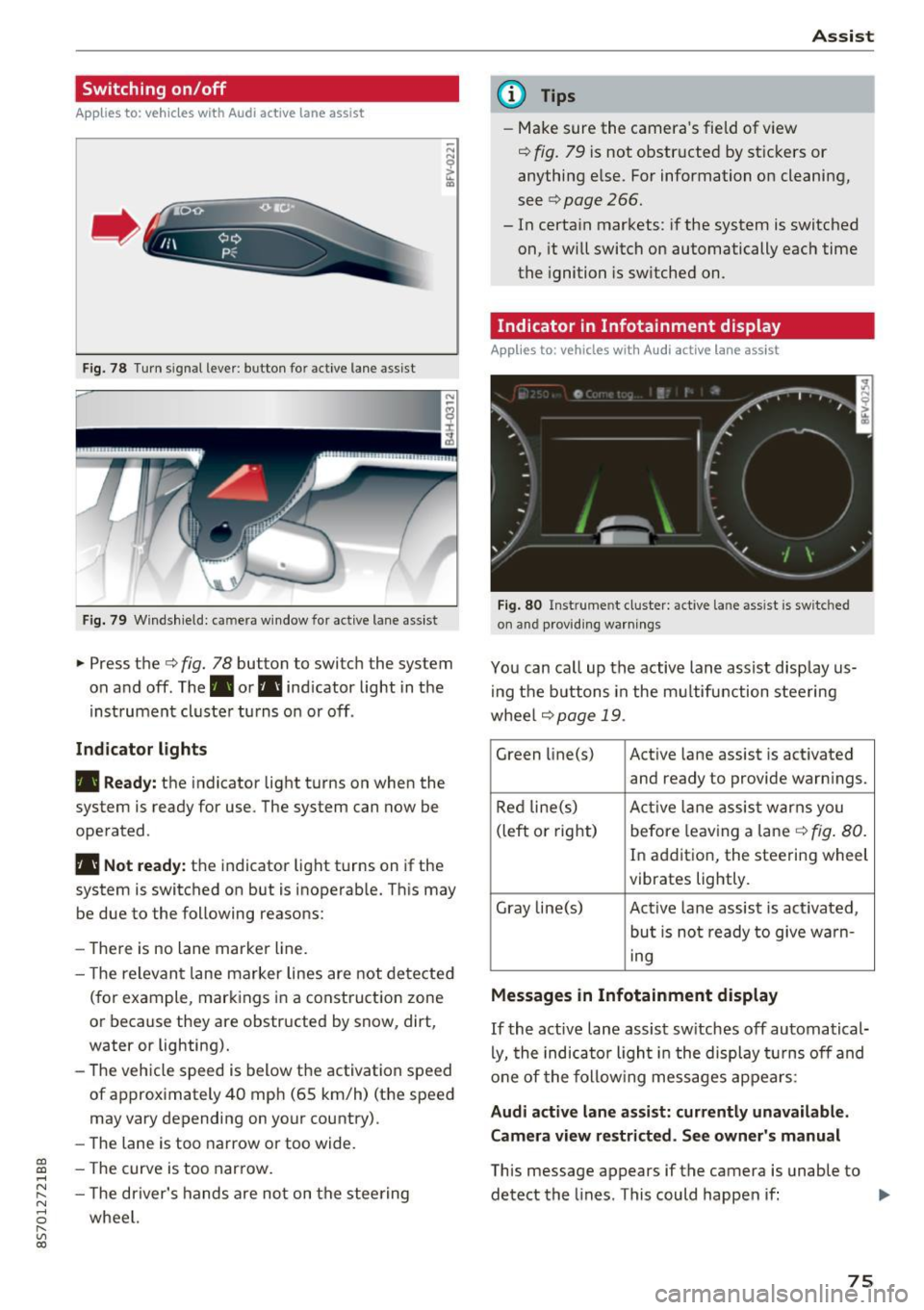
Fig. 78 T urn s ignal lever: button for active lane assist
F ig. 79 Windsh ield: camera w indow for active lane assist
... Press the c:> fig. 78 button to switch the system
on and off . The . or. indicator light in the
inst rument cluster turns on or off .
Indicator lights
• Ready:
the indicator light turns on when the
system is ready for use. The system can now be
operated .
• Not ready: the indicator light turns on if the
system is switched on but is inoperab le. Th is may
be due to the following reasons:
- There is no lane marker line.
- T he relevant lane marker lines are not detected
(for example, markings in a construction zone
or because they are obstructed by snow, dirt,
water or lighting).
- The vehicle speed is below the activation speed
of approximately 40 mph (65 km/h) (the speed
may vary depending on your country).
- The lane is too narrow or too wide.
- T he curve is too narrow.
- The driver's hands are not on the steering
wheel.
Assist
(D Tips
- Make sure the camera 's field of view
¢ fig. 79 is not obstructed by st ickers or
anything else. For information on cleaning,
see
c:> page 266.
- In certain markets: if the system is switched
on, it wi ll switch on automatically each time
the ignition is switched on.
Indicator in Infotainment di splay
App lies to : vehicles wit h Audi active la ne ass ist
Fi g. 80 Inst rume nt cluster: active la n e ass ist is switc hed
on and providing warnings
You can call up the active lane assist disp lay us
in g the butt ons in the multifunction steering
wheel
c> page 19 .
Green li ne(s) Act ive lane assist is activated
and ready to provide warn ings.
Red line(s) Active lan e assist warns you
(left or right) before leav ing a lane
c:> fig. 80.
In addition, the steering wheel
vibrates lightly.
Gray line(s) Active lane assist is act ivated,
but is not ready to give warn-
ing
Messages in Infotainment display
If the active lane assist sw itches off automatical
ly, the indicato r ligh t in the display turns off and
one of the following messages appears :
Audi active lane assist: currently unavailable.
Camera view restricted. See owner's manual
This message appears if the camera is unable to
detect the lines . This could happen if: ..,
75
Page 94 of 314
Intelligent Technology
snow and ice. Always read and follow safety pre
cautions
¢ & .
Winter tires
By using all wheel drive, your vehicle has good
forward motion with standard tires in winter con
ditions. However, in winter we recommend using
winter or all season tires on
all four wheels, be
cause this will improve the
broking effect.
Snow chains
If there are snow chain laws, snow chains must
also be used on vehicles with all wheel drive
¢ page 261, Snow chains.
Replacing tires
For vehicles with all wheel drive, only whee ls with
the same rolling circumference should be used .
Avoid using tires with different tread depths
¢ page 2 53, New tires or wheels.
Offroad vehicle?
Your Aud i is not an offroad vehicle - there is not
enough ground clearance. For this reason, avoid
difficult terrain.
_&. WARNING
-Also, in vehicles with all wheel drive, adapt
your driv ing style to the current road and
t ra ffic conditions. Do not let the increased
safety provided tempt you into taking risks,
because this increases the r isk of an acci
dent.
- The braking ability of your vehicle is limited
to the traction of the wheels. In this way, it
is not different from a two wheel drive vehi
cle. Do not be tempted to accelerate to a
high speed when the road is slippery, be
cause this increases the risk of an accident.
- Note that on wet streets, the front wheels
can "hydroplane" if driving at speeds that
are too high. Unlike front whee l drive
vehicles, the eng ine does not rev highe r sud
denly when the vehicle begins hydroplaning.
For this reason, pay attention to the road
conditions regardless o f your speed.
92
Rear spoiler
Appl ies to: vehicles with retractable rear spoile r
The extendoble rear spoiler increases driving sta
bility.
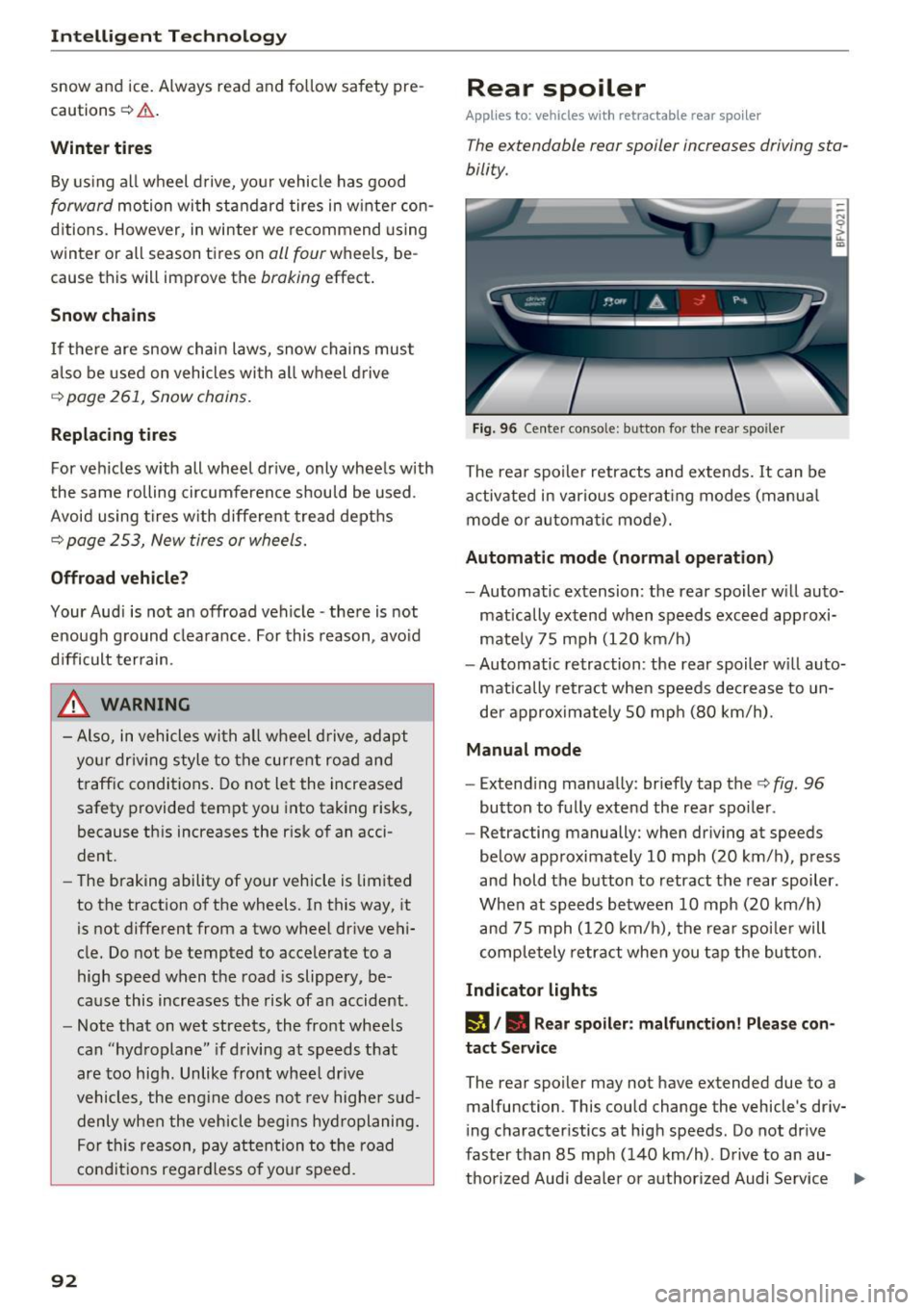
Fig. 96 Center conso le: button for the rear spoiler
The rear spoiler retracts and extends. It can be
activated in various operat ing modes (manua l
mode or automatic mode).
Automatic mode (normal operation)
- Automatic extension: the rear spoiler w ill auto-
mat ically extend when speeds exceed approxi
mately 75 mph (120 km/h)
- Automatic retraction: the rear spoiler w ill auto
matically retract when speeds decrease to un
der approximately 50 mph (80 km/h).
Manual mode
-Extend ing manually : briefly tap the¢ fig. 96
button to fully extend the rear spoiler .
- Retracting manually: when driving at speeds
below approximately 10 mph (20 km/h), press
and hold the b utton to retract the rear spoiler .
When at speeds be tween 10 mph (20 km/h)
and 75 mph (120 km/h), the rea r spoi ler will
completely retract when you tap the button.
Indicator lights
IJ,. Rear spoiler: malfunction! Please con
tact Service
The rear spoiler may not have extended due to a
malfunction. This could change the vehicle's driv
ing characteristics at high speeds. Do not drive
faster than 85 mph (140 km/h) . Drive to an au-
thorized Audi dea ler or authorized Audi Service ..,.
Page 138 of 314
Navigation
Navigation
Opening navigation
A pplies to: ve hicles w ith navigation system
The navigation system directs you to your destination, around traffic incidents and on alternative
routes, if desired.
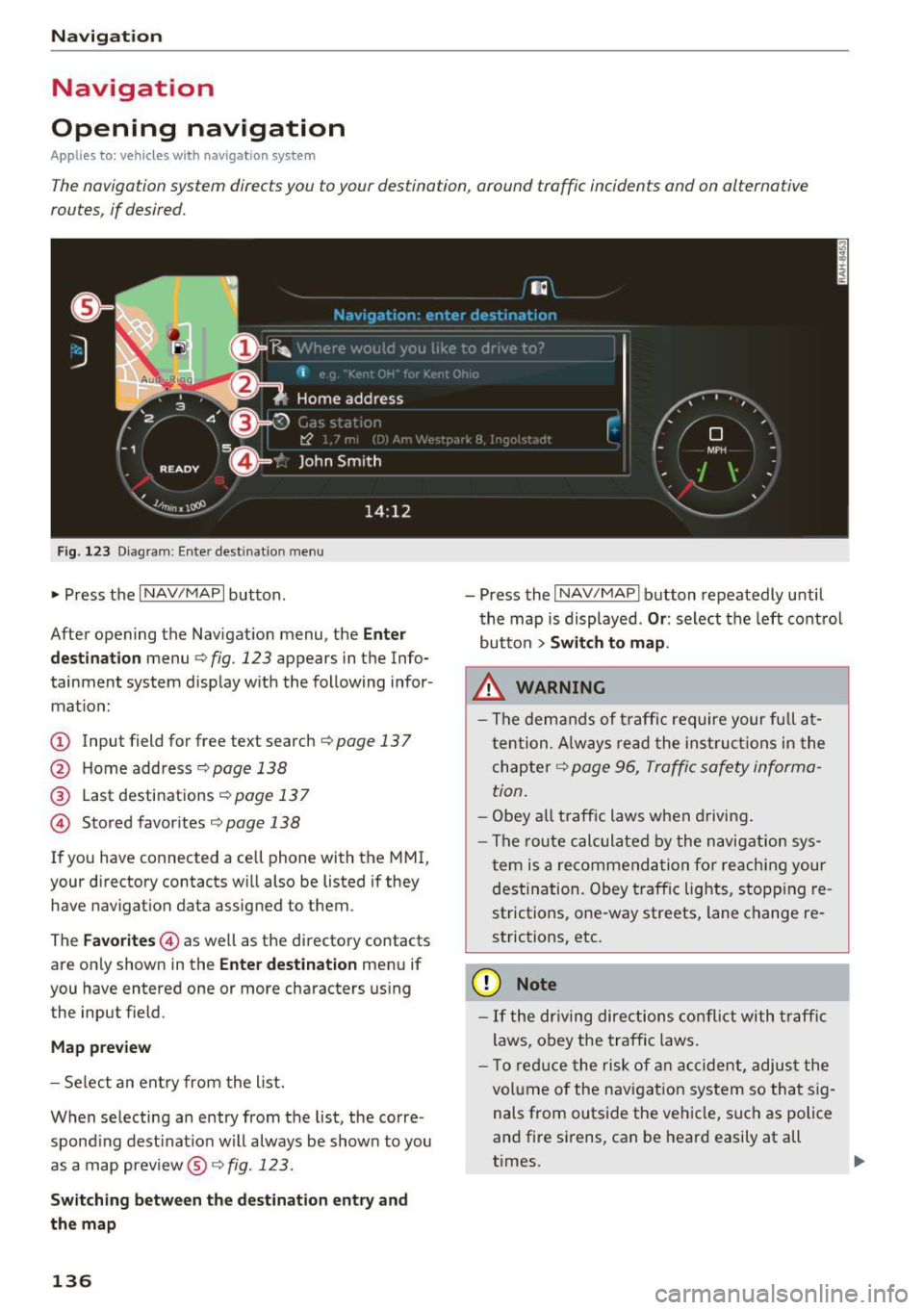
Fig. 123 Diagram: Enter destination menu
~ Press the I NAV/MAPI button.
After opening the Navigation menu, the
Enter
destination
menu Q fig. 123 appears in the Info
tainment system display with the following infor mat ion:
(!) Input field for free text search q page 13 7
@ Home address 9poge 138
@ Last destinations qpoge 137
© Stored favorites q page 138
If you have connected a cell phone with the MMI,
your directory contacts will also be listed if they
have navigation data assigned to them .
The
Favorites © as well as the directory contacts
are only shown in the
Enter destination menu if
you have entered one or more characters using the input field.
Map preview
-Select an entry from the list.
When selecting an entry from the list, the corre
spond ing dest ination will always be show n to you
as a map preview®~
fig. 123.
Switching between the destination entry and
the map
136
- Press the I NAV/MAPI button repeatedly until
the map is displayed .
Or: select the left control
button
> Switch to map.
.&_ WARNING
-The demands of traffic require your full at
tention. Always read the instructions in the
chapter
9 page 96, Traffic safety informa
tion.
- Obey all traffic laws when driving.
- The route calculated by the navigation sys-
tem is a recommendation for reaching your
destination. Obey traffic lights, stopp ing re
strictions, one-way streets, lane change re
strictions, etc.
(D Note
- If the dr iving directions conflict with traffic
laws, obey the traffic laws.
- T o reduce the risk of an accident, adjust the
volume of the navigation system so that sig
nals from outside the vehicle, such as police
and fire sirens, can be heard easily at all
times.
-
Page 183 of 314
co
co
.... N
" N .... 0
" "' c:o
Safe driving Basics
Safe driving habits
Please remember -safety first!
This chapter contains important information,
tips, instructions and warnings that you need to
read and observe for your own safety, the safety
of your passengers and others . We have summar
ized here what you need to know about safety
be lts, airbags, child restraints as well as child
safety. Yo ur safety is for us
priority number 1. Al
ways observe the info rmation and warn ings i n
this section - for you r own safety as well as that
of your passengers.
The information in this sect ion app lies to all
model ve rsions of your vehicle. Some of the fea
tures descr ibed in t his sec tions may be standa rd
equipment on some models, or may be optional
equipment on others . If you are not sure, ask
your authorized Audi dealer.
A WARNING
- Always make sure that you follow the in
struct ions and heed the WARNINGS in th is
Manual. It is in your interest and in the in
terest of your passengers .
-
-Always keep the complete Owner's Litera
ture in your Audi when you lend or sell your
vehicle so that this important information
will always be available to the d river and
passenge rs.
- Always keep the Owne r's literature handy so
that you can find it easily if you have ques
t ions.
Safety equipment
The safety features are part of the occupant re
straint system and work together to help reduce
the risk of injury in a wide variety of accident sit
uations.
Your safety and the safety of yo ur passenger
should not be left to c han ce. Advances in tech
nology have made a var iety of features ava ilab le
t o he lp reduce the risk of injury in an accident.
Safe d riv ing
The following is a lis t of just a few of the sa fe ty
features in yo ur Audi :
- sophisti cated safety be lts fo r dr ive r and pas -
senger seat ing pos ition,
- safety belt p re tensioners,
- safety belt force lim ite rs,
- front airbags,
- knee airbags*
- side airbags in the seats,
- specia l LATCH anchorages for child restraints,
- ad justab le steer ing colum n.
These ind iv idual safety features , ca n work to
gether as a system to he lp p rotect you and your
passenger in a w ide range of acc idents. These
f ea tures canno t work as a system if they are not
always correc tly ad justed and cor rect ly used.
Safet y is everybody's r esponsibility!
Important things to do before driving
Safety is everybody 's job! Vehicle and occupant
saf ety always depends on the informed and care
f1,1/ driver .
For your safety and the safety of your passenger,
before driv ing always:
.,. Make sure that all lights and s ignals are operat
ing correctly .
.,. Make sure that the tire pressure is correct .
.,. Ma ke sure that a ll w indows are clean and afford
good v isibility to the outs ide.
.,. Sec ure all luggage and othe r items c arefully
¢ page 185, ¢ page 49.
.,. Make sure that not hing can i nterfere with the
peda ls .
.,. Adj ust seat and mirro rs cor rectly for your
he ight .
.,. Make sure to use the right child restra int cor
rectly to protect children ¢
page 218, Child
safety .
.,. Sit p roper ly in you r seat a nd make sure that
your passenger do the same¢
page 47, Seats
and storage .
.,. Fasten your safety belt and wear i t properly . Al
so instruct your passenge r to fasten his safety
be lt properly
c:!:> page 189.
181
Page 191 of 314
co
co
..... N
" N ..... 0
" "' c:o
Safety belts
General notes
Always wear safety belts!
Wearing safety belts correctly saves lives!
This chapter explains why safety belts are neces
sary, how they work and how to adjust and wear
them correctly. .. Read all the information that follows and heed
all of the instructions and WARNINGS.
A WARNING
Not wearing safety belts or wearing them im
properly increases the risk of serious personal
injury and death .
- Safety belts are the single most effective
means available to reduce the risk of serious
injury and death in automobile accidents.
For your protection and that of your passen
gers, always correctly wear safety belts
when the vehicle is moving.
- Pregnant women, injured, or physically im
paired persons must also use safety belts.
Like all vehicle occupants, they are more
likely to be seriously injured if they do not
wear safety belts. The best way to protect a
fetus is to protect the mother -throughout
the entire pregnancy.
Number of seats
Your Audi TT Roadster has two seating positions. Each seating position has a safety belt .
A WARNING
Not wearing safety belts or wearing them im
properly increases the risk of serious personal
injury and death .
- Never strap more than one person, includ
ing small children, into any belt .
It is espe
cially dangerous to place a safety belt over a
child sit ting on your lap.
- Never let more people ride in the vehicle
than there are safety belts ava ilable.
Safety belts
-Be sure everyone riding in the vehicle is
properly restrained with a separate safety
belt or child restraint.
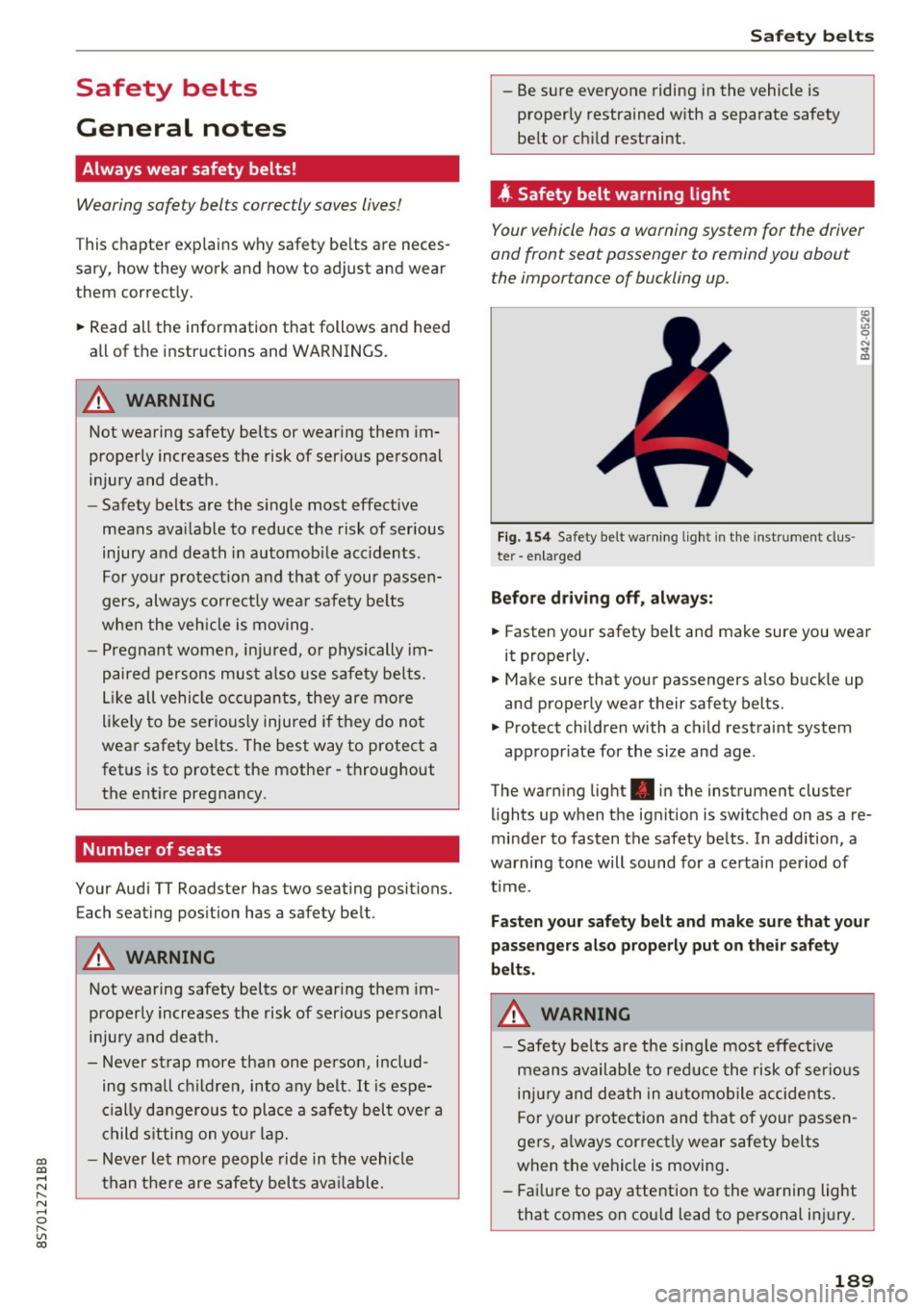
4 Safety belt warning l ight
Your vehicle hos o warning system for the driver
and front seat passenger to remind you about the importance of buckling up.
Fi g. 154 Safety belt warn ing light in the instrument clus
te r -enlarged
Before driving off, always:
.. Fasten your safety belt and make sure you wear
it properly.
.,. Make sure that your passengers also buckle up
and properly wear their safety belts.
.,. Protect children with a child restraint system
appropr iate for the size and age.
The warning light . in the instrument cluster
lights up when the ignit ion is switched on as a re
minder to fasten the safety belts . In addition, a
warning tone will sound for a certain period of
t im e.
Fasten your safety belt and make sure that your
passengers also properly put on their safety
belts.
A WARNING
-
- Safety belts are the sing le most effective
means available to reduce the risk of serious
injury and death in automobile accidents.
F or your protection and that of your passen
gers, a lways correctly wear safety belts
when the vehicle is moving .
- Failure to pay attention to the warning light
that comes on could lead to personal injury.
189
Page 240 of 314
Check ing and F illing
Using the proper engine oil is impo rtant for the
functionality and service life of the engine. Your engine was facto ry-filled with a h igh-quality oi l
which can usually be used throughout the entire
year.
@) Note
Your Limited New Vehicle War ranty does not
cover damage or malfunctions due to failure
to follow recommended maintenance and use
requirements as set forth in the Audi Owner's
Manual and Warran ty
& Maintenance booklet.
- Use only a high quality eng ine oil t hat ex-
p ressly complies with the Audi oil qua lity
standard specified for your vehicle's engine .
Using a ny o ther oil can cause serious engine
d am age.
- D o not mix any lubricants o r other addit ives
i nto the engine oil. Doing so ca n cause en
g ine damage.
(D Tips
I f you need to add oil and there is none availa
ble t hat meets the Audi o il quality standard
your eng ine requi res , you m ay ad d a tot al of
no more than 0.5 q t (0,5
l) of a h igh-quali ty
"synthe tic"oil that meets t he following speci
fications.
- AC EA A3 o r API SM wi th a viscosity grade o f
SAE 0W-30, SAE 5W-30 or SAE 5W-40.
- F or more inform ation about engine o il that
has been approve d for your ve hicl e, please
contact eithe r you r a uthorized Audi dea le r
or A udi C ustome r Relat ions at
1 (800) 822-2834 or visit o ur web site at
www.audiusa.com or www.audicanada.ca .
Engine oil consumption
T he engine in your vehicle depends on an ade
quate amoun t of oil to lubricate and cool all of
i ts moving par ts.
In order to p rovide effective lubr ication and cool
ing of internal engine components, all interna l
combustion engines consume a cer tain amount
of oil. Oi l co nsumption varies from engine to en
g ine and may change significant ly over the life of
the eng ine . Typically, eng ines with a specified
238
b reak -in period (see q page 57) cons ume more
oi l during the break-in period than they consume
after o il consumption has stab ilized.
U nder normal cond itions, the ra te of oil con
s u mption depends on the q ua lity and viscos ity o f
the oil , the RPM (revo lutions per minute) at
which the engine is operated, the amb ient tem
perature and road condit ions. Further facto rs a re
the amount of o il di lution from wate r condensa
tion or fue l resid ue a nd the oxidation level of the
o il. As any engine is subject to wear as mileage
builds up, the o il consumption may increase ove r
ti me until replacement o f wo rn components may
become ne cessary.
With a ll these va riables coming into p lay, no
standard rate of o il consumption can be estab
li sh ed or spec ified . T he re is no alte rnative to reg
u lar and freq uen t che cki ng of the oil level , see
Note .
If the yellow engine oil level warning symbo l l!I
in the instrument clus ter lights up , you sho uld
c h eck t he o il level as soon as poss ible
q page 239 . Top off the o il at your earlies t con
venience
q page 239.
_& WARNING
Before you check a nyt hing in the en gine com
partment, always read and heed all WARN
INGS
9 page 235.
@ Note
D riving w ith an insufficient oil level is like ly to
cause severe damage to the eng ine.
(D Tips
- The oil pressure warning display. is not
an indicator of the oil level. Do not rely on
it . Instead, check the oil level in your en
gine at regular intervals , preferably each
time you refuel, and always befo re going
on a long trip .
- If you have the impress io n your engine con
sumes excessive amounts of oil, we recom
mend that yo u consult an authorized A udi
dea le r to have t he cause of your concern
properly diagnosed. Keep in mind that the .,.