display AUDI TT ROADSTER 2018 Workshop Manual
[x] Cancel search | Manufacturer: AUDI, Model Year: 2018, Model line: TT ROADSTER, Model: AUDI TT ROADSTER 2018Pages: 310, PDF Size: 46.95 MB
Page 145 of 310
Cl 00 .-< N r-N .-< 0 r-Vl 00
turn the left thumbwhee l on the mu ltifunction
steering wheel*
r=> page 18.
Turning th e cross hair s on /off
-Switching the crosshairs on : press the control
knob in the map view .
-Switching th e crossh airs off : press the I BACKI
button .
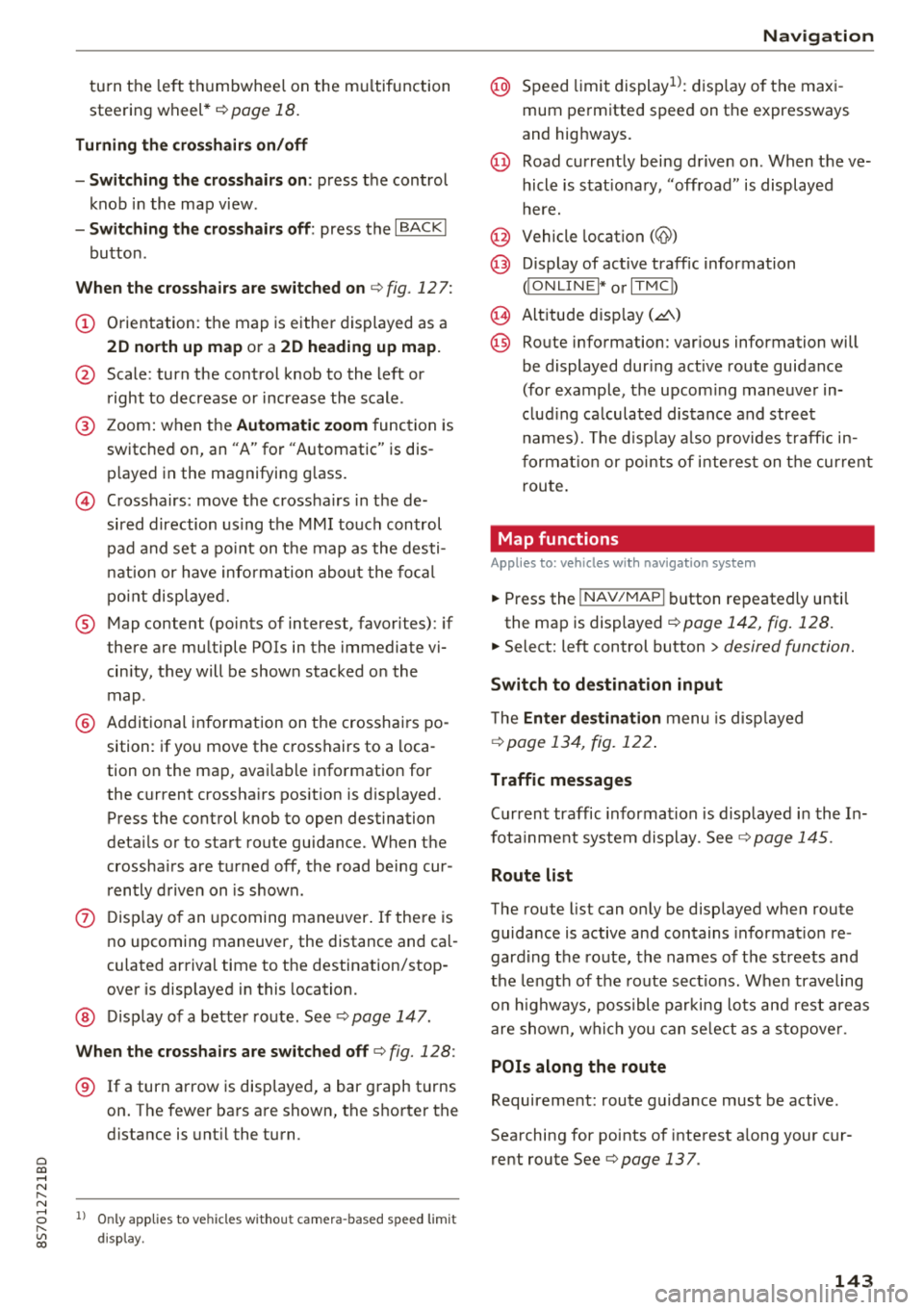
When the cros s h air s are s witched on r:!> fig. 12 7:
(D Orientation : th e map is either displayed as a
2D north up m ap or a 2D heading up map.
@ Scale : turn the control knob to the left or
right to decrease or increase the scale .
@ Zoom: when the Automatic zo om function is
switc hed on, an
"A" for "Automatic" is dis
p layed in the magnifying g lass.
© Crosshairs: move the crossha irs in the de
sired direction us ing the MMI touch control
pad and set a po int on t he map as the desti
n at ion or have info rmation about the fo cal
po int disp layed.
® Map content (points of interest, favorites) : if
there are mult iple POis in the immed iate v i
cin ity, they will be shown stacked o n the
map .
@ Additional information on t he crosshai rs po
sition : if you move the crosshairs to a loca
tion on the map, avai lable information for
the current c rosshairs position is displayed.
Press the control knob to open destination
deta ils or to start route guidance . When the
crossha irs are turned off, the road being cur
rently d riven on is shown .
0 Disp lay o f an upcoming maneuver. If the re is
no upcoming maneuver, the distance and ca l
culat ed arrival tim e to the destination/stop
over is displayed in this location.
@ Di sp lay of a better route . Seer:!> page 147 .
When the c rosshairs a re s witched o ff r:!> fig. 128 :
® If a turn arrow is displayed, a bar graph turns
on. The fewer bars are shown, th e shorter th e
d istance is unt il the turn .
l) O nly applie s to vehicl es withou t ca mer a-b as ed speed li mit
d is play .
Navigation
@ Speed limit display l): disp lay of the max i
mum permitted speed on the expressways
and highways.
@ Road currently being driven on . When the ve
hicle is stat iona ry, "off road" is displayed
here.
@ Vehicle location (@)
@ Display of active traffic information
(ION LINEI* or lTMC !)
@ Altitude disp lay (.d\)
@ Route information: var ious informa tion will
be displayed dur ing active route guidance
(for example, t he upcom ing maneuver in
clud ing ca lculated distance and street
names). The d isplay a lso p rovides t raff ic in
format io n or points of inte rest on the cur rent
route.
Map functions
Applies to : vehicles with navigation system
.. Press the !NAV /MAP I button repeatedly unti l
the map is displayed
r=> page 142, fig. 128.
.. Select: left control button > desired function.
Switch to d estin ation input
T he Enter de stin ation menu is d isp layed
r:!> page 134, fig. 1 22 .
Traffic messages
Current traffic information is disp layed in the In
fota inme nt system display . See
r:!> page 145 .
Route list
The route list can o nly be disp layed when route
guidance is active and contains informat ion re
gard ing the route, the names of the streets and
the le ngth of the route sect ions. When traveling
o n highways, poss ible parking lots and rest areas
are show n, wh ich you can se lect as a stopove r.
POis along the route
Requirement: route guidance must be active .
Searching for points of interest a long your cur
rent route See
r:!> page 13 7 .
143
Page 146 of 310
Navigation Additional options on the map
A pp lies to: ve hicles w ith navigat ion system
.,. P ress t he I N AV/MAPI but ton repeate dly un til
t h e map is d is pla yed
¢page 14 2, fig. 12 8.
.,. Press t he righ t con tro l bu tton .
D epending on the f unct ion selected, the follow
i n g op tions can also be se lec ted unde r the
Map
menu:
Cancel route guidance : see¢ page 139.
Map settings: see ¢ page 144.
Route criteria : see ¢page 14 1.
Voi ce guidance: see ¢ page 1 41.
Navigation settings : see ¢ page 140.
Online traffic data* : see ¢page 145 .
Show alternative routes: see ¢ page 14 1.
Parking along the route : parking options near
t he vehicle are disp laye d.
Save current position : you can save your current
ve hicle posi tion as a favor ite
¢ page 140 or save
it as a contact in t he
d ire cto ry¢ pag e 140.
Audi connect at this location ": allows yo u to
search fo r
City events or Weather at the entered
locat ion .
Country information: you ca n disp lay the appli
cab le urban and rura l speed lim its for any coun
try/state . T his i nfo rmation w ill be automat ica lly
shown to you in the route i nfo rmat ion @
¢ pag e 142, fig . 128 w hen the speed lim it is ex
cee ded, if this funct ion is
acti vate d¢ page 145 .
Avoid route *: when route gu idance is act ive, the
calc ulated ro ute w ill avoid t he a rea yo u have
specif ied (max imum : 12 mi (20 km)), if possibl e.
Th e navigation sys te m cal cula tes a n alt er nat ive
ro ute. The rout e to be av o ide d that you h ave en
t ered applie s on ly to the cur rent route an d m ust
be set a gain, if neede d. The a reas yo u have se -
1> Provider at time of printing.
2> AUDI AG provi des access to services from third party pro
v iders. Pe rmanent ava ilability cann ot be guaran teed , be
cause that depe nds on th e thir d party provider.
144 l
ecte d to avoi d w ill appear wi th re d an d whit e
s h ading on the map .
Map settings
Applies to: vehicles wit h navigat ion syste m
.,. Press the I NAV/MAPI button repeatedly unti l
the map is displayed
¢ page 142, fig. 128.
.,. Select: r ight cont rol b utton> Map settings.
De pend ing o n the selected fu nction, t he follow
i ng settings can be selected :
Map colors
Day /Night :
the map i s disp laye d wit h a lig ht/
dar k backgroun d.
Automatic : when the ligh ts swi tch on, th e map
c ol ors swi tch from day to n ight.
Map display
Standard
<=> pag e 142, fig. 127 .
Google Earth *1
)2
) ¢ page 145, fig. 129 .
Traffic ¢page 14 5.
Map orientation
Destination :
th e map indica tes the des tination
and is or iented to t he nor th .
2D heading up map /2D north up map : the cur
r ent vehicle pos ition is displayed . Th e map is ori
en ted in the d irecti on of tr ave l o r to t he nor th.
3D map : when this function is switched on, the
cu rrent veh icle pos it io n is shown on a three-di
mens iona l ma p and orien ted in t he d irec tion of
travel. At a sca le o f 62 mi ( 100 km) and la rge r,
t he m ap orie nta tion is to th e north.
Overview : the entire route from the vehicle pos i
tion to the des tina tion or th e next s to p ove r is d is
p layed on the m ap. The map scale depends on
t he le ngth of the ro ute an d ad ap ts au toma tically .
T he map is or iente d t o the north.
1111-
Page 147 of 310
Cl co .... N ,....
N ...... 0 ,....
Vl co
Route information
The display of route information s uch as the cur
rent road being driven on, upcom ing maneuvers,
traffic information or points of interest along the
route can be switched on/off .
Automatic zoom
On: the map scale is adapted a utomat ica lly de
pending on the type of road being trave led (ex
p ressway, highway, other roads) so that you al
ways have an optimal overview of the road ahead.
The scale is also automatically adapted when
there are upcoming maneuvers to provide a bet
ter detai led view.
Off : the map sca le you have chosen is main
tained .
Map content
Map content, such as traff ic information favor-'
ites or restaurants, can be displayed or hidden
( ~ ).
Satellite map
App lies to: ve hicles with navigation sys tem and Audi co nnect
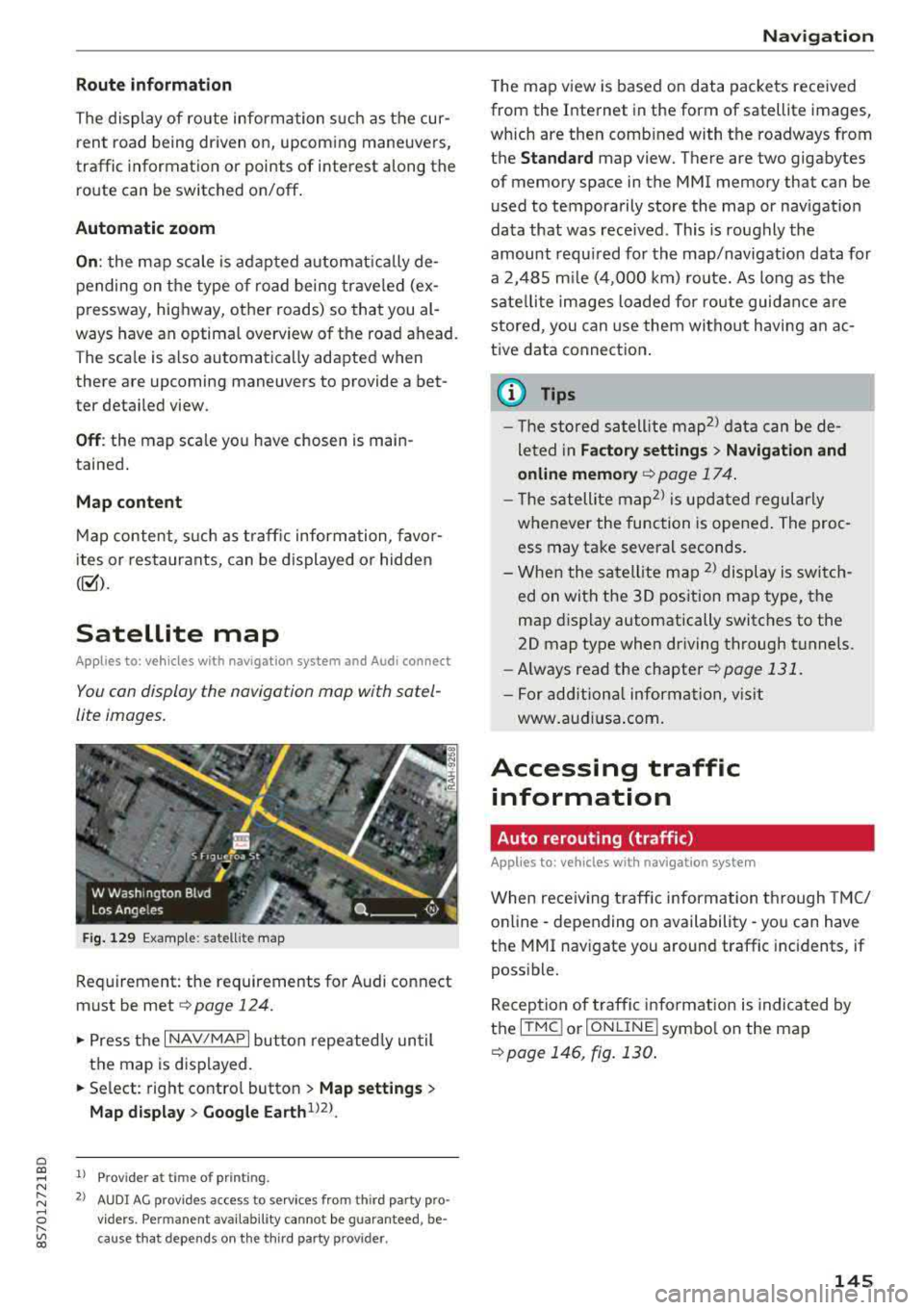
You can display the navigation map with satel
lite images.
F ig. 129 Examp le: satellite map
Requirement: the requirements for Audi co nnect
must be met
~ page 124.
.,. Press t he I NAV/MAPI button repeated ly un til
the map is displayed .
.. Se lect: right contro l button > Map setting s >
Map di splay > Google Earth 1J2J.
l) Provider at time of printing .
2> AUDI AG prov ides access to services from th ird party pro ·
v iders . Pe rman ent ava ilability cannot be guaran teed , be
c ause that depe nds on th e th ird party provider.
Na viga tion
The ma p view is based on data packets rece ived
from the Internet in the form of satellite images,
which are then comb ined with the roadways from
the
Standard map view. There are two gigabytes
of memory space in the MMI memory that can be
used to temporarily store the map or navigat io n
data that was rece ived. This is roughly the
amount requ ired for the map/navigation data for
a 2,485 m ile (4,000 km) ro ute. As long as the
satellite images loaded for route guidance a re
stored, you can use them witho ut hav ing a n ac
tive data connect ion .
© Tips
- T he sto red satell ite map2> d ata can be de
le ted in
Fa ctory setting s> Navigation and
online memory
¢page 174 .
-The s atellite map2l is up dated regularly
whenever the function is opened . The proc
ess may take several seconds.
- When the sate llite map
2
) display is switch
ed on wi th the 30 position map type, the
map display automatically switches to the
20 map type when driving through tunnels.
- Always read the
chapter~ page 131.
- For add ition al information, v isit
www .aud iusa .com .
Accessing traffic
information
Auto rerouting (traffic)
Applies to: vehicles wi th navigat ion syste m
When receiving t raffic information through TMC/
online · depending on availability- you can have
the MMI nav igate you around traffic inc idents, if
poss ible.
Reception of traffic i nfo rmation is indicated by
the
ITMC ! or ION LINE I symbo l on the map
~ page 146, fig. 130 .
145
Page 148 of 310
Navigation
Online traffic information
Applies to: ve hicles w ith navigation system and Audi connect
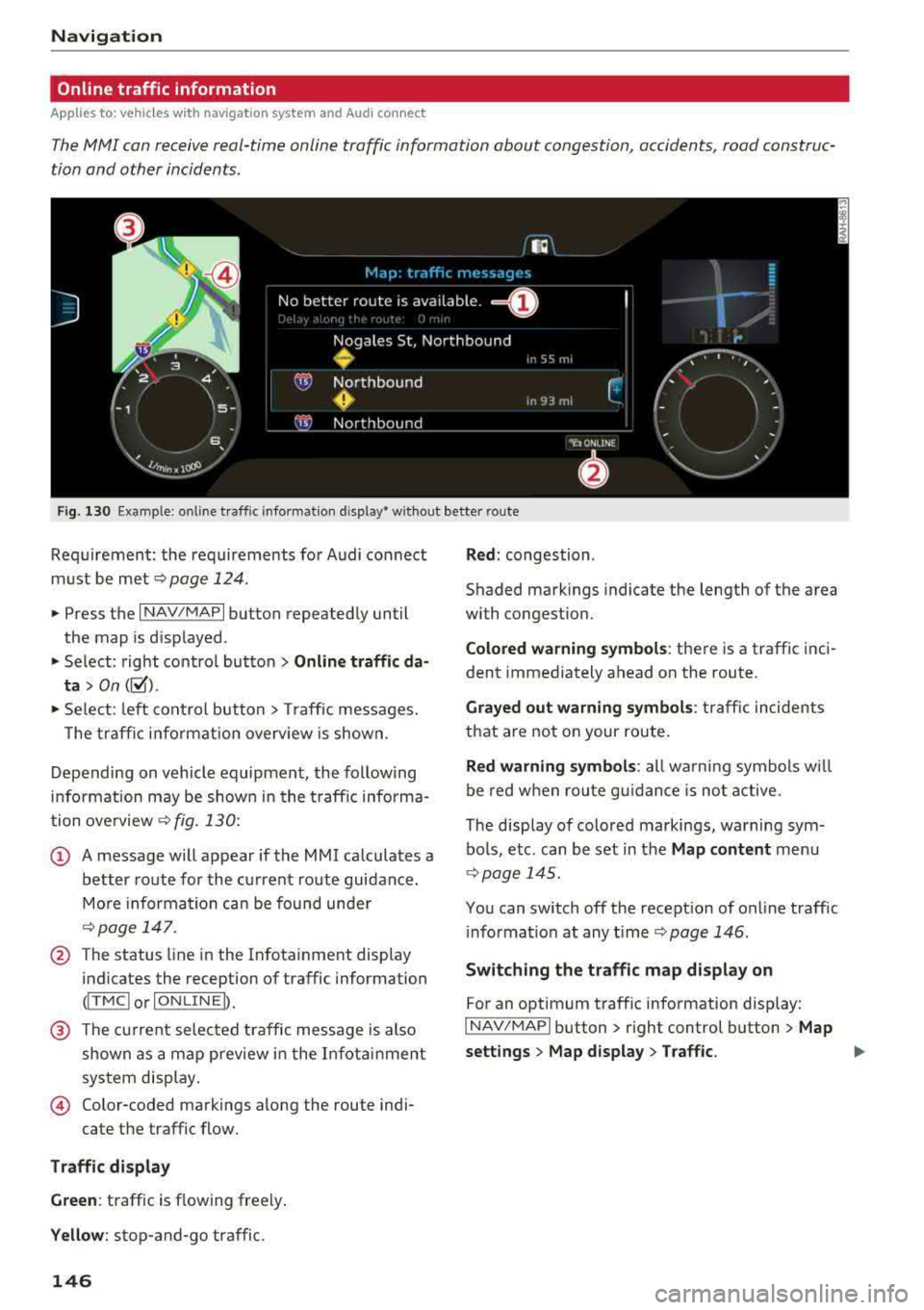
The MMI can receive real-time online traffic information about congestion, accidents, road construc
tion and other incidents .
Fig . 130 Example : on line t raffic info rmat io n disp lay • wit hout better route
Req uirement : the requirements fo r Audi con nect
m ust be
met ~ page 124.
.,. Press the I NAV/MAPI button repeated ly until
the map is d isplayed .
" Select : rig ht contro l bu tton > Online traffic da
ta > On ([;1).
"Se lect : left co ntrol button> Traff ic messages.
T he tra ffi c in fo rmat ion overv iew is shown.
D epending on vehicle equipment, the follow ing
i n fo rm ation may be show n in t he t raff ic informa
tion
o ve rview ~ fig. 130:
(D A message will appear if the MMI calculates a
better route for the cu rrent route guidance .
M ore infor mation ca n be found unde r
~page 14 7.
@ The status line in the Infota inment display
indicates the reception of traffic information
(I T MC I or IONLI NEI).
@ The current selected traffic message is also
shown as a ma p preview i n the I nfota inment
sys tem disp lay.
© Color-coded markings along the route indi-
cate the traffic flow.
Traffic di splay
Green : traffic is flowing freely .
Yellow: stop-and-go traffic.
146
Red : congestion .
Shaded mark ings indicate the length of the area
with congestion.
Colored warning symbol s: there is a traffic i nci
dent immediately ahead on the route .
Grayed out warning symbols : traffic incidents
that are not on your route .
Red warning symbols: all w arning sym bols w ill
be red w he n r out e g uidance is no t act ive.
The disp lay of colo red markings, warning sym
bo ls, e tc. can be set in the
Map content menu
<;} page 14 5.
You can switch off the recept ion of on line traff ic
i nforma tion at any
t ime ~ page 146.
Switching the traffic map display on
For an optimum traffic information display:
I NAV/MAPI button> r ight control button > Map
settings > Map display > Traffic.
..,
Page 149 of 310
Cl 00 ... N r-N ... 0 r-Vl 00
You can also display the o nline traffic info rma
tion
in the sate llite map*1
) ¢ page 145 or the
standard map
¢ pag e 142, fig . 127
(D Tips
-Online traff ic information is not available in
Canada .
- Always read the chapter
~ page 131, About
Audi connect .
-Havi ng the Online tr affic data fu nction
switched on provides t he most accu rate re
ports of traffic situations as we ll as traffic
forecasting. Yo ur vehicle transmits and
processes its anonymous, encrypted posi
tion information at regular intervals to the
traffic data provider . If yo u do not want to
use this, you can switch off the
on line traf
fic information
function at any time .
-The online traffic informat ion network is
curre ntly not ava ilable i n all countr ies, and
the coverage is not nat io nwide . For add i
tiona l information, v is it www.aud iusa.com.
Traffic information (TMC)
Applies to: vehicles with navigation system
~ Press the I NAV /MAPI button repeated ly un til
the map is disp layed.
~ Se lect : left control button > Traffic me ssage s.
TMC t raffic mess ages are switched o n at the fac
tory.
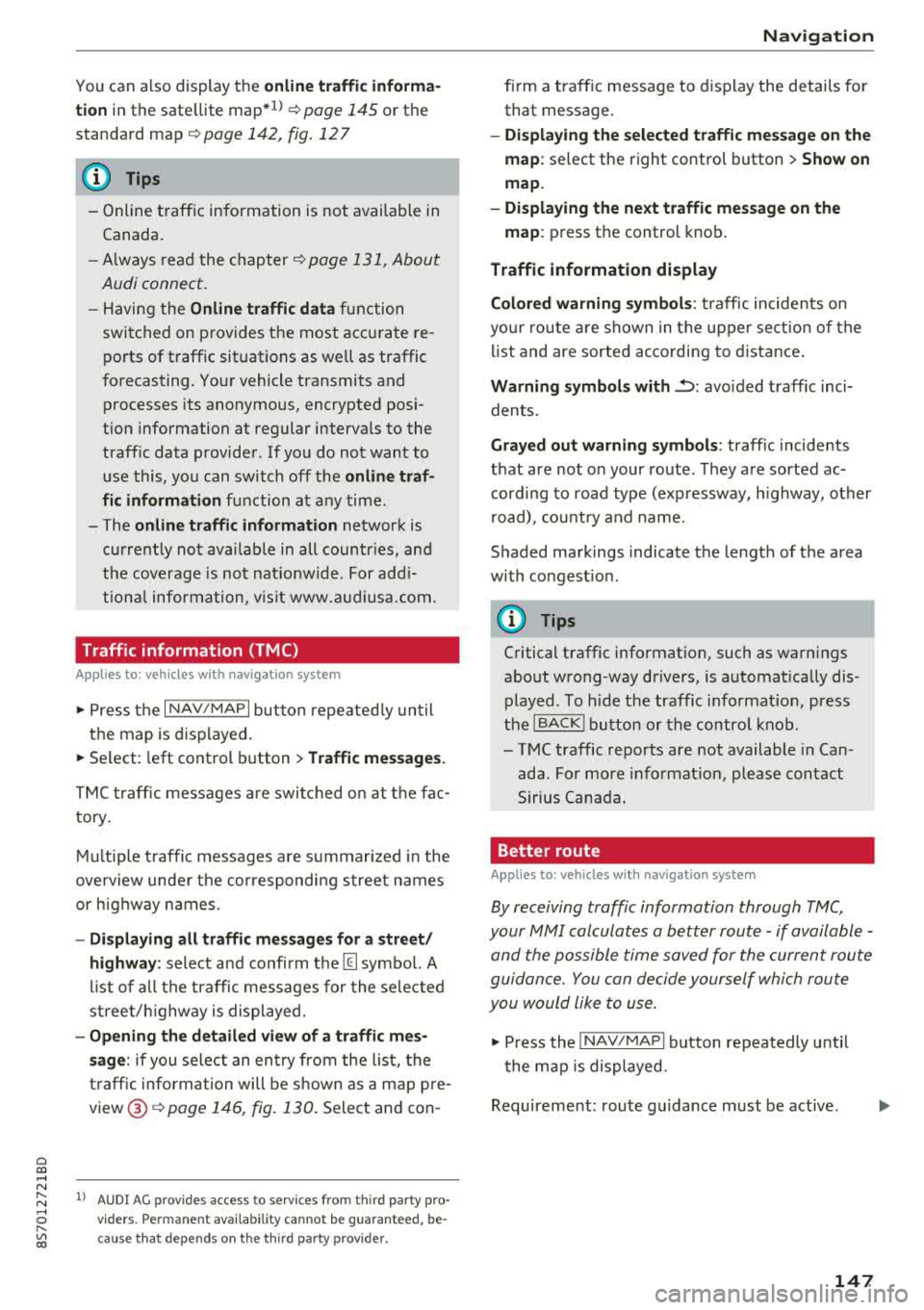
Multip le traffic messages a re summarized in the
overview unde r th e correspondi ng street names
or h ighway names.
-Di spla ying all traffic messages for a street /
highwa y:
select and confirm the [ill symbol. A
l ist of a ll the traffic messages for the sele cted
st ree t/ hi ghway is displayed.
-Opening the detailed view of a tr affic me s
s age :
if you se lect an ent ry from the list, the
t raff ic information will be shown as a map p re
view ®¢
page 146, fig. 130 . Select and con-
l) AU DI AG prov ides acces s to serv ices from third pa rty pro
v iders . Pe rman ent availa bili ty c anno t be g uara nteed , be
c a use that dep ends on th e th ird party provid er.
Na vigation
firm a traff ic message to d isplay the details for
that message.
-Displ aying th e sele cted traffic me ssage on the
map :
select the right control button > Sh ow on
map .
-Displaying the ne xt traffic mes sage on the
map :
press the control knob .
Traffic information display
Colored warning symbol s:
traffic incidents o n
yo ur r oute are shown in the upper sect io n of the
li st and are sorted ac cording to d istance .
Warning symbol s with~: avo ided traff ic inci
dents.
Grayed out warning s ymbol s: traffic incidents
that are not on your route . T hey are sorted ac
cording to road type (expressway, h ighway, other
r oad), cou ntry and name.
Shaded markings indicate the length of the area
with congest ion .
(D Tips
Critical traffic information, such as war nings
abo ut wrong-way drivers, is a utomat ica lly dis
played . To hide t he traffic informat ion, press
the
IBACK ! button or the contro l knob .
-TMC traffic reports are not available in Can
ada . For more info rmat io n, p lease contact
S irius Canada.
Better route
Applies to: vehicles with navigation system
By receiving traffic information through TMC,
your MMI calculates a better route -if available -
and the possible time saved for the current route
guidance. You can decide yourself which route
you would like to use.
~ Press the ! NAV/MAPI button repeatedly unti l
t he map is displayed.
Requirement: route guidance must be active .
147
Page 150 of 310
Navigation
If you r MMI has calculated a better route than
the current route guidance, the message
A better
route is available.
appears on the map along
with the time that may be saved. A better route
is indicated in the map view by the symbol
rS
c::;,pag e 142, fig. 127 .
Apply better route
- Press the right contro l button in the map view .
Or: select the left contro l button > Traffic mes·
sages.
The better route with the calcu lated ar
rival time is displayed .
Troubleshooting
App lies to: ve hicles w ith navigation system
Problem Solution
-Select and confirm the better route. Or: select
and confirm
Details to display details about the
optimized route. You can zoom in or out on the
map using the MMI touch control pad. Require
ment: there must be more than one optimized
route calculated. Press the control knob to
sw itch to the next route in the detailed view .
Closing the detailed view: press the I BACK I
button.
- After you have selected a better route, the
route w ill be recalculated.
Free text search: the desired des- The dest inat ion might not be entered in the navigation database.
ti nat ion cannot be found .
Or: check the spelling of the term that was searched . Check if the
desired country/state was selected for the free text search using
the
Country/state selection ¢page 135 or the option All coun-
tries/states.
148
Page 151 of 310
Radio
Opening the radio
The radio supports the F M, AM and SiriusXM*
(satellite radio) bands. Using the HO Radio re
ceiver also allows you to receive radio stations
on the FM and AM bands in digital format.
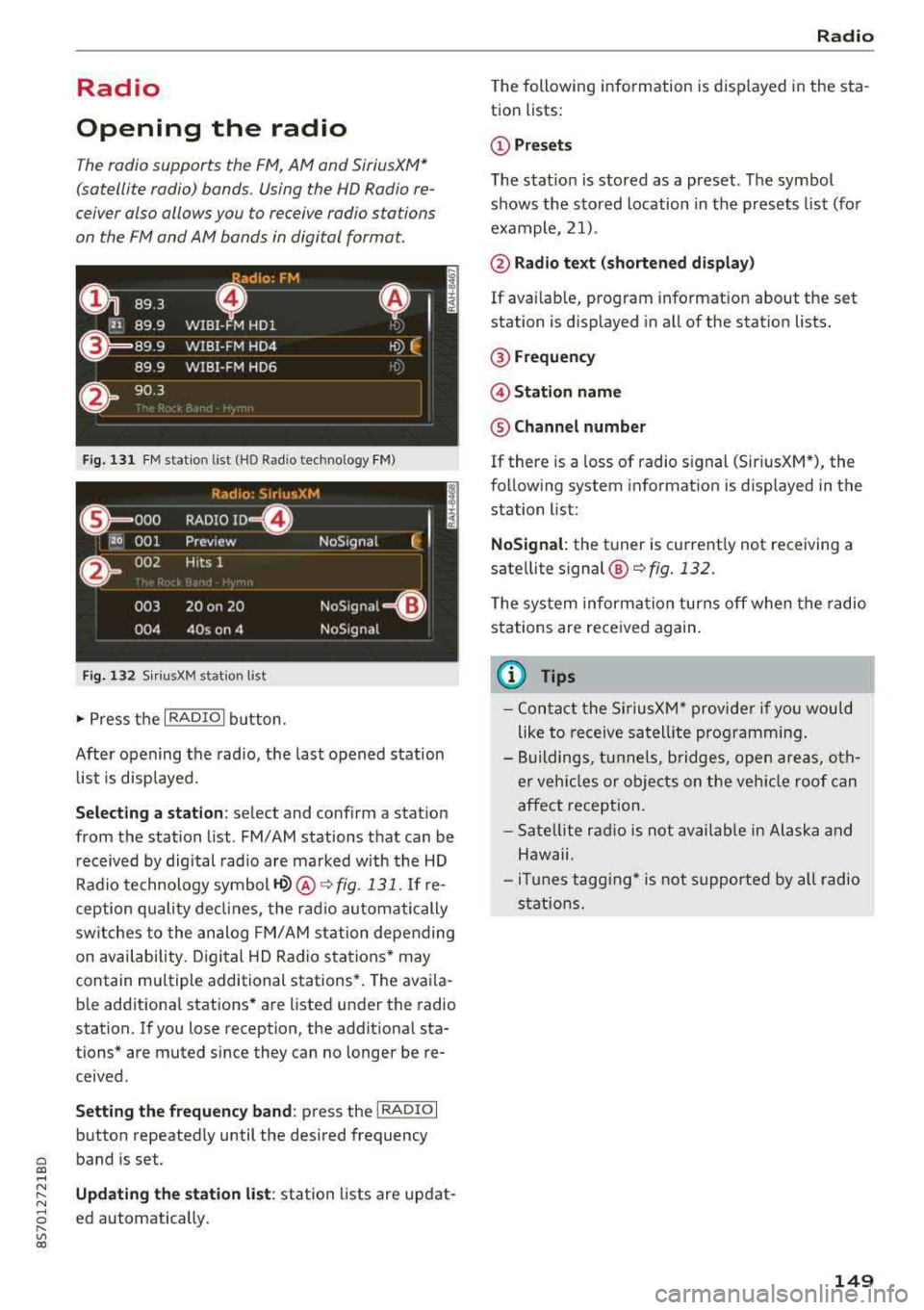
Fig . 131 FM stat ion list (H O Ra dio tec hn ology FM)
Rad io: SiriusXM
t i
(@== ooo RADIO ID m
120 001
Preview NoSignal
&
002 H
its 1
003 20 on 20
NoSignat=<(l)
004 40s on 4 NoSignal
F ig. 1 32 Siri usXM station list
.,. P ress the I RADIO I bu tton.
Afte r opening the rad io, t he last opened station
lis t is disp laye d.
.
I
Selecting a station : select and confirm a stat io n
from the station list . FM/ AM stations t hat can be
received by digital radio are ma rked with the HD
R adio technology symbol
H2> @ ~ fig. 131. If re
ception quality decl ines, the ra dio au tomatically
switches to the analog FM/AM st ation depe nding
on availability . D igi tal HD Radio s ta tions * may
contain multiple additional stations* . The ava ila
b le add itiona l stations* are listed under the radio
station. I f you lose reception, the addit iona l sta
tions* are muted since they can no longer be re
ceived.
Setting the frequency band : press the I RADIO I
b utton repeated ly until the desired frequency
a band is set. co ....
~ Updat ing the station list : station lists are updat -
"' 8 ed automatically. r--Vl co
Radio
The following information is displayed in the s ta
tion lists:
(D Presets
T he s tat io n is stored as a preset. The symbo l
shows the sto red location in the p resets list (fo r
example, 21).
@ Rad io text (shortened display )
If availab le, program info rmat ion about the set
station is displayed in a ll of the stat ion lists.
@ Frequency
@ Station name
® Channel number
If there is a loss of radio s ignal (Sir iusXM*), the
f o llow ing system in format ion is displayed in the
station list:
NoSignal : the tu ner is cu rrent ly not receiving a
sate llite
s ignal @~ fig. 132.
The system inform ation turns off when the radio
st ations are rece ived again.
(D Tips
- Con tact the SiriusXM* provide r if you would
like to receive sa tell ite programming .
- Bu ilding s, tu nnels, b ridges, ope n area s, oth
er veh icles or objects o n the veh icle roof can
affect reception.
- Satel lite ra dio is not availab le in Alaska and
Haw aii.
- iT unes tagg ing* is not supporte d by all radio
sta tio ns.
149
Page 153 of 310
Cl co .... N ,....
N ...... 0 ,....
Vl co
View: Show "Now Playing" screen
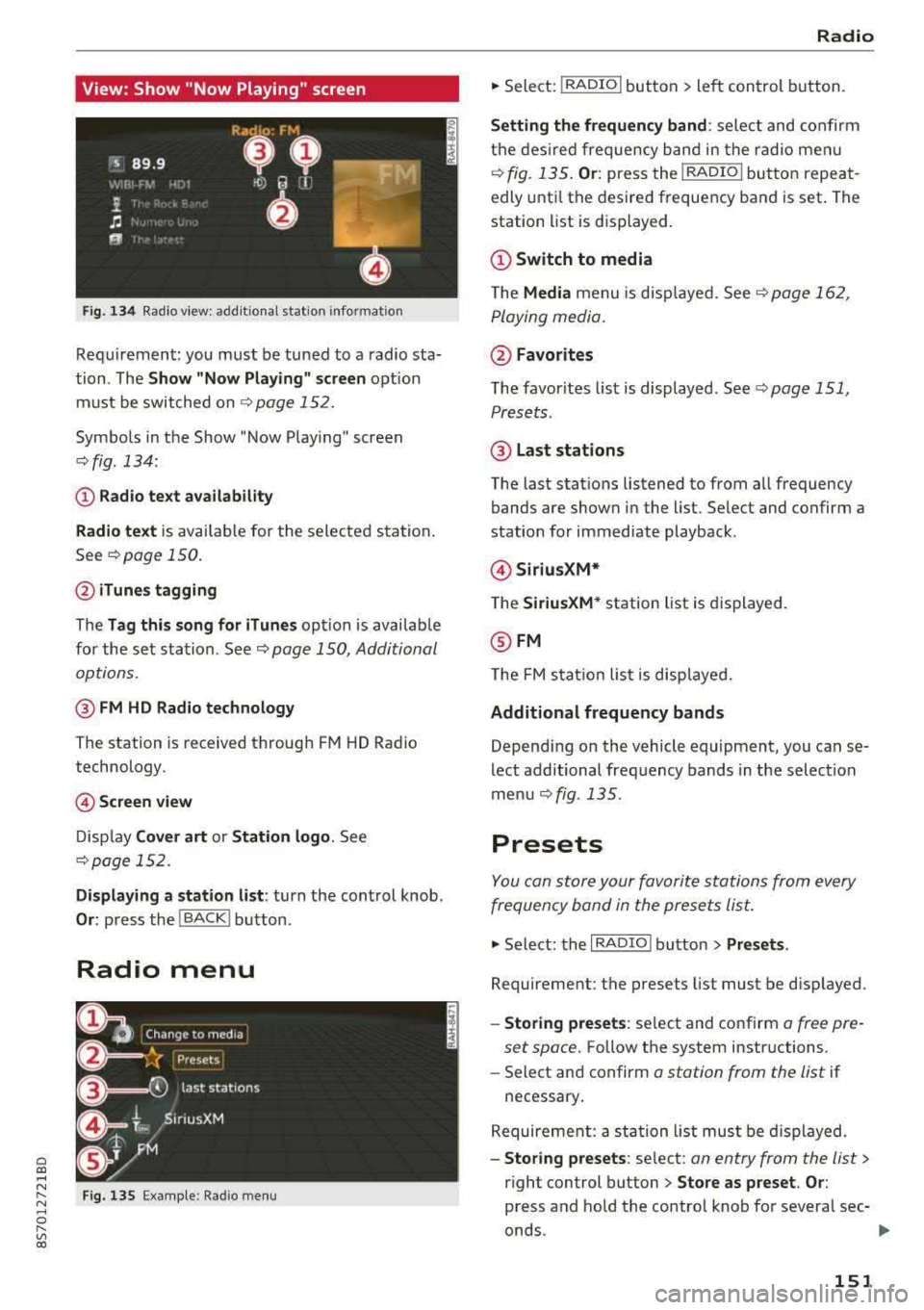
Fig. 134 Radio view: add it ional station information
Requirement: you must be tuned to a radio sta
tion . The
Show "Now P la y ing" screen opt ion
must be switched on
9 page 152.
Symbo ls in the Show "Now Playing" screen
o:;, fig. 134:
CD Radio te xt ava ilabil ity
Radio te xt
is availab le for the selected station .
See
o:;, page 150.
@ iTune s tagging
The Tag this song for iTun es option is availab le
for the se t station. See
o:;, page 150, Additional
options.
@ FM HD Radio technology
The station is received through FM HD Radio
technology.
@ Screen view
D isp lay Cover art or Station logo . See
o:;, page 152.
Displaying a station list : turn the control knob.
Or: press the I BACK! button .
Radio menu
Fig . 135 Examp le: Radio men u
Radio
.. Sele ct: I RADIO I button > le ft con trol button.
Setting th e frequency band : select and confirm
the des ired frequency band in the rad io me nu
o:;, fig. 135 . Or: press the I RADIO I button repeat
edly unt il the desire d frequency band is set . The
station list is displayed.
(!) Switch to media
The Media menu is disp layed. See¢ page 16 2,
Playing media.
@ Favorites
The favorites list is displayed . See t:;, page 151,
Presets .
@ Last stations
The last stations listened to from all frequency
bands are shown in the list. Select and confirm a
station for immediate playback .
@Siriu sXM*
T he SiriusXM* station list is displayed.
@ FM
The FM s ta ti on lis t is disp laye d.
Additional frequency bands
Depend ing on the vehicle equipment, you can se
lect additional freq uency bands in the selection
me nu
o:;, fig. 135 .
Presets
You can store your favorite sta tions from every
frequency band in the prese ts list.
.. Select: the I RADIO I button > Presets .
Requireme nt: the presets list must be disp layed.
- Storing preset s: select and confirm a free pre-
set space.
Follow the system instructions.
- Select an d confirm
o station from the list if
necessary .
Requireme nt: a st ation list must be d isplayed.
- Storing presets : select : an entry from the list>
right control button > Store as preset . Or :
press and hold the control knob for severa l sec-
onds .
~
151
Page 154 of 310
Radio
-Di spla ying the pre set s list : select: I RADIO I but -
ton
> Presets.
Re quir emen t: the favorites list m ust be dis
p laye d.
- Listening to presets : select and confirm a pre
set from the list.
- Mo ve preset : select a preset from the list >
right control button> Move p reset . O r: press
and hold the cont rol knob for several seconds .
Se lect and confirm the location of the selected
preset .
-Deleting presets : select a preset from the list>
right cont ro l button> Delete preset > Delete
this preset or Delete all presets .
Additional settings
Radio settings
~ Select : I RADIO I button > right contro l button >
Rad io settings .
The follow ing settings can be se lected, depend
i n g on the band that is se lected :
Station names (FM)
Variable :
scr oll ing text tran smi tted by the FM
s ta ti ons is shown in the Info tainmen t system d is
p lay .
Fixed : scrolling text t rans mitted by t he FM sta
tions is no t sh ow n in the In fota inment syste m
d is pla y. Onl y the cu rrent se ction of the scro lling
t ext is disp layed.
FM/AM HD Radio*
You can sw itc h H D Rad io recep tion on o r off .
Channel sorting (SiriusXM*)
You can set the station sorting fo r SiriusXM sta
tion lists* by:
- Channel number: the channe ls are so rted in as
cending orde r according to their channel n um
ber.
- Channel name : the channels a re listed in alpha
betica l orde r.
- First category, then channel number : th e
c h annels a re so rted by the ir catego ry and t hen
by the ir ch annel numbe rs .
152
- First category , then channel name : the sta
tions a re sorted by thei r category and then by
their cha nnel names .
Category filter (Sirius XM*)
The stat io ns sh ow n in the st ation l ist can be fil
te red by yo ur person al pre ferences and by pro
gram type . The program catego ries t hat you ca n
se lect depen d on w hat is offere d by your provid
er. Se lect the
All categories opt ion to deactivate
a ll filter options and d isplay all available stations
i n the satellite stat ion list.
Show "Now Playing" screen
When the f unct io n is switched on@' and the sta
tions o r presets list is open, the disp lay w ill
switch to the
Show "Now Playing" screen view
after approximate ly five
seconds ¢ page 151. De
pending on avai lab ility, information about the
set stat io n (such as stat io n name, artis t and sta
tion logo) may be d is p layed in th is view .
Preferred picture view
You can set your pre fer red screen view fo r the
Show "Now Play ing" screen ¢ page 151.
- Station logo: the station logo is displayed, de
pen ding on ava ilability .
-Cover art: the al bum cove r or genre cover is dis -
played, depending on availabi lity.
Gracenote online database*
Require ment: t he M MI m ust be co nne cted to the
I n ter net. T he
Cover art opt io n mu st be sele cte d
¢ page 1 52, Preferred picture view.
When the funct ion is switch ed on@', the a lb um
cove r o r genre cover for the so ng th at is p lay ing
i s loade d from the G ra cenote online database,
depen ding on av ailability .
Subscription status (SiriusXM)*
This op tion is available w hen your subscr ip ti on i s
abo ut to expire or has already expired . The exp i
r a tion da te fo r you r license is displayed.
Call to SiriusXM *: th e contac t information for
yo ur sate lli te rad io provider is d isplayed . To ca ll
yo ur sate lli te rad io prov ider using the M MI, p ress
Call to SiriusXM *.
Page 155 of 310
Cl 00 .-< N r--N .-< 0 r--Vl 00
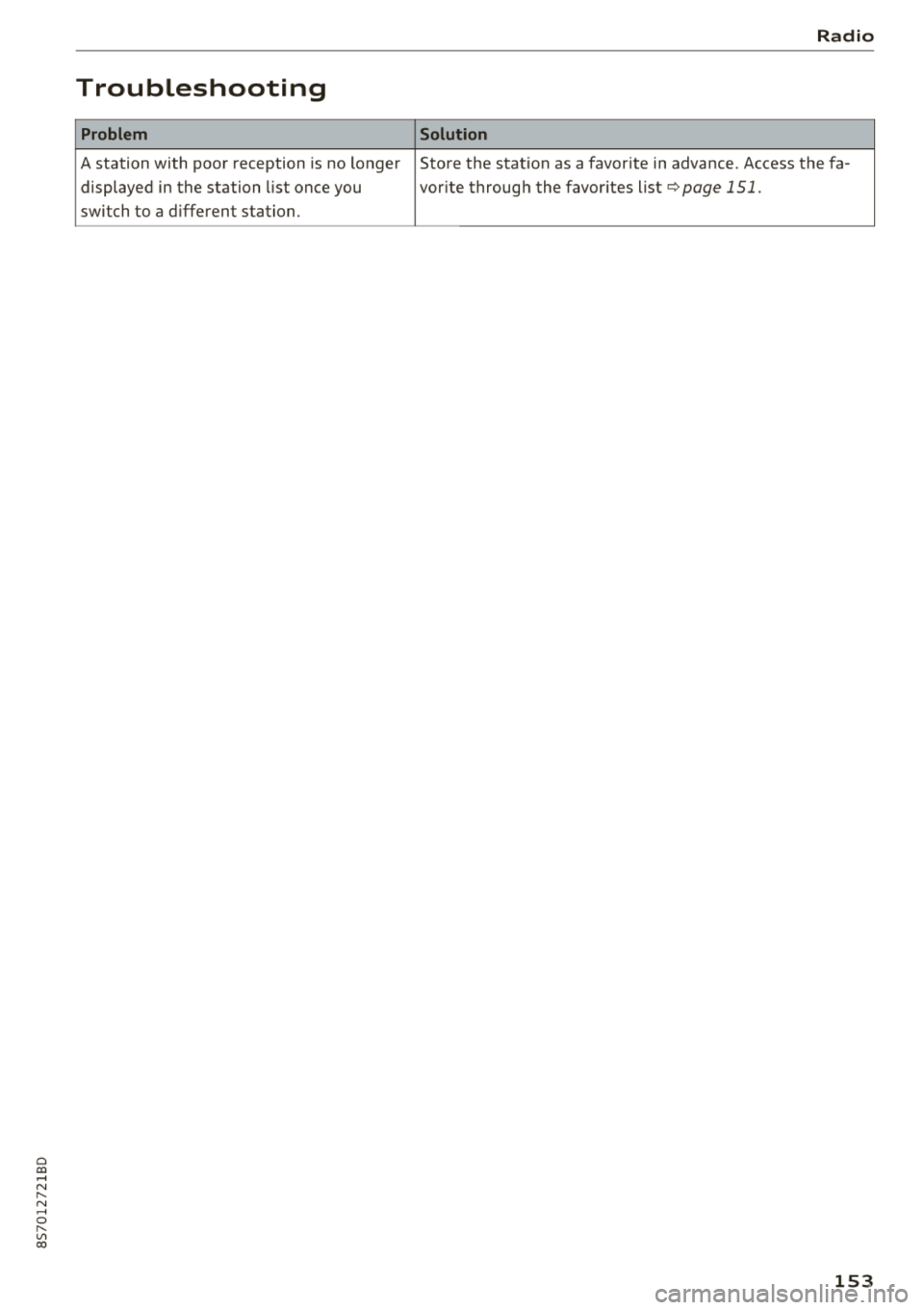
Troubleshooting
Problem
A station with poor reception is no longer displayed in the station list once you
switch to a d ifferent station.
Radio
Solution
Store the station as a favorite in advance. Access the fa-
vor ite through the favor ites list
¢page 151.
153