ignition AUDI TT ROADSTER 2018 User Guide
[x] Cancel search | Manufacturer: AUDI, Model Year: 2018, Model line: TT ROADSTER, Model: AUDI TT ROADSTER 2018Pages: 310, PDF Size: 46.95 MB
Page 41 of 310
Cl co .... N ,..._
N .... 0 ,..._
Vl co
turned on in accordance with traffic
reg ulations.
- If the battery has been discharging for a
while, the parking light may sw itch off auto
matically. A lways make sure your vehicle is
parked and adequately lit according to the
laws . Avo id using the parking lights for sev
era l hours.
- Always observe legal reg ulat ions when us
ing the light ing systems described.
(!') Tips
- The light sensor for the automatic head
lights* is in the rearview mirror mount. Do
not place any stickers in this area on the
windsh ield.
- Some exterior lighting fu nctions can be ad
j usted
c::> page 39.
- If you turn off the ignition wh ile the exterio r
lights are on and open the door, a warning
tone so unds.
- In some markets, the ta il lights will sw itch
on when the dayt ime runn ing lights sw itch
on.
- In cool o r damp weather, the inside of the
headlig hts, tu rn s ignals and tai l lights can
fog over d ue to the tem perature d ifference
betwee n the inside and ou ts ide. They will
clea r shor tly after sw itch ing them o n. This
d oes not aff ect t he serv ice life o f the lig ht
i ng.
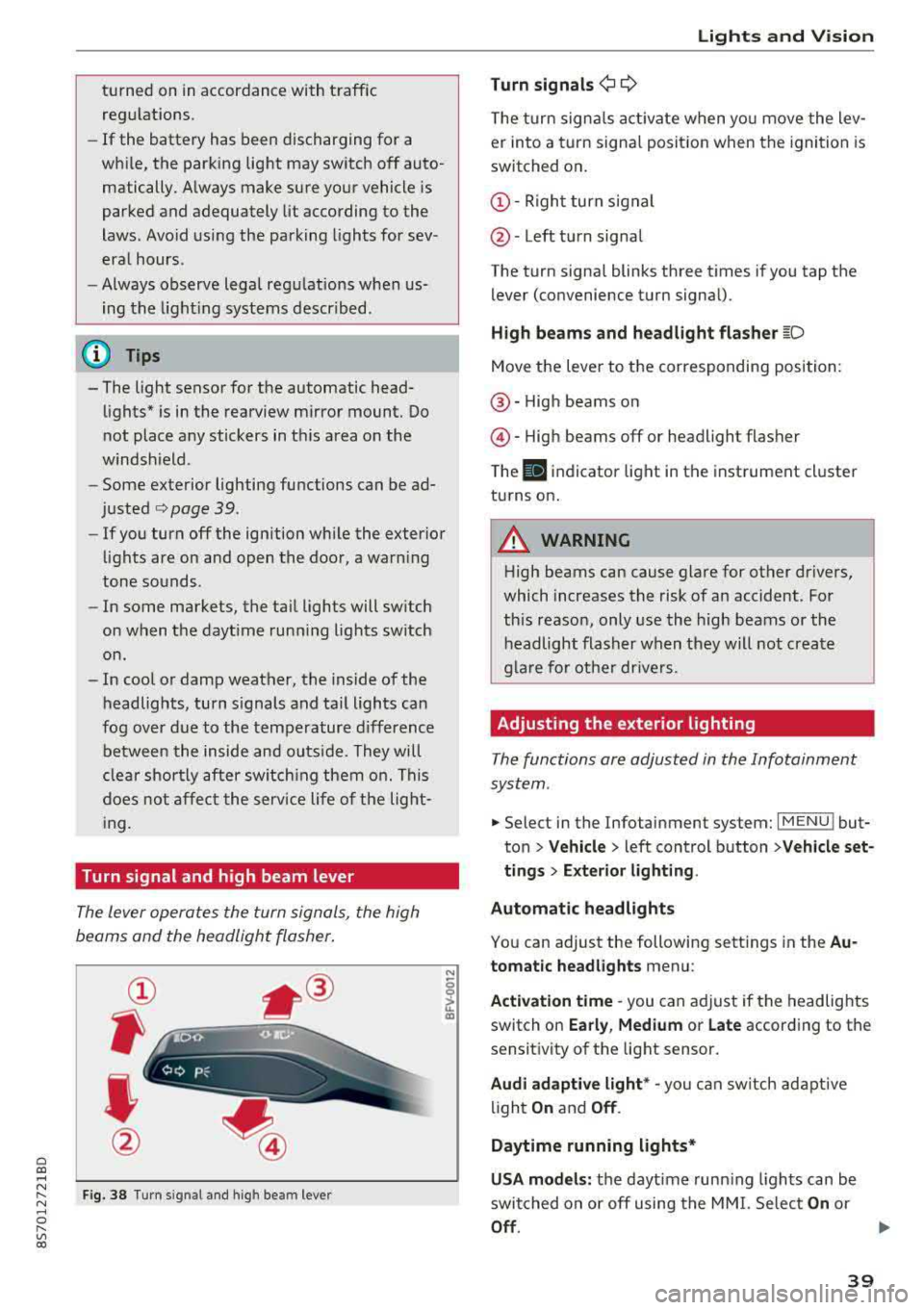
Turn signal and high beam lever
The lever opera tes the turn sign als, the high
beams and the headlight flasher .
Fig . 38 Tu rn signal an d high beam lever
N
0
~
"'
Lights and V ision
Turn signals ¢ 9
The turn signa ls act ivate w hen yo u move the lev
er into a turn signa l posit io n when the igni tion is
switched on .
©-Righ t turn signal
@ -Left tur n signal
The turn signa l blinks three t imes i f you tap t he
lever (convenience t urn signa l).
High beams and headlight flasher
~D
Move t he lever to the corresponding position:
@ -High beams o n
@-High beams off or headlight flasher
T he
II indicato r light in t he inst rument cl uster
turns on .
A WARNING
-High beams can cause glare for other drivers,
which increases the risk of an accident. Fo r
this reaso n, only use the high beams or the
headlight flasher when they wil l not create
g la re fo r ot her dr ivers.
Adjusting the exterior lighting
The functions are adjusted in the Infotainment
system .
.,. Select in the Infotainment system: I MENU ! but
ton> Vehicle > left control button >Vehicle set
tings > Exterior lighting .
Automatic headlights
You can adjust the following sett ings in the Au
tomatic headlights menu:
Activation time
-you can a djust if the headlights
switch on Early, Medium or Late according to the
sensit ivity of the light sensor.
Audi adaptive light * -you can sw itch ad ap tive
li gh t
On and Off .
Daytime running lights*
USA models: the daytime runn ing ligh ts can be
switched on or off using the MM I. Se lec t
On or
Off .
39
Page 42 of 310
Lights and Vision
Canada models: this function cannot be switched
off . They activate automatica lly each time the ig
n ition is switched on . T his menu item is shown
with a "gray background".
Entry /exit lighting
The ent ry li ghti ng function illum ina tes the area
outside the vehicle when you unlock the vehicle
when it is dark . To switch on the function, select
Ent ry/ex it lighting .
The exit light ing fun ct io n illum inates the area
outside the vehicle when you turn the ignition o ff
an d open the driver 's door when it is dark. To
sw itch on the function, select
Entry /exit light·
ing .
The ent ry/exit lighting only wo rks when it is dar k
an d the light switch is in the
AUTO position.
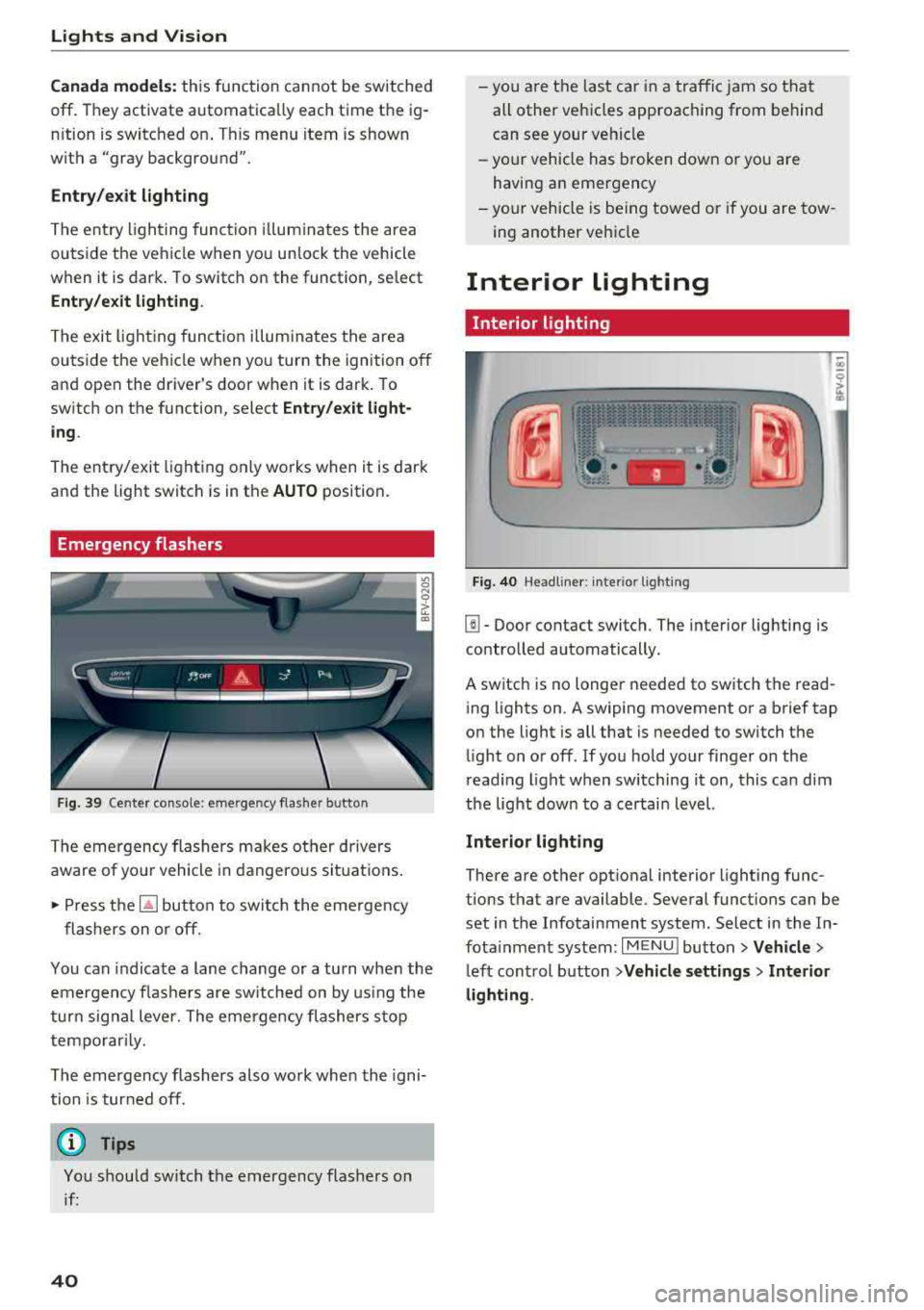
Emergency flashers
Fig. 39 Cente r conso le : eme rge ncy f las her butto n
The emergency flashers makes ot her dr ivers
aware of yo ur vehicle in dangerous si tuat io ns.
• P ress t h e ~ button to swi tch the eme rgency
flashers on or off.
You can indicate a lane change or a tu rn when the
em ergency fl ashe rs are sw itched on by us ing the
tur n sig na l lever. The emergency flashers s to p
tempo rarily.
The emergency flashers also work whe n the igni
tion is tur ned off.
(D Tips
You s hou ld switch t he emergency flashers on
i f :
40
-yo u are t he las t car in a traffi c jam so that
all other vehi cles approaching from behind
can see your ve hicle
- yo ur vehicle has broken down o r yo u a re
havin g an emerge ncy
-yo ur vehicle is be ing towed or if you a re tow
ing another vehi cle
Interior lighting
Interior lighting
Fi g. 40 Head lin e r: int eri or light ing
[]] - Door contact switch. The interior lighting is
contro lled automatically.
A switch is no longer needed to sw itch the read
i ng lights on .
A swiping movement o r a b rief tap
o n the light is all that is needed to switch the
li ght on o r off. If yo u ho ld your finger on the
r ead ing light when switching it on, this ca n dim
the lig ht dow n to a certai n level.
Interior lighting
There are othe r opt ional interior lighting func
tions that are available . Seve ral funct ions can be
set in the Infotainment system. Select in the In
fota inment system :
I MENU I button> Vehicle >
left con trol b utton > Vehicle settings > Interior
lighting .
Page 43 of 310
Cl co .... N ,....
N ...... 0 ,....
Vl co
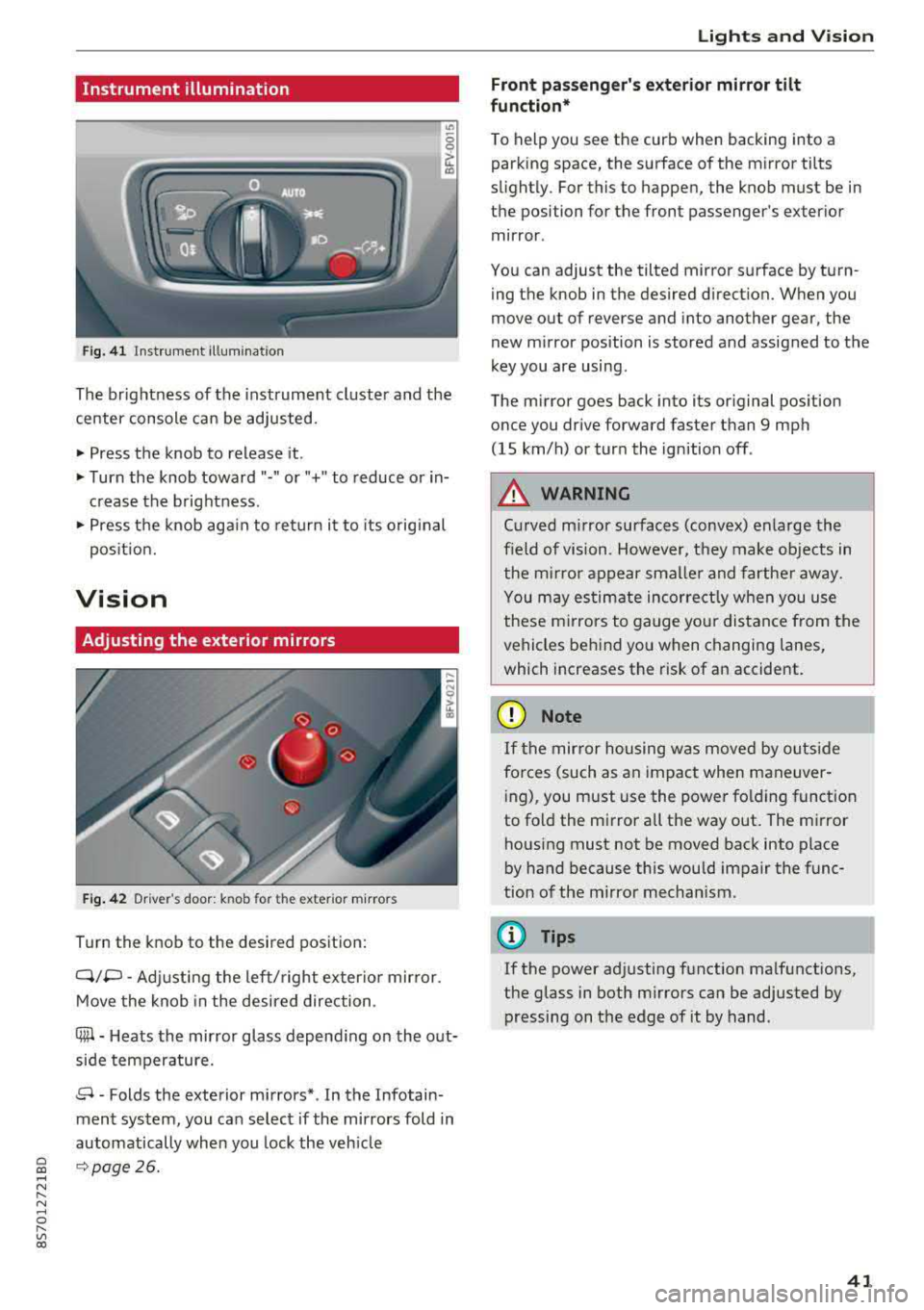
Instrument illumination
Fig. 41 Instrument illumination
The brightness of the instrument cluster and the
center console can be adjusted.
~ Press the knob to release it.
~ Turn the knob toward"·" or"+" to reduce or in
crease the brightness .
~ Press the knob again to return it to its original
posit ion.
Vision
Adjusting the exterior mirrors
Fig. 42 Driver 's door: knob for the ex ter ior mirrors
Turn the knob to the desired pos ition:
Q/P -Adjusting the left/ right exter io r mir ror.
Move the knob in the desired direction .
C@-Heats the mirror glass depend ing on the out
side temperature.
8 -Folds the exterior mirrors* . In the Infotain
ment system, you can select if the mirrors fold in
automatically when you lock the veh icle
9 page26.
Lights and Vision
Front passenger 's exterior mirror tilt
function*
To help you see the curb when backing into a
parking space, the surface of the mirror tilts
slight ly. For this to happen, the knob must be in
the position for the front passenger's exterior
mirror .
You can adjust the tilted mirror surface by turn ing the knob in the desired direction. When you
move out of reverse and into another gear, the
new mirror position is stored and assigned to the
key you are using .
The mirror goes back into its original position
once you drive forward faster than 9 mph
(15 km/h) or turn the ignition off .
A WARNING
Curved mirror surfaces (convex) enlarge the
f ield of vision. However, they make objects in
the m irror appear smaller and farther away.
You may estimate incorrectly when you use
these mirrors to gauge your distance from the
vehicles behind you when changing lanes,
which increases the risk of an accident.
(D Note
If th e mirror housing was moved by outs ide
fo rces (such as an impact when maneuver
i ng), you must use the power fold ing funct ion
to fold the mirror a ll the way out . The mirror
housing must not be moved back into place
by hand because th is would impair the func
tion of the mirror mechanism.
(D Tips
If the power adjusting function malfunctions,
the glass in both mirrors can be adjusted by
pressing on the edge of it by hand.
41
Page 45 of 310
Cl 00 .-< N r-N .-< 0 r-Vl 00
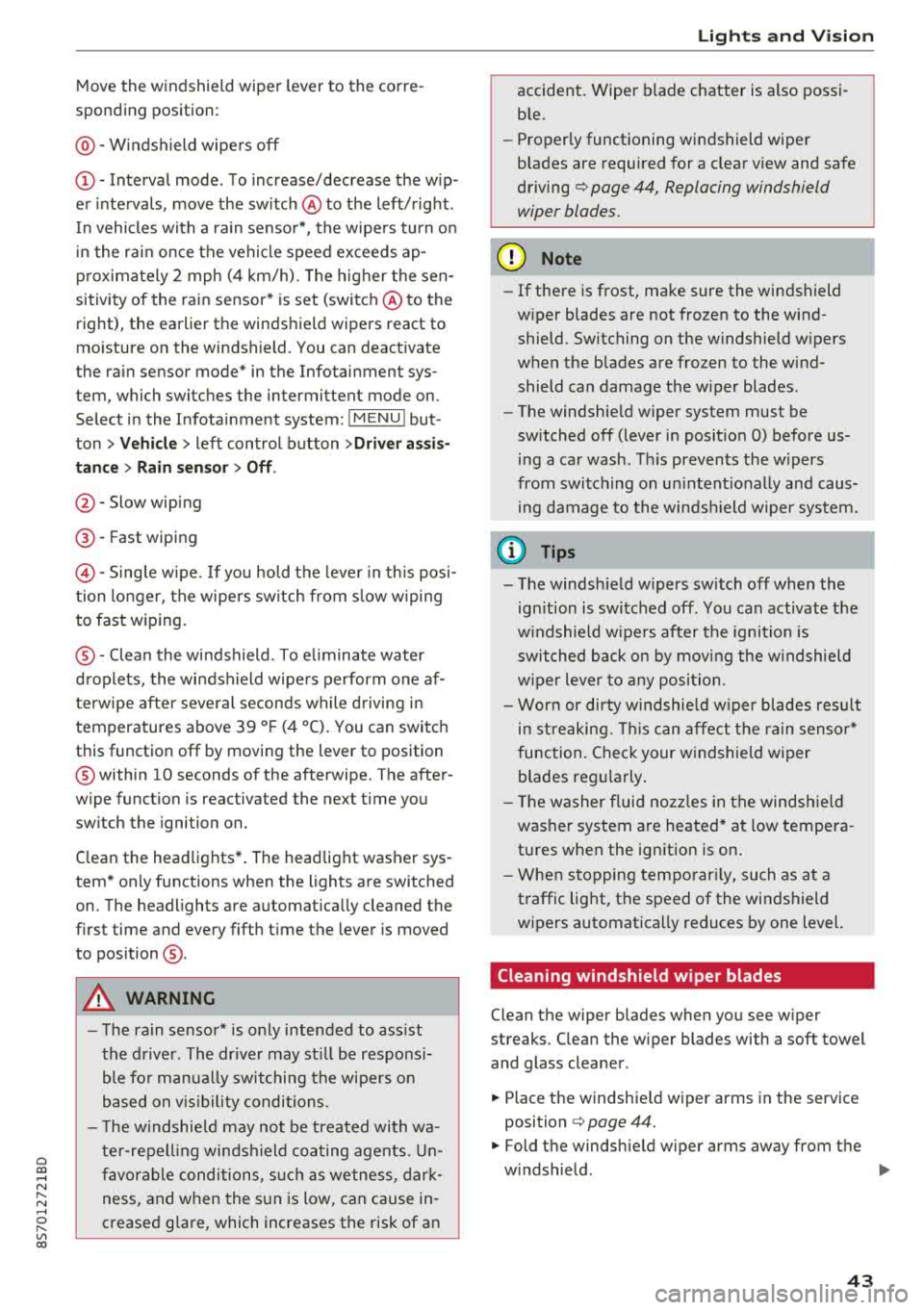
Move the windshield wiper lever to the corre
sponding position:
@ -Windshield wipe rs off
(D -Interval mode . T o increase/decrease the w ip
er intervals, move the sw itch
@ to the left/rig ht.
I n vehicles with a ra in senso r*, the wipe rs turn o n
in the ra in once the vehicle speed exceeds ap
p roximate ly 2 mph (4 km/h). The h igher the sen
sitivity of the rain sensor* is set (switch @to the
right), the earlier the winds hield wipers react to
mo isture on the windshield. You can deact ivate
the ra in sensor mode* in the Infotainment sys
tem, which switches the intermittent mode on.
Select in the Infotainment system:
IMENU I but
ton>
V ehicle > left control button >Driv er a ssis
tance > Rain sensor > Off .
@-Slow wiping
@-Fast wiping
© -Sing le w ipe. If yo u hold t he leve r in th is posi
tion longer, the wipers sw itch from s low w iping
to fast wiping.
® -Clea n the wi ndshield . To e liminate water
d roplets, the windsh ield wipers pe rform one af
terwipe after several seconds wh ile driving in
temperatures above 39 ° F (4 °C). You can switc h
this function off by moving the lever to position
@ within 10 seconds of the afterwipe. The after
wipe function is reactivated the next t ime you
switch the ignition on.
C lean the headlights*. The headlight washer sys
tem* only functions when the lights are switched
on. The headlights are automat ically cleaned the
f irst time and every fifth t ime the lever is moved
to position
® ·
A WARNING
- T he ra in sensor* is o nly intended to ass ist
the d river. The dr ive r may st ill be responsi
ble fo r manua lly swit ching the wi pe rs on
based on v is ibility co ndi tions.
- T he w indshie ld ma y not be treated with wa
te r-repell ing winds hield coa ting age nts. Un
f avor ab le cond itions, s uch a s wetness, dar k
ness, and when the s un is low, can cause in
creased g lare, which increases the risk of an
-
Light s and Vision
accident. Wiper b lade chatter is also possi
b le.
- Properly functioning windshield wiper
b lades are required for a clear v iew and safe
driving¢ page 44, Replacing windshield
wiper blades.
@ Note
- If there is frost, make sure the windshield
w iper blades are not frozen to the wind
shield. Switching on the w indshield w ipers
when the blades are frozen to the wind shield can damage the w iper blades.
- The windshie ld w iper system must be
sw itched off (lever in posit io n 0) before us
ing a car wash. This prevents the w ipers
from switc hing on un intent io nally and caus
ing damage to the winds hield wiper system.
(D Tips
- T he windsh ie ld w ipers sw itch off when the
ign ition is switched off. You can activate the
w indshield w ipe rs after the ignition is
sw itched back on by mov ing the w indshield
w iper lever to a ny posi tion.
- Wor n or d irty w indshie ld w iper blades res ult
in st reaking. This can affect t he rain senso r*
function. Chec k your w indshie ld w iper
blades reg ularly.
- Th e washer fluid no zzles in the winds hield
washe r system are heated* at low tempera
t ur es when the ignition is on .
- Whe n stopping tempo rar ily, such as at a
traffic lig ht, the speed of the windshield
wipers automatica lly reduces by one level.
Cleaning windshield wiper blades
Clean the wiper b lades when you see w iper
streaks. C lean the wiper blades with a soft towel
and glass cleaner .
.,. Place the windshie ld wiper arms in the service
position
¢ page 44.
.,. Fold the windshie ld wiper arms away from the
w indshield .
.,,.
43
Page 46 of 310
Lights and Vision
& WARNING
Dirty windshield wiper blades can impair vi
sion, which increases the risk of an accident .
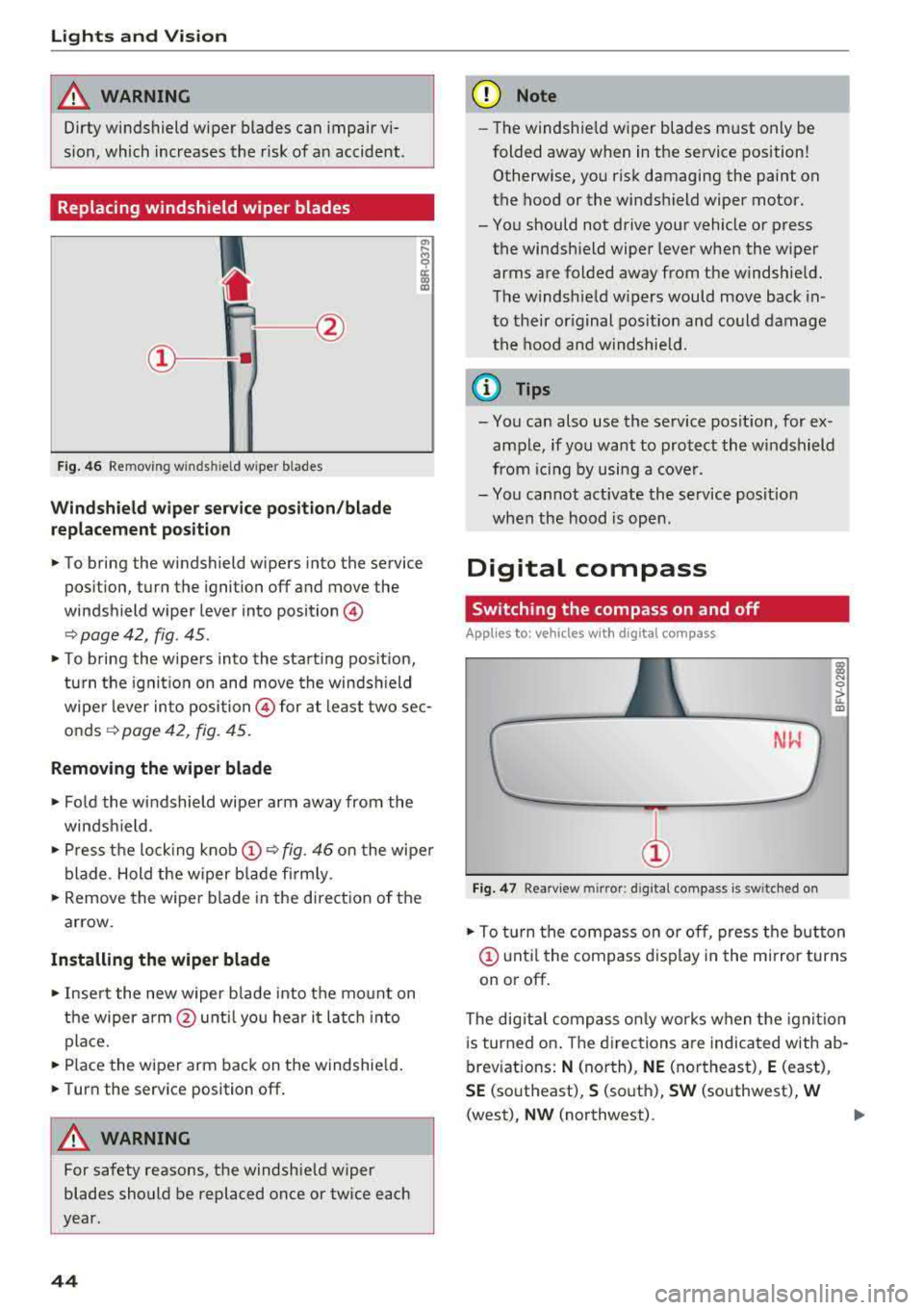
Replacing windshield wiper blades
Fig. 46 Removing w inds hield w iper b lades
Windshield wiper service position/blade
replacement position
"' ij
a:: CX) m
,.. To bring the windshield wipers into the service
position, turn the ignition off and move the
windshield wiper lever into position@
¢ page 42, fig. 45 .
,.. To bring the wipers into the starting pos it io n,
turn the ignition on and move the windsh ield
wiper lever into position @ for at least two sec
onds¢ page 42, fig. 45.
Removing the wiper blade
,.. Fold the windshield wiper arm away from the
windshield.
,.. Press the locking knob@¢ fig. 46 on the wiper
blade . Hold the wiper blade firmly.
,.. Remove the wiper blade in the direction of the
arrow.
Installing the wiper blade
,.. Insert the new wiper b lade into the mount on
the wiper arm@until you hear it latch into
place.
,.. Place the wiper arm back on the windshield.
,.. Turn the service position off.
& WARNING
-
For safety reasons, the windshie ld wiper
blades should be replaced once or twice each
year.
44
(D Note
- Th e windshie ld wiper blades must only be
folded away when in the service position!
Otherwise, you risk damaging the paint on
the hood or the windshield wiper motor.
- You should not drive your vehicle or press the windshield wiper lever when the wiper
arms are folded away from the windshield.
The windshield w ipers would move back in
to their original position and could damage
the hood and windshield.
a) Tips
- You can also use the service posit ion, for ex
ample, if you want to protect the windshield
from icing by using a cover .
- You cannot activate the service posit ion
when the hood is open .
Digital compass
Switching the compass on and off
Applies to: vehicles wit h digital compass
Fig. 47 Rearview m irror: d ig ital compass is sw itched on
l!l
"' 0
> ... m
,.. To turn the compass on or off, press the button
@ until the compass display in the mirror turns
on or off.
The dig ital compass only works when the ignit ion
is turned on . The directions are indicated with ab
breviations:
N (north), NE (northeast), E (east),
SE (southeast), S (south), SW (southwest), W
(west), NW (northwest).
Page 48 of 310
Seats and stor age
Seats and storage
General information
A WARNING
See c> page 179, Safe driving for important
information, tips, suggestions and warnings
that you should read and follow for your own
safety and the safety of yo ur passengers .
Front seats
Power seat adjustment
Applies to vehicles with power adjustable seats
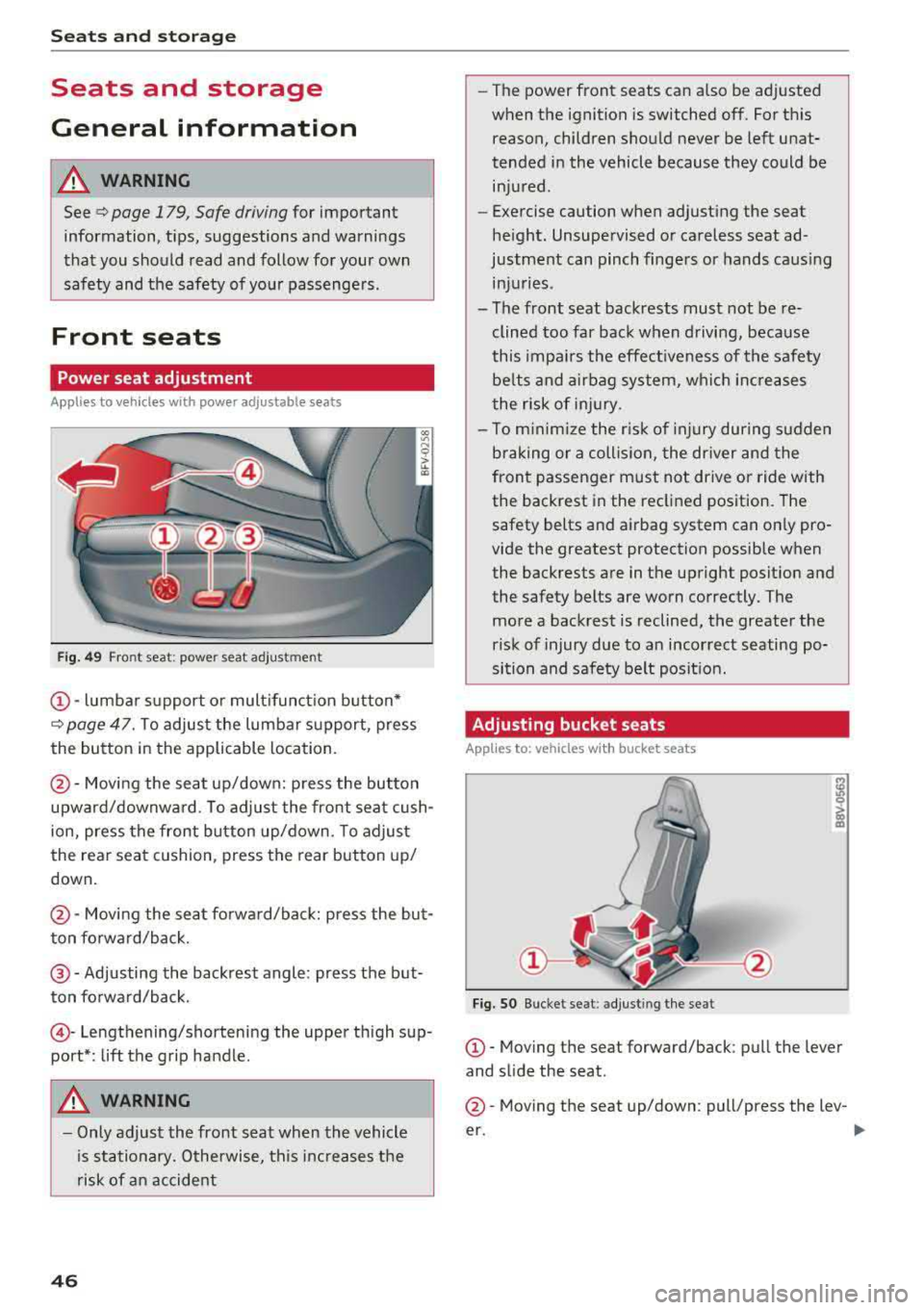
Fig. 49 Fro nt seat: power seat ad jus tm en t
CD -lumbar s upport o r mult ifunct ion button*
c> page 47. T o adjus t the lumbar s upport, press
the button in the applicable location.
@ -Moving the seat up/down: p ress the button
upward/downwa rd . To adjust the front seat cush
ion, press the front button up/down. To adjust
the rear seat cushion, press the rear button up/
down.
@ -Moving the sea t fo rwa rd/back: press the but
ton fo rward/back.
@ -Adjusting the backrest angle : press the but
ton fo rwa rd/back.
© -Lengthening/shortening the upper th igh sup
port* : lift the grip handle.
A WARNING
- Only adjust the front seat when the vehicle
i s sta tionary. Otherwise, this increases the
risk of an accident
46
- The power front seats can also be adjusted
when the ignition is switched off. For this reason, children should never be left unat
tended in the vehicle because they could be injured.
- Exercise caution when adjust ing the seat
he ight. Unsupervised or ca reless seat ad
justment can pinch fingers or hands caus ing
in ju ries .
- The front seat backrests must not be re
clined too far back when d riving, because
this impa irs the effect iveness of the safety
be lts and a irbag sy stem, whi ch in creases
the risk of in jury.
- To m inimi ze the r isk of inj ury dur ing s udden
braking or a collision, the dr iver and the
front passenger must not drive or ride with
the backrest in the reclined position. The
safety belts and a irbag system can o nly pro
vide the greatest protection possible when
the backrests are in the upright posit ion and
the safety belts are worn correctly. The more a backrest is reclined, the greater the
risk of injury due to an incorrect seating po
si tion and safety belt posit ion .
Adjusting bucket seats
App lies to: vehicles with bucket seats
Fig. SO B uck et se at: ad jus tin g the se at
CD-Mov ing the seat forward/back : pull the lever
and s lide the seat .
@-Moving the seat up/down : pull/p ress the lev-
er.
..,_
Page 50 of 310
Seats and stor age
Cigarette lighter and
socket
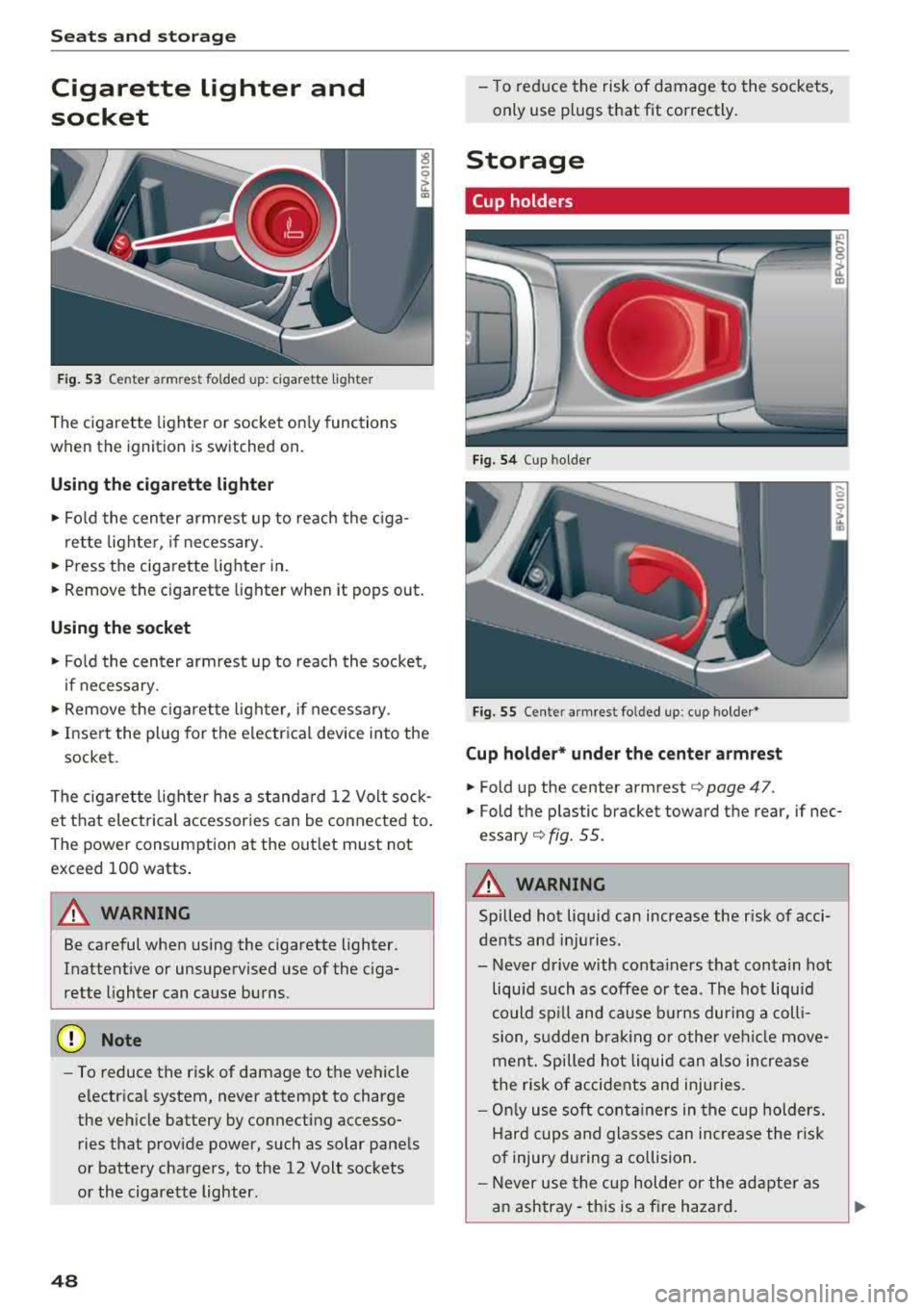
F ig. 53 Cen te r armre st fo ld ed u p: cig arette ligh te r
The cigarette lighter o r socket on ly functions
when the ignition is switched on.
Using the cigarette li ghter
• Fo ld the center armrest up to reach the c iga-
rette lighter, if necessary .
• Press the ciga re tte lighter in .
.. Remove the cigarette lighter when it pops out.
Using the socket
• Fo ld the cen ter armrest up to reach the socket ,
i f necessary .
... Remove the cigarette lighter, if necessary .
.. Insert the plug for the e lectrica l device into the
socket.
The cigaret te lighter has a standa rd 12 Volt sock
et that electrical accessor ies can be conne cted to .
Th e power consumption a t the out let must not
exceed 100 watts .
A WARNING
Be careful when using the cigarette lighter.
Inattentive or unsupervised use of the c iga
rette lighter can cause burns.
(D Note
- To reduce the risk of damage to the vehicle
electrical system, never attempt to charge
the veh icle battery by connecting accesso
ries that prov ide power, such as solar panels
or battery chargers , to the 12 Volt sockets
or the cigarette lighter.
48
- To reduce the risk of damage to the sockets,
only use plugs that fit correctly .
Storage
Cup holders
Fig. 54 Cup hol der
Fig. 5 5 Cente r armres t fo lded up : cup holder *
Cup holder* und er the center armrest
• Fold up the cente r armrest¢ page 47.
.. Fold the p lastic bracket toward the rear, if nec
essary ¢ fig. 55.
A WARNING
Spilled hot liqu id can increase the r isk of acci
dents and in ju ries .
- Never d rive with conta iners that contain hot
liquid such as coffee or tea . The hot liquid
could sp ill and cause b urns dur ing a coll i
sion, s udden bra king or other vehi cle move
men t. Spilled hot liquid can also increase
the risk of accidents and injuries.
- On ly use soft cont ainers in the cup holders.
Hard cups and glasses can increase the r isk
of injury dur ing a collision.
- Never use the c up holder or the adapte r as
a n ashtray- th is is a fire hazard.
Page 55 of 310
Cl co .... N ,....
N ...... 0 ,....
Vl co
1- 1 Switching recirculation mode on and off
The recir cu lation mode can be turned o n m anu al
l y o r automat ically* .
- Swi tching m anual rec ircula tion mo de on an d
off: p res s
l'-"" I
- Automa tic* recircu lation mode: au to rec ircula
t io n needs to be ac tiva ted in the Info tainmen t
system. Selec t in the Infot ainme nt system :
I MENU I button > Vehicle > le ft co nt rol but ton
>Vehicle settings > Air conditioning > Auto re
circulation .
The ai r quality sensor that is de
s igned for diese l and gasoline exhaust auto
matically switches the recircu lation mode on or
off depend ing o n the level of pollutants in the
o utside air .
In recircu lation mode , the a ir inside the vehicle is
circu lated and fi ltered. This prevents the unfil
tered ai r outside the vehicle from entering the
ve hicle interio r. Switch ing recircu lation mode on
when dr iving t hrough a tunnel or when s itti ng i n
traffic is recomme nded
¢ .&, .
Recirculation mode is switched off by pressing
the
!""' I button o r I AUTO I or! MAX !.
I@ MAXI Switching defr ost on and off
The winds hield and side windows are defrosted
or cleared of condensation as q uickly as possib le.
The optimum amount of a ir flows main ly out of
the vents under the windshield. Rec irculat ion
mode switches off . The temperature is cont rolled
automatically .
The
IAU TOI button switches the defroster off .
I@ REAR I Switching the rear window defogger
on and off
I f the rear w indow defogger is activated when
the ignition is switched on, the battery manage
ment determines based on the batte ry charge if
it is possib le to turn on . Ot herwise , the rea r win
dow defogger functions with the engine running
and switches off automatically after approxi
mate ly 10
-2 0 mi nutes, depen ding on the out
side tem per ature.
To prevent t he rear w indow defogge r from
switch ing off automatically, press and ho ld the
I@ REARI b utton fo r more than two seconds. This
Warm and cold
remains stored up to approx imately 15 minutes
after t urning off the ignition.
A WARNING
-
You should not use the reci rculat ion mode for
an extended period since no fresh a ir is drawn
i n . With the air-conditioning switched off, the
windows can fog up, which increases the risk
of an acc ident .
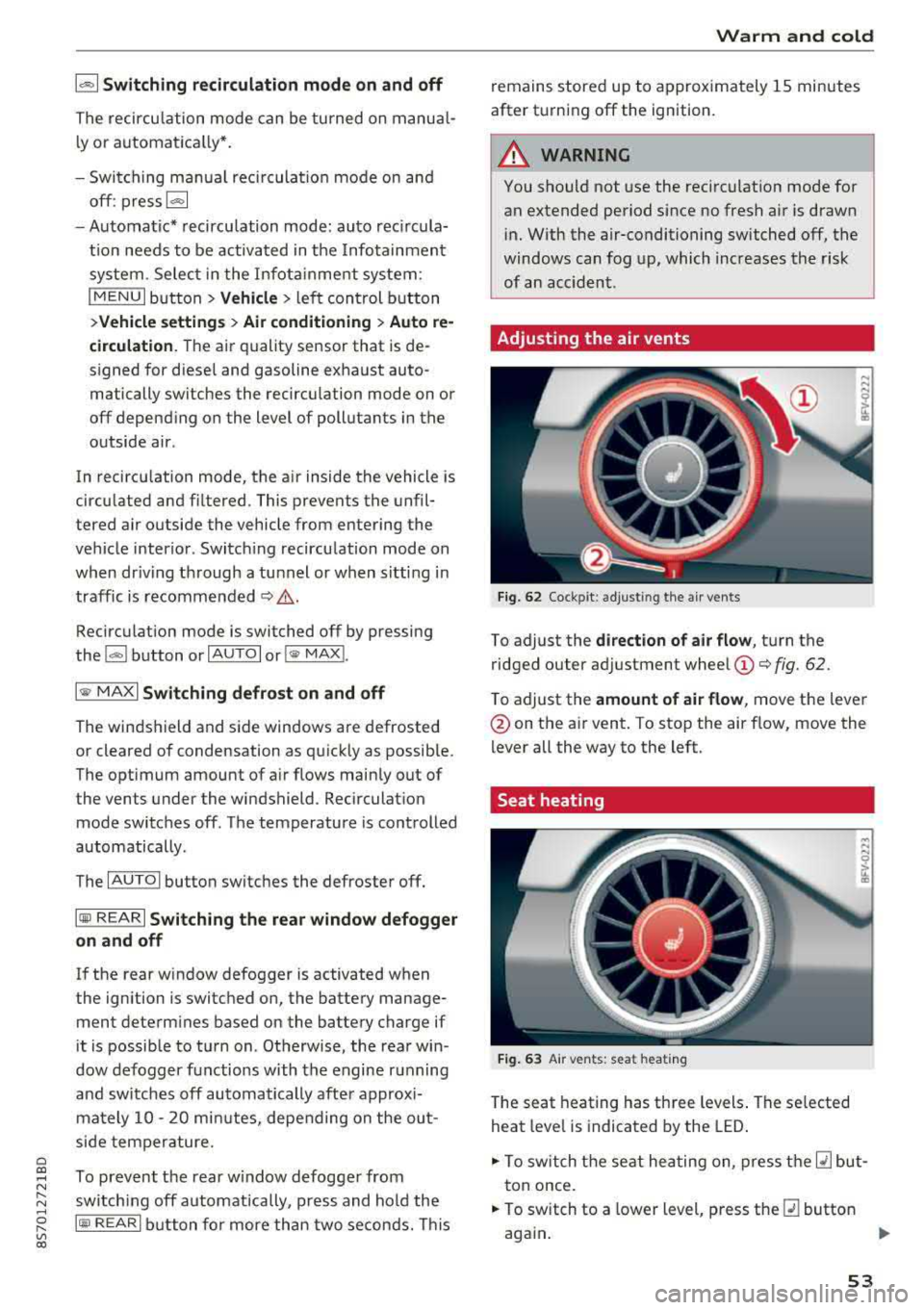
Adjusting the air vents
Fig. 62 Cock pit: a djust ing the a ir ven ts
To adjust the di rection of air flow, tu rn the
ridged outer ad justment wheel
(D ¢ fig. 62.
T o adjust the
amount of air flow , move the lever
@on the a ir vent . To stop the air flow, move the
lever all the way to the left.
Seat heating
Fig. 63 A ir ve nts: seat heat ing
T he seat heating has th ree levels . The se lected
heat leve l is indicat ed by the LED .
.,. To switch the seat he ating on, press t he Q] but
t on once.
.,. To switch to a lower level, p ress the Q] button
aga in .
""
53
Page 56 of 310
![AUDI TT ROADSTER 2018 User Guide Warm and cold
,.. To switch the seat heating off, press the Q] but-
ton repeatedly until the LED turns off.
The seat heating sw itches automatically from
setting 3 to setting 2](/img/6/57668/w960_57668-55.png "AUDI TT ROADSTER 2018 User Guide Warm and cold
,.. To switch the seat heating off, press the Q] but-
ton repeatedly until the LED turns off.
The seat heating sw itches automatically from
setting 3 to setting 2")
Warm and cold
,.. To switch the seat heating off, press the Q] but-
ton repeatedly until the LED turns off.
The seat heating sw itches automatically from
setting 3 to setting 2 after 10 minutes.
When seat h eating should not be switched
on
Do not t ur n the seat heating on under the follow
i n g circumstances :
- The seat is unocc upied.
- The seat is covered with a seat cover.
- The seat is covered with a child seat.
- The seat is damp or wet.
A WARNING
Individua ls with reduced sensitivity to pain or
temperature could develop burns when using
the seat heating function. To reduce the risk
of injury, these individuals should not use
seat heat ing .
«D Note
To avoid damage to the heat ing elements in
the seats, do not kneel o n the seats or place
heavy loads on a small area of the seat.
(D Tips
- The setting for the seat heating on the driv
er's side is ass igned to the key that is in use.
- If the front passenger's seat heating is
turned on, it will not turn on again automat
i ca lly if more than 10 m inutes have passed
between sw itching the ignition off and
switching it on again.
54
Neck heating
App lies to : vehicles wi th neck heating
The neck heating functions when the engine is
running .
Fig. 64 Driver 's seat: neck heating vents
Fig . 65 Cockp it: neck heating
The neck heating has three levels . If you turn the
knob to the right, the neck heating switches on
¢ fig. 65. The LEDs above the seat symbol indi
cate the ventilation level. Turn the knob to the
left to reduce ventilat ion. To switch off the neck
heating, keep turning the knob to the left until
no LEDs are turned on .
When the power top is closed, the neck heating
switches automatically from setting 3 to setting
2 after approx imately six minutes.
A WARNING
- Individuals with reduced sensitiv ity to pain
or temperature could develop burns when
using the neck heat ing . To reduce the risk of
in ju ry, these individuals shou ld no t use neck
heat ing.
- The output from the neck hea ting may be
come very hot temporarily if the air vents in
the seats
qfig . 64 are covered by clothing
or simi lar ob jects when the system is
Page 59 of 310
Cl 00 .-< N r-N .-< 0 r-Vl 00
Avoid full acceler ation
You sho uld rare ly t rave l a t t he maxim um vehicle
speed . High speeds cause a disproportionately
h igh increase in fuel consumption, emissions and
traffic noise . Slower driving saves fuel.
Reduce idling time
It pays off to stop the eng ine, for example when
at ra ilroad crossings or traffi c lights w ith longer
red lights . Stopping the engine for 30 -40 sec
onds already saves more fuel than the amount of
extra fuel needed to restart the engine.
I t takes a very long time in idle to wa rm the en
gine up to operating tempera ture . Wea r and
emissions are especially high in the warm -up
p hase . Therefore, you should begin driving im
mediately after starting the engine. Avoid high
RPMs while do ing th is.
Hav e ma intenanc e performed r egularly
By having maintenance performed regu lar ly on
your vehicle, you can he lp to reduce fuel con
sumption before yo u even start to drive. The
maintenance condition of your vehicle not only
affects traffic safety and long-term va lue but al
so impacts
fu el con sumpt ion .
A poorly maintained engine can lead to fuel con
sumpt ion that is 10% higher than norma l.
A lso check the
o il l evel when refueling . The oil
consumpt ion
depends large ly on the engine load
and speed. It is normal for the oil consumption
of a new eng ine to reach its lowest point only af
ter a certain amount of use. Therefore, the oil
consumption can only be properly judged after
approx imately 3,000 m i (S,000 km) have been
driven.
Avoid short trips
The engine and exhaust clean ing system must
reach their opt imal
op erating temp eratur e to ef
fective ly reduce consumpt ion and emiss ions.
A co ld engine uses a disproportionately h igh
amount of fuel. The eng ine reaches operating
temperature and consumpt ion normalizes only
afte r approx imately
2.5 miles (4 km) .
Driving
@ Note
Do not leave engine idling unattended after
start ing. If warning lights sho uld come on to
i ndicate improper operation, they would go
unheeded. Extended idling also produces
heat, which could resu lt in overheating or
other damage to the veh icle o r other proper
ty.
@ Note
- Have your ve hicle ma intained properly and
in accordance w ith the service recommenda
tions i n your Warranty
& Main tenance book
let. La ck of prope r mai nte nan ce as we ll as
imp rope r use of t he ve hicle will impa ir the
function of the em iss ion cont ro l system and
co uld lead to damage .
- Do not alte r or remove any compone nt o f
t he Emission Contro l System unless ap
proved by the man ufacturer .
- Do not alte r or remove any dev ice, s uch as
heat shields, switc hes, ignition wires,
valves, which are designed to protect your
vehicle's Emission Contro l System and other
impo rtant ve hicle components.
(D Tips
The cons umption estimates as published by
ENVIRONMENTAL PROTECTION AGENCY
(EPA) and T ransport Canada may not co rre
spond to your actual consumption on the r oad, wh ich w ill vary depending upon veh icle
l oad and speed, road and weather cond itions,
tr ip length, etc.
57