ignition AUDI TT ROADSTER 2018 Owner's Manual
[x] Cancel search | Manufacturer: AUDI, Model Year: 2018, Model line: TT ROADSTER, Model: AUDI TT ROADSTER 2018Pages: 310, PDF Size: 46.95 MB
Page 60 of 310
Driving
Steering
Adjusting the steering wheel position
The steering wheel position is fully adjustable up
and down and forward and back .
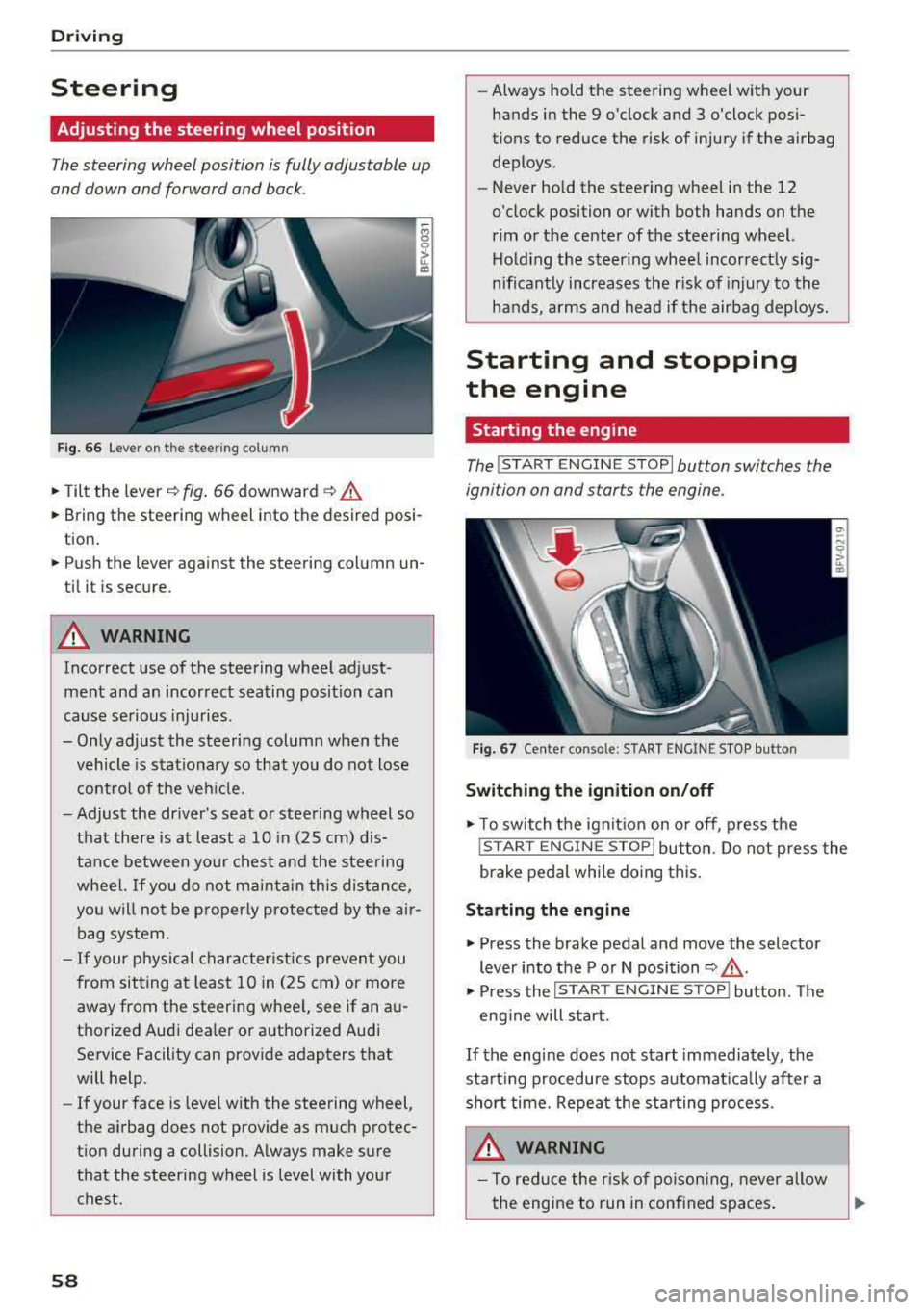
Fig. 6 6 Lever on th e steering column
.., Tilt the lever~ fig . 66 downward ~ .&.
... Bring the steering wheel into the desired posi
tion .
... Push the lever against the steering column un
til it is secure.
A WARNING
Incorrect use of the steering wheel adjust
ment and an incorrect seating position can
cause se rious injuries .
- Only adjust the steering column when the vehicle is stat io nary so that you do not lose
contro l of the ve hicle.
-
-Adjust the driver's seat or steering wheel so
that there is at least a 10 in (25 cm) d is
tance between your c hest an d the steering
wheel.
If you do not mainta in this dis tan ce,
you will not be p roper ly protec ted by t he air
bag system.
- If your physical character istics preven t you
from sit ting at least 1 0 in (25 cm) or more
away from the steering wheel, see if an a u
tho rized Aud i dea le r or a uthorized Audi
Service Facility can provide adapters that
will help.
- If your face is leve l w ith the steering
wheel,
the a irbag does not prov ide as much protec
t ion during a collision. A lways make sure
that the steering wheel is level with your
chest.
58
-Always hold the steering wheel with your hands in the 9 o'clock and 3 o'clock pos i
tions to reduce the risk of injury if the airbag
deploys .
- Never hold the steering wheel in the 12
o'clock position or with both hands on the
rim or the center of the steering wheel. Ho ld ing the steer ing whee l incorrect ly sig
nificant ly increases the risk of injury to the
hands, a rms and head if the airbag deploys.
Starting and stopping
the engine
Starting the engine
The !S T ART ENGINE STOP lbutton switches the
ignition on and starts the engine .
F ig . 67 Ce nter conso le: S TART ENGINE STOP bu tton
Switching the ignition on /off
.., T o switch the ign it io n on o r off, p ress the
! STAR T
ENGINE STOPI button. Do not press the
brake pedal while do ing this.
Starting the engine
... Press the brake pedal and move the selector
lever into the P or N position
~ .&_ .
... Press the !S TAR T ENGIN E ST OP ! butto n. Th e
eng ine will s tart.
If the engine does not start immediately , the
start ing procedure stops a utomat ica lly after a
sho rt time. Repeat the sta rting process.
A WARNING
- To red uce the r isk of po ison ing, never allow
the engine to run in conf ined spaces .
Page 61 of 310
Cl 00 .-< N r--N .-< 0 r--Vl 00
-Never turn off the engine before the vehicle
has come to a complete stop.
- The brake booster and power steering only
work when the engine is running. If the en gine is off, you have to use more force when
steering or braking. Because you cannot
steer and brake as you usually would, this
could lead to accidents and serious injuries.
@ Note
Avoid high engine speed, full throttle, and
heavy engine load if the engine has not
reached operating temperature yet. You could
damage the engine.
@ For the sake of the environment
Do not let the engine run while parked to
warm up. Begin driving immediately . This re
duces unnecessary emissions.
(D Tips
-Some noise after starting the engine is nor
mal and is no cause for concern.
- If you leave the vehicle with the ignition
switched on, the ignition will switch off af
ter a certain amount of time. Make sure that
electrical equipment such as the exterior
lights are switched off.
Stopping the engine
.,. Bring the vehicle to a full stop.
.,. Move the selector lever into the P position .
... Press the I START ENGINE STOPI button.
Emergency off function*
If it is absolutely necessary, the engine can also
be turned off while driving at speeds starting at
4 mph (7 km/h). To switch the engine off, press
the
I START ENGINE STOPI button twice in a row
br iefly or press and hold for longer than two sec
onds.
A WARNING
- Never turn off the engine before the vehicle has come to a complete stop.
Driving
-Please note that the brake booster and pow
er steering only work when the engine is
running. When the engine off, you must use
more force to steer or brake the vehicle. Be
cause the usual steering and braking capa
bility is not available, the risk of accidents or
. . . . mJunes increases.
-For safety reasons, always park the vehicle
with the selector lever in the P position.
Otherwise, there is the risk that the vehicle
could roll.
- After the engine has been switched off, the
radiator fan can continue to run for up to 10
minutes
-even with the ignition switched
off. It can also switch on again after some
time if the coolant temperature rises as the result of heat buildup or if the engine is al
ready warm and the engine compartment is
also heated by the sun's rays.
@ Note
If the engine has been under heavy load for
an extended period of time, heat builds up in
the engine compartment after the
engine is
switched off and there is a risk of damaging
the engine . For this reason, let the engine run
at idle for approximately two minutes before
shutting it off.
(D Tips
For up to 10 minutes after stopping the en
gine, the radiator fan may turn on again auto matically or it may continue to run (even if
the ignition is switched off) for the following
reasons :
- The coolant temperature is increasing due
to trapped heat.
- If the engine is warm and the engine com
partment also heats up from strong sun
light.
Messages
Turn off ignition before leaving vehicle. Battery
is discharging
This message appears and a warning tone sounds
if you open the driver's door when the ignition is
..,
59
Page 62 of 310
Driving
switched on. Switch the ignition off so that the
battery will not discharge .
Pressing start /stop button again will swit ch off
e ngine.
This message appea rs when you press the
I S TAR T
ENGI NE STOP I but ton while dr iving .
Engine start sy st e m: malfunction! Please con
tact Se rvice
The engine automatic start system has a mal
function. Drive to an author ized Audi dealer or
author ized Audi Service Facility immed iate ly to
have the malfunct ion co rrected . To sta rt the en
g ine, p ress and ho ld the lS TART
ENGINE STOPI
button.
fl Remote control key : hold back of key
again st the designated area. See owner 's man
ual
This message appears if there is no convenience
key inside the vehicle or if the system does not
recognize the key. The conve nience key may not
be recognized, for examp le, if it is covered by an
object that
disrupts t he s ignal (such as a b rief
case), o r if the key ba tte ry is weak. Elect ronic de
vices s uch as cell phones can also interfere w it h
the sign al.
T o sti ll be able to sta rt or stop the e ngine, see
~ page 60, Starting the engine when there i s a
malfunction .
Ill Remote control key: key not recognized . Is
the key still in the vehicle?
The Ill ind icator light turns on and this message
appears if the conve nience key was removed from
the vehicle whe n the eng ine was running .
If the
conven ience key is no longer in the vehicle, you
cannot swi tch the ig nition on or st art the engine
once yo u stop it. Yo u also cannot lock the veh icle
from the outside.
Please press brake pedal
This message appears if you do not press the
b rake pedal whe n starting the engine.
Please select N o r P
60
This message appears w hen starting or stopping
the engine if the selecto r lever is not in the "N " or
" P" pos ition. The engine will not sta rt/stop.
Shift to P, otherwise vehicle c an roll away.
Door s do not lock if gearshift is not in P
This message appears for safety reasons along
with a war ning tone. It appears if t he selec to r
l ever for the a utoma tic tr ansmiss ion is no t in the
P position when switching the ign ition off with
the I START
ENGINE STOPI button. Shift these
l ector lever to the P pos ition. Otherwise, t he vehi
cle co uld ro ll. You also cannot lock the veh icle us
ing the lock ing sensor on the door handle or us
i ng the conven ience key .
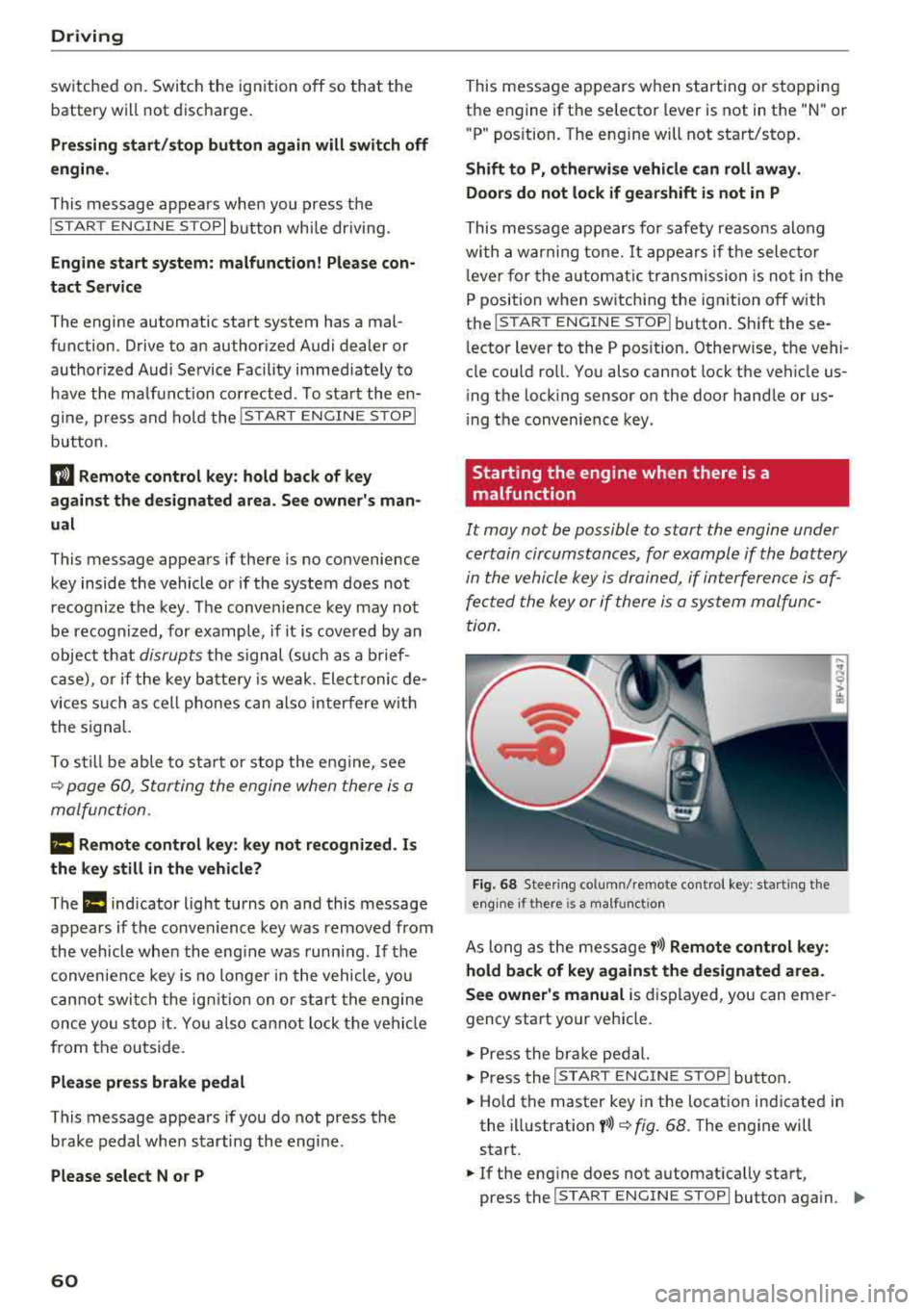
Starting the engine when there is a
malfunction
It may not be possible to start the engine under
certain circumstances, for example if the battery
in the vehicle key i s drained, if in terferen ce is af
fe cted the key or if there i s a system malfunc
tion.
Fi g. 6 8 Stee ring co lumn /remote contro l key : sta rting t he
e n g in e if there is
a m alfunct io n
As long as the message y>>) Remote control key :
hold back of key against the designated area.
See owner's manual
is d isplayed, you can emer
gency start your vehicle.
.,. Press the br ake pe dal.
... Press the I S TAR T ENGINE ST OP ! butto n.
.,. Hold the master key in the location ind icated in
the illustration
y >>) ~ fig . 68. The engine will
start .
.,. If the eng ine does not automat ica lly start,
press the
I S TART E NGINE STOPI butto n aga in . ..,.
Page 65 of 310
Cl co .... N ,....
N ...... 0 ,....
Vl co
Automatic transmission
Introduction
Your vehicle is equipped with an electronically
controlled DSG transmiss ion called S tronic. Two
independent clutches transfer the power be
tween the engine and transmission . It allows the
vehicle to accelerate without a noticeab le inter
ruption in traction.
The transmission upshifts or downsh ifts auto
mat ica lly. The driving style continuously influen
ces the selection of the driving program.
When a
mod erat e d rivin g sty le is used, the
transmission selects the most economical d riving
mode. The transmiss ion upsh ifts at a lower RPM
and downshifts at a higher RPM to improve fuel
efficiency.
The transm ission switches to a spo rty mode after
a kick-down or when the driver uses a
s po rt y
d riv ing sty le
characterized by quick accelerator
pedal movements, heavy acce leration, frequent
changes in speed and traveling at the maximum
speed.
If desired, the driver can also select the gears
manually ( tipt roni c mod e).
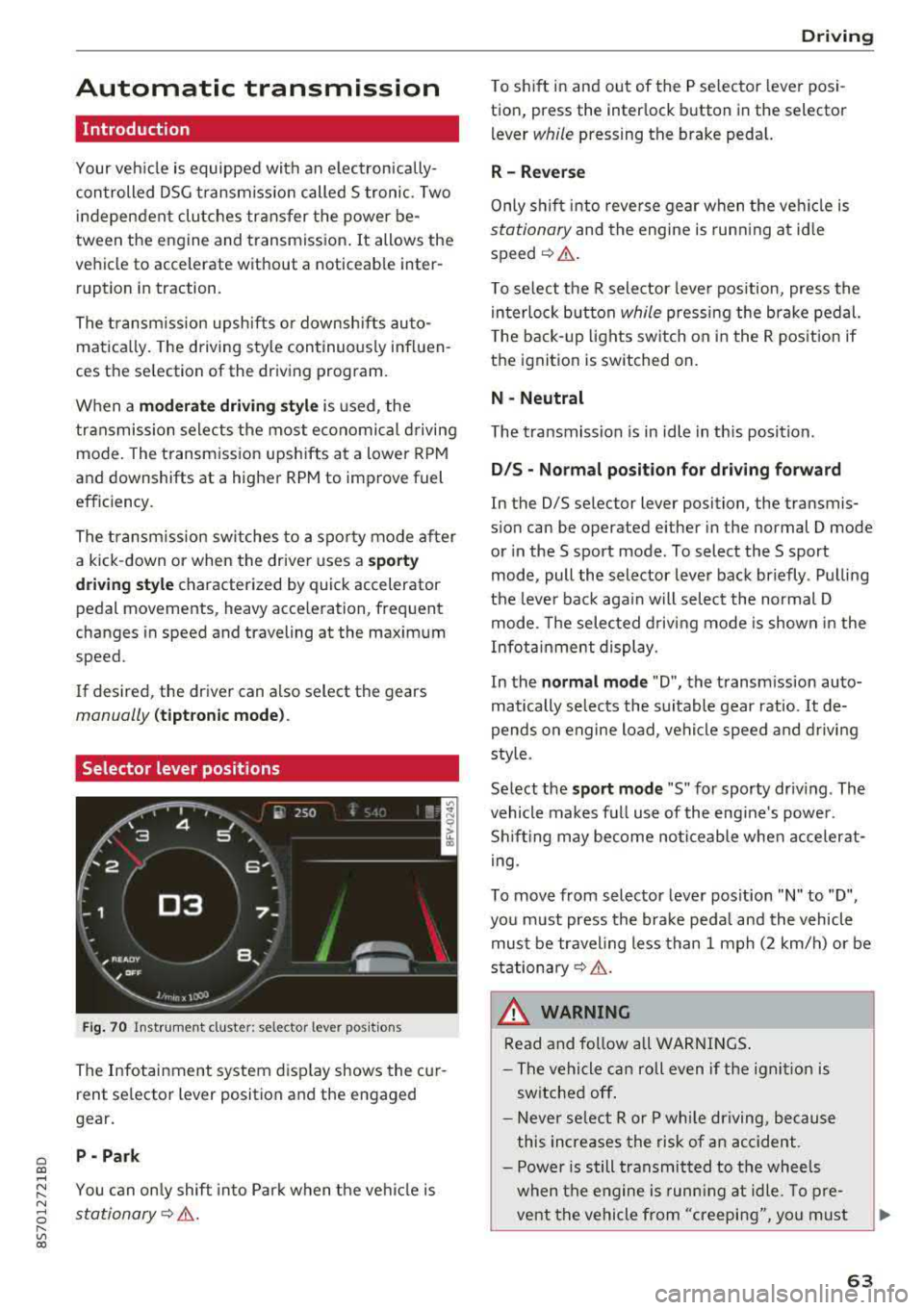
Selector lever positions
Fig . 70 Instrumel'lt cluster: selector lever positions
The Infotainment system d isplay shows the cur
rent se lector lever position and the engaged
gear.
P -Pa rk
You can on ly shift into Park when the vehi cle is
stationary¢ &.
Drivi ng
To shift in and out of the P selector lever posi
tion, press the inter lock button in the selector
lever
while pressing the brake pedal.
R- Reverse
Only s hift into reverse gear when the vehicle is
stationary and the engine is runn ing at id le
speed¢ &.
To se lect the R selector leve r pos ition, press the
in terlock button
while press ing the brake pedal.
T he back-up lights sw itch on in the R pos ition if
the ignition is switched on.
N -Neutral
The t ransmission is in idle in th is posit ion.
D IS -Norm al position fo r driving forward
In the D/S se lector lever position, the transmis
s ion can be operated either in the normal D mode
or in the S sport mode . To select the S sport
mode, pull the selector lever back briefly . Pulling
the leve r back aga in will selec t the normal D
mode. The selected d riving mode is shown in the
Infotainment display.
In the
n ormal mode "D", the transm ission auto
matically selects the suitable gear ratio.
It de
pends on engine load, vehicle speed and driving
sty le.
Select the
s p o rt mod e "S" for sporty driving . The
vehicle makes full use of the eng ine 's powe r.
Shifting may become noticeable whe n accelerat
i ng.
To move from selector lever pos ition
"N" to "D",
you m ust press the brake peda l and the vehicle
must be traveling less than 1 mph (2 km/h) or be
stationary¢ &.
A WARNING
Read and fo llow all WARNI NGS .
- The vehicle can roll even if the ignit ion is
switched off .
- Never se lect R or P whi le driving, because
this increases the risk of an accident .
- Power is still transmitted to the wheels
when the engine is runn ing at idle. To pre
vent the vehicle from "creeping", yo u must
63
Page 66 of 310
Driving
keep your foot on the brake in all selector
lever positions (except P) when the engine is
running. Otherwise, this increases the risk
of an accident.
- Do not inadvertently press the accelerator
pedal when the vehicle is stopped if a gear is
engaged. Otherwise the vehicle will start to
move immediately, even if the parking brake
is set . This could result in a crash.
- Do not press the accelerator pedal when changing the selector lever position while
the vehicle is stationary and the engine is
running.
- Never leave your vehicle with the engine
running while in gear.
If you must leave
your vehicle when the engine is running, set
the parking brake and move the selector lev
er to the "P" position.
- To decrease the risk of an accident, these
lector lever must be in the P position and
the parking brake must be set before open
ing the hood and working on a running en
gine. Always read and follow the applicable
warnings¢ page 233, Working in the en
gine compartment .
(D Note
Never let the vehicle roll downhill with engine
off and the selector lever in the "N" position,
because this could damage the automatic
transmission and catalytic converter .
{D) Tips
- Drive select: sporty shifting characteristics
can be selected using the
Dynamic driving
mode . The Infotainment display shows Sas
the selector lever position instead of D.
- If you accidentally select "N" while driving,
take your foot off the accelerator pedal im
mediately and wait for the engine to slow
down to idle before selecting "D" or "S".
- If there is a power failure, the selector lever
will not move out of the "P" position. The
emergency release can be used if this hap
pens. Left-hand drive
vehicles¢ page 69.
64
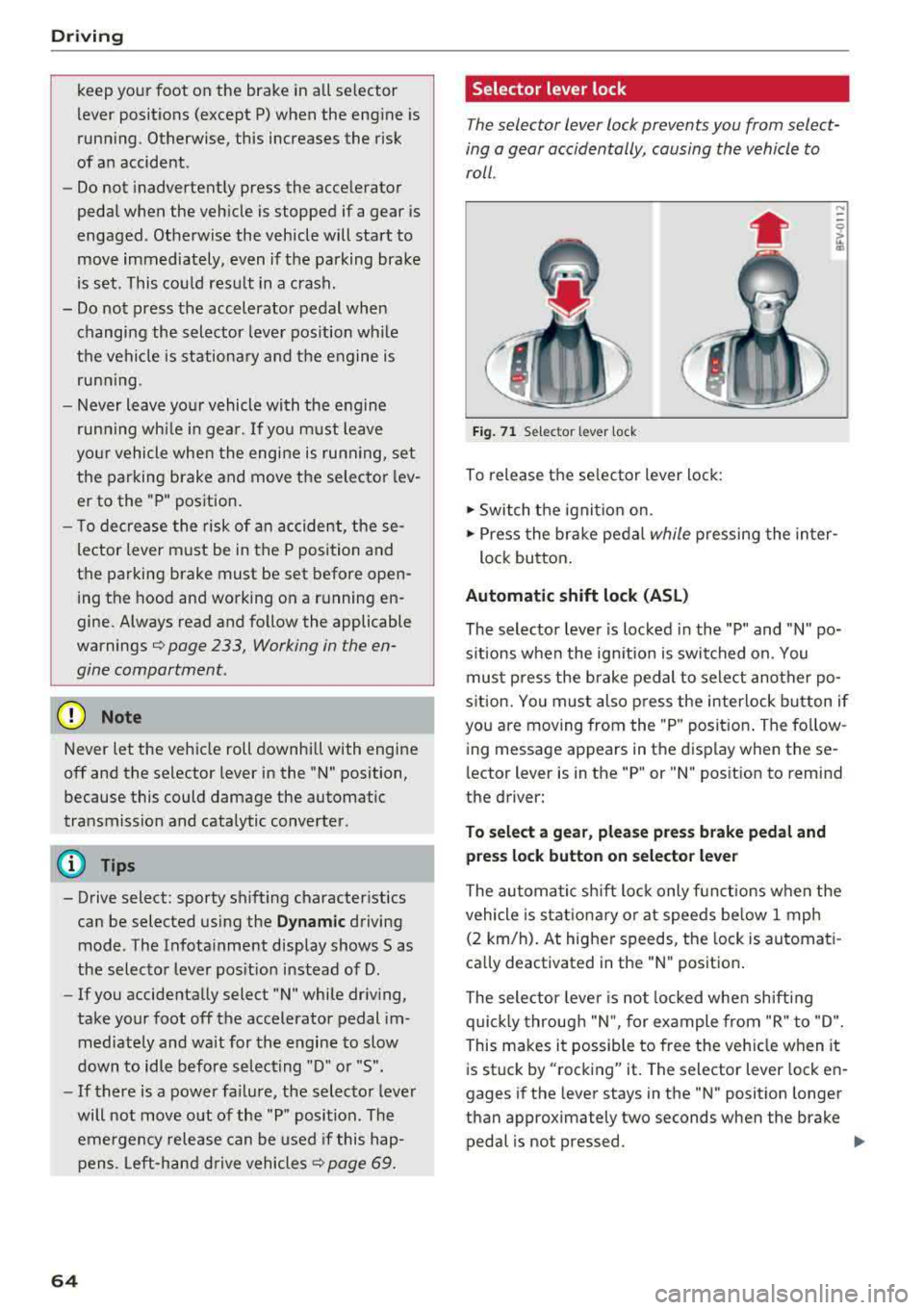
Selector lever lock
The selector lever lock prevents you from select
ing a gear accidentally, causing the vehicle to
roll .
Fig. 71 Selector lever lock
To release the selector lever lock:
.., Switch the ignition on.
....
.., Press the brake pedal while pressing the inter-
lock button.
Automatic shift lock (ASL)
The selector lever is locked in the "P" and "N" po
sitions when the ignition is switched on. You
must press the brake pedal to select another po
sition. You must also press the interlock button if
you are moving from the "P" position. The follow
ing message appears in the display when these
lector lever is in the "P" or
"N" position to remind
the driver:
To select a gear, please press brake pedal and press lock button on selector lever
The automatic shift lock only functions when the
vehicle is stationary or at speeds below 1 mph
(2 km/h). At higher speeds, the lock is automati
cally deactivated in the "N" position.
The selector lever is not locked when shifting
quickly through "N", for example from "R" to "D".
This makes it possible to free the vehicle when it
is stuck by "rocking" it. The selector lever lock en
gages if the lever stays in the "N" position longer
than approximately two seconds when the brake
pedal is not pressed.
Iii>
Page 84 of 310
Parking systems
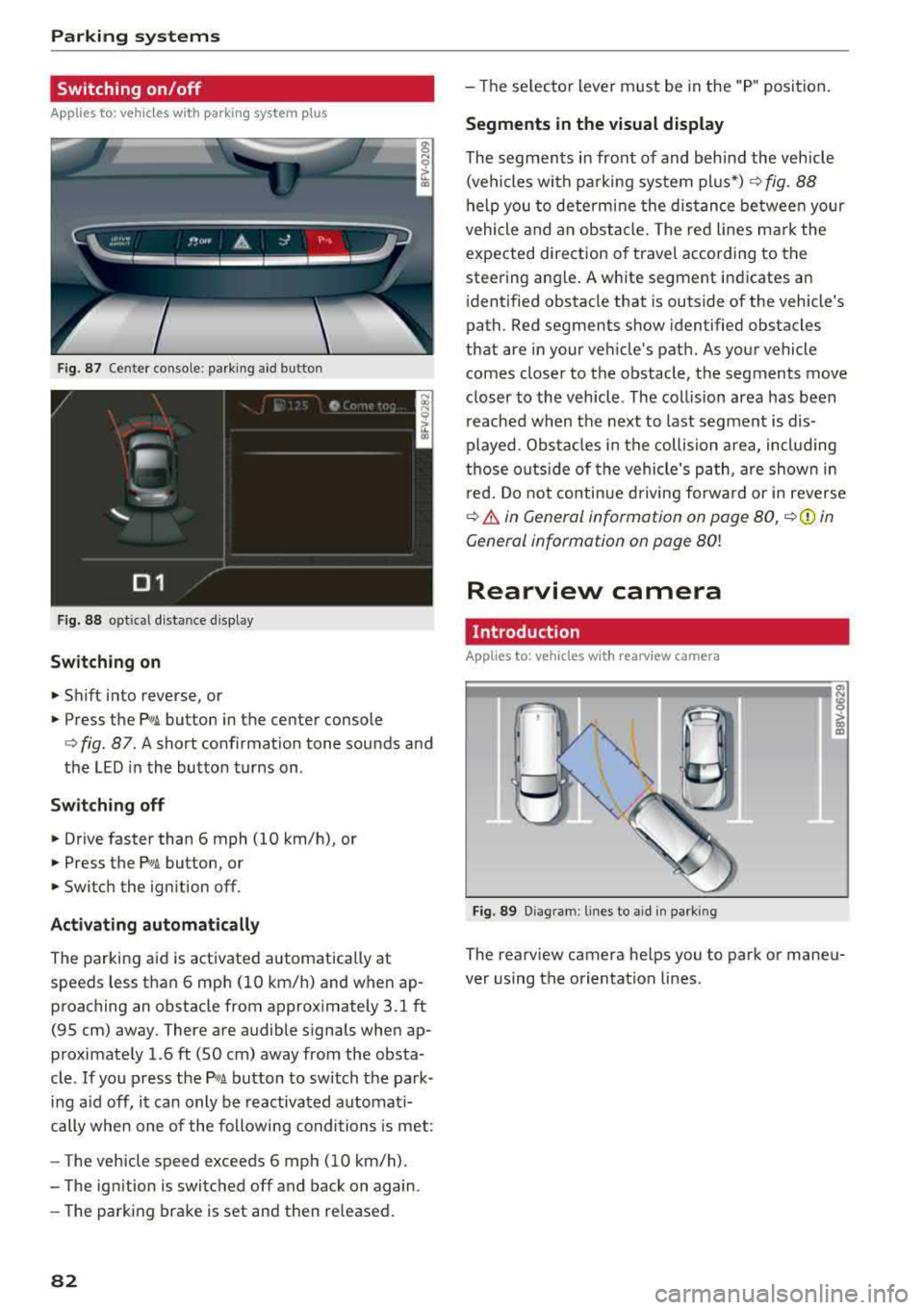
Switching on/off
Applies to: ve hicles w ith pa rking system p lus
F ig. 87 Center console: parking aid button
Fig. 88 opt ical distance display
Switching on
• Shift into reverse, or
.. Press the PwA button in the center console
c> fig. 87. A short confirmat ion tone sounds and
the LED in the button turns on .
Switch ing off
.. Drive faster than 6 mph (10 km/h), or
• Press the P,, ,A button, or
.. Switch the ignition off.
Activating automatically
The parking aid is activated automatically at
speeds less than 6 mph (10 km/h) and when ap
proaching an obstacle from approximately 3.1 ft (95 cm) away. There are audible signals when ap
proximately 1.6
ft (SO cm) away from the obsta
cle .
If you press the p,,1.I! button to switch the park
ing a id off, it can only be reactivated automati
cally when one of the following conditions is met :
- The vehicle speed exceeds 6 mph (10 km/h).
- The ignition is switched off and back on again.
- The parking brake is set and then re leased.
82
- The selector lever must be in the "P " position.
Segments in the visual display
The segments in front of and behind the vehicle
(vehicles with parking system plus*)
c> fig. 88
help you to determine the distance between your
vehicle and an obstacle. The red lines mark the
expected direction of travel according to the
steering ang le. A white segment indicates an
identified obstacle that is outside of the vehicle's
path. Red segments show identified obstacles
that are in your vehicle's path. As your vehicle comes closer to the obstacle, the segments move
closer to the vehicle . The collision area has been
reached when the next to last segment is dis
played. Obstacles in the collision a rea, including
those outside of the vehicle 's path, are shown in
red. Do not continue driving forward or in reverse
c> .& in General information on page 80, c>(D in
General information on page
80!
Rearview camera
Introduction
App lies to: vehicles wit h rearv iew camera
Fig. 89 Diagram: lines to ai d in parking
The rearview camera helps you to park or maneu
ver using the orientation lines .
Page 86 of 310
Parking systems
Switching off
~ Drive faster than 6 mph (10 km/h), or
~ Press the P"'il button, or
~ Switch the ignition off .
(D Tips
-The visual display in the left part of the dis
play should help you detect the critical vehi
cle areas .
- You can change the volume of the signals
and the display
¢page 84.
Perpendicular parking
Applies to: vehicles with rearview camera
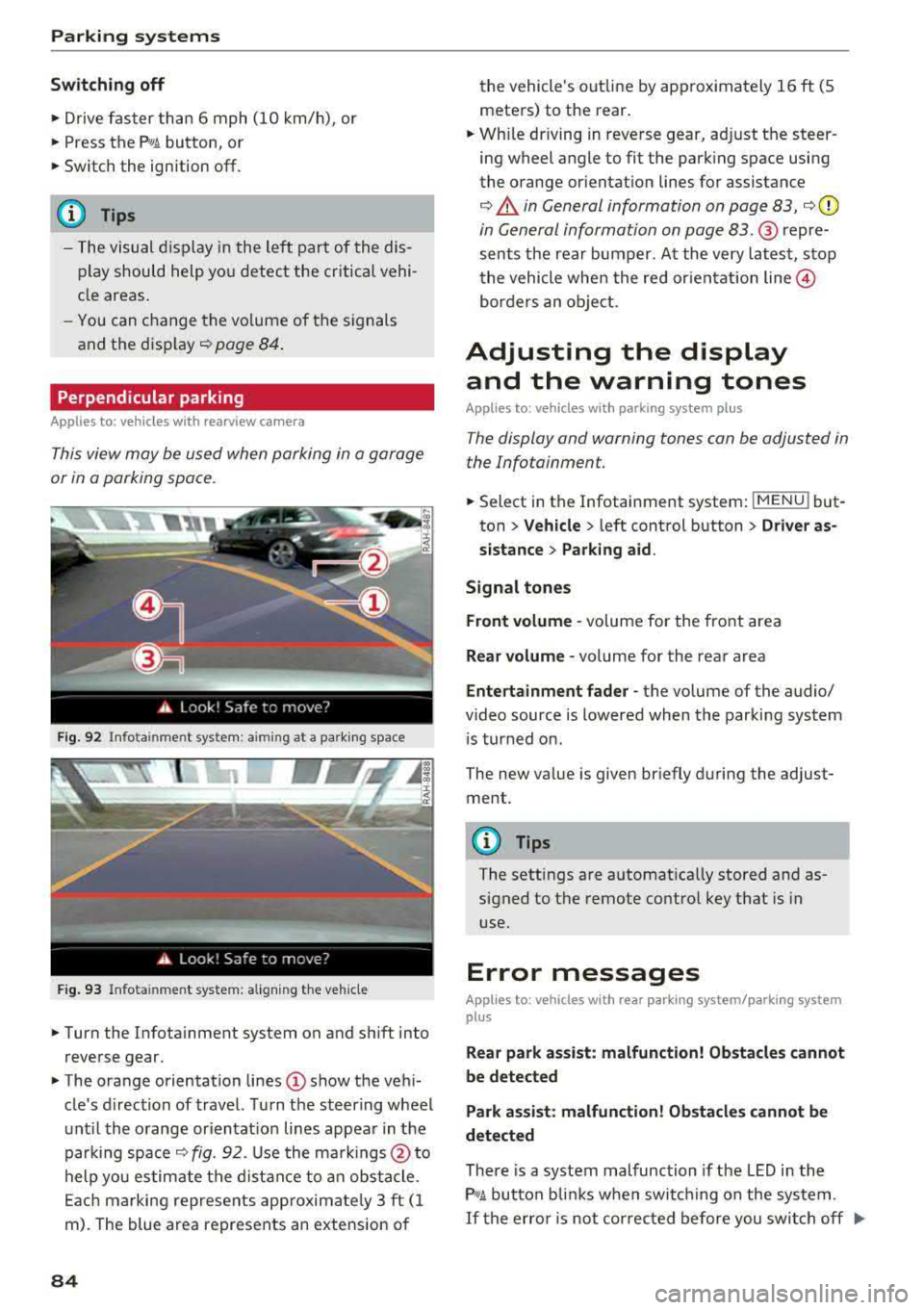
This view may be used when parking in a garage
or in a parking space.
F ig. 92 Info ta in ment system: a im ing at a park ing space
Fig. 93 Infota inme nt system: aligning the vehicle
~ Turn the Infota inment system on and shift into
reverse gear.
~ The orange orientation lines (D show the vehi
cle's d irection of travel. Turn the steering wheel
until the orange or ientat ion lines appear in the
parking space
¢ fig. 92. Use the markings @to
help you estimate the distance to an obstacle.
Each marking represents app roximate ly 3 ft (1
m). The blue area represents an extension of
84
the vehicle 's out line by approximately 16 ft (5
meters) to the rear.
~ Wh ile driving in reverse gear, adjust the steer
ing wheel angle to fit the parking space using
the orange orientation lines for assistance
¢ .&. in General information on page 83, ¢(D
in General information on page 83. ® repre
sents the rear bumper. At the very latest, stop
the vehicle when the red or ientat ion
line @
borders an object.
Adjusting the display
and the warning tones
Applies to: vehicles with parking system plus
The display and warning tones can be adjusted in
the Infotainment.
~ Select in the Infotainment system : IMENU! but
ton
> Vehicle > left control button > Driver as
sistance> Parking aid.
Signal tones
Front volume -
volume for the front area
Rear volume -volume for the rear area
Entertainment fader -the volume of the audio/
video source is lowered when the parking system
i s turned on.
The new value is given briefly during the adjust ment.
{!) Tips
The settings are automat ically stored and as
signed to the remote control key that is in
use.
Error messages
App lies to: vehicles with rear park ing system/parking system
plus
Rear park assist: malfunction! Obstacles cannot
be detected
Park assist: malfunction! Obstacles cannot be
detected
There is a system malfunction if the LED in the
P'1
1 .ll button blin ks when switc hing on the system .
If the error is not corrected before you switch off Ill-
Page 87 of 310
Cl 00 .-< N r-N .-< 0 r-Vl 00
the ignition, the LED in the P•1~ button will blink
the next time you switch on the parking system
by shifting into reverse. As long as the error is ac
tive, you can display the error messages in the
second tab of the dr iver information system.
Parking system plus*
If a sensor or speaker is fau lty, t he J;l4 symbol
will appear in front of/behind the vehicle in the Infotainment disp lay. If a rear sensor is faulty,
only obstacles that are in areas
(D and @
¢ page 81, fig. 86 are shown. If a front sensor is
faulty, only obstacles that are in areas ®
and@
are shown .
Drive to an authorized Aud i dea ler or authorized
Aud i Service Facility immediately to have the
malfunct ion corrected.
Parking systems
85
Page 95 of 310
Cl co .... N ,....
N .... 0 ,....
Vl co
Multi Media Interface
Traffic safety information
Aud i recommends performing certa in Infotain
ment system functions, such as enteri ng a desti
n ation, only when the vehicle is stat ionary . Al
ways be p repa red to stop operat ing the Info tain
ment system in the interest of your safety and
t he safety of o ther ro ad use rs.
_& WARNING
O nly use the In fo tainme nt sys tem when tra f
fic con ditio ns permit and alw ays in a way t hat
allows you to maintain complete control over
your vehicle.
@ Tips
Ce rtain functi ons are not av ailable wh ile driv
ing .
Introduction
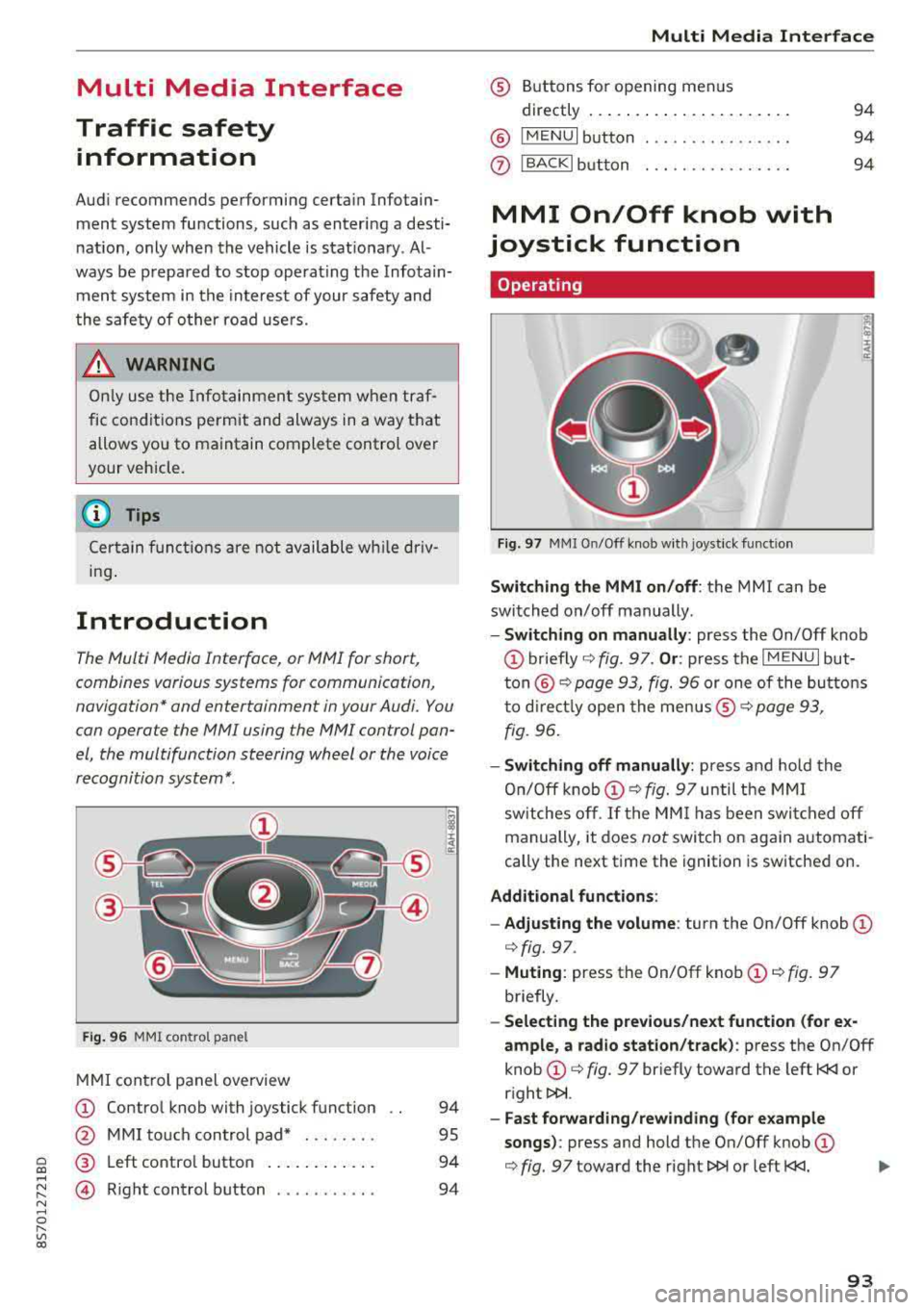
The Multi Media Interface, or MMI for short,
combines various systems for communication,
navigation* and entertainment in your Audi. You
can opera te the MMI using the MMI control pan
el , the multifunction steering wheel or the voice
recognition system*.
F ig. 96 MMI co ntrol pa nel
M MI con trol panel overview
(D Contro l knob with joystick f unction
@ M MI to uch con trol pad* . .... .. .
® Left co ntro l butto n .... .. . ... . .
© R ight control b utton .......... .
94
95
94
94
Multi Media Inte rface
® Buttons fo r opening menus
directly .... ... .. .. .. .. .... .. .
@ IM ENU I button
0 IBACKI bu tton . .. .. .. .... .... .
MMI On/Off knob with
joystick function
Operating
Fig . 97 MMI O n/Off k nob w it h joys tick funct io n
Switching the MMI on/off : the MMI can be
switched on/off manually .
94
94
94
E
" ~ .. a:
- Switching on manually : press the On/Off knob
(D briefly c::> fig. 9 7. Or : press the IM ENU I but
t o n
@ c::> page 93, fig. 96 or one of the bu tton s
t o dir ect ly open the menus ®
r=.> page 93,
fig. 96.
- Switching off manually : press and ho ld the
O n/O ff k nob
(D r=.> fig. 97 until t he MMI
sw itches o ff.
If the MM I has been swi tc h ed off
manually, it does
not switch o n again automati
cally the next time the ignition is sw itche d on.
Additional fun ctions :
- Adjusting the volume :
turn the On/Off knob (D
c::> fig. 97.
-Muting : press the On/Off knob (D c::> fig. 97
briefly .
-Selecting the previous/next function (for e x
ample , a radio station/track ):
p ress the On/Off
knob
(D c::> fig. 97 br iefly toward the left t
l>!>i.
- Fast forwarding/rew inding (for e xample
songs) :
press and hold the On/Off knob (D
c::> fig. 97 toward the right l>!>i or left t
Page 107 of 310
Cl 00 .-< N r-N .-< 0 r-Vl 00
Voice recognition system Operating
Applies to: vehicles with voice recognitio n system
You con operate many Infotainment functions
conveniently by speaking.
Requirement: the ignition and the MM I must be
switched on, there m ust be no phone call in p rog
ress and the park ing system must not be active.
~ Switching on : briefly p ress t h e ~ but ton @
¢page 19, fig . 9 on the multif unction steering
whee l and say th e desi red command after the
Beep .
~ Switching off : press and hold the ~ button .
Or: say the command Cancel.
~ Pausing : say the command Pause . To resume,
press
the~ b utt on .
~ Corr ecting : press t h e ~ button one t ime ®
¢ page 18, fig. 7. Or: say the co mmand Correc
tion .
Input assistance
The system g uides you throug h the input with
v isua l and aud io feedback .
-Visual input assistance : after switching on
vo ice recogn it io n, a display with a se lection of
poss ible commands appears . The command
display can be sw itched on/off under
I M EN U I >
Setting s> left contro l butto n > MMI setting s>
Speech dialog system .
- Audio input assistance:
to have the poss ible
c omma nds read, press t he
10, I bu tton o n the
mul tifunc tion steering w heel b riefly and say
Help.
For the system to understand you:
Speak clearly and dis tinct ly a t a normal vo lume .
Speak lo uder when d riving faste r.
Emphasi ze the words in the commands even ly
a n d do not leave long pauses .
Do not spea k a command when the voice recogni
tion system is m aking an a nno uncement.
C lose the doors, the windows and the sunroof* to
r e duce background noise. Make s ure that passe n-
Voice recognition system
gers are not speaking w hen you are g iv ing a voice
comman d.
D o no t direct the vents towa rd the handsfree mi
c rophone, wh ic h is near the fro nt inter ior lights
on the roof headline r or on the dr iver's safety
belt*. Fo r additional informat io n on th e safety
belt m ic rophone, see
¢ pag e 122 .
Only use the system from the dr ive r's sea t be
ca use the hands -free microphone is di rected to
ward that s eat .
Additional settings
See ¢ page 178, Voice recognition system.
_&. WARNING
- D ir e ct y ou r full a tte ntio n to dr iv in g. A s t he
dr iver, you have com ple te re spon sibility fo r
safety in t raff ic . O nly use the functions in
such a way t hat you a lways maintai n com
p lete contro l over your vehicle in all traffic
situations.
- Do not use t he voice recognition system in
emergencies beca use your voice may change
in st ressfu l s ituations. It may ta ke longe r to
d ia l the number o r th e system may not be
ab le to d ia l it at all. Dia l the emergency
number manually .
(D Tips
-The d ialog pauses w hen the re is a n incom
ing phone call a nd will con tinue if yo u ig
nore the ca ll. The dia log ends if yo u answer
t he ca ll.
- There are no vo ice gu idance* prompts when
a dialog is ac tive .
- Yo u ca n select a n item in the list us ing ei
t her the vo ice recogn ition sys tem o r the
cont ro l knob .
Command overview
information
Applies to: vehicles with voice recognition system
T he following overv iews des crib e the co m man ds
t h at can be used to oper ate the MMI using the
vo ice recognit ion system.
..,.
105