infotainment AUDI TT ROADSTER 2018 User Guide
[x] Cancel search | Manufacturer: AUDI, Model Year: 2018, Model line: TT ROADSTER, Model: AUDI TT ROADSTER 2018Pages: 310, PDF Size: 46.95 MB
Page 42 of 310
Lights and Vision
Canada models: this function cannot be switched
off . They activate automatica lly each time the ig
n ition is switched on . T his menu item is shown
with a "gray background".
Entry /exit lighting
The ent ry li ghti ng function illum ina tes the area
outside the vehicle when you unlock the vehicle
when it is dark . To switch on the function, select
Ent ry/ex it lighting .
The exit light ing fun ct io n illum inates the area
outside the vehicle when you turn the ignition o ff
an d open the driver 's door when it is dark. To
sw itch on the function, select
Entry /exit light·
ing .
The ent ry/exit lighting only wo rks when it is dar k
an d the light switch is in the
AUTO position.
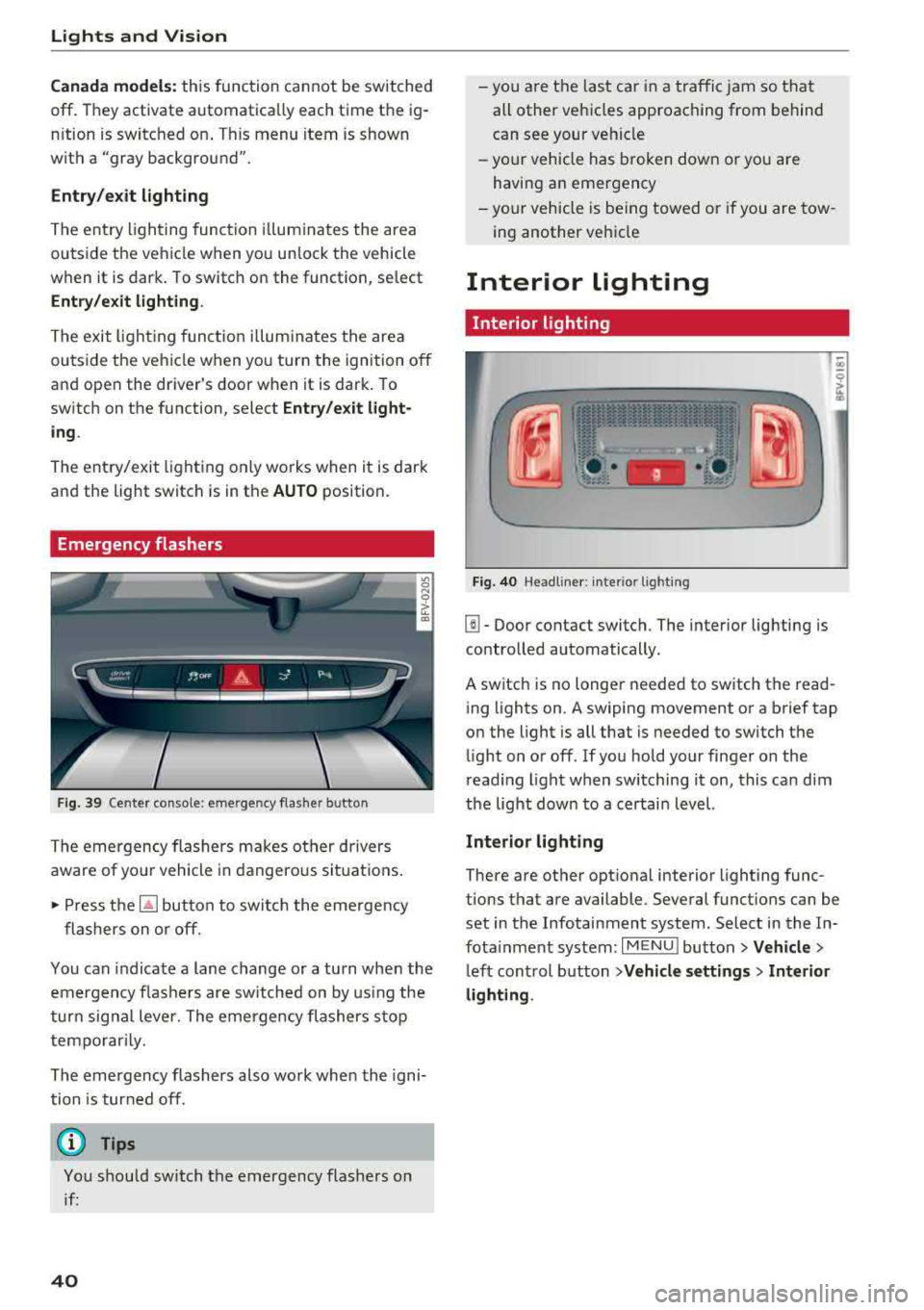
Emergency flashers
Fig. 39 Cente r conso le : eme rge ncy f las her butto n
The emergency flashers makes ot her dr ivers
aware of yo ur vehicle in dangerous si tuat io ns.
• P ress t h e ~ button to swi tch the eme rgency
flashers on or off.
You can indicate a lane change or a tu rn when the
em ergency fl ashe rs are sw itched on by us ing the
tur n sig na l lever. The emergency flashers s to p
tempo rarily.
The emergency flashers also work whe n the igni
tion is tur ned off.
(D Tips
You s hou ld switch t he emergency flashers on
i f :
40
-yo u are t he las t car in a traffi c jam so that
all other vehi cles approaching from behind
can see your ve hicle
- yo ur vehicle has broken down o r yo u a re
havin g an emerge ncy
-yo ur vehicle is be ing towed or if you a re tow
ing another vehi cle
Interior lighting
Interior lighting
Fi g. 40 Head lin e r: int eri or light ing
[]] - Door contact switch. The interior lighting is
contro lled automatically.
A switch is no longer needed to sw itch the read
i ng lights on .
A swiping movement o r a b rief tap
o n the light is all that is needed to switch the
li ght on o r off. If yo u ho ld your finger on the
r ead ing light when switching it on, this ca n dim
the lig ht dow n to a certai n level.
Interior lighting
There are othe r opt ional interior lighting func
tions that are available . Seve ral funct ions can be
set in the Infotainment system. Select in the In
fota inment system :
I MENU I button> Vehicle >
left con trol b utton > Vehicle settings > Interior
lighting .
Page 45 of 310
Cl 00 .-< N r-N .-< 0 r-Vl 00
Move the windshield wiper lever to the corre
sponding position:
@ -Windshield wipe rs off
(D -Interval mode . T o increase/decrease the w ip
er intervals, move the sw itch
@ to the left/rig ht.
I n vehicles with a ra in senso r*, the wipe rs turn o n
in the ra in once the vehicle speed exceeds ap
p roximate ly 2 mph (4 km/h). The h igher the sen
sitivity of the rain sensor* is set (switch @to the
right), the earlier the winds hield wipers react to
mo isture on the windshield. You can deact ivate
the ra in sensor mode* in the Infotainment sys
tem, which switches the intermittent mode on.
Select in the Infotainment system:
IMENU I but
ton>
V ehicle > left control button >Driv er a ssis
tance > Rain sensor > Off .
@-Slow wiping
@-Fast wiping
© -Sing le w ipe. If yo u hold t he leve r in th is posi
tion longer, the wipers sw itch from s low w iping
to fast wiping.
® -Clea n the wi ndshield . To e liminate water
d roplets, the windsh ield wipers pe rform one af
terwipe after several seconds wh ile driving in
temperatures above 39 ° F (4 °C). You can switc h
this function off by moving the lever to position
@ within 10 seconds of the afterwipe. The after
wipe function is reactivated the next t ime you
switch the ignition on.
C lean the headlights*. The headlight washer sys
tem* only functions when the lights are switched
on. The headlights are automat ically cleaned the
f irst time and every fifth t ime the lever is moved
to position
® ·
A WARNING
- T he ra in sensor* is o nly intended to ass ist
the d river. The dr ive r may st ill be responsi
ble fo r manua lly swit ching the wi pe rs on
based on v is ibility co ndi tions.
- T he w indshie ld ma y not be treated with wa
te r-repell ing winds hield coa ting age nts. Un
f avor ab le cond itions, s uch a s wetness, dar k
ness, and when the s un is low, can cause in
creased g lare, which increases the risk of an
-
Light s and Vision
accident. Wiper b lade chatter is also possi
b le.
- Properly functioning windshield wiper
b lades are required for a clear v iew and safe
driving¢ page 44, Replacing windshield
wiper blades.
@ Note
- If there is frost, make sure the windshield
w iper blades are not frozen to the wind
shield. Switching on the w indshield w ipers
when the blades are frozen to the wind shield can damage the w iper blades.
- The windshie ld w iper system must be
sw itched off (lever in posit io n 0) before us
ing a car wash. This prevents the w ipers
from switc hing on un intent io nally and caus
ing damage to the winds hield wiper system.
(D Tips
- T he windsh ie ld w ipers sw itch off when the
ign ition is switched off. You can activate the
w indshield w ipe rs after the ignition is
sw itched back on by mov ing the w indshield
w iper lever to a ny posi tion.
- Wor n or d irty w indshie ld w iper blades res ult
in st reaking. This can affect t he rain senso r*
function. Chec k your w indshie ld w iper
blades reg ularly.
- Th e washer fluid no zzles in the winds hield
washe r system are heated* at low tempera
t ur es when the ignition is on .
- Whe n stopping tempo rar ily, such as at a
traffic lig ht, the speed of the windshield
wipers automatica lly reduces by one level.
Cleaning windshield wiper blades
Clean the wiper b lades when you see w iper
streaks. C lean the wiper blades with a soft towel
and glass cleaner .
.,. Place the windshie ld wiper arms in the service
position
¢ page 44.
.,. Fold the windshie ld wiper arms away from the
w indshield .
.,,.
43
Page 65 of 310
Cl co .... N ,....
N ...... 0 ,....
Vl co
Automatic transmission
Introduction
Your vehicle is equipped with an electronically
controlled DSG transmiss ion called S tronic. Two
independent clutches transfer the power be
tween the engine and transmission . It allows the
vehicle to accelerate without a noticeab le inter
ruption in traction.
The transmission upshifts or downsh ifts auto
mat ica lly. The driving style continuously influen
ces the selection of the driving program.
When a
mod erat e d rivin g sty le is used, the
transmission selects the most economical d riving
mode. The transmiss ion upsh ifts at a lower RPM
and downshifts at a higher RPM to improve fuel
efficiency.
The transm ission switches to a spo rty mode after
a kick-down or when the driver uses a
s po rt y
d riv ing sty le
characterized by quick accelerator
pedal movements, heavy acce leration, frequent
changes in speed and traveling at the maximum
speed.
If desired, the driver can also select the gears
manually ( tipt roni c mod e).
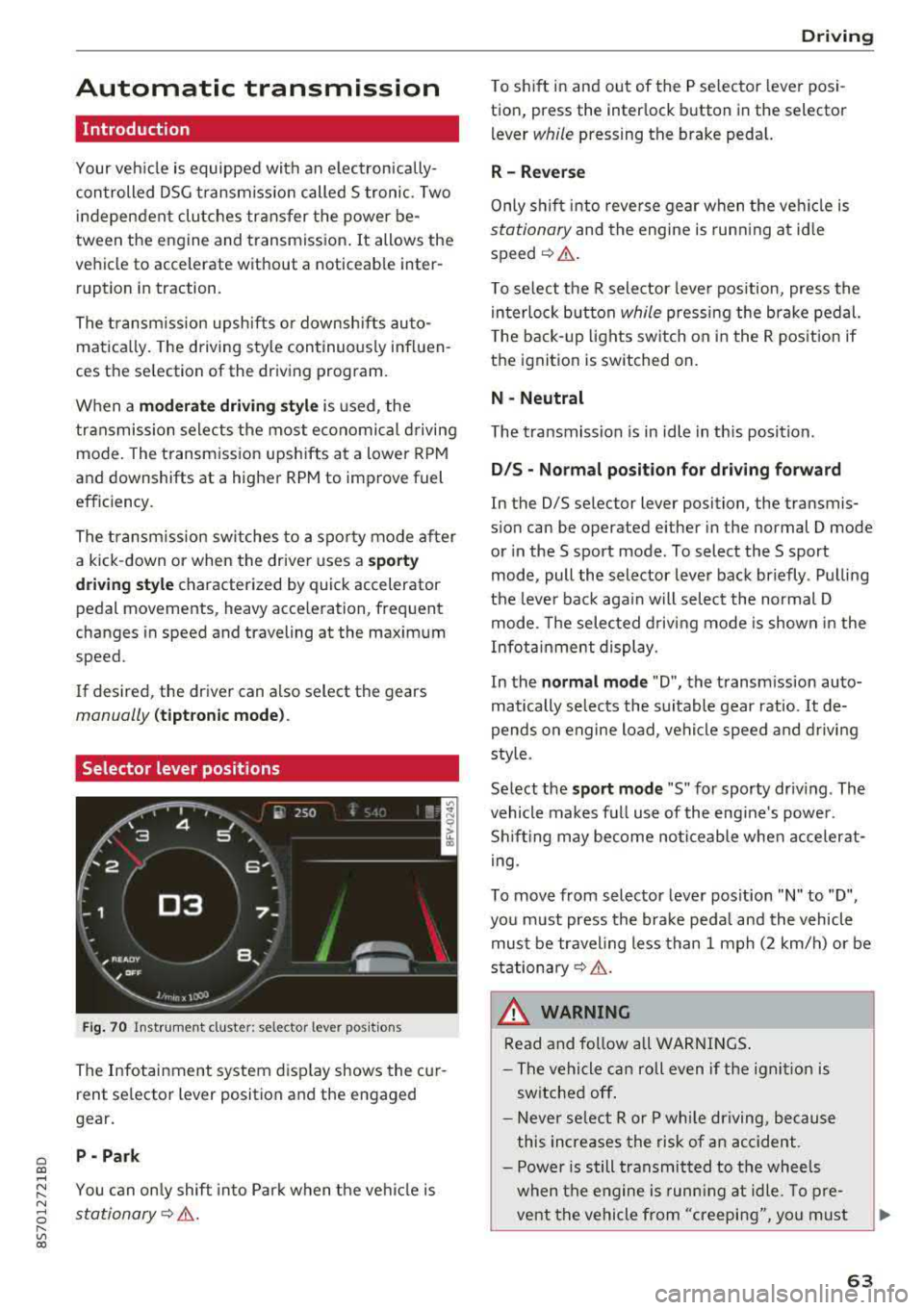
Selector lever positions
Fig . 70 Instrumel'lt cluster: selector lever positions
The Infotainment system d isplay shows the cur
rent se lector lever position and the engaged
gear.
P -Pa rk
You can on ly shift into Park when the vehi cle is
stationary¢ &.
Drivi ng
To shift in and out of the P selector lever posi
tion, press the inter lock button in the selector
lever
while pressing the brake pedal.
R- Reverse
Only s hift into reverse gear when the vehicle is
stationary and the engine is runn ing at id le
speed¢ &.
To se lect the R selector leve r pos ition, press the
in terlock button
while press ing the brake pedal.
T he back-up lights sw itch on in the R pos ition if
the ignition is switched on.
N -Neutral
The t ransmission is in idle in th is posit ion.
D IS -Norm al position fo r driving forward
In the D/S se lector lever position, the transmis
s ion can be operated either in the normal D mode
or in the S sport mode . To select the S sport
mode, pull the selector lever back briefly . Pulling
the leve r back aga in will selec t the normal D
mode. The selected d riving mode is shown in the
Infotainment display.
In the
n ormal mode "D", the transm ission auto
matically selects the suitable gear ratio.
It de
pends on engine load, vehicle speed and driving
sty le.
Select the
s p o rt mod e "S" for sporty driving . The
vehicle makes full use of the eng ine 's powe r.
Shifting may become noticeable whe n accelerat
i ng.
To move from selector lever pos ition
"N" to "D",
you m ust press the brake peda l and the vehicle
must be traveling less than 1 mph (2 km/h) or be
stationary¢ &.
A WARNING
Read and fo llow all WARNI NGS .
- The vehicle can roll even if the ignit ion is
switched off .
- Never se lect R or P whi le driving, because
this increases the risk of an accident .
- Power is still transmitted to the wheels
when the engine is runn ing at idle. To pre
vent the vehicle from "creeping", yo u must
63
Page 66 of 310
Driving
keep your foot on the brake in all selector
lever positions (except P) when the engine is
running. Otherwise, this increases the risk
of an accident.
- Do not inadvertently press the accelerator
pedal when the vehicle is stopped if a gear is
engaged. Otherwise the vehicle will start to
move immediately, even if the parking brake
is set . This could result in a crash.
- Do not press the accelerator pedal when changing the selector lever position while
the vehicle is stationary and the engine is
running.
- Never leave your vehicle with the engine
running while in gear.
If you must leave
your vehicle when the engine is running, set
the parking brake and move the selector lev
er to the "P" position.
- To decrease the risk of an accident, these
lector lever must be in the P position and
the parking brake must be set before open
ing the hood and working on a running en
gine. Always read and follow the applicable
warnings¢ page 233, Working in the en
gine compartment .
(D Note
Never let the vehicle roll downhill with engine
off and the selector lever in the "N" position,
because this could damage the automatic
transmission and catalytic converter .
{D) Tips
- Drive select: sporty shifting characteristics
can be selected using the
Dynamic driving
mode . The Infotainment display shows Sas
the selector lever position instead of D.
- If you accidentally select "N" while driving,
take your foot off the accelerator pedal im
mediately and wait for the engine to slow
down to idle before selecting "D" or "S".
- If there is a power failure, the selector lever
will not move out of the "P" position. The
emergency release can be used if this hap
pens. Left-hand drive
vehicles¢ page 69.
64
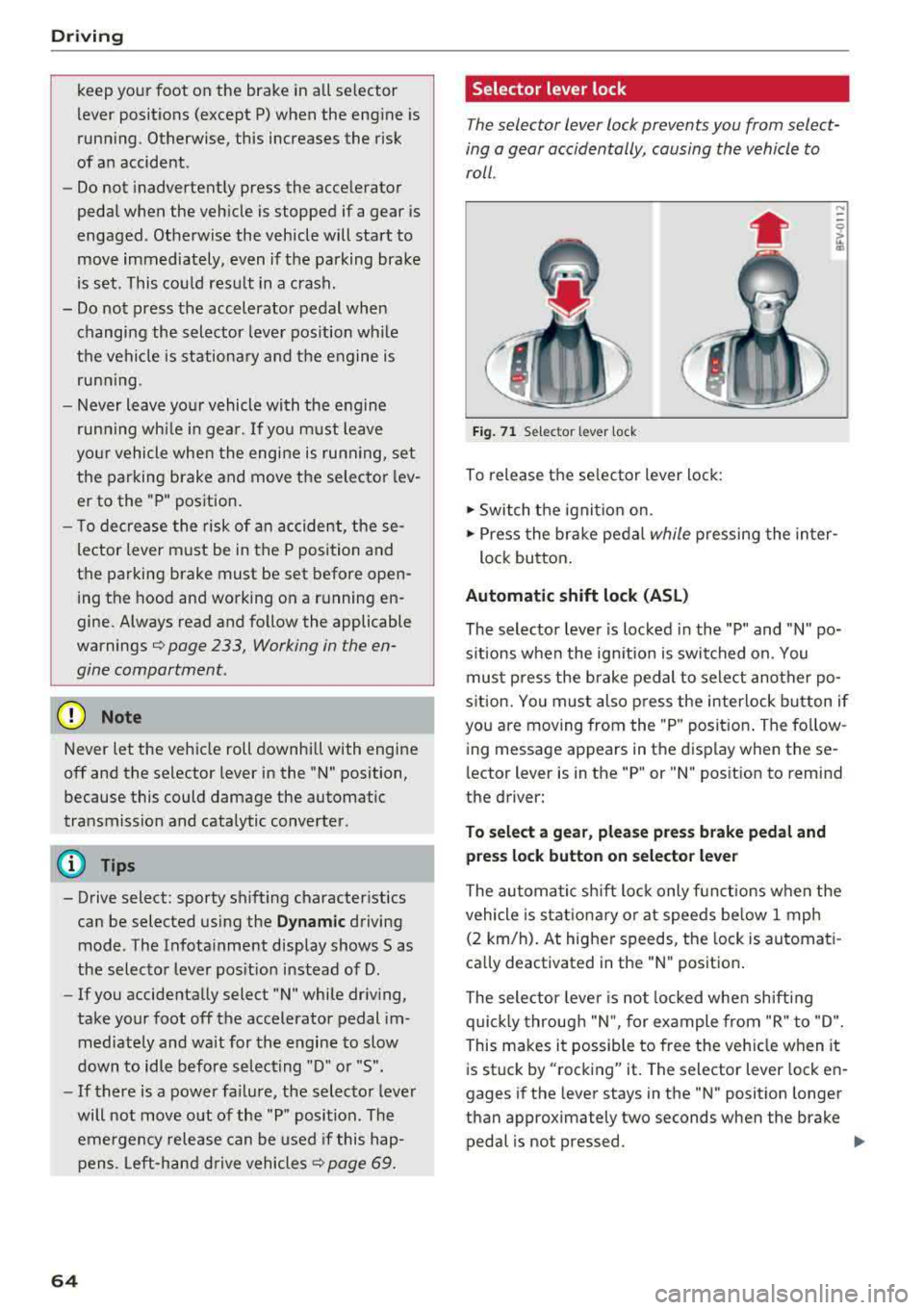
Selector lever lock
The selector lever lock prevents you from select
ing a gear accidentally, causing the vehicle to
roll .
Fig. 71 Selector lever lock
To release the selector lever lock:
.., Switch the ignition on.
....
.., Press the brake pedal while pressing the inter-
lock button.
Automatic shift lock (ASL)
The selector lever is locked in the "P" and "N" po
sitions when the ignition is switched on. You
must press the brake pedal to select another po
sition. You must also press the interlock button if
you are moving from the "P" position. The follow
ing message appears in the display when these
lector lever is in the "P" or
"N" position to remind
the driver:
To select a gear, please press brake pedal and press lock button on selector lever
The automatic shift lock only functions when the
vehicle is stationary or at speeds below 1 mph
(2 km/h). At higher speeds, the lock is automati
cally deactivated in the "N" position.
The selector lever is not locked when shifting
quickly through "N", for example from "R" to "D".
This makes it possible to free the vehicle when it
is stuck by "rocking" it. The selector lever lock en
gages if the lever stays in the "N" position longer
than approximately two seconds when the brake
pedal is not pressed.
Iii>
Page 69 of 310
Cl co .... N ,....
N ...... 0 ,....
Vl co
Hill descent control
The hill descent control system assists the driver
when driving down hills .
Hill descent control is activated when the selec
tor lever is in the "D" or "S" position and you press the brake pedal. The transm iss ion auto
mat ically selects a gear that is suitable for the
h ill. Hill descent con trol tries to maintain the
speed ach ieved at the t ime of b raking, w ith in
phys ica l and technical limi tatio ns. If may still be
necessa ry to adjust the speed with the brakes .
Because hill descent contro l cannot sh ift down
farther than 3rd gear, it may be necessary to
shift into tiptronic mode in very steep areas. In
this case, shift manually into 1st or 2nd gear in
tiptron ic mode to use the engine 's braking force
to relieve the brakes .
Hill descent control switches off once the hill lev
els out or you press the accelerator pedal.
On vehicles with a cruise contro l system*
¢ page 71, hill descent control is also activated
when the speed is set .
A WARNING
Hill descent control cannot overcome physical
limitations , so it may not be able to maintain
a constant speed under all condit ions . Always
be ready to apply the brakes .
Shifting manually (tiptronic mode)
The tiptronic mode allows the driver to shift the
gears manually .
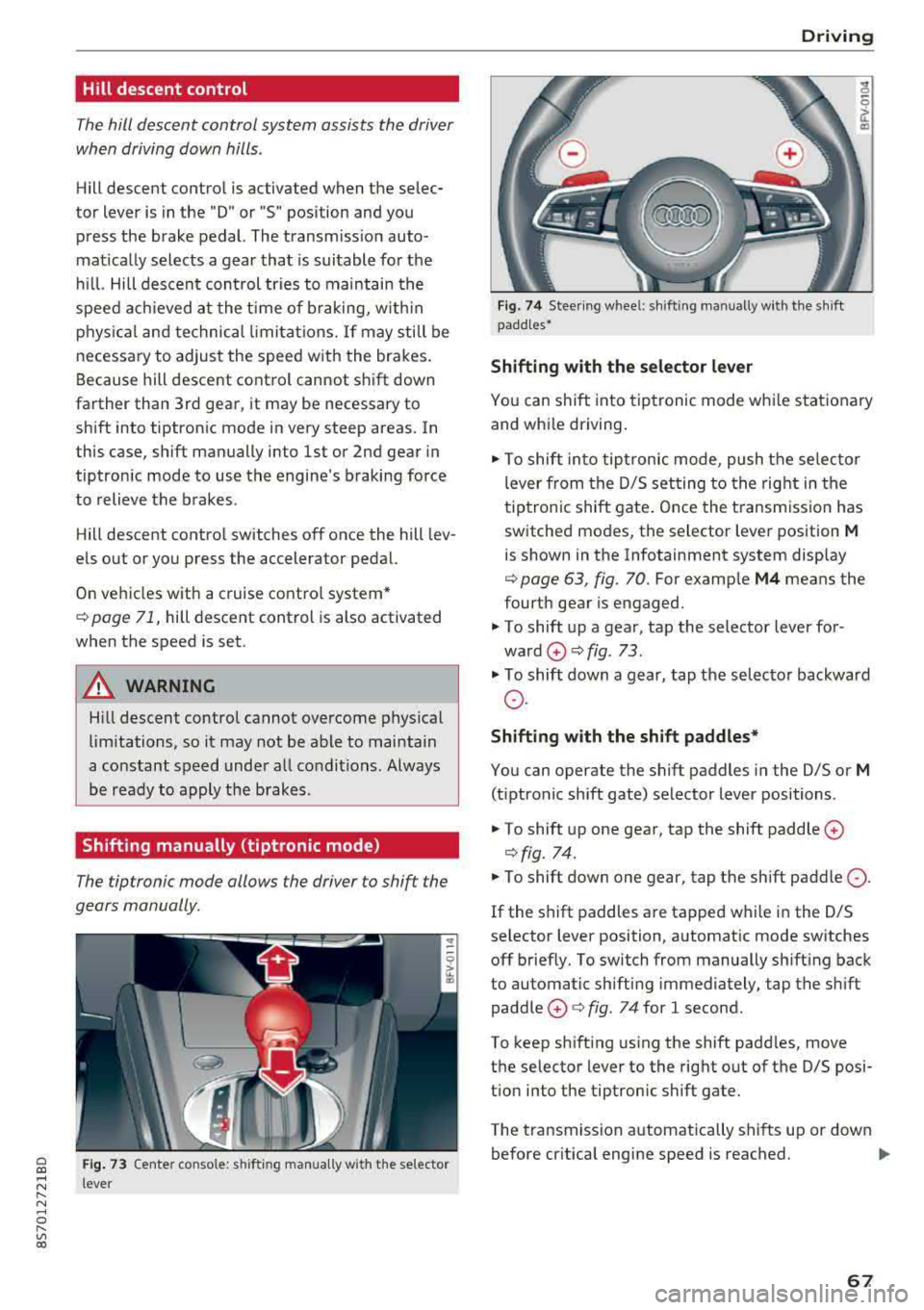
Fig. 73 Center co nso le: s hift ing ma nually w it h the selector
l ever
D rivi ng
Fig. 74 Steer ing w hee l: sh ifting manually w it h the sh ift
padd les•
Shifting with the s elector le ver
"' 0 6
~
"'
Yo u can shift into tiptronic mode whi le stat ionary
and whi le driving.
.,. To shift into tip tronic mode, push the selec to r
lever from the D/S setting to the right in the
tiptronic shift gate . Once the t ransmiss ion has
switched modes, the selector lever position
M
is shown in the Infotainment system disp lay
¢ page 63, fig. 70. For examp le M4 means the
fourth gear is engaged.
.,. T o shift up a gear, tap the selector lever for
ward
0 ¢ fig. 73 .
.,. To shift down a gear, tap the selecto r backward
o.
Shift ing with the shift paddle s*
You can operate the shift paddles in the D/S or
M
(t iptronic shift gate) selector lever positions .
.,. To shift up one gear, tap the shift paddle 0
¢fig. 74 .
.,. To shift down one gear, tap the shift paddle 0 -
If the shift paddles are tapped w hile in the D/S
selector lever position, automatic mode switches off brief ly. To switch from manually sh ifting back
to automatic sh ifting immediately, tap the shift
paddle
0 ¢ fig . 74 for 1 second.
To keep sh ifting using the shift padd les, move
the selector lever to the rig ht out of the D/S posi
t ion into the tiptronic shift gate.
The transmission automatically shifts up or down before cr itical engine speed is reached.
..,.
67
Page 73 of 310
Cl co .... N ,....
N ...... 0 ,....
Vl co
Assistance systems Speed warning system
Description
App lies to: vehicles with speed warning system
The speed warning system helps you to stay be
low a specified maximum speed that can be set,
changed or deleted in the Infotainment system .
The speed warning system warns you if you are
exceeding the maximum speed that you have set .
A warning tone will sound as soon as your speed
exceeds the stored value slightly. The
(Ol (USA
models)/
(01 (Canada models) indicato r light
and a message appear i n the ins trumen t cluster
d isplay at the same time. The
(Sl (USA models)/
(O] (Canada models) indicator light and the mes
sage turn off when the ve hicle speed drops below
the stored maximum speed.
Sett ing a threshold is recommended if you would
like to be reminded when you reach a certain
maximum speed . Situations where you may want
to do so include driving in a country with a gener
al speed limit or if there is a specified maximum
speed for winter tires.
Setting the warning thr eshold
.. Se lect in the Infotainment system: ! MENUI b ut
ton
> Vehicle > left contro l button > Driver a s
s istan ce
> S peed warning > Manual.
@ Tips
Regard less of the speed warning system, you
should always monitor your speed using the
speedometer and make sure you are following
the legal speed limit.
A ssi st a nce systems
Cruise control system
Switching on
Applies to: vehicles with cruise control system
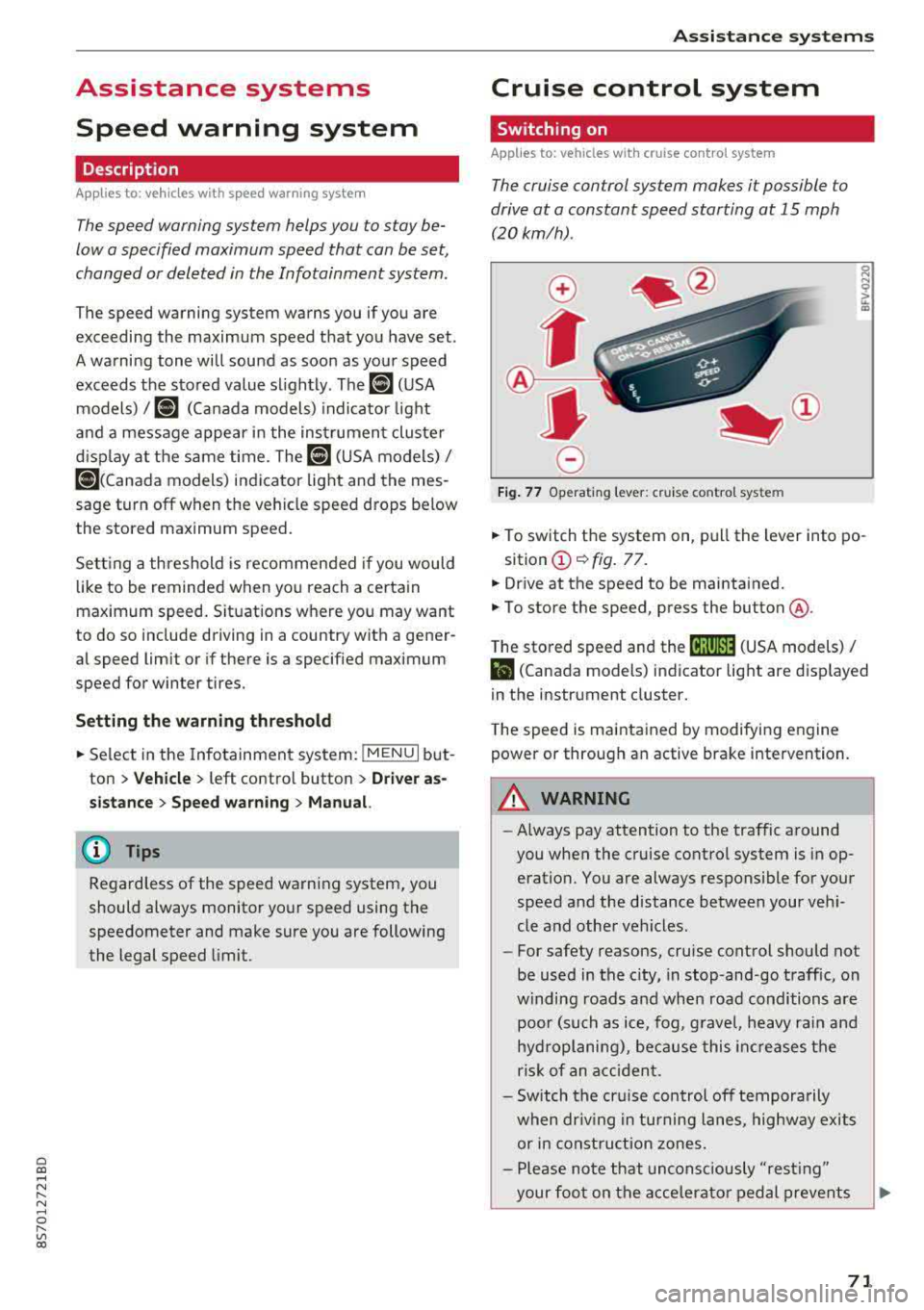
The cruise control system makes it possible to
drive at a constant speed starting at 15 mph
(20 km/h).
0
f
~
0
Fig . 7 7 Operat ing leve r: cru ise control system
.. To switch t he system on, pull the lever into po-
sition
(D ¢ fig. 77.
.. Drive at the speed to be maintained.
.. To store the speed, press the button @.
T he stored speed and the
@jltJ~i, (USA models) /
l'I (Canada models) ind icator lig ht are d isp layed
in the instrument cluster.
T he speed is maintained by modifying engine
power or through an active brake intervention.
_8 WARNING
---A lways pay attention to the traffic around
you when the cruise control system is in op
eration. You are always responsible for your
speed and the distance between your vehi
cle and othe r vehicles.
-For safety reasons, cruise control should not
be used in the city, in stop-and-go traffic, on
w inding roads a nd when road conditions a re
poor (such as ice, fog, g rave l, heavy rai n and
hydroplaning), because this in cr eases the
risk of an acciden t.
-Sw itch the cr uise con trol off tempora rily
when dr iv ing in tu rning lanes, highway exits
or in const ruc tion zones.
-Please no te that uncons ciously "resting"
your foo t on the accelera to r ped al prevents
-
71
Page 75 of 310
Cl co .... N ,....
N
wheel will vibrate lightly. In order for this warn
ing vibration to occur, it must first be switched
on in the Infotainment system. Active lane assist
is ready for operation when the lane marker line
is detected on a t least one side of the vehicle.
The system is design ed for driving on express
ways and highways and so it only activates at
speeds above approximately 40 mph (65 km/h)
(depending on the market).
Applies to vehicles with side assist* : if you acti
vate a turn s ignal when active lane assist is ready
and it classifies a lane change as critical because
of vehicles traveling alongside you or approach ing you, there will be noticeable corrective steer
in g shortly before you leave the lane . This will at
tempt to keep your vehicle in the lane.
Applies to vehicles without side assist *: the sys
tem does not warn when it is ready if you activate
the turn signal before crossing the lane marker line. In this case , it assumes that you are chang
ing lanes intentionally .
A WARNING
- The system warns the driver that the vehicle
is leaving the lane using corrective steer ing.
The driver is always responsible for keeping
the vehicle within the lane.
- The system can assist the driver in keeping
the vehicle in the lane, but it does not drive
by itself. Always keep your hands on the
steering wheel.
- Corrective steering may not occur in certain
situations, such as during heavy braking .
-There may be cases where the camera does
not recognize all lane marker lines . Correc
tive steering can only take place on the side
of the vehicle where lane marker lines are
detected .
-Other road structures or objects could possi
bly be identified unintentionally as lane
marker lines . As a result, corrective steering
may be unexpected or may not occur .
8 1l The corrective stee rin g func tion is not avail able in all mar,..._
~ ket s.
Assistance systems
-The camera view can be restricted, for ex
ample by vehicles driving ahead or by rain,
snow, heavy spray light shining into the
camera or by dirt on the window . This can
result in active lane assist not detecting the
lane marker lines or detecting them incor
rectly.
- In certain situations where visibility is low,
the vehicle may switch internally from "ear
ly " to "late" steering correction
l).
-Under certain conditions such as ruts in the
road, an inclined roadway or crosswinds, the
corrective steer ing alone may not be enough
to keep the vehicle in the middle of the lane .
- For safety reasons, act ive lane assist must
not be used when there are poor road and/
or weather conditions such as slippery roads, fog, gravel, heavy rain, snow and the
potential for hydroplaning. Using active lane
assist under these conditions may increase
the risk of a crash.
Switching on/off
Applies to : vehicles wit h Aud i act ive la ne ass ist
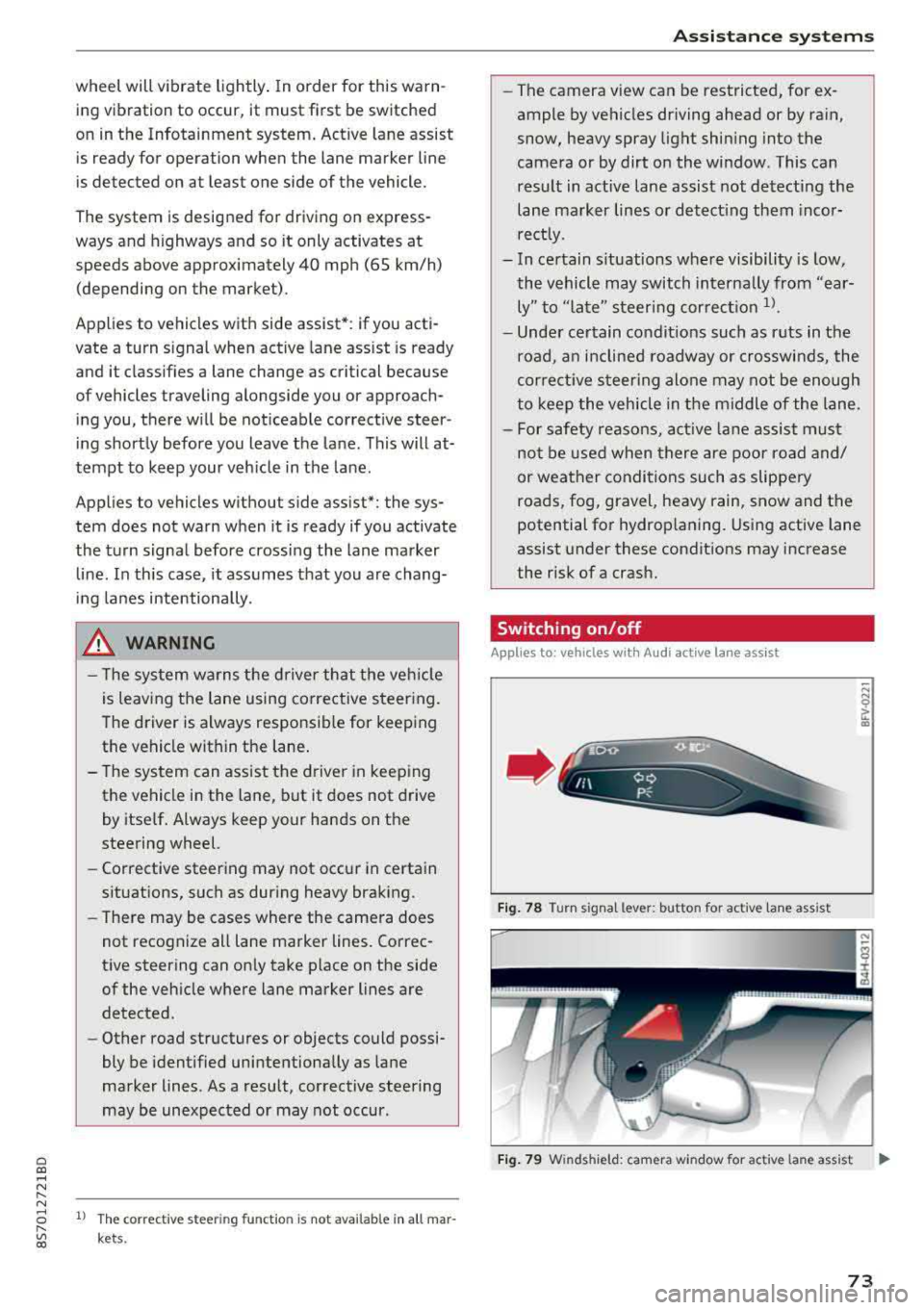
Fig. 78 Turn s ignal lever: but ton for activ e lane ass ist
"' N 0 > u. CD
Fig. 79 W inds hield: camera w indow for ac tive la n e ass ist ..,.
73
Page 76 of 310
Ass is tance sy stem s
,.. Press the button to switch the system on and
off¢ fig. 78. The . or rl1 indicator light in
the instrument cluster turns on or off.
Ind icat or light s
• Read y: the i ndicator light t urns on when the
system is ready for use. The system can now be
operated.
rl1 Not read y: the indicator light turns on if the
system is swi tched on but is inoperab le. Th is may
be due to the following reasons:
- There is no lane marker line .
- The relevant lane marker lines are not detected (for example, mark ings in a construction zone
o r because they are obstructed by snow, dirt,
water or lighting).
- The veh icle speed is below the activation speed
of approximately 40 mph (65 km/h) (the speed
may vary depending on yo ur country).
- The lane is too narrow or too wide.
- The curve is too narrow .
- The driver's hands are not on the steering
wheel.
(D Tips
- Make sure the camera's field of view
¢
fig. 79 is not obstructed by stickers or
anything else . For informat ion on cleaning,
see¢ page 266 .
-In certain markets : if the system is switched
on, it will sw itch on automat ically each time
the ign it ion is switched on .
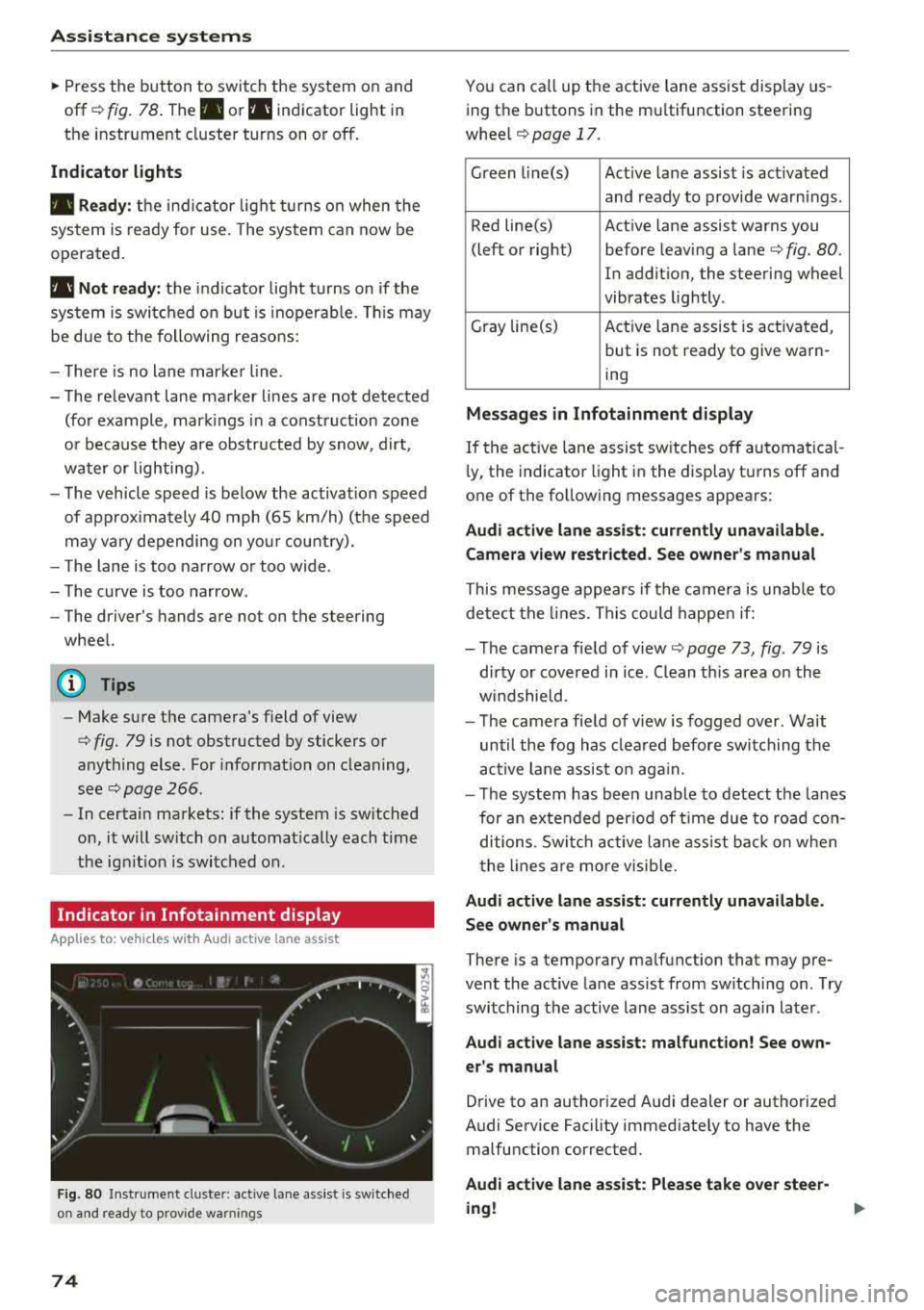
Indicator in Infotainment d isplay
Ap plies to: ve hicles w ith Aud i active lane assist
F ig. 80 Instrument cluste r: active lane ass ist is switched
on and ready to prov ide warnings
74
You can call up the active lane ass ist display us
ing the buttons in the mu ltifunction steering
wheel
¢ page 17.
Green l i ne(s) Act ive lane assist is act ivated
and ready to provide warnings .
Red line(s) Active lane assist warns you
(left or right) before leav ing a
lane¢ fig. 80.
In addition, the steering wheel
vibrates lightly .
Gray line(s) Act ive lane assist is activated,
but is not ready to give warn-
ing
M essag es in Infotainm ent disp la y
If the active lane assist sw itches off automatical
l y, the indicato r light i n the display turns off and
one of the following messages appears :
Audi a ctive l ane ass is t: currentl y unavailable.
Camera view restricted . See ow ner' s ma nual
This message appears if the camera is unable to
detect the lines. This could happe n if:
- The camera field of
view ¢ page 73, fig. 79 is
dirty or covered in ice . Clean th is area on the
w indshield.
- The camera fie ld of view is fogged over. Wait
until the fog has clea red before switching the
active lane assist on aga in.
- T he system has been unable to detect the lanes
for an extended per iod of t ime due to road con
ditions . Switch ac tive lane assist ba ck on w hen
the lines a re more visib le.
A udi acti ve l ane as sis t: cur rentl y una vailable.
Se e owner' s manual
There is a temporary malfunction that may pre
vent the act ive lane assist from sw itching on . T ry
switching the active lane assist on again later .
Audi active lane assi st: mal func tion! See own
er 's manual
Drive to an authorized Audi dealer or authorized
Audi Service Facility immediately to have the malfunction corrected.
Audi a ctive lane a ssi st: Plea se take over stee r
ing !
Page 77 of 310
Cl co .... N ,....
N
This message appears if you are not stee ring by
yourse lf . If this is th e case, active lane ass ist does
not switch off, but it is "not ready" to provide a
warning . The system can he lp you keep the veh i
cle in the lane. However, you are responsible for
driving the vehicle and must steer it yourself .
A WARNING
Note that messages may be delayed or not
displayed on vehicles with accessor ies mount
ed on the steer ing whee l, such as a stee ring
wheel sp inner knob. Always keep you r hands
on t he steering whee l.
Adjusting the steering time and vibration
warning
Appl ies to: vehicles with Audi act ive lane ass ist
You con adjust individual act ive lone assist set
tings in the Infotainment system.
Selec t in the Infotai nment system : I MENUI but
ton>
Vehicle > left con trol button > Driv er a ssis
tance > Audi acti ve lane assist
Steering time
1>
Early : in this setting, the correct ive steering hap
pens continuously to help keep the vehicle in the
center of the lane .
Late : in this setting, the system provides correc
tive steering just before a vehicle whee l touches a
detected lane ma rker line .
Vibration warning
You can switch the additional vibration warning
in the steering wheel o n or off.
(I) Tips
In certain markets: your settings are stored
automatically and assigned to the remote
cont rol key in use .
8 1l The co rrect ive stee rin g fu nctio n is not ava ilabl e in all mar ,..._
~ kets.
A ssi st a nce systems
Audi side assist
Description
Applies to: veh icles w ith Audi side assist
0, :;; 0
it m
Fig . 81 Senso r de tect io n range
Fi g. 82 Disp lay on t he ex te ri or m irro r
Side assist helps you monitor your blind spot and
traff ic beh ind your vehicle . Withi n the limits of
the system , it warns you abo ut vehicles that are
coming closer or that a re t raveling with you with
i n senso r
range @~ fig. 81: if a lane change is
cla ssified as critical , the disp lay @ in the e xte rior
mirror
~ fig . 82 turns on .
T he display in the left exterio r m irror p rovides as
s istance when making a lane change to the left,
whi le the display in the r ight exterior mirro r pro
vides ass istance when m aking a lane change to
the right.
Information stage
As long as you do not act ivate the tu rn s igna l,
s ide ass ist
informs you about vehicles tha t are
detec ted and classifie d as critical. The display in
t h e mirror tu rns on, but is d im.
75
Page 79 of 310
Cl 00 ... N r-N ... 0 r-Vl 00
system may have detected a vehicle in another
l ane that is
not adjacent to your current lane .
- If you are dr iving t hrough a curve . Side assist
may react to a vehicle that is one lane over
from the adjacent lane .
- If side assist reacts to other objects (such as
high or displaced guard rails) .
- In poor weat her condit ions . The side assist
functions a re limited.
D o no t cove r the radar
sensors ¢ fig. 84 wit h
sticke rs, deposits, bicycle whee ls o r othe r ob
jects , beca use they w ill impai r the f unct ion . For
information on cleaning,
see¢ page 266 .
A WARNING
-Always pay atte ntion to traffic and to the
area aro und yo ur vehicle. Side assist cannot
rep lace a dr ive r's attention. The dr ive r alone
is a lways responsib le for lane changes and
s imi lar driving maneuvers .
- In some situat ions, the system may not
function or its funct io n may be limited . For
example:
- If vehicles a re a ppro ac hi ng o r being le ft
behind very quickly. The display may not
tur n on in t ime .
- I n poo r weather cond itions s uch as heavy
rain, snow o r heavy mist .
- On very wide lanes, in t ight curves, o r if
there is a rise in the road s urface. Vehicles
in the adjacent lane may not be detected
beca use they are outs ide of the sensor
range.
{Ll) Note
The sensors can be disp laced by im pacts o r
damage to the bumpe r, whee l housing and
underbody. Th is can impa ir the system. Have
an authorized A udi dealer or autho rized Audi
Serv ice Facility c heck their fu nction.
(D Tips
- If the window g lass in the d river 's doo r or
front passenger 's doo r has been t inted, the
display in the exterior mirror may be i ncor
r ect .
-
Ass istance systems
- F or an exp lanat ion on co nf orm ity w it h t he
FCC regulat ions in the Un ite d States an d the
Indust ry Canada regulat ions, see
¢ page 293.
Switching on and off
App lies to : vehicles wi th Audi side ass ist
.. Select in the Infotainmen t system: I M ENU ! but
ton
> Vehicle > left control b utton > Driver a s
s istance > Audi side a ssist
If the system is activated, the disp lays in the ex
terior m irrors w ill turn on briefly when the igni
t ion is switched on .
Adjusting the display brightness
Applies to : vehicles wit h Audi s ide ass ist
The display brightness con be adjusted in the In
fotainment system .
.. Select in the Infotainment system: I MENU! but
ton
> Vehicle > left control button >Dri ver as
sistance > Audi side assist
The disp lay br ightness adjusts automatically to
the brightness of the surroundings, both in the
i nformation and in the wa rn ing stage. I n very
dark or very br ight surround ings, the automatic
adjustment w ill set the display to t he m inimum
o r max imum level. In such cases, yo u may notice
no ch ange when adj usting the br igh tne ss, or the
c h ange m ay only be noticeab le on ce t he sur
r oundings change.
Adjust the br ightness to a leve l w he re the d isplay
in th e i nfo rm atio n stage will not disrupt yo ur
v iew ahe ad. If yo u change the br igh tness , the d is
play in the exterio r mirror wi ll briefly show the
brightness leve l in the information stage . The
brig htness of th e warning stage is linked to the
brightness in the information stage and is adjust
ed along with the information stage.
(D Tips
- Side ass ist is not act ive while you are mak
ing the adjustment.
- Yo ur settings a re automat ica lly stored and
assigned to the remote control key be ing
used.
77