warning AUDI TT ROADSTER 2018 User Guide
[x] Cancel search | Manufacturer: AUDI, Model Year: 2018, Model line: TT ROADSTER, Model: AUDI TT ROADSTER 2018Pages: 310, PDF Size: 46.95 MB
Page 19 of 310
Cl co .... N ,-... N ...... 0 ,-... Vl co
Driver information system
Overview
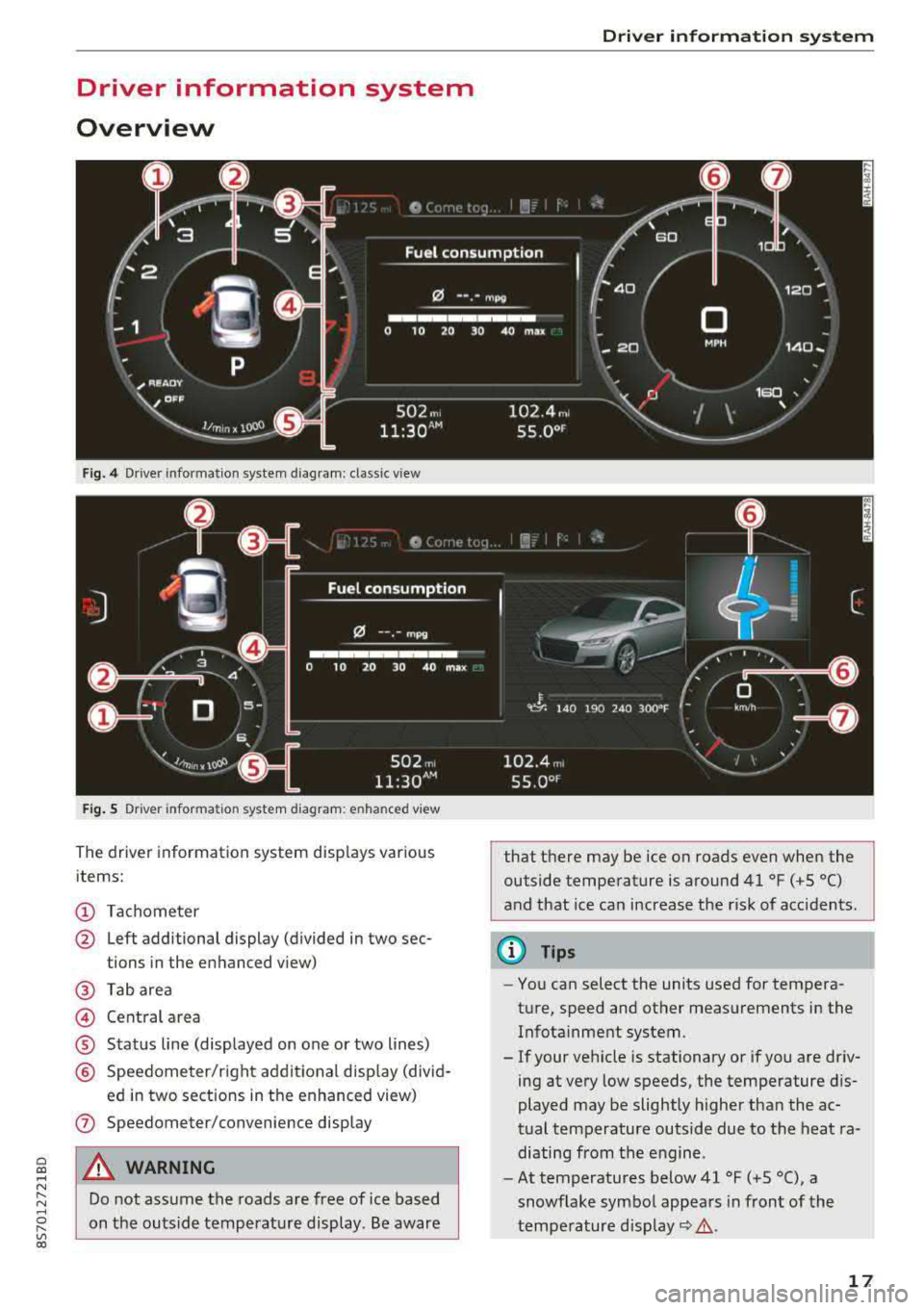
Fig. 4 Driver information system diagram: classic v iew
Fig. S D rive r in formation system diagram : en ha nced v iew
The driver information system displays various
items:
(D Tachometer
@ Left additional display (divided in two sec-
tions in the enhanced view)
@ Tab area
@ Central area
® Status line (displayed on one or two lines)
@ Speedometer/right additional display (divid-
ed in two sections in the enhanced view)
(J) Speedometer/convenience display
A WARNING
Do not assume the roads are free of ice based
on the outside temperature display . Be aware
Driver information system
that there may be ice on roads even when the
outside temperature is around 41 °F ( +S °C)
and that ice can increase the risk of acc idents.
(D Tips
- You can select the units used for tempera
ture, speed and other measurements in the Infotainment system .
- If your vehicle is stationary or if you are driv
ing at
very low speeds, the temperature dis
played may be slightly higher than the ac
tual temperature outside due to the heat ra
diating from the engine.
- At temperatures below 41 °F (+S °C), a
snowflake symbol appears in front of the
temperature
display~ &.
17
Page 20 of 310
Driver information system
Multifunction steering
wheel plus
Operating
Applies to: vehicles with multifunction steering wheel plus
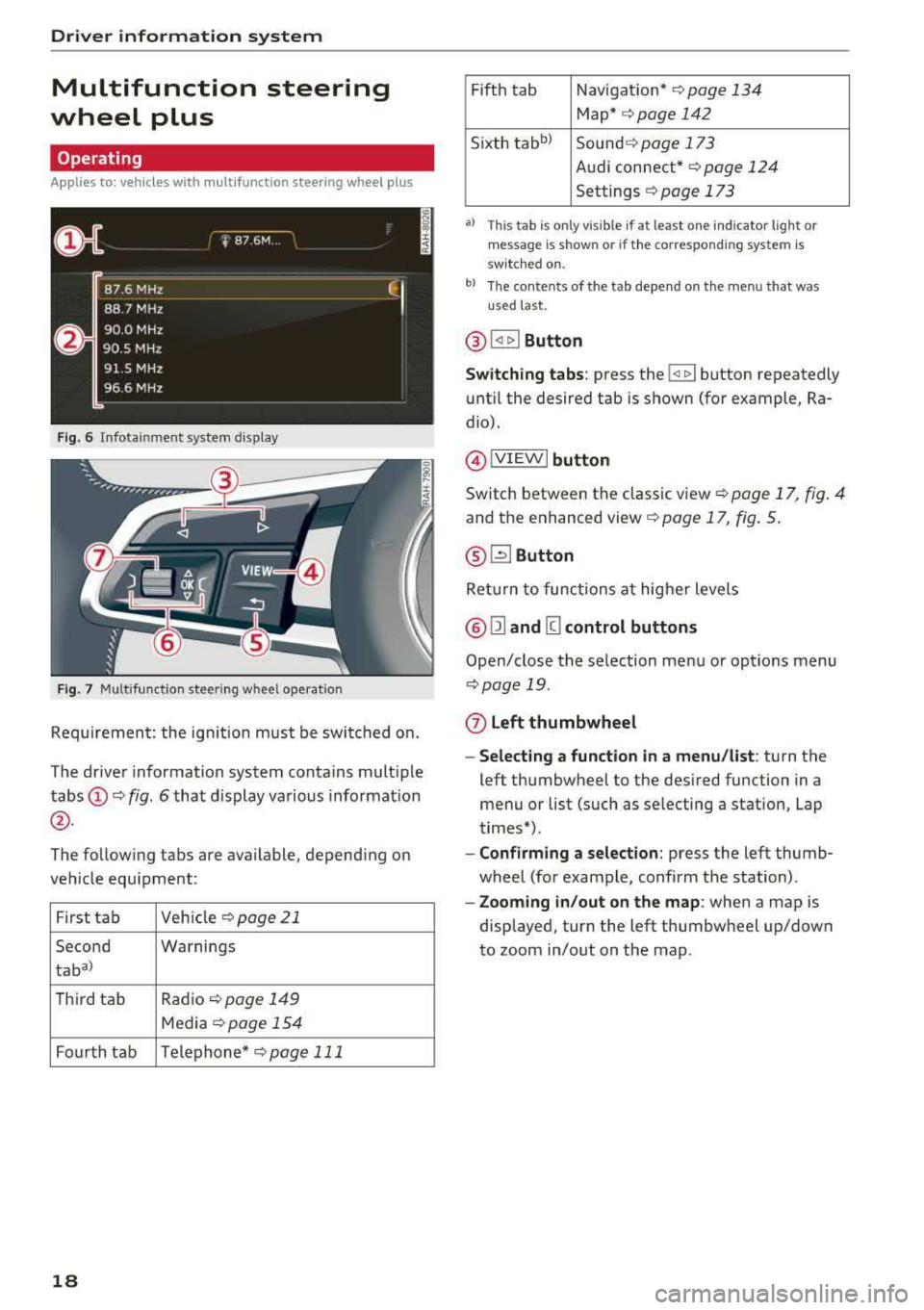
F ig. 6 Infotainment system display
Fig. 7 Multifunction steering wheel operation
Requirement: the ign ition must be switched on.
The driver information system contains multiple
tabs
(D ¢ fig. 6 that display various information
@.
The following tabs are available, depend ing on
vehicle equipment:
First tab Veh
icle ¢page21
Second Warnings
taba)
T
hird tab Radio ¢page 149
Media ¢page 154
Fourth tab Telephone*
¢pag e 111
18
Fifth tab Navigat ion* ¢page 134
Map* ¢ page 142
Sixth
tabb ) Sound ¢ page 173
Audi connect*
¢page 124
Settings ¢ page 173
a) This tab is only visible if at least o ne indicator lig ht or
mes sage is shown or if the correspon ding system is
sw itc hed on.
b) The contents of the tab depend on the menu that was
u se d last.
® I<] t>I Button
Switching tabs: press the !
until the desired tab is shown (for example, Ra
dio).
@ !VIEWI button
Switch between the classic view¢ page 17, fig. 4
and the enhanced
view¢ page 17, fig. 5.
® G2J Button
Ret urn to functions at higher levels
@ Ill and [g control buttons
Open/close the selection menu or options menu
¢page 19.
(z) Left thumbwheel
- Selecting a function in a menu/list : turn the
left thumbwheel to the desired function in a
menu or list (such as se lecting a station, Lap
times*).
- Confirming a selection: press the left thumb
wheel (for example, confirm the station) .
-Zooming in/out on the map : when a map is
displayed, turn the left thumbwheel up/down
to zoom in/out on the map.
Page 22 of 310
Driver information system
@l1<1
- Selecting the previous/next track or station :
press the l1<1<1! or l1:>1>1 I button.
-Fast forwarding/rewinding audio files : press
and hold the
!1<1<1 1 or 11:>1:> 1! bu tton un til the desired
location in the file is reached.
@lilButton
- Programmable steering wheel button
-open
ing a function :
press the@ button.
-Programmable steering wheel button - re
questing a function :
press and hold the@ but
ton.
- Programmable steering wheel button - chang
ing a function :
select the first tab > Vehicle
settings
> Steering wheel button assignment .
@l~w l Button
- Repeating the last navigation prompt :
press
the
l ~"'v l button when route guidance is act ive.
- Changing the voice guidance volume : when
route gu idance is active, turn the right thumb
whee l upward or downward during a navigation
prompt.
Multifunction steering
wheel
Operating
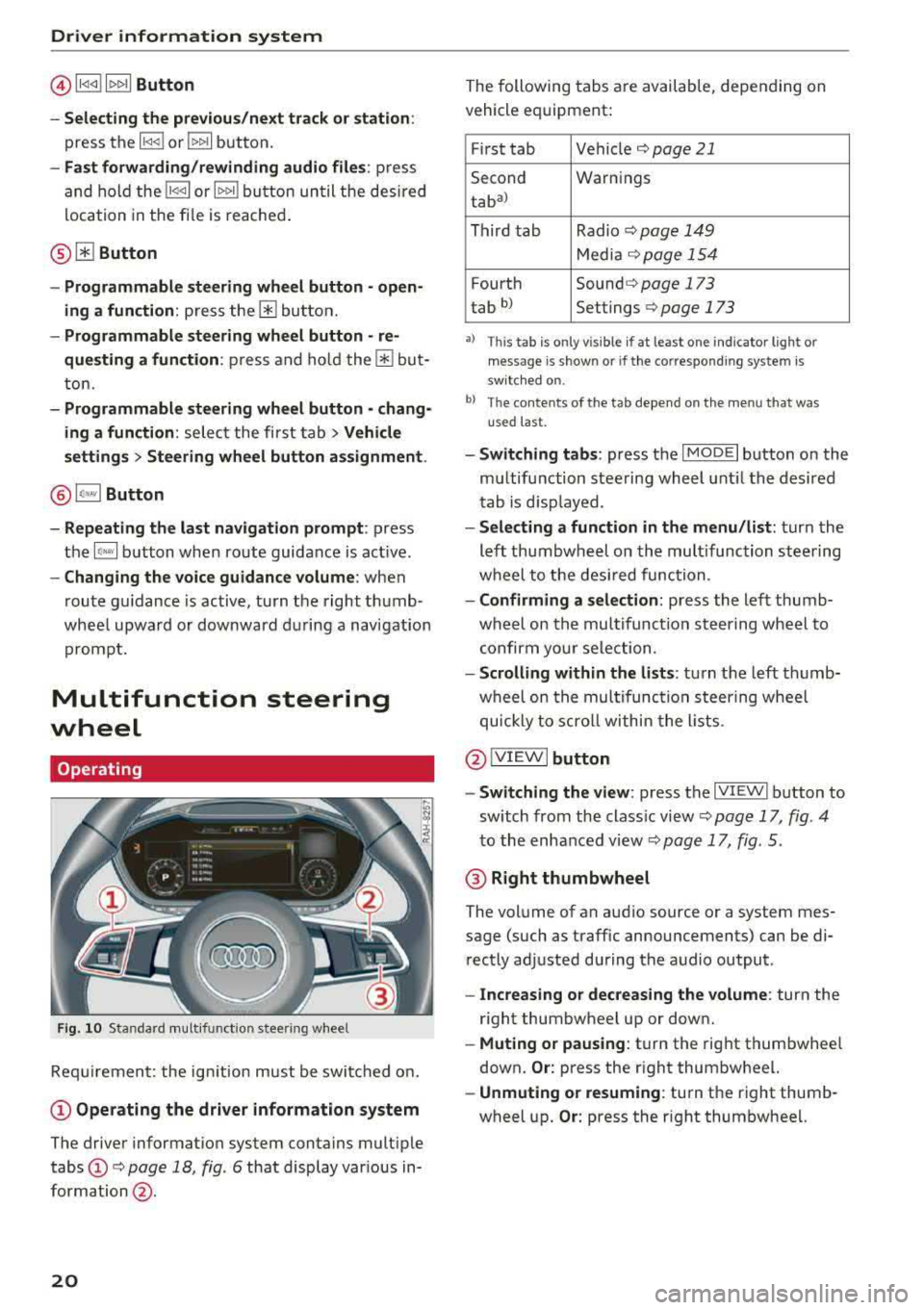
F ig . 10 Standard multifunct ion stee ring wheel
Requirement: the ign ition must be swi tched on.
(D Operating the driver information system
The driver information system contains multiple
tabs
(D c> page 18 , fig. 6 that display various in
formation @.
20
The following tabs are available, depending on
vehicle equipment:
First tab Vehicle
c> page 21
Second Warnings
tab
a)
Third tab Radio c> page 149
Media c>page 154
Fourth Sound c> page 173
tab b) Settings c> page 173
•> This tab is onl y visi ble if at least on e indi ca tor ligh t o r
mess age is show n or if the co rres pond ing sys te m is
s w it ch ed o n.
bl Th e conten ts of the t ab depe nd on the men u th at wa s
u se d las t.
- Switching tabs: press the I MOD E I button on the
multifunction steering wheel until the desired
tab is disp layed .
-Selecting a function in the menu /list: turn the
left thumbwheel on the multifunction steering
wheel to the desired function.
-Confirming a selection: press the left thumb
wheel on the multifunc tion steering wheel to
confirm your selection .
-Scrolling within the lists : turn the left thumb
wheel on the multifunction steering wheel
quickly to scroll within the lists .
@IVIEWI button
- Switching the view :
press the IV IEWI button to
sw itch from the class ic view
c> page 17, fig . 4
to the enhanced view c> page 17, fig. 5.
@ Right thumbwheel
The volume of an audio source or a system mes
sage (such as traffic announcements) can be di
rectly adjusted during the audio output .
-Increasing or decreasing the volume : turn the
right thumbwheel up or down.
-Muting or pausing : turn the right thumbwhee l
down.
Or: press the right thumbwheel.
-Unmuting or resuming : turn the right thumb
wheel up.
Or: press the right thumbwheel.
Page 25 of 310
Replacing a key
If a key is lost, see an authorized Audi dealer or
authorized Audi Service Facility. Have
this key de
activated.
It is important to bring all keys with
you. If a key is lost, you should report it to your
insurance company.
Number of keys
You can check the number of keys ass igned to
your vehicle in the Infotainment system . To do
this, select the
I MENU I button > Vehicle > left
control button
> Service & checks > Vehicle in ·
formation .
This way, you can make sure that you
have all the keys when purchasing a used vehicle .
Electronic immobilizer
The immobilizer prevents unautho rized use of
the vehicle .
Unde r certain circumstances, the vehicle may not
be able to start if there is a remote contro l key
from a different vehicle manufacturer on the key
chain .
Data in the master key
When driving , service and maintenance- relevant
data is continuously stored in your remote con
trol key . Your Audi service adviso r can read out
this data and te ll you about the work your vehicle
needs. This applies also to veh icles with a con
venience key *.
Personal convenience settings
If two people use one vehicle, it is recommended
that each person always uses "their own" master
key. When the ignition is turned
off or when the
ve hicle is locked, persona l convenience settings
for the following systems are stored and as
signed to the remote master key .
- Climate control system
- Parking aid*
- Active lane assist*
- Side ass ist*
- Drive select
a The stored settings are automatically recalled co
;:::: when you unlock the vehicle, open the doors or ,....
~ turn on the ignition. 0 ,....
Vl co
Opening and closing
A WARNING
If you leave the vehicle, switch the ignition off
and take the vehicle key w ith you. This applies
particularly when children remain in the vehi
cle . Otherwise the child ren cou ld start the en
g ine or operate electrical equ ipment such as
power windows.
(D Note
Protect the remote control key against high
temperatures and direct sunl ight.
(D Tips
- The operation of the remote control key can
be temporarily disrupted by interference
from transmitters near the vehicle working
in the same frequency range (such as a cell
phone or radio equipment). Always check if
yo ur vehicle is locked!
- For an explanat ion on conformity with the
FCC regulatio ns in the United States and the
Industry Canada regulations, see
¢page 293.
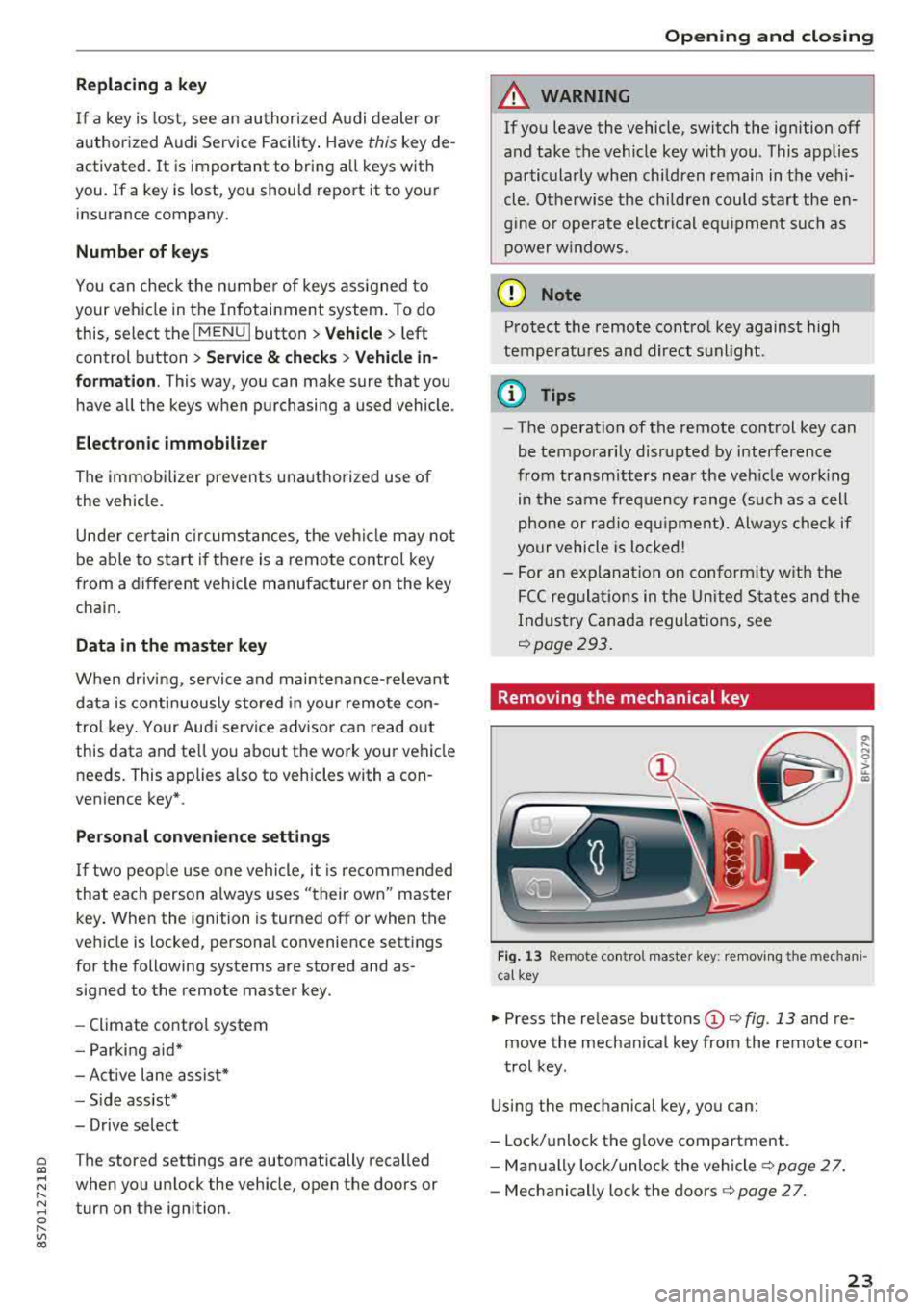
Removing the mechanical key
Fig. 13 Remote co ntro l master key : removing the mechan i
cal key
.,. Press the re lease buttons (D ¢ fig . 13 and re
move the mechanical key from the remote con
trol key.
Using the mechanical key, you can:
- Lock/unlock the glove compartment.
- Manually lock/unloc k the vehicle s>
page 2 7.
- Mechanically loc k the doors s>
page 2 7.
23
Page 27 of 310
Cl 00 .-< N r-N .-< 0 r-Vl 00
is unlocked when unlocking the vehicle
<=> page 26.
A WARNING
No one, especially children, should stay in the
vehicle when it is locked from the outside, be
cause the windows can no longer be opened
from the inside <=> page
2 7. Locked doors
make it more difficult for emergency workers
to get into the vehicle, which puts lives at
risk.
(D Tips
- Only use the remote control key when you
are within view of the vehicle .
- Do not use the remote control when you are
inside the vehicle. Otherwise, you could un
intentionally lock the vehicle. If you then
tried to start the engine or open a door, the
alarm would be triggered. If this happens,
press the unlock
button @.
-The selector lever must be in the P position
on vehicles with a convenience key*; other
wise the vehicle will not lock.
- Only use the panic function in an emergen
cy.
Unlocking/locking with the convenience
key
Applies to: vehicles with convenience key
The doors and luggage compartment lid can be
unlocked/locked without using the remote con
trol key.
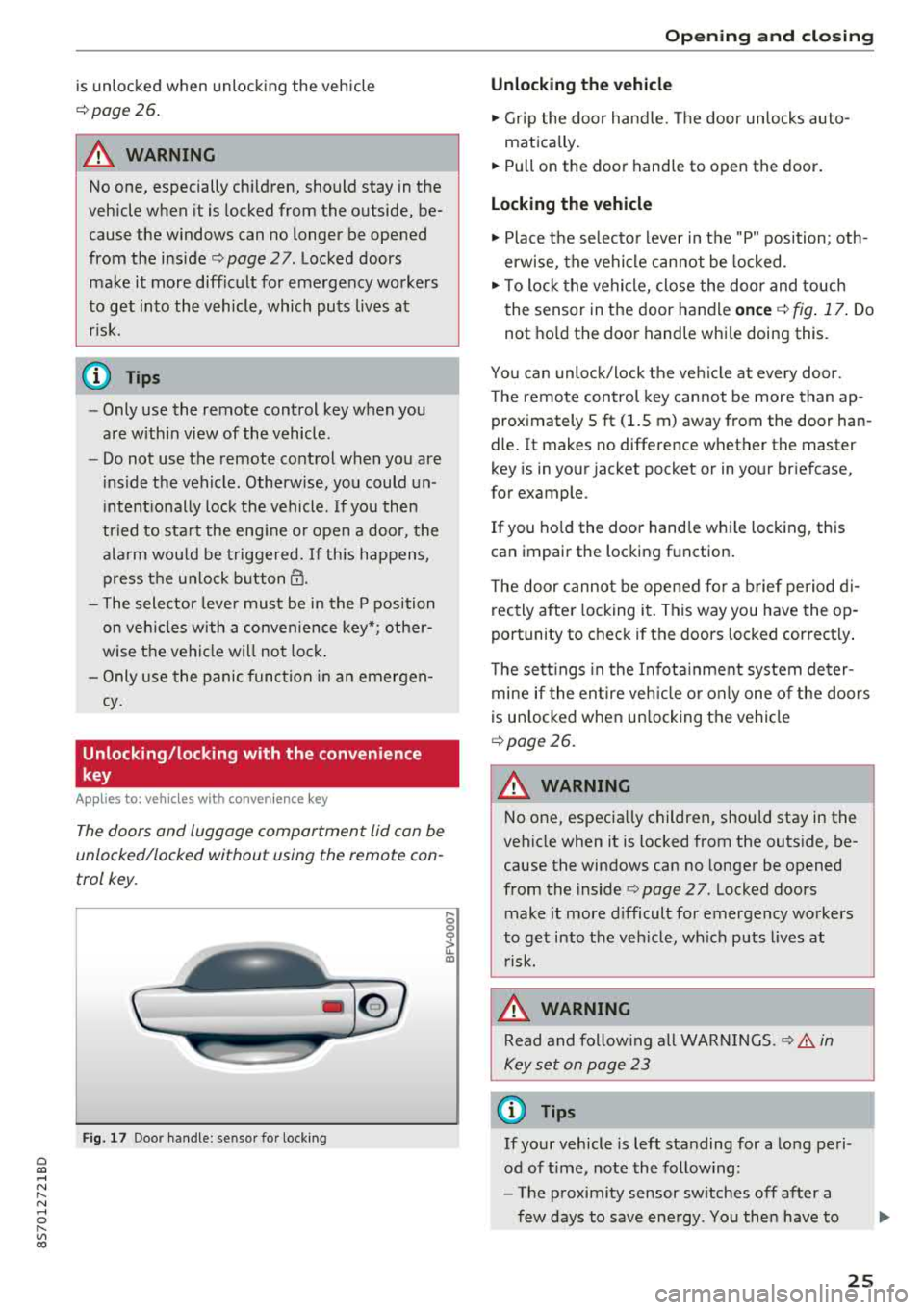
Fig. 17 Door handle : senso r for locking
,... 0
0
~ a:,
Opening and closing
Unlocking the vehicle
.,. Grip the door handle. The door unlocks auto-
matically.
.,. Pull on the door handle to open the door.
Locking the vehicle
.,. Place the selector lever in the "P" position; oth
erwise, the vehicle cannot be locked.
.,. To lock the vehicle, close the door and touch
the sensor in the door handle
once <=> fig. 17. Do
not hold the door handle while doing this.
You can unlock/lock the vehicle at every door.
Th e remote control key cannot be more than ap
proximately S ft
(1.5 m) away from the door han
dle. It makes no difference whether the master
key is in your jacket pocket or in your briefcase,
for example .
If you hold the door handle while locking, this
can impair the locking func tion .
The door cannot be opened for a brief period di
r ectly after locking i t. This way you have the op
portunity to check if the doors locked correctly.
The settings in the Infotainment system deter
mine if the entire vehicle or only one of the doors
is unlocked when unlocking the vehicle
¢page 26.
A WARNING ,..___ -
No one, especially children, should stay in the
vehicle when it is locked from the outside, be
cause the windows can no longer be opened
from the inside
¢page 27 . Locked doors
make it more difficult for emergency workers
to get into the vehicle, which puts lives at risk.
A WARNING
Read and following all WARNINGS .<=>.& in
Key set on page 23
(D Tips
If your vehicle is left standing for a long peri
od of time, note the following:
- The proximity sensor switches off after a
few days to save energy. You then have to
-
25
Page 28 of 310
Opening and clo sin g
pull once on the door handle to unlock the
vehicle and a second time to open it .
- The energy management system gradually
turns off unnecessary convenience functions
to prevent the vehicle battery from draining
and to maintain the vehicle's ability to start
for as long as possible. You may not be able
to unlock your vehicle using the convenience
key.
- For an explanation on conformity with the
FCC regulations in the United States and the
Industry Canada regulations, see
¢page 293.
(0 Tips
Unlocking with the convenience key (keyless
access) can be deactivated temporarily .
- Place the selector lever in the "P" pos ition;
otherwise, the vehicle cannot be locked.
- Close the door and press the button
(D III
¢ page 24, fig.16.
- Press the sensor on the door handle on ce
within five seconds ¢ fig. 17, ¢ & . Do not
ho ld the door handle wh ile doing this .
- The next time the vehicle is unlocked, it can
on ly be done with the remote control key or
mechanically us ing the door lock cylinder.
The convenience key will be active again af
ter the next loc king/un locking.
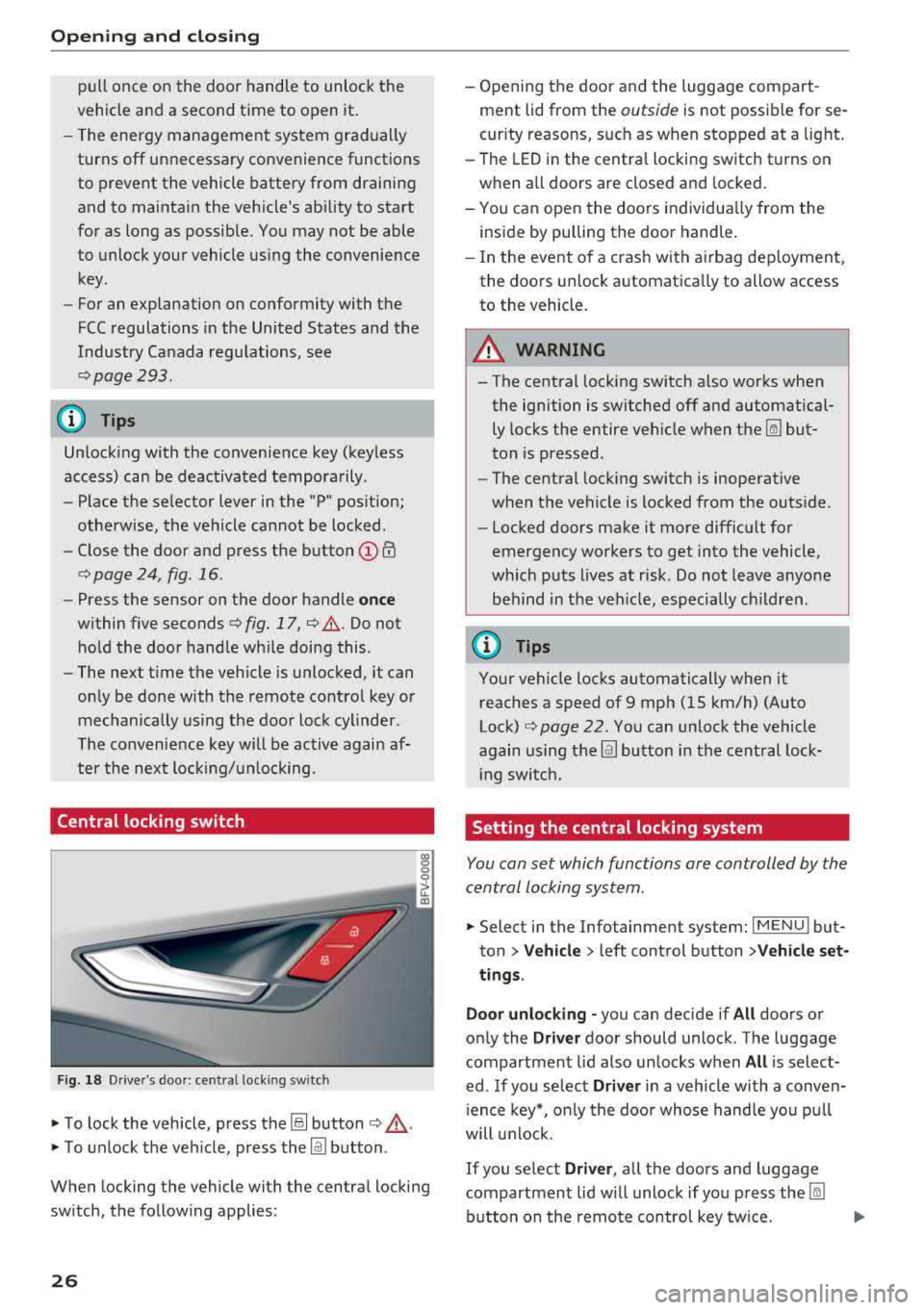
Central locking switch
F ig . 18 Dr ive r's doo r: central locki ng switch
• To lock the vehicle, press the@! button ¢,& .
• To unlock the veh icle, press the @J button .
When locking the vehicle with the central locking
sw itch, the follow ing applies:
26
- Opening the door a nd the luggage compart
ment lid from the
outside is not possible for se
curity reasons, such as when stopped at a light.
- The LED in the centra l locking switch t urns on
when all doors are closed and locked.
- You ca n open the doors individua lly from the
inside by pulling the door handle.
- In the eve nt of a cras h with a irbag dep loyment,
the doo rs unlock automatica lly to allow access
to the vehicle.
8_ WARNING
-The central locking switch a lso works when
the ignition is switched off and automatical
ly locks the entire vehicle when
the~ but
ton is pressed.
- The central locking switch is inoperative
when the vehicle is locked from the outs ide .
-Locked doors make it more difficult for
emergency workers to get into the vehicle,
which p uts lives at risk . Do not leave anyone
behind in the ve hicle, especially ch ildren.
(D Tips
Your vehicle locks automatically when it
reaches a speed of 9 mph (15 km/h) (Auto
Lock)
¢ page 22. Yo u can unlock the vehicle
again using the
@J button i n the cent ral lock-
i ng switch.
Setting the central locking system
You con set which functions ore controlled by the
central locking system .
• Select in the Infotainment system: IMENUJ but
ton
>Ve hicle > left control button >V ehicle set
ting s.
Door unloc king -
you can decide if All doors or
on ly the
Driv er door should unlock . The luggage
compartmen t lid also un locks when
All is select
ed . If you se lect
Driver in a vehicle with a conven
i ence key*, o nly the doo r whose hand le yo u pu ll
will u nlock.
If you se lect Driver , all the doors and luggage
compartment lid w ill unloc k if yo u press
the ~
button on the remo te con trol key tw ice.
Page 30 of 310
Opening and clo sin g
Cl osing the luggage compartment lid
~ U se the inside g rip to pull the luggage com
partment lid down and a llow it to close using a
g en tle push
¢ &_ .
A WARNING
-Afte r clos ing the luggage compartment lid,
make sure that it is latched. Otherwise the
luggage compartment lid could open sud
denly when driving, which inc reases the risk
of an accident .
-Never drive with the luggage compartment
lid ajar or open, because po isonous gases
can enter the vehicle interior and create the
risk of asphyxiation .
-Never leave your vehicle unatte nded when
the luggage compartment lid is open . A
child could c raw l into the luggage compar t
ment.
If the l uggage compar tment lid was
then closed, the chi ld wou ld be trapped in
the vehicle and unable to escape . To reduce
the risk of injury, do not allow children to
play in or around the vehicle. Always keep
the luggage compartment lid and the doors
closed when the veh icle is not in use.
-Always make sure no one is in the luggage
compartment lid's range of motion when it
is closing , especially near the h inges . Fin
gers or hands could be p inched .
(D Tips
-When the vehicle is locked, the luggage
compartment lid can be unlocked separately
by pressing the
a button on the remote
control key . The luggage compartment lid
l ocks automatically when it is closed aga in .
-In case of an eme rgency or a faulty handle,
the luggage compartment lid can be opened
manua lly from the
inside ¢ page 28 .
28
Luggage compartment lid emergency
release
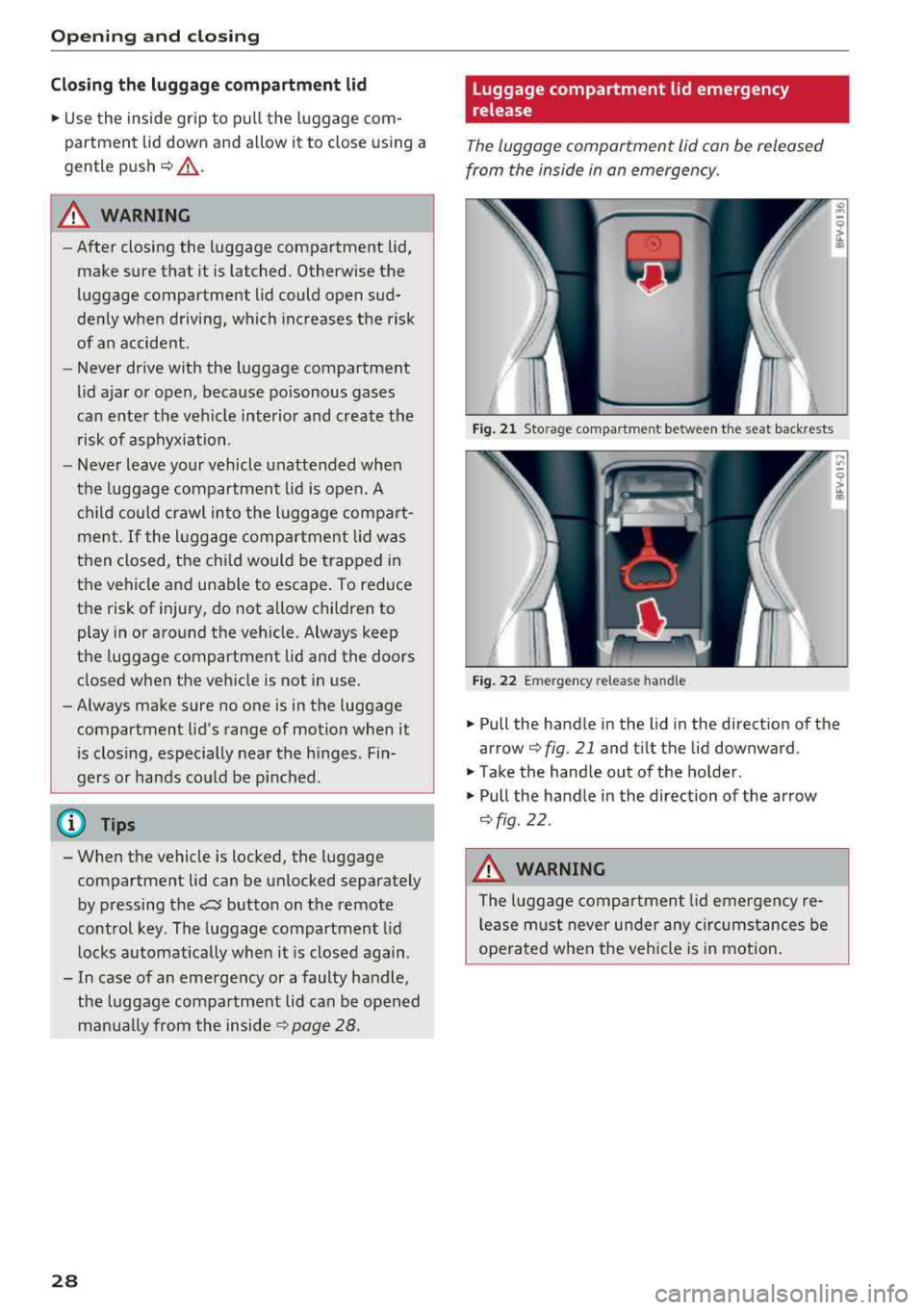
The luggage compartment lid can be released
from the inside in an emergency.
Fig . 21 Sto rag e compar tmen t be twee n the sea t ba ckre sts
F ig . 2 2 Emerge ncy rele ase handl e
~ Pull the handle in the lid in the direct ion of the
arrow
q fig . 21 and t ilt the lid downward .
~ Take the hand le out of the ho lder.
~ Pull the ha ndle in the direction of the arrow
q fig .22 .
.&_ WARNING
The luggage comp artment lid emergency re
lease m ust never under any circumstances be
ope ra ted when the vehicle is in motion.
Page 31 of 310
Cl 00 ... N r-N ... 0 r-Vl 00
Power window
Controls
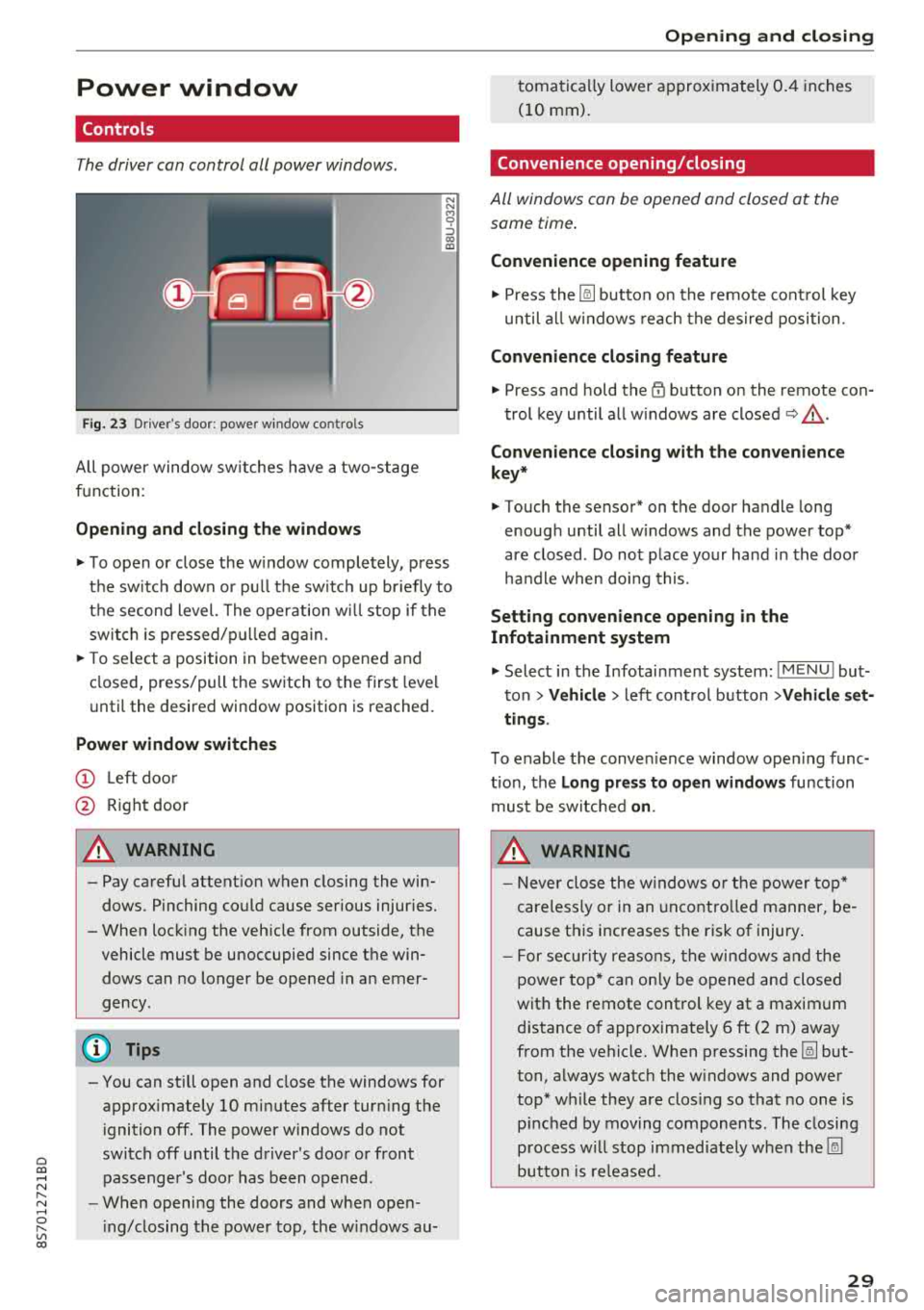
The driver can control all power windows.
Fig. 23 Dr iver's door: power w indow co ntro ls
All power window sw itches have a two -stage
function:
Opening and clo sing the windows
N N M 0 ::':,
"' ID
.,. T o open or close the w indow completely, press
the sw itch down or pu ll the sw itch up br iefly to
the second level. The operation wi ll stop if the
switch is pressed/p ulled aga in.
.,. T o se lect a position in between opened and
closed, press/pull the switch to the first level
unti l the desired window position is reached.
Power window switch es
(D Left doo r
@ Right door
A WARNING
- Pay careful attent ion when closing the win
dows . Pinching could cause serious injur ies.
- When locking the veh icle from outside, the
vehicle must be unoccupied since the win dows can no longer be opened in an emer
gency .
(D Tips
-You can still open and close the windows for
approximately
10 minutes after turning the
i gnition off. The power windows do not
switch off until the driver's door or front passenger's doo r has been opened .
- When opening the doors and when open
i ng/closing the power top, the w indows au-
Open ing and cl osing
tomatically lower approx imately 0.4 inches
(10 mm).
Convenience opening/closing
All windows can be opened and closed at the
same time.
Convenience opening feature
.,. Press the [@] button on the remote cont rol key
until all w indows reach the desired position .
Convenience closing feature
.,. Press and hold the~ button on the remote con-
trol key until all w indows are
closed ~,&. .
Con venience closing with the con venience
key *
.,. Touch the sensor* on the door handle long
enough until all w indows and the power top*
are closed . Do not place your hand in the door
ha ndle when doing this.
Settin g convenience opening in the
Infotainment sy stem
.,. Select in the Infotainment system: I M ENU ! but
ton
> Vehicl e> left cont rol button > Vehicle set
ting s.
To enable the conven ience window open ing func
tion, the
L o ng pres s to open windows function
must be switched
o n.
A WARNING
- Never close the w indows o r the power top*
careless ly or in an uncontro lled manner, be
cause this increases the risk of injury.
- For secur ity reasons, the win dows and the
power top* can only be opened and closed
with the remote control key at a maximum
d istance of approximately 6 ft (2 m) away
from the vehicle. When p ressing the [@] but
ton, always watch the w indows and power
top* while they are closing so that no one is
p inched by moving components . The closing
p rocess w ill stop immediately when the [@]
button is re leased.
29
Page 32 of 310
Opening and clo sin g
Correcting power w indow malfunctions
You can reactivate the one-touch up/down func
tion if it malfunctions .
.. Pull the power window sw itch up unt il the win
dow is completely raised.
.. Release the sw itch and pull it up again for at
least one second .
Garage door opener
(Homelink)
Description
Applies to: vehicles with garage door opener (Homelink)
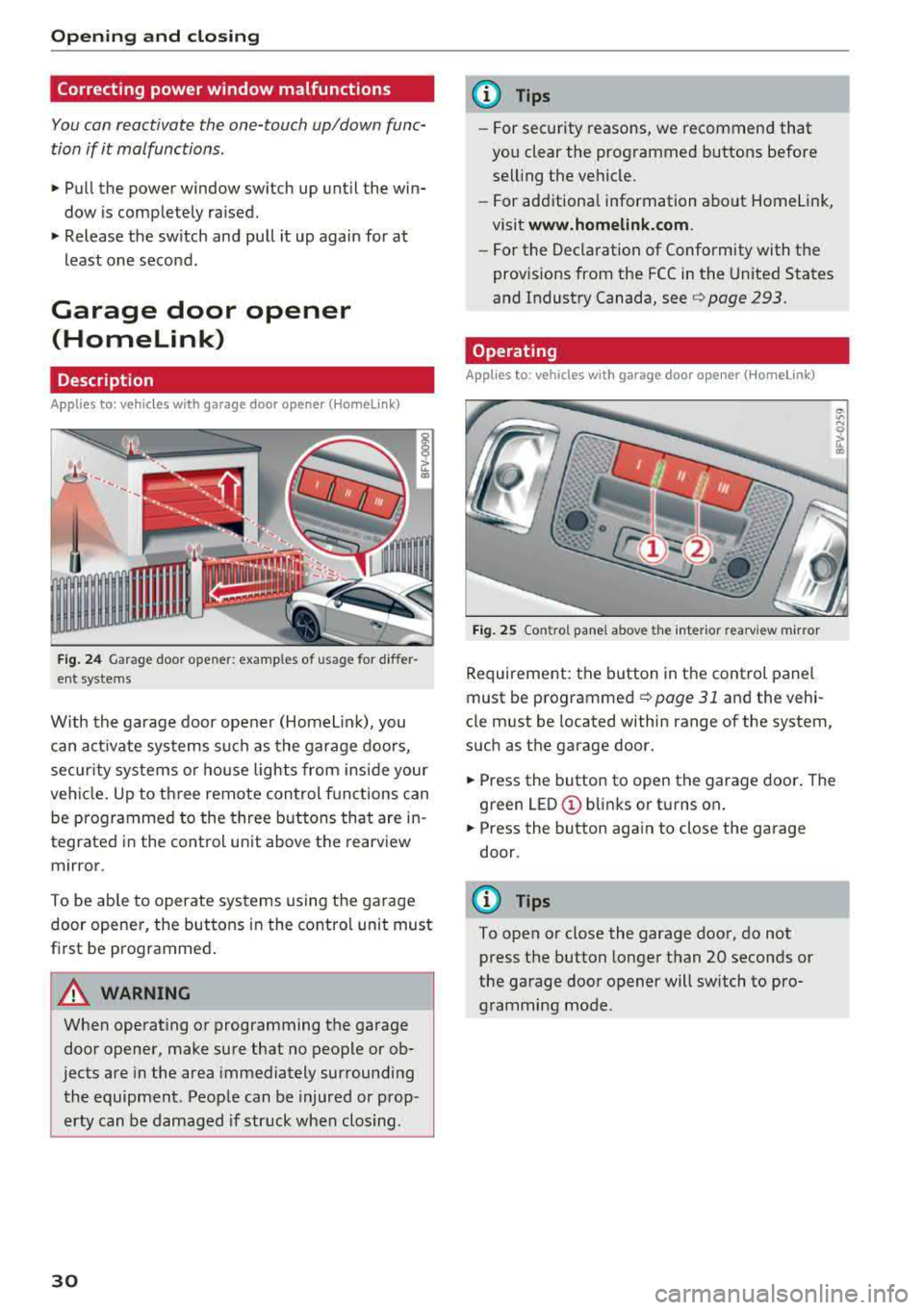
Fig . 24 Garage door ope ner: exa mples o f usage fo r differ
ent systems
W ith the garage door opener (Homelin k), you
can activate systems such as the garage doors,
secur ity systems o r house lights from inside your
veh icle. Up to three remote control f unctions can
be programmed to the three buttons that are in
tegrated in the control unit above the rearview
mirror .
To be ab le to operate systems using the garage
door opener, the buttons in the contro l unit must
first be programmed .
A WARNING
When operating or programming the garage
door opener, make sure that no people or ob
jects are in the area immediately surrounding
the equipment . Peop le can be injured or prop
erty can be damaged if str uck when closing .
30
@ Tips
-For security rea.sons, we recommend that
you clear the programmed buttons before
selling the vehicle .
- For additiona l information about Homelink,
visit
www.homeli nk.com .
-For the Dec laration of Conformity with the
prov isions from the FCC in the United States
and Industry Canada, see
c;, page 293.
Operating
App lies to : vehicles with garage door opener (Homelink)
F ig . 25 Co ntro l pane l above t he inter ior rea rv iew mirror
Requirement: the button in the control panel
must be
programmed ¢ page 31 and the vehi
cle must be located within range of the system,
such as the garage door.
.. Press the button to open the garage door . The
green
LED © blinks or turns on .
.. Press the button aga in to close the garage
door.
(D Tips
To open or close the garage door, do not
press the button longer than 20 seconds or
the garage door opener will switch to pro gramming mode.
Page 35 of 310
Cl co .... N ,....
N .... 0 ,....
Vl co
Power top
Power top
General information
The power top opens and closes automat ica lly .
When open , the power top is stored completely
in the power top compartment . The power top
can be opened or closed at speeds up to 30 mph (SO km/h).
Under normal conditions , the power top is wind
and waterproof. In rare cases, small droplets of
water may form under ext reme weather condi
tions such as torrential or prolonged rain. That is normal and no cause for conc ern .
F ollow the care instruct ions to keep the power
top free of leaks and to maintain its appearance
9 page 266, Care and cleaning . Also observe the
following:
- Open and stow the power top only when it is
clean and dry . Stowing the power top when it is
damp can create imprints in it, and if it is left
that way for long periods of time, mi ldew and
other damage can fo rm . T o prevent scratch ing
or damaging the power top, do not use any
sharp-edged objects to remove ice and snow .
The rear window may be cleared w ith a stand
ard ice scraper .
- Do not leave the power top open for several
weeks or the creases in it may become discol ored .
- Do not open the power top when the tempera
ture is below 32 °F (0 °C) . The fabric in the
power top loses elast icity in s ub-zero tempe ra
tu res .
Powe r top
Opening and closing the power top
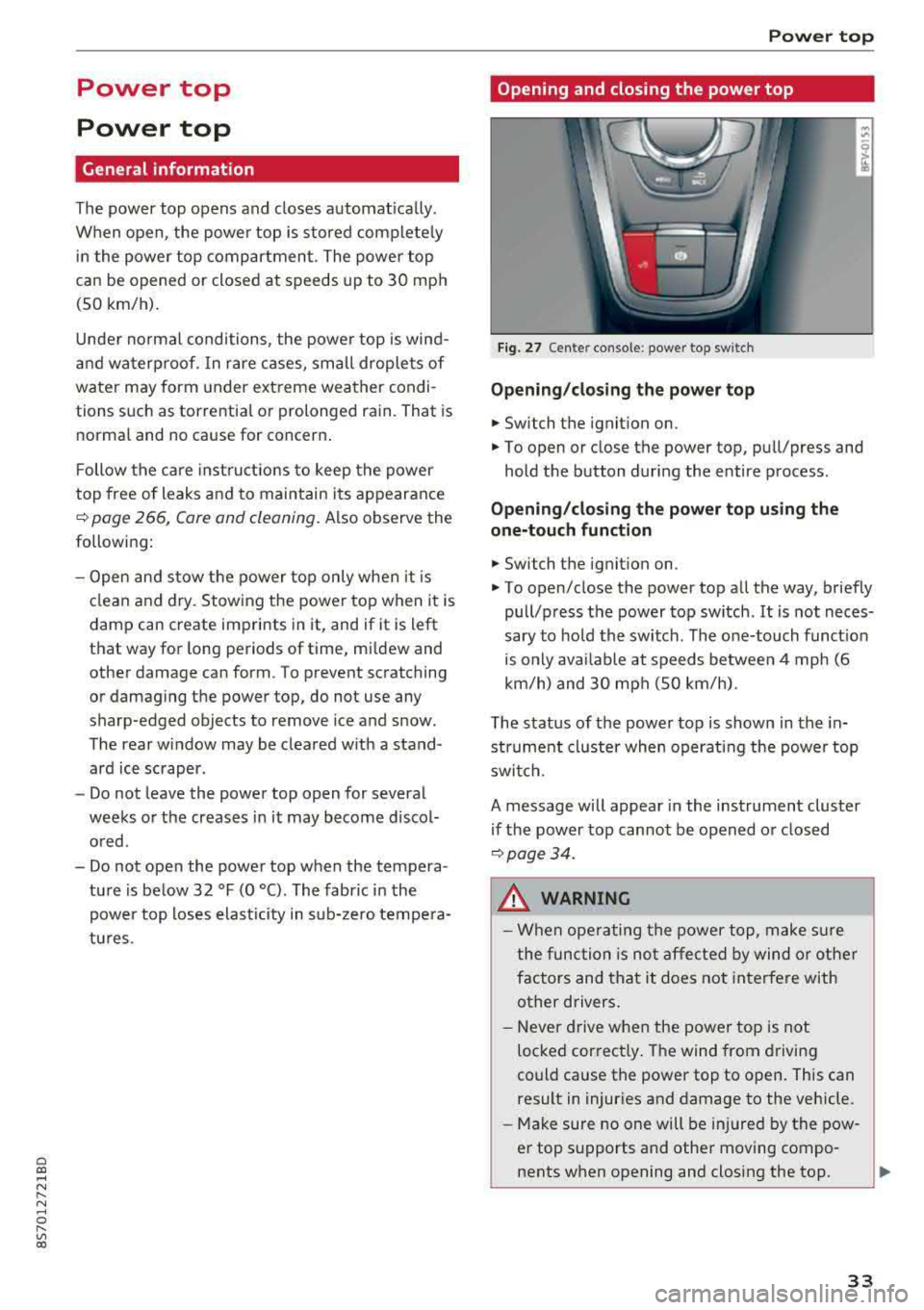
Fig. 27 Cen te r conso le : p ow er t op swi tch
Opening /closing the power top
.. Switch the ignition on.
.. To open or close the power top , pu ll/press and
hold the button during the entire process .
Opening/cl osi ng the power top u sing the
one-touch function
.. Switch the ignit ion on .
.. To open/close the power top all the way, briefly
pull/press the power top switch . It is not neces
sary to ho ld the switch . The one-touch funct io n
is only avai lab le at speeds between 4 mph (6
km/h) and 30 mph (SO km/h).
The status of the power top is shown in the in strument cluster when operating the powe r top
switch .
A message will appear in the instrument cluster
if the power top cannot be opened or closed
9 page34.
A WARNING
-When operating the power top, make s ure
the func tion is not affected by wind or other
factors and that it does not interfere with
other drivers .
- Neve r drive when the power top is not
locked cor rect ly . The wind from driving
could cause the power top to open . This can
result in injuries and damage to the vehicle .
-Make sure no one will be injured by the pow
er top supports and othe r moving compo
nents when opening and closing the top.
3 3