warning AUDI TT ROADSTER 2018 Owner's Guide
[x] Cancel search | Manufacturer: AUDI, Model Year: 2018, Model line: TT ROADSTER, Model: AUDI TT ROADSTER 2018Pages: 310, PDF Size: 46.95 MB
Page 47 of 310
Cl co .... N ,..._
N .... 0 ,..._
Vl co
(D Tips
To prevent inaccurate compass readings, do not bring any remote controls, e lectr ica l devi
ces or metallic objects near the mirror .
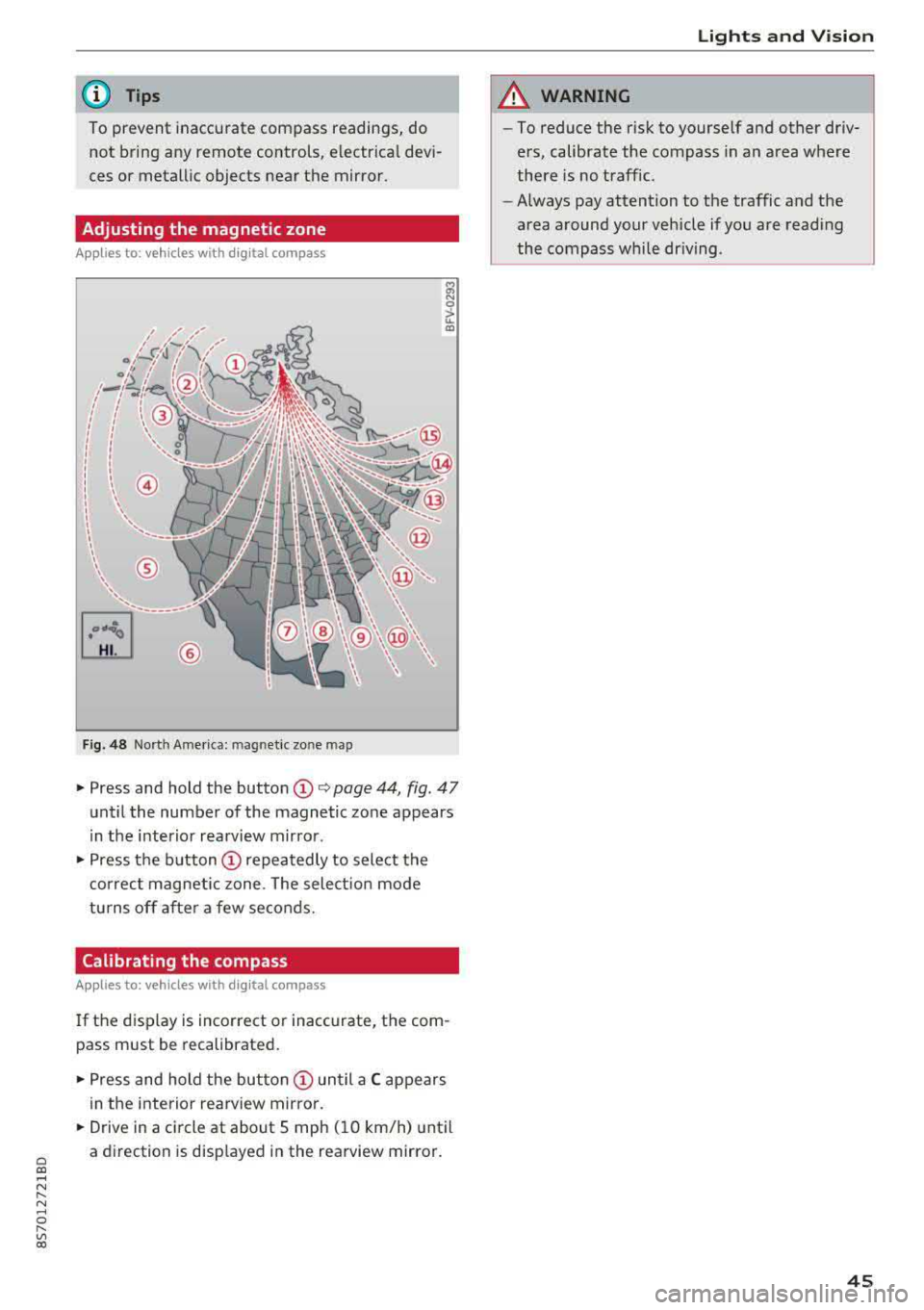
Adjusting the magnetic zone
Applies to: vehicles with digital compass
I
I I
' I
I I
®
' ' ' '
®
Fig. 48 Nort h Ame rica: mag netic zo ne map
~ N 0
> u. ID
• Press and hold the button (D Q page 44, fig . 47
until the number of the magnetic zone appears
in the interior rearview mirror .
• Press the button (D repeatedly to select the
correct magnetic zone . The select ion mode
turns off after a few seconds.
Calibrating the compass
Applies to: vehicles with digital compass
If the display is incorrect or inaccurate, the com
pass must be recalibrated.
• Press and hold the button (D until a C appears
in the interior rearview mirror .
.,. Drive in a circle at about 5 mph ( 10 km/h) until
a direction is displayed in the rearview mirror .
Lights and Vision
A WARNING
-To reduce the risk to yourself and other driv
ers, calibrate the compass in an area where
there is no traffic.
- Always pay attention to the traffic and the
area around your vehicle if you are reading
the compass while driving .
45
Page 48 of 310
Seats and stor age
Seats and storage
General information
A WARNING
See c> page 179, Safe driving for important
information, tips, suggestions and warnings
that you should read and follow for your own
safety and the safety of yo ur passengers .
Front seats
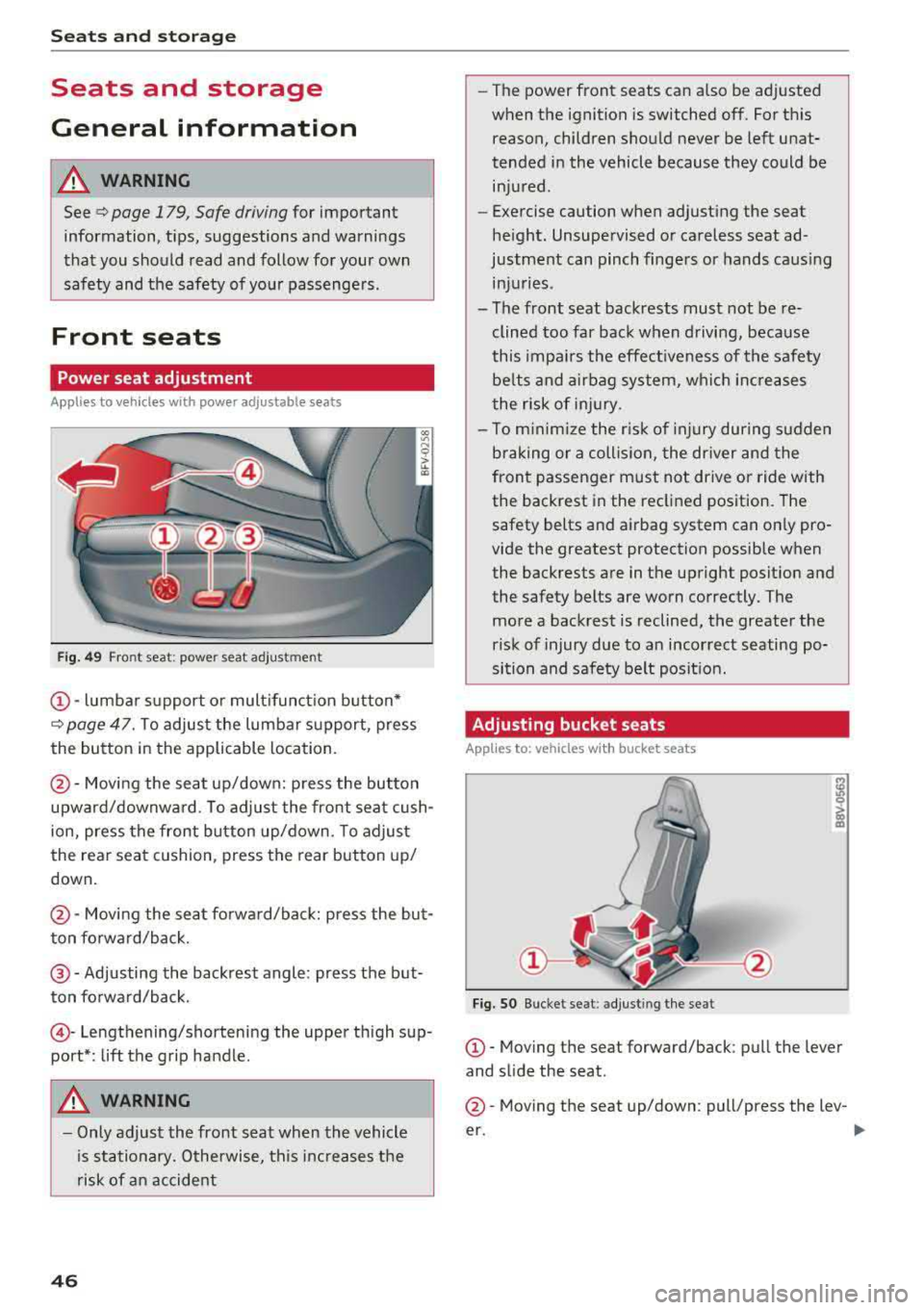
Power seat adjustment
Applies to vehicles with power adjustable seats
Fig. 49 Fro nt seat: power seat ad jus tm en t
CD -lumbar s upport o r mult ifunct ion button*
c> page 47. T o adjus t the lumbar s upport, press
the button in the applicable location.
@ -Moving the seat up/down: p ress the button
upward/downwa rd . To adjust the front seat cush
ion, press the front button up/down. To adjust
the rear seat cushion, press the rear button up/
down.
@ -Moving the sea t fo rwa rd/back: press the but
ton fo rward/back.
@ -Adjusting the backrest angle : press the but
ton fo rwa rd/back.
© -Lengthening/shortening the upper th igh sup
port* : lift the grip handle.
A WARNING
- Only adjust the front seat when the vehicle
i s sta tionary. Otherwise, this increases the
risk of an accident
46
- The power front seats can also be adjusted
when the ignition is switched off. For this reason, children should never be left unat
tended in the vehicle because they could be injured.
- Exercise caution when adjust ing the seat
he ight. Unsupervised or ca reless seat ad
justment can pinch fingers or hands caus ing
in ju ries .
- The front seat backrests must not be re
clined too far back when d riving, because
this impa irs the effect iveness of the safety
be lts and a irbag sy stem, whi ch in creases
the risk of in jury.
- To m inimi ze the r isk of inj ury dur ing s udden
braking or a collision, the dr iver and the
front passenger must not drive or ride with
the backrest in the reclined position. The
safety belts and a irbag system can o nly pro
vide the greatest protection possible when
the backrests are in the upright posit ion and
the safety belts are worn correctly. The more a backrest is reclined, the greater the
risk of injury due to an incorrect seating po
si tion and safety belt posit ion .
Adjusting bucket seats
App lies to: vehicles with bucket seats
Fig. SO B uck et se at: ad jus tin g the se at
CD-Mov ing the seat forward/back : pull the lever
and s lide the seat .
@-Moving the seat up/down : pull/p ress the lev-
er.
..,_
Page 49 of 310
Cl co .... N ,....
N ...... 0 ,....
Vl co
_& WARNING
-To reduce the risk of an accident, only adjust
the seat when the veh icle is stationary.
- Exercise caution when adjusting the seat
height . Adjusting the seat care lessly or
without checking can pinch hands and fin
gers .
- For safety reasons, the seat backrests must
always be locked while driving .
- Never drive with a safety belt through the
openings in the backrest . Otherw ise the
backrest could fold forward wh ile driving
and cause an accident.
Multifunction button
Applies to: vehicles with multifunction button
You con adjust the side bolsters using the multi
function button .
"If you turn the multifun ction button (D
¢ page 46, fig. 49 to the left or r ight, the side
bolsters on the seat backrests will increase or
decrease the lateral support.
@ Tips
The air in the side bolsters* is released as
soon as the driver's door opens . T his makes is
possible to enter and exit the vehicle more
comfortably. As soon as you start driving the
veh icle, the side bolsters fill.
Center armrest
Applies to: vehicles with center armrest
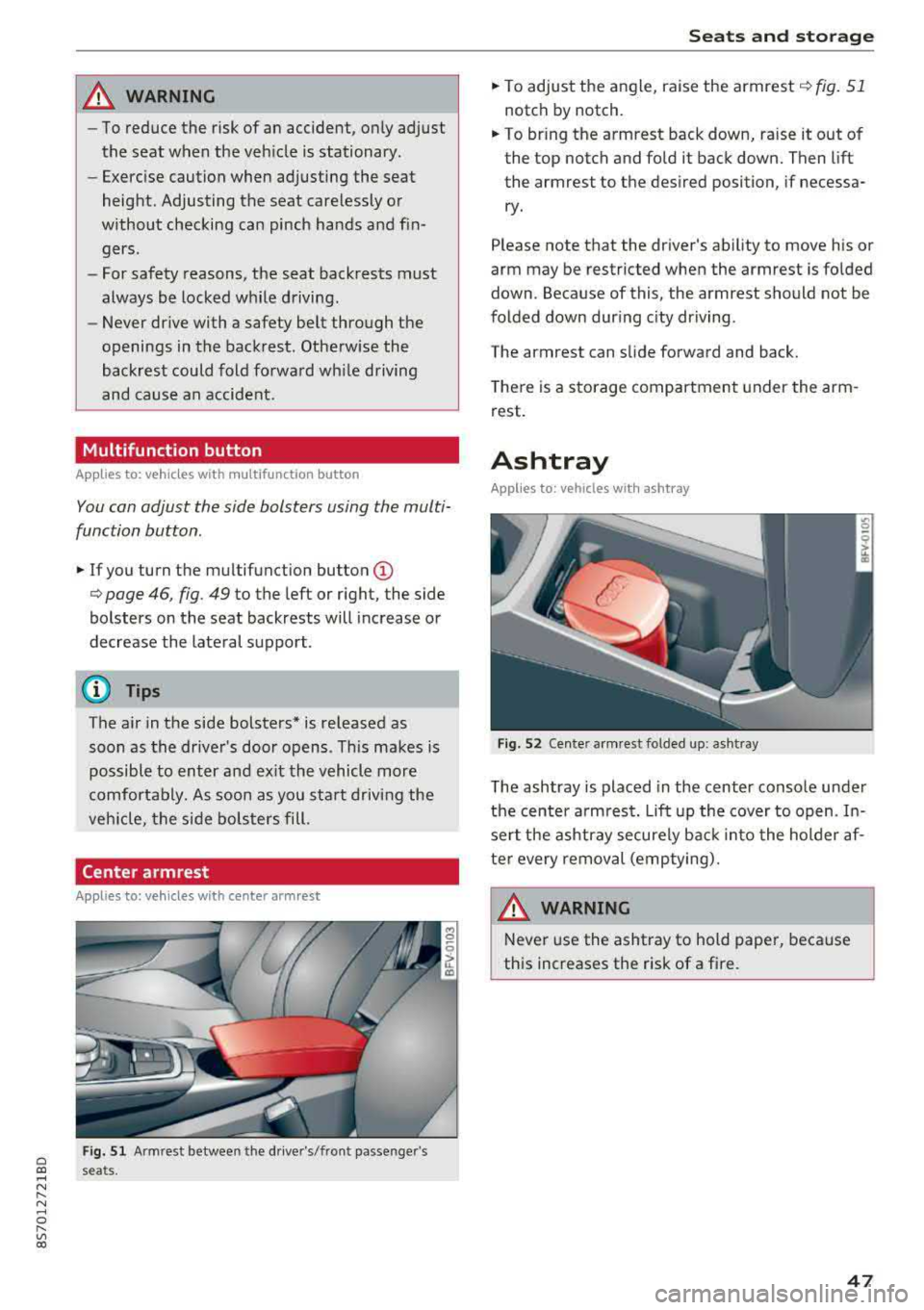
Fig. 51 A rm rest betwee n the dr ive r's/fr ont passe nge r's
s e a ts.
S eats and storag e
"To adjust the angle, raise the armrest ¢ fig. 51
notch by notch.
.. To br ing the armrest back down, ra ise it out of
the top notch and fold it back down. Then lift
the armrest to the desired position, if necessa ry .
Please note that the d river 's ability to move his or
arm may be restricted when the armrest is folded
down . Because of this , the armrest should not be
folded down dur ing c ity dr iving .
The a rm rest can slide forward and back.
T here is a storage compartment under the arm
rest.
Ashtray
Applies to: vehicles with ashtray
F ig. 52 Cen te r arm re st fo lded up: ash tray
The ashtray is placed in the center console under
the center a rm rest.
Lift up the cover to open . In
sert the ashtray securely back into the holder af
ter every removal (emptying).
_& WARNING
Never use the ashtray to hold paper, because
this increases the risk of a fire.
47
Page 50 of 310
Seats and stor age
Cigarette lighter and
socket
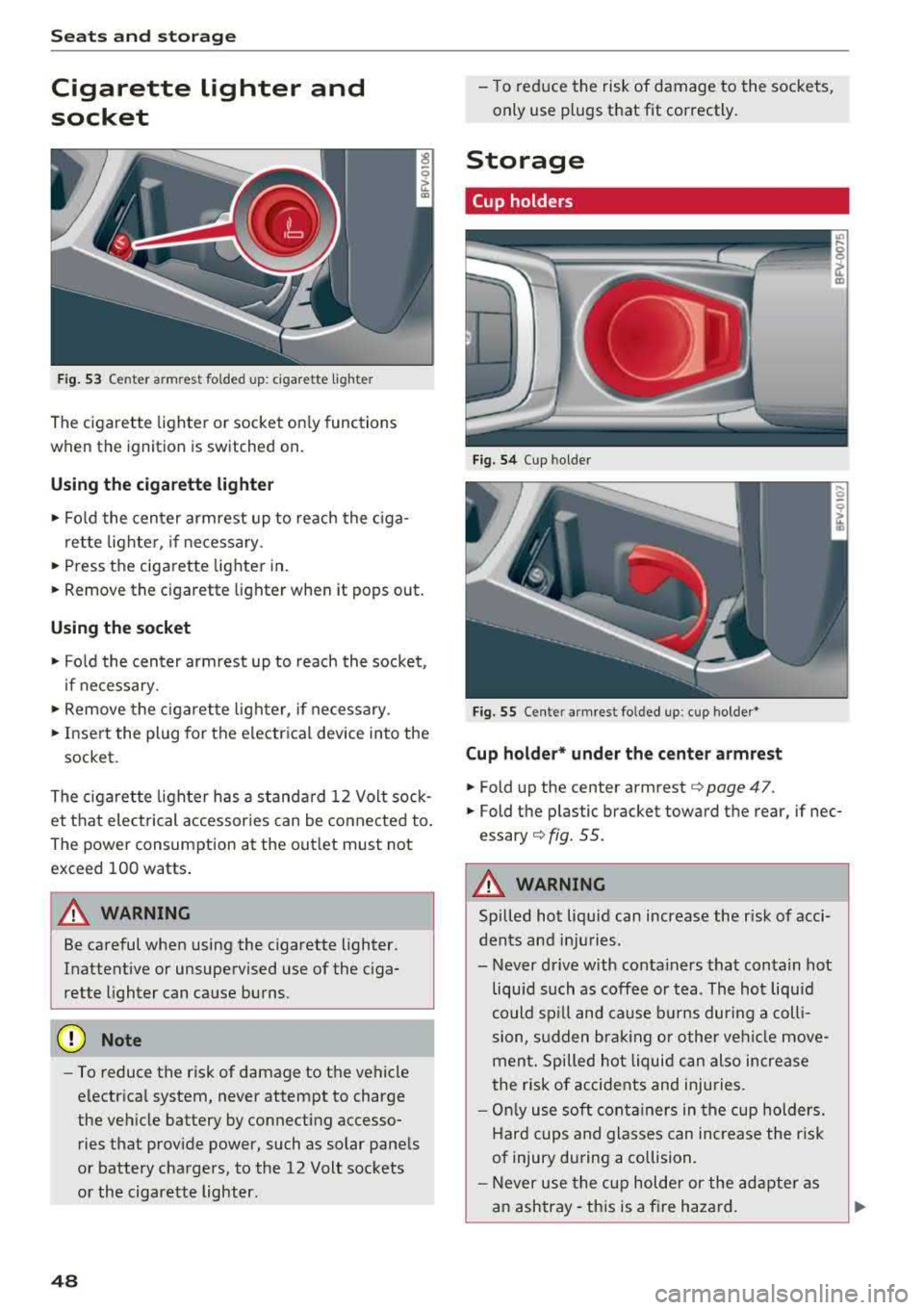
F ig. 53 Cen te r armre st fo ld ed u p: cig arette ligh te r
The cigarette lighter o r socket on ly functions
when the ignition is switched on.
Using the cigarette li ghter
• Fo ld the center armrest up to reach the c iga-
rette lighter, if necessary .
• Press the ciga re tte lighter in .
.. Remove the cigarette lighter when it pops out.
Using the socket
• Fo ld the cen ter armrest up to reach the socket ,
i f necessary .
... Remove the cigarette lighter, if necessary .
.. Insert the plug for the e lectrica l device into the
socket.
The cigaret te lighter has a standa rd 12 Volt sock
et that electrical accessor ies can be conne cted to .
Th e power consumption a t the out let must not
exceed 100 watts .
A WARNING
Be careful when using the cigarette lighter.
Inattentive or unsupervised use of the c iga
rette lighter can cause burns.
(D Note
- To reduce the risk of damage to the vehicle
electrical system, never attempt to charge
the veh icle battery by connecting accesso
ries that prov ide power, such as solar panels
or battery chargers , to the 12 Volt sockets
or the cigarette lighter.
48
- To reduce the risk of damage to the sockets,
only use plugs that fit correctly .
Storage
Cup holders
Fig. 54 Cup hol der
Fig. 5 5 Cente r armres t fo lded up : cup holder *
Cup holder* und er the center armrest
• Fold up the cente r armrest¢ page 47.
.. Fold the p lastic bracket toward the rear, if nec
essary ¢ fig. 55.
A WARNING
Spilled hot liqu id can increase the r isk of acci
dents and in ju ries .
- Never d rive with conta iners that contain hot
liquid such as coffee or tea . The hot liquid
could sp ill and cause b urns dur ing a coll i
sion, s udden bra king or other vehi cle move
men t. Spilled hot liquid can also increase
the risk of accidents and injuries.
- On ly use soft cont ainers in the cup holders.
Hard cups and glasses can increase the r isk
of injury dur ing a collision.
- Never use the c up holder or the adapte r as
a n ashtray- th is is a fire hazard.
Page 51 of 310
Cl co .... N ,....
N .... 0 ,....
Vl co
(D Note
Beverage containers in the cup holders should
always have a lid. If not, beverages could spill
and cause damage to vehicle equipment, such
electronics or seat covers.
Additional storage compartments
You will find a range of storage compartments
and holders at different locations in the veh icle .
- Compartments in the doors
- Storage area in the glove compartment . The
glove compartment can be locked using the
mechan ica l key
q page 23.
- Storage compartment under the center arm
rest*
- Storage compartment on the rear side of the
seat* . The compartment can hold a max imum
weight of 2.2 lbs (1 kg).
A WARNING
-Always leave the lid on the glove compart
ment cover closed while driving to reduce
the risk of injury.
- Only use the storage compartments in the door trim panels to store small objects that
will not st ic k out of the compa rtment and
impair the range of the side a irbags.
Storage compartment between the seat
backrests
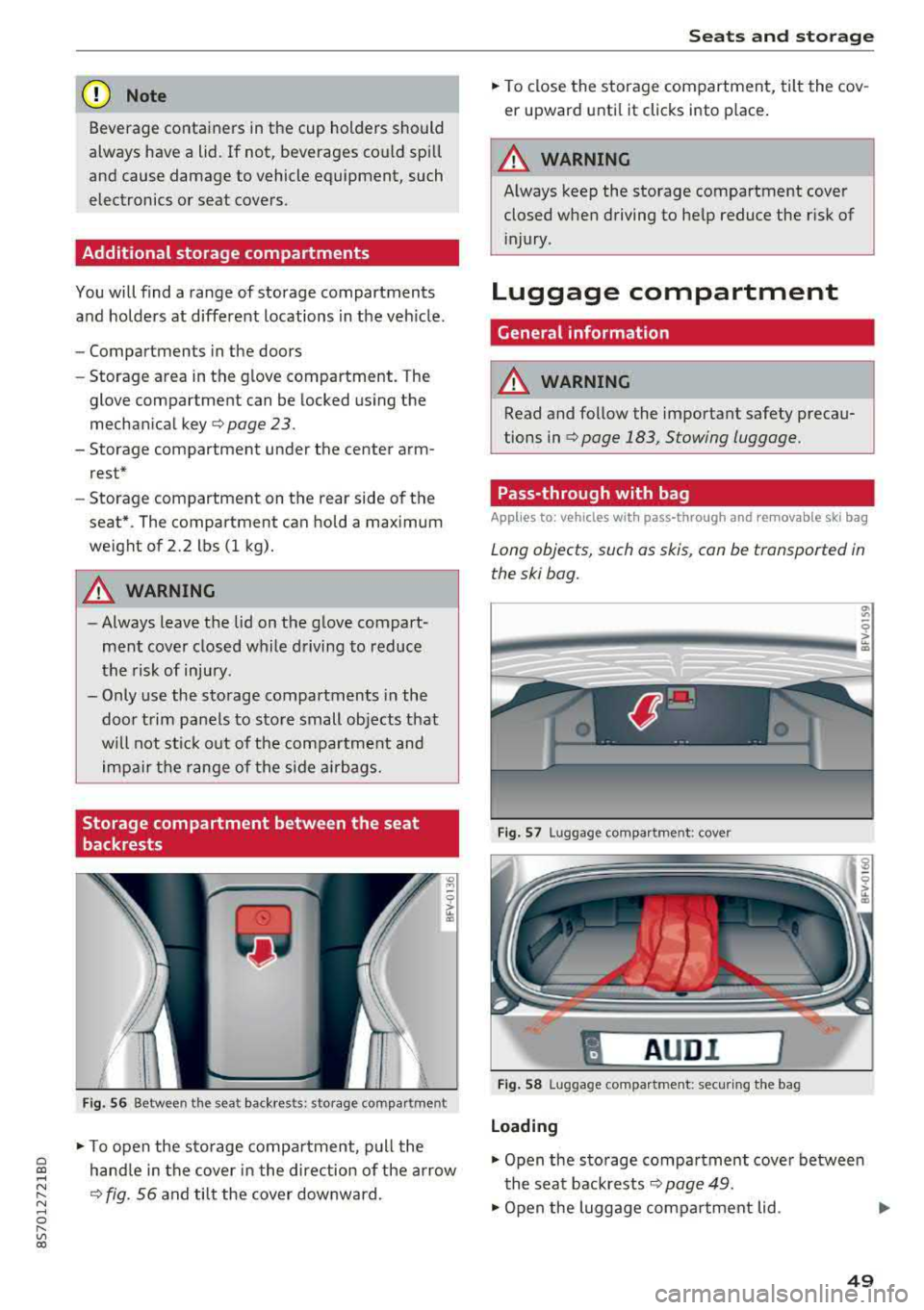
F ig . 56 Between the seat backrests: storage compartment
-
.. To open the s to rage compa rtment, p ull the
hand le in the cover in the direction of the arrow
q fig. 56 and tilt the cover downward.
S eats and storag e
.. To close the storage com partment, tilt the cov
er upward unti l it clicks into place .
A WARNING
Always keep the storage compartment cover
closed when driving to he lp reduce the risk of
i njury.
Luggage compartment
Gene ral information
A WARNING
-Read and follow the important safety precau
tions in
qpage 183, Stowing luggage.
Pass-through with bag
Applies to : vehicles with pass-through and removable ski bag
Long objects, such as skis, con be transported in
the ski bog.
Fig. 57 Luggage compa rtment : cove r
"
AUD I l
Fig . 58 Luggage compa rtment: secur ing the bag
Loading
.. Open the storage compartment cover betwee n
the seat backrests
Q page 49.
.. Open the luggage compartment lid . .,_
49
Page 52 of 310
Seats and stor age
,.. Press the release button and fold the cover for
the pass-through towards the luggage com
partment
¢ fig . 57.
,.. Slide the bag from the luggage compartment
into the vehicle interior w ith the zipper facing
toward the rear
cc> &.
.. Load the sk i bag.
Secur ing
.. Secure the carab ine r hooks on both st raps in
the corresponding rear tie-downs <=>
fig. 58.
A WARNING
After loading the bag, it must be t ied down
w ith both straps.
@ Tips
- Only fold the ski bag up if it is dry.
- Lay skis in the bag with the points facing
forward and ski pole points facing the rear.
Lowering the cargo floor
In exceptional situations, the cargo floor can be lowered .
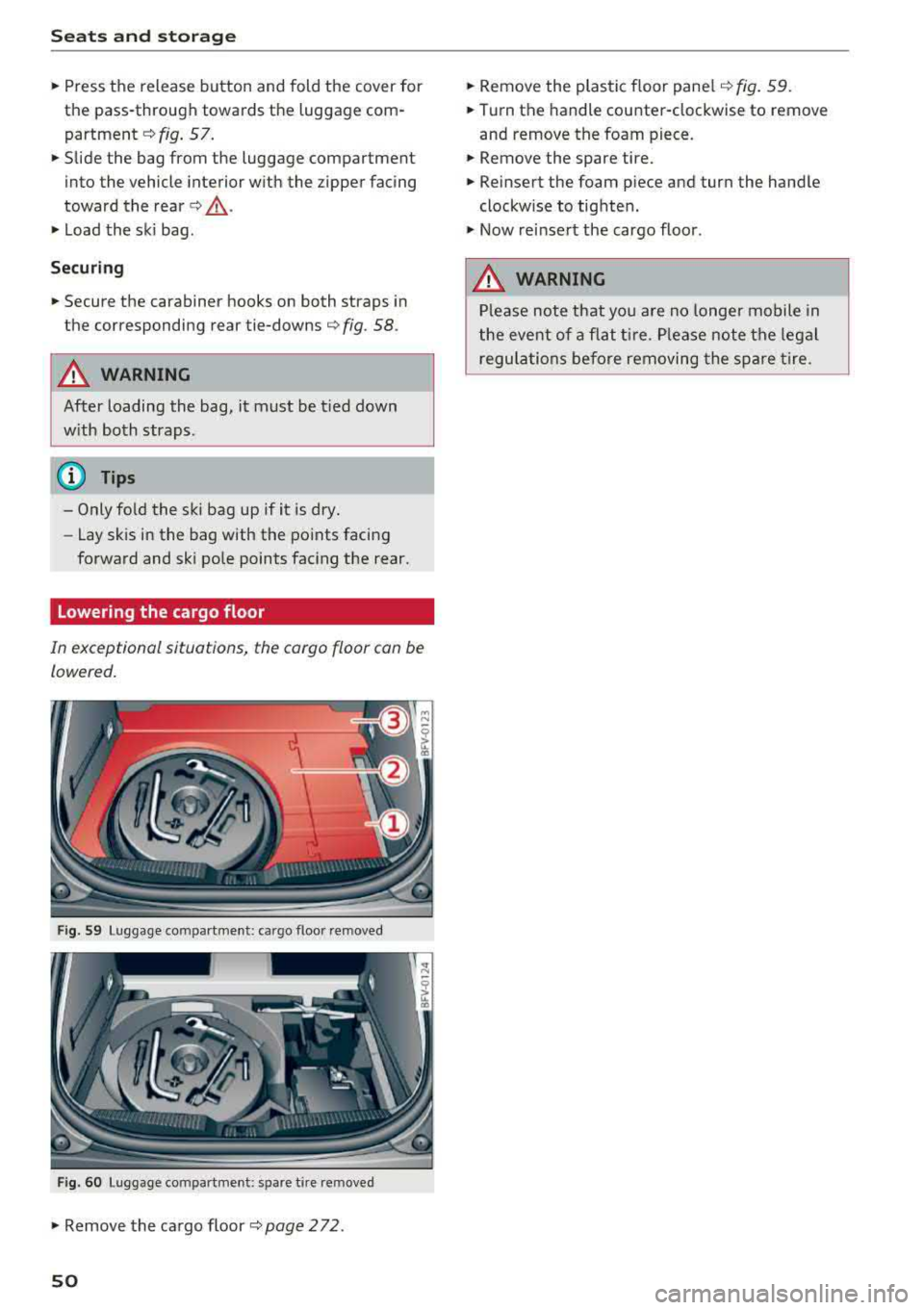
Fig . S9 Luggage com partment : ca rgo f loo r re m oved
Fig. 60 Luggage co mpartment : spa re t ire re m oved
.. Remove the cargo floor ¢page 272 .
50
.. Remove the plastic floor pane l¢ fig. 59 .
.. Turn th e handle counter-clockw ise to remove
and remove the foam piece.
.. Remove the spare tire .
.. Reinsert the foam p iece and turn the hand le
clockwise to tighten .
.. Now re insert the cargo floor .
A WARNING
Please note that you are no longe r mobile in
the eve nt of a flat ti re . P lease note the legal
regula tions before removing the spare tire.
Page 53 of 310
Cl 00 .-< N r-N .-< 0 r-Vl 00
Warm and cold Climate control system
Description
The climate control system warms , cools and re
moves humidity from the air in the vehicle inte ri
or. It functions most effective ly w hen the w in
dows are closed. If there is a build -up of heat in
side the vehicle, venti lation can help to speed up
the cooling process .
Pollutant filter
The pollutant filte r removes pollutants such as
d ust and pollen from the a ir.
Key recognition
Certain settings are automat ically stored and as
signed to the remote contro l key being used .
A WARNING
Poor vis ibili ty ca n lead to ac cidents .
- For safer d riving, keep all windows free of
ice, snow a nd fog.
- Become fam ilia r as qu ickly as possible with
the correct use and function of the cl imate
c o ntro l system, espe cially with the defrost
ing and defogg ing func tion.
- Whe n the tempe ratu re is below free zing,
o nly use the win dshi eld washer sys tem after
the wi nds hield ha s been war med by t he cli
mate co ntro l sys tem. The washer fluid co ul d
freeze on the w indshield and impair visibili
ty .
{LlJ) Note
-If yo u suspect t hat the clim ate con trol sys
tem is d amaged, sw itch the system off to
Warm and c old
preven t furt her damage and have it chec ked
by an autho rized Audi dea ler o r auth orized
Audi Service Facility .
- Repairs to t he Audi climate control system
require special technical know ledge and
special tools. Have it inspected by an a u
thorized Aud i dealership or a qualified elec
tronics store.
@) For the sake of the environment
Reducing the amount of fue l used a lso re
duces the amount of pollutants that enter the
a ir.
{!) Tips
- To prevent interference with the heat ing
and cooling output and to prevent the win
dows from fogging over , th e a ir intake in
fro nt of t he w indshie ld m ust be free of ice,
snow o r leaves .
- Condensation from the cooli ng system can
dr ip and form a pudd le of water unde r the
veh icle . T h is is no rma l and does not mean
there is a le ak .
- Th e ene rgy managemen t system may tem
pora rily switch off certa in fu nctions, s uch as
the seat heati ng* o r rear window defogger.
Th ese sys tems are availab le aga in as soon
as t he ene rgy supply has been res tored .
- Th e flows throug h the vents under the re ar
w indow. Make s ure the openings are no t
cove red when plac ing clothing on t he lug
gage compa rtment cover .
51
Page 55 of 310
Cl co .... N ,....
N ...... 0 ,....
Vl co
1- 1 Switching recirculation mode on and off
The recir cu lation mode can be turned o n m anu al
l y o r automat ically* .
- Swi tching m anual rec ircula tion mo de on an d
off: p res s
l'-"" I
- Automa tic* recircu lation mode: au to rec ircula
t io n needs to be ac tiva ted in the Info tainmen t
system. Selec t in the Infot ainme nt system :
I MENU I button > Vehicle > le ft co nt rol but ton
>Vehicle settings > Air conditioning > Auto re
circulation .
The ai r quality sensor that is de
s igned for diese l and gasoline exhaust auto
matically switches the recircu lation mode on or
off depend ing o n the level of pollutants in the
o utside air .
In recircu lation mode , the a ir inside the vehicle is
circu lated and fi ltered. This prevents the unfil
tered ai r outside the vehicle from entering the
ve hicle interio r. Switch ing recircu lation mode on
when dr iving t hrough a tunnel or when s itti ng i n
traffic is recomme nded
¢ .&, .
Recirculation mode is switched off by pressing
the
!""' I button o r I AUTO I or! MAX !.
I@ MAXI Switching defr ost on and off
The winds hield and side windows are defrosted
or cleared of condensation as q uickly as possib le.
The optimum amount of a ir flows main ly out of
the vents under the windshield. Rec irculat ion
mode switches off . The temperature is cont rolled
automatically .
The
IAU TOI button switches the defroster off .
I@ REAR I Switching the rear window defogger
on and off
I f the rear w indow defogger is activated when
the ignition is switched on, the battery manage
ment determines based on the batte ry charge if
it is possib le to turn on . Ot herwise , the rea r win
dow defogger functions with the engine running
and switches off automatically after approxi
mate ly 10
-2 0 mi nutes, depen ding on the out
side tem per ature.
To prevent t he rear w indow defogge r from
switch ing off automatically, press and ho ld the
I@ REARI b utton fo r more than two seconds. This
Warm and cold
remains stored up to approx imately 15 minutes
after t urning off the ignition.
A WARNING
-
You should not use the reci rculat ion mode for
an extended period since no fresh a ir is drawn
i n . With the air-conditioning switched off, the
windows can fog up, which increases the risk
of an acc ident .
Adjusting the air vents
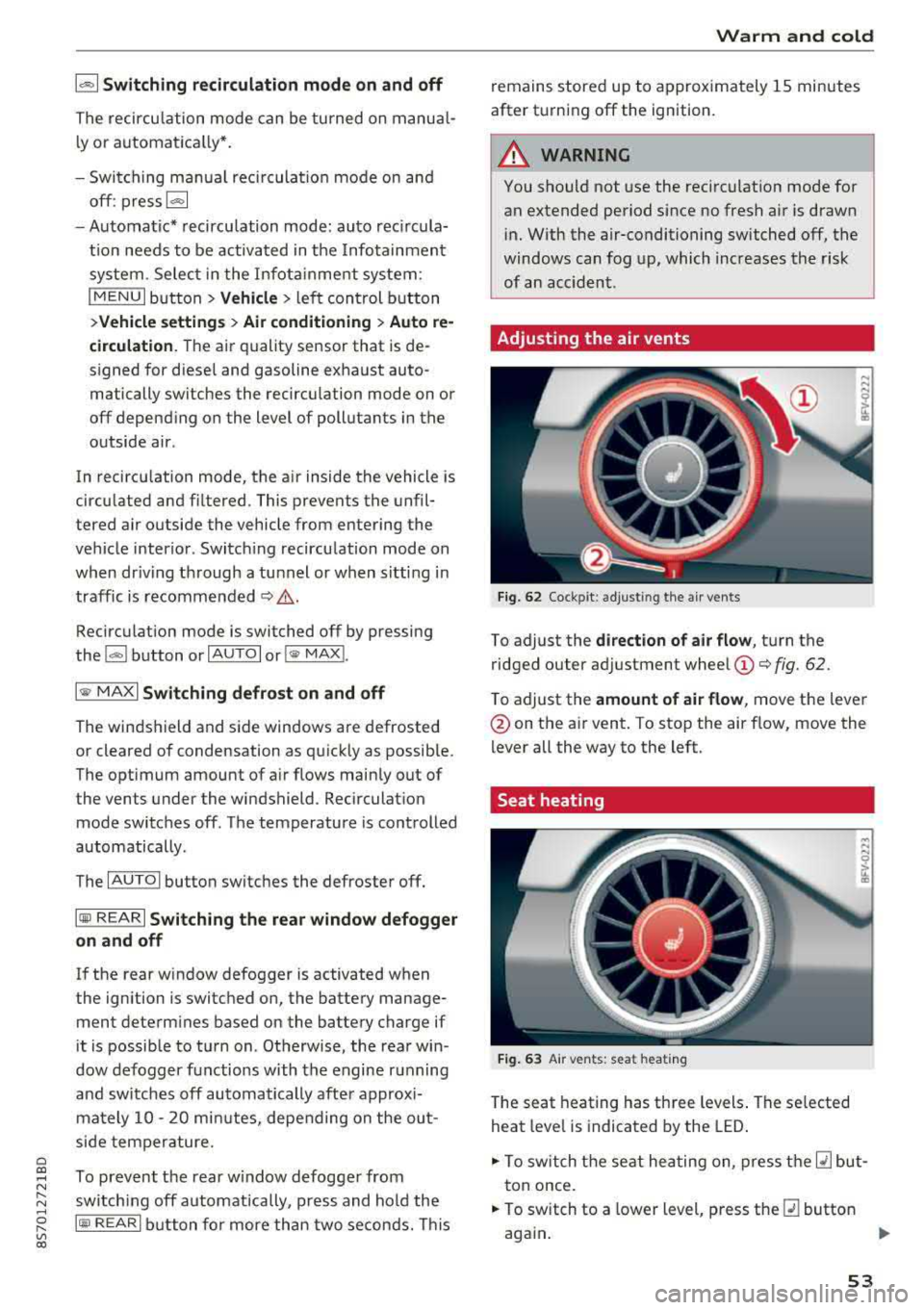
Fig. 62 Cock pit: a djust ing the a ir ven ts
To adjust the di rection of air flow, tu rn the
ridged outer ad justment wheel
(D ¢ fig. 62.
T o adjust the
amount of air flow , move the lever
@on the a ir vent . To stop the air flow, move the
lever all the way to the left.
Seat heating
Fig. 63 A ir ve nts: seat heat ing
T he seat heating has th ree levels . The se lected
heat leve l is indicat ed by the LED .
.,. To switch the seat he ating on, press t he Q] but
t on once.
.,. To switch to a lower level, p ress the Q] button
aga in .
""
53
Page 56 of 310
![AUDI TT ROADSTER 2018 Owners Guide Warm and cold
,.. To switch the seat heating off, press the Q] but-
ton repeatedly until the LED turns off.
The seat heating sw itches automatically from
setting 3 to setting 2](/img/6/57668/w960_57668-55.png "AUDI TT ROADSTER 2018 Owners Guide Warm and cold
,.. To switch the seat heating off, press the Q] but-
ton repeatedly until the LED turns off.
The seat heating sw itches automatically from
setting 3 to setting 2")
Warm and cold
,.. To switch the seat heating off, press the Q] but-
ton repeatedly until the LED turns off.
The seat heating sw itches automatically from
setting 3 to setting 2 after 10 minutes.
When seat h eating should not be switched
on
Do not t ur n the seat heating on under the follow
i n g circumstances :
- The seat is unocc upied.
- The seat is covered with a seat cover.
- The seat is covered with a child seat.
- The seat is damp or wet.
A WARNING
Individua ls with reduced sensitivity to pain or
temperature could develop burns when using
the seat heating function. To reduce the risk
of injury, these individuals should not use
seat heat ing .
«D Note
To avoid damage to the heat ing elements in
the seats, do not kneel o n the seats or place
heavy loads on a small area of the seat.
(D Tips
- The setting for the seat heating on the driv
er's side is ass igned to the key that is in use.
- If the front passenger's seat heating is
turned on, it will not turn on again automat
i ca lly if more than 10 m inutes have passed
between sw itching the ignition off and
switching it on again.
54
Neck heating
App lies to : vehicles wi th neck heating
The neck heating functions when the engine is
running .
Fig. 64 Driver 's seat: neck heating vents
Fig . 65 Cockp it: neck heating
The neck heating has three levels . If you turn the
knob to the right, the neck heating switches on
¢ fig. 65. The LEDs above the seat symbol indi
cate the ventilation level. Turn the knob to the
left to reduce ventilat ion. To switch off the neck
heating, keep turning the knob to the left until
no LEDs are turned on .
When the power top is closed, the neck heating
switches automatically from setting 3 to setting
2 after approx imately six minutes.
A WARNING
- Individuals with reduced sensitiv ity to pain
or temperature could develop burns when
using the neck heat ing . To reduce the risk of
in ju ry, these individuals shou ld no t use neck
heat ing.
- The output from the neck hea ting may be
come very hot temporarily if the air vents in
the seats
qfig . 64 are covered by clothing
or simi lar ob jects when the system is
Page 58 of 310
Drivin g
Driving
General information
Breaking in
A new vehicle must be broken in for the first 1,000 mi les (1,500 km). Do not dr ive at speeds
t hat will exceed 2/3 of the max imum pe rm itted
engine speed (RPM) for the first 600 miles
(1,000 km), and avoid fu ll acceleration during
this period . You may gradually start increasing
the RPM and the speed between 600 miles
(1,000 km) and 1,000 miles (1,500 km) .
During the first hours of use, the engine has a
higher internal friction than later on when all
moving parts have settled into place with each
other.
How the vehicle is driven d uring the first 1,000
miles (1,500 km) a lso affects the engine quality .
Drive at moderate engine speeds after the initial
break-in per iod, part icu larly when running a cold
eng ine . Th is will reduce eng ine wear and improve
the m ileage.
Do not drive at too
low of an engine speed (RPM).
Shift down if the engine stops running "smooth ly". Extremely high eng ine speeds are automati
cally reduced .
Reducing the risk of vehicle damage
@ Note
When driving on poo r roads, by cu rbs and on
s teep ramps, make su re t hat low-hang ing
compone nts such as the spo ile r and exha ust
system do not come into contact with these
or they could be damaged. This especially ap
plies to vehicles with low ground clearance
and veh icles that are heavily loaded.
Driving through water on roads
Note the following to reduce the r isk of vehicle
damage when driv ing through water, for example
on flooded roads :
- The water must not be any higher than the bot
tom of the vehicle body .
56
-Do not drive faster than walking speed .
A WARNING
After driving through water or m ud, the effec
tiveness of the brakes may be red uced due to
mo isture on the brake rotors and brake pads.
A few careful brake applications shou ld dry
off the brakes and restore the full braking ef
fect .
@ Note
Vehicle components such as the engine,
transmission, suspension or electr ica l system
can be severely damaged by driving through
water.
{D Tips
- Determine the depth before driving through
water.
- Do not stop the vehicle, drive in reverse or
switch t he engine off whe n driving through
water.
- Keep in mind that oncom ing vehicles may
create waves that raise the water level and
make it too deep fo r yo ur vehicle to drive
throug h safe ly.
- Avoid driv ing th rough salt water, because
this ca n cause cor rosion .
Economical and environmentally-friendly
driving
The amount o f fuel consumption, the environ
mental impact and the wear to the engine,
bra kes and tires depends mostly on your d riving
style. With an ant icipatory and economic driving
sty le, fuel consumpt ion can be reduced by ap
prox imately 10-15% . The follow ing t ips will help
you conserve the environment and your money at
t h e same time .
Anticipatory dri ving
A vehicle uses the most fuel when accelerating.
When you drive with anticipation, you do not
need to brake as often and so you acce lerate less .
When poss ible, let you r vehicle coast with a
gear
engag ed ,
for examp le, when you not ice that the
next t raff ic light is red.
Ill>