phone AUDI TT ROADSTER 2018 Workshop Manual
[x] Cancel search | Manufacturer: AUDI, Model Year: 2018, Model line: TT ROADSTER, Model: AUDI TT ROADSTER 2018Pages: 310, PDF Size: 46.95 MB
Page 176 of 310
System settings
delete the programmed voice training with the
Reset individual speech training function .
Factory settings
The follo wing funct ions can be reset to the facto
ry default settings :
-Sound settings
- Radio
- Media settings
- Jukebox*
- Directory*
- Telephone *
- Bluetooth and Wi-Fi*
- Navigation settings *
- Navigation and online memory *
- Voice recognition system*
- Message settings *
-Apps*
-Tool tips
-Audi connect *
You can select the desired functions individually
or all at once with the option
Select all entries .
Select and confirm Restore factory settings.
(D Tips
-Make sure that not only t he settings were
deleted but also the stored data, if appl ica
ble.
- Please note that the
voice recognit ion sys
tem* is not available in Cabriolets that do
not have a factory- insta lled safety belt mi
crophone .
174
Connection manager
Introduction
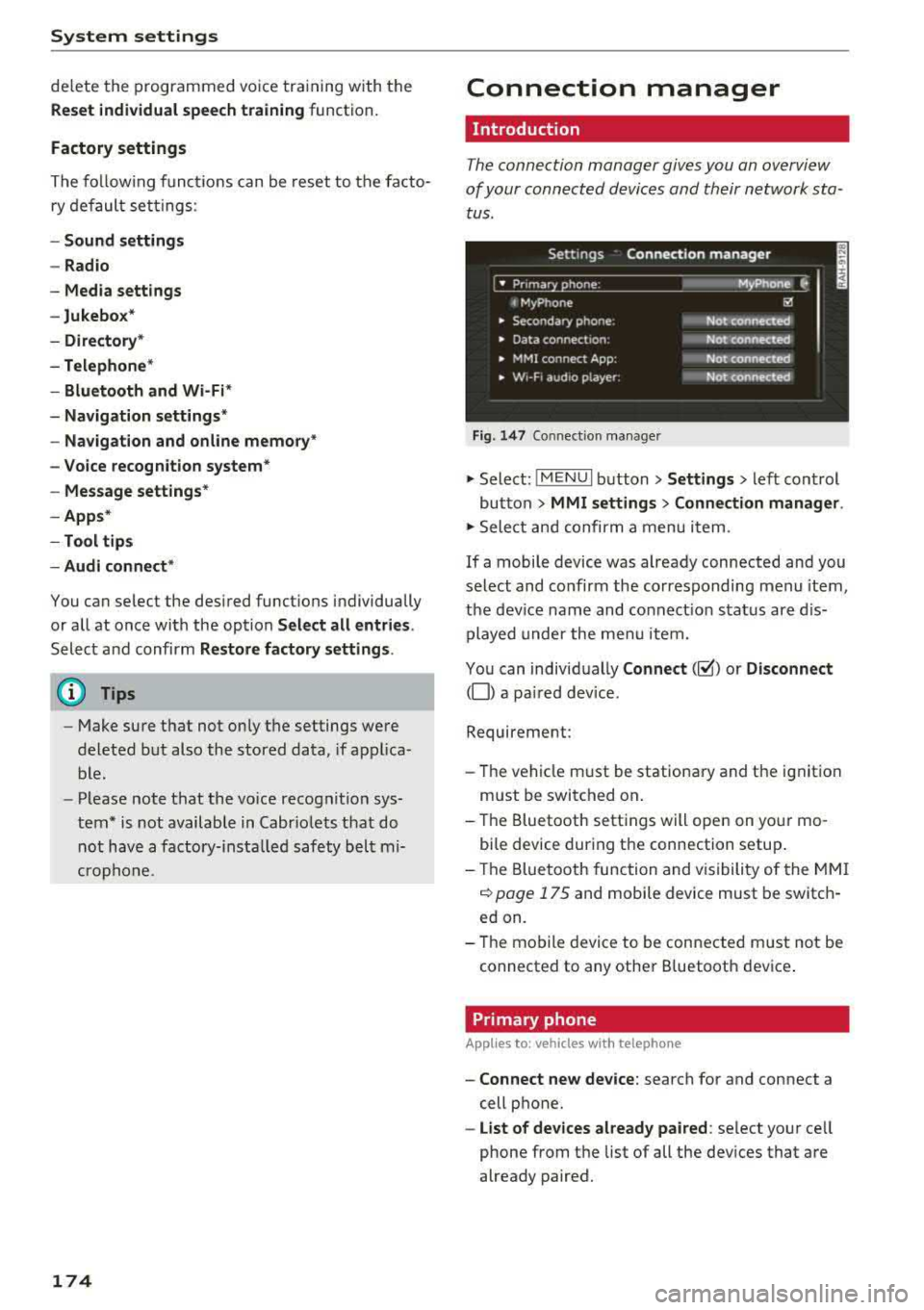
The connection manager gives you an overview
of your connected devices and their network sta
tus.
Settings Connection manager
I • Prima hone : M_Phone C,
t MyPhone ~
• Secondary phone : Not connected
• Data connect,on: Not connected
• MMI connect App: Not connected
• w,- F, aud ,o player: Not connected
Fig . 147 Co nnect ion manager
.,.. Select: !MENUI button> Settings > left control
button
> MMI settings > Connection manager.
.,.. Select and confirm a menu it em.
If a mobile device was already connected and you
select and co nfirm the corresponding menu item,
the device name and connect ion status are dis
played under the menu item.
You can individually
Connect(~) or Disconnect
(0) a pa ired device.
Requirement:
- Th e vehicle m ust be stationary and the ignition
m ust be switched on .
- Th e Bluetooth settings will open on your mo
bile device during the connection setup .
- Th e Bluetooth function and visibility of the MMI
c::> page 175 and mobile device must be switch
ed on.
- Th e mobile device to be connected m ust not be
connected to any other B luetooth dev ice .
Primary phone
App lies to: vehicles wi th telepho ne
- Connect new device: search for and connect a
cell phone.
- List of devices already paired: select your cell
phone from the list of all the devices that are
already paired.
Page 177 of 310
Cl 00 .-< N r--N .-< 0 r--Vl 00
Secondary phone
Applies to: vehicles with telephone
-Connect new device : search for and connec t a
c e ll phone.
- List of devices already paired : selec t your cell
p hone fro m the lis t of all the devices t hat are
al re ad y p aired.
Data connection
Applies to: vehicles with Audi connect
-Connect new device : search for and connec t a
mobile device (s uch as a smartp hone) .
-List of devices already paired : selec t your cell
p hone from the list of all the devices t hat are
al ready pa ired .
Or : insert a mini SI M card into
the S IM ca rd
reader* c> page 124.
({;D) Note
Always follow t he i nfo rmat ion foun d in c> (0) in
W i-F i hotspot on page 130 .
MMI connect app
Applies to: vehicles with Audi connect
Requirement: the Audi MMI connect app m ust
be i nstalled and open on your mobile device.
- Connect new device : search for and connect a
mobile device (s uch as a smartp hone) .
-List of devices already paired : select your mo
b ile device from the list of a ll the devices that
are already paired.
Audio player
Applies to vehicles with Bluetooth or Wi-Fi audio player
Bluetooth player
Requirement: the Bl uetooth funct ion and v is ibi li
ty must be sw itched on in the MMI
c> page 175
and on the B luetoot h aud io player.
- Connect new device : press the control knob.
Se lect
Bluetooth audio player . Search fo r and
connect a mobile device .
-List of devices already paired : select a Bl ue
tooth device from the list of a ll the devices that
are already paired.
System settings
Wi-Fi audio player
Re quiremen t: th e W i-Fi h otspo t on the M MI
c> page 1 29 an d the Wi -Fi on you r W i-Fi audio
player m ust be switched on .
-Connect new device : pres s t he co ntrol knob.
Se arch for and conne ct a Wi-Fi ca pabl e dev ice.
- Disconnect Wi-Fi audio player: deactivate t he
Wi-Fi on you r W i-Fi capa ble dev ice. The devi ce
w ill be au tom atic a lly removed from the lis t.
@ Note
Alway s follow the infor mation foun d in c> @ in
W i-F i ho tspo t on p age 130.
Directory
Applies to: vehicles with telephone
Display contacts from a cell phone (or an addi
tiona l cell phone).
Requirement: cell phones must not be connected
to the M MI t hro ugh the Blue too th remote SI M
ac cess profi le or throug h th e
Handsfree p ro file.
- Connect new device: search for and connect a
new ce ll phone .
-List of devices already paired : select yo ur cell
p ho ne from the list of all the cell phones that
are a lready paired .
Audi smartphone
Applies to: vehicles with Audi smartphone interface
-Con nect yo ur cell phone to the A udi music in
t erfa ce
c> p age 161 using a USB a dap ter
c> page 160, fig. 139 .
-Sele ct your cell p ho ne fro m th e list of cell
p hon es th at h ave alread y bee n connec ted.
Additional options
D epen ding o n the sele cte d fu nction, yo u can use
t h e right contro l button to access the avai la bl e
additional opt ions in t he connection mana ger.
Bluetooth settings
- Bluetooth:
selec t and co nfi rm a s etti ng for the
Bl uetoo th conne ct ion visib ility. Se lec t
Visible
for the MM I to be visib le to othe r devices . ..,.
175
Page 178 of 310
System settings
Select Invisible for t he MMI to not be v is ibl e to
othe r devices. Howeve r, it is still possib le to es
ta bli sh a B luetooth con nection with paired de
vices when the v is ibility is switched off . Se lect
Off to turn visibi lity off . Then a B luetooth con
nect io n is not possible .
-Bluetooth audio player : when this function is
switched on
g, t h e Blue tooth aud io player is
available as a so urce in t he
Media menu .
-Delete Bluetooth device : th e se lected cell
phone/mobile device is d isconnected from t he
MMI.
- Show Bluetooth profiles : you ca n Connect or
Disconnect the Handsfree profi le a nd the Di
rectory /contacts *
separately.
- Bluetooth audio player : switch th is function on
g to be a ble to selec t the B luetoo th a udio p lay
er as a source in t he M edia me nu.
-Bluetooth name : the MMI B luetoo th name (for
example ,,AUDI M MI 2017") is displayed and
can be changed .
W hen the function is switched on
g , the symbo l
@<=>page 102, fig . 110 appears in the Infotain
ment sys tem disp lay.
Online settings*
- Data connection settings :
see<=> page 130,
Configuring the data connection
- Data usage counter : th e amount of data pack
ets that a re sent and received throug h the MMI
is d isp layed. You can reset the data usage infor
mation to zero using the
Reset data counter
opt ion.
- Network status : the mobile netwo rk p rovider
for data se rvice as well as the network status
are disp layed .
Wi-Fi settings*
See <=> page 129, Wi -Fi hotspot.
SIM PIN settings*
- Automatic PIN entry:
when this funct ion is
swi tched on
g , th e S IM PIN is automatically
saved in the MMI after it is entered for t he first
time. The SI M PIN for four d ifferent SIM ca rds
can be saved i n the MMI. With the function
switched off, the cur rently stored SI M PIN i s
dele ted from the MMI. When the a utomat ic
176
P IN entry is swi tched on, the re a re no S IM P IN
prompts .
-Disable PIN query : when sw itche d on, there are
no SIM PIN queries . The a utomatic PIN entry is
not use d in this case .
-Change PIN : you can change the P IN on you r
SI M card . First ente r th e cur rent SI M PIN. T he
SI M PIN may on ly conta in digits 0 -9 . T he new
SI M PIN must be entered twice for security a nd
then it w ill be saved to the SI M card .
Apple CarPlay sound settings/ Android Auto
sound settings
App lies to : vehicles wit h Audi s m artph one interface
See<=> page 177.
About Apple CarPlay/ About Android Auto
App lies to : vehicles wi th Audi sma rtphone interface
Here you w ill find leg al inform ation reg arding
t h e use o f A pple Car Play o r And ro id Auto and in
fo rmat ion about devi ce -s p ecific data exc han ge.
Delete CarPlay device/Delete Android Auto
device
App lies to : vehicles wi th Audi s m artph one interface
Requirement: yo ur cell phone m ust not be con
necte d to the Au di music interface with a USB
adapter.
S e le ct :
Audi smartphone > a d evice from th e list
> righ t con trol button .
To re m ove your cell p ho ne from the list, se lect
a nd con firm
Delete CarPlay device or Delete An
droid Auto device .
© Tips
Some SIM cards do not allo w the SIM PIN
qu eri es to be sw itch ed off .
System update
.,. Selec t: !ME NUI butt on> Settings > left cont rol
bu tton >
System maintenance.
- System update :
slide the storage device with
t he upda te da ta into the a pprop ria te d rive
r=;, page 155. Selec t an d co nfirm t he drive>
Start update . The leng th of the p rocess de
pe nd s on the s ize of the up dat e.
Page 179 of 310
-Rese t driver in stallat ion: the selected media
driver package is reset to the settings at the
t ime of de livery.
- Ver sion inf orm ation : information on the MMI
software version and the navigat ion database *
software version is displayed. The
S oftwa re in
format io n
function a lso provides information
on the software contained in the MMI and the licens ing agreement .
Sound settings
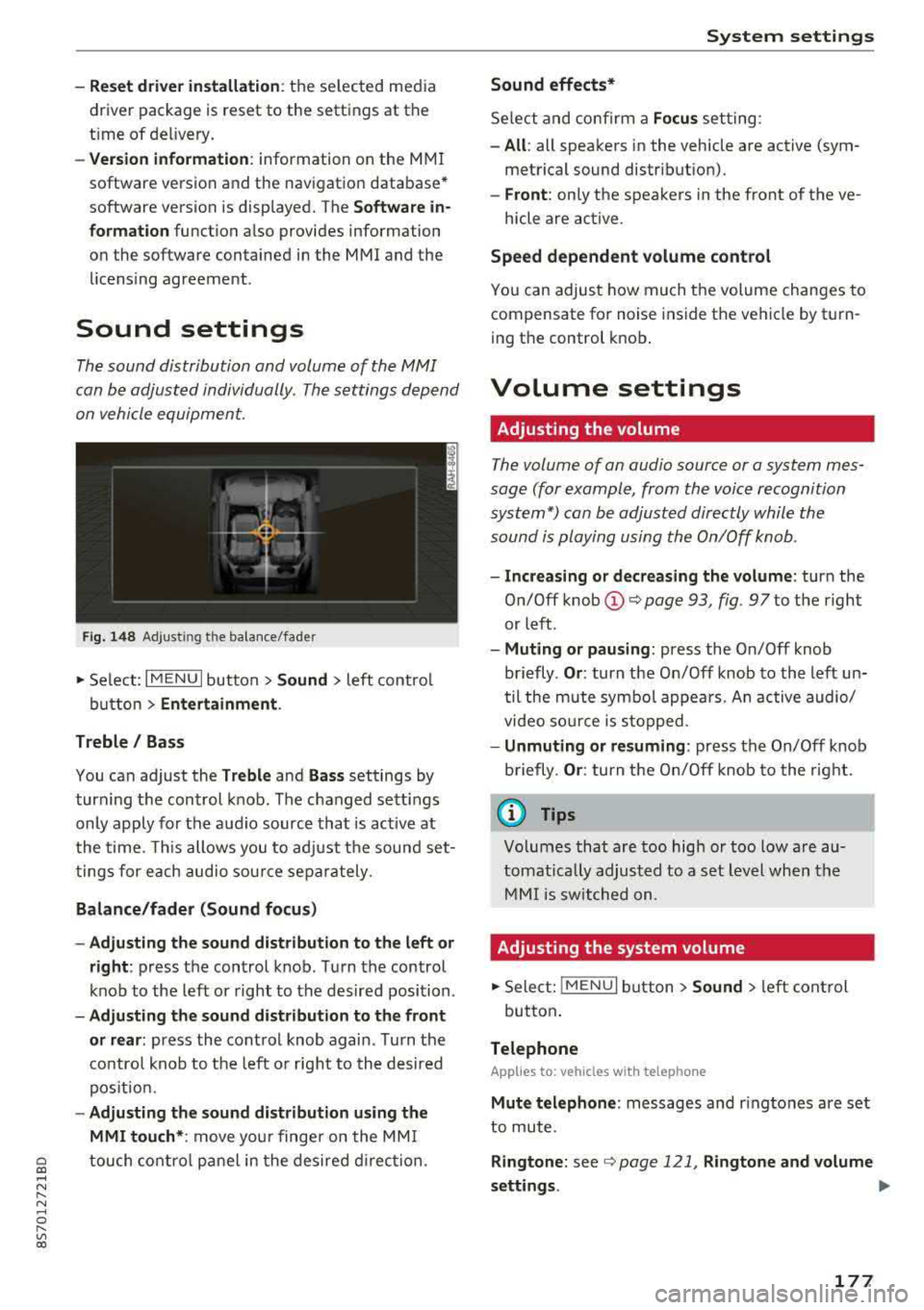
The sound distribution and volume of the MMI
can be adjusted individually . The settings depend
on vehicle equipment.
F ig . 1 48 Adj ustin g the balance /fade r
~ Select : I MENU I button >Sound > left contro l
button
> Ent ertainm ent .
Treble / Bass
You can adjust the Treble and Ba ss settings by
turn ing t he control knob . The changed sett ings
only apply for the audio source that is act ive at
the time. This allows you to ad just the sound set
t ings for each audio sour ce separately .
Bal ance /fader (Sound focus )
- Adju sting th e sound d istribution to the left or
right :
press the control knob . Turn the control
knob to the left or right to the desired position .
-Ad ju sting th e sound d istribution to the front
or rear :
press the control knob again . Turn the
contro l knob to the left o r right to the desired
pos ition.
- Adjusting the so und d istribution u sing th e
MMI touch* :
move your finger on the MM I
~ touch contro l panel in the desired d irec tion.
.... N ,....
N ...... 0 ,....
Vl co
S ys tem settings
Sound effects*
Select and confirm a Focu s setting:
-All : all speakers in the vehicle are active (sym
metrical sound distribut ion).
- Front : only the speakers in the front of the ve -
hicle are active .
Speed depend ent v olume control
You can adjust how much t he volume changes to
compensate for noise inside the vehicle by turn
ing t he control knob .
Volume settings
Adjusting the volume
The volume of an audio source or a system mes
sage (for example, from the voice recognition
system*) can be adjusted directly while the
sound is playing using the On/Off knob .
-Incr easing or decr eas ing the volume : turn the
O n/Off knob
(D ¢ page 93 , fig. 97 to t he right
or left .
-Muting or p au sing : press the On/Off knob
briefly .
Or: turn the On/Off knob to the left un
til the mute symbol appea rs. An active audio/
video so urce is stopped.
- Unmuting o r re suming : press the On/Off knob
briefly .
Or: turn the O n/Off knob to the right.
(D Tips
Volumes that are too high or too low are au
tomatically adjus ted to a set level when the
MM I is switched on.
Adjusting the system volume
~ Sele ct: ! MENU I button> Sound> le ft control
button .
Telephone
Applies to: vehicles with telephone
Mute t elephone : messages and r ingtones are set
to mute.
Ringtone : see ¢ page 121, Rin gton e and volume
s ettings .
.,.
177
Page 180 of 310
System settings
Ringtone volume: you can adjust the volume of
the selected ringtone by turning the contro l
knob.
Message volume: you can adjust the volume of
the notification for an incoming text message by
turning the control knob.
Microphone input level : you can adjust the vol
ume during a phone call by turning the control
knob.
Navigation
A pp lies to: ve hicles w ith navigation system
Voice guidance: see¢ page 141, Voice guidance.
Voice guidance during phone call: see
¢ page 141, Voice guidance.
Voice guidance volume: you can adjust the voice
gu idance volume during active route guidance by
turn ing the control knob.
Entertainment fader : the volume of audio play
back can be temporarily lowered when the park
ing system or voice guidance is active.
Voice recognition system
App lies to: ve hicles w ith vo ice recogni tion sys te m
Short dialog : prompts in a shorte r format can be
switched on or o ff.
Speech dialog system volume: you can adjust
the volume of the prompts by turning the control
knob.
Parking aid*
You can adjust the signal tone volume by turning
the control knob.
-Adjusting the Front volume: select and con
firm
High , Medium or Low .
- Adjusting
the Rear volume: select and confirm
High, Medium or Low .
MMI touch volume*
You can adjust the vo lume of the prompts for the
MMI to uch* by turning the contro l knob.
Audi Heartbeat
You can adjust the volume of Aud i Heartbeat by
t ur nin g the control knob.
178
(D Tips
Please note that the voice recognition sys
tem* is not available in Cabr io lets t hat do not
have a factory-installed safety belt micro
phone.
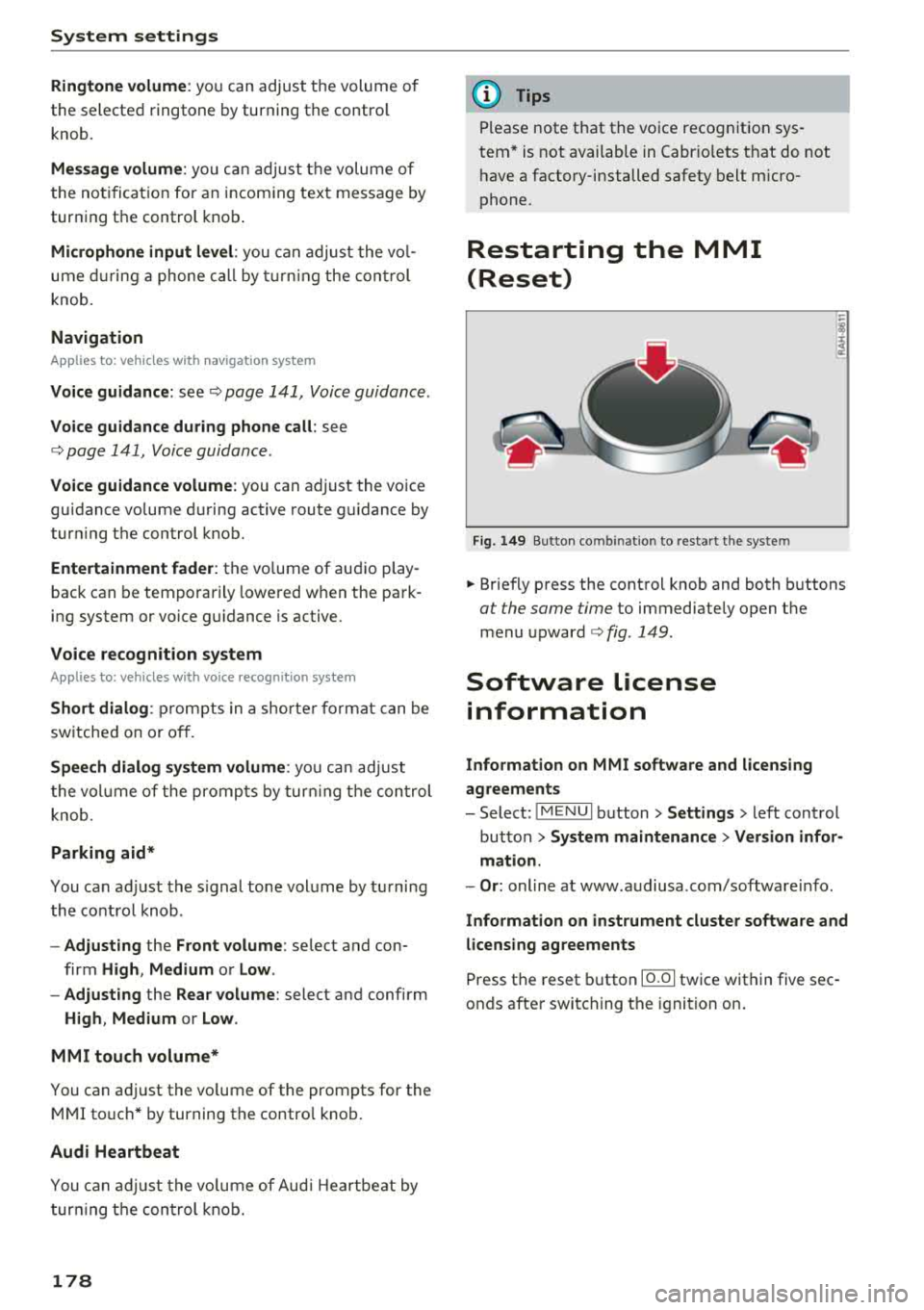
Restarting the MMI
(Reset)
Fig. 149 Button co mbin ation to res tart the syste m
.. Briefly press the control knob and both buttons
at the same time to immediately open the
menu
upward ¢ fig. 149.
Software License
information
Information on MMI software and licensing
agreements
- Select: ~
I M _ E_N_ U~ I button> Settings > left control
button >
System maintenance > Version infor
mation.
- Or : online at www .audiusa .com/software info .
Information on instrument cluster software and
licensing agreements
Press the reset button 10.01 twice within five sec
onds after switching the ignition on.
Page 181 of 310
Cl 00 .-< N r--N .-< 0 r--Vl 00
Safe driving Basics
Safe driving habits
Please remember -safety first!
The individua l safety features of your vehicle can
work together as a system to help protect you
and your passengers in a wide range of accidents.
These features cannot work as a system if they
are not always correctly adjusted and correctly
used .
This chapter contains important informat ion,
tips, instruct ions and warn ings that you need to
read and observe for your own safety, the safety
of your passenge rs and others . We have summar
i zed here w hat you need to know about safety
be lts, a irbags, child restra ints as well as child
safety. Yo ur safety is for us priority number 1. Al
ways observe the information and warnings in
this section - for your own safety as well as that
of your passengers.
The informa tion in t his sect ion app lies to all
model versions of your vehicle. Some of the fea
tures described in t his sections may be standard
eq uipment on some models, or may be optional
equ ipment on others. If you are not sure, ask
your author ized Audi dealer.
A WARNING
-Always make sure that you follow the in
st ruct ions and heed the WAR NINGS in t his
Manua l. It is in your i nterest a nd in the in
t e res t of your passengers .
-
-Always keep the complete Owner's Litera
t ur e in yo ur Audi whe n you lend or se ll yo ur
vehicle so tha t this import ant information
w ill a lways be available to t he d rive r and
passengers.
-Alw ays keep t he Owne r's lite rature h andy so
that you can f ind it easily if yo u have ques
tions .
Safe dri ving
Important things to do before driving
Safety is everybody 's job ! Vehicle and occupant
safety always depends on the informed and care
ful driver .
For your safety and the safety of your passenger,
b efor e driving alw ay s:
.. Make sure that a ll lights and s ignals are operat
ing correctly.
.. Make sure tha t the tire pressure is correct .
.. Make sure that all windows are clean and afford
good vis ibility to the outs ide .
.. Secure all luggage and othe r items ca refully
c::> page 183, c::> page 49.
.. M ak e sure tha t not hing c an in terfere wi th the
peda ls .
.. Adj ust seat and mirrors correctly for your
height .
.. Make sure to use the right child restra int cor
rectly to protect children
c::> page 216, Child
safety.
.. Sit properly in your seat and make sure that
your passenger do the
same ¢ page 46, Front
seats.
.. Fasten yo ur safety belt and wear i t properly. Al
so inst ru ct yo ur passenge r to fas ten his safety
be lt properly
¢ page 187.
What impairs driving safety?
Safe driving is dire ctly related to the condition of
the vehicle, the driver as well as the driver's abili
ty to concentrate on the road without being dis
tracted.
T he dr iver is responsib le for the sa fe ty of the ve
hicle and a ll of its occupants. If your ability to
drive is impai red, safety risks for everybody in the
vehicl e inc rease and you a lso become a hazard to
everyone else on the road
¢ A_ . Therefore:
.. Do not let yourse lf be distracted by passenge r
or by using a ce llular telephone .
.. NEVER drive when your driving ability is im
pa ired (by med ications, alcohol, drugs, etc.) .
.. Observe all traffic laws, rules of the road and
speed lim its and plain common sense .
.. ALWAYS adjust your speed to road, traffic and
weather conditions .
.,.
179
Page 200 of 310
Airbag system
Front airbags
Description of front airbags
The airbag system can provide supplemental
protection to properly restrained front seat occu
pants.
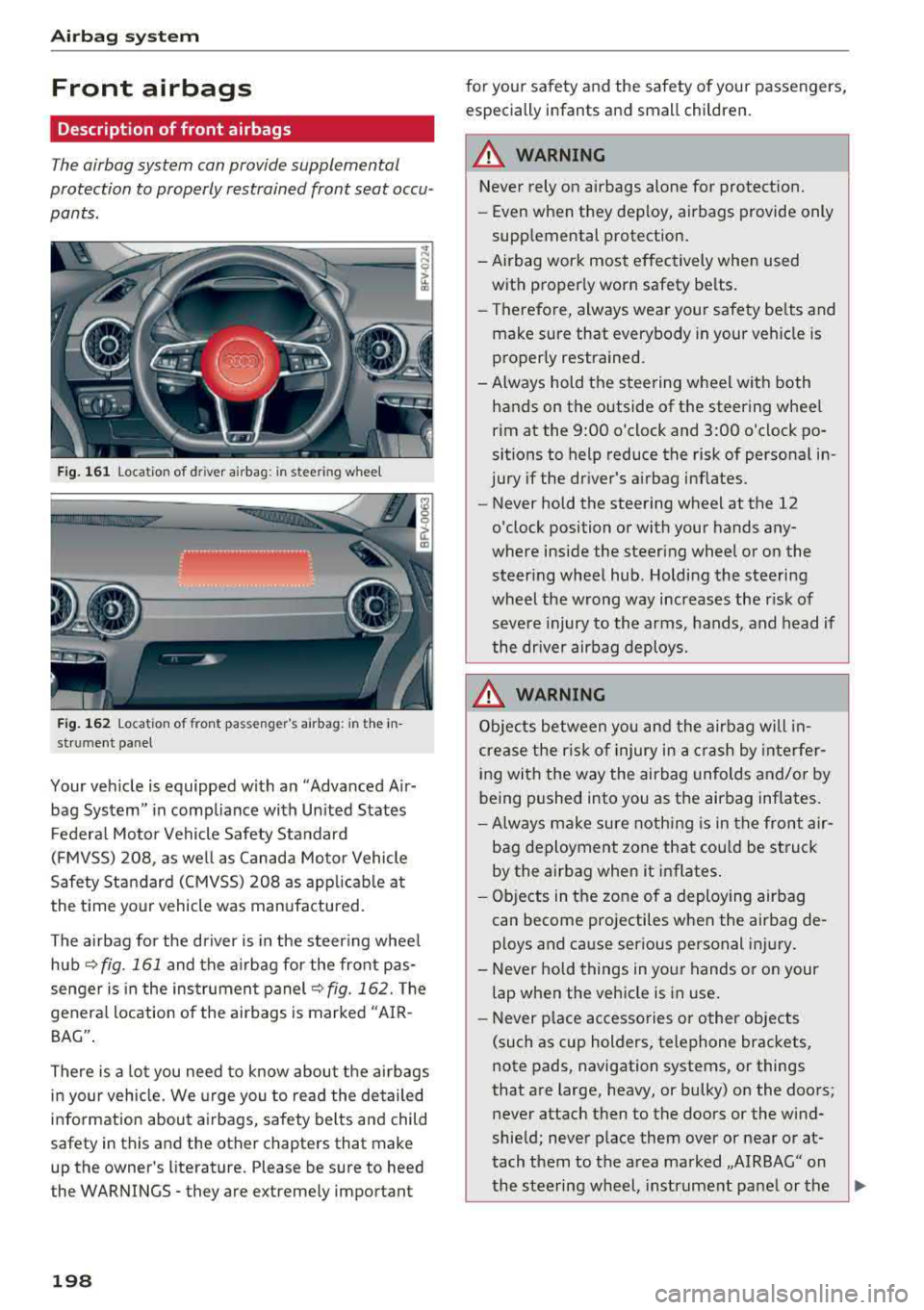
Fig. 161 location of driver airbag: in steering wheel
Fig. 162 location of front passenger's airbag: in the in
strument panel
Your vehicle is equipped with an "Advanced Air
bag System" in compliance with Un ited States
Federal Motor Vehicle Safety Standard
(FMVSS) 208, as well as Canada Motor Vehicle
Safety Standard (CMVSS) 208 as applicable at
the time your vehicle was manufactured.
The airbag for the driver is in the steer ing whee l
hub
~ fig. 161 and the airbag for the front pas
senger is in the instrument panel
~fig. 162. The
general location of the airbags is marked "AIR
BAG" .
There is a lot you need to know about the airbags
in your vehicle. We urge you to read th e detailed
information about airbags, safety belts and child
safety in this and the other chapters that make
up the owner's literature. Please be sure to heed
the WARNINGS - they are extremely important
198
for your safety and the safety of your passengers,
especially infants and small children.
A WARNING -
Never rely on airbags alone for protection.
- Even when they deploy, airbags provide only
supplemental protection.
- Airbag work most effectively when used with proper ly worn safety belts.
- Therefore, always wear your safety be lts and
make sure that everybody in your veh icle is
properly restrained.
- Always hold the steering wheel with both hands on the outside of the steering wheel
rim at the 9:00 o'clock and 3:00 o'clock po
sitions to help reduce the risk of personal in
jury if the driver's airbag inflates.
- Never hold the steering wheel at the 12
o'clock position or with your hands any
where inside the steering wheel or on the
steering wheel hub. Holding the steering
wheel the wrong way increases the risk of
severe injury to the arms, hands, and head if
the dr iver airbag deploys .
.&_ WARNING
Objects between you and the airbag will in
crease the r isk of injury in a crash by interfer
ing with the way the airbag unfolds and/or by
being pushed into you as the airbag inflates.
-Always make sure nothing is in the front air-
bag deployment zone that cou ld be struck
by the airbag when it inflates.
-
- Objects in the zone of a deploying airbag
can become projectiles when the airbag de
ploys and cause serious personal injury.
- Never hold things in your hands or on your
lap when the vehicle is in use.
- Never p lace accessories or other objects
(such as cup holders, telephone brackets,
note pads, navigation systems, or things
that are large, heavy, or bulky) on the doors;
never attach then to the doors or the wind
shield; never place them over or near or at
tach them to the area marked ,,AIRBAG" on the steering wheel, instrument panel or the
.,..
Page 206 of 310
Airbag syste m
Front airbag s will not d eploy:
- i f the ig nition is switched off whe n a cr ash oc-
cu rs,
- i n s ide collisions,
- in rear-end collisions,
- in rollovers,
- when the crash decelerat ion measured by the
airbag system is less than the minimum thresh
old needed for airbag deployment as registered
by the electronic contro l unit .
The front p assenger airb ag will also not
deploy:
- when the front passenger seat is not occup ied,
- whe n the electrical capac itance measured by
the capacitive passenger detect ion system for
the front passenger seat indicates that the pas
senger side frontal airbag must be switched off
by the electronic contro l unit (the
PASSENGER
A IR BAG
OFF ~; ligh t~ page 206 and how
they work comes on and stays on) .
.&_ WARNING
Sitting in the wrong position can increase the
risk of serious injury in crashes.
- To reduce the risk of injury when the airbags inflate, the driver and passengers must al
ways sit in an upright position, must not
lean against or p lace any part of their body
too close to the area where the airbags are located.
- Occupants who are unbelted, out of position
or too close to the a irbag can be seriously
injured by an airbag as it unfolds with great
force in the b link of an
eye <=;> page 195.
.&_ WARNING
A child in a rearward-facing chi ld seat insta l
led on the front passenger seat will be ser i
ously inju red and can be killed if the front air
bag inflates
-even with an Advanced Airbag
System.
- T he inflating a irbag w ill hit the child seat or
infant carrier with great force and will
smash the chi ld seat and child against the
backrest, center armrest, door or roof.
204
-
- Never install a rearward facing chi ld safety
seat on the front passenger seat unless the
PAS SEN GER AIR B AG OFF ~; light comes
on and stays on . If the
PA SSENGER AIR
BAG
OFF ~; light does not come on and stay
on, the inflat ing airbag will hit the chi ld
safety seat or infant carrie r wi th great force
and will smash the child safety seat and
child against the bac krest, door or roof .
Have the airbag system inspected immedi
ately by your authorized Audi dealer .
.&_ WARNING
Objects between you and the airbag will in
crease the r isk of injury in a crash by interfer
ing with the way the airbag unfolds or by be
ing pushed into you as the airbag inflates.
- Never hold things in your hands or on your lap when the veh icle is in use.
- Never transport items on or in the area of
the front passenger seat. Objects could
move into the area of the front airbags dur
ing braking or other sudden maneuver and
become dangerous projectiles that can
cause serious persona l injury if the airbags
inflate.
- Never place or attach accesso ries o r othe r
objects (such as cup holders, telephone brackets, large, heavy or bulky ob jects) on
the doo rs, ove r or near the area ma rked
"AIRBAG" on the steering wheel, instru
ment panel, seat backrests or between
those areas and yourself. These objects
could cause injury in a crash, especially
when the a irbags inflate.
- Never recl ine the front passenger's seat to
transport objects. Items can also move into
the area of the side a irbag or the front air
bag during brak ing or in a sudden maneu
ver. Objects near the airbags can become projecti les and cause injury, part icularly
when the seat is reclined.
- Never p lace or t ransport objects on the
-
front passenger seat. Objects on the front
passenger seat could ca use the capaci tive
sensor in the seat to signal to airbag system
that the seat is occ upied by a person when it
..,
Page 210 of 310
Airbag syste m
the system inspected immediately by your
authorized Aud i dealer. It is possible that
the a irbag will inflate when it is not sup
posed to, or will not inflate when it should.
A WARNING
If the front airbag inflates, a child without a
child restra int, or in a rearward-facing child
safety seat, or in a forward-facing child re
st raint that has not been p roperly installed
w ill be seriously injured and can be killed.
- If you must install a rearward-fac ing child
seat on the front passenger seat because of
exceptional c ircumstances and the
PA SSEN
GER AIR BAG
OFF ,;; light does not appear
and stay on, have the airbag system inspect
ed by your Audi dealer.
- If, in exceptiona l circumstances, you must
install a forward-facing chi ld restraint on
the front passenger seat, always move the
seat into its rearmost pos ition in the seat's
fore and aft adjustment range, as far away
from the airbag as possible. The backrest
must be adjusted to an upright posit ion .
Make sure that the PASSENGER AIR BAG
OFF ,;; light comes on and stays on a ll the
t ime whenever the ignition is switched on.
A WARNING
If the PASSENGER AIR BAG OFF ~; ligh t does
not go o ut when an adult is s itting on the
front passenger seat after taking the steps described above, have the airbag system in
spected by your Audi dealer before transport
ing anyone on the front passenger seat.
(D Tips
If the capacitive passenger detection system
determines that the front passenger seat is
empty, the frontal airbag on the passenger
side w ill be turned off, and the
PA SSENGER
AIR BAG
OFF ~; light will stay on.
Repair , care and disposal of the airbags
Parts of the a irbag system are installed at many
d ifferent p laces on your Aud i. Insta lling, remov-
208
ing, servicing or repair ing a part in an area of the
vehicle can damage a part of an airbag system
and prevent that system from work ing properly
i n a coll is ion.
There are some important things you have to know to make sure that the effectiveness of the
system will not be impaired and that discarded
components do not cause injury or pollute the
environment .
A WARNING
Improper care, servicing and repair proce
du res can increase the risk of personal in jury
and death by p reventing an airbag from de
p loying when needed or deploy ing an a irbag
unexpectedly:
-
- Never cover, obstruct, or change the steer
ing wheel ho rn pad or airbag cover or the in
s trumen t panel or modify them in any way.
- Never attach any objects s uch as c up ho lde rs
or telephone mountings to the surfaces cov
ering the a irbag un its.
- For cleaning the horn p ad or instr ument
panel, use only a soft, dry doth or one mois
tened w ith plain water . Solvents or cleaners
could damage the airbag cover or change
the stiffness o r strength of the material so
that the airbag cannot deploy and protect properly.
- Never repair, ad just, or change any parts o f
the airbag system.
- All work on the steering wheel, instrument
panel, front seats or e lectr ica l system ( in
cluding the installation of a udio eq uipment,
cellular te lephones and CB radios, etc.)
m ust be performed by a qualified techn ician
who has the training and spec ial equipment
necessary.
- For any work on the airbag system, we
strong ly recommend tha t you see you r au
thori zed A udi dealer or qualified wo rkshop.
- Never modify the front bumper or pa rts of
the vehicle body.
- Always make sure that the side a irbag can
inflate w ithout interfe rence:
Page 216 of 310
Airbag syste m
Important safety instructions on the side
airbag system
Airbags are only supplemental restraints. Always
p roperly wear safety belts and ride in a proper
seating position.
There is a lot that you and your passengers must
know and act accord ingly to help t he safety be lts
and a irbags do the ir job to provide supplemental
protection.
A WARNING
An inflating side airbag can cause serious or
fatal injury . Improperly wearing safety belts
and improper seating positions increase the
r isk of serious personal injury and death
whenever a vehicle is being used .
- In order to reduce the risk of injury when
the supplemental s ide airbag inflates:
- Always sit in an up right posit ion and never
lean ag ainst the area where the s upple
mental side airbag is located.
-
- Never let a chi ld or anyone else rest the ir
head agains t the side t rim p anel in the
area whe re the supp lemental s ide a irbag
inflates.
- Always make sure that safety belts are
worn correctly,
- Do not let anyone sitting in the fron t seat
put their hand or any other parts o f the ir
body out of the window .
- Always make sure tha t the side airbag can
inflate without inter ference.
- Never install seat covers or rep lacement
upho lstery over the front seatbacks that
have not been specifically approved by
Aud i.
- Never use add itiona l seat cushions that
cover the areas where the s ide airbags de
ploy .
- Damage to the origina l seat covers or to
the seam in the area of the side airbag
mod ule m ust always be repaired immed i
ately by an authorized Audi dealer.
- Objects between you and the airbag can in
cr ease t he risk of inju ry in an accident by in
te rfe ring w ith the way the airb ag unfo lds or
214 by being pushed
into you as the airbag in
flates .
- Never place or attach accessor ies or other
ob jects (s uch as cup ho lde rs, telephone
bracke ts, or even l arge, b ulk y objec ts) on
the doors, over or near the area mar ke d
"A IRBAG" on the seat backrests .
- Such objec ts and accessories can become
dange ro us projecti les and cause injury
when the supplemental side airbag de ploys.
- Never carry any objects or pets in the de
ployment space between them and the
airbags or allow children or other passen
gers to trave l in this position .
- Always prevent the side airbags from being
damaged by heavy objects knocking against
or hitting the sides of the seatbacks.
- The a irbag system can only be triggered
once . If the airbag has been triggered, the
system must be replaced by an authorized
Aud i dealership.
- Damage (cracks, deep scratches etc.) to the
or iginal seat covers or to the seam in the
area of the side airbag module must always
be repaired immediately by an authorized
Aud i dea le r.
- If ch ildren are seated imprope rly, thei r risk
of injury increases in the case of an accident
~ page 216, Child safety .
-Never attempt to mod ify any components of
the airbag system in any way.
- In a side collision, side airbags will not func
tion properly if sensors cannot correctly measure increasing air press ure inside the
doors when a ir e scapes th rough large r, un
closed openings in the door p anel.
- Never dr ive with interior door t rim panels
removed.
- Never dr ive when parts have been re
moved from the inside door panel and the
openings they leave have not been proper
ly closed .
- Never dr ive when loudspeakers in the
doors have been removed unless the
speaker holes have been properly closed .