remote control BMW 740I 1998 Owner's Manual
[x] Cancel search | Manufacturer: BMW, Model Year: 1998, Model line: 740I, Model: BMW 740I 1998Pages: 211, PDF Size: 1.68 MB
Page 90 of 211
89n
RepairsIndexOverview Controls Car care Technology Data
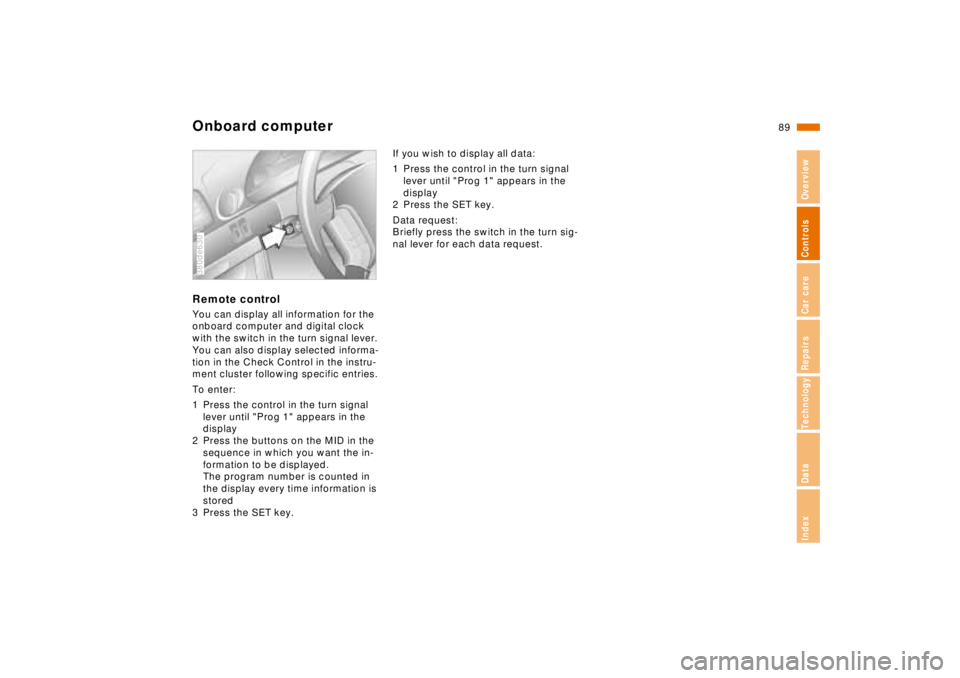
Onboard computerRemote controlYou can display all information for the
onboard computer and digital clock
with the switch in the turn signal lever.
You can also display selected informa-
tion in the Check Control in the instru-
ment cluster following specific entries.
To enter:
1 Press the control in the turn signal
lever until "Prog 1" appears in the
display
2 Press the buttons on the MID in the
sequence in which you want the in-
formation to be displayed.
The program number is counted in
the display every time information is
stored
3 Press the SET key.380de630
If you wish to display all data:
1 Press the control in the turn signal
lever until "Prog 1" appears in the
display
2 Press the SET key.
Data request:
Briefly press the switch in the turn sig-
nal lever for each data request.
Page 103 of 211
102n
Automatic climate controlTips for pleasant drivingUse the automatic system, i.e., press
AUTO button 4. Select an interior tem-
perature that is comfortable for you -
we recommend 707 (226) as a com-
fortable setting. When the outside tem-
perature is above 427 (56), you can
also use the air conditioning system 14.
This will dry the air and prevent window
fogging, for example if people are wear-
ing damp clothes in the vehicle. Set the
outlets 2 so that the air flows past you
and does not flow directly at you. Set
the rotary dial between the air outlets 2
for the upper body to a medium posi-
tion, since air that is somewhat cooler
promotes driving without fatigue.
The following description will guide you
through additional individual settings.
You can make the settings of your
vehicle in such a manner that,
when you unlock the car with your per-
sonalized remote control, your own per-
sonalized setting of the automatic cli-
mate control is initiated.<
Automatic air distribution
The AUTO program as-
sumes the adjustment of
the air distribution and the air supply for
you and in addition adapts the tempera-
ture to external influences (summer,
winter) to meet preferences you can
specify. This program maintains a com-
fortable in-car climate regardless of the
season. Select an interior temperature
that is comfortable for you - we recom-
mend 707 (226) as a comfortable
setting.
The temperature setting and the word
"AUTO" for the air flow appear in the
display 7 (refer to the overview on
page 100). Open the ventilation outlet
for the upper body area. Switch on the
air conditioner in warm weather. The
maximum cooling capacity is achieved
when you set the rotary dial 3 (refer to
page 104) to cold.
Individual air distribution
You can cancel the AUTO
program by selecting spe-
cific distribution patterns to
suit your own individual re-
quirements. You can direct
air to flow onto the windows , toward
the upper body , and into the footwell
.
To defrost windshield and door
windows
This program quickly removes
ice and condensation from the
windshield and the side windows.
Air conditioner
The air is cooled and dehumidi-
fied and - depending on the tem-
perature setting - warmed again when
the air conditioner system is switched
on.
Depending on the weather, the wind-
shield may fog over briefly when the en-
gine is started.
At outside temperatures below approx.
427 (56), switch off the air condi-
tioner. This will help to prevent the win-
dows from fogging up.
If the windows fog over immediately af-
ter the air conditioner is switched off,
switch it back on.
Condensation forms in the air con-
ditioner system during operation,
which then exits under the vehicle.
Traces of condensed water of this kind
are thus normal.<
Page 109 of 211
108n
Integrated Universal Remote Control
*
The conceptThe Integrated Universal Remote Con-
trol replaces up to three hand-held
transmitters of different devices such as
garage-door openers, alarm systems,
or door locking systems. The Integrated
Universal Remote Control recognizes
and "learns" the transmitted signal of
each of the original hand-held transmit-
ters.
The signal of an original hand-held
transmitter can be programmed on one
of the three channel keys. Following
that, each of the devices can be actu-
ated with the appropriately-program-
med channel key. Transmission of the
signal is signaled by the indicator lamp.
If the vehicle is sold, the memory of the
channel keys should be cleared as de-
scribed on page 110.
During programming and before
every remote actuation of a pro-
grammed device by the Integrated Uni-
versal Remote Control, check to be
sure that there are no persons, animals
or objects within the actuation range of
the device in order to prevent possible
injuries or damage. Also, comply with
the safety precautions of the original
hand-held transmitter.<
To Canadian residents:
During programming, your hand-
held transmitter may automatically stop
transmitting after two seconds, which
may not be long enough to program the
BMW Universal Transmitter. If you are
programming from one of these hand-
held transmitters, the Universal Trans-
mitter's light may begin to flash in a se-
ries of double-blinks. If this occurs,
continue to hold the button on the Uni-
versal Transmitter while you reactivate
your hand-held transmitter. You may
have to repeat this function several
times while programming.<
Before programming, read the
"User information" section on
page 110.<
Original hand-held transmitter
If this symbol is present on the
packaging or in the instructions
of the original hand-held trans-
mitter, it may be assumed that this
hand-held transmitter is compatible
with the Integrated Universal Remote
Control.
Checking for the conversion codeTo determine whether the original
hand-held transmitter is provided with a
conversion-code system, you may ei-
ther read the instructions for the original
hand-held transmitter or program a
channel key as described on page 109
(left-hand column under "Program-
ming").
Then press and hold the programmed
channel key of the Integrated Universal
Remote Control. If the indicator lamp of
the Integrated Universal Remote Con-
trol flashes for two seconds and then
comes on steadily, the original hand-
held transmitter is provided with a con-
version-code system. With a conver-
sion-code system, program the channel
keys as described on page 109 (right-
hand column under "Programming a
hand-held transmitter with conversion
code").
If you have additional questions,
please consult your BMW center
or call 1-800-355-3515.<
Page 110 of 211
109n
RepairsIndexOverview Controls Car care Technology Data
Integrated Universal Remote Control
*
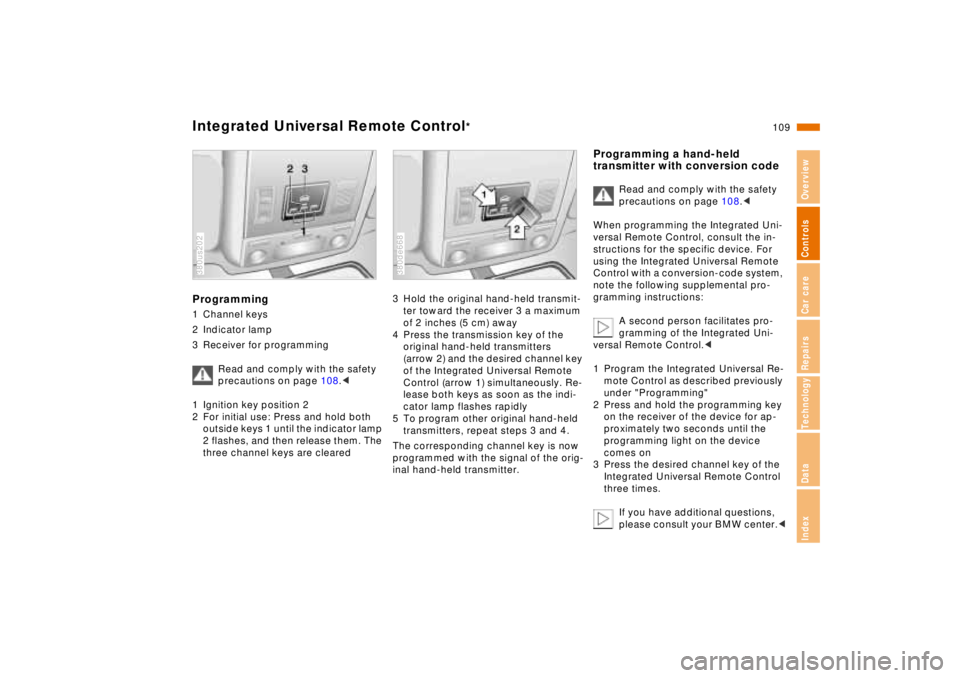
Programming1 Channel keys
2 Indicator lamp
3 Receiver for programming
Read and comply with the safety
precautions on page 108.<
1 Ignition key position 2
2 For initial use: Press and hold both
outside keys 1 until the indicator lamp
2 flashes, and then release them. The
three channel keys are cleared380us202
3 Hold the original hand-held transmit-
ter toward the receiver 3 a maximum
of 2 inches (5 cm) away
4 Press the transmission key of the
original hand-held transmitters
(arrow 2) and the desired channel key
of the Integrated Universal Remote
Control (arrow 1) simultaneously. Re-
lease both keys as soon as the indi-
cator lamp flashes rapidly
5 To program other original hand-held
transmitters, repeat steps 3 and 4.
The corresponding channel key is now
programmed with the signal of the orig-
inal hand-held transmitter.380de668
Programming a hand-held
transmitter with conversion code
Read and comply with the safety
precautions on page 108.<
When programming the Integrated Uni-
versal Remote Control, consult the in-
structions for the specific device. For
using the Integrated Universal Remote
Control with a conversion-code system,
note the following supplemental pro-
gramming instructions:
A second person facilitates pro-
gramming of the Integrated Uni-
versal Remote Control.<
1 Program the Integrated Universal Re-
mote Control as described previously
under "Programming"
2 Press and hold the programming key
on the receiver of the device for ap-
proximately two seconds until the
programming light on the device
comes on
3 Press the desired channel key of the
Integrated Universal Remote Control
three times.
If you have additional questions,
please consult your BMW center.<
Page 111 of 211
110n
Integrated Universal Remote Control
*
Glove compartment
Clearing the channel keys
Read and comply with the safety
precautions on page 108.<
The memory of individual channel keys
cannot be deleted. However, the three
channel keys can be cleared together
as follows:
>Press and hold both outside keys of
the Integrated Universal Remote
Control until the indicator lamp
flashes, and then release them.
All of the channel keys are cleared.
User informationDo not use this BMW Universal Trans-
mitter with any garage door opener that
lacks safety "stop" and "reverse" fea-
tures as required by federal safety stan-
dards (this includes any garage door
opener model manufactured before
April 1, 1982).
This device complies with Section 15 of
the FCC Rules. Operation is subject to
the following two conditions: As defined
in the regulations, this device must not
emit harmful interference, and must be
shielded against interference from ex-
ternal sources to prevent unauthorized
or inadvertent activation.
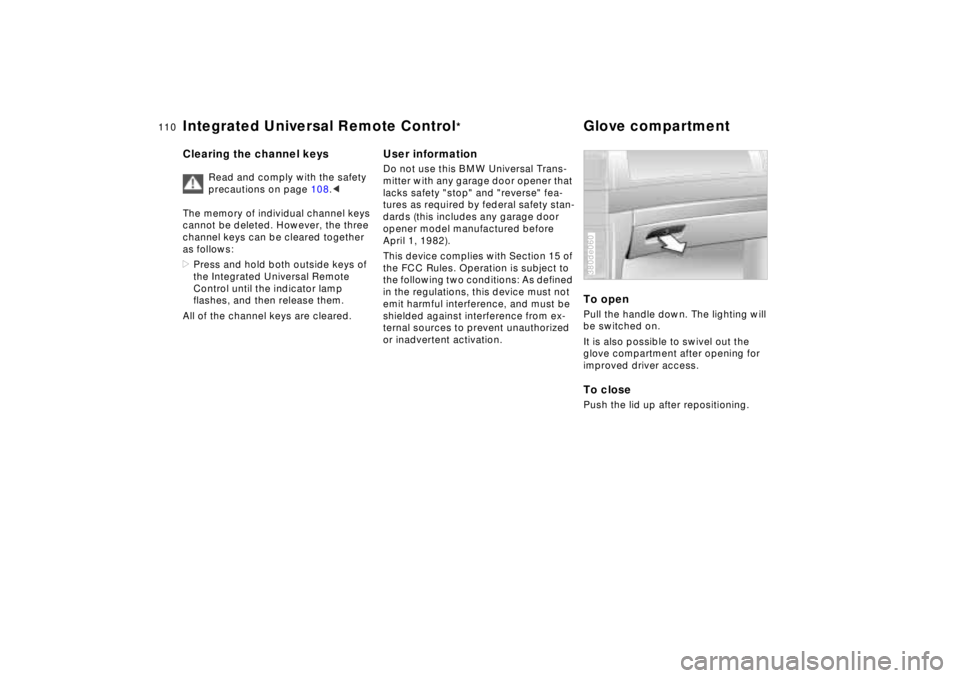
To openPull the handle down. The lighting will
be switched on.
It is also possible to swivel out the
glove compartment after opening for
improved driver access.To closePush the lid up after repositioning.380de060
Page 162 of 211
Overview
Controls and features
Operation, care
and maintenance
Owner service procedures
Technical data
Index Advanced technology
161n
RepairsIndexOverview Controls Car care Technology Data
Replacement procedures:
Onboard tool kit162
Windshield wiper blades162
Lamps and bulbs163
Remote control168
Changing tires170
Battery173
Fuses176
In case of electrical
malfunction:
Fuel filler door178
Sliding/Tilt sunroof178
Assistance, giving and
receiving:
Jump-starting179
Towing the vehicle180
Page 169 of 211
168n
Remote controlChanging batteryReplace the battery when the message
"REMOTE KEY BATTERY" appears in
the Check Control. The LED no longer
lights up when a button is pressed and
it is no longer possible to lock the car
using the remote key.
Install only a battery of the type that is
specified in the battery compartment
(CR 2016). Be sure the battery is in-
stalled in the correct position.
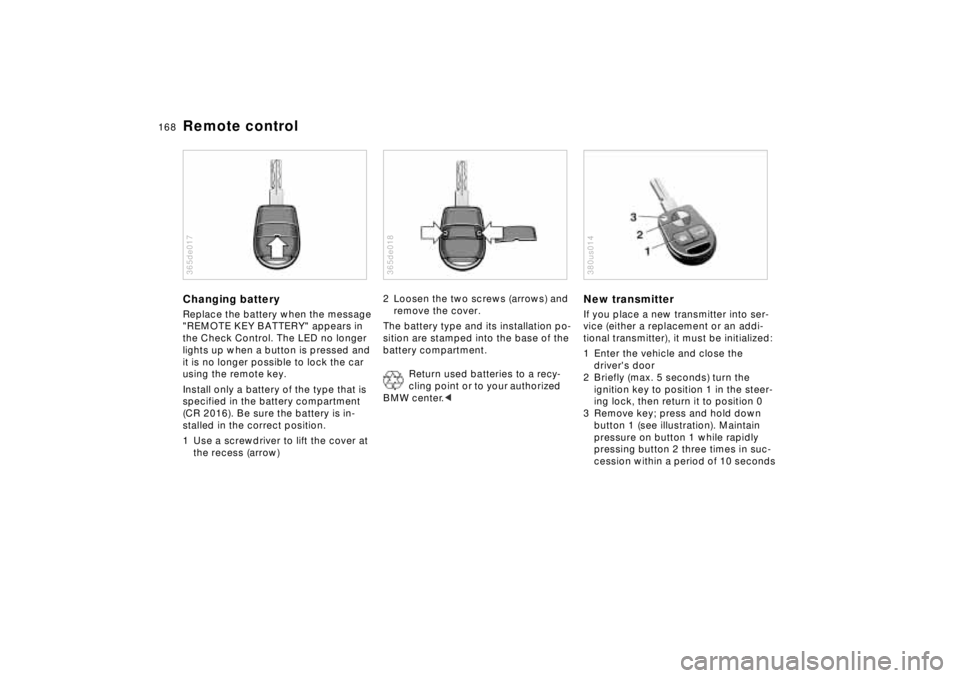
1 Use a screwdriver to lift the cover at
the recess (arrow)365de017
2 Loosen the two screws (arrows) and
remove the cover.
The battery type and its installation po-
sition are stamped into the base of the
battery compartment.
Return used batteries to a recy-
cling point or to your authorized
BMW center.< 365de018
New transmitterIf you place a new transmitter into ser-
vice (either a replacement or an addi-
tional transmitter), it must be initialized:
1 Enter the vehicle and close the
driver's door
2 Briefly (max. 5 seconds) turn the
ignition key to position 1 in the steer-
ing lock, then return it to position 0
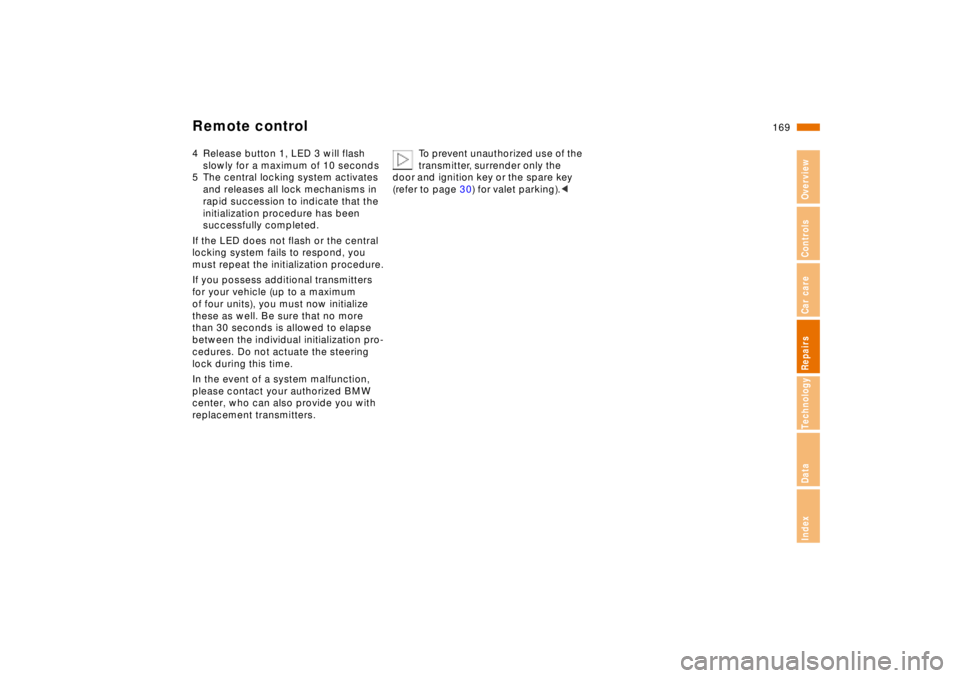
3 Remove key; press and hold down
button 1 (see illustration). Maintain
pressure on button 1 while rapidly
pressing button 2 three times in suc-
cession within a period of 10 seconds380us014
Page 170 of 211
169n
RepairsIndexOverview Controls Car care Technology Data
Remote control4 Release button 1, LED 3 will flash
slowly for a maximum of 10 seconds
5 The central locking system activates
and releases all lock mechanisms in
rapid succession to indicate that the
initialization procedure has been
successfully completed.
If the LED does not flash or the central
locking system fails to respond, you
must repeat the initialization procedure.
If you possess additional transmitters
for your vehicle (up to a maximum
of four units), you must now initialize
these as well. Be sure that no more
than 30 seconds is allowed to elapse
between the individual initialization pro-
cedures. Do not actuate the steering
lock during this time.
In the event of a system malfunction,
please contact your authorized BMW
center, who can also provide you with
replacement transmitters.To prevent unauthorized use of the
transmitter, surrender only the
door and ignition key or the spare key
(refer to page 30) for valet parking).<
Page 203 of 211

Everything from A to ZAABS125
Accessories6
Activated-charcoal filter105
Active seat48
Adaptive Transmission
Control (ATC)63
Adding engine oil143
Adding washer fluid142
Adjust the backrest46
Adjusting steering wheel49
Air distribution102
Air flow103
Air jets100
Air pressure132
Airbags55
Alarm system40
Deactivating in an
emergency41
Antenna diversity186
Antifreeze146
Antifreeze, radiator128, 146
Antilock Brake System
(ABS)125
Anti-theft alarm system
32,40
Approved gross vehicle
weight196
Aquaplaning123,132
Armrest111
ASC+T (Automatic Stability
Control plus Traction)92Ashtray114
AUC (Automatic recirculated-
air control)103
Audio System78
Automatic car washes150
Automatic climate
control100
Automatic climate control,
removing window
condensation102
Automatic recirculated-air
control (AUC)103
Automatic Soft-Close
feature38
Automatic Stability Control
plus Traction (ASC+T)92
Automatic steering wheel
adjustment49
Automatic transmission62
Automatic transmission with
Steptronic65
Automatic windshield
washer69
Average fuel consumption 85
Average speed86
Axle loads196
BBackup lamps, bulb
replacement166
Battery173,198
Battery capacity198Battery change, radio remote
control168
Battery charge current20
Battery, discharged179
Battery, removal and
installation175
Belts54
Beverage holders113
Blower103
Body-cavity protectant151
Brake faults128
Brake fluid147
Brake hydraulic system20
Brake lamps, bulb
replacement166
Brakes126
Break-in procedure122
Break-resistant security
glass, care153
Bulb replacement163
CCar jack170
Car Memory53
Car radio reception131, 186
Car telephone113
Car wash150
Care, exterior152
Care, interior154
Caring for the vehicle
finish152
Caring for your car150Catalytic converter124
Cellular phone131
Center (high-mount) brake
lamp166
Central locking system32
Central locking system,
button36
Changing a wheel170
Charge indicator lamp20
Charging the battery174
Check Control75
CHECK key75
Checking the engine oil143
Checking tire pressure26
Child restraints57
Childproof door locks58
Cigarette lighter115
Clock,
refer to Digital clock79
Code88
Refer to the Radio Owner's
Manuel
Codes, tires134
Coin tray113
Cold start60
Comfort seats47
Connecting a car vacuum
cleaner115
Consumption display73
Contour seat48
Page 204 of 211

RepairsIndexOverview Controls Car care Technology Data
Everything from A to Z
203n
Convenience operating mode
for windows and sliding/tilt
roof32
Convenience operating mode
for windows and sliding/tilt
sunroof33
Convenience starting59
Coolant146
Coolant temperature
gauge74
Coolant, antifreeze128
Cooling system, capacity 197
Cruise control70
Cruising range85
DDaytime-driving light
switch96
DBC (Dynamic Brake
Control)127
Defrosting, windows102
Digital clock79
Digital sound processor187
Dimensions195
Dimming feature, interior
rearview mirror50
Dipstick, engine oil143
Disc brakes126
Disconnect the battery175
Displacement194
Displays18
Distance86Distance warning90
Door key30
Door warning lamps, bulb
replacement167
Doors, emergency release 32
Doors, radio remote
control33
Drink holders113
Drive belts198
Driving notes123
DSC (Dynamic Stability
Control)92
Dynamic Brake Control
(DBC)127
Dynamic Stability Control
(DSC)92
EEDC (Electronic Damper
Control)93
Electric power windows42
Electric rear seat
adjustment48
Electric steering wheel
adjustment49
Electrical accessories,
failure176
Electrical system198
Electronic Damper Control
(EDC)93
Electronic immobilizer31Emergency deactivation of
the alarm system41
Emergency release
doors32
fuel filler door178
luggage compartment
lid37
sliding/tilt sunroof178
Energy Control73
Engine coolant146
Engine data194
Engine oil consumption143
Engine oil pressure20
Engine oil specifications144
Estimated time of arrival87
Exterior door handles,
lighted33
Exterior finish, care151, 152
FFailure messages75
First-aid kit24
Fittings for tow-starting
and towing180
Flashlight111
Flat tires132
Fluid, power steering148
Fog lamps97
bulb replacement165
switch97
Footwell lamps98Footwell lamps, bulb
replacement167
For wheelslip control, refer
to ASC+T/DSC92
Front armrest112
Front seat adjustment46
Fuel25
Fuel consumption
indicator73
Fuel filler door25
Fuel filler door,
manual release after
electrical fault178
Fuel gauge73
Fuel specifications25
Fuel tank capacity197
Fuel, average fuel
consumption85
Fuses176
GGasoline25
Glove compartment110
Glove compartment lamp,
bulb replacement167
Gross vehicle weight196HHand brake, refer to Parking
brake61
Handsfree system113
Hazard warning triangle24