service BMW X5M 2012 User Guide
[x] Cancel search | Manufacturer: BMW, Model Year: 2012, Model line: X5M, Model: BMW X5M 2012Pages: 317, PDF Size: 8.83 MB
Page 71 of 317
Displays
Odometer, external
temperature display, clock
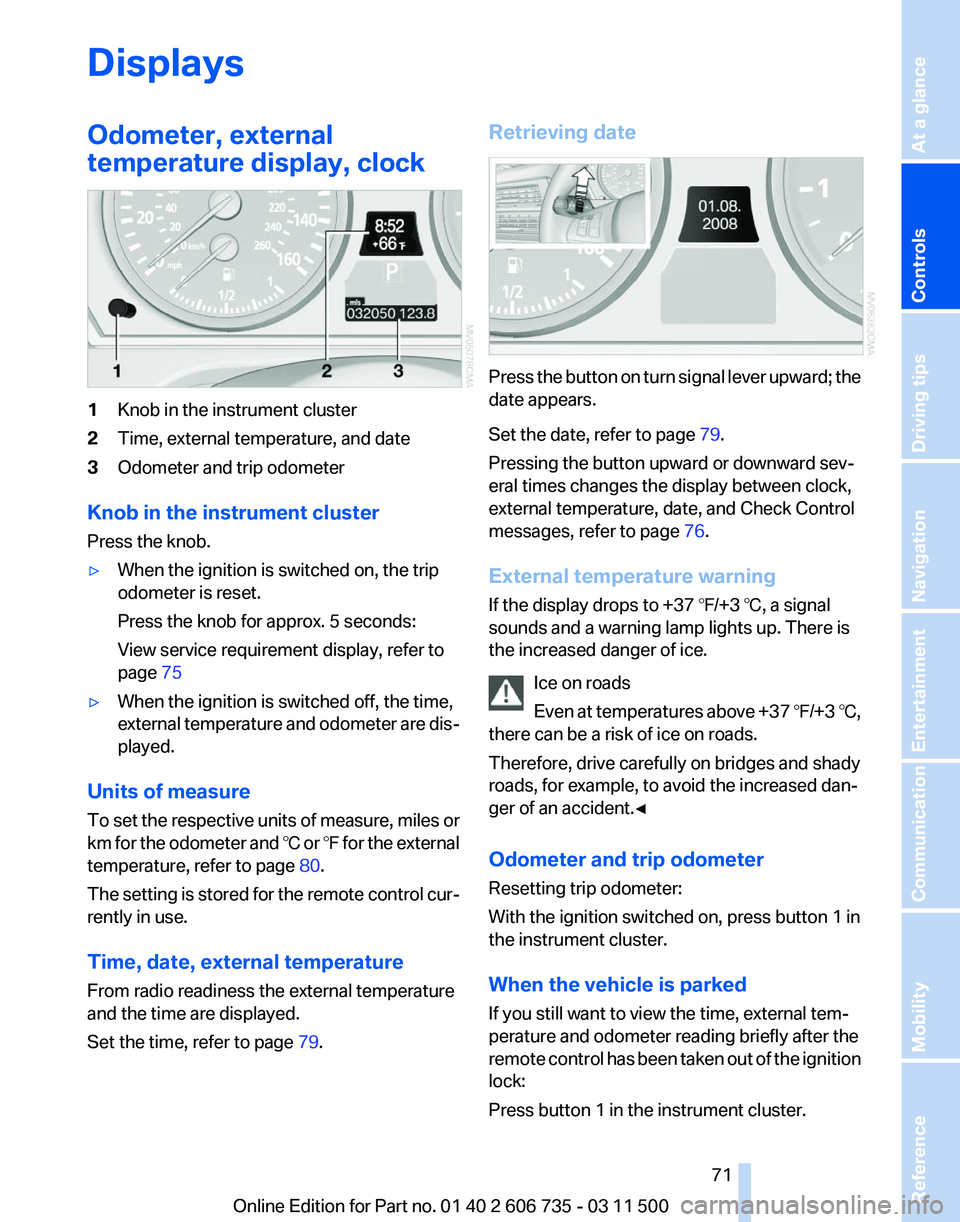
1
Knob in the instrument cluster
2 Time, external temperature, and date
3 Odometer and trip odometer
Knob in the instrument cluster
Press the knob.
▷ When the ignition is switched on, the trip
odometer is reset.
Press the knob for approx. 5 seconds:
View service requirement display, refer to
page 75
▷ When the ignition is switched off, the time,
external
temperature and odometer are dis‐
played.
Units of measure
To
set the respective units of measure, miles or
km for the odometer and ℃ or ℉ for the external
temperature, refer to page 80.
The setting is stored for the remote control cur‐
rently in use.
Time, date, external temperature
From radio readiness the external temperature
and the time are displayed.
Set the time, refer to page 79.Retrieving date
Press the button on turn signal lever upward; the
date appears.
Set the date, refer to page
79.
Pressing the button upward or downward sev‐
eral times changes the display between clock,
external temperature, date, and Check Control
messages, refer to page 76.
External temperature warning
If the display drops to +37 ℉/+3 ℃, a signal
sounds and a warning lamp lights up. There is
the increased danger of ice. Ice on roads
Even
at temperatures above +37 ℉/+3 ℃,
there can be a risk of ice on roads.
Therefore, drive carefully on bridges and shady
roads, for example, to avoid the increased dan‐
ger of an accident.◀
Odometer and trip odometer
Resetting trip odometer:
With the ignition switched on, press button 1 in
the instrument cluster.
When the vehicle is parked
If you still want to view the time, external tem‐
perature and odometer reading briefly after the
remote control has been taken out of the ignition
lock:
Press button 1 in the instrument cluster. Seite 71
71Online Edition for Part no. 01 40 2 606 735 - 03 11 500
Reference Mobility Communication Entertainment Navigation Driving tips
Controls At a glance
Page 75 of 317
Service requirements
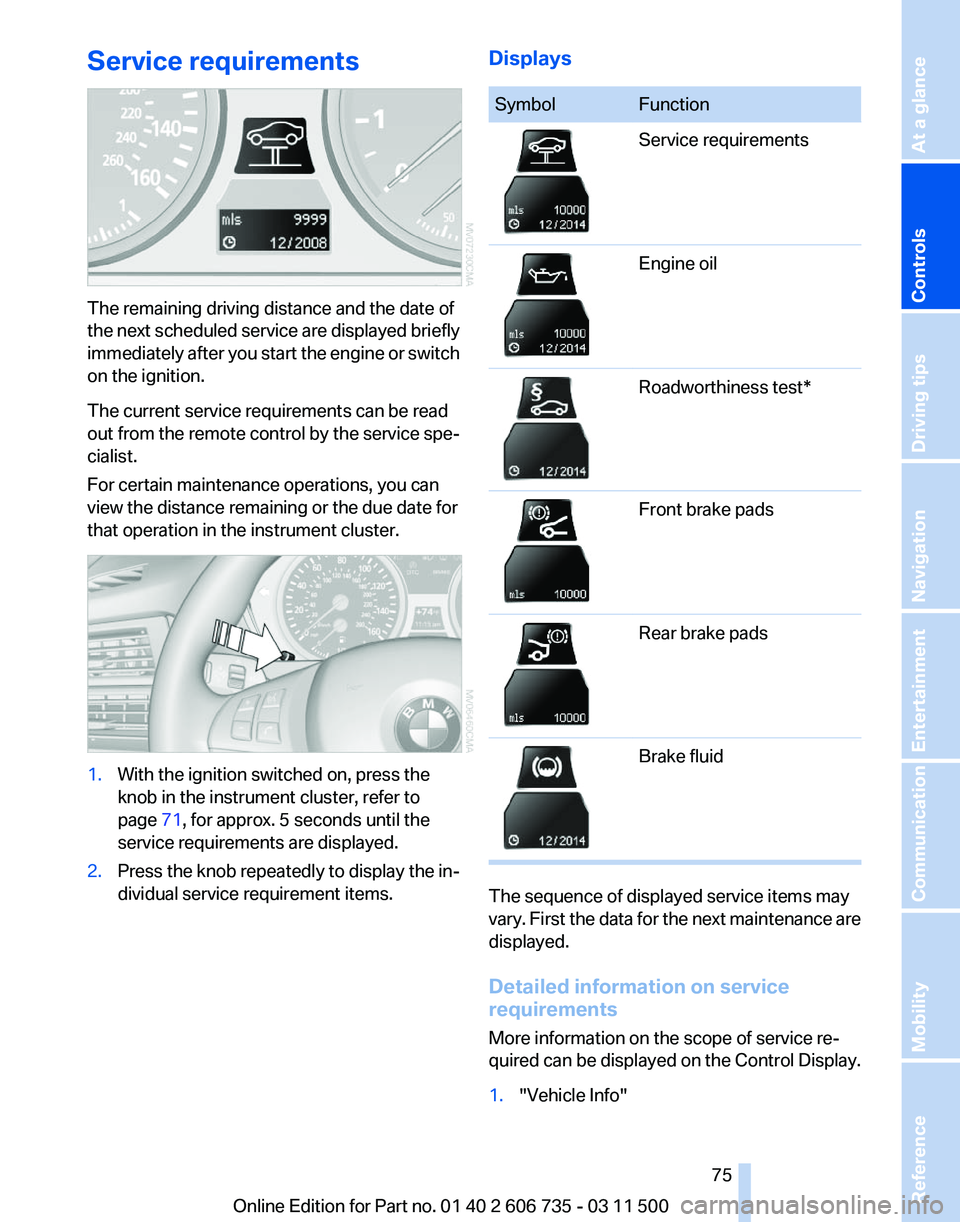
The remaining driving distance and the date of
the
next scheduled service are displayed briefly
immediately after you start the engine or switch
on the ignition.
The current service requirements can be read
out from the remote control by the service spe‐
cialist.
For certain maintenance operations, you can
view the distance remaining or the due date for
that operation in the instrument cluster. 1.
With the ignition switched on, press the
knob in the instrument cluster, refer to
page 71, for approx. 5 seconds until the
service requirements are displayed.
2. Press the knob repeatedly to display the in‐
dividual service requirement items. Displays Symbol Function
Service requirements
Engine oil
Roadworthiness test*
Front brake pads
Rear brake pads
Brake fluid
The sequence of displayed service items may
vary.
First the data for the next maintenance are
displayed.
Detailed information on service
requirements
More information on the scope of service re‐
quired can be displayed on the Control Display.
1. "Vehicle Info"
Seite 75
75Online Edition for Part no. 01 40 2 606 735 - 03 11 500
Reference Mobility Communication Entertainment Navigation Driving tips
Controls At a glance
Page 76 of 317
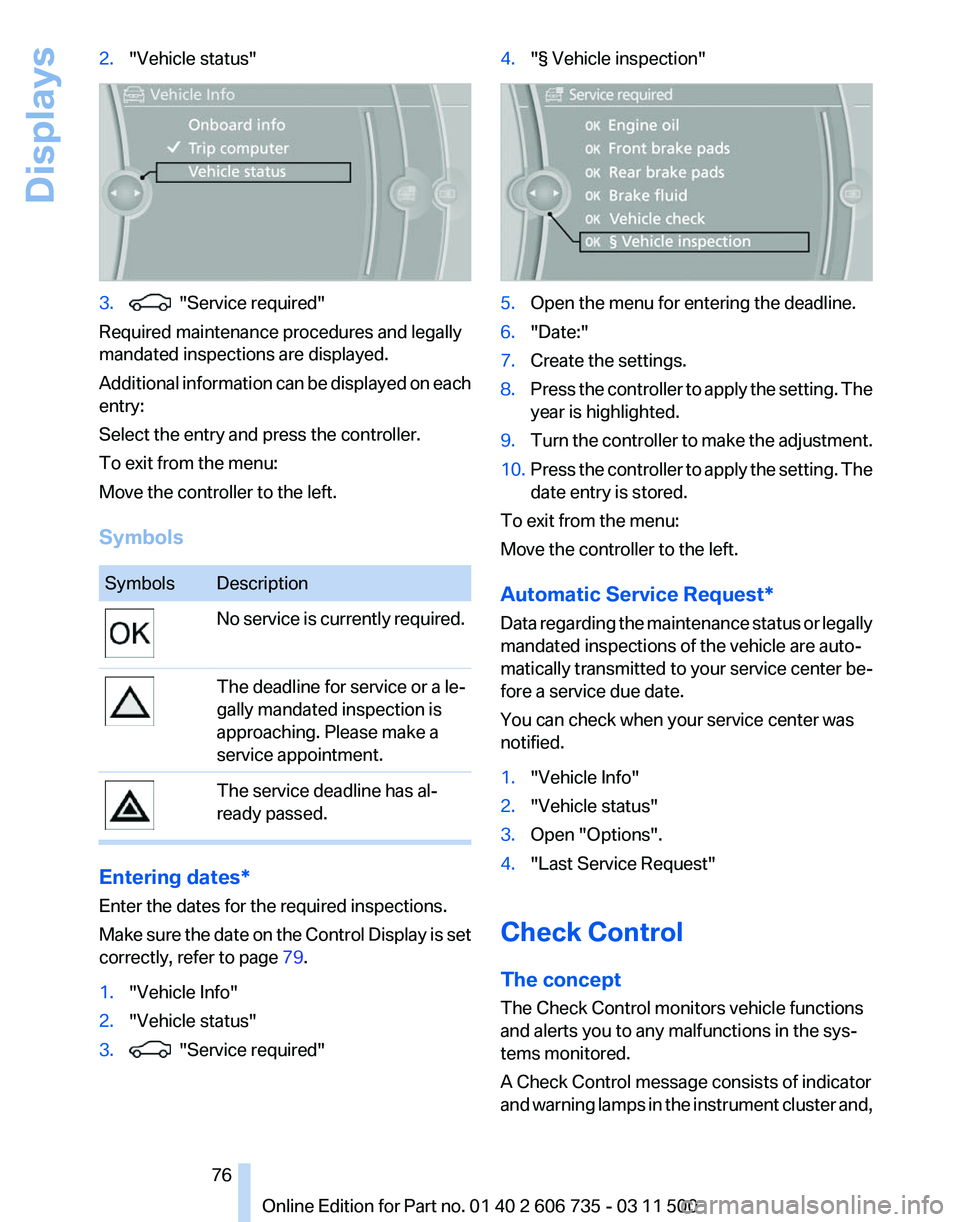
2.
"Vehicle status" 3. "Service required"
Required maintenance procedures and legally
mandated inspections are displayed.
Additional
information can be displayed on each
entry:
Select the entry and press the controller.
To exit from the menu:
Move the controller to the left.
Symbols Symbols Description
No service is currently required.
The deadline for service or a le‐
gally mandated inspection is
approaching. Please make a
service appointment.
The service deadline has al‐
ready passed.
Entering dates*
Enter the dates for the required inspections.
Make
sure the date on the Control Display is set
correctly, refer to page 79.
1. "Vehicle Info"
2. "Vehicle status"
3. "Service required" 4.
"§ Vehicle inspection" 5.
Open the menu for entering the deadline.
6. "Date:"
7. Create the settings.
8. Press the controller to apply the setting. The
year is highlighted.
9. Turn the controller to make the adjustment.
10. Press the controller to apply the setting. The
date entry is stored.
To exit from the menu:
Move the controller to the left.
Automatic Service Request
*
Data regarding the maintenance status or legally
mandated inspections of the vehicle are auto‐
matically transmitted to your service center be‐
fore a service due date.
You can check when your service center was
notified.
1. "Vehicle Info"
2. "Vehicle status"
3. Open "Options".
4. "Last Service Request"
Check Control
The concept
The Check Control monitors vehicle functions
and alerts you to any malfunctions in the sys‐
tems monitored.
A Check Control message consists of indicator
and
warning lamps in the instrument cluster and,
Seite 76
76 Online Edition for Part no. 01 40 2 606 735 - 03 11 500
Displays
Page 77 of 317
in some circumstances, an acoustic signal and
text
messages at the top of the Control Display.
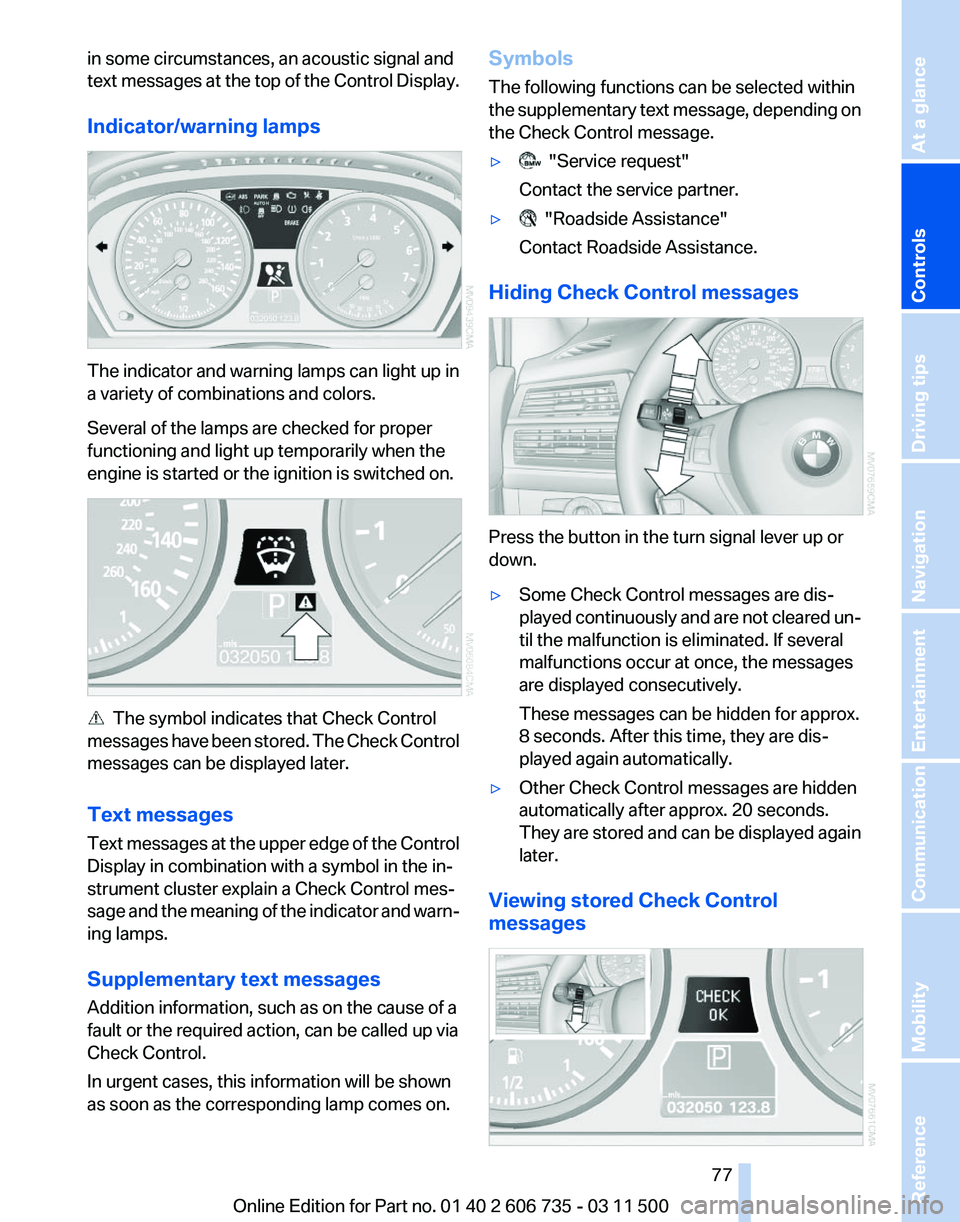
Indicator/warning lamps The indicator and warning lamps can light up in
a variety of combinations and colors.
Several of the lamps are checked for proper
functioning and light up temporarily when the
engine is started or the ignition is switched on.
The symbol indicates that Check Control
messages
have been stored. The Check Control
messages can be displayed later.
Text messages
Text messages at the upper edge of the Control
Display in combination with a symbol in the in‐
strument cluster explain a Check Control mes‐
sage and the meaning of the indicator and warn‐
ing lamps.
Supplementary text messages
Addition information, such as on the cause of a
fault or the required action, can be called up via
Check Control.
In urgent cases, this information will be shown
as soon as the corresponding lamp comes on. Symbols
The following functions can be selected within
the
supplementary text message, depending on
the Check Control message.
▷ "Service request"
Contact the service partner.
▷ "Roadside Assistance"
Contact Roadside Assistance.
Hiding Check Control messages Press the button in the turn signal lever up or
down.
▷
Some Check Control messages are dis‐
played
continuously and are not cleared un‐
til the malfunction is eliminated. If several
malfunctions occur at once, the messages
are displayed consecutively.
These messages can be hidden for approx.
8 seconds. After this time, they are dis‐
played again automatically.
▷ Other Check Control messages are hidden
automatically after approx. 20 seconds.
They
are stored and can be displayed again
later.
Viewing stored Check Control
messages Seite 77
77Online Edition for Part no. 01 40 2 606 735 - 03 11 500
Reference Mobility Communication Entertainment Navigation Driving tips
Controls At a glance
Page 87 of 317
▷
Do not apply adhesive materials to the air‐
bag cover panels, cover them or modify
them in any way.
▷ Never modify either the individual compo‐
nents
or the wiring in the airbag system. This
also applies to steering wheel covers, the
dashboard, the seats, the roof pillars and the
sides of the headliner.◀
Even when all instructions are followed closely,
injury from contact with the airbags cannot be
ruled out in certain situations.
The ignition and inflation noise may lead to
short-term
and, in most cases, temporary hear‐
ing impairment in sensitive individuals.
In the case of a malfunction, deactivation
and after triggering of the airbags
Do not touch the individual components imme‐
diately after the system has been triggered; oth‐
erwise, there is the danger of burns.
Only have the airbags checked, repaired or dis‐
mantled and the airbag generator scrapped by
your service center or a workshop that has the
necessary authorization for handling explosives.
Non-professional attempts to service the sys‐
tem could lead to failure in an emergency or un‐
desired triggering of the airbag, either of which
could result in injury.◀
Warnings and information on the airbags are
also found on the sun visors.
Automatic deactivation of the front
passenger airbags
The occupation of the seat is detected by eval‐
uating the impression on the occupied seat sur‐
face of the front passenger seat.
The front and side airbags on the front passen‐
ger side are activated or deactivated accordingly
by the system.
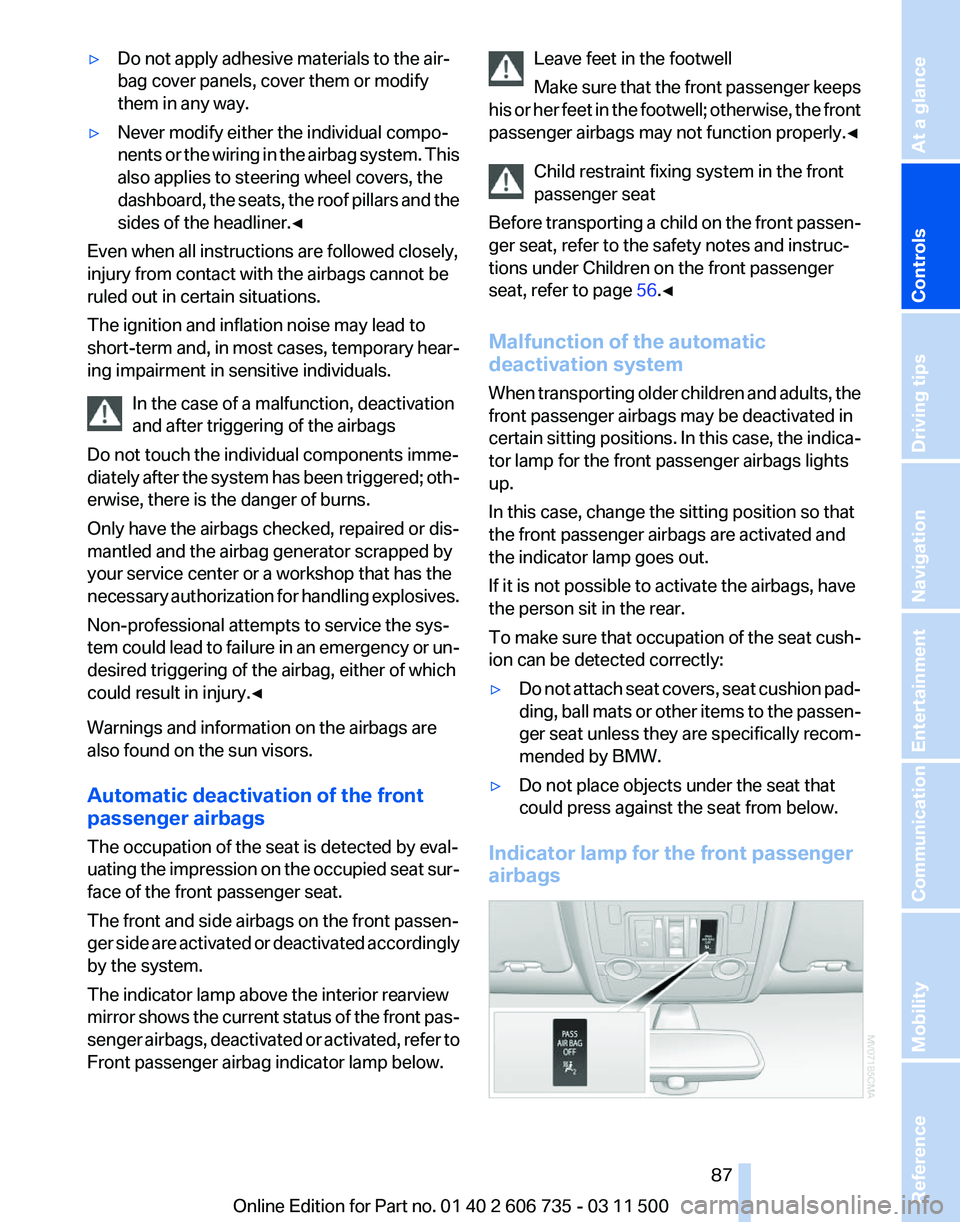
The indicator lamp above the interior rearview
mirror shows the current status of the front pas‐
senger airbags, deactivated or activated, refer to
Front passenger airbag indicator lamp below. Leave feet in the footwell
Make
sure that the front passenger keeps
his or her feet in the footwell; otherwise, the front
passenger airbags may not function properly.◀
Child restraint fixing system in the front
passenger seat
Before transporting a child on the front passen‐
ger seat, refer to the safety notes and instruc‐
tions under Children on the front passenger
seat, refer to page 56.◀
Malfunction of the automatic
deactivation system
When transporting older children and adults, the
front passenger airbags may be deactivated in
certain sitting positions. In this case, the indica‐
tor lamp for the front passenger airbags lights
up.
In this case, change the sitting position so that
the front passenger airbags are activated and
the indicator lamp goes out.
If it is not possible to activate the airbags, have
the person sit in the rear.
To make sure that occupation of the seat cush‐
ion can be detected correctly:
▷ Do not attach seat covers, seat cushion pad‐
ding,
ball mats or other items to the passen‐
ger seat unless they are specifically recom‐
mended by BMW.
▷ Do not place objects under the seat that
could press against the seat from below.
Indicator lamp for the front passenger
airbags Seite 87
87Online Edition for Part no. 01 40 2 606 735 - 03 11 500
Reference Mobility Communication Entertainment Navigation Driving tips
Controls At a glance
Page 90 of 317
Approx. 30 miles/50 km.
The possible driving distance after a loss of tire
inflation pressure depends on the cargo load
and the driving style and conditions.
When the vehicle is driven with a damaged tire,
its handling characteristics change, e.g., re‐
duced lane stability during braking, a longer
braking distance, and altered self-steering
properties. Adjust your driving style accord‐
ingly. Avoid abrupt steering maneuvers or driv‐
ing over obstacles, e. g., curbs, potholes, etc.
Because
the possible driving distance depends
on how the vehicle is used during the trip, the
actual distance may be smaller or greater de‐
pending on the driving speed, road conditions,
external temperature, cargo load, etc.
Continued driving with a flat tire
Drive moderately and do not exceed a
speed of 50 mph/80 km/h.
A loss of tire inflation pressure results in a
change in the handling characteristics, e.g., re‐
duced lane stability during braking, a longer
braking distance and altered self-steering prop‐
erties.◀
Final tire failure
Vibrations or loud noises while driving can
indicate the final failure of the tire. Reduce speed
and stop; otherwise, pieces of the tire could
come loose and cause an accident. Do not con‐
tinue driving, and contact your service center.◀
Tire Pressure Monitor TPM*
The concept
The tire inflation pressure is measured in the
four mounted tires. The system notifies you if
there is a significant loss of pressure in one or
more tires.
Functional requirements
The system must have been reset while the in‐
flation pressure was correct; otherwise, reliable
signaling of a flat tire is not ensured. Always use wheels with TPM electronics to en‐
sure that the system will operate properly.
Reset the system after each correction of the
tire inflation pressure and after every tire or
wheel change.
System limits
Sudden tire damage
Sudden serious tire damage caused by
external influences cannot be indicated in ad‐
vance.◀
The system does not operate correctly if it has
not been reset. For example, a flat tire may be
indicated despite correct tire inflation pres‐
sures.
The
system is inactive and cannot indicate a flat
tire:
▷ If a wheel without TPM electronics is
mounted, e.g.,
compact wheel*.
▷ When the TPM is disturbed by other sys‐
tems or devices with the same radio fre‐
quency.
Status display
1. "Vehicle Info"
2. "Vehicle status"
3. "TPM"
The status is displayed.
Status
indicator on the Control Display
The tire and system status is indicated by the
color of the tires.
A change in the tire inflation pressure during
driving is taken into account.
A correction is only necessary if this is indicated
by the TPM
Wheels, green
The tire inflation pressure is equal to the target
state.
One wheel is yellow
A flat tire or major drop in inflation pressure in
the indicated tire. Seite 90
90 Online Edition for Part no. 01 40 2 606 735 - 03 11 500
Safety
Page 92 of 317
Approx. 155 miles/200 km.
▷ With a medium load:
2
persons, cargo area full, or 4 persons with‐
out luggage:
Approx. 94 miles/150 km.
▷ With a full load:
4 or more persons, cargo area full:
Approx. 30 miles/50 km.
The possible driving distance after a loss of tire
inflation pressure depends on the cargo load
and the driving style and conditions.
When the vehicle is driven with a damaged tire,
its handling characteristics change, e.g., re‐
duced lane stability during braking, a longer
braking distance, and altered self-steering
properties. Adjust your driving style accord‐
ingly. Avoid abrupt steering maneuvers or driv‐
ing over obstacles, e. g., curbs, potholes, etc.
Because
the possible driving distance depends
on how the vehicle is used during the trip, the
actual distance may be smaller or greater de‐
pending on the driving speed, road conditions,
external temperature, cargo load, etc.
Continued driving with a flat tire
Drive moderately and do not exceed a
speed of 50 mph/80 km/h.
A loss of tire inflation pressure results in a
change in the handling characteristics, e.g., re‐
duced lane stability during braking, a longer
braking distance and altered self-steering prop‐
erties.◀
Final tire failure
Vibrations or loud noises while driving can
indicate the final failure of the tire. Reduce speed
and stop; otherwise, pieces of the tire could
come loose and cause an accident. Do not con‐
tinue driving, and contact your service center.◀
Message when the system was not
reset
The yellow warning lamp lights up. A
message appears on the Control Dis‐
play. The system detected a wheel change but was
not reset.
Warnings regarding the current tire inflation
pressure are not reliable.
Check the tire inflation pressure and reset the
system.
Malfunction
The
small warning lamp flashes in yel‐
low and then lights up continuously;
the larger warning lamp comes on in
yellow. On the Control Display, the
tires are shown in gray and a message appears.
No flat tire can be detected.
Display in the following situations:
▷ If a wheel without TPM electronics is fitted,
for instance a compact wheel*: have the
service center check it if necessary.
▷ Malfunction: have the system checked by
your service center.
▷ TPM could not be fully reset. Reset the sys‐
tem again.
▷ Disturbance by systems or devices with the
same
radio frequency: after leaving the area
of the disturbance, the system automatically
becomes active again.
Declaration according to NHTSA/
FMVSS 138 Tire Pressure Monitoring
Systems
Each tire, including the spare (if provided)
should be checked monthly when cold and in‐
flated
to the inflation pressure recommended by
the vehicle manufacturer on the vehicle placard
or tire inflation pressure label. (If your vehicle has
tires of a different size than the size indicated on
the vehicle placard or tire inflation pressure la‐
bel, you should determine the proper tire infla‐
tion pressure for those tires.)
As an added safety feature, your vehicle has
been equipped with a tire pressure monitoring
system (TPMS) that illuminates a low tire pres‐
sure telltale when one or more of your tires is
significantly under-inflated. Accordingly, when
the low tire pressure telltale illuminates, you Seite 92
92 Online Edition for Part no. 01 40 2 606 735 - 03 11 500
Safety
Page 103 of 317
As with conventional cruise control systems, ac‐
tive cruise control in no way reduces or substi‐
tutes for the driver's own personal experience,
responsibility, alertness and awareness in ad‐
justing speed, braking or otherwise controlling
the vehicle. The driver should decide when to
use the system on the basis of road, traffic, vis‐
ibility, and weather conditions. Active cruise
control is intended for use on highway-type
roadways where traffic is moving relatively
smoothly as well as in slow-moving traffic con‐
gestion.
Do not use the system in city driving; in
complex driving situations; heavy traffic such as
during rush hour; on curvy, winding roads, slip‐
pery roads or roads with sharp curves such as
highway off-ramps; during inclement weather
such as snow, strong rain or fog; or when enter‐
ing interchanges, service/parking areas or toll
booths. It is also important to regulate your ve‐
hicle's speed and distance setting within appli‐
cable legal limits. Always be ready to take action
or apply the brakes if necessary, especially when
the system is actively following a vehicle in front
of you. Otherwise, driving conditions can result
which lead to a violation of the law or elevated
risk of an accident.
The minimum initial activation speed is
20 mph/ 30 km/h, and the maximum speed is
110 mph/ 180 km/h. The system can also be ac‐
tivated while the vehicle is stationary, refer to
page 105.
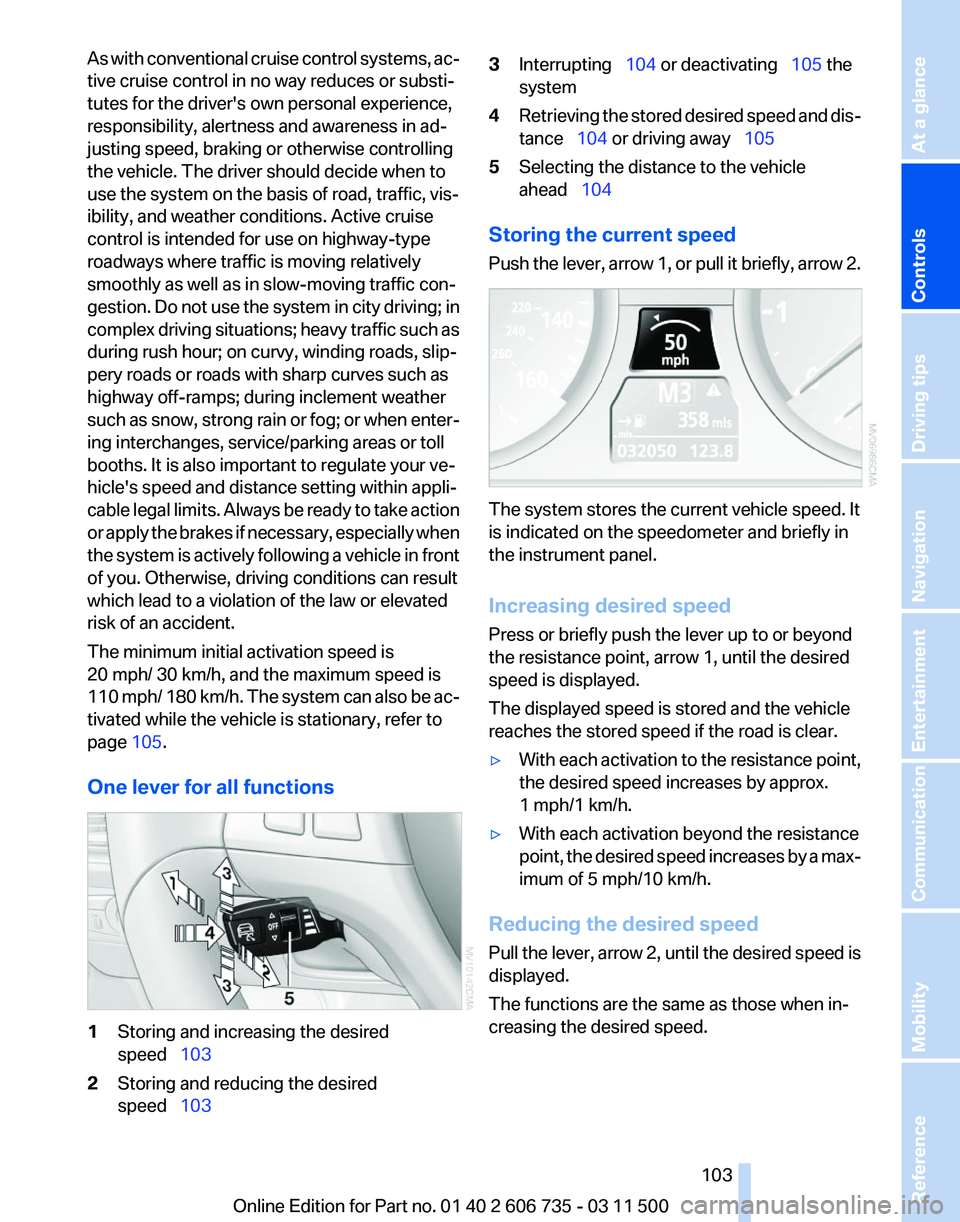
One lever for all functions 1
Storing and increasing the desired
speed 103
2 Storing and reducing the desired
speed 103 3
Interrupting 104 or deactivating 105 the
system
4 Retrieving the stored desired speed and dis‐
tance 104 or driving away 105
5 Selecting the distance to the vehicle
ahead 104
Storing the current speed
Push
the lever, arrow 1, or pull it briefly, arrow 2. The system stores the current vehicle speed. It
is indicated on the speedometer and briefly in
the instrument panel.
Increasing desired speed
Press or briefly push the lever up to or beyond
the resistance point, arrow 1, until the desired
speed is displayed.
The displayed speed is stored and the vehicle
reaches the stored speed if the road is clear.
▷
With each activation to the resistance point,
the desired speed increases by approx.
1 mph/1 km/h.
▷ With each activation beyond the resistance
point,
the desired speed increases by a max‐
imum of 5 mph/10 km/h.
Reducing the desired speed
Pull
the lever, arrow 2, until the desired speed is
displayed.
The functions are the same as those when in‐
creasing the desired speed.
Seite 103
103Online Edition for Part no. 01 40 2 606 735 - 03 11 500
Reference Mobility Communication Entertainment Navigation Driving tips
Controls At a glance
Page 118 of 317
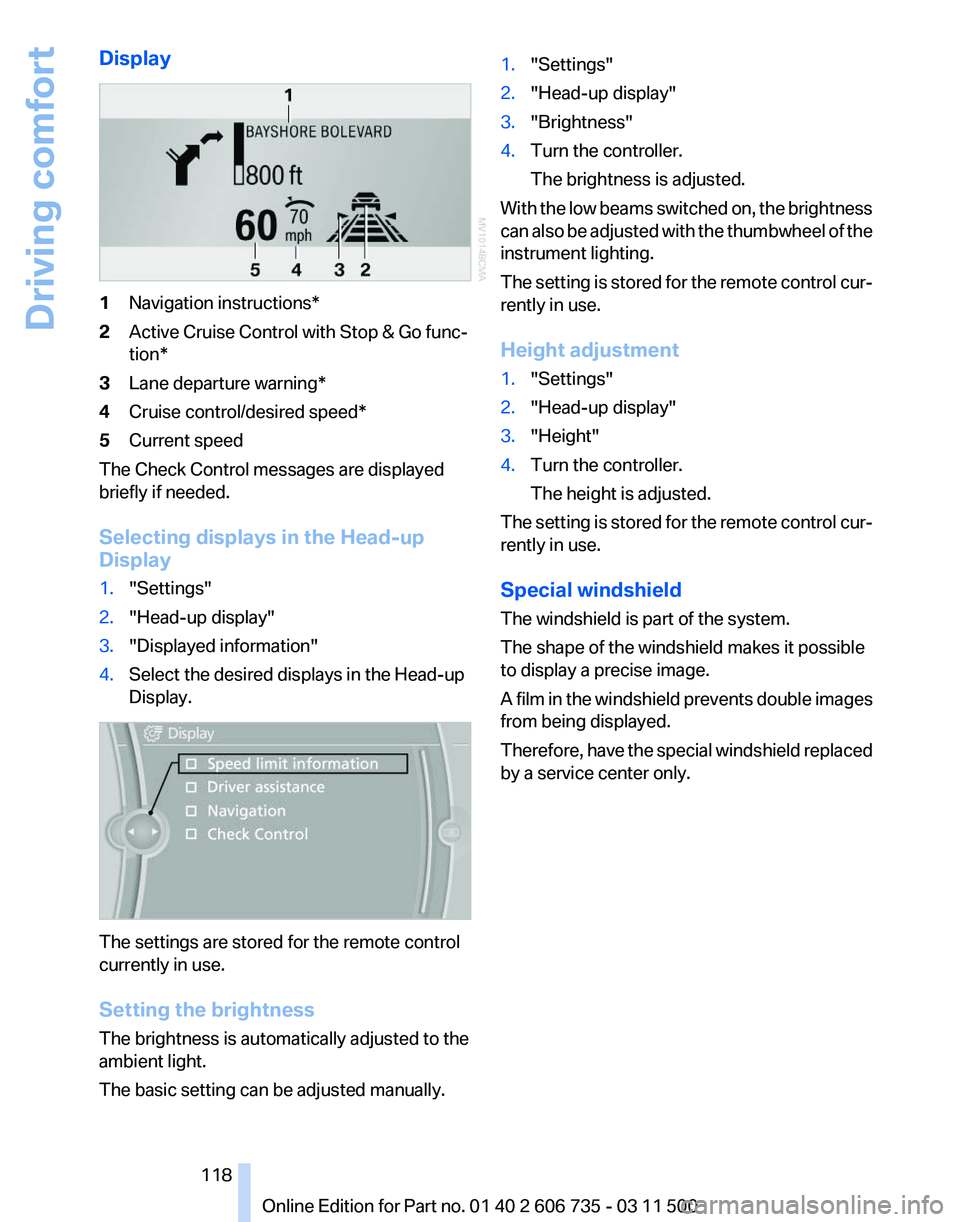
Display
1
Navigation instructions*
2 Active Cruise Control with Stop & Go func‐
tion*
3 Lane departure warning*
4 Cruise control/desired speed*
5 Current speed
The Check Control messages are displayed
briefly if needed.
Selecting displays in the Head-up
Display
1. "Settings"
2. "Head-up display"
3. "Displayed information"
4. Select the desired displays in the Head-up
Display. The settings are stored for the remote control
currently in use.
Setting the brightness
The brightness is automatically adjusted to the
ambient light.
The basic setting can be adjusted manually. 1.
"Settings"
2. "Head-up display"
3. "Brightness"
4. Turn the controller.
The brightness is adjusted.
With the low beams switched on, the brightness
can also be adjusted with the thumbwheel of the
instrument lighting.
The setting is stored for the remote control cur‐
rently in use.
Height adjustment
1. "Settings"
2. "Head-up display"
3. "Height"
4. Turn the controller.
The height is adjusted.
The setting is stored for the remote control cur‐
rently in use.
Special windshield
The windshield is part of the system.
The shape of the windshield makes it possible
to display a precise image.
A
film in the windshield prevents double images
from being displayed.
Therefore, have the special windshield replaced
by a service center only.
Seite 118
118 Online Edition for Part no. 01 40 2 606 735 - 03 11 500
Driving comfort
Page 124 of 317
▷
Activating heating and distributing air in
footwell:
Turn toward front
▷ Distributing air in storage compartment
area between seats:
Turn toward rear
2 Button for switching on the blower: LED is lit
The heating is not ready for operation without
switching on the blower. After the heating is
switched
off, the blower can be used to recircu‐
late the air within the vehicle, for instance at high
temperatures. To do this, turn thumbwheel 1 to‐
ward the rear and switch on the blower, button 2.
Microfilter/activated-charcoal filter
The microfilter traps dust and pollen in the in‐
coming air.
The activated-charcoal filter removes gaseous
pollutants from the outside air that enters the
vehicle.
The service center replaces this combined filter
during routine maintenance.
More information can be found in the service re‐
quirements display, refer to page 75.
Automatic climate control
with 4-zone control*
Front operation
Corresponds to the operation of automatic cli‐
mate control with 2-zone control, refer to
page 120.
Rear operation
The control unit is located in the center console
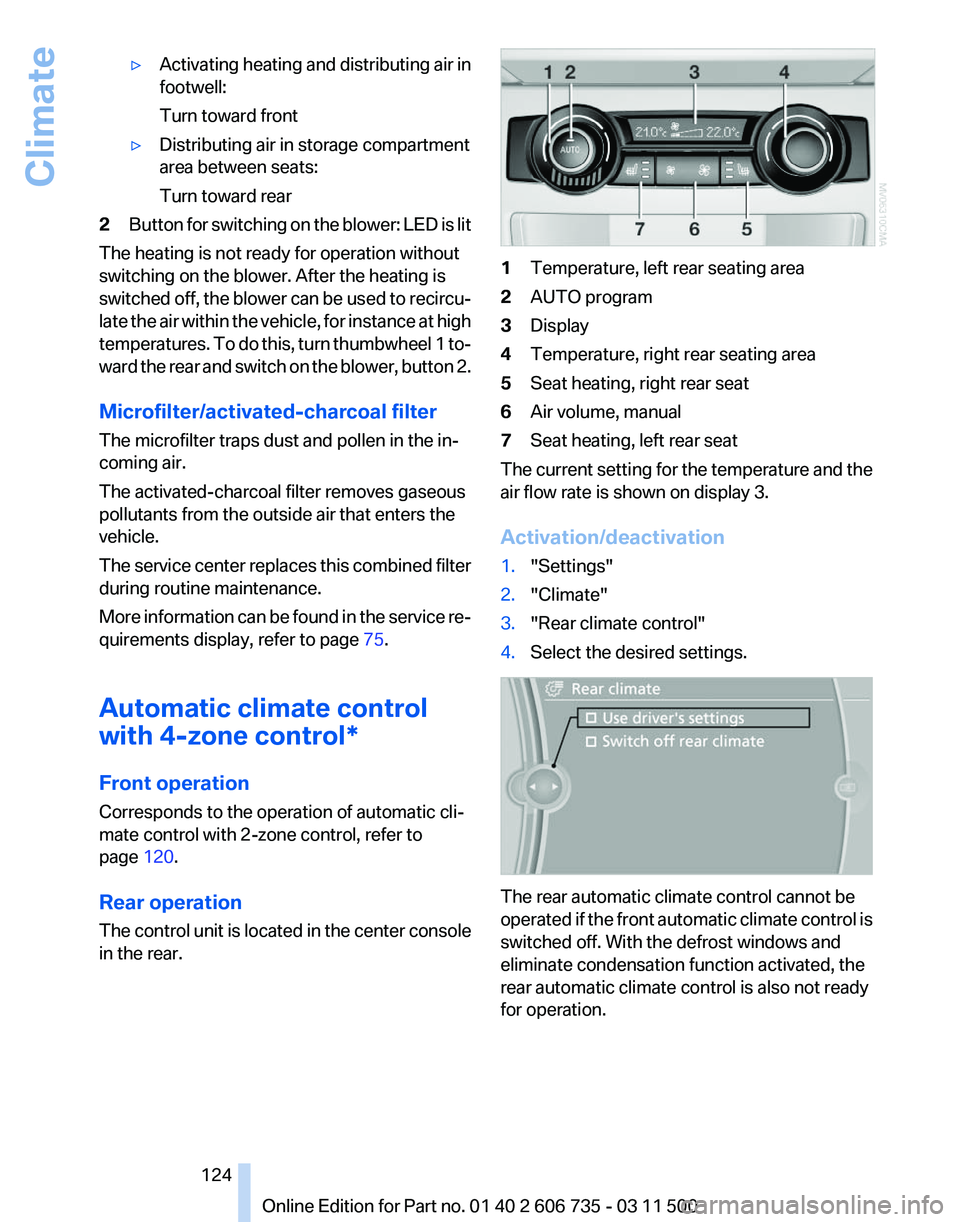
in the rear. 1
Temperature, left rear seating area
2 AUTO program
3 Display
4 Temperature, right rear seating area
5 Seat heating, right rear seat
6 Air volume, manual
7 Seat heating, left rear seat
The current setting for the temperature and the
air flow rate is shown on display 3.
Activation/deactivation
1. "Settings"
2. "Climate"
3. "Rear climate control"
4. Select the desired settings. The rear automatic climate control cannot be
operated
if the front automatic climate control is
switched off. With the defrost windows and
eliminate condensation function activated, the
rear automatic climate control is also not ready
for operation.
Seite 124
124 Online Edition for Part no. 01 40 2 606 735 - 03 11 500
Climate