reset BUICK REGAL 1997 User Guide
[x] Cancel search | Manufacturer: BUICK, Model Year: 1997, Model line: REGAL, Model: BUICK REGAL 1997Pages: 422, PDF Size: 21.34 MB
Page 174 of 422
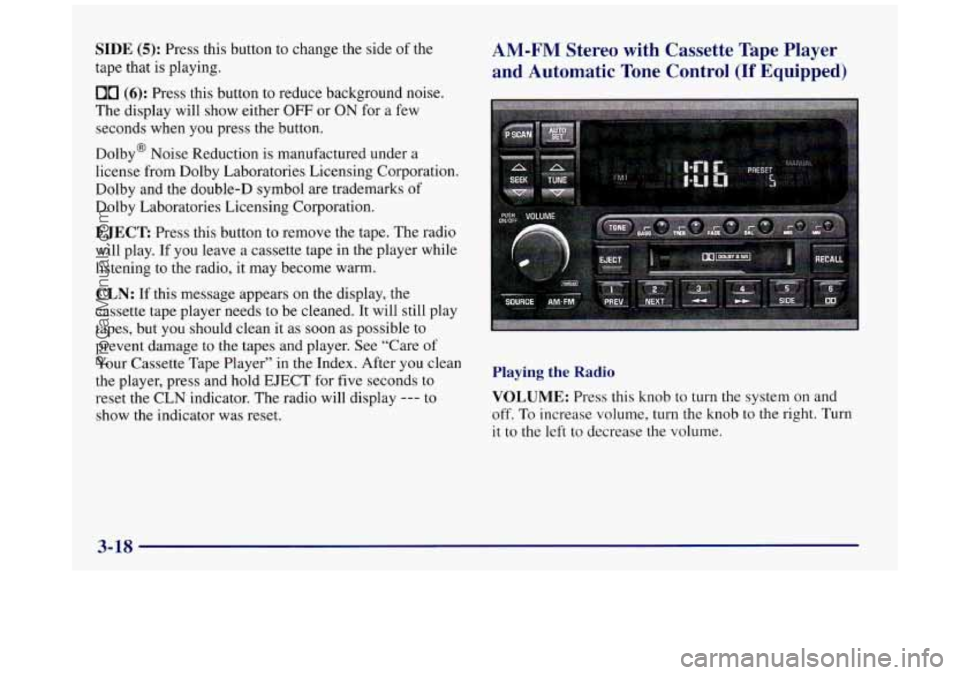
SIDE (5): Press this button to change the side of the
tape that is playing.
00 (6): Press this button to reduce background noise.
The display will show either
OFF or ON for a few
seconds when you press the button.
Dolby@ Noise Reduction is manufactured under a
license from Dolby Laboratories Licensing Corporation.
Dolby and the double-D symbol are trademarks
of
Dolby Laboratories Licensing Corporation.
EJECT Press this button to remove the tape. The radio
will play. If you leave a cassette tape in the player while
listening to the radio, it may become warm.
AM-FM Stereo with Cassette Tape Player
and Automatic Tone Control
(If Equipped)
I
CLN: If this message appears on the display, the
cassette tape player needs to be cleaned. It will still play
tapes, but you should clean it as soon as possible
to
prevent damage to the tapes and player. See “Care of
Your Cassette Tape Player” in the Index. After you clean
the player, press and hold EJECT for five seconds to
reset
the CLN indicator. The radio will display --- to VOLUME: Press this knob to turn the system on and
show the indicator was reset. off.
To increase volume, turn the knob to the right. Turn
Playing the Radio
it to the left to decrease the volume.
I
3-18
ProCarManuals.com
Page 175 of 422
RECALL: Press this button briefly to recall the station
being played or to display the clock.
To change what is
normally shown on the display (station or
time), press
this button until you see the display you want, then hold
the button
until the display flashes. If you press the
button when the ignition is off, the clock will show for
a
few seconds.
Finding a Station
AM-FM: Press this button to switch between AM, FM1
and FM2. The display shows your selection.
TUNE: Press the up or down arrow to choose
radio stations.
SEEK: Press the up or down arrow to go to the next
higher or lower station and stay there. The sound will
mute while seeking.
SCAN: Press one of the SEEK arrows for two seconds
and SCAN will appear on the display. Use SCAN to
listen to stations for
a few seconds. The radio will go to
a station, stop for a few seconds, then go on to the next
station. Press one of the SEEK buttons again to stop
scanning. The sound will mute while scanning.
PUSHBUTTONS: The six numbered pushbuttons let
you return to your favorite stations. You can set up to
18 stations (six AM, six
FM1 and six FM2). Just:
1. Turn the radio on.
2. Press AM-FM to select the band.
3. Tune in the desired station
4. Press TONE to select the setting you prefer.
5. Press and hold one of the six numbered buttons. The
sound will mute. When it returns, release the button.
Whenever you press that numbered button, the
station you set will return and the tone you selected
will be automatically selected for that button.
6. Repeat the steps for each pushbutton.
P SCAN: Press this button to listen to each of your
preset stations for a few seconds. The radio will
go to
the first preset station, stop for a few seconds, then go
on to the next preset station. Press P SCAN again to stop
scanning. If
a preset station has weak reception, the
radio will not stop at the preset station.
ProCarManuals.com
Page 176 of 422
AUTO SET Press this button and the system will seek
and set the 12 strongest FM
or the 6 strongest AM
stations on your preset buttons (depending
on which
band (AM or FM) you are listening to). AUTO
SET will
flash while seeking and will remain
on until this
function is complete. To return
to the stations you
manually
set, press AUTO SET again.
Setting the Tone
BASS:
Press this knob lightly so it extends. Turn the
knob to increase or decrease bass.
TREB: Press this knob lightly so it extends. Turn the
knob to increase or decrease treble.
If a station is weak
or noisy,
you may want to decrease the treble.
Push these knobs back into their stored positions when
you’re not using them.
TONE: This feature allows you to choose preset bass
and treble equalization settings designed for classical,
pop, rock, jazz, talk and country/western stations.
CLASS will appear on the display when you first press
TONE. Each time you press it, another setting will
appear on the display. Press it again after
C & W
appears and MANUAL will appear. Tone control will
return to the BASS and TREB knobs. Also, if you use
the BASS and TREB knobs, control will return to them
and MANUAL will appear.
Adjusting the Speakers
BAL:
Press this knob lightly so it extends. Turn the
knob to move the sound
to the left or right speakers.
The middle position balances the sound between
the speakers.
FADE: Press this knob lightly so it extends. Turn the
knob to move the sound
to the front or rear speakers.
The middle position balances the sound between
the speakers.
Push these knobs back into their stored positions when
you’re not using them.
Playing a Cassette Tape
The longer side with the tape visible should face to the
right. If the ignition and the radio are on, the tape can be
inserted and will begin playing.
If you hear nothing or
hear a garbled sound, the tape may
not be in squarely.
Press EJECT to remove the tape and start over.
While the tape is playing,
use the VOLUME, FADE,
BAL, BASS and TREB controls just as
you do for the
radio. Other controls may have different functions when
a tape is inserted. The display will show an arrow to
show which side
of the tape is playing.
3-20
ProCarManuals.com
Page 178 of 422
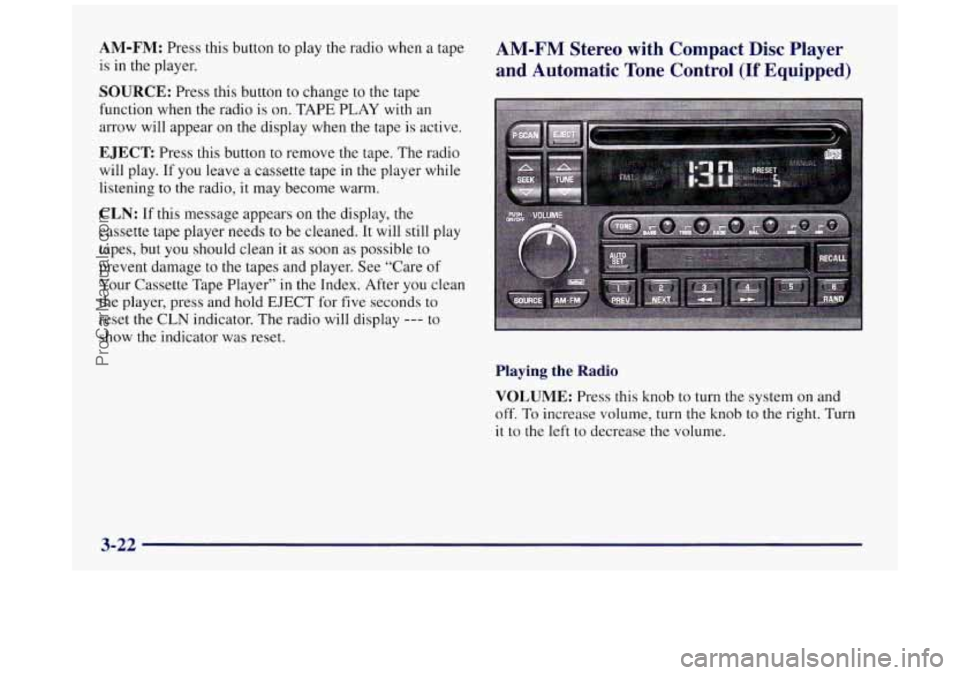
AM-FM: Press this button to play the radio when a tape
is in the player.
SOURCE: Press this button to change to the tape
function when the radio
is on. TAPE PLAY with an
arrow will appear on the display when the tape is active.
EJECT: Press this button to remove the tape. The radio
will play. If you leave a cassette tape in
the player while
listening to the radio, it may become warm.
CLN: If this message appears on the display, the
cassette tape player needs
to be cleaned. It will still play
tapes, but
you should clean it as soon as possible to
prevent damage to the tapes and player. See “Care of
Your Cassette Tape Player” in the Index. After you clean
the player, press and hold EJECT for five seconds to
reset the CLN indicator. The radio will display
--- to
show the indicator was reset.
AM-FM Stereo with Compact Disc Player
and Automatic Tone Control
(If Equipped)
Playing the Radio
VOLUME:
Press this knob to turn the system on and
off. To increase volume, turn the knob to the right. Turn
it to the left to decrease the volume.
3-22
ProCarManuals.com
Page 179 of 422
RECALL: Press this button briefly to recall the station
being played or to display the clock.
To change what is
normally shown on the display (station or time), press
the button until you see the display you want, then hold
the button until the display flashes. If you press the
button when the ignition
is off, the clock will show for a
few seconds.
Finding a Station
AM-FM: Press this burron to switch between AM, FMl
and
FM2. The display shows your selection.
TUNE: Press the up or down arrow to choose
radio stations.
SEEK: Press the up or down arrow to go to the next
higher
or lower station and stay there. The sound will
mute while seeking.
SCAN: Press one of the SEEK arrows for two seconds
and
SCAN will appear on the display. Use SCAN to
listen to stations for
a few seconds. The radio will go to
a station, stop for a few seconds, then go on to the next
station. Press one of the
SEEK arrows again to stop
scanning. The sound will mute while scanning.
PUSHBUTTONS: The six numbered pushbuttons let
you return to your favorite stations. You can set up to
18 stations (six AM, six FM1 and six FM2). Just:
1. Turn the radio on.
2. Press AM-FM to select the band.
3. Tune in the desired station.
4. Press TONE to select the setting you prefer.
5. Press and hold one of the six numbered buttons. The
sound will mute. When it returns, release
the button.
Whenever you press that numbered button, the
station you set will return and the tone you selected
will be automatically selected for that button.
6. Repeat the steps for each pushbutton.
P SCAN: Press this button to listen to each of your
preset stations for
a few seconds. The radio will go to
the first preset station, stop for a few seconds, then
go
on to the next preset station. Press P SCAN again to stop
scanning. If a preset station has weak reception, the
radio will
not stop at the preset station.
3-23
- -
ProCarManuals.com
Page 180 of 422
AUTO SET Press this button and the system will seek
and set the
12 strongest FM or the 6 strongest AM
stations on your preset buttons (depending on which
band (AM or
FM) you are listening to). AUTO SET will
flash while seeking and will remain on until this
function is complete. To return to the stations you
manually set, press AUTO SET again.
Setting the Tone
BASS:
Press this knob lightly so it extends. Turn the
knob
to increase or decrease bass.
TREB: Press this knob lightly so it extends. Turn the
knob to increase
or decrease treble. If a station is weak
or noisy, you may want to decrease the treble.
Push these knobs back into their stored positions when
you’re not using them.
TONE: This feature allows you to choose preset bass
and treble equalization settings designed for classical,
pop, rock, jazz, talk and country/western stations.
CLASS will appear on the display when you first press
TONE. Each time you press
it, another setting will
appear on the display. Press
it again after C & W
appears and MANUAL will appear. Tone control will
return to the BASS and TREB knobs.
Also, if you use
the BASS and TREB knobs, control will return to them
and MANUAL will appear.
Adjusting the Speakers
BAL: Press this knob lightly so it extends. Turn this
knob to move
the sound to the left or right speakers.
The middle position balances the sound between
the speakers.
FADE: Press this knob lightly so it extends. Turn this
knob to move the sound to the front or rear speakers.
The middle position balances the sound between
the speakers.
Push these knobs back into their stored positions when
you’re not using them.
Playing a Compact Disc
Insert a disc partway into the slot, label side up. The
player will pull it
in. The disc should begin playing.
If you want to insert a CD while the ignition or the radio
is off, first press EJECT or RECALL.
If you’re driving on a very rough road or if it’s very hot,
the disc may not play and an error code may appear on
the display. When things get back to normal, the disc
should play.
If the disc comes out, it could be that:
0 E20: The disc is upside down.
ProCarManuals.com
Page 183 of 422
PUSHBUTTONS: The six numbered pushbuttons let
you return to your favorite stations. You can set up to
18 stations (six AM, six FM 1 and six FM2). Just:
1.
2.
3.
4.
5.
6.
Turn the radio on.
Press AM-FM to select
the band.
Tune in the desired station.
Press TONE to select the setting you prefer.
Press and hold one of the six numbered buttons. The
sound
will mute. When it returns, release the button.
Whenever you press that numbered button, the
station you set will return and the tone you selected
will be automatically selected for that button.
Repeat the steps for each pushbutton.
P SCAN: Press this button to listen to each of your
preset stations for
a few seconds. The radio will go to
the first preset station, stop for
a few seconds, then go
on to
the next preset station. Press P SCAN again to stop
scanning. If
a preset station has weak reception, the
radio will not stop at
the preset station.
AUTO SET Press this button and the system will seek
and set the
12 strongest FM or the 6 strongest AM
stations on your preset buttons. AUTO
SET will flash
while seeking and will remain on until this function is
complete.
To return to the stations you manually set,
press AUTO SET again.
Setting the Tone
BASS:
Press this knob lightly so it extends. Turn the
knob to increase or decrease bass.
TREB: Press this knob lightly so it extends. Turn the
knob to increase or decrease treble. If
a station is weak
or noisy, you may want to decrease the treble.
Push these knobs back into their stored positions when
you’re not using them.
TONE: This feature allows you to choose preset bass
and treble equalization settings designed for classical,
pop, rock, jazz, talk and country/western stations.
CLASS will appear on the display when you first press
TONE. Each time you press
it, another setting will
appear on the display. Press
it again after C & W
appears and MANUAL will appear. Tone control will
return to the BASS and TREB knobs. Also,
if you use
the BASS and TREB knobs, control will return to them
and MANUAL will appear.
ProCarManuals.com
Page 185 of 422
NEXT (2): Press this button to search for the next
selection on the tape. Your tape must
have at least three
seconds of silence between each selection for
NEXT to
work. The sound will mute while seeking.
The
SEEK down and up arrows will also find the
previous and next selections
on the tape.
44 (3): Press this button to reverse the tape rapidly.
Press it again to return to playing speed. The radio will
play while the tape reverses.
bb (4): Press this button to advance quickly to
another part of the tape. Press the button again to
return
to playing speed. The radio will play while the
tape advances.
EJECT: The system has two EJECT buttons. Press the
button near the CD slot
to remove a disc. Press the
button near the tape slot to remove a tape and the radio
will play. If you leave
a cassette tape in the player while
listening to the radio, it may become warm.
CLN: If this message appears on the display, the
cassette tape player needs to be cleaned. It will still play
tapes, but you should clean
it as soon as possible to
prevent damage to the tapes and player. See “Care of
Your Cassette Tape Player”
in the Index. After you clean
the player, press and hold EJECT for five seconds to
reset the CLN indicator. The radio will display
--- to
show the indicator was reset.
Your cassette tape player automatically reduces
background noise from tapes encoded with Dolby
NR.
You may turn Dolby off by pressing the number
six preset.
Dolby Noise Reduction
is manufactured under a license
from Dolby Laboratories Licensing Corporation. Dolby
and the double-D symbol are trademarks
of Dolby
Laboratories Licensing Corporation.
SIDE (5): Press this button to change the side of the
tape that is playing.
RAND (6): Press this button to reduce background
noise when playing
a cassette tape. The double-D
symbol will appear in the display.
SOURCE: Press this button to change to the tape or
disc function when the radio
is on. If both a tape and a
disc are installed, the system will first go to tape play;
TAPE SIDE and an arrow will appear on the display. If
SOURCE is pressed again, the system will go to disc
play; CD PLAY will appear on the display.
3-29
ProCarManuals.com
Page 189 of 422
Disabling the Theft-Deterrent Feature
Enter your secret code as follows; pause no more than
15 seconds between steps:
1. Turn the ignition to ACCESSORY or RUN.
2. Turn the radio off.
3. Press the 1 and 4 buttons together. Hold them down
4. Press MIN and 000 will appear on the display.
5. Press MTN again to make the last two digits agree
6. Press HRS to make the first one or two digits agree
7. Press AM-FM after you have confirmed that the
until
SEC shows on the display.
with your code.
with your code.
code matches the secret code you have written down.
The display will show
---, indicating that the radio is
no longer secured.
If the code entered is incorrect, SEC will appear on the
display. The radio will remain secured until the correct
code is entered.
When battery power
is removed and later applied to a
secured radio, the radio won’t turn on and LOC will
appear on the display.
To unlock a secured radio see “Unlocking the
Theft-Deterrent Feature After a Power
Loss” earlier in
this section.
Audio Steering Wheel Controls
(If Equipped)
If your vehicle has this feature, you can control certain
radio functions using the buttons
on your steering wheel.
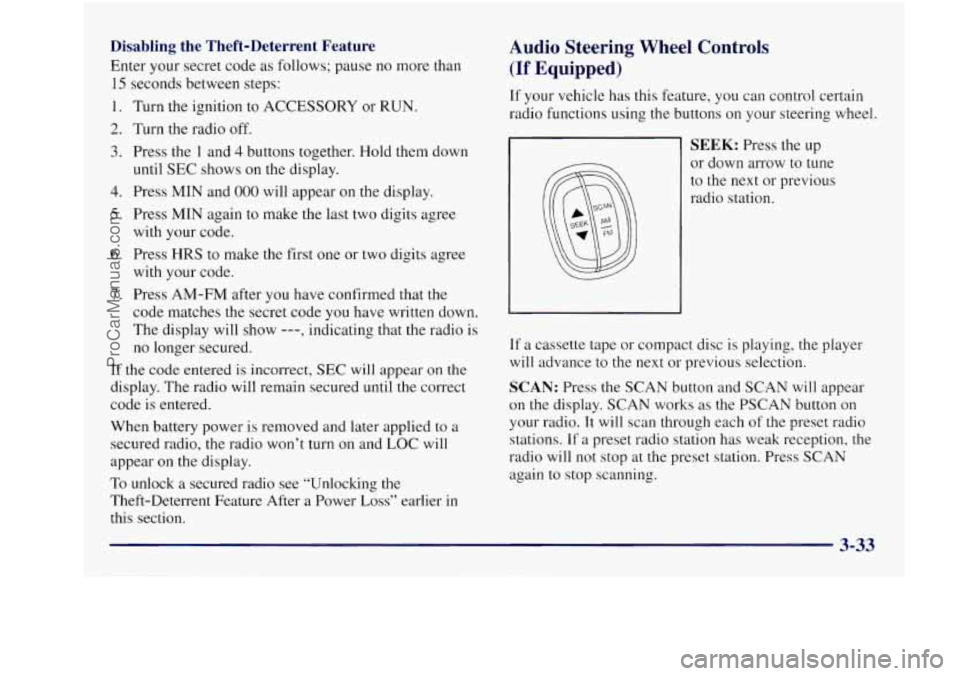
SEEK: Press the up
or down arrow to tune
to the next or previous
radio station.
If a cassette tape or compact disc is playing, the player
will advance to the next or previous selection.
SCAN: Press the SCAN button and SCAN will appear
on the display. SCAN works as the PSCAN button
on
your radio. It will scan through each of the preset radio
stations. If
a preset radio station has weak reception, the
radio will not stop at the preset station. Press
SCAN
again to stop scanning.
ProCarManuals.com
Page 191 of 422
To help avoid hearing loss or damage:
Adjust the volume control to the lowest setting.
Increase volume slowly until you hear comfortably
and clearly.
NOTICE:
Before you add any sound equipment to your
vehicle
-- like a tape player, CB radio, mobile
telephone or two-way radio
-- be sure you can
add what you want.
If you can, it’s very
important to do it properly. Added sound
equipment may interfere with the operation
of
your vehicle’s engine, Delco radio or other
systems, and even damage them. Your vehicle’s
systems may interfere with the operation
of sound equipment that has been
added improperly.
So, before adding sound equipment, check with
your dealer and be sure to check Federal rules
covering mobile radio and telephone units.
Care of Your Cassette Tape Player
A tape player that is not cleaned regularly can cause
reduced sound quality, ruined cassettes or a damaged
mechanism. Cassette tapes should be stored in their
cases away from contaminants, direct sunlight and
extreme heat. If they aren’t, they may not operate
properly or may cause failure of the tape player.
Your tape player should be cleaned regularly after every
50 hours of use. Your radio may display CLN to indicate
that you have used your tape player for
50 hours without
resetting the tape clean timer. If this message appears on
the display, your cassette tape player needs to be
cleaned. It will still play tapes, but you should clean it as
soon as possible to prevent damage to your tapes and
player. If you notice a reduction in sound quality, try a
known good cassette to see if it
is the tape or the tape
player at fault.
If this other cassette has no improvement
in sound quality, clean the tape player.
ProCarManuals.com