brake CADILLAC CT5 2023 Owner's Manual
[x] Cancel search | Manufacturer: CADILLAC, Model Year: 2023, Model line: CT5, Model: CADILLAC CT5 2023Pages: 526, PDF Size: 6.85 MB
Page 221 of 526

Cadillac CT5 Owner Manual (GMNA-Localizing-U.S./Canada-16500419) -
2023 - CRC - 5/6/22
220 Infotainment System
The PIN is required to:
.Set up/Add or remove keys.
.Change Teen Driver
settings.
.Change or clear the Teen
Driver PIN.
.Access or delete Report
Card data.
Set up/Add keys to activate
Teen Driver and assign
restrictions to the key:
Any vehicle key can be
registered, up to a maximum
of eight keys. Label the key to
tell it apart from the
other keys.
For a pushbutton start
system: 1. Start the vehicle.
2. For automatic transmissions, the vehicle
must be in P (Park). For
manual transmissions, the
vehicle must be stopped
with the parking brake set. 3. From the Settings menu,
touch Vehicle and then
Teen Driver.
4. Enter the PIN.
5. Place the remote key you wish to register in the
transmitter pocket. The
key does not need to be
the one that started the
vehicle. See Remote Key
Operation 09 for
transmitter pocket
location.
6. From the Teen Driver menu, touch Setup Keys or
Add/Remove Teen
Driver Keys.
.If the remote key has
not previously been
registered, the option to
add the key displays.
Touch Add and a
confirmation message
displays. Teen Driver
restrictions will be
applied whenever this
remote key is used to
operate the vehicle.
.If the remote key has
already been registered,
the option to remove
the key displays.
If Remove is touched,
the remote key is no
longer registered.
A confirmation message
displays, and Teen
Driver restrictions will
not be applied if this
remote key is used to
operate the vehicle.
In vehicles with a pushbutton
start system, if a Teen Driver
and a non-Teen Driver key are
both present at start up, the
vehicle will recognize the
non-Teen Driver key to start
the vehicle. The Teen Driver
settings will not be active.
For a keyed ignition system: 1. Start the vehicle.
2. For automatic transmissions, the vehicle
must be in P (Park). For
manual transmissions, the
vehicle must be stopped
with the parking brake set.
Page 222 of 526

Cadillac CT5 Owner Manual (GMNA-Localizing-U.S./Canada-16500419) -
2023 - CRC - 5/6/22
Infotainment System 221
3. From the Settings menu,touch Vehicle and then
Teen Driver.
4. Enter the PIN.
5. Touch Setup Keys or Add/ Remove Teen Driver Keys.
The system displays
instructions for registering
or unregistering a key.
A confirmation message
displays.
Manage Settings or Teen
Driver Settings
Depending on the options of
your vehicle, the following
menu items may be displayed:
Buckle to Drive : When turned
ON, Buckle to Drive prevents
the driver from shifting out of
P (Park) for a period of time
after the brake pedal is
pressed if the driver, or on
some vehicles the detected
passenger, has not buckled
their seat belt. On some
vehicles, Buckle to Drive is
always ON when Teen Driver is active and is not
configurable. See Buckle To
Drive
056.
Audio Volume Limit : Allows a
maximum audio volume to be
set. Turn the audio volume
limit on or off. Use the arrows
to choose the maximum
allowable level for the audio
volume. On some infotainment
systems, touch Set Audio
Volume Limit to choose the
maximum allowable audio
volume level.
Set Audio Volume Limit : Use
the arrows to choose the
maximum allowable level for
the audio volume.
Teen Driver Speed Limiter :
Limits the maximum speed of
the vehicle. When the speed
limiter is turned on and the
vehicle is started with a Teen
Driver key, the DIC displays a
message that the top speed is
limited.
On certain vehicles, when the
Speed Limiter is turned ON,
the vehicle’s maximum acceleration will be limited.
The DIC will display a message
that the acceleration is limited.
Teen Driver Speed Warning :
Displays a warning in the DIC
when exceeding a selectable
speed. Turn the speed
warning on or off and choose
the desired speed warning
level. The speed warning does
not limit the speed of the
vehicle. On some infotainment
systems, touch Set Teen
Driver Speed Warning to set
the warning speed.
Set Teen Driver Speed
Warning :
Choose the desired
speed warning level. The
speed warning does not limit
the speed of the vehicle.
SiriusXM Explicit Content
Filter : Allows the SiriusXM
Explicit Content Filter to be
turned ON or OFF. When ON,
the teen driver will not be able
to listen to SiriusXM stations
that contain explicit content,
Page 224 of 526
Cadillac CT5 Owner Manual (GMNA-Localizing-U.S./Canada-16500419) -
2023 - CRC - 5/6/22
Infotainment System 223
.Wide Open Throttle–the
number of times the
accelerator pedal was
pressed nearly all the
way down.
.Forward Collision Alerts (if
equipped) –the number of
times the driver was notified
when approaching a vehicle
ahead too quickly and at
potential risk for a crash.
.Forward Automatic Braking,
also called Automatic
Emergency Braking (if
equipped) –the number of
times the vehicle detected
that a forward collision was
imminent and applied the
brakes.
.Reverse Automatic Braking
(if equipped) –the number of
times the vehicle detected
that a rearward collision was
imminent and applied the
brakes.
.Traction Control –the
number of times the
Traction Control System
activated to reduce wheel
spin or loss of traction.
.Stability Control –the
number of events which
required the use of
electronic stability control.
.Antilock Braking System
Active –The number of
Antilock Brake System
activations.
.Tailgating Alerts (if
equipped)– the number of
times the driver was alerted
for following a vehicle ahead
too closely.
Report Card Data
Cumulative Data is saved for
all trips until the Report Card
is reset or until the maximum
count is exceeded. If the
maximum count is exceeded
for a Report Card line item,
that item will no longer be
updated in the Report Card
until it is reset. Each item will
report a maximum of
1,000 counts. The distance
driven will report a maximum
of 64 374 km (40,000 mi). To delete Report Card data,
do one of the following:
.From the Report Card
display, touch Reset.
.Touch Clear PIN and All
Teen Driver Keys from the
Teen Driver menu. This will
also unregister any Teen
Driver keys and delete
the PIN.
Forgotten PIN
See your dealer to reset
the PIN.
Trademarks and
License
Agreements
FCC Information
See Radio Frequency
Statement 0496.
Page 241 of 526

Cadillac CT5 Owner Manual (GMNA-Localizing-U.S./Canada-16500419) -
2023 - CRC - 5/10/22
240 Driving and Operating
Driving and
Operating
Driving Information
Driving for Better FuelEconomy . . . . . . . . . . . . . . . . . . . . 241
Distracted Driving . . . . . . . . . 242
Defensive Driving . . . . . . . . . . 242
Impaired Driving . . . . . . . . . . . 243
Control of a Vehicle . . . . . . 243
Braking . . . . . . . . . . . . . . . . . . . . . . . 243
Steering . . . . . . . . . . . . . . . . . . . . . . 244
Off-Road Recovery . . . . . . . 245
Loss of Control . . . . . . . . . . . . 245
Track Events and Competitive Driving
(V-Series and V-Series
Blackwing) . . . . . . . . . . . . . . . . . 246
Driving on Wet Roads . . . . 257
Hill and Mountain Roads . . . . . . . . . . . . . . . . . . . . . . . 258
Winter Driving . . . . . . . . . . . . . . 259
If the Vehicle Is Stuck . . . . . 261
Vehicle Load Limits . . . . . . . 261
Starting and Operating
New Vehicle Break-In . . . . 265
Composite Materials . . . . . 266
Ignition Positions . . . . . . . . . . 267 Starting the Engine . . . . . . . 269
Stop/Start System . . . . . . . . 270
Engine Heater . . . . . . . . . . . . . . 272
Retained Accessory
Power (RAP) . . . . . . . . . . . . . . . 273
Shifting Into Park . . . . . . . . . . 273
Shifting out of Park . . . . . . . 274
Parking (Manual Transmission) . . . . . . . . . . . . . 275
Parking over Things That Burn . . . . . . . . . . . . . . . . . . 275
Active Fuel Management . . . . . . . . . . . . . . 275
Extended Parking . . . . . . . . . 275
Engine Exhaust
Engine Exhaust . . . . . . . . . . . . 276
Running the Vehicle While Parked . . . . . . . . . . . . . . 276
Automatic Transmission
AutomaticTransmission . . . . . . . . . . . . . . 277
Manual Mode . . . . . . . . . . . . . . . 282
Manual Transmission
Manual Transmission . . . . . 283
Active Rev Match . . . . . . . . . 286
Drive Systems
All-Wheel Drive . . . . . . . . . . . . . 287
Brakes
Electric Brake Boost . . . . . . 287
Antilock Brake System (ABS) . . . . . . . . . . . . . 287
Electric Parking Brake . . . 288
Brake Assist . . . . . . . . . . . . . . . . 289
Hill Start Assist (HSA) . . . . 289
Automatic Vehicle Hold (AVH) . . . . . . . . . . . . . . . . . 290
Ride Control Systems
Traction Control/Electronic Stability
Control . . . . . . . . . . . . . . . . . . . . . . 291
Driver Mode Control . . . . . . 293
Competitive Driving Mode . . . . . . . . . . . . . . 299
Limited-Slip
Differential . . . . . . . . . . . . . . . . . 302
Cruise Control
Cruise Control . . . . . . . . . . . . . 302
Adaptive Cruise Control(Advanced) . . . . . . . . . . . . . . . . 305
Super Cruise . . . . . . . . . . . . . . . . 317
Driver Assistance
Systems
Driver Assistance Systems . . . . . . . . . . . . . . . . . . . . 334
Page 242 of 526

Cadillac CT5 Owner Manual (GMNA-Localizing-U.S./Canada-16500419) -
2023 - CRC - 5/10/22
Driving and Operating 241
Assistance Systems forParking or Backing . . . . . . 336
Rear Vision Camera (RVC) . . . . . . . . . . . . . 336
Surround Vision
System . . . . . . . . . . . . . . . . . . . . . . 337
Park Assist . . . . . . . . . . . . . . . . . . 338
Automatic Parking Assist (APA) . . . . . . . . . . . . . . . . 341
Reverse Automatic Braking (RAB) . . . . . . . . . . . . . 343
Rear Pedestrian Alert . . . . 344
Rear Cross Traffic Alert (RCTA) System . . . . . . . . . . . 346
Assistance Systems for Driving . . . . . . . . . . . . . . . . . . . . . . 346
Forward Collision Alert (FCA) System . . . . . . . . . . . . . 346
Automatic Emergency Braking (AEB) . . . . . . . . . . . . . 349
Front Pedestrian Braking (FPB) System . . . . . . . . . . . . . . 351
Side Blind Zone Alert (SBZA) . . . . . . . . . . . . . . . 353
Lane Change Alert (LCA) . . . . . . . . . . . . . . . . . 353
Lane Keep Assist (LKA) . . . . . . . . . . . . . . . 356
Surround Vision Recorder . . . . . . . . . . . . . . . . . . . 358Fuel
Top Tier Fuel . . . . . . . . . . . . . . . 360
Recommended Fuel (LSY2.0L L4 Engine) . . . . . . . . . . 360
Recommended Fuel (LGY 3.0L V6 and LT4 6.2L
V8 Engines) . . . . . . . . . . . . . . . . 361
Prohibited Fuels . . . . . . . . . . . . 361
Fuels in Foreign Countries . . . . . . . . . . . . . . . . . . . 361
Fuel Additives . . . . . . . . . . . . . . 362
Filling the Tank . . . . . . . . . . . . . 362
Filling a Portable Fuel Container . . . . . . . . . . . . . . . . . . 364
Trailer Towing
General TowingInformation . . . . . . . . . . . . . . . . 364
Driving Characteristics and Towing Tips . . . . . . . . . 365
Trailer Towing (LSY 2.0L L4 and LGY 3.0L
V6 Engines Only) . . . . . . . . . 369
Towing Equipment . . . . . . . . . 371
Conversions and Add-Ons
Add-On Electrical Equipment . . . . . . . . . . . . . . . . . 372
Driving
Information
Driving for Better
Fuel Economy
Driving habits can affect fuel
mileage. Here are some driving
tips to get the best fuel
economy possible:
.Set the climate controls to
the desired temperature
after the engine is started,
or turn them off when not
required.
.Avoid fast starts and
accelerate smoothly.
.Brake gradually and avoid
abrupt stops.
.Avoid idling the engine for
long periods of time.
.When road and weather
conditions are appropriate,
use cruise control.
.Always follow posted speed
limits or drive more slowly
when conditions require.
Page 244 of 526

Cadillac CT5 Owner Manual (GMNA-Localizing-U.S./Canada-16500419) -
2023 - CRC - 5/10/22
Driving and Operating 243
.Assume that other road
users (pedestrians,
bicyclists, and other drivers)
are going to be careless and
make mistakes. Anticipate
what they may do and be
ready.
.Allow enough following
distance between you and
the driver in front of you.
.Focus on the task of driving.
Impaired Driving
Death and injury associated
with impaired driving is a
global tragedy.
{Warning
Drinking alcohol or taking
drugs and then driving is
very dangerous. Your
reflexes, perceptions,
attentiveness, and judgment
can be affected by even a
small amount of alcohol or
drugs. You can have a(Continued)
Warning (Continued)
serious—or even fatal —
collision if you drive after
drinking or taking drugs.
Do not drive while under the
influence of alcohol or drugs,
or ride with a driver who has
been drinking or is impaired
by drugs. Find alternate
transportation home; or if
you are with a group,
designate a driver who will
remain sober.
Control of a Vehicle
Braking, steering, and
accelerating are important
factors in helping to control a
vehicle while driving.
Braking
Braking action involves
perception time and reaction
time. Deciding to push the
brake pedal is perception time.
Actually doing it is
reaction time. Average driver reaction time is
about three-quarters of a
second. In that time, a vehicle
moving at 100 km/h (60 mph)
travels 20 m (66 ft), which
could be a lot of distance in an
emergency.
Helpful braking tips to keep in
mind include:
.Keep enough distance
between you and the vehicle
in front of you.
.Avoid needless heavy
braking.
.Keep pace with traffic.
If the engine ever stops or a
brake fault occurs, the brakes
may lose power assist. More
effort will be required to stop
the vehicle and it can take
longer to stop.
Page 246 of 526

Cadillac CT5 Owner Manual (GMNA-Localizing-U.S./Canada-16500419) -
2023 - CRC - 5/10/22
Driving and Operating 245
.Holding both sides of the
steering wheel allows you to
turn 180 degrees without
removing a hand.
.Antilock Brake System (ABS)
allows steering while
braking.
Off-Road Recovery
The vehicle's right wheels can
drop off the edge of a road
onto the shoulder while
driving. Follow these tips:1. Ease off the accelerator and then, if there is
nothing in the way, steer the vehicle so that it
straddles the edge of the
pavement.
2. Turn the steering wheel about one-eighth of a turn,
until the right front tire
contacts the
pavement edge.
3. Turn the steering wheel to go straight down the
roadway.
Loss of Control
Skidding
There are three types of skids
that correspond to the
vehicle's three control
systems:
.Braking Skid —wheels are
not rolling.
.Steering or Cornering Skid —
too much speed or steering
in a curve causes tires to slip
and lose cornering force.
.Acceleration Skid —too
much throttle causes the
driving wheels to spin. Defensive drivers avoid most
skids by taking reasonable
care suited to existing
conditions, and by not
overdriving those conditions.
But skids are always possible.
If the vehicle starts to slide,
follow these suggestions:
.Ease your foot off the
accelerator pedal and steer
the way you want the vehicle
to go. The vehicle may
straighten out. Be ready for
a second skid if it occurs.
.Slow down and adjust your
driving according to weather
conditions. Stopping
distance can be longer and
vehicle control can be
affected when traction is
reduced by water, snow, ice,
gravel, or other material on
the road. Learn to recognize
warning clues
—such as
enough water, ice, or packed
snow on the road to make a
mirrored surface —and slow
down when you have any
doubt.
Page 247 of 526
Cadillac CT5 Owner Manual (GMNA-Localizing-U.S./Canada-16500419) -
2023 - CRC - 5/10/22
246 Driving and Operating
.Try to avoid sudden
steering, acceleration,
or braking, including
reducing vehicle speed by
shifting to a lower gear. Any
sudden changes could cause
the tires to slide.
Remember: Antilock brakes
help avoid only the
braking skid.
Track Events and
Competitive Driving
(V-Series and
V-Series Blackwing)
Before any track event, there
are three features that should
be turned off:
.Automatic Emergency
Braking (AEB). See
Automatic Emergency
Braking (AEB) 0349.
.Lane Keep Assist. See Lane
Keep Assist (LKA) 0356.
.Adaptive Cruise Control. See
Adaptive Cruise Control
(Advanced) 0305.
{Danger
High-performance features
are intended for use only on
closed tracks by
experienced and qualified
drivers and should not be
used on public roads.
High-speed driving,
aggressive cornering, hard
braking, and other
high-performance driving
can be dangerous. Improper
driver inputs for the
conditions may result in loss
of control of the vehicle,
which could injure or kill you
or others. Always drive
safely.
Track events and competitive
driving may affect the vehicle
warranty. See the warranty
manual before using the
vehicle for competitive driving.
{Warning
Some of the adjustments
and procedures specified in
this section may require
specialized skill, training, and
equipment. Failure to
perform these procedures
properly could cause
malfunction, potentially
resulting in death, personal
injury, or damage to the
vehicle or property. Do not
attempt to perform these
adjustments or procedures
unless properly qualified.
{Warning
Prior to each track event
and again before returning
to public roads, tighten the
wheel nuts with a torque
wrench to the proper torque
specification. Wheel nuts
that are improperly or
incorrectly tightened can (Continued)
Page 249 of 526
Cadillac CT5 Owner Manual (GMNA-Localizing-U.S./Canada-16500419) -
2023 - CRC - 5/10/22
248 Driving and Operating
Caution
During a first time track or
racing event, high axle
temperatures can occur.
Damage could be caused to
the axle and would not be
covered by the vehicle
warranty. Do not drive as
long or as fast the first time
the vehicle is driven on the
track or raced.
.The axle lubricant should be
replaced with new lubricant.
.On vehicles without a
differential cooler, additional
cooling capacity is required
for continuous competitive
driving. The V-Series
Blackwing has a differential
cooler, so no additional
cooling capacity is
necessary.
Engine OilCaution
If the vehicle is used for
track events and
competitive driving, the
engine may use more oil
than it would with normal
use. Low oil levels can
damage the engine. Check
the oil level often and
maintain the proper level.
See Engine Oil 0383.
Check the oil level often during
track events and competitive
driving, and keep the oil level
at or near the upper mark. See
“Checking the Engine Oil" in
Engine Oil 0383.
Fuel
Use premium unleaded
gasoline with a posted octane
rating of 93 at a track event.
Unleaded gasoline with a
posted octane rating of 91 may be used, but
performance will be degraded.
See Prohibited Fuels
0361.
Automatic or Manual
Transmission Fluid
Have the transmission fluid
set to the track specific oil
level prior to track usage.
Transmission fluid should be
changed after every 15 hours
of track usage. Any
transmission level set or
change should be performed
at the dealer.
Brakes
Battery Disconnect
Disconnect the battery before
servicing the hydraulic brake
system. It is critical to
disconnect the battery before
bleeding the system, replacing
the pads, or any other work.
The battery must be
disconnected to prevent the
brake master cylinder from
pressurizing the hydraulic
system during its automated
Page 250 of 526
Cadillac CT5 Owner Manual (GMNA-Localizing-U.S./Canada-16500419) -
2023 - CRC - 5/10/22
Driving and Operating 249
self diagnostic tests that may
occur when a door is opened
or the remote key is present.
{Warning
To avoid personal injury and/
or vehicle damage, always
disconnect the battery
before performing service
work on the hydraulic brake
system. Bleeding the brake
system with the battery
connected can lead to
excessive pressurization of
the system during automatic
diagnostic tests or diagnosis
of a leak or air in the braking
system. A Diagnostic
Trouble Code (DTC) may set
and vehicle speed may be
limited.Brake Cooling (V-Series
Blackwing)
Prior to any track event, high
speed driving event,
or competitive driving,
complete the following:
1. Ensure all the brake cooling parts are correctly
secured and installed.
2. Inspect and replace any deflectors that have
damage.
3. Inspect for blockage in the front brake cooling duct
prior to every event.
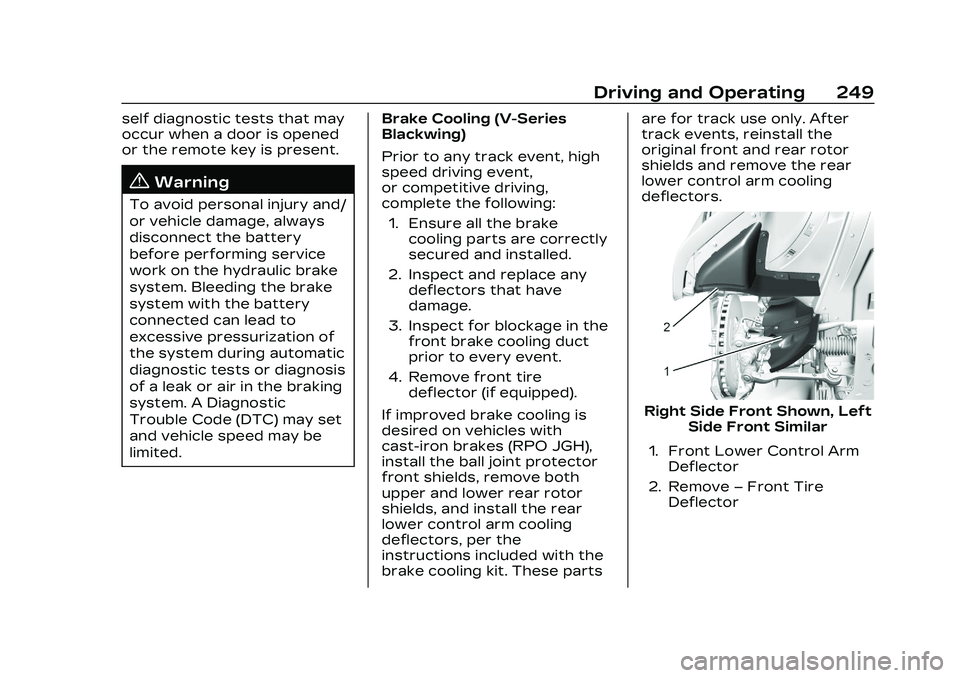
4. Remove front tire deflector (if equipped).
If improved brake cooling is
desired on vehicles with
cast-iron brakes (RPO JGH),
install the ball joint protector
front shields, remove both
upper and lower rear rotor
shields, and install the rear
lower control arm cooling
deflectors, per the
instructions included with the
brake cooling kit. These parts are for track use only. After
track events, reinstall the
original front and rear rotor
shields and remove the rear
lower control arm cooling
deflectors.
Right Side Front Shown, Left
Side Front Similar
1. Front Lower Control Arm Deflector
2. Remove –Front Tire
Deflector