warning light CADILLAC CT6 2018 1.G Workshop Manual
[x] Cancel search | Manufacturer: CADILLAC, Model Year: 2018, Model line: CT6, Model: CADILLAC CT6 2018 1.GPages: 445, PDF Size: 7.7 MB
Page 268 of 445
Cadillac CT6 Owner Manual (GMNA-Localizing-U.S./Canada-11292458) -
2018 - crc - 2/14/17
DRIVING AND OPERATING 267
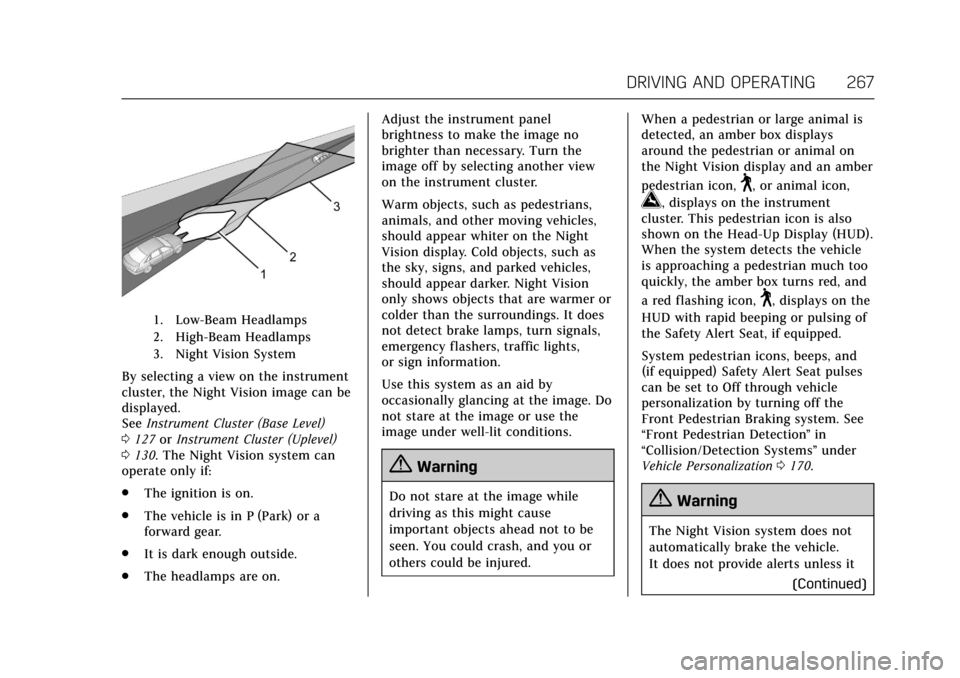
1. Low-Beam Headlamps
2. High-Beam Headlamps
3. Night Vision System
By selecting a view on the instrument
cluster, the Night Vision image can be
displayed.
SeeInstrument Cluster (Base Level)
0 127 orInstrument Cluster (Uplevel)
0 130. The Night Vision system can
operate only if:
. The ignition is on.
. The vehicle is in P (Park) or a
forward gear.
. It is dark enough outside.
. The headlamps are on. Adjust the instrument panel
brightness to make the image no
brighter than necessary. Turn the
image off by selecting another view
on the instrument cluster.
Warm objects, such as pedestrians,
animals, and other moving vehicles,
should appear whiter on the Night
Vision display. Cold objects, such as
the sky, signs, and parked vehicles,
should appear darker. Night Vision
only shows objects that are warmer or
colder than the surroundings. It does
not detect brake lamps, turn signals,
emergency flashers, traffic lights,
or sign information.
Use this system as an aid by
occasionally glancing at the image. Do
not stare at the image or use the
image under well-lit conditions.
{Warning
Do not stare at the image while
driving as this might cause
important objects ahead not to be
seen. You could crash, and you or
others could be injured.
When a pedestrian or large animal is
detected, an amber box displays
around the pedestrian or animal on
the Night Vision display and an amber
pedestrian icon,
~, or animal icon,
!, displays on the instrument
cluster. This pedestrian icon is also
shown on the Head-Up Display (HUD).
When the system detects the vehicle
is approaching a pedestrian much too
quickly, the amber box turns red, and
a red flashing icon,
~, displays on the
HUD with rapid beeping or pulsing of
the Safety Alert Seat, if equipped.
System pedestrian icons, beeps, and
(if equipped) Safety Alert Seat pulses
can be set to Off through vehicle
personalization by turning off the
Front Pedestrian Braking system. See
“Front Pedestrian Detection ”in
“Collision/Detection Systems” under
Vehicle Personalization 0170.
{Warning
The Night Vision system does not
automatically brake the vehicle.
It does not provide alerts unless it
(Continued)
Page 269 of 445
Cadillac CT6 Owner Manual (GMNA-Localizing-U.S./Canada-11292458) -
2018 - crc - 2/14/17
268 DRIVING AND OPERATING
Warning (Continued)
detects a pedestrian or large
animal. The system may not detect
pedestrians, including children,
or animals:. If they are less than 25 m
(82 ft) away.
. If they are not directly ahead
in the sensor coverage area,
fully visible, standing upright,
or part of a group.
. If the pedestrian or animal is
moving too quickly through
the field of view, such as a
bicyclist.
. If the pedestrian is wearing
certain types of clothing.
. If headlamps are off, except
when parked.
. If the outside temperature is
higher than 30 °C (86 °F).
. Due to poor visibility,
including in heavy fog, rain,
or snow.
(Continued)
Warning (Continued)
.If the sensor is blocked by
dirt, snow, rain, or ice.
Be ready to take action and apply
the brakes. For more information,
see Defensive Driving 0207. Keep
the Night Vision sensor clean and
in good repair.
Pedestrian detection may not be
available in high outside temperatures.
An amber icon,
*, displays. The
system does not need service.
In rain, snow, or fog the image may
not be clear and the direction of the
road ahead may not be seen. In more
severe weather conditions, the image
may be unclear and unusable. The
system does not need service.
Keep the system sensor clean by
activating the windshield washer up to
five times when it is dark enough for
the system to operate. If the Night
Vision image still looks blurry, use a
soft wet cloth to gently clean the
sensor camera lens and dry thoroughly. The sensor is behind the
front grille to the inside of the driver
side headlamp.
The camera must also be aligned to
work correctly. If the camera needs
adjustment, see your dealer. Do not
attempt to adjust the camera yourself.
Side Blind Zone
Alert (SBZA)
If equipped, the SBZA system is a
lane-changing aid that assists drivers
with avoiding crashes that occur with
moving vehicles in the side blind zone
(or spot) areas. When the vehicle is in
a forward gear, the left or right side
mirror display will light up if a moving
vehicle is detected in that blind zone.
If the turn signal is activated and a
vehicle is also detected on the same
side, the display will flash as an extra
warning not to change lanes. Since
this system is part of the Lane Change
Alert (LCA) system, read the entire
LCA section before using this feature.
Page 270 of 445
Cadillac CT6 Owner Manual (GMNA-Localizing-U.S./Canada-11292458) -
2018 - crc - 2/14/17
DRIVING AND OPERATING 269
Lane Change Alert (LCA)
If equipped, the LCA system is a
lane-changing aid that assists drivers
with avoiding lane change crashes
that occur with moving vehicles in the
side blind zone (or spot) areas or with
vehicles rapidly approaching these
areas from behind. The LCA warning
display will light up in the
corresponding outside side mirror and
will flash if the turn signal is on.
{Warning
LCA does not alert the driver to
vehicles outside of the system
detection zones, pedestrians,
bicyclists, or animals. It may not
provide alerts when changing lanes
under all driving conditions. Failure
to use proper care when changing
lanes may result in injury, death,
or vehicle damage. Before making a
lane change, always check mirrors,
glance over your shoulder, and use
the turn signals.LCA Detection Zones
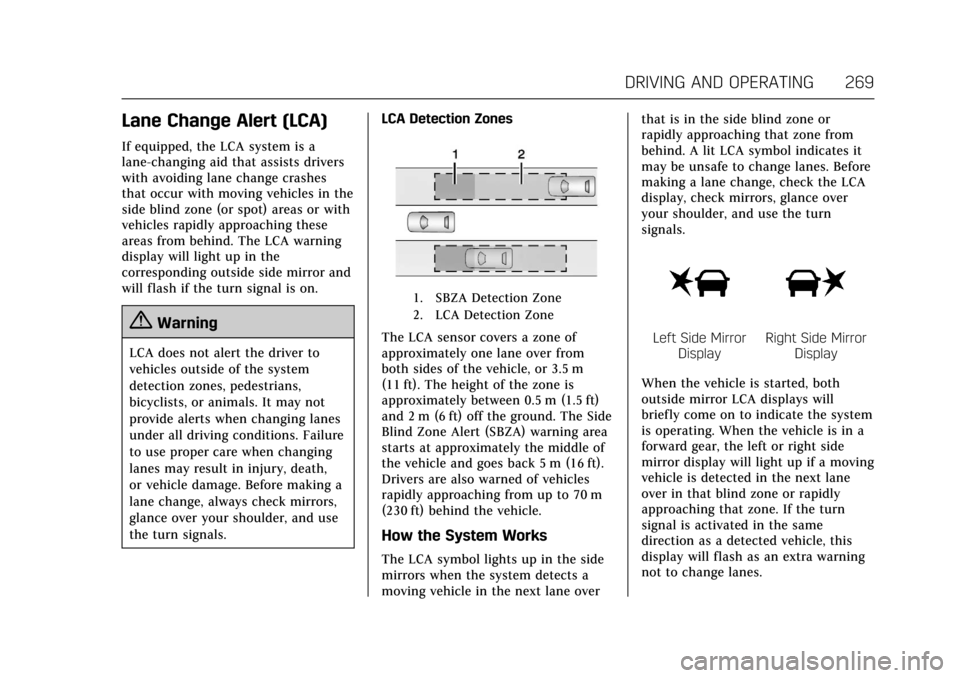
1. SBZA Detection Zone
2. LCA Detection Zone
The LCA sensor covers a zone of
approximately one lane over from
both sides of the vehicle, or 3.5 m
(11 ft). The height of the zone is
approximately between 0.5 m (1.5 ft)
and 2 m (6 ft) off the ground. The Side
Blind Zone Alert (SBZA) warning area
starts at approximately the middle of
the vehicle and goes back 5 m (16 ft).
Drivers are also warned of vehicles
rapidly approaching from up to 70 m
(230 ft) behind the vehicle.
How the System Works
The LCA symbol lights up in the side
mirrors when the system detects a
moving vehicle in the next lane over that is in the side blind zone or
rapidly approaching that zone from
behind. A lit LCA symbol indicates it
may be unsafe to change lanes. Before
making a lane change, check the LCA
display, check mirrors, glance over
your shoulder, and use the turn
signals.
Left Side Mirror
DisplayRight Side Mirror Display
When the vehicle is started, both
outside mirror LCA displays will
briefly come on to indicate the system
is operating. When the vehicle is in a
forward gear, the left or right side
mirror display will light up if a moving
vehicle is detected in the next lane
over in that blind zone or rapidly
approaching that zone. If the turn
signal is activated in the same
direction as a detected vehicle, this
display will flash as an extra warning
not to change lanes.
Page 271 of 445

Cadillac CT6 Owner Manual (GMNA-Localizing-U.S./Canada-11292458) -
2018 - crc - 2/14/17
270 DRIVING AND OPERATING
LCA can be disabled through vehicle
personalization using the Side Blind
Zone Alert option. See“Collision/
Detection Systems” underVehicle
Personalization 0170. If LCA is
disabled by the driver, the LCA mirror
displays will not light up.
When the System Does Not
Seem to Work Properly
The LCA system requires some driving
for the system to calibrate to
maximum performance. This
calibration may occur more quickly if
the vehicle is driving on a straight
highway road with traffic and roadside
objects (e.g., guardrails, barriers).
LCA displays may not come on when
passing a vehicle quickly, for a
stopped vehicle, or when towing a
trailer. The LCA detection zones that
extend back from the side of the
vehicle do not move further back
when a trailer is towed. Use caution
while changing lanes when towing a
trailer. LCA may alert to objects
attached to the vehicle, such as a
trailer, bicycle, or object extending out
to either side of the vehicle. Attached
objects may also interfere with the detection of vehicles. This is normal
system operation; the vehicle does not
need service.
LCA may not always alert the driver to
vehicles in the next lane over,
especially in wet conditions or when
driving on sharp curves. The system
does not need to be serviced. The
system may light up due to guardrails,
signs, trees, shrubs, and other
non-moving objects. This is normal
system operation; the vehicle does not
need service.
LCA may not operate when the LCA
sensors in the left or right corners of
the rear bumper are covered with
mud, dirt, snow, ice, or slush, or in
heavy rainstorms. For cleaning
instructions, see "Washing the
Vehicle" under
Exterior Care0380.
If the DIC still displays the system
unavailable message after cleaning
both sides of the vehicle toward the
rear corners of the vehicle, see your
dealer.
If the LCA displays do not light up
when moving vehicles are in the side
blind zone or are rapidly approaching this zone and the system is clean, the
system may need service. Take the
vehicle to your dealer.
When LCA is disabled for any reason
other than the driver turning it off,
the Side Blind Zone Alert On option
will not be available on the
personalization menu.
Radio Frequency Information
See
Radio Frequency Statement 0417.
Lane Departure
Warning (LDW)
If equipped, LDW may help avoid
crashes due to unintentional lane
departures. It may provide a warning
if the vehicle is crossing a detected
lane marking without using a turn
signal in the lane departure direction.
Since this system is part of the Lane
Keep Assist (LKA) system, read the
entire LKA section before using this
feature.
Page 291 of 445

Cadillac CT6 Owner Manual (GMNA-Localizing-U.S./Canada-11292458) -
2018 - crc - 2/14/17
290 DRIVING AND OPERATING
3. Remove and clean the funneladapter and return it to the
storage location.
Filling a Portable Fuel
Container
{Warning
Filling a portable fuel container
while it is in the vehicle can cause
fuel vapors that can ignite either by
static electricity or other means.
You or others could be badly
burned and the vehicle could be
damaged. Always:
. Use approved fuel containers.
. Remove the container from
the vehicle, trunk, or pickup
bed before filling.
. Place the container on the
ground.
. Place the nozzle inside the fill
opening of the container
before dispensing fuel, and
(Continued)
Warning (Continued)
keep it in contact with the fill
opening until filling is
complete.
. Fill the container no more
than 95% full to allow for
expansion.
. Do not smoke, light matches,
or use lighters while
pumping fuel.
. Avoid using cell phones or
other electronic devices.
Trailer Towing
General Towing
Information
Only use towing equipment that has
been designed for the vehicle. Contact
your dealer or trailering dealer for
assistance with preparing the vehicle
for towing a trailer. Read the entire
section before towing a trailer.
For towing a disabled vehicle, see
Towing the Vehicle 0376. For towing
the vehicle behind another vehicle
such as a motor home, see
Recreational Vehicle Towing 0378.
Driving Characteristics and
Towing Tips
Driving with a Trailer
When towing a trailer:
.
Become familiar with the local
laws that apply to trailer towing.
. Do not tow a trailer during the
first 2 414 km (1,500 mi) to
prevent damage to the engine,
axle, or other parts.
Page 296 of 445

Cadillac CT6 Owner Manual (GMNA-Localizing-U.S./Canada-11292458) -
2018 - crc - 2/14/17
DRIVING AND OPERATING 295
Because the vehicle has antilock
brakes, do not tap into the vehicle's
brake system. If this is done, both
brake systems will not work well or
at all.Conversions and
Add-Ons
Add-On Electrical
Equipment
{Warning
The Data Link Connector (DLC) is
used for vehicle service and
Emission Inspection/Maintenance
testing. SeeMalfunction Indicator
Lamp (Check Engine Light) 0143.
A device connected to the DLC —
such as an aftermarket fleet or
driver-behavior tracking device —
may interfere with vehicle systems.
This could affect vehicle operation
and cause a crash. Such devices
may also access information stored
in the vehicle’s systems.
Caution
Some electrical equipment can
damage the vehicle or cause
components to not work and would
not be covered by the vehicle
warranty. Always check with your
dealer before adding electrical
equipment.
Add-on equipment can drain the
vehicle's 12-volt battery, even if the
vehicle is not operating.
The vehicle has an airbag system.
Before attempting to add anything
electrical to the vehicle, see Servicing
the Airbag-Equipped Vehicle 095 and
Adding Equipment to the
Airbag-Equipped Vehicle 095.
Page 297 of 445
Cadillac CT6 Owner Manual (GMNA-Localizing-U.S./Canada-11292458) -
2018 - crc - 2/15/17
296 VEHICLE CARE
Vehicle Care
General Information
General Information . . . . . . . . . . . . . 297
California Proposition65 Warning . . . . . . . . . . . . . . . . . . . . . 297
California Perchlorate Materials Requirements . . . . . . . . . . . . . . . . . . . 297
Accessories and Modifications . . . . . . . . . . . . . . . . . . . 298
Vehicle Checks
Doing Your OwnService Work . . . . . . . . . . . . . . . . . . . . 298
Hood . . . . . . . . . . . . . . . . . . . . . . . . . . . . . . 299
Engine Compartment Overview . . . . . . . . . . . . . . . . . . . . . . . . . 300
Engine Oil . . . . . . . . . . . . . . . . . . . . . . . . . 307
Engine Oil Life System . . . . . . . . . . . 309
Automatic Transmission Fluid . . . . . . . . . . . . . . . . . . . . . . . . . . . . . 310
Engine Air Cleaner/Filter . . . . . . . . . 311
Cooling System (Gasoline Only) . . . . . . . . . . . . . . . . . 312
Cooling System (PLUG-IN Only) . . . . . . . . . . . . . . . . . 316
Engine Overheating . . . . . . . . . . . . . . 321
Washer Fluid . . . . . . . . . . . . . . . . . . . . . 322
Brakes . . . . . . . . . . . . . . . . . . . . . . . . . . . . . 322
Brake Fluid . . . . . . . . . . . . . . . . . . . . . . . 323 Battery - North America . . . . . . . . . 324
All-Wheel Drive . . . . . . . . . . . . . . . . . . 326
Starter Switch Check . . . . . . . . . . . . . 326
Automatic Transmission Shift
Lock Control Function
Check . . . . . . . . . . . . . . . . . . . . . . . . . . . . 327
Park Brake and P (Park) Mechanism Check . . . . . . . . . . . . . . 327
Wiper Blade Replacement . . . . . . . 327
Windshield Replacement . . . . . . . . 328
Gas Strut(s) . . . . . . . . . . . . . . . . . . . . . . . 328
Headlamp Aiming
Headlamp Aiming . . . . . . . . . . . . . . . . 329
Bulb Replacement
Bulb Replacement . . . . . . . . . . . . . . . . 330
LED Lighting . . . . . . . . . . . . . . . . . . . . . 330
License Plate Lamp . . . . . . . . . . . . . . 330
Replacement Bulbs . . . . . . . . . . . . . . . 330
Electrical System
Electrical System Overload . . . . . . 331
Fuses and Circuit Breakers . . . . . . 331
Engine Compartment Fuse Block . . . . . . . . . . . . . . . . . . . . . . . . . . . . 332
Instrument Panel Fuse Block . . . . 335
Rear Compartment Fuse Block . . . . . . . . . . . . . . . . . . . . . . . . . . . . 337
Wheels and Tires
Tires . . . . . . . . . . . . . . . . . . . . . . . . . . . . . . . 340 All-Season Tires . . . . . . . . . . . . . . . . . . 341
Winter Tires . . . . . . . . . . . . . . . . . . . . . . 341
Low-Profile Tires . . . . . . . . . . . . . . . . . 342
Summer Tires . . . . . . . . . . . . . . . . . . . . 342
Tire Sidewall Labeling . . . . . . . . . . . 342
Tire Designations . . . . . . . . . . . . . . . . . 344
Tire Terminology and
Definitions . . . . . . . . . . . . . . . . . . . . . . 345
Tire Pressure . . . . . . . . . . . . . . . . . . . . . . 347
Tire Pressure for High-Speed Operation . . . . . . . . . . . . . . . . . . . . . . . . 349
Tire Pressure Monitor System . . . 349
Tire Pressure Monitor Operation . . . . . . . . . . . . . . . . . . . . . . . . 350
Tire Inspection . . . . . . . . . . . . . . . . . . . 353
Tire Rotation . . . . . . . . . . . . . . . . . . . . . 353
When It Is Time for New Tires . . . . . . . . . . . . . . . . . . . . . . . . . . . . . 355
Buying New Tires . . . . . . . . . . . . . . . . 355
Different Size Tires and Wheels . . . . . . . . . . . . . . . . . . . . . . . . . . 357
Uniform Tire Quality Grading . . . 357
Wheel Alignment and Tire Balance . . . . . . . . . . . . . . . . . . . . . . . . . . 359
Wheel Replacement . . . . . . . . . . . . . . 359
Tire Chains . . . . . . . . . . . . . . . . . . . . . . . 360
If a Tire Goes Flat . . . . . . . . . . . . . . . . 360
Tire Sealant and Compressor Kit . . . . . . . . . . . . . . . . . 362
Storing the Tire Sealant and Compressor Kit . . . . . . . . . . . . . . . . . 368
Page 322 of 445

Cadillac CT6 Owner Manual (GMNA-Localizing-U.S./Canada-11292458) -
2018 - crc - 2/15/17
VEHICLE CARE 321
Engine Overheating
The vehicle has several indicators to
warn of the engine overheating.
There is an engine coolant
temperature gauge and an engine
coolant temperature warning light on
the instrument cluster.
SeeEngine Coolant Temperature Gauge
0 139 and Engine Coolant Temperature
Warning Light 0149. The vehicle may
also display a message on the Driver
Information Center (DIC).
If the decision is made not to lift the
hood when this warning appears, get
service help right away. See Roadside
Service 0411.
If the decision is made to lift the
hood, make sure the vehicle is parked
on a level surface. Then check to see if
the engine cooling fan is running.
If the engine is overheating, the fan
should be running. If it is not, do not
continue to run the engine. Have the
vehicle serviced.Caution
Do not run the engine if there is a
leak in the engine cooling system.
This can cause a loss of all coolant
and can damage the system and
vehicle. Have any leaks fixed
right away.
If Steam Is Coming from the
Engine Compartment
{Warning
Steam and scalding liquids from a
hot cooling system are under
pressure. Turning the pressure cap,
even a little, can cause them to
come out at high speed and you
could be burned. Never turn the cap
when the cooling system, including
the pressure cap, is hot. Wait for
the cooling system and pressure
cap to cool.
If No Steam Is Coming from the
Engine Compartment
If an engine overheat warning is
displayed but no steam can be seen or
heard, the problem may not be too
serious. Sometimes the engine can get
a little too hot when the vehicle:
. Climbs a long hill on a hot day
. Stops after high-speed driving
. Idles for long periods in traffic
If the overheat warning is displayed
with no sign of steam: 1. Turn the air conditioning off.
2. Turn the heater on to the highest temperature and to the highest
fan speed. Open the windows as
necessary.
3. When it is safe to do so, pull off the road, shift to P (Park) or
N (Neutral), and let the
engine idle.
If the engine coolant temperature
gauge is no longer in the overheated
area or the engine coolant
temperature warning light no longer
displays, the vehicle can be driven.
Continue to drive the vehicle slowly
Page 324 of 445
Cadillac CT6 Owner Manual (GMNA-Localizing-U.S./Canada-11292458) -
2018 - crc - 2/15/17
VEHICLE CARE 323
{Warning
The brake wear warning sound
means that soon the brakes will not
work well. That could lead to a
crash. When the brake wear
warning sound is heard, have the
vehicle serviced.
Caution
Continuing to drive with worn-out
brake pads could result in costly
brake repair.
Some driving conditions or climates
can cause a brake squeal when the
brakes are first applied or lightly
applied. This does not mean
something is wrong with the brakes.
Properly torqued wheel nuts are
necessary to help prevent brake
pulsation. When tires are rotated,
inspect brake pads for wear and
evenly tighten wheel nuts in the proper sequence to torque
specifications. See
Capacities and
Specifications 0404.
Brake pads should be replaced as
complete sets.
Brake Pedal Travel
See your dealer if the brake pedal does
not return to normal height, or if
there is a rapid increase in pedal
travel. This could be a sign that brake
service may be required.
Replacing Brake System Parts
Always replace brake system parts
with new, approved replacement parts.
If this is not done, the brakes may not
work properly. The braking
performance expected can change in
many other ways if the wrong
replacement brake parts are installed
or if parts are improperly installed.
Brake Fluid
The brake master cylinder reservoir is
filled with GM approved DOT 3 (for
gasoline only vehicles) or DOT 4 (for
PLUG-IN vehicles) brake fluid as
indicated on the reservoir cap. See
Engine Compartment Overview 0300
for the location of the reservoir.
Checking Brake Fluid
With the vehicle in P (Park) on a level
surface, the brake fluid level should be
between the minimum and maximum
marks on the brake fluid reservoir.
There are only two reasons why the
brake fluid level in the reservoir may
go down:
. Normal brake lining wear. When
new linings are installed, the fluid
level goes back up.
Page 325 of 445
Cadillac CT6 Owner Manual (GMNA-Localizing-U.S./Canada-11292458) -
2018 - crc - 2/15/17
324 VEHICLE CARE
.A fluid leak in the brake hydraulic
system. Have the brake hydraulic
system fixed. With a leak, the
brakes will not work well.
Always clean the brake fluid reservoir
cap and the area around the cap
before removing it.
Do not top off the brake fluid. Adding
fluid does not correct a leak. If fluid is
added when the linings are worn,
there will be too much fluid when
new brake linings are installed. Add or
remove fluid, as necessary, only when
work is done on the brake hydraulic
system.
{Warning
If too much brake fluid is added, it
can spill on the engine and burn,
if the engine is hot enough. You or
others could be burned, and the
vehicle could be damaged. Add
brake fluid only when work is done
on the brake hydraulic system. When the brake fluid falls to a low
level, the brake warning light comes
on. See
Brake System Warning Light
0 145.
Brake fluid absorbs water over time
which degrades the effectiveness of
the brake fluid. Replace brake fluid at
the specified intervals to prevent
increased stopping distance. See
Maintenance Schedule 0390.
What to Add
Use only GM approved DOT 3 (for
gasoline only vehicles) or DOT 4 (for
PLUG-IN vehicles) brake fluid from a
clean, sealed container. See
Recommended Fluids and Lubricants
0 399.{Warning
The wrong or contaminated brake
fluid could result in damage to the
brake system. This could result in
the loss of braking leading to a
possible injury. Always use the
proper GM approved brake fluid.
Caution
If brake fluid is spilled on the
vehicle's painted surfaces, the paint
finish can be damaged. Immediately
wash off any painted surface.
Battery - North America
The original equipment battery is
maintenance free. Do not remove the
cap and do not add fluid.
Refer to the replacement number
shown on the original battery label
when a new 12-volt battery is needed.
The battery is in the trunk under the
spare tire. The vehicle has an
Absorbed Glass Mat (AGM) 12-volt
battery. Installation of a standard
12-volt battery will result in reduced
12-volt battery life.
When using a 12-volt battery charger
on the 12-volt AGM battery, some
chargers have an AGM battery setting
on the charger. If available, use the
AGM setting on the charger, to limit
charge voltage to 14.8 volts.