steering CADILLAC DEVILLE 2003 8.G User Guide
[x] Cancel search | Manufacturer: CADILLAC, Model Year: 2003, Model line: DEVILLE, Model: CADILLAC DEVILLE 2003 8.GPages: 423, PDF Size: 2.91 MB
Page 95 of 423
{CAUTION:
Plugging the cord into an ungrounded outlet
could cause an electrical shock. Also, the
wrong kind of extension cord could overheat
and cause a ®re. You could be seriously
injured. Plug the cord into a properly grounded
three-prong 110-volt AC outlet. If the cord
won't reach, use a heavy-duty three-prong
extension cord rated for at least 15 amps.
4. Before starting the engine, be sure to unplug and
store the cord as it was before to keep it away
from moving engine parts. If you don't, it could be
damaged.
How long should you keep the coolant heater plugged
in? The answer depends on the outside temperature, the
kind of oil you have, and some other things. Instead
of trying to list everything here, we ask that you contact
your dealer in the area where you'll be parking your
vehicle. The dealer can give you the best advice for that
particular area.
Automatic Transaxle Operation
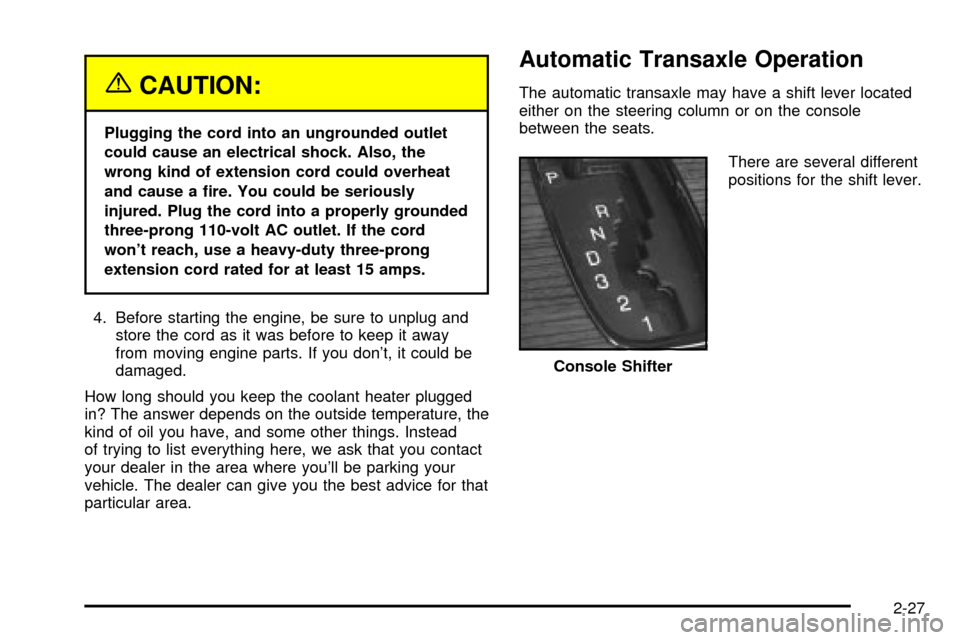
The automatic transaxle may have a shift lever located
either on the steering column or on the console
between the seats.
There are several different
positions for the shift lever.
Console Shifter
2-27
Page 99 of 423

1. Verify that the shift lever is in PARK (P).
2. Locate the override
access slot underneath
the steering column
below the lock
cylinder.
3. Remove the override access slot cap.
4. Insert a tool into the access slot, press in and hold.
5. Turn the ignition key to OFF.
6. Remove the tool from the slot.
7. Remove the key from the ignition.
8. Reinstall the override access slot cap.The following procedure applies only to vehicles
equipped with the console shift lever and is used to shift
the transaxle out of PARK (P) in case of a dead
battery or low voltage battery.
The console shift lock
release is located on the
front of the center console.
To access the shift lock release, do the following:
1. Verify that the shift lever is in PARK (P).
2. Pull up the rubber mat located on the front of the
center console.
3. Remove the shift lock release hole cover by prying
it open with a small diameter tool.
2-31
Page 103 of 423

Steering Column Shift Lever
If your vehicle is equipped with a steering column shift
lever, use the following procedure to shift the vehicle
into PARK (P):
1. Hold the brake pedal down with your right foot.
2. Move the shift lever into PARK (P) like this:
·Pull the lever toward you.
·Move the lever up as far as it will go.
3. With your right foot still holding the brake pedal
down, set the parking brake.
4. Turn the ignition key to OFF.
5. Remove the key and take it with you. If you can
leave your vehicle with the ignition key in your
hand, your vehicle is in PARK (P).
2-35
Page 111 of 423

The mirrors can be manually folded inward to prevent
damage when going through an automatic car wash.
To fold, push the mirror toward the vehicle. To return the
mirror to its original position, push outward. Be sure
to return both mirrors to their original unfolded positions
before driving.
The mirrors also have an arrow on the mirror face that
¯ashes in the direction of the turn when the turn
signal is used. See
Turn Signal/Multifunction Lever on
page 3-8.
The mirrors can also be programmed for personalization
and the parallel parking feature if you have the
optional memory package. For more information, see
Memory Seat, Mirrors and Steering Wheel on page 2-55andDIC Vehicle Personalization on page 3-67.
Outside Automatic Dimming Mirror
If your vehicle is equipped with this feature, the
driver's side mirror will adjust for the glare of headlamps
behind you. This feature is controlled by the on and
off settings on the automatic dimming rearview mirror.
See
Automatic Dimming Rearview Mirror with OnStarž
on page 2-40.
Outside Curb View Assist Mirror
If your vehicle is equipped with memory mirrors, it will
also be capable of performing the curb view assist mirror
feature. This feature will cause the passenger's mirror
to tilt to a factory programmed position when the vehicle
is in REVERSE (R). This feature may be useful in
allowing you to view the curb when you are parallel
parking.
When the vehicle is shifted out of REVERSE (R) and a
®ve-second delay has occurred, the passenger's
mirror will return to its original position.
If further adjustment is needed after the mirror is tilted,
the mirror switch may be used.
This feature can be enabled/disabled through the Driver
Information Center (DIC). See
DIC Vehicle
Personalization on page 3-67for more information.
2-43
Page 114 of 423

OnStaržVirtual Advisor
With OnStaržVirtual Advisor you can listen to the news,
entertainment and informative topics, such as traffic
and weather reports. You are able to listen and reply to
your e-mail through your vehicle's speakers.
A completed Subscription Service Agreement is required
prior to delivery of OnStar
žservices and prepaid
calling minutes are also required for OnStaržPersonal
Calling and OnStaržVirtual Advisor use. Terms and
conditions of the Subscription Service Agreement can be
found at www.onstar.com.
OnStaržSteering Wheel Controls
You can use the steering wheel controls with OnStarž.
The controls are located
on the left side of the
steering wheel.Press the top part of the control to access OnStar
ž.
You will hear a ready prompt from the system, and
then you can begin your OnStar
žsession or begin
making calls.
If your vehicle has the optional Navigation system or
cellular phone, the ready prompt will come from
that system ®rst. You must say the word phone to
access OnStar
ž.
If your vehicle has both optional systems, the ready
prompt will come from the Navigation system ®rst. When
you say the word phone after the ready prompt, you
will access the cellular phone.
If you prefer to use OnStar
žto make calls, you must
repeat the word phone again after the cellular
phone ready prompt.
To end a communication session, press the bottom part
of the control that says END.
2-46
Page 119 of 423

Storage Areas
Glove Box
The glove box is located in front of the passenger's seat
on the instrument panel. To lock the glove box door,
insert the master key into the lock cylinder and
turn it clockwise. Turn the key counterclockwise to
unlock the door.
Instrument Panel Storage Area
This storage compartment is located in the center of the
instrument panel below the radio. Pull the door out to
reveal the accessory power outlet and storage
compartment. To clean the storage compartment, lift out
while pulling on the sides.
Cellular Telephone
Your vehicle may have been prewired for dealer
installation of a portable cellular telephone system. The
system has steering wheel telephone controls and
information output through the Driver Information Center
(DIC). Voice activation with remote record and
hands-free operation are standard features. For more
information, contact your dealer. A user's guide is
provided with the telephone.
Front Storage Area
If your vehicle is equipped with the front storage area, it
comes with a coinholder, a storage compartment for
CDs or tapes, an optional cellular telephone and a dual
cupholder.
Full Floor Console Storage Area
If your vehicle is equipped with the full ¯oor console, it
has an upper and lower storage area. The upper
storage area is available for the optional cellular
telephone. The lower storage area has two removable
bins that can hold tapes and/or CDs.
To open the console, pull up on either lever to open the
upper or lower storage area.
There is also a removable coinholder that attaches to
the side of one of the bins. A dual cupholder is located in
front of the console. Open and close by pressing on
the cupholder.
Center Console Storage Area
If your vehicle is equipped with the center console, it
comes with a storage tray, a storage compartment for
CDs or tapes, a dual cupholder that unfolds, a coinholder,
an optional phone and an armrest. The cupholder can be
opened by pressing on the surface panel located in front
of the armrest and unfolding it. Close the lid to secure it.
2-51
Page 123 of 423

Vehicle Personalization
Memory Seat, Mirrors and Steering
Wheel
Your vehicle may be
equipped with the memory
package. The controls
for these features
are located on the driver's
door panel, and are
used to program and recall
memory settings for the
driver's seating positions.
Use the following steps to program each button:
1. Adjust the driver's seat including the seatback
recliner, lumbar and head restraint, both outside
mirrors and the steering wheel to a comfortable
position.
2. Press the SET button.
3. Within ®ve seconds, press button 1. After a brief
delay, a single beep will sound through the driver's
side front speaker to let you know that the
position has been stored.A second mirror, seating and steering wheel position
can be programmed by repeating the above steps and
pressing button 2 (for driver 2). Each time a memory
button is pressed, a single beep will sound. Each time
button 1 or 2 is pressed and released while the
vehicle is in PARK (P), the memory positions will be
recalled after a brief delay. If the vehicle is not in PARK
(P), the memory buttons must be pressed and held
to recall the stored positions.
If you use the remote keyless entry transmitter to enter
your vehicle, automatic seat and mirror movement
will occur. The numbers on the back of the transmitters,
1 and 2, correspond to the numbers on the buttons
on the door panel.
When the key is placed in the ignition in OFF and you
have entered the vehicle without using the remote
keyless entry transmitter, the seat and mirrors
will automatically adjust to the programmed position of
the last driver.
To stop recall movement of the memory feature at any
time, press one of the power seat controls or memory
buttons.
2-55
Page 124 of 423

Two personalized exit positions can be set by ®rst
recalling the driving position (by pressing 1 or 2), then
positioning the steering wheel and seat in the desired
exit positions and then pressing and releasing the
MEMORY SET button and, within ®ve seconds, pressing
the EXIT button. With the vehicle in PARK (P), the
exit position for the previously set driver can be recalled
by pressing the EXIT button. The mirrors, power
lumbar and shoulder belt height positions will not be
stored or recalled.Further programming for automatic seat and mirror
movement can be done using the Driver Information
Center (DIC). You can select or not select the following:
·Automatic seat and mirror movement when the
vehicle is unlocked with the remote keyless
entry transmitter, or
·automatic seat and mirror movement when a key is
placed in the ignition.
For programming information, see
DIC Vehicle
Personalization on page 3-67.
2-56
Page 125 of 423

Instrument Panel Overview...............................3-4
Hazard Warning Flashers................................3-6
Other Warning Devices...................................3-7
Horn.............................................................3-7
Tilt Wheel.....................................................3-7
Turn Signal/Multifunction Lever.........................3-8
Exterior Lamps.............................................3-15
Interior Lamps..............................................3-19
Night Vision System......................................3-22
Ultrasonic Rear Parking Assist (URPA)............3-25
Accessory Power Outlets...............................3-27
Ashtrays and Cigarette Lighter........................3-28
Climate Controls............................................3-29
Dual Climate Control System..........................3-29
Outlet Adjustment.........................................3-33
Rear Climate Control System.........................3-34
Passenger Compartment Air Filter...................3-36
Steering Wheel Climate Controls.....................3-38
Climate Controls Personalization.....................3-39
Warning Lights, Gages and Indicators.............3-40
Instrument Panel Cluster................................3-40
Speedometer and Odometer...........................3-43
Trip Odometer..............................................3-43
Tachometer (Analog Cluster Only)...................3-44Safety Belt Reminder Light.............................3-45
Air Bag Readiness Light................................3-45
Charging System Light..................................3-46
Brake System Warning and Parking Brake
Indicator Light...........................................3-47
Anti-Lock Brake System Warning Light.............3-48
Traction Control System (TCS) Warning Light . . .3-48
Engine Coolant Temperature Warning Light......3-49
Engine Coolant Temperature Gage..................3-50
Malfunction Indicator Lamp.............................3-50
Oil Pressure Light.........................................3-53
Security Light...............................................3-54
Fog Lamp Light............................................3-54
Lights On Reminder......................................3-54
Cruise Control Light......................................3-55
Fuel Gage...................................................3-55
Fuel Data Display
(Digital Cluster Only)..................................3-56
Driver Information Center (DIC).......................3-57
DIC Controls and Displays.............................3-57
DIC Warnings and Messages.........................3-60
Climate Controls and Radio System
Personalization..........................................3-67
DIC Vehicle Personalization............................3-67
Section 3 Instrument Panel
3-1
Page 126 of 423

Trip Computer................................................3-79
Oil Life Indicator...........................................3-79
Audio System(s).............................................3-80
Setting the Time for Radios without Radio
Data Systems (RDS)..................................3-80
Setting the Time for Radios with Radio Data
Systems (RDS).........................................3-80
Radio with Cassette and CD
(Base Level).............................................3-81
Radio with Cassette and CD
(Up Level)................................................3-89
Navigation/Radio System..............................3-100Glovebox-Mounted CD Changer....................3-100
Radio Personalization with Home and Away
Feature..................................................3-103
Theft-Deterrent Feature................................3-104
Audio Steering Wheel Controls......................3-105
Understanding Radio Reception....................3-105
Care of Your Cassette Tape Player...............3-106
Care of Your CDs.......................................3-107
Care of Your CD Player...............................3-107
Diversity Antenna System.............................3-108
XMŸ Satellite Radio Antenna System
(United States Only).................................3-108
Section 3 Instrument Panel
3-2