lock CADILLAC ESCALADE 2010 3.G Owners Manual
[x] Cancel search | Manufacturer: CADILLAC, Model Year: 2010, Model line: ESCALADE, Model: CADILLAC ESCALADE 2010 3.GPages: 616, PDF Size: 39.41 MB
Page 380 of 616

Menu Language :Touch English, Francais, Espanol,Italiano, or Deutsch to change the default language ofthe DVD video menus. The menu language must beavailable on the disc. The menu language may vary foreach DVD.
Parental Level :Touch this button to change the ratinglevel to only allow the play of DVDs with a certainrating. The rating selection is 1 through 8, with 1 KidsSafe being a G rating. If the 1 is selected, any DVD witha rating above G will not be able to be viewed withoutentering a password.
When the parental level is first entered a keyboard willappear on the display and a four-digit password willneed to be created. Type in a password that you will beable to remember. Once the password is created, youcan then select a rating level.
If you would like to change the rating level, press theParental Level button, then press the Password button.Type in the password and then change the rating level.
If the password has been forgotten, contact yourdealer/retailer.
This may not be available on all DVDs.
Aspect :Touch this button to change the aspect ratioof the DVD. This may not be available on all DVDs.
y(Next Track/Chapter):Press this hard key to go tothe next track or chapter. This button may not workwhen the DVD is playing the copyright information orthe previews.
z(Previous Track/Chapter):Press this hard key toreturn to the start of the current track or chapter. Pressthis button again to go to the previous track or chapter.This button may not work when the DVD is playing thecopyright information or the previews.
w(Tuning Knob):Turn this knob counterclockwiseone notch to go to the start of the current chapter/track,turn it again to go to the previous chapter/track. Turnthis knob clockwise to go to the next chapter/track.
DVD Messages
If Disc Read Error appears on the display and/or theDVD comes out, it could be for one of the followingreasons:
.If a disc was inserted with an invalid or unknownformat.
.If the disc is not from a correct region.
.If the map DVD disc was installed into the DVDaudio/video slot. See“Installing the Map DVD”underMapson page 5!14for more information.
.It is very hot. When the temperature returns tonormal, the DVD should play.
5-80
Page 391 of 616
Section 6 Driving Your Vehicle
Your Driving, the Road, and the Vehicle. . . . . . . . . . 6-2Defensive Driving . . . . . . . . . . . . . . . . . . . . . . . . . . . . . . . 6-2Drunk Driving . . . . . . . . . . . . . . . . . . . . . . . . . . . . . . . . . . . 6-2Control of a Vehicle . . . . . . . . . . . . . . . . . . . . . . . . . . . . . 6-3Braking . . . . . . . . . . . . . . . . . . . . . . . . . . . . . . . . . . . . . . . . . 6-4Antilock Brake System (ABS) . . . . . . . . . . . . . . . . . . . 6-5Braking in Emergencies . . . . . . . . . . . . . . . . . . . . . . . . . 6-6StabiliTrak®System . . . . . . . . . . . . . . . . . . . . . . . . . . . . . 6-6Magnetic Ride Control™. . . . . . . . . . . . . . . . . . . . . . . . 6-9Road Sensing Suspension . . . . . . . . . . . . . . . . . . . . . . 6-9Locking Rear Axle . . . . . . . . . . . . . . . . . . . . . . . . . . . . . . 6-9All-Wheel Drive (AWD) System . . . . . . . . . . . . . . . . . 6-9Steering . . . . . . . . . . . . . . . . . . . . . . . . . . . . . . . . . . . . . . . 6-10Off-Road Recovery . . . . . . . . . . . . . . . . . . . . . . . . . . . . . 6-11Passing . . . . . . . . . . . . . . . . . . . . . . . . . . . . . . . . . . . . . . . . 6-12Loss of Control . . . . . . . . . . . . . . . . . . . . . . . . . . . . . . . . 6-12Off-Road Driving . . . . . . . . . . . . . . . . . . . . . . . . . . . . . . . 6-13
Driving at Night . . . . . . . . . . . . . . . . . . . . . . . . . . . . . . . . 6-24Driving in Rain and on Wet Roads . . . . . . . . . . . . . 6-25Before Leaving on a Long Trip . . . . . . . . . . . . . . . . . 6-26Highway Hypnosis . . . . . . . . . . . . . . . . . . . . . . . . . . . . . 6-26Hill and Mountain Roads . . . . . . . . . . . . . . . . . . . . . . . 6-27Winter Driving . . . . . . . . . . . . . . . . . . . . . . . . . . . . . . . . . 6-28If Your Vehicle is Stuck in Sand, Mud, Ice,or Snow . . . . . . . . . . . . . . . . . . . . . . . . . . . . . . . . . . . . . 6-30Rocking Your Vehicle to Get It Out . . . . . . . . . . . . . 6-30Recovery Hooks . . . . . . . . . . . . . . . . . . . . . . . . . . . . . . . 6-31Loading the Vehicle . . . . . . . . . . . . . . . . . . . . . . . . . . . . 6-32
Towing. . . . . . . . . . . . . . . . . . . . . . . . . . . . . . . . . . . . . . . . . . . . 6-38Towing Your Vehicle . . . . . . . . . . . . . . . . . . . . . . . . . . . 6-38Recreational Vehicle Towing . . . . . . . . . . . . . . . . . . . 6-38Level Control . . . . . . . . . . . . . . . . . . . . . . . . . . . . . . . . . . 6-41Autoride®. . . . . . . . . . . . . . . . . . . . . . . . . . . . . . . . . . . . . . 6-42Towing a Trailer . . . . . . . . . . . . . . . . . . . . . . . . . . . . . . . . 6-42Trailer Recommendations . . . . . . . . . . . . . . . . . . . . . . 6-55
6-1
Page 395 of 616

Antilock Brake System (ABS)
This vehicle has the Antilock Brake System (ABS), anadvanced electronic braking system that helps preventa braking skid.
When the engine is started and the vehicle begins todrive away, ABS checks itself. A momentary motor orclicking noise might be heard while this test is going on.This is normal.
If there is a problem withABS, this warning lightstays on. SeeAntilockBrake System (ABS)Warning Lightonpage 4!34.
Along with ABS, the vehicle has a Dynamic RearProportioning (DRP) system. If there is a DRP problem,both the brake and ABS warning lights come onaccompanied by a 10!second chime. The lights andchime will come on each time the ignition is turned onuntil the problem is repaired. See your dealer/retailerfor service.
Let us say the road is wet and you are driving safely.Suddenly, an animal jumps out in front of you. You slamon the brakes and continue braking. Here is whathappens with ABS:
A computer senses that the wheels are slowing down.If one of the wheels is about to stop rolling, thecomputer will separately work the brakes at each frontwheel and at both rear wheels.
ABS can change the brake pressure to each wheel, asrequired, faster than any driver could. This can help thedriver steer around the obstacle while braking hard.
As the brakes are applied, the computer keepsreceiving updates on wheel speed and controls brakingpressure accordingly.
Remember: ABS does not change the time needed toget a foot up to the brake pedal or always decreasestopping distance. If you get too close to the vehicle infront of you, there will not be enough time to apply thebrakes if that vehicle suddenly slows or stops. Alwaysleave enough room up ahead to stop, even with ABS.
6-5
Page 396 of 616

Using ABS
Do not pump the brakes. Just hold the brake pedaldown firmly and let antilock work. The brakes mightvibrate or some noise might be heard, but this isnormal.
Braking in Emergencies
ABS allows the driver to steer and brake at the sametime. In many emergencies, steering can help morethan even the very best braking.
Brake Assist
This vehicle has a Brake Assist feature designed toassist the driver in stopping or decreasing vehiclespeed in emergency driving conditions. This featureuses the stability system hydraulic brake control moduleto supplement the power brake system under conditionswhere the driver has quickly and forcefully applied thebrake pedal in an attempt to quickly stop or slow downthe vehicle. The stability system hydraulic brake controlmodule increases brake pressure at each corner of thevehicle until the ABS activates. Minor brake pedalpulsations or pedal movement during this time is normaland the driver should continue to apply the brake pedalas the driving situation dictates The Brake Assistfeature will automatically disengage when the brakepedal is released or brake pedal pressure is quicklydecreased.
StabiliTrak®System
The vehicle has a vehicle stability enhancement systemcalled StabiliTrak. It is an advanced computer controlledsystem that assists the driver with directional control ofthe vehicle in difficult driving conditions.
StabiliTrak activates when the computer sensesa discrepancy between the intended path and thedirection the vehicle is actually traveling. StabiliTrakselectively applies braking pressure at any one of thevehicle's brakes to assist the driver with keeping thevehicle on the intended path.
When the vehicle is started and begins to move, thesystem performs several diagnostic checks to insurethere are no problems. The system may be heard or feltwhile it is working. This is normal and does not meanthere is a problem with the vehicle. The system shouldinitialize before the vehicle reaches 20 mph (32 km/h).In some cases, it may take approximately two miles ofdriving before the system initializes.
If cruise control is being used when StabiliTrakactivates, the cruise control automatically disengages.The cruise control can be re-engaged when roadconditions allow. SeeCruise Control on page 4!8.
6-6
Page 397 of 616

If the system fails to turn on or activate, the StabiliTraklight along with one of the following messages will bedisplayed on the Driver Information Center (DIC):TRACTION CONTROL OFF, SERVICE TRACTIONCONTROL, STABILITRAK OFF, SERVICESTABILITRAK. If these DIC messages appear, makesure the StabiliTrak system has not been turned offusing the StabiliTrak on/off button. Then turn thesteering wheel clockwise from the nine o'clock positionto the three o'clock position. If this clears themessage(s), the vehicle does not need servicing.If this does not clear the message(s), then turn thevehicle off, wait 15 seconds, and then turn it back onagain to reset the system. If any of these messagesstill appear on the Driver Information Center (DIC), thevehicle should be taken in for service. For moreinformation on the DIC messages, seeDriverInformation Center (DIC) on page 4!41.
The StabiliTrak light willflash on the instrumentpanel cluster when thesystem is both onand activated.
The system may be heard or felt while it is working; thisis normal.
The traction controldisable button is locatedon the instrument panelbelow the climatecontrols.
The traction control part of StabiliTrak can be turnedoff by pressing and releasing the StabiliTrak button ifboth systems (traction control and StabiliTrak) werepreviously on. To disable both traction control andStabiliTrak, press and hold the button for five seconds.
Traction control and StabiliTrak can be turned on bypressing and releasing the StabiliTrak button if notautomatically shut off for any other reason.
When the TCS or StabiliTrak system is turned off,the StabiliTrak light and the appropriate TCS off orStabiliTrak off message will be displayed on the DIC towarn the driver. The vehicle will still have brake-tractioncontrol when traction control is off, but will not be ableto use the engine speed management system. See“Traction Control Operation”next for more information.
When the traction control system has been turned off,system noises may still be heard as a result of thebrake-traction control coming on.
6-7
Page 399 of 616

Magnetic Ride Control™
The vehicle may have the MagneRide control system.MagneRide constantly checks speed, wheel position,lift/dive and steering of the vehicle. The damping forcefor each shock absorber and adjustment level is chosenfor the best ride and handling.
MagneRide also works with the tow/haul switch that,when engaged, will provide more firmness from theshock absorbers. This added control gives better rideand handling when carrying heavy loads or towinga trailer. SeeTow/Haul Modeon page 3!36formore information.
Road Sensing Suspension
The Road Sensing Suspension (RSS) feature providessuperior vehicle ride and handling under a variety ofpassenger and loading conditions.
The system is fully automatic and uses a computercontroller to continuously monitor vehicle speed, wheelto body position, lift/dive and steering position of thevehicle. The controller then sends signals to each shockabsorber to independently adjust the damping level toprovide the optimum vehicle ride.
RSS also interacts with the tow/haul mode that, whenengaged, will provide additional control of the shockabsorbers. This additional control results in better rideand handling characteristics when the vehicle is loadedor towing a trailer. See“Tow/Haul Mode”underTowing aTrailer on page 6!42.
Locking Rear Axle
Vehicles with a locking rear axle can give more tractionon snow, mud, ice, sand or gravel. It works like astandard axle most of the time, but when traction is low,this feature will allow the rear wheel with the mosttraction to move the vehicle.
All-Wheel Drive (AWD) System
If the vehicle has this feature, engine power is sent toall four wheels when extra traction is needed. This islike four-wheel drive, but there is no separate lever orswitch to engage or disengage the front axle. It is fullyautomatic, and adjusts itself as needed for roadconditions.
If the vehicle is a Two-mode Hybrid, see“Four-WheelDrive”in the Two-mode Hybrid Supplement.
6-9
Page 401 of 616
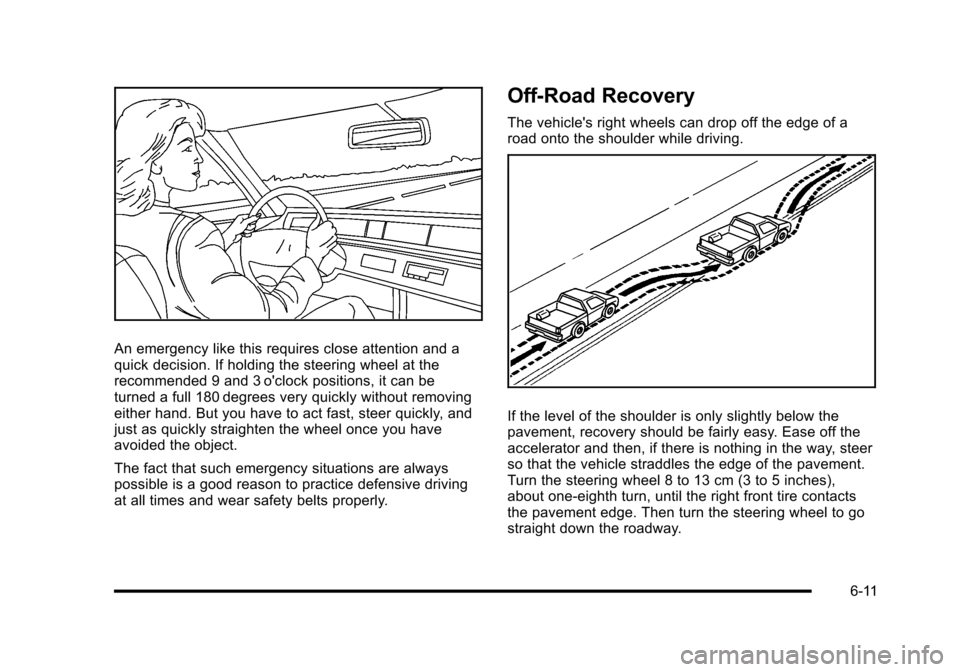
An emergency like this requires close attention and aquick decision. If holding the steering wheel at therecommended 9 and 3 o'clock positions, it can beturned a full 180 degrees very quickly without removingeither hand. But you have to act fast, steer quickly, andjust as quickly straighten the wheel once you haveavoided the object.
The fact that such emergency situations are alwayspossible is a good reason to practice defensive drivingat all times and wear safety belts properly.
Off-Road Recovery
The vehicle's right wheels can drop off the edge of aroad onto the shoulder while driving.
If the level of the shoulder is only slightly below thepavement, recovery should be fairly easy. Ease off theaccelerator and then, if there is nothing in the way, steerso that the vehicle straddles the edge of the pavement.Turn the steering wheel 8 to 13 cm (3 to 5 inches),about one-eighth turn, until the right front tire contactsthe pavement edge. Then turn the steering wheel to gostraight down the roadway.
6-11
Page 403 of 616
While driving on a surface with reduced traction, tryyour best to avoid sudden steering, acceleration,or braking, including reducing vehicle speed by shiftingto a lower gear. Any sudden changes could cause thetires to slide. You may not realize the surface is slipperyuntil the vehicle is skidding. Learn to recognize warningclues—such as enough water, ice, or packed snow onthe road to make a mirrored surface—and slow downwhen you have any doubt.
Remember: Antilock brakes help avoid only thebraking skid.
Off-Road Driving
Vehicles with all!wheel drive can be used for off!roaddriving. Vehicles without all!wheel drive and vehicleswith 22!inch tire/wheel assemblies should not be drivenoff-road except on a level, solid surface.
Many of the vehicle design features that help make thevehicle more responsive on paved roads during poorweather conditions also help make it better suited foroff!road use than conventional passenger vehicles.The vehicle does not have features usually thought tobe necessary for extended or severe off!road use suchas special underbody shielding and transfer case lowgear range.
The airbag system is designed to work properly under awide range of conditions, including off!road usage.Always wear your safety belt and observe safe drivingspeeds, especially on rough terrain.
Drinking and driving can be very dangerous on anyroad and this is certainly true for off-road driving.At the very time you need special alertness and drivingskills, your reflexes, perceptions, and judgment can beaffected by even a small amount of alcohol. You couldhave a serious—or even fatal—accident if you drinkand drive or ride with a driver who has been drinking.
Off-roading can be great fun but has some definitehazards. The greatest of these is the terrain itself. Whenoff-road driving, traffic lanes are not marked, curves arenot banked, and there are no road signs. Surfaces canbe slippery, rough, uphill, or downhill.
Avoid sharp turns and abrupt maneuvers. Failure tooperate the vehicle correctly off!road could result in lossof vehicle control or vehicle rollover.
Off-roading involves some new skills. That is why it isvery important that you read these driving tips andsuggestions to help make off-road driving safer andmore enjoyable.
6-13
Page 406 of 616
.Always carry a litter bag and make sure all refuseis removed from any campsite before leaving.
.Take extreme care with open fires (wherepermitted), camp stoves, and lanterns.
.Never park your vehicle over dry grass or othercombustible materials that could catch fire from theheat of the vehicle's exhaust system.
Traveling to Remote Areas
It makes sense to plan your trip, especially when goingto a remote area. Know the terrain and plan your route.Get accurate maps of trails and terrain. Check to see ifthere are any blocked or closed roads.
It is also a good idea to travel with at least one othervehicle in case something happens to one of them.
For vehicles with a winch, be sure to read the winchinstructions. In a remote area, a winch can be handyif you get stuck but you will want to know how to useit properly.
Getting Familiar with Off-Road Driving
It is a good idea to practice in an area that is safe andclose to home before you go into the wilderness.Off-roading requires some new and different skills.
Tune your senses to different kinds of signals.Your eyes need to constantly sweep the terrain forunexpected obstacles. Your ears need to listen forunusual tire or engine sounds. Use your arms, hands,feet, and body to respond to vibrations and vehiclebounce.
Controlling the vehicle is the key to successful off-roaddriving. One of the best ways to control the vehicle is tocontrol the speed. At higher speeds:
.You approach things faster and have less timeto react.
.There is less time to scan the terrain for obstacles.
.The vehicle has more bounce when driving overobstacles.
.More braking distance is needed, especially on anunpaved surface.
6-16
Page 408 of 616
Driving on Hills
Off-road driving often takes you up, down, or across ahill. Driving safely on hills requires good judgment andan understanding of what the vehicle can and cannotdo. There are some hills that simply cannot be driven,no matter how well built the vehicle.
{WARNING:
Many hills are simply too steep for any vehicle.
If you drive up them, you will stall. If you drive
down them, you cannot control your speed. If you
drive across them, you will roll over. You could be
seriously injured or killed. If you have any doubt
about the steepness, do not drive the hill.
Approaching a Hill
When you approach a hill, decide if it is too steep toclimb, descend, or cross. Steepness can be hard tojudge. On a very small hill, for example, there may be asmooth, constant incline with only a small change in
elevation where you can easily see all the way to thetop. On a large hill, the incline may get steeper as younear the top, but you might not see this because thecrest of the hill is hidden by bushes, grass, or shrubs.
Consider this as you approach a hill:
.Is there a constant incline, or does the hill getsharply steeper in places?
.Is there good traction on the hillside, or will thesurface cause tire slipping?
.Is there a straight path up or down the hill so youwill not have to make turning maneuvers?
.Are there obstructions on the hill that can blockyour path, such as boulders, trees, logs, or ruts?
.What is beyond the hill? Is there a cliff, anembankment, a drop-off, a fence? Get out andwalk the hill if you do not know. It is the smart wayto find out.
.Is the hill simply too rough? Steep hills often haveruts, gullies, troughs, and exposed rocks becausethey are more susceptible to the effects of erosion.
6-18