radio CADILLAC ESCALADE 2010 3.G User Guide
[x] Cancel search | Manufacturer: CADILLAC, Model Year: 2010, Model line: ESCALADE, Model: CADILLAC ESCALADE 2010 3.GPages: 616, PDF Size: 39.41 MB
Page 175 of 616

FCC Information
SeeRadio Frequency Statementon page 9!20forFCC information.
Frequency of operation: 24.05GHz–24.25GHz.
Field Strength: Not greater than 2.5V/m peak(0.25V/m average) at a distance of 3 m.
The manufacturer is not responsible for any radio orTV interference caused by unauthorized modificationsto this equipment. Such modifications could void theuser's authority to operate the equipment.
Rear Vision Camera (RVC)
This vehicle may have a Rear Vision Camera system.Read this entire section before using it.
The rear vision camera system is designed to helpthe driver when backing up by displaying a view of thearea behind the vehicle. When the driver shifts thevehicle into R (Reverse), the video image automaticallyappears on the navigation screen. Once the driver shiftsout of R (Reverse), the navigation screen will go back tothe last screen that had been displayed, after a delay.
Turning the Rear Vision Camera System
On or Off
To turn the rear vision camera system on or off:
1. Shift into P (Park).
2. Press the CONFIG hard key to enter the configuremenu options, then press the CONFIG hard key toselect Display or touch the Display screen button.
3. Select the Rear Camera Options screen button.The Rear Camera Options screen will display.
4. Select the Video screen button. When the Videoscreen button is highlighted the RVC system is on.
3-51
Page 179 of 616
When the System Does Not Seem To
Work Properly
The rear vision camera system might not work properlyor display a clear image if:
.The RVC is turned off. See“Turning the RearCamera System On or Off”earlier in this section.
.It is dark.
.The sun or the beam of headlights is shiningdirectly into the camera lens.
.Ice, snow, mud, or anything else builds up on thecamera lens. Clean the lens, rinse it with water,and wipe it with a soft cloth.
.The back of the vehicle is in an accident, theposition and mounting angle of the camera canchange or the camera can be affected. Be sure tohave the camera and its position and mountingangle checked at your dealer/retailer.
Universal Home Remote
System
SeeRadio Frequency Statementon page 9!20forinformation regarding Part 15 of the FederalCommunications Commission (FCC) Rules andRSS-210/211 of Industry and Science Canada.
Universal Home Remote System
Operation (With Three Round LED)
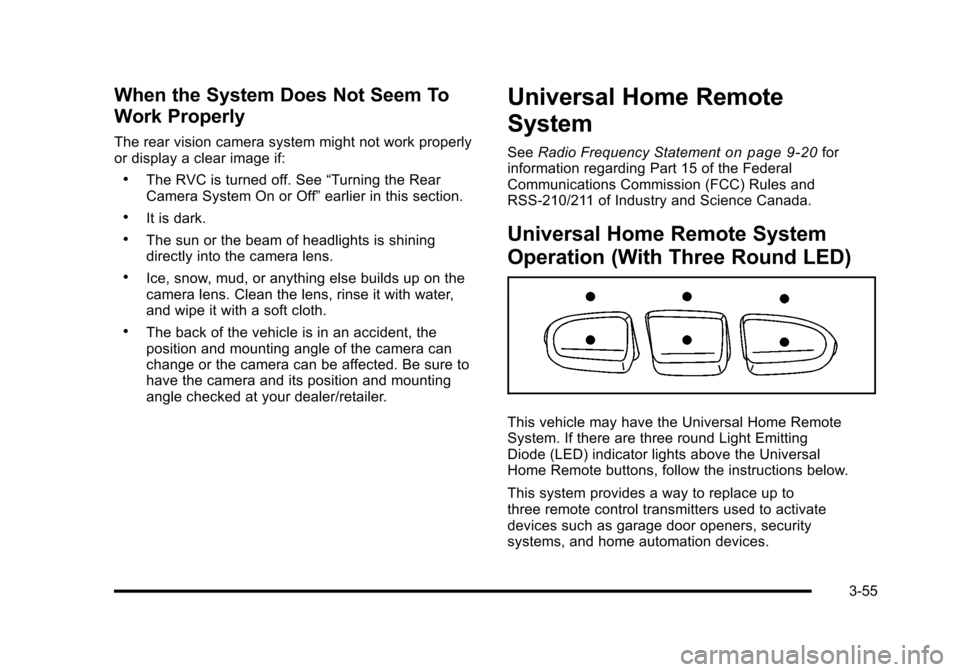
This vehicle may have the Universal Home RemoteSystem. If there are three round Light EmittingDiode (LED) indicator lights above the UniversalHome Remote buttons, follow the instructions below.
This system provides a way to replace up tothree remote control transmitters used to activatedevices such as garage door openers, securitysystems, and home automation devices.
3-55
Page 194 of 616
Section 4 Instrument Panel
StabiliTrak®Indicator Light . . . . . . . . . . . . . . . . . . . . . 4-34Engine Coolant Temperature Gage . . . . . . . . . . . . 4-35Tire Pressure Light . . . . . . . . . . . . . . . . . . . . . . . . . . . . 4-35Malfunction Indicator Lamp . . . . . . . . . . . . . . . . . . . . 4-36Oil Pressure Light . . . . . . . . . . . . . . . . . . . . . . . . . . . . . 4-38Security Light . . . . . . . . . . . . . . . . . . . . . . . . . . . . . . . . . . 4-39Fog Lamp Light . . . . . . . . . . . . . . . . . . . . . . . . . . . . . . . . 4-39Lights On Reminder . . . . . . . . . . . . . . . . . . . . . . . . . . . 4-39Cruise Control Light . . . . . . . . . . . . . . . . . . . . . . . . . . . 4-39Highbeam On Light . . . . . . . . . . . . . . . . . . . . . . . . . . . . 4-40Tow/Haul Mode Light . . . . . . . . . . . . . . . . . . . . . . . . . . 4-40Fuel Gage . . . . . . . . . . . . . . . . . . . . . . . . . . . . . . . . . . . . . 4-40
Driver Information Center (DIC). . . . . . . . . . . . . . . . . . 4-41DIC Operation and Displays . . . . . . . . . . . . . . . . . . . 4-41DIC Compass . . . . . . . . . . . . . . . . . . . . . . . . . . . . . . . . . . 4-47DIC Warnings and Messages . . . . . . . . . . . . . . . . . . 4-48DIC Vehicle Customization . . . . . . . . . . . . . . . . . . . . 4-57
Audio System(s). . . . . . . . . . . . . . . . . . . . . . . . . . . . . . . . . . 4-67Bluetooth®. . . . . . . . . . . . . . . . . . . . . . . . . . . . . . . . . . . . . 4-67Rear Seat Entertainment (RSE) System(Overhead) . . . . . . . . . . . . . . . . . . . . . . . . . . . . . . . . . . 4-77Rear Seat Entertainment (RSE) System(Headrest DVD) . . . . . . . . . . . . . . . . . . . . . . . . . . . . . 4-86Rear Seat Audio (RSA) . . . . . . . . . . . . . . . . . . . . . . . 4-103Theft-Deterrent Feature . . . . . . . . . . . . . . . . . . . . . . 4-105Audio Steering Wheel Controls . . . . . . . . . . . . . . . 4-105Radio Reception . . . . . . . . . . . . . . . . . . . . . . . . . . . . . . 4-107Rear Side Window Antenna . . . . . . . . . . . . . . . . . . 4-108XM™Satellite Radio Antenna System . . . . . . . . 4-108
4-2
Page 207 of 616
Headlamps on Reminder
If a door is open, a reminder chime sounds when theheadlamps or parking lamps are manually turned onand the key is out of the ignition. To turn off the chime,turn the headlamp switch to off or AUTO and then backon, or close and re-open the door. In the AUTO mode,the headlamps turn off once the ignition is in LOCK/OFFor remains on until the headlamp delay ends (if enabledin the DIC). See“Exit Lighting”underDIC VehicleCustomization on page 4!57.
Daytime Running Lamps (DRL)
Daytime Running Lamps (DRL) can make it easier forothers to see the front of your vehicle during the day.Fully functional daytime running lamps are required onall vehicles first sold in Canada.
The DRL system comes on when the followingconditions are met:
.The ignition is on.
.The exterior lamps control is in AUTO.
.The engine is running.
.The light sensor determines it is daytime.
When the DRL system is on, only the DRL lamps areon. The taillamps, sidemarker, instrument panel lights,and other lamps will not be on.
When it begins to get dark, the automatic headlampsystem switches from DRL to the headlamps.
To turn off the DRL lamps, turn the exterior lampscontrol to the OFF position and then release. Forvehicles first sold in Canada, the transmission must bein the P (Park) position, before the DRL lamps can beturned off.
Automatic Headlamp System
When it is dark enough outside, the automaticheadlamp system turns on the headlamps at the normalbrightness, along with the taillamps, sidemarker, parkinglamps, and the instrument panel lights. The radio lightswill also be dim.
To turn off the automatic headlamp system, turn theexterior lamps switch to the off position and thenrelease it. For vehicles first sold in Canada, thetransmission must be in the P (Park) position, beforethe automatic headlamp system can be turned off.
The vehicle has a light sensor located on the top of theinstrument panel in the defroster grille that regulateswhen the automatic headlamps turn on. Do not coverthe sensor or the headlamps will come on whenever theignition is on.
The system may also turn on the headlamps whendriving through a parking garage, heavy overcastweather, or a tunnel. This is normal.
4-15
Page 224 of 616

If the word ON or the on symbol is lit on the passengerairbag status indicator, it means that the right frontpassenger frontal airbag is enabled (may inflate).
If the word OFF or the off symbol is lit on the airbagstatus indicator, it means that the passenger sensingsystem has turned off the right front passenger frontalairbag.
If, after several seconds, both status indicator lightsremain on, or if there are no lights at all, there may be aproblem with the lights or the passenger sensingsystem. See your dealer/retailer for service.
{WARNING:
If the airbag readiness light ever comes on and
stays on, it means that something may be wrong
with the airbag system. To help avoid injury to
yourself or others, have the vehicle serviced right
away. SeeAirbag Readiness Lighton page 4!30
for more information, including important safety
information.
Charging System Light
This light comes on brieflywhen the ignition key isturned to START, but theengine is not running, asa check to show it isworking.
If it does not, have the vehicle serviced by your dealer/retailer.
The light should go out once the engine starts. If it stayson, or comes on while driving, there could be a problemwith the charging system. A charging system messagein the Driver Information Center (DIC) can also appear.SeeDIC Warnings and Messageson page 4!48formore information. This light could indicate that there areproblems with a generator drive belt, or that there is anelectrical problem. Have it checked right away. If thevehicle must be driven a short distance with the light on,turn off accessories, such as the radio and airconditioner.
4-32
Page 259 of 616

Audio System(s)
Determine which radio the vehicle has and read thefollowing pages to become familiar with its features.
{WARNING:
Taking your eyes off the road for extended periods
could cause a crash resulting in injury or death to
you or others. Do not give extended attention to
entertainment tasks while driving.
This system provides access to many audio and nonaudio listings.
To minimize taking your eyes off the road while driving,do the following while the vehicle is parked:
.Become familiar with the operation and controls ofthe audio system.
.Set up the tone, speaker adjustments, and presetradio stations.
For more information, seeDefensive Drivingonp a g e 6!2.
This vehicle's infotainment system may be equippedwith a noise reduction system which can workimproperly if the audio amplifier, engine calibrations,
exhaust system, microphones, radio, or speakers aremodified or replaced. This could result in morenoticeable engine noise at certain speeds.
Notice:Contact your dealer/retailer before addingany equipment.
Adding audio or communication equipment couldinterfere with the operation of the vehicle's engine,radio, or other systems, and could damage them.Follow federal rules covering mobile radio andtelephone equipment.
The vehicle has Retained Accessory Power (RAP).With RAP, the audio system can be played even afterthe ignition is turned off. SeeRetained AccessoryPower (RAP)on page 3!28for more information.
Bluetooth®
Vehicles with a Bluetooth system can use a Bluetoothcapable cell phone with a Hands Free Profile to makeand receive phone calls. The system can be used whilethe key is in ON/RUN or ACC/ACCESSORY position.The range of the Bluetooth system can be up to 9.1 m(30 ft). Not all phones support all functions, and not allphones are guaranteed to work with the in-vehicleBluetooth system. See www.gm.com/bluetooth for moreinformation on compatible phones.
4-67
Page 269 of 616

Sending a Stored Name Tag During a Call
1. Pressbg. The system responds with“Ready”
followed by a tone.
2. Say“Send name tag.”The system responds with“Say a name tag to send tones”followed by a tone.
3. Say the name tag to send.
.If the system clearly recognizes the name tag itresponds with“OK, Sending
.If the system is not sure it recognized the nametag properly, it responds“Dial
Clearing the System
Unless information is deleted out of the in!vehicleBluetooth system, it will be retained indefinitely. Thisincludes all saved name tags in the phonebook andphone pairing information. For information on how todelete this information, see the above sections onDeleting a Paired Phone and Deleting Name Tags.
Other Information
The Bluetooth®word mark and logos are owned by theBluetooth®SIG, Inc. and any use of such marks byGeneral Motors is under license. Other trademarks andtrade names are those of their respective owners.
SeeRadio Frequency Statementon page 9!20for FCCinformation.
Rear Seat Entertainment (RSE)
System (Overhead)
The vehicle may have an Overhead DVD Rear SeatEntertainment (RSE) system. The RSE system workswith the vehicle's audio system. The DVD player is partof the front radio. The RSE system includes a radio witha DVD player, a video display screen, and if the vehiclehas a third row seat, it could have a second videodisplay screen, audio/video jacks, two wirelessheadphones, and a remote control. SeeNavigationAudio Systemon page 5!60for more information onthe vehicle's audio/DVD system.
4-77
Page 270 of 616

Driver Control of the Audio System
The driver has basic control of the whole audio system.
Press and holdOfor more than two seconds to turn off
the radio, RSE, and the RSA (rear seat audio). SeeNavigation Audio Systemon page 5!60for moreinformation.
Before Driving
The RSE is designed for rear seat passengers only. Thedriver cannot safely view the video screen while drivingand should not try to do so.
In severe or extreme weather conditions the RSEsystem might not work until the temperature is withinthe operating range. The operating range for the RSEsystem is above!4°F (!20°C) or below 140°F (60°C).If the temperature of the vehicle is outside of this range,heat or cool the vehicle until the temperature is withinthe operating range of the RSE system.
Headphones
The RSE includes two 2-channel wireless headphonesthat are dedicated to this system. Channel 1 isdedicated to the DVD player, while Channel 2 isdedicated to RSA selections. These headphones areused to listen to media such as CDs, DVDs, MP3s,DVDAs, radio, any auxiliary source connected toA/V jacks, or the auxiliary input jack, if the vehiclehas this feature. The wireless headphones have anOn/Off button, channel 1/2 switch, and a volumecontrol.
If the vehicle has a third row video screen display,it has two additional headphones.
Push the power button to turn on the headphones. Anindicator light located on the headphones comes on.If the light comes on but, there is intermittent soundand/or static on the headphones, or if the indicator lightdoes not come on, the batteries might need to bereplaced. See“Battery Replacement”later in thissection for more information. Switch the headphones toOff when not in use.
4-78
Page 272 of 616

Audio/Video (A/V) Jacks
The A/V jacks are located on the rear of the floorconsole. The A/V jacks allow audio or video signals tobe connected from an auxiliary device such as acamcorder or a video game unit to the RSE system.Adapter connectors or cables (not included) maybe required to connect the auxiliary device to theA/V jacks. Refer to the manufacturer’s instructionsfor proper usage.
The A/V jacks are color coded to match typical homeentertainment system equipment. The yellow jack (A) isfor the video input. The white jack (B) is for the leftaudio input. The red jack (C) is for the right audio input.
Power for auxiliary devices is not supplied by the radiosystem.
To use the auxiliary inputs of the RSE system, connectan external auxiliary device to the color-coded A/V jacksand turn both the auxiliary device and the video screenpower on. If the video screen is in the DVD playermode, pressing the AUX (auxiliary) button on theremote control switches the video screen from the DVDplayer mode to the auxiliary device. The radio plays theaudio of the connected auxiliary device by sourcing toauxiliary. SeeNavigation Audio Systemon page 5!60for more information.
For optimal sound quality, increase the portable audiodevice's volume to the loudest level. Higher levels ofvolume decreases audio distortion.
It is always best to power a portable audio devicethrough its own battery while playing.
4-80
Page 273 of 616
How to Change the RSE Video Screen
Settings
The screen display mode (normal, full, and zoom),screen brightness, and setup menu language can bechanged from the on screen setup menu. To changeany feature, perform the following:
1. Press thezbutton on the remote control.
2. Use the remote controlQ,R,q,rnavigation
arrows and therbutton to use the setup menu.
3. Press thezbutton again to remove the setup
menu from the screen.
Audio Output
Audio from the DVD player or auxiliary inputs can beheard through the following possible sources:
.Wireless Headphones
.Vehicle Speakers
.Vehicle wired headphone jacks on the rear seataudio system, if the vehicle has this feature.
The RSE system always transmits the audio signal tothe wireless headphones, if there is audio available.See“Headphones”earlier in this section for moreinformation.
The DVD player is capable of outputting audio to thewired headphone jacks on the RSA system, if thevehicle has this feature. The DVD player can beselected as an audio source on the RSA system. SeeRear Seat Audio (RSA)on page 4!103for moreinformation.
When a device is connected to the A/V jacks, the rearseat passengers are be able to hear audio from theauxiliary device through the wireless or wiredheadphones. The front seat passengers are able tolisten to playback from this device through the vehiclespeakers by selecting AUX as the source on the radio.
Video Screen(s)
The video screen(s) are located in the overheadconsole.
To use the video screen(s):
1. Push the release button located on the overheadconsole.
2. Move the screen to the desired position.
When the video screen is not in use, push it up into itslocked position.
If a DVD is playing and the screen is raised to its lockedposition, the screen remains on, this is normal, and theDVD continues to play through the previous audiosource. Use the remote control power button or ejectthe disc to turn off the screen.
4-81