radio CADILLAC ESCALADE 2010 3.G Service Manual
[x] Cancel search | Manufacturer: CADILLAC, Model Year: 2010, Model line: ESCALADE, Model: CADILLAC ESCALADE 2010 3.GPages: 616, PDF Size: 39.41 MB
Page 342 of 616

Configure Menu
Press the CONFIG (Configure) hard key to adjustseveral of the system's features and preferences.The last selected CONFIG screen is the screen thatdisplays: Sound, Radio, Nav (navigation), Display,or Time.
Sound
Press the CONFIG key to enter the configure menuoptions, then press the CONFIG key repeatedly untilSound is selected or touch the Sound screen button tomake speaker and DSP (Digital Signal Processing)adjustments. See“Sound Menu”under,NavigationAudio Systemon page 5!60for more information.
Radio
Press the CONFIG key to enter the configure menuoptions, then press the CONFIG key repeatedly untilRadio is selected or touch the Radio screen button tomake changes for radio information displayed, presetpages, XM™categories, and Bose®AudioPilot®.See“Radio Menu”under,Navigation Audio Systemonpage 5!60for more information.
5-42
Page 347 of 616

Traffic Options
Read the following Options descriptions to understandhow the XM NavTraffic™operates.
XM NavTraffic™(USA and Canada)
Vehicles with the navigation system have anXM NavTraffic™receiver. XM NavTraffic™is asubscription service provided via XM™Satellite Radio.XM NavTraffic™provides real-time traffic informationfully integrated to the navigation system to displaycurrent traffic conditions for a driver’s chosen route.XM NavTraffic™allows drivers to make the mostinformed, timesaving routing decisions.
If the Traffic touch screen button is pressed or if anattempt is made to turn on the traffic display in theNavigation Setup Menu without a subscription, aCaution screen displays indicating that XM traffic isnot activated.
Three types of traffic information for major roadways aredisplayed on the navigation system:
.Unscheduled traffic incident data, such asaccidents and disabled vehicles
.Scheduled traffic incident data, such as roadconstruction and road closures
.Traffic flow information (rate of speed data)
Traffic information is delivered to the vehicle bythe XM™Radio satellites. XM NavTraffic™makesit possible for the navigation system to providecontinuously updated traffic information personalizedfor a driver’s needs.
5-47
Page 360 of 616

Navigation Audio System
Notice:Before adding any sound equipment tothe vehicle, such as an audio system, CD player,CB radio, mobile telephone, or two-way radio, makesure that it can be added by checking with yourdealer/retailer. Also, check federal rules coveringmobile radio and telephone units. If soundequipment can be added, it is very important todo it properly. Added sound equipment can interferewith the operation of the vehicle's engine, radio,or other systems, and even damage them. Thevehicle's systems can interfere with the operationof sound equipment that has been added.
Notice:The chime signals related to safety belts,parking brake, and other functions of the vehicleoperate through the navigation system. If thatequipment is replaced or additional equipment isadded to the vehicle, the chimes may not work.Make sure that replacement or additional equipmentis compatible with the vehicle before installing it.See“Accessories and Modifications”in the Index ofthe vehicle's owner manual.
Playing the Radio
O/n(Power/Volume):Press to turn the audiosystem on and off. Turn to increase or to decreasethe volume.
Press and hold for more than two seconds to turn offthe navigation system, the Rear Seat Entertainment(RSE) video screen, and Rear Seat Audio (RSA). If thevehicle has not been turned off, press this knob to turnRSE and RSA back on and to continue playback of thelast active source.
w(Tuning Knob):Turn to go to the next or previousfrequency or disc track or chapter. SeeCD Playeronpage 5!68orDVD Playeron page 5!75for moreinformation.
AUDIO :Press to display the audio screen. Press toswitch between AM, FM, or XM, if equipped, DISC,or AUX (Auxiliary), or touch the screen button. SeeCDPlayeron page 5!68,DVD Playeron page 5!75, andAuxiliary Deviceson page 5!85for more information.
5-60
Page 362 of 616
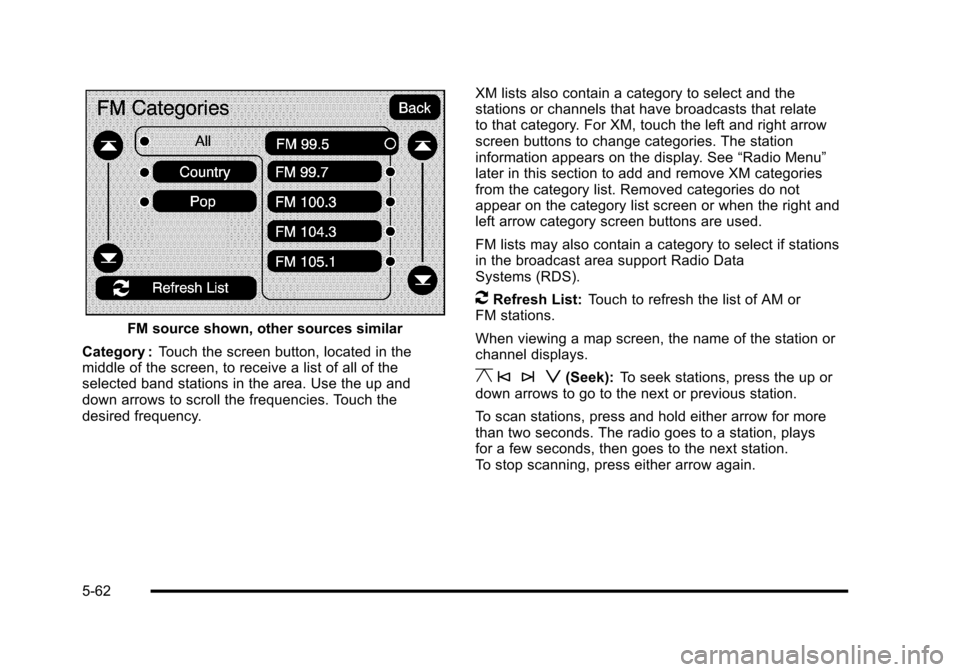
FM source shown, other sources similar
Category :Touch the screen button, located in themiddle of the screen, to receive a list of all of theselected band stations in the area. Use the up anddown arrows to scroll the frequencies. Touch thedesired frequency.
XM lists also contain a category to select and thestations or channels that have broadcasts that relateto that category. For XM, touch the left and right arrowscreen buttons to change categories. The stationinformation appears on the display. See“Radio Menu”later in this section to add and remove XM categoriesfrom the category list. Removed categories do notappear on the category list screen or when the right andleft arrow category screen buttons are used.
FM lists may also contain a category to select if stationsin the broadcast area support Radio DataSystems (RDS).
2Refresh List:Touch to refresh the list of AM orFM stations.
When viewing a map screen, the name of the station orchannel displays.
y © ¨ z(Seek):To seek stations, press the up ordown arrows to go to the next or previous station.
To scan stations, press and hold either arrow for morethan two seconds. The radio goes to a station, playsfor a few seconds, then goes to the next station.To stop scanning, press either arrow again.
5-62
Page 363 of 616
Storing Radio Station Presets
This feature stores a mix of up to 30 AM, FM, andXM (if equipped) preset stations. To store presets:
1. PressOto turn the system on.
2. If viewing a map screen, touch the sourcescreen button, press the AUDIO key, or pressthe FAV (favorite) key.
3. Select the band.
4. Seek, scan, or tune to the desired station, to selectthe station.
5. Press and hold one of the preset screen buttonsfor more than two seconds or until a beep is heard.
6. Repeat the steps for each preset.
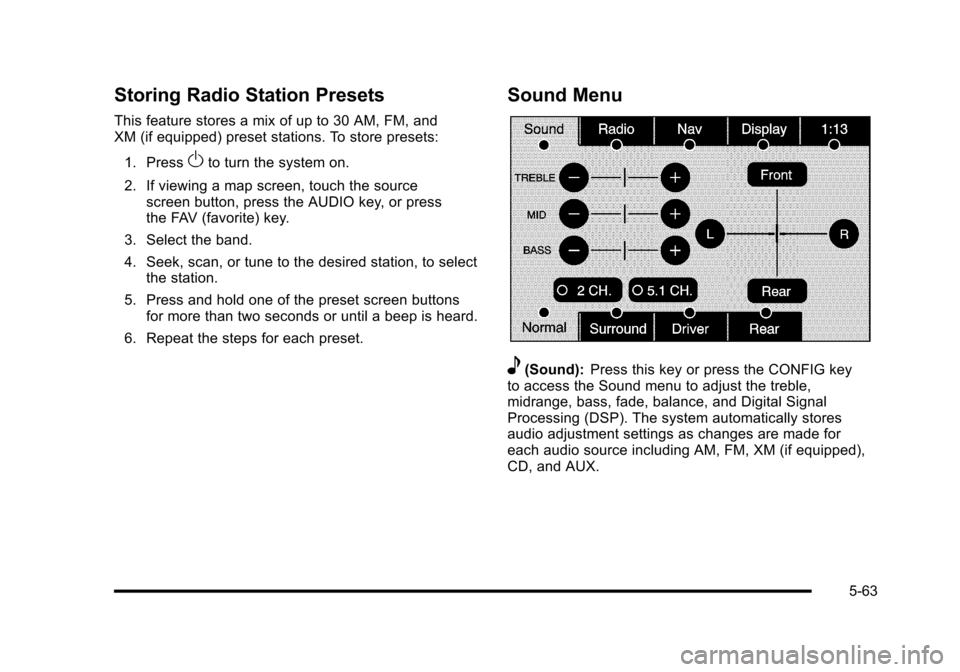
Sound Menu
e(Sound):Press this key or press the CONFIG keyto access the Sound menu to adjust the treble,midrange, bass, fade, balance, and Digital SignalProcessing (DSP). The system automatically storesaudio adjustment settings as changes are made foreach audio source including AM, FM, XM (if equipped),CD, and AUX.
5-63
Page 365 of 616
Radio Menu
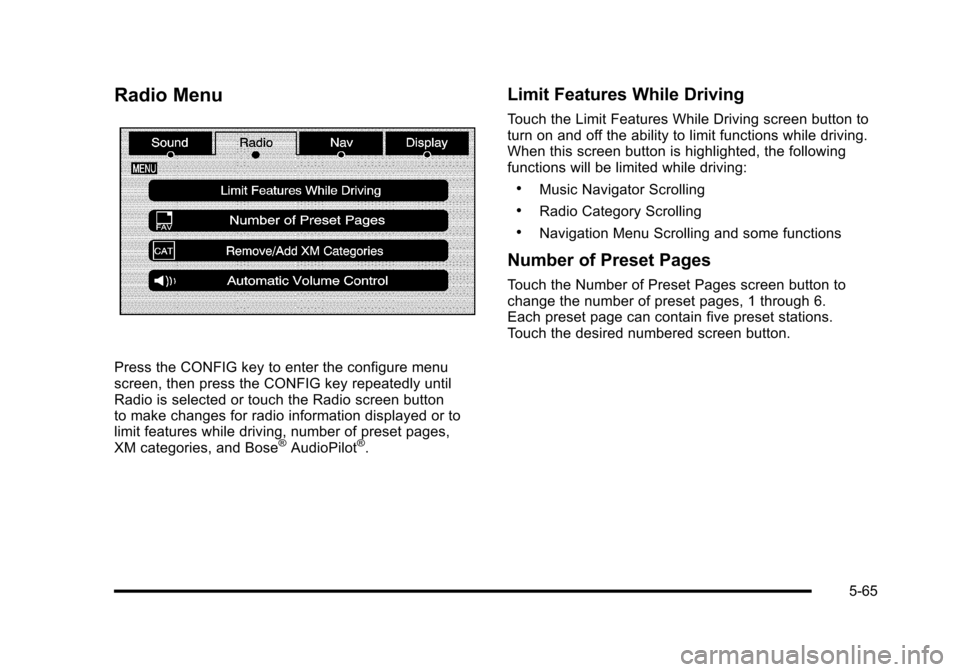
Press the CONFIG key to enter the configure menuscreen, then press the CONFIG key repeatedly untilRadio is selected or touch the Radio screen buttonto make changes for radio information displayed or tolimit features while driving, number of preset pages,XM categories, and Bose®AudioPilot®.
Limit Features While Driving
Touch the Limit Features While Driving screen button toturn on and off the ability to limit functions while driving.When this screen button is highlighted, the followingfunctions will be limited while driving:
.Music Navigator Scrolling
.Radio Category Scrolling
.Navigation Menu Scrolling and some functions
Number of Preset Pages
Touch the Number of Preset Pages screen button tochange the number of preset pages, 1 through 6.Each preset page can contain five preset stations.Touch the desired numbered screen button.
5-65
Page 366 of 616
Bose®AudioPilot®
AudioPilot :The Bose®AudioPilot®noisecompensation technology.
To use AudioPilot®:
1. Press the CONFIG key to enter the menu screen,then press the CONFIG key repeatedly until Radiois selected or touch the Radio screen button
2. Press the Automatic Volume Control screen buttonto access the AudioPilot menu.
3. Press the ON screen button.
To turn it off, touch the OFF screen button. When on,AudioPilot®continuously adjusts the audio systemequalization, to compensate for background noise,so that the music sound is consistent at the setvolume level.
This feature is most effective at lower volume settingswhere background noise can affect how well the musicbeing played is heard through the vehicle's audiosystem. At higher volume settings, where the music ismuch louder than the background noise, there may belittle or no adjustments by AudioPilot®. For moreinformation on AudioPilot®, visit bose.com/audiopilot.
Remove/Add XM Categories
Touch the Remove/Add XM Categories screen buttonto remove or add XM categories when selectingXM categories from the category list screen. The listof XM categories appear on the screen. Use the up anddown arrow screen buttons to scroll through the list. Thecategories to remove are highlighted and the categoriesto add are dark in color. Touch the category to be addedor removed. Touch the Restore All Categories screenbutton to add all categories that have been removed.
Radio Data System (RDS)
The audio system has a Radio Data System (RDS).RDS features are available for use only on FM stationsthat broadcast RDS information. With RDS, the radiocan do the following:
.Receive announcements concerning local andnational emergencies
.Display messages from radio stations
This system relies on receiving specific informationfrom these stations and only works when theinformation is available. In rare cases, a radio stationmay broadcast incorrect information that causes theradio features to work improperly. If this happens,contact the radio station.
5-66
Page 367 of 616
The RDS system is always on. When information isbroadcast from the FM station that is playing, the stationname or call letters displays on the audio screen.
XM™Satellite Radio Service
XM™is a satellite radio service that is based inthe 48 contiguous United States and 10 Canadianprovinces. XM Satellite Radio has a wide varietyof programming and commercial-free music,coast-to-coast, and in digital-quality sound. Duringyour trial or when you subscribe, you will get unlimitedaccess to XM Radio Online while not in the vehicle.A service fee is required to receive the XM service.For more information, contact XM at xmradio.com orcall 1-800-929-2100 in the U.S. and xmradio.ca orcall 1-877-438-9677 in Canada.
When XM™is active, the channel name and number,song title, and artist displays on the screen.
XM™Radio Messages
XL (Explicit Language Channels) :XL on the radiodisplay, after the channel name, indicates contentwith explicit language. These channels, or anyothers, can be blocked at a customer's request bycalling 1!800!852!XMXM (9696).
XM Updating :The encryption code in the receiver isbeing updated and no action is required.
No XM signal :The vehicle is in a location that isblocking the XM™signal. When the vehicle is movedinto an open area, the signal should return.
Loading XM :The audio system is processing audioand text data received. No action is needed.
Channel Off Air :This channel is not currently inservice.
Channel Unauth :This channel is blocked or cannotbe received with your XM Subscription package.
Channel Unavail :This previously assigned channel isno longer assigned.
5-67
Page 368 of 616

No Artist Info :No artist information is available.The system is working properly.
No Title Info :No song title information is available.The system is working properly.
No CAT Info :No category information is available.The system is working properly.
CAT Not Found :There are no channels available forthe selected category. The system is working properly.
No Information :No text or informational messages areavailable. The system is working properly.
XM Theftlocked :The XM™receiver may havepreviously been in another vehicle. For securitypurposes, XM™receivers cannot be swapped betweenvehicles. If this message is received after having yourvehicle serviced, check with your dealer/retailer.
XM Radio ID :If tuned to channel 0, this message willalternate with the XM™Radio eight digit radio ID label.This label is needed to activate the service.
Unknown :If this message is received when tuned tochannel 0, there may be a receiver fault. Consult withyour dealer/retailer.
Check XM Receiver :If this message does not clearwithin a short period of time, the receiver may have afault. Consult with your dealer/retailer.
CD Player
The player can be used for CD, MP3, DVD audio, andas a DVD video player. SeeDVD Playeron page 5!75for more information about DVD audio and video.
Six-Disc CD Player
While playing a CD, the navigation system is available.
When you insert a CD, the CD tab displays. If a DSPsetting is selected for the CD, it activates each time youplay a CD.
If the ignition or radio is turned off with a CD in theplayer, it stays in the player. When the ignition or radiois turned on, the CD starts playing where it stopped, if itwas the last selected audio source.
As each new track starts to play, the track numberdisplays.
If an error appears on the display, see“CD Messages”later in this section.
If viewing a map screen, touch the CD screen button.The display will split between the audio screen and themap screen. If you do not want to view a split screen oryou are not on a map screen, press the AUDIO keythen press the AUDIO key repeatedly until CD isselected or touch the CD screen button.
5-68
Page 371 of 616
Using an MP3 CD
MP3 Format
There are guidelines that must be met, when creatingan MP3 disc. If the guidelines are not met whenrecording a CD-R(W), the CD may not play.The guidelines are:
.Sampling rate: 16 kHz, 22.05 kHz, 24 kHz, 32 kHz,and 44.1 kHz.
.Bit rates supported: 32, 40, 48, 56, 64, 80, 96, 112,128, 160, 192, 224, 256, and 320 kbps.
.ID3 tag information is displayed by the radio if it isavailable. The radio supports ID3 tag informationv1.0, v1.1, or v2.0. The radio will display afilename, song name, artist name, album name,and directory name.
.Maximum 32 characters, including spaces, in a fileor folder name.
.Maximum number of folders is 100 with amaximum hierarchy of eight folders.
.Create a folder structure that makes it easy to findsongs while driving. Organize songs by albumsusing one folder for each album. Each folder oralbum should contain 18 songs or less.
.It is recommended that there is a maximum of192 files on a disc.
.The files can be recorded on a CD-R or CD-RWwith a maximum capacity of 700MB.
.DVD with MP3 are not playable on this system.
Root Directory
The root directory will be treated as a folder. If the rootdirectory has compressed audio files, the directory willbe displayed as No Folder or ALL.
Empty Directory or Folder
If a root directory or a folder exists somewhere in thefile structure that contains only folders/subfolders andno compressed files directly beneath them, the playerwill advance to the next folder in the file structure thatcontains compressed audio files and the empty folderwill not be displayed or numbered.
No Folder
When the CD contains only compressed files, the fileswill be located under the root folder. The next andprevious folder functions will have no function on aCD that was recorded without folders or playlists.When displaying the name of the folder the radio willdisplay No Folder.
5-71