service CADILLAC ESCALADE 2010 3.G Owner's Manual
[x] Cancel search | Manufacturer: CADILLAC, Model Year: 2010, Model line: ESCALADE, Model: CADILLAC ESCALADE 2010 3.GPages: 616, PDF Size: 39.41 MB
Page 148 of 616
PASS-Key®III+ Electronic
Immobilizer
SeeRadio Frequency Statementon page 9!20forinformation regarding Part 15 of the FederalCommunications Commission (FCC) Rules andRSS-210/211 of Industry and Science Canada.
PASS-Key®III+ Electronic
Immobilizer Operation
Your vehicle has PASS-Key®III+ (PersonalizedAutomotive Security System) theft-deterrent system.PASS-Key®III+ is a passive theft-deterrent system.
The system is automatically armed when the key isremoved from the ignition.
The system is automatically disarmed when the key isturned to ON/RUN, ACC/ACCESSORY or START fromthe LOCK/OFF position.
You do not have to manually arm or disarm the system.
The security light will come on if there is a problem witharming or disarming the theft-deterrent system.
When the PASS-Key®III+ system senses that someoneis using the wrong key, it prevents the vehicle fromstarting. Anyone using a trial-and-error method to startthe vehicle will be discouraged because of the highnumber of electrical key codes.
If the engine does not start and the security light onthe instrument panel cluster comes on when trying tostart the vehicle, there may be a problem with yourtheft-deterrent system. Turn the ignition off andtry again.
If the engine still does not start, and the key appears tobe undamaged, try another ignition key. At this time,you may also want to check the fuse, seeFuses andCircuit Breakerson page 7!108. If the engine still doesnot start with the other key, your vehicle needs service.
3-24
Page 149 of 616
If your vehicle does start, the first key may be faulty.See your dealer/retailer who can service thePASS-Key®III+ to have a new key made. In anemergency, contact Roadside Assistance.
It is possible for the PASS-Key®III+ decoder to learnthe transponder value of a new or replacement key.Up to 10 keys may be programmed for the vehicle.The following procedure is for programming additionalkeys only. If all the currently programmed keys are lostor do not operate, you must see your dealer/retailer or alocksmith who can service PASS-Key®III+ to have keysmade and programmed to the system.
See your dealer/retailer or a locksmith who can servicePASS-Key®III+ to get a new key blank that is cutexactly as the ignition key that operates the system.
To program the new additional key:
1. Verify that the new key has a1stamped on it.
2. Insert the original, already programmed, key in theignition and start the engine. If the engine will notstart, see your dealer/retailer for service.
3. After the engine has started, turn the key toLOCK/OFF, and remove the key.
4. Insert the new key to be programmed and turn it tothe ON/RUN position within five seconds of turningthe ignition to the LOCK/OFF position in Step 3.
The security light will turn off once the key hasbeen programmed.
5. Repeat Steps 1 through 4 if additional keys are tobe programmed.
If you lose or damage your PASS-Key®III+ key, seeyour dealer/retailer or a locksmith who can servicePASS-Key®III+ to have a new key made.
Do not leave the key or device that disarms ordeactivates the theft deterrent system in the vehicle.
3-25
Page 151 of 616
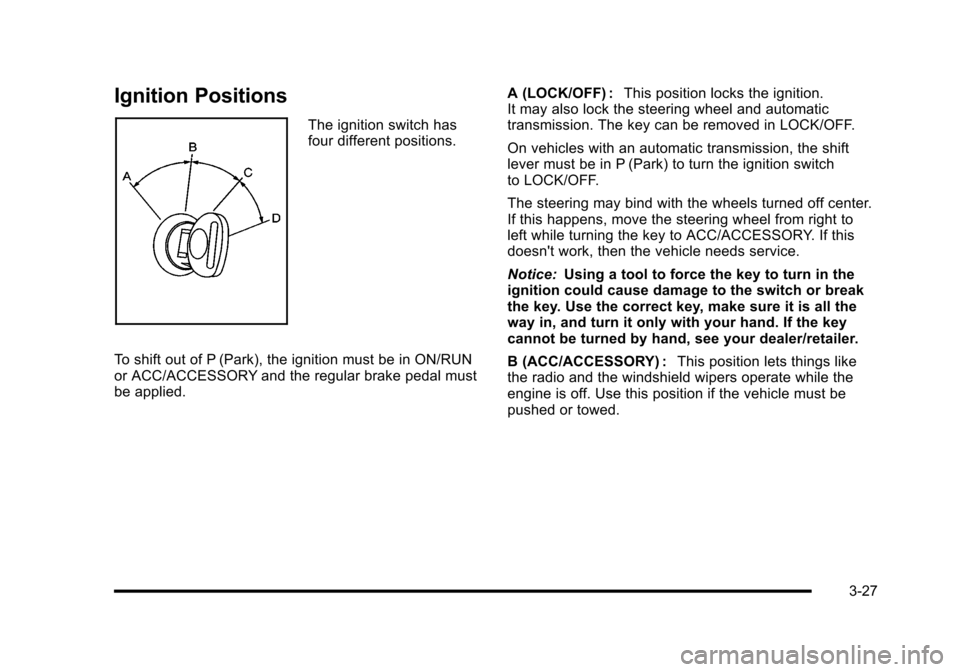
Ignition Positions
The ignition switch hasfour different positions.
To shift out of P (Park), the ignition must be in ON/RUNor ACC/ACCESSORY and the regular brake pedal mustbe applied.
A (LOCK/OFF) :This position locks the ignition.It may also lock the steering wheel and automatictransmission. The key can be removed in LOCK/OFF.
On vehicles with an automatic transmission, the shiftlever must be in P (Park) to turn the ignition switchto LOCK/OFF.
The steering may bind with the wheels turned off center.If this happens, move the steering wheel from right toleft while turning the key to ACC/ACCESSORY. If thisdoesn't work, then the vehicle needs service.
Notice:Using a tool to force the key to turn in theignition could cause damage to the switch or breakthe key. Use the correct key, make sure it is all theway in, and turn it only with your hand. If the keycannot be turned by hand, see your dealer/retailer.
B (ACC/ACCESSORY) :This position lets things likethe radio and the windshield wipers operate while theengine is off. Use this position if the vehicle must bepushed or towed.
3-27
Page 164 of 616
Torque Lock
If you are parking on a hill and you do not shift thetransmission into P (Park) properly, the weight of thevehicle can put too much force on the parking pawl inthe transmission. It might be difficult to pull the shiftlever out of P (Park). This is called torque lock. Toprevent torque lock, set the parking brake and then shiftinto P (Park) properly before you leave the driver seat.To find out how, seeShifting Into Park on page 3!39.
When you are ready to drive, move the shift lever out ofP (Park) before releasing the parking brake.
If torque lock does occur, you might need to haveanother vehicle push yours a little uphill to take some ofthe pressure from the parking pawl in the transmission.Then you should be able to pull the shift lever outof P (Park).
Shifting Out of Park
This vehicle is equipped with an electronic shift lockrelease system. The shift lock release is designed to:
.Prevent ignition key removal unless the shift leveris in P (Park) with the shift lever button fullyreleased, and
.Prevent movement of the shift lever out ofP (Park), unless the ignition is in ON/RUN orACC/ACCESSORY and the regular brake pedalis applied.
The shift lock release is always functional exceptin the case of an uncharged or low voltage(less than 9 volt) battery.
If the vehicle has an uncharged battery or a batterywith low voltage, try charging or jump starting thebattery. SeeJump Startingon page 7!44formore information.
To shift out of P (Park) use the following:
1. Apply the brake pedal.
2. Move the shift lever to the desired position.
If you still are unable to shift out of P (Park):
1. Ease the pressure on the shift lever.
2. While holding down the brake pedal, press theshift lever all the way into P (Park).
3. Move the shift lever to the desired position.
If you are still having a problem shifting, then have thevehicle serviced soon.
3-40
Page 171 of 616

The system can bedisabled by pressing therear park aid disablebutton located next tothe radio.
The indicator light will come on and PARK ASSIST OFFdisplays on the Driver Information Center (DIC) toindicate that URPA is off, seeDIC Warnings andMessages on page 4!48.
When the System Does Not Seem to
Work Properly
If the URPA system will not activate due to a temporarycondition, the messages PARK ASSIST OFF or PARKASSIST BLOCKED SEE OWNERS MANUAL will bedisplayed on the DIC.
SERVICE PARK ASSIST :If this message occurs, takethe vehicle to your dealer/retailer to repair the system.
PARK ASSIST OFF :This message occurs if the driverdisables the system.
PARKING ASSIST BLOCKED SEE OWNERSMANUAL :This message can occur under thefollowing conditions:
.The ultrasonic sensors are not clean. Keep thevehicle's rear bumper free of mud, dirt, snow, iceand slush. For cleaning instructions, seeWashingYour Vehicle on page 7!102.
.The park assist sensors are covered by frost orice. Frost or ice can form around and behind thesensors and may not always be seen; this canoccur after washing the vehicle in cold weather.The message may not clear until the frost or icehas melted.
.A trailer was attached to the vehicle, or a bicycle oran object was hanging out of the liftgate during thelast drive cycle. Once the attached object isremoved, URPA will return to normal operation.
.A tow bar is attached to the vehicle.
.The vehicle's bumper is damaged. Take the vehicleto your dealer/retailer to repair the system.
.Other conditions may affect system performance,such as vibrations from a jackhammer or thecompression of air brakes on a very large truck.
If the system is still disabled, after driving forward atleast 40 km/h (25 mph), take the vehicle to yourdealer/retailer.
3-47
Page 173 of 616
SBZA Detection Zones
The SBZA sensor covers a zone of approximatelyone lane over from both sides of the vehicle,3.5 m (11 ft). This zone starts at each side mirror andgoes back approximately 16 ft. (5.0 m). The height ofthe zone is approximately between 0.5 m (1.5 ft) and2.0 m (6 ft) off the ground.
Use caution while changing lanes when towing a trailer,as the SBZA detection zones do not change when atrailer is towed.
How the System Works
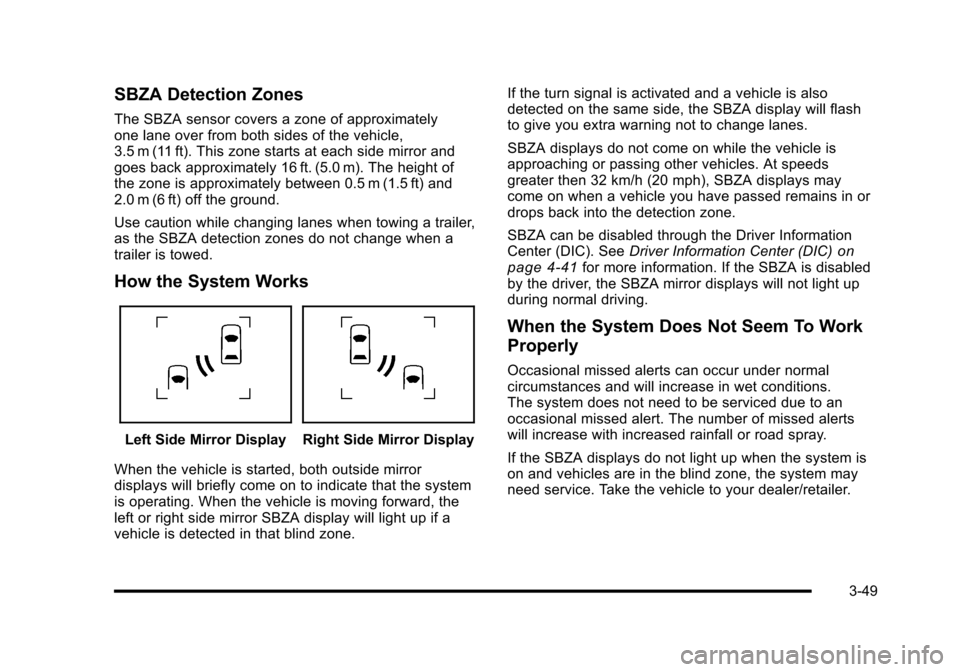
Left Side Mirror DisplayRight Side Mirror Display
When the vehicle is started, both outside mirrordisplays will briefly come on to indicate that the systemis operating. When the vehicle is moving forward, theleft or right side mirror SBZA display will light up if avehicle is detected in that blind zone.
If the turn signal is activated and a vehicle is alsodetected on the same side, the SBZA display will flashto give you extra warning not to change lanes.
SBZA displays do not come on while the vehicle isapproaching or passing other vehicles. At speedsgreater then 32 km/h (20 mph), SBZA displays maycome on when a vehicle you have passed remains in ordrops back into the detection zone.
SBZA can be disabled through the Driver InformationCenter (DIC). SeeDriver Information Center (DIC)onpage 4!41for more information. If the SBZA is disabledby the driver, the SBZA mirror displays will not light upduring normal driving.
When the System Does Not Seem To Work
Properly
Occasional missed alerts can occur under normalcircumstances and will increase in wet conditions.The system does not need to be serviced due to anoccasional missed alert. The number of missed alertswill increase with increased rainfall or road spray.
If the SBZA displays do not light up when the system ison and vehicles are in the blind zone, the system mayneed service. Take the vehicle to your dealer/retailer.
3-49
Page 174 of 616

SBZA is designed to ignore stationary objects; however,the system may occasionally light up due to guard rails,signs, trees, shrubs, and other stationary objects.This is normal system operation, the vehicle does notneed service.
SBZA does not operate when the left or right cornersof the rear bumper are covered with mud, dirt, snow,ice, slush, or in heavy rainstorms. For cleaninginstructions, seeWashing Your Vehicleon page 7!102.If the DIC still displays the SIDE BLIND ZONE SYSTEMUNAVAILABLE message after cleaning the bumper, seeyour dealer/retailer.
The SBZA displays may remain on if a trailer isattached to the vehicle, or a bicycle or object isextending out to either side of the vehicle.
When SBZA is disabled for any reason other than thedriver turning it off, the driver will not be able to turnSBZA back on using the DIC. The SIDE BLIND ZONEALERT ON option will not be selectable if the conditionsfor normal system operation are not met. Until normaloperating conditions for SBZA are met, you should notrely upon SBZA while driving.
SBZA Error Messages
The following messages may appear in the DIC:
SIDE BLIND ZONE ALERT SYSTEM OFF :Thismessage indicates that the driver has turned thesystem off.
SIDE BLIND ZONE SYSTEM UNAVAILABLE :Thismessage indicates that the SBZA system is disabledeither because the sensor is blocked and cannot detectvehicles in your blind zone, or the vehicle is passingthrough an open field of view area, such as the desert,where there is insufficient data for operation. Thesensor may be blocked by mud, dirt, snow, ice, slush,or even heavy rainstorms. This message may alsoactivate during heavy rain or due to road spray. Thevehicle does not need service. For cleaning, seeWashing Your Vehicle on page 7!102.
SERVICE SIDE BLIND ZONE ALERT SYSTEM :If thismessage appears, both SBZA displays will remain onindicating there is a problem with the SBZA system.If these displays remain on after continued driving,the system needs service. Take the vehicle toyour dealer/retailer.
3-50
Page 177 of 616
Rear Vision Camera Error Messages
Service Rear Vision Camera System :This messagecan display when the system is not receivinginformation it requires from other vehicle systems.
Rear Vision Camera System Unavailable :Displayswhen the system is not receiving information it requiresfrom other vehicle systems.
If any other problem occurs or if a problem persists, seeyour dealer/retailer.
{WARNING:
The Rear Vision Camera (RVC) system does not
replace driver vision. RVC does not:
.Detect objects that are outside the camera's
field of view, below the bumper, or underneath
the vehicle.
.Detect children, pedestrians, bicyclists,
or pets.
(Continued)
WARNING: (Continued)
Do not back the vehicle by only looking at the
RVC screen, or use the screen during longer,
higher speed backing maneuvers or where there
could be cross-traffic. Your judged distances using
the screen will differ from actual distances.
So if you do not use proper care before backing
up, you could hit a vehicle, child, pedestrian,
bicyclist, or pet, resulting in vehicle damage,
injury, or death. Even though the vehicle has the
RVC system, always check carefully before
backing up by checking behind and around
the vehicle.
3-53
Page 223 of 616
{WARNING:
If the airbag readiness light stays on after the
vehicle is started or comes on while driving, it
means the airbag system might not be working
properly. The airbags in the vehicle might not
inflate in a crash, or they could even inflate
without a crash. To help avoid injury, have the
vehicle serviced right away.
If there is a problem with the airbag system, an airbagDriver Information Center (DIC) message can alsocome on. SeeDIC Warnings and Messagesonpage 4!48for more information.
Passenger Airbag Status Indicator
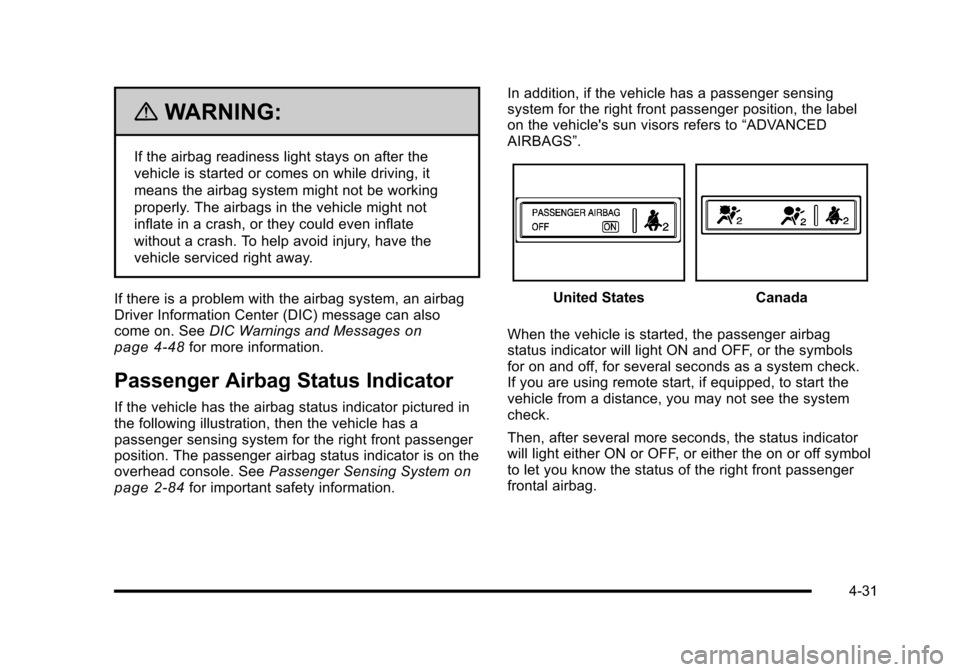
If the vehicle has the airbag status indicator pictured inthe following illustration, then the vehicle has apassenger sensing system for the right front passengerposition. The passenger airbag status indicator is on theoverhead console. SeePassenger Sensing Systemonpage 2!84for important safety information.
In addition, if the vehicle has a passenger sensingsystem for the right front passenger position, the labelon the vehicle's sun visors refers to“ADVANCEDAIRBAGS”.
United StatesCanada
When the vehicle is started, the passenger airbagstatus indicator will light ON and OFF, or the symbolsfor on and off, for several seconds as a system check.If you are using remote start, if equipped, to start thevehicle from a distance, you may not see the systemcheck.
Then, after several more seconds, the status indicatorwill light either ON or OFF, or either the on or off symbolto let you know the status of the right front passengerfrontal airbag.
4-31
Page 224 of 616

If the word ON or the on symbol is lit on the passengerairbag status indicator, it means that the right frontpassenger frontal airbag is enabled (may inflate).
If the word OFF or the off symbol is lit on the airbagstatus indicator, it means that the passenger sensingsystem has turned off the right front passenger frontalairbag.
If, after several seconds, both status indicator lightsremain on, or if there are no lights at all, there may be aproblem with the lights or the passenger sensingsystem. See your dealer/retailer for service.
{WARNING:
If the airbag readiness light ever comes on and
stays on, it means that something may be wrong
with the airbag system. To help avoid injury to
yourself or others, have the vehicle serviced right
away. SeeAirbag Readiness Lighton page 4!30
for more information, including important safety
information.
Charging System Light
This light comes on brieflywhen the ignition key isturned to START, but theengine is not running, asa check to show it isworking.
If it does not, have the vehicle serviced by your dealer/retailer.
The light should go out once the engine starts. If it stayson, or comes on while driving, there could be a problemwith the charging system. A charging system messagein the Driver Information Center (DIC) can also appear.SeeDIC Warnings and Messageson page 4!48formore information. This light could indicate that there areproblems with a generator drive belt, or that there is anelectrical problem. Have it checked right away. If thevehicle must be driven a short distance with the light on,turn off accessories, such as the radio and airconditioner.
4-32