service CADILLAC ESCALADE 2010 3.G Workshop Manual
[x] Cancel search | Manufacturer: CADILLAC, Model Year: 2010, Model line: ESCALADE, Model: CADILLAC ESCALADE 2010 3.GPages: 616, PDF Size: 39.41 MB
Page 348 of 616
XM NavTraffic™currently broadcasts the trafficinformation for many markets nationally, and the servicemay be available in more cities in the future. Visitxmnavtraffic.com for more details on local coverage.
A service fee is required in order to receive theXM NavTraffic™service.
Turning XM NavTraffic™On and Off
To turn traffic on or off:
1. Press the CONFIG hard key, then press theCONFIG key repeatedly until Nav is selected orpress the Nav screen button.
2. Touch the Traffic Options button.
3. Touch the Traffic button. This button is highlightedwhen it is active.
Selecting Alert for Approaching Traffic Eventsenables the system to show a pop-up screen thatnotifies of possible traffic issues ahead.
When this feature is highlighted, while traveling ona route, accidents located on the route areindicated and can be avoided.
Traffic Icon
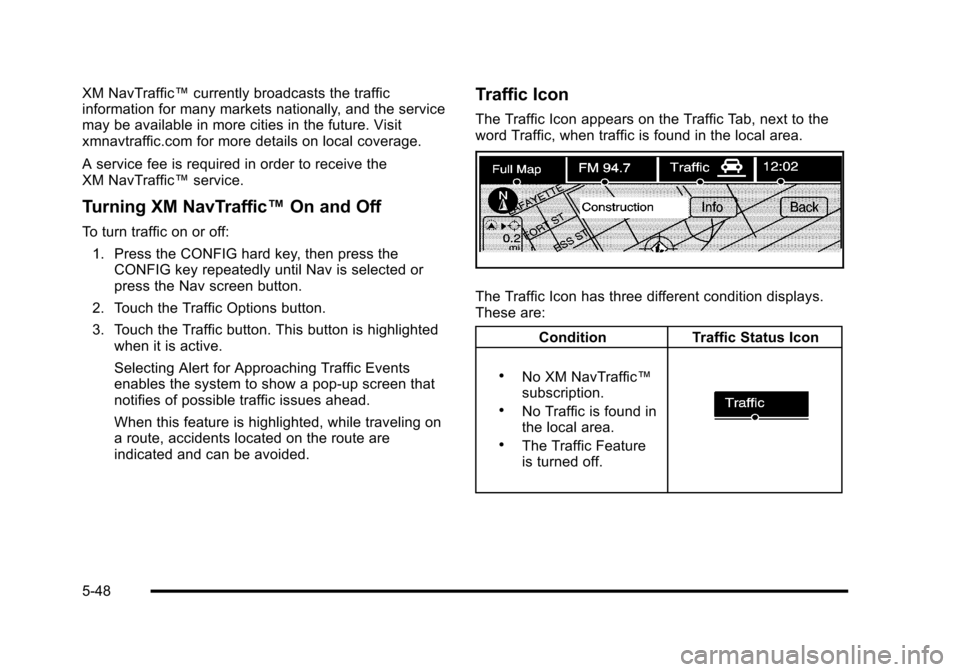
The Traffic Icon appears on the Traffic Tab, next to theword Traffic, when traffic is found in the local area.
The Traffic Icon has three different condition displays.These are:
ConditionTraffic Status Icon
.No XM NavTraffic™subscription..No Traffic is found inthe local area..The Traffic Featureis turned off.
5-48
Page 357 of 616

Global Positioning System (GPS)
The navigation system determines the position of thevehicle by using satellite signals, various vehiclesignals, and map data.
At times, other interferences such as the satellitecondition, road configuration, the condition of thevehicle and/or other circumstances can interfere withthe navigation system's ability to determine the accurateposition of the vehicle.
The GPS shows the current position of the vehicleusing signals sent by the GPS Satellites of the UnitedStates Department of Defense. When the vehicle is notreceiving signals from the satellites, a symbol appearson the map screen. Refer toSymbols on page 5!17.
This system may not be available or interferences mayoccur if any of the following are true:
.Signals are obstructed by tall buildings, trees, largetrucks, or a tunnel.
.Objects are located on the front dash of thevehicle.
.Satellites are being repaired or improved.
.After-market glass tinting has been applied to thevehicle's windshield.
Notice:Do not apply after-market glass tinting tothe vehicle's windows. Glass tinting interferes withthe system's ability to receive GPS signals andcauses the system to malfunction. The windowmight have to be replaced to correct the problem.This would not be covered by the warranty.
For more information if the GPS is not functioningproperly, seeIf the System Needs Serviceonpage 5!59andProblems with Route Guidanceonpage 5!58.
Vehicle Positioning
At times, the position of the vehicle on the map may beinaccurate due to one or more of the following reasons:
.Road system has changed.
.Vehicle is driving on slippery road surfaces suchas in sand, gravel, and/or snow.
.Vehicle is traveling on winding roads.
.Vehicle is on a long straight road.
.Vehicle is approaching a tall building or alarge vehicle.
.Surface streets run parallel to a freeway.
.Vehicle has just been transferred by a vehiclecarrier or a ferry.
.Current position calibration is set incorrectly.
5-57
Page 359 of 616

.Some routes may not be searched.
.The route to the destination may not be shown ifthere are new roads, if roads have recentlychanged, or if certain roads are not listed on themap DVD. SeeOrdering Map DVDs on page 5!59.
To recalibrate the vehicle's position on the map, seeyour dealer/retailer.
If the System Needs Service
If your system needs service and you have followed thesteps listed here and still are experiencing problems,see your dealer/retailer for assistance.
Ordering Map DVDs
The map DVD in your vehicle is the most up-to-dateinformation available when your vehicle was produced.The map DVD is updated periodically, provided that themap information has changed.
If you have any questions about the operation ofthe navigation system or the update process, contactthe GM Nav Disc Center toll!free phone number,1!877!NAV!DISC (1!877!628!3472) or go to the center'swebsite, gmnavdisc.com. If you need any updates or a
replacement disc, because the current disc is lost,damaged, or needs to be updated, call the GM NavDisc Center or order a new disc online. To order a disc,have your Vehicle Identification Number (VIN) available.This helps the center make sure you receive the correctand most up-to-date DVD map disc for your vehicle.See“Vehicle Identification Number (VIN)”in the Index ofyour vehicle's owner manual for more information.
After receiving the updated disc, replace the old disc inthe navigation system. See“Installing the DVD MapDisc”and“Ejecting the DVD Map Disc”underMapsonpage 5!14. Dispose of the old disc to avoid confusionabout which disc is the most current.
Database Coverage Explanations
Coverage area depends upon the map detail available.Some areas have greater map detail than others. Thenavigation system works only as well as the informationprovided on the map disc. SeeOrdering Map DVDsonpage 5!59on how to obtain updated map information.
5-59
Page 367 of 616
The RDS system is always on. When information isbroadcast from the FM station that is playing, the stationname or call letters displays on the audio screen.
XM™Satellite Radio Service
XM™is a satellite radio service that is based inthe 48 contiguous United States and 10 Canadianprovinces. XM Satellite Radio has a wide varietyof programming and commercial-free music,coast-to-coast, and in digital-quality sound. Duringyour trial or when you subscribe, you will get unlimitedaccess to XM Radio Online while not in the vehicle.A service fee is required to receive the XM service.For more information, contact XM at xmradio.com orcall 1-800-929-2100 in the U.S. and xmradio.ca orcall 1-877-438-9677 in Canada.
When XM™is active, the channel name and number,song title, and artist displays on the screen.
XM™Radio Messages
XL (Explicit Language Channels) :XL on the radiodisplay, after the channel name, indicates contentwith explicit language. These channels, or anyothers, can be blocked at a customer's request bycalling 1!800!852!XMXM (9696).
XM Updating :The encryption code in the receiver isbeing updated and no action is required.
No XM signal :The vehicle is in a location that isblocking the XM™signal. When the vehicle is movedinto an open area, the signal should return.
Loading XM :The audio system is processing audioand text data received. No action is needed.
Channel Off Air :This channel is not currently inservice.
Channel Unauth :This channel is blocked or cannotbe received with your XM Subscription package.
Channel Unavail :This previously assigned channel isno longer assigned.
5-67
Page 368 of 616

No Artist Info :No artist information is available.The system is working properly.
No Title Info :No song title information is available.The system is working properly.
No CAT Info :No category information is available.The system is working properly.
CAT Not Found :There are no channels available forthe selected category. The system is working properly.
No Information :No text or informational messages areavailable. The system is working properly.
XM Theftlocked :The XM™receiver may havepreviously been in another vehicle. For securitypurposes, XM™receivers cannot be swapped betweenvehicles. If this message is received after having yourvehicle serviced, check with your dealer/retailer.
XM Radio ID :If tuned to channel 0, this message willalternate with the XM™Radio eight digit radio ID label.This label is needed to activate the service.
Unknown :If this message is received when tuned tochannel 0, there may be a receiver fault. Consult withyour dealer/retailer.
Check XM Receiver :If this message does not clearwithin a short period of time, the receiver may have afault. Consult with your dealer/retailer.
CD Player
The player can be used for CD, MP3, DVD audio, andas a DVD video player. SeeDVD Playeron page 5!75for more information about DVD audio and video.
Six-Disc CD Player
While playing a CD, the navigation system is available.
When you insert a CD, the CD tab displays. If a DSPsetting is selected for the CD, it activates each time youplay a CD.
If the ignition or radio is turned off with a CD in theplayer, it stays in the player. When the ignition or radiois turned on, the CD starts playing where it stopped, if itwas the last selected audio source.
As each new track starts to play, the track numberdisplays.
If an error appears on the display, see“CD Messages”later in this section.
If viewing a map screen, touch the CD screen button.The display will split between the audio screen and themap screen. If you do not want to view a split screen oryou are not on a map screen, press the AUDIO keythen press the AUDIO key repeatedly until CD isselected or touch the CD screen button.
5-68
Page 395 of 616

Antilock Brake System (ABS)
This vehicle has the Antilock Brake System (ABS), anadvanced electronic braking system that helps preventa braking skid.
When the engine is started and the vehicle begins todrive away, ABS checks itself. A momentary motor orclicking noise might be heard while this test is going on.This is normal.
If there is a problem withABS, this warning lightstays on. SeeAntilockBrake System (ABS)Warning Lightonpage 4!34.
Along with ABS, the vehicle has a Dynamic RearProportioning (DRP) system. If there is a DRP problem,both the brake and ABS warning lights come onaccompanied by a 10!second chime. The lights andchime will come on each time the ignition is turned onuntil the problem is repaired. See your dealer/retailerfor service.
Let us say the road is wet and you are driving safely.Suddenly, an animal jumps out in front of you. You slamon the brakes and continue braking. Here is whathappens with ABS:
A computer senses that the wheels are slowing down.If one of the wheels is about to stop rolling, thecomputer will separately work the brakes at each frontwheel and at both rear wheels.
ABS can change the brake pressure to each wheel, asrequired, faster than any driver could. This can help thedriver steer around the obstacle while braking hard.
As the brakes are applied, the computer keepsreceiving updates on wheel speed and controls brakingpressure accordingly.
Remember: ABS does not change the time needed toget a foot up to the brake pedal or always decreasestopping distance. If you get too close to the vehicle infront of you, there will not be enough time to apply thebrakes if that vehicle suddenly slows or stops. Alwaysleave enough room up ahead to stop, even with ABS.
6-5
Page 397 of 616

If the system fails to turn on or activate, the StabiliTraklight along with one of the following messages will bedisplayed on the Driver Information Center (DIC):TRACTION CONTROL OFF, SERVICE TRACTIONCONTROL, STABILITRAK OFF, SERVICESTABILITRAK. If these DIC messages appear, makesure the StabiliTrak system has not been turned offusing the StabiliTrak on/off button. Then turn thesteering wheel clockwise from the nine o'clock positionto the three o'clock position. If this clears themessage(s), the vehicle does not need servicing.If this does not clear the message(s), then turn thevehicle off, wait 15 seconds, and then turn it back onagain to reset the system. If any of these messagesstill appear on the Driver Information Center (DIC), thevehicle should be taken in for service. For moreinformation on the DIC messages, seeDriverInformation Center (DIC) on page 4!41.
The StabiliTrak light willflash on the instrumentpanel cluster when thesystem is both onand activated.
The system may be heard or felt while it is working; thisis normal.
The traction controldisable button is locatedon the instrument panelbelow the climatecontrols.
The traction control part of StabiliTrak can be turnedoff by pressing and releasing the StabiliTrak button ifboth systems (traction control and StabiliTrak) werepreviously on. To disable both traction control andStabiliTrak, press and hold the button for five seconds.
Traction control and StabiliTrak can be turned on bypressing and releasing the StabiliTrak button if notautomatically shut off for any other reason.
When the TCS or StabiliTrak system is turned off,the StabiliTrak light and the appropriate TCS off orStabiliTrak off message will be displayed on the DIC towarn the driver. The vehicle will still have brake-tractioncontrol when traction control is off, but will not be ableto use the engine speed management system. See“Traction Control Operation”next for more information.
When the traction control system has been turned off,system noises may still be heard as a result of thebrake-traction control coming on.
6-7
Page 398 of 616
It is recommended to leave the system on for normaldriving conditions, but it may be necessary to turn thesystem off if the vehicle is stuck in sand, mud, ice orsnow, and you want to“rock”the vehicle to attempt tofree it. It may also be necessary to turn off the systemwhen driving in extreme off-road conditions where highwheel spin is required. SeeIf Your Vehicle is Stuck inSand, Mud, Ice, or Snow on page 6!30.
Traction Control Operation
The traction control system is part of the StabiliTraksystem. Traction control limits wheel spin by reducingengine power to the wheels (engine speedmanagement) and by applying brakes to each individualwheel (brake-traction control) as necessary.
The traction control system is enabled automaticallywhen the vehicle is started. It will activate and theStabiliTrak light will flash if it senses that any of thewheels are spinning or beginning to lose tractionwhile driving. If traction control is turned off, only thebrake-traction control portion of traction control willwork. The engine speed management will be disabled.In this mode, engine power is not reduced automaticallyand the driven wheels can spin more freely. This cancause the brake-traction control to activate constantly.
Notice:If the wheel(s) of one axle is allowed to spinexcessively while the StabiliTrak, ABS and brakewarning lights and any relevant DIC messages aredisplayed, the transfer case could be damaged.The repairs would not be covered by the vehiclewarranty. Reduce engine power and do not spin thewheel(s) excessively while these lights andmessages are displayed.
The traction control system may activate on dry orrough roads or under conditions such as heavyacceleration while turning or abrupt upshifts/downshiftsof the transmission. When this happens, a reduction inacceleration may be noticed, or a noise or vibration maybe heard. This is normal.
If cruise control is being used when the systemactivates, the StabiliTrak light will flash and cruisecontrol will automatically disengage. Cruise control maybe reengaged when road conditions allow. SeeCruiseControl on page 4!8.
StabiliTrak may also turn off automatically if itdetermines that a problem exists with the system.If the problem does not clear itself after restarting thevehicle, see your dealer/retailer for service.
6-8
Page 404 of 616

Before You Go Off-Roading
.Have all necessary maintenance and servicework done.
.Make sure there is enough fuel, that fluid levels arewhere they should be, and that the spare tire, if thevehicle has one, is fully inflated.
.Be sure to read all the information aboutall-wheel-drive vehicles in this manual.
.Make sure all underbody shields, if the vehicle hasthem, are properly attached.
.Know the local laws that apply to off-roading whereyou will be driving or check with law enforcementpeople in the area.
.Be sure to get the necessary permission if you willbe on private land.
If you think you will need some more ground clearanceat the front of your vehicle, you can remove the frontfascia lower air dam. The air dam is held in place bytwo bolts and 10 snaps accessible from underneaththe front fascia.
To remove the air dam:
1. Remove the two outboard air dam bolts.
2. With a flat!blade tool, disengage the snaps.
3. After the bolts are removed and the snaps aredisengaged, push forward on the air dam untilit is free.
Notice:Operating your vehicle for extended periodswithout the front fascia lower air dam installed cancause improper air flow to the engine. Always besure to replace the front fascia air dam when youare finished off-road driving.
After off-roading, be sure to reinstall the air dam:
1. Line up the snaps and push the air dam rearwardto engage the snaps.
2. Install the two outboard bolts.
6-14
Page 414 of 616
Driving in Water
{WARNING:
Driving through rushing water can be dangerous.
Deep water can sweep your vehicle downstream
and you and your passengers could drown. If it is
only shallow water, it can still wash away the
ground from under your tires, and you could lose
traction and roll the vehicle over. Do not drive
through rushing water.
Heavy rain can mean flash flooding, and flood watersdemand extreme caution.
Find out how deep the water is before driving throughit. Do not try it if it is deep enough to cover the wheelhubs, axles, or exhaust pipe—you probably will not getthrough. Deep water can damage the axle and othervehicle parts.
If the water is not too deep, drive slowly through it.At faster speeds, water splashes on the ignition systemand the vehicle can stall. Stalling can also occur if youget the tailpipe under water. If the tailpipe is underwater, you will never be able to start the engine. Whengoing through water, remember that when the brakesget wet, it might take longer to stop. SeeDriving in Rainand on Wet Roads on page 6!25.
After Off-Road Driving
Remove any brush or debris that has collectedon the underbody, chassis, or under the hood.These accumulations can be a fire hazard.
After operation in mud or sand, have the brake liningscleaned and checked. These substances can causeglazing and uneven braking. Check the body structure,steering, suspension, wheels, tires, and exhaust systemfor damage and check the fuel lines and cooling systemfor any leakage.
The vehicle requires more frequent service due tooff-road use. Refer to the Maintenance Schedule foradditional information.
Driving at Night
Night driving is more dangerous than day drivingbecause some drivers are likely to be impaired—byalcohol or drugs, with night vision problems, or byfatigue.
Night driving tips include:
.Drive defensively.
.Do not drink and drive.
.Reduce headlamp glare by adjusting the insiderearview mirror.
6-24