service CADILLAC ESCALADE 2010 3.G Service Manual
[x] Cancel search | Manufacturer: CADILLAC, Model Year: 2010, Model line: ESCALADE, Model: CADILLAC ESCALADE 2010 3.GPages: 616, PDF Size: 39.41 MB
Page 246 of 616

SERVICE STABILITRAK
If your vehicle has StabiliTrak®and this messagedisplays, it means there may be a problem with theStabiliTrak system. If you see this message, try toreset the system. Stop; turn off the engine for at least15 seconds; then start the engine again. If this messagestill comes on, it means there is a problem. You shouldsee your dealer/retailer for service. The vehicle is safeto drive, however, you do not have the benefit ofStabiliTrak, so reduce your speed and drive accordingly.
SERVICE SUSPENSION SYSTEM
This message displays when the Road SensingSuspension (RSS) system is not operating properly.Have your vehicle serviced by your dealer/retailer.
SERVICE THEFT DETERRENT SYSTEM
This message displays when there is a problem with thetheft-deterrent system. The vehicle may or may notrestart so you may want to take the vehicle to yourdealer/retailer before turning off the engine. SeePASS-Key®III+ Electronic Immobilizer Operationonpage 3!24for more information.
SERVICE TIRE MONITOR SYSTEM
On vehicles with the Tire Pressure Monitor System(TPMS), this message displays if a part on the TPMS isnot working properly. The tire pressure light also flashesand then remains on during the same ignition cycle.SeeTire Pressure Lighton page 4!35. Severalconditions may cause this message to appear. SeeTirePressure Monitor Operationon page 7!68for moreinformation. If the warning comes on and stays on,there may be a problem with the TPMS. See yourdealer/retailer.
SERVICE TRACTION CONTROL
If your vehicle has StabiliTrak, this message displayswhen there is a problem with the Traction ControlSystem (TCS). When this message displays, thesystem will not limit wheel spin. Adjust your drivingaccordingly. See your dealer/retailer for service.SeeStabiliTrak®Systemo n p a g e 6!6for moreinformation.
SIDE BLIND ZONE ALERT
SYSTEM OFF
If your vehicle has the Side Blind Zone Alert (SBZA)system, this message displays when the SBZA systemhas been turned off. SeeSide Blind Zone Alert (SBZA)on page 3!48andDIC Operation and Displaysonpage 4!41for more information.
4-54
Page 247 of 616

SIDE BLIND ZONE SYSTEM
UNAVAILABLE
If your vehicle has the Side Blind Zone Alert (SBZA)system, this message displays when the SBZA systemis disabled because the sensor is blocked and cannotdetect vehicles in your blind zone. The sensor may beblocked by mud, dirt, snow, ice, or slush. This messagemay also display during heavy rain or due to road spray.It may also come on when driving in isolated areas withno guardrails, trees, or road signs and light traffic.Your vehicle does not need service. For cleaninginstructions, seeWashing Your Vehicleon page 7!102.SeeSide Blind Zone Alert (SBZA)on page 3!48formore information.
STABILITRAK OFF
If your vehicle has StabiliTrak, this message displayswhen you turn off StabiliTrak, or when the stabilitycontrol has been automatically disabled. To limit wheelspin and realize the full benefits of the stabilityenhancement system, you should normally leaveStabiliTrak on. However, you should turn StabiliTrak offif your vehicle gets stuck in sand, mud, ice, or snow andyou want to rock your vehicle to attempt to free it, or if
you are driving in extreme off-road conditions andrequire more wheel spin. SeeIf Your Vehicle is Stuck inSand, Mud, Ice, or Snowon page 6!30. To turn theStabiliTrak system on or off, seeStabiliTrak®Systemo n p a g e 6!6.
There are several conditions that can cause thismessage to appear.
.One condition is overheating, which could occur ifStabiliTrak activates continuously for an extendedperiod of time.
.The message also displays if the brake systemwarning light is on. SeeBrake System WarningLight on page 4!33.
.The message could display if the stability systemtakes longer than usual to complete its diagnosticchecks due to driving conditions.
.The message displays if an engine or vehiclerelated problem has been detected and the vehicleneeds service. See your dealer/retailer.
The message turns off as soon as the conditions thatcaused the message to be displayed are no longerpresent.
4-55
Page 266 of 616

3. Say the name tag of the person to call.
.If the system clearly recognizes the name tag itresponds with“OK, calling,
.If the system is unsure it recognizes the rightname tag, it confirms the name tag followed bya tone. If the name tag is correct, say“Yes”.The system responds with“OK, calling,
Once connected, the person called will be heardthrough the audio speakers.
Using the Re!dial Command
1. Press and holdbgfor two seconds. The system
responds with“Ready”followed by a tone.
2. After the tone, say“Re!dial”. The system respondswith“Re!dial using
Once connected, the person called will be heardthrough the audio speakers.
Receiving a Call
When an incoming call is received, the audio systemmutes and a ring tone is heard in the vehicle.
.Pressbgand begin speaking to answer the call.
.Presscxto ignore a call.
Call Waiting
Call waiting must be supported on the Bluetooth phoneand enabled by the wireless service carrier to work.
.Pressbgto answer an incoming call when
another call is active. The original call is placedon hold.
.Pressbgagain to return to the original call.
.To ignore the incoming call, continue with theoriginal call with no action.
.Presscxto disconnect the current call and
switch to the call on hold.
4-74
Page 267 of 616

Three!Way Calling
Three!Way Calling must be supported on the Bluetoothphone and enabled by the wireless service carrierto work.
1. While on a call pressbg. The system responds
with“Ready”followed by a tone.
2. Say“Three!way call”. The system responds with“Three!way call, please say dial or call”.
3. Use the dial or call command to dial the number ofthe third party to be called.
4. Once the call is connected, pressbgto link all
the callers together.
Ending a Call
Presscxto end a call.
Muting a Call
During a call, all sounds from inside the vehicle can bemuted so that the person on the other end of the callcannot hear them.
To Mute a call
1. Pressbg. The system responds with“Ready”
followed by a tone.
2. Say“Mute Call”. The system responds with“Callmuted”.
To Cancel Mute
1. Pressbg. The system responds with“Ready”
followed by a tone.
2. After the tone, say“Mute Call”. The systemresponds with“Resuming call”.
Transferring a Call
Audio can be transferred between the in!vehicleBluetooth system and the cell phone.
To Transfer Audio to the Cell Phone
During a call with the audio in the vehicle:
1. Pressbg. The system responds with“Ready”
followed by a tone.
2. Say“Transfer Call.”The system responds with“Transferring call”and the audio will switch fromthe vehicle to the cell phone.
4-75
Page 299 of 616
Music Navigator Screen
To enter the music navigator screen, press and release¨while on the main audio screen. While using themusic navigator screen, the track currently playingcontinues to play until the next track is selected.
To move up or down the list of tracks or folders:
.Press and releaseworxto highlight one track
or folder at a time.
.Press and holdworxto scroll through the list.
To select the highlighted track or folder press and
release¨.
To move back to the previous folder, press
and hold¨.
Radio Reception
Frequency interference and static can occur duringnormal radio reception if items such as cell phonechargers, vehicle convenience accessories, andexternal electronic devices are plugged into theaccessory power outlet. If there is interference or static,unplug the item from the accessory power outlet.
AM
The range for most AM stations is greater than for FM,especially at night. The longer range can cause stationfrequencies to interfere with each other. For better radioreception, most AM radio stations boost the powerlevels during the day, and then reduce these levelsduring the night. Static can also occur when things likestorms and power lines interfere with radio reception.When this happens, try reducing the treble on the radio.
FM Stereo
FM signals only reach about 10 to 40 miles (16 to 65 km).Although the radio has a built-in electronic circuit thatautomatically works to reduce interference, some staticcan occur, especially around tall buildings or hills,causing the sound to fade in and out.
XM™Satellite Radio Service
XM Satellite Radio Service gives digital radio receptionfrom coast-to-coast in the 48 contiguous United States,and in Canada. Just as with FM, tall buildings or hillscan interfere with satellite radio signals, causing thesound to fade in and out. In addition, traveling orstanding under heavy foliage, bridges, garages,or tunnels may cause loss of the XM signal for a periodof time.
4-107
Page 301 of 616
Section 5 Navigation System
Overview. . . . . . . . . . . . . . . . . . . . . . . . . . . . . . . . . . . . . . . . . . . 5-2Navigation System Overview . . . . . . . . . . . . . . . . . . . . 5-2Getting Started . . . . . . . . . . . . . . . . . . . . . . . . . . . . . . . . . . 5-4Cleaning the Display . . . . . . . . . . . . . . . . . . . . . . . . . . . 5-11
Features and Controls. . . . . . . . . . . . . . . . . . . . . . . . . . . 5-12Using the Navigation System . . . . . . . . . . . . . . . . . . 5-12Maps . . . . . . . . . . . . . . . . . . . . . . . . . . . . . . . . . . . . . . . . . . 5-14Symbols . . . . . . . . . . . . . . . . . . . . . . . . . . . . . . . . . . . . . . . 5-17Destination . . . . . . . . . . . . . . . . . . . . . . . . . . . . . . . . . . . . 5-24Configure Menu . . . . . . . . . . . . . . . . . . . . . . . . . . . . . . . 5-42Global Positioning System (GPS) . . . . . . . . . . . . . . 5-57
Vehicle Positioning . . . . . . . . . . . . . . . . . . . . . . . . . . . . 5-57Problems with Route Guidance . . . . . . . . . . . . . . . . 5-58If the System Needs Service . . . . . . . . . . . . . . . . . . . 5-59Ordering Map DVDs . . . . . . . . . . . . . . . . . . . . . . . . . . . 5-59Database Coverage Explanations . . . . . . . . . . . . . 5-59
Navigation Audio System. . . . . . . . . . . . . . . . . . . . . . . . 5-60CD Player . . . . . . . . . . . . . . . . . . . . . . . . . . . . . . . . . . . . . 5-68DVD Player . . . . . . . . . . . . . . . . . . . . . . . . . . . . . . . . . . . . 5-75Care of Your CDs and DVDs . . . . . . . . . . . . . . . . . . . 5-84Auxiliary Devices . . . . . . . . . . . . . . . . . . . . . . . . . . . . . . 5-85
Voice Recognition. . . . . . . . . . . . . . . . . . . . . . . . . . . . . . . . 5-86
5-1
Page 312 of 616
Features and Controls
Using the Navigation System
This section presents basic information needed tooperate the navigation system.
Use the hard keys located on the navigation systemalong with the available touch-sensitive screen buttonson the navigation screen to operate the system. SeeNavigation System Overviewo n p a g e 5!2for moreinformation.
Once the vehicle is moving, various functions aredisabled to reduce driver distractions.
Hard Keys
The following hard keys are located on the navigationsystem:
O/n(Power/Volume):Press to turn the systemon and off. Turn to increase or decrease the volume tothe audio system.
Press and hold for more than two seconds to turn offthe navigation system, the Rear Seat Entertainment(RSE), and Rear Seat Audio (RSA). If the vehicle hasnot been tuned off, the RSE and the RSA can be turnedback on by pressing this knob and continues play of thelast active source.
w(Tune):Turn to go to the next or previous radiostation or disc track or chapter. SeeNavigation AudioSystemon page 5!60,CD Playeron page 5!68,orDVD Playeron page 5!75for more information.
Z(DVD Map Disc Eject):Press to eject the DVDmap disc. This button is located next to the upper discslot. SeeMapson page 5!14for more information.
M(Load):Press to load CDs or audio/video DVDs. SeeCD Playeron page 5!68orDVD Playeron page 5!75for more information.
Z(CD/DVD Eject):Press to eject CDs or audio/videoDVDs. This button is located under the load button. SeeCD Playeron page 5!68orDVD Playeron page 5!75for more information.
M(Disc Up/Down):Press the up or down arrows to goto the next or previous disc.
AUDIO :Press access the full Audio screen to changeAM, FM, XM™Satellite Radio Service (if equipped),CD/DVD, and auxiliary input. See“Audio”underNavigation Audio Systemon page 5!60for moreinformation.
FAV (Favorite) :Press to access the preset stations.See“Storing Radio Station Presets”underNavigationAudio Systemon page 5!60for more information.
5-12
Page 314 of 616
U(Space):Select to enter a space betweencharacters or the words of a name.
Backspace :Select if an incorrect character hasbeen entered.
To make name entries easier, the system only highlightsthe characters that can follow the last one entered. Forexample, if a Z is entered, a T may not be available forselection.
If a name does not display after entry, it may need to beentered differently or the map DVD disc may not containthat information. SeeDatabase Coverage Explanationson page 5!59for more information.
Maps
This section includes basic information that you need toknow about the map database.
The maps are stored on a DVD. The United States,Canada, and Puerto Rico are contained on one disc.
Detailed Areas
Road network attributes are contained in the mapdatabase for detailed areas. Attributes includeinformation such as street names, street address, turnrestrictions, etc. A detailed area includes all majorhighways, service roads, and residential roads. Thedetailed areas include points of interest (POI) such as:restaurants, airports, banks, hospitals, police stations,gas stations, tourist attractions, historical monuments,etc. The map database may not include data for newlyconstructed areas or map database corrections thatare completed after the production of the disc. Thenavigation system provides full route guidance in thedetailed map areas.
Limited Guidance Areas
Any area that is not classified as detailed, is a limitedguidance area. Limited guidance streets are displayedon the map but route guidance may not be given onthese streets. Some POI categories, such as the citycenter POI category, and some street addresses areincluded in the limited guidance areas.
The navigation system informs through voice promptswhen you are traveling into a limited guidance areawhere route guidance is not available. The street mapsand the directional arrow displayed on the navigationsystem can then be used to determine the remainingroute to your destination.
5-14
Page 334 of 616
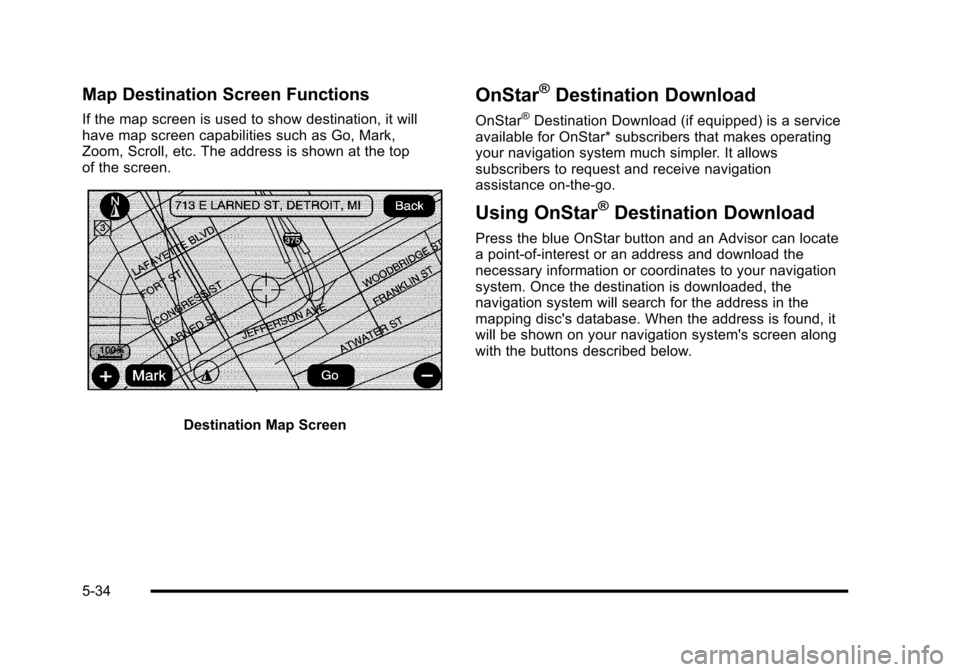
Map Destination Screen Functions
If the map screen is used to show destination, it willhave map screen capabilities such as Go, Mark,Zoom, Scroll, etc. The address is shown at the topof the screen.
Destination Map Screen
OnStar®Destination Download
OnStar®Destination Download (if equipped) is a serviceavailable for OnStar* subscribers that makes operatingyour navigation system much simpler. It allowssubscribers to request and receive navigationassistance on-the-go.
Using OnStar®Destination Download
Press the blue OnStar button and an Advisor can locatea point-of-interest or an address and download thenecessary information or coordinates to your navigationsystem. Once the destination is downloaded, thenavigation system will search for the address in themapping disc's database. When the address is found, itwill be shown on your navigation system's screen alongwith the buttons described below.
5-34
Page 347 of 616

Traffic Options
Read the following Options descriptions to understandhow the XM NavTraffic™operates.
XM NavTraffic™(USA and Canada)
Vehicles with the navigation system have anXM NavTraffic™receiver. XM NavTraffic™is asubscription service provided via XM™Satellite Radio.XM NavTraffic™provides real-time traffic informationfully integrated to the navigation system to displaycurrent traffic conditions for a driver’s chosen route.XM NavTraffic™allows drivers to make the mostinformed, timesaving routing decisions.
If the Traffic touch screen button is pressed or if anattempt is made to turn on the traffic display in theNavigation Setup Menu without a subscription, aCaution screen displays indicating that XM traffic isnot activated.
Three types of traffic information for major roadways aredisplayed on the navigation system:
.Unscheduled traffic incident data, such asaccidents and disabled vehicles
.Scheduled traffic incident data, such as roadconstruction and road closures
.Traffic flow information (rate of speed data)
Traffic information is delivered to the vehicle bythe XM™Radio satellites. XM NavTraffic™makesit possible for the navigation system to providecontinuously updated traffic information personalizedfor a driver’s needs.
5-47