audio CADILLAC ESCALADE 2010 3.G Owner's Guide
[x] Cancel search | Manufacturer: CADILLAC, Model Year: 2010, Model line: ESCALADE, Model: CADILLAC ESCALADE 2010 3.GPages: 616, PDF Size: 39.41 MB
Page 281 of 616

STOPc:Press once to stop playing a DVD.
There is a pre-stop feature for DVD and video CD only.This feature resumes playback of the disc where it wasstopped. Press the stop button once during disc
playback andcdisplays on the DVD startup screen.
This icon disappears after a few seconds. Press thestop button a second time, or eject the disc, to cancelthe pre-stop feature and to clear the disc positionmemory.
SOURCE :Press to select between Monitor 3,Monitor 4, or the AV INPUT.
Each video display screen can be adjustedindependently, as well as display information from bothDVD players and both A/V inputs.
Infrared Remote Sensor :Located in the top center ofthe video display screen. Do not block the signal fromthe remote to the sensor.
Infrared Transmitters :Located in the top center of thevideo display screen. Do not block the signal from theheadphones to the transmitter.
Video Display Screen :Located on the back of eachheadrest.
AV OUTPUT (Audio/Video Output Jack) :Located onthe lower left side of the screen and is identified on thevideo screen panel as the AV OUTPUT.
Headphone Jack :Wired headphones can be pluggedinto the headphone jack with one-eighth inch stereoplugs.
AV INPUT: (Audio/Video Input Jack) :The audio/videoinput jack is located below the video display screen andallows viewing of auxiliary sources such as portableDVD players, game stations, or video cameras, on eachscreen.
.Video Input—The yellow connector is used forvideo input.
.L Audio—The white connector is used for the leftside audio.
.R Audio—The red connector is used for the rightside audio.
Level Lock and Release Latch :The viewing angle ofthe video screen can be adjusted by releasing the latchand gently moving the screen. Then lock it into a secureposition.
4-89
Page 282 of 616
Vehicle Speakers
Audio from the DVD player or an auxiliary device canbe heard through the vehicle speakers or the wireless/wired headphones, while the radio is tuned to one of thesix frequencies selected on the Sound Around portionof the system’s remote control. See“Remote Control”later in this supplement.
Only one audio source can be heard through thevehicle’s speakers at a time. The audio source beingused is specified by the A/V (audio/video) sourceselected on the driver side head restraint video displayscreen.
To turn the RSE system audio output to the vehicle’sspeakers, press Sound Around ON, on the system’sremote control. The audio from the RSE system can beheard through the wireless/wired headphones and thevehicle’s speakers at the same time. The volume on theradio can vary when switching between the radio, CD,DVD, MP3, or an auxiliary device.
Wireless Headphones
The two wireless headphones included with theHeadrest DVD RSE system will only work with theHeadrest DVD RSE system and are marked for channel3 and 4. The wireless headphones must be used withina line of sight of the transmitter that is located above thevideo display screen.
3!4 Channel Selector :This is located on the rightearpiece. Either Channel 3 or 4 can be selected withthe channel selector. The driver side monitor isdesignated as Channel 3, and the passenger side asChannel 4. Set the channel selector switch according tothe video display screen being viewed. The message,“To listen to this monitor tune your headphones toChannel 3 (or 4)”displays for five seconds thendisappears when the video display screen is turned on.
OFF/ON (Power) :Turn the power switch located onthe earpiece to turn the wireless headphones on or off.Each headphone has a light to indicate ON. If the lightdoes not come on, the batteries may need to bereplaced. See“Battery Replacement”under Rear SeatEntertainment System in the vehicle’s owner manual.
The headphones shut off automatically if the RSEsystem is turned off or if the headphones are out ofrange of the transmitter for more than three minutes.
VOL0(Volume):Use to adjust the volume on the
headphones.
Notice:Do not store the headphones in heat ordirect sunlight. This could damage the headphonesand repairs will not be covered by the warranty.Storage in extreme cold can weaken the batteries.Keep the headphones stored in a cool, dry place.
4-90
Page 284 of 616

SETUP :Press to change the default settings, see“Using the RSE On-Screen Display (OSD) Menus”laterin this manual. There are four main menu screens, eachscreen displays a menu to select different settingoptions. The screens are:
1. General Setup—adjusts screen settings.
2. Audio Setup—sets the language.
3. Preference Screen—sets the subtitles andparental controls.
4. Password Setup—allows a password to be set.
Press SETUP again to exit.
EJECTX:Press to eject or reload a disc.
DVD-Video Screen 3 :Press the DVD button locatedunder 3 to transmit IR codes for DVD mode on VideoScreen 3.
TV-Video Screen 3 :This button is not used with thesystem.
DVD-Video Screen 4 :Press the DVD button locatedunder 4 to transmit IR codes for DVD mode on VideoScreen 4.
TV-Video Screen 4 :This button is not used with thesystem.
SOUND AROUND ON/OFF :Press to turn the FMTransmitter power on or off.
MUTE>(For DVD Only):Press to turn off the
headphone sound. Press again to turn the sound onagain.
PIX (Picture Selection) :Press to adjust the picture’sOn Screen Display (OSD). Each time this button ispressed, the picture adjustment OSD, cycles throughbars for BRIGHTNESS, CONTRAST, COLOR, andTINT. Use the right/left navigation arrows to adjust thesetting. This feature automatically shuts off id anotherbutton is pressed or adjustments are not made withinsix seconds.
SOUND AROUND SELECT :Press to select an FMtransmitter channel. The SOUND AROUND SELECTlets the DVD audio play over the vehicle’s soundsystem by tuning the radio to one of the six FMfrequencies listed below.
.CH1 : 88.3MHz
.CH2 : 88.7MHz
.CH3 : 89.1MHz
.CH4 : 89.5MHz
.CH5 : 89.9MHz
.CH6 : 90.3MHz
MENU :Press to enter the DVD disc menu while thedisc is playing.
Q,R,q,r(Navigation Arrows):Press to navigatethrough menus.
4-92
Page 285 of 616

ENTER :Press to enter a selected function or to beginplayback of the disc.
REPEAT7:Press to repeat part or all of a chapter,
title, track, or the entire disc after using the A!B buttonto setup repeat preset sections.
RETURN8:This button is not used with the system.
A!B:This button is used to setup repeat presetsections. Press this button once while the disc isplaying to select the starting position. Press a secondtime to select the end position. Press a third time to turn
the function off. To view the preset section, press7.
AUTO MEMORY :This button is not used with thesystem.
SEARCH/SKIP :This button is not used with thesystem.
ERASE/ADD :This button is not used with the system.
R-S :This button is not used with the system.
TITLE :Press to enter the disc title mode. The titlefeature is disc-specific, and may not be available on alldiscs.
SUBTITLE :Press to change the subtitle language toanother available language or to turn subtitles off.
ANGLE :Press to select a different viewing angle fordiscs that are recorded with different camera angles.
AUDIO :Press to select a different language for discsthat are recorded with different languages.
0!9 (Numbers) :The numbers located on the lower leftside of the remote control can be used to enternumbered menu options, channels, or track numbers.
GOTO :Press to enter the GOTO menu to choose adesired title, chapter, track, or song inside the disc.
DISPLAY :Press to scroll through display informationon the upper left corner of the screen, such as title,chapter/track, time elapsed, and time remaining, or toturn off the display
PROGRAM :Press to edit a playback programcontaining desired titles in the DVD or tracks inthe CD-DA.
3D :Press to change between different 3D audiomodes for DVD or CD.
The options for DVD are: Off, Rock, Pop, Live, Dance,Techno, Classic, and Soft.
The options for CD are: Off, Concert, Living room, Hall,Bathroom Cave, Arena, and Church.
RANDOM :Press to play titles randomly.
PLAY/PAUSEr/j:Press to start playback of the
disc, or to pause playback.
4-93
Page 292 of 616
Playing Audio CD
When an audio CD is playing, the display shows thecurrent track and the amount of time that track has beenplaying, the total amount of time on the disc, and thecurrent time running on the disc.
DISPLAY :Press to choose from the following displayoptions:
1. Press DISPLAY once and Single Elapsed appearsalong with the current track playing and the lengthof time for that track.
2. Press DISPLAY twice and Single Remain appearsalong with the current track playing and the amountof time left on the track.
3. Press DISPLAY three times and Total Elapsedappears along with the current track playing andthe total time that has played on the CD.
4. Press DISPLAY four times and Total Remainappears along with the current track playing andthe amount of time left on the CD.
REPEAT :Press to toggle between Track and All.The default for repeat is OFF.
.Track repeats the track that is playing.
.All repeats the disc that is playing.
Playing MP3 CD
MP3 is the format for storing digital audio. An audio CDquality song can be compressed into the MP3 formatwith very little loss of quality, while taking up much lessspace. CD-R/RW discs that have been encoded in MP3format can be played on the DVD player. See“Using anMP3”under the Audio System(s) section in the vehicle’sowner manual.
4-100
Page 294 of 616
Using the REPEAT Feature
REPEAT :Press to change between Repeat One andRepeat Folder.
.Repeat One—Repeats the song that is playing.
.Repeat Folder—Repeats the folder that isplaying.
Tips and Troubleshooting Chart
ProblemRecommended Action
IR Sensor Inoperative.Check that thebatteries are goodin the remotecontrol..Check that theremote Control IRSensor is notblocked..Aim the remotecontrol toward theIR Sensor beingcontrolled..Select the correctscreen, 3 or 4.
ProblemRecommended Action
No picture.Check that thecorrect video inputmode is selected..Check that thevideo cable isplugged into thejack securely.
No Sound.Check that thecorrect audio inputmode is selected..Check that theaudio cable issecurely pluggedinto the jack.
Cleaning the Video Screens
The video display screens are made of a speciallycoated glass and can be scratched or damaged byabrasive products, solvents, or ammonia-based windowcleaners. Clean with a soft, lint-free, cotton cloth thathas been slightly dampened with warm water. Dry thescreens by wiping with a clean dry cotton cloth.
4-102
Page 295 of 616
Cleaning the Components
Use care when touching or cleaning the componentssuch as the DVD player or the discs.
Do not use DVD lens cleaners for DVD players becausethe lens of the DVD optics can become contaminatedby lubricants.
Handle CDs and DVDs carefully. Store them in theiroriginal cases or other protective cases and away fromdirect sunlight and dust. The DVD player scans thebottom surface of the disc. If the surface of a CD orDVD is damaged, such as cracked, broken,or scratched, the CD or DVD may not play properly ornot at all. If the surface of a CD or DVD is soiled, take asoft, lint free cloth or dampen a clean, soft cloth in amild, neutral detergent solution mixed with water, andclean it. Make sure the wiping process starts from thecenter to the edge.
Do not touch the bottom side of a CD or DVD whilehandling it; this could damage the surface. Pick up CDsor DVDs by grasping the outer edges or the edge of thehole and the outer edge.
Rear Seat Audio (RSA)
Vehicles with this feature allow the rear seatpassengers to listen to and control any of the musicsources: radio, CDs, DVDs, or other auxiliary sources.The rear seat passengers can control the same musicsources the front seat passengers are listening to (dualcontrol) or a different source. For example, rear seatpassengers can listen to and control a CD through theheadphones, while the driver listens to the radio throughthe speakers. The rear seat passengers have control ofthe volume for each set of headphones.
The radio functionality is controlled by both the RSAand the front radio, only one band can be tuned to atone time. Changing the band on the RSA or the frontradio will change band on the other system.
RSA functions can be operated even when the mainradio is off.
Audio can be heard through wired headphones(not included) plugged into the jacks on the RSA.If the vehicle has this feature, audio can also beheard on Channel 2 of the wireless headphones.
The audio system allows the rear speakers to continueplaying even when the RSA audio is active through theheadphones.
4-103
Page 296 of 616

To listen to an iPod or portable audio device through theRSA, attach the iPod or portable audio device to theauxiliary input (if available), located below the RSA.Turn the iPod on, then choose the auxiliary input withthe RSA SRCE button.
P(Power):Press thePbutton to turn RSA onand off.
Volume :Turn this knob to increase or to decrease thevolume of the wired headphones. The left knob controlsthe left headphones and the right knob controls the rightheadphones.
SRCE (Source) :Press this button to switch betweenthe radio (AM/FM), XM™(if equipped), CD, and if thevehicle has these features, DVD, and rear auxiliary.
©¨(Seek):When listening to FM, AM, or XM
(if equipped), press either the left©or right¨seek
arrow to go to the previous or to the next station orchannels and stay there. This function is inactive, withsome radios, if the front seat passengers are listeningto the radio.
Press and hold either the left©or right¨seek arrow
until the display flashes, to tune to an individual station.The display stops flashing after the buttons have notbeen pushed for more than two seconds. This functionis inactive, with some radios, if the front seatpassengers are listening to the radio.
While listening to a disc, press the right¨seek arrow
to go to the next track or chapter on the disc. Press the
left©seek arrow to go back to the start of the current
track or chapter (if more than ten seconds have played).This function is inactive, with some radios, if the frontseat passengers are listening to the disc.
When a DVD video menu is being displayed, press
either the left©or right¨seek arrow to perform a
cursor up or down on the menu. Hold the left©or
right¨seek arrow to perform a cursor left or right on
the menu.
4-104
Page 297 of 616
PROG (Program) :Press this button to go to the nextpreset radio station or channel set on the main radio.This function is inactive, with some radios, if the frontseat passengers are listening to the radio.
When a CD or DVD audio disc is playing, press thisbutton to go to the beginning of the CD or DVD audio.This function is inactive, with some radios, if the frontseat passengers are listening to the disc.
When a disc is playing in the CD or DVD changer, pressthis button to select the next disc, if multiple discs areloaded. This function is inactive, with some radios, if thefront seat passengers are listening to the disc.
When a DVD video menu is being displayed, press thePROG button to perform the menu function, enter.
Theft-Deterrent Feature
THEFTLOCK®is designed to discourage theft of thevehicle's radio by learning a portion of the VehicleIdentification Number (VIN). The radio does not operateif it is stolen or moved to a different vehicle.
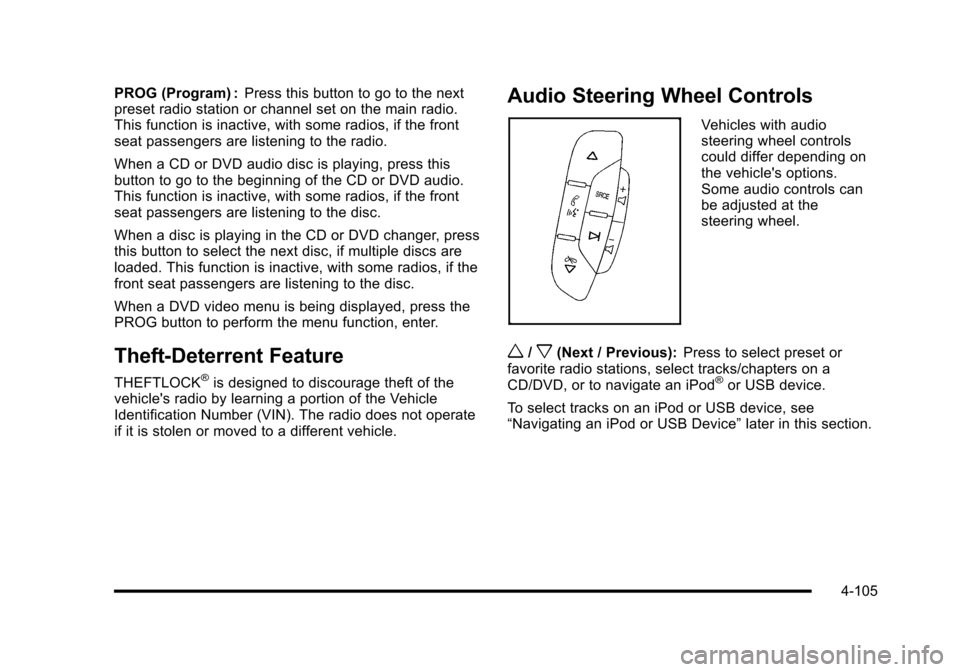
Audio Steering Wheel Controls
Vehicles with audiosteering wheel controlscould differ depending onthe vehicle's options.Some audio controls canbe adjusted at thesteering wheel.
w/x(Next / Previous):Press to select preset orfavorite radio stations, select tracks/chapters on aCD/DVD, or to navigate an iPod®or USB device.
To select tracks on an iPod or USB device, see“Navigating an iPod or USB Device”later in this section.
4-105
Page 298 of 616
Radio
To select preset or favorite radio stations:
Press and releaseworxto go to the next or previous
radio station stored as a preset or favorite.
CD/DVD
To select tracks/chapters on a CD/DVD:
Press and releaseworxto go to the next or previous
track/chapter.
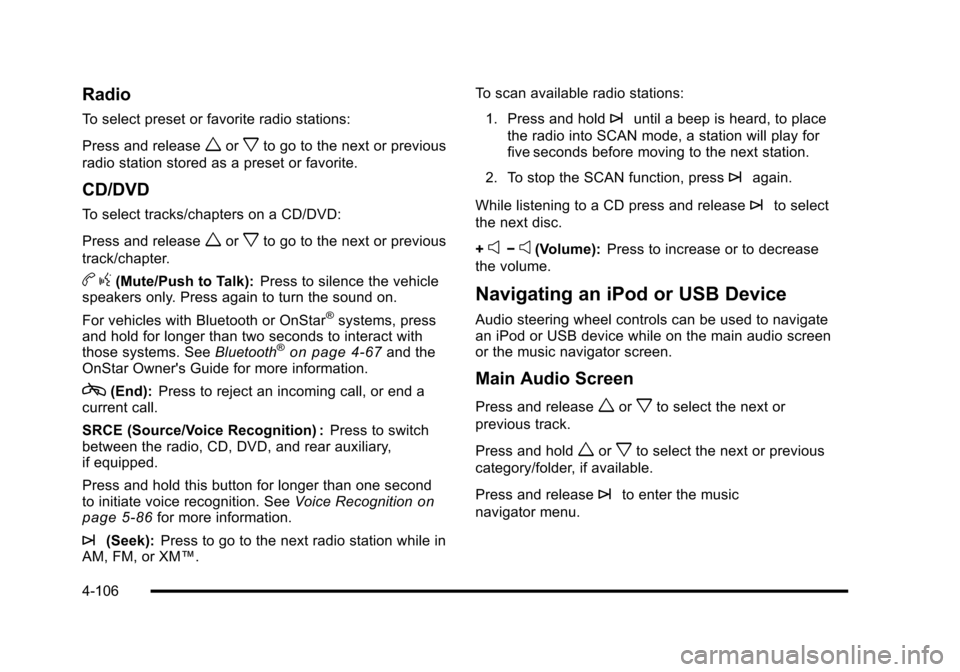
bg(Mute/Push to Talk):Press to silence the vehiclespeakers only. Press again to turn the sound on.
For vehicles with Bluetooth or OnStar®systems, pressand hold for longer than two seconds to interact withthose systems. SeeBluetooth®on page 4!67and theOnStar Owner's Guide for more information.
c(End):Press to reject an incoming call, or end acurrent call.
SRCE (Source/Voice Recognition) :Press to switchbetween the radio, CD, DVD, and rear auxiliary,if equipped.
Press and hold this button for longer than one secondto initiate voice recognition. SeeVoice Recognitiononpage 5!86for more information.
¨(Seek):Press to go to the next radio station while inAM, FM, or XM™.
To scan available radio stations:
1. Press and hold¨until a beep is heard, to place
the radio into SCAN mode, a station will play forfive seconds before moving to the next station.
2. To stop the SCAN function, press¨again.
While listening to a CD press and release¨to select
the next disc.
+e!e(Volume):Press to increase or to decrease
the volume.
Navigating an iPod or USB Device
Audio steering wheel controls can be used to navigatean iPod or USB device while on the main audio screenor the music navigator screen.
Main Audio Screen
Press and releaseworxto select the next or
previous track.
Press and holdworxto select the next or previous
category/folder, if available.
Press and release¨to enter the music
navigator menu.
4-106