audio CADILLAC ESCALADE 2010 3.G Service Manual
[x] Cancel search | Manufacturer: CADILLAC, Model Year: 2010, Model line: ESCALADE, Model: CADILLAC ESCALADE 2010 3.GPages: 616, PDF Size: 39.41 MB
Page 299 of 616
Music Navigator Screen
To enter the music navigator screen, press and release¨while on the main audio screen. While using themusic navigator screen, the track currently playingcontinues to play until the next track is selected.
To move up or down the list of tracks or folders:
.Press and releaseworxto highlight one track
or folder at a time.
.Press and holdworxto scroll through the list.
To select the highlighted track or folder press and
release¨.
To move back to the previous folder, press
and hold¨.
Radio Reception
Frequency interference and static can occur duringnormal radio reception if items such as cell phonechargers, vehicle convenience accessories, andexternal electronic devices are plugged into theaccessory power outlet. If there is interference or static,unplug the item from the accessory power outlet.
AM
The range for most AM stations is greater than for FM,especially at night. The longer range can cause stationfrequencies to interfere with each other. For better radioreception, most AM radio stations boost the powerlevels during the day, and then reduce these levelsduring the night. Static can also occur when things likestorms and power lines interfere with radio reception.When this happens, try reducing the treble on the radio.
FM Stereo
FM signals only reach about 10 to 40 miles (16 to 65 km).Although the radio has a built-in electronic circuit thatautomatically works to reduce interference, some staticcan occur, especially around tall buildings or hills,causing the sound to fade in and out.
XM™Satellite Radio Service
XM Satellite Radio Service gives digital radio receptionfrom coast-to-coast in the 48 contiguous United States,and in Canada. Just as with FM, tall buildings or hillscan interfere with satellite radio signals, causing thesound to fade in and out. In addition, traveling orstanding under heavy foliage, bridges, garages,or tunnels may cause loss of the XM signal for a periodof time.
4-107
Page 301 of 616
Section 5 Navigation System
Overview. . . . . . . . . . . . . . . . . . . . . . . . . . . . . . . . . . . . . . . . . . . 5-2Navigation System Overview . . . . . . . . . . . . . . . . . . . . 5-2Getting Started . . . . . . . . . . . . . . . . . . . . . . . . . . . . . . . . . . 5-4Cleaning the Display . . . . . . . . . . . . . . . . . . . . . . . . . . . 5-11
Features and Controls. . . . . . . . . . . . . . . . . . . . . . . . . . . 5-12Using the Navigation System . . . . . . . . . . . . . . . . . . 5-12Maps . . . . . . . . . . . . . . . . . . . . . . . . . . . . . . . . . . . . . . . . . . 5-14Symbols . . . . . . . . . . . . . . . . . . . . . . . . . . . . . . . . . . . . . . . 5-17Destination . . . . . . . . . . . . . . . . . . . . . . . . . . . . . . . . . . . . 5-24Configure Menu . . . . . . . . . . . . . . . . . . . . . . . . . . . . . . . 5-42Global Positioning System (GPS) . . . . . . . . . . . . . . 5-57
Vehicle Positioning . . . . . . . . . . . . . . . . . . . . . . . . . . . . 5-57Problems with Route Guidance . . . . . . . . . . . . . . . . 5-58If the System Needs Service . . . . . . . . . . . . . . . . . . . 5-59Ordering Map DVDs . . . . . . . . . . . . . . . . . . . . . . . . . . . 5-59Database Coverage Explanations . . . . . . . . . . . . . 5-59
Navigation Audio System. . . . . . . . . . . . . . . . . . . . . . . . 5-60CD Player . . . . . . . . . . . . . . . . . . . . . . . . . . . . . . . . . . . . . 5-68DVD Player . . . . . . . . . . . . . . . . . . . . . . . . . . . . . . . . . . . . 5-75Care of Your CDs and DVDs . . . . . . . . . . . . . . . . . . . 5-84Auxiliary Devices . . . . . . . . . . . . . . . . . . . . . . . . . . . . . . 5-85
Voice Recognition. . . . . . . . . . . . . . . . . . . . . . . . . . . . . . . . 5-86
5-1
Page 303 of 616

A. FULL MAP Touch Screen Button. See“NAV”under“Hard Keys”underUsing the Navigation Systemon page 5!12for more information.
B. No GPS Symbol. SeeSymbolson page 5!17formore information.
C. North Up/Heading Up Symbol. SeeSymbolsonpage 5!17for more information.
D. Map Scale. See“Map Scales”underMapsonpage 5!14for more information.
E.0(Zoom In) Touch Screen Button. See“Map
Scales”underMapson page 5!14for moreinformation.
F. Mark Touch Screen Button. See“AddingDestinations to the Address Book”underDestinationon page 5!24for more information.
G.Z(DVD Map Disc Eject) Key. SeeMapson
page 5!14for more information.
H. Map DVD Slot. See“Installing the Map DVD”underMapson page 5!14for information on how toinstall and eject a map DVD.
I.M(Load) Key. SeeCD Playeron page 5!68or
DVD Playeron page 5!75for more information.
J.Z(CD/DVD Video/Audio Eject) Key. SeeCD
Playeron page 5!68orDVD Playeron page 5!75for more information.
K. CD/DVD Video/Audio Slot. SeeCD Playeronpage 5!68orDVD Playeron page 5!75formore information.
L.O/n(Power/Volume) Knob. SeeNavigation
Audio Systemon page 5!60for more information.
M.M(Disc Up/Down) Key. See“Hard Keys”under
Using the Navigation Systemon page 5!12formore information.
N. AUDIO Key. SeeNavigation Audio Systemonpage 5!60for more information.
O. FAV (Favorite) Key. See“Storing Radio StationPresets”underNavigation Audio Systemonpage 5!60for more information.
P.5(Phone) Key. See the OnStar®owner guide and
Bluetooth®on page 4!67for more information.
Q.e(Sound) Key. See“Sound Menu”under
Navigation Audio Systemon page 5!60formore information.
R. Source (AM, FM, XM, CD, etc.) Touch ScreenButton. SeeNavigation Audio Systemonpage 5!60for more information.
S. Clock Touch Screen Button. See“Setting theClock”underConfigure Menuon page 5!42formore information.
5-3
Page 304 of 616
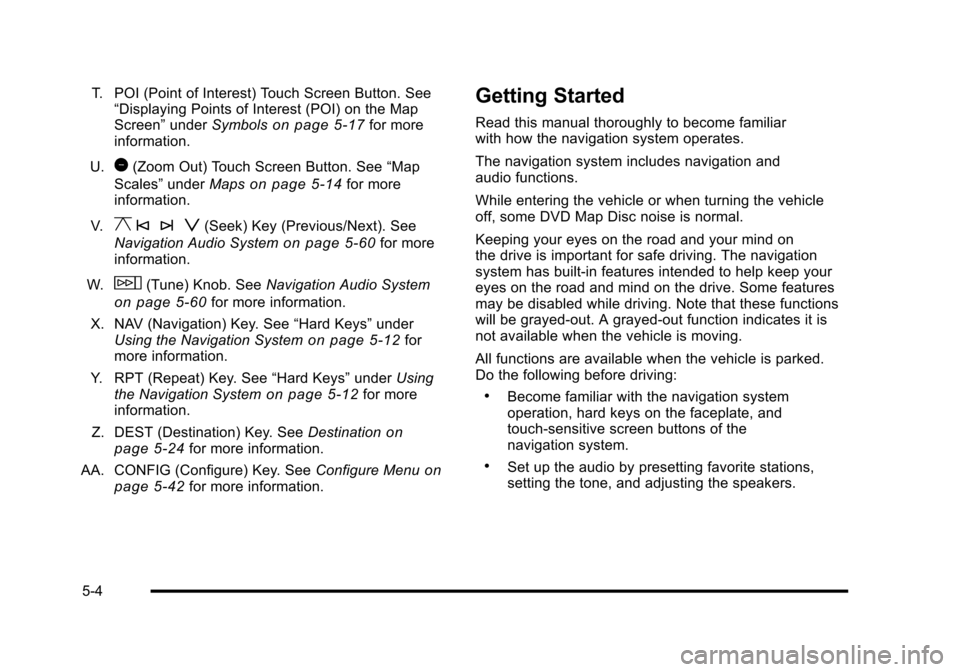
T. POI (Point of Interest) Touch Screen Button. See“Displaying Points of Interest (POI) on the MapScreen”underSymbolson page 5!17for moreinformation.
U.1(Zoom Out) Touch Screen Button. See“Map
Scales”underMapson page 5!14for moreinformation.
V.y © ¨ z(Seek) Key (Previous/Next). See
Navigation Audio Systemon page 5!60for moreinformation.
W.w(Tune) Knob. SeeNavigation Audio System
on page 5!60for more information.
X. NAV (Navigation) Key. See“Hard Keys”underUsing the Navigation Systemon page 5!12formore information.
Y. RPT (Repeat) Key. See“Hard Keys”underUsingthe Navigation Systemon page 5!12for moreinformation.
Z. DEST (Destination) Key. SeeDestinationonpage 5!24for more information.
AA. CONFIG (Configure) Key. SeeConfigure Menuonpage 5!42for more information.
Getting Started
Read this manual thoroughly to become familiarwith how the navigation system operates.
The navigation system includes navigation andaudio functions.
While entering the vehicle or when turning the vehicleoff, some DVD Map Disc noise is normal.
Keeping your eyes on the road and your mind onthe drive is important for safe driving. The navigationsystem has built-in features intended to help keep youreyes on the road and mind on the drive. Some featuresmay be disabled while driving. Note that these functionswill be grayed-out. A grayed-out function indicates it isnot available when the vehicle is moving.
All functions are available when the vehicle is parked.Do the following before driving:
.Become familiar with the navigation systemoperation, hard keys on the faceplate, andtouch-sensitive screen buttons of thenavigation system.
.Set up the audio by presetting favorite stations,setting the tone, and adjusting the speakers.
5-4
Page 307 of 616
Language—English/Metric
To change the language of the navigation screens, seeDriver Information Center (DIC)on page 4!41for moreinformation.
To change the navigation screens from English ormetric, seeDIC Operation and Displayson page 4!41for more information.
Deleting Personal Information
This navigation system can record and store personalinformation such as names and addresses. Delete thisinformation when selling your vehicle or returning aleased vehicle. See“Edit Address Book—Edit/View”underConfigure Menuon page 5!42for deletinginformation from the address book.
Limit Features While Driving
The navigation system may have this feature.
Touch the Limit Features While Driving screen button toturn the ability to limit functions on and off while driving.When this screen button is highlighted, the followingfunctions are limited while driving:
.Music Navigator Scrolling
.Radio Category Scrolling
.Navigation Menu Scrolling and some functions
See“Category”underNavigation Audio Systemonpage 5!60for more information. See“From Map”underDestinationon page 5!24for more information.
Some functions will remain limited regardless of thesetting.
Storing Radio Station Presets
To set preset radio stations, do the following:
1. PressOto turn the system on.
2. Press the AUDIO hard key and select the desiredband (AM, FM, or XM (if equipped)).
3. Use thew(tuning) knob or the SEEK arrows to
tune to the desired station.
4. Press and hold one of the five preset screenbuttons, at the bottom of the screen, until a beep isheard or if the station displays on the selectedpreset button.
5. Repeat the steps for each preset.
See“Storing Radio Station Presets”underNavigationAudio Systemon page 5!60for more information.
5-7
Page 312 of 616
Features and Controls
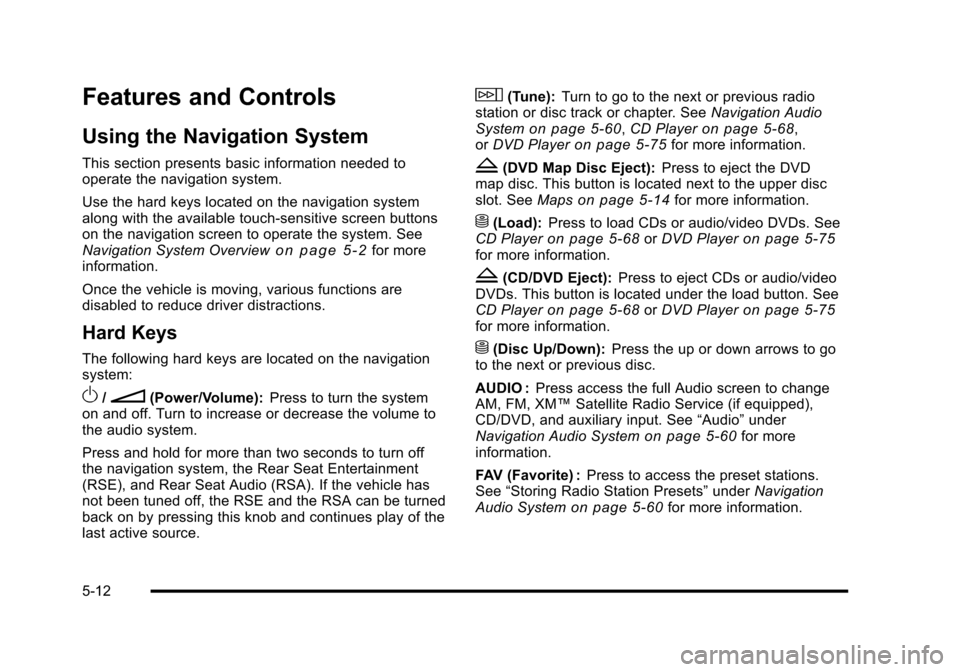
Using the Navigation System
This section presents basic information needed tooperate the navigation system.
Use the hard keys located on the navigation systemalong with the available touch-sensitive screen buttonson the navigation screen to operate the system. SeeNavigation System Overviewo n p a g e 5!2for moreinformation.
Once the vehicle is moving, various functions aredisabled to reduce driver distractions.
Hard Keys
The following hard keys are located on the navigationsystem:
O/n(Power/Volume):Press to turn the systemon and off. Turn to increase or decrease the volume tothe audio system.
Press and hold for more than two seconds to turn offthe navigation system, the Rear Seat Entertainment(RSE), and Rear Seat Audio (RSA). If the vehicle hasnot been tuned off, the RSE and the RSA can be turnedback on by pressing this knob and continues play of thelast active source.
w(Tune):Turn to go to the next or previous radiostation or disc track or chapter. SeeNavigation AudioSystemon page 5!60,CD Playeron page 5!68,orDVD Playeron page 5!75for more information.
Z(DVD Map Disc Eject):Press to eject the DVDmap disc. This button is located next to the upper discslot. SeeMapson page 5!14for more information.
M(Load):Press to load CDs or audio/video DVDs. SeeCD Playeron page 5!68orDVD Playeron page 5!75for more information.
Z(CD/DVD Eject):Press to eject CDs or audio/videoDVDs. This button is located under the load button. SeeCD Playeron page 5!68orDVD Playeron page 5!75for more information.
M(Disc Up/Down):Press the up or down arrows to goto the next or previous disc.
AUDIO :Press access the full Audio screen to changeAM, FM, XM™Satellite Radio Service (if equipped),CD/DVD, and auxiliary input. See“Audio”underNavigation Audio Systemon page 5!60for moreinformation.
FAV (Favorite) :Press to access the preset stations.See“Storing Radio Station Presets”underNavigationAudio Systemon page 5!60for more information.
5-12
Page 313 of 616
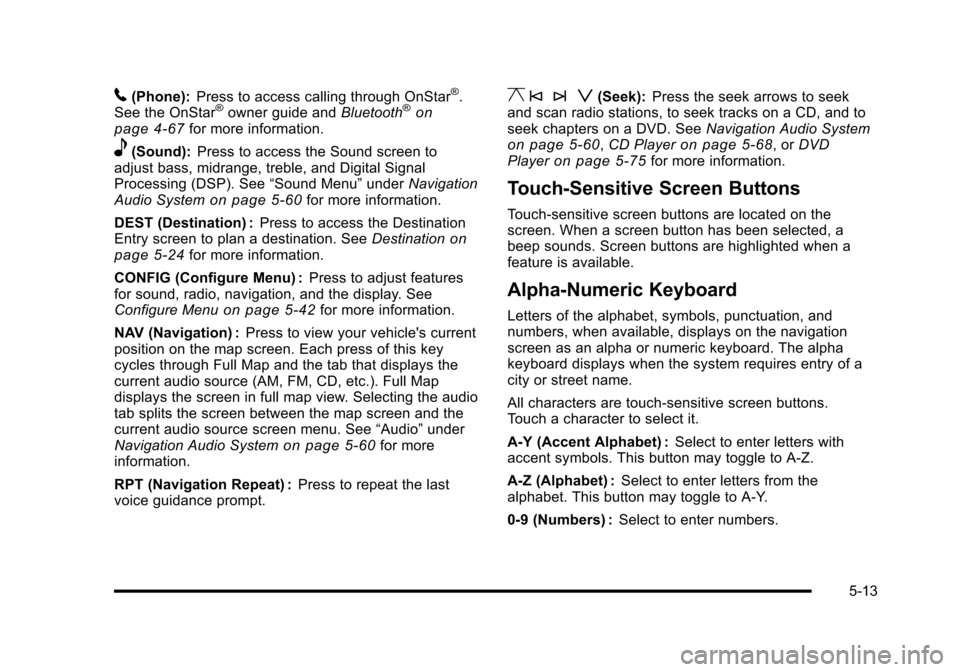
5(Phone):Press to access calling through OnStar®.See the OnStar®owner guide andBluetooth®onpage 4!67for more information.
e(Sound):Press to access the Sound screen toadjust bass, midrange, treble, and Digital SignalProcessing (DSP). See“Sound Menu”underNavigationAudio Systemon page 5!60for more information.
DEST (Destination) :Press to access the DestinationEntry screen to plan a destination. SeeDestinationonpage 5!24for more information.
CONFIG (Configure Menu) :Press to adjust featuresfor sound, radio, navigation, and the display. SeeConfigure Menuon page 5!42for more information.
NAV (Navigation) :Press to view your vehicle's currentposition on the map screen. Each press of this keycycles through Full Map and the tab that displays thecurrent audio source (AM, FM, CD, etc.). Full Mapdisplays the screen in full map view. Selecting the audiotab splits the screen between the map screen and thecurrent audio source screen menu. See“Audio”underNavigation Audio Systemon page 5!60for moreinformation.
RPT (Navigation Repeat) :Press to repeat the lastvoice guidance prompt.
y © ¨ z(Seek):Press the seek arrows to seekand scan radio stations, to seek tracks on a CD, and toseek chapters on a DVD. SeeNavigation Audio Systemon page 5!60,CD Playeron page 5!68, orDVDPlayeron page 5!75for more information.
Touch-Sensitive Screen Buttons
Touch-sensitive screen buttons are located on thescreen. When a screen button has been selected, abeep sounds. Screen buttons are highlighted when afeature is available.
Alpha-Numeric Keyboard
Letters of the alphabet, symbols, punctuation, andnumbers, when available, displays on the navigationscreen as an alpha or numeric keyboard. The alphakeyboard displays when the system requires entry of acity or street name.
All characters are touch-sensitive screen buttons.Touch a character to select it.
A-Y (Accent Alphabet) :Select to enter letters withaccent symbols. This button may toggle to A-Z.
A-Z (Alphabet) :Select to enter letters from thealphabet. This button may toggle to A-Y.
0-9 (Numbers) :Select to enter numbers.
5-13
Page 342 of 616

Configure Menu
Press the CONFIG (Configure) hard key to adjustseveral of the system's features and preferences.The last selected CONFIG screen is the screen thatdisplays: Sound, Radio, Nav (navigation), Display,or Time.
Sound
Press the CONFIG key to enter the configure menuoptions, then press the CONFIG key repeatedly untilSound is selected or touch the Sound screen button tomake speaker and DSP (Digital Signal Processing)adjustments. See“Sound Menu”under,NavigationAudio Systemon page 5!60for more information.
Radio
Press the CONFIG key to enter the configure menuoptions, then press the CONFIG key repeatedly untilRadio is selected or touch the Radio screen button tomake changes for radio information displayed, presetpages, XM™categories, and Bose®AudioPilot®.See“Radio Menu”under,Navigation Audio Systemonpage 5!60for more information.
5-42
Page 360 of 616

Navigation Audio System
Notice:Before adding any sound equipment tothe vehicle, such as an audio system, CD player,CB radio, mobile telephone, or two-way radio, makesure that it can be added by checking with yourdealer/retailer. Also, check federal rules coveringmobile radio and telephone units. If soundequipment can be added, it is very important todo it properly. Added sound equipment can interferewith the operation of the vehicle's engine, radio,or other systems, and even damage them. Thevehicle's systems can interfere with the operationof sound equipment that has been added.
Notice:The chime signals related to safety belts,parking brake, and other functions of the vehicleoperate through the navigation system. If thatequipment is replaced or additional equipment isadded to the vehicle, the chimes may not work.Make sure that replacement or additional equipmentis compatible with the vehicle before installing it.See“Accessories and Modifications”in the Index ofthe vehicle's owner manual.
Playing the Radio
O/n(Power/Volume):Press to turn the audiosystem on and off. Turn to increase or to decreasethe volume.
Press and hold for more than two seconds to turn offthe navigation system, the Rear Seat Entertainment(RSE) video screen, and Rear Seat Audio (RSA). If thevehicle has not been turned off, press this knob to turnRSE and RSA back on and to continue playback of thelast active source.
w(Tuning Knob):Turn to go to the next or previousfrequency or disc track or chapter. SeeCD Playeronpage 5!68orDVD Playeron page 5!75for moreinformation.
AUDIO :Press to display the audio screen. Press toswitch between AM, FM, or XM, if equipped, DISC,or AUX (Auxiliary), or touch the screen button. SeeCDPlayeron page 5!68,DVD Playeron page 5!75, andAuxiliary Deviceson page 5!85for more information.
5-60
Page 361 of 616
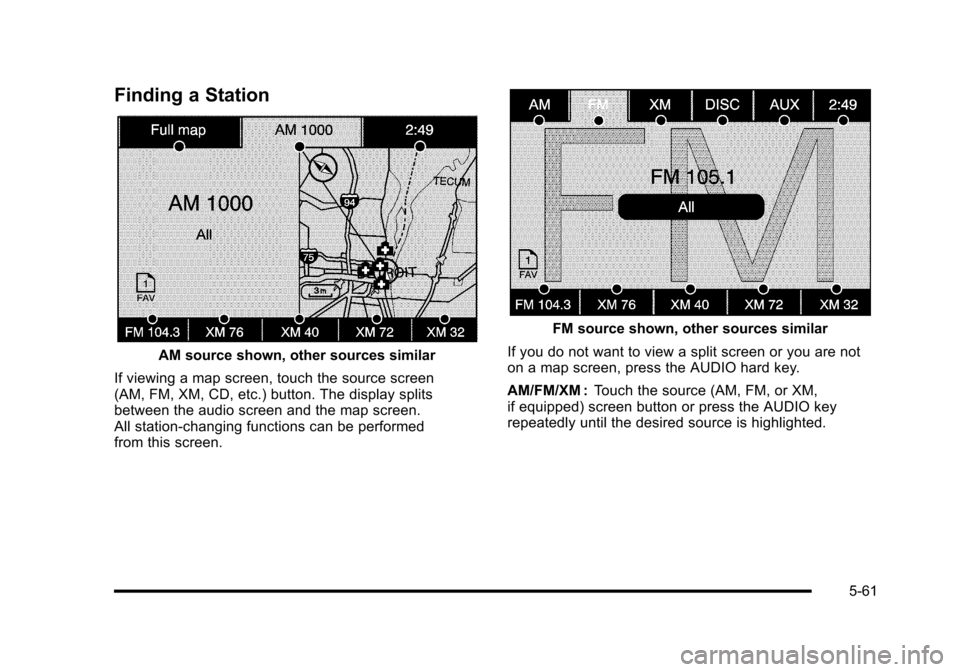
Finding a Station
AM source shown, other sources similar
If viewing a map screen, touch the source screen(AM, FM, XM, CD, etc.) button. The display splitsbetween the audio screen and the map screen.All station-changing functions can be performedfrom this screen.
FM source shown, other sources similar
If you do not want to view a split screen or you are noton a map screen, press the AUDIO hard key.
AM/FM/XM :Touch the source (AM, FM, or XM,if equipped) screen button or press the AUDIO keyrepeatedly until the desired source is highlighted.
5-61