audio CADILLAC ESCALADE 2010 3.G Owners Manual
[x] Cancel search | Manufacturer: CADILLAC, Model Year: 2010, Model line: ESCALADE, Model: CADILLAC ESCALADE 2010 3.GPages: 616, PDF Size: 39.41 MB
Page 1 of 616

2010 Cadillac Escalade/Escalade ESV Owner ManualM
In Brief. . . . . . . . . . . . . . . . . . . . . . . . . . . . . . . . . . . . . . . . . . . . 1-1Instrument Panel . . . . . . . . . . . . . . . . . . . . . . . . . . . . . . . . . 1-2Initial Drive Information . . . . . . . . . . . . . . . . . . . . . . . . . . . 1-4Vehicle Features . . . . . . . . . . . . . . . . . . . . . . . . . . . . . . . . 1-16Performance and Maintenance . . . . . . . . . . . . . . . . . . 1-22
Seats and Restraint System. . . . . . . . . . . . . . . . . . . . . . 2-1Head Restraints . . . . . . . . . . . . . . . . . . . . . . . . . . . . . . . . . . 2-2Front Seats . . . . . . . . . . . . . . . . . . . . . . . . . . . . . . . . . . . . . . . 2-4Rear Seats . . . . . . . . . . . . . . . . . . . . . . . . . . . . . . . . . . . . . . 2-10Safety Belts . . . . . . . . . . . . . . . . . . . . . . . . . . . . . . . . . . . . . 2-26Child Restraints . . . . . . . . . . . . . . . . . . . . . . . . . . . . . . . . . 2-49Airbag System . . . . . . . . . . . . . . . . . . . . . . . . . . . . . . . . . . 2-74Restraint System Check . . . . . . . . . . . . . . . . . . . . . . . . . 2-91
Features and Controls. . . . . . . . . . . . . . . . . . . . . . . . . . . . 3-1Keys . . . . . . . . . . . . . . . . . . . . . . . . . . . . . . . . . . . . . . . . . . . . . 3-3Doors and Locks . . . . . . . . . . . . . . . . . . . . . . . . . . . . . . . . 3-10Windows . . . . . . . . . . . . . . . . . . . . . . . . . . . . . . . . . . . . . . . . 3-18Theft-Deterrent Systems . . . . . . . . . . . . . . . . . . . . . . . . 3-22Starting and Operating Your Vehicle . . . . . . . . . . . . . 3-26Mirrors . . . . . . . . . . . . . . . . . . . . . . . . . . . . . . . . . . . . . . . . . . 3-43Object Detection Systems . . . . . . . . . . . . . . . . . . . . . . . 3-46Universal Home Remote System . . . . . . . . . . . . . . . . 3-55Storage Areas . . . . . . . . . . . . . . . . . . . . . . . . . . . . . . . . . . . 3-62Sunroof . . . . . . . . . . . . . . . . . . . . . . . . . . . . . . . . . . . . . . . . . 3-66
Instrument Panel. . . . . . . . . . . . . . . . . . . . . . . . . . . . . . . . . 4-1Instrument Panel Overview . . . . . . . . . . . . . . . . . . . . . . . 4-3Climate Controls . . . . . . . . . . . . . . . . . . . . . . . . . . . . . . . . 4-20Warning Lights, Gages, and Indicators . . . . . . . . . . 4-27Driver Information Center (DIC) . . . . . . . . . . . . . . . . . 4-41Audio System(s) . . . . . . . . . . . . . . . . . . . . . . . . . . . . . . . . 4-67
Page 2 of 616

2010 Cadillac Escalade/Escalade ESV Owner ManualM
Navigation System. . . . . . . . . . . . . . . . . . . . . . . . . . . . . . . 5-1Overview . . . . . . . . . . . . . . . . . . . . . . . . . . . . . . . . . . . . . . . . . 5-2Features and Controls . . . . . . . . . . . . . . . . . . . . . . . . . . 5-12Navigation Audio System . . . . . . . . . . . . . . . . . . . . . . . 5-60Voice Recognition . . . . . . . . . . . . . . . . . . . . . . . . . . . . . . . 5-86
Driving Your Vehicle. . . . . . . . . . . . . . . . . . . . . . . . . . . . . . 6-1Your Driving, the Road, and the Vehicle . . . . . . . . . . 6-2Towing . . . . . . . . . . . . . . . . . . . . . . . . . . . . . . . . . . . . . . . . . . 6-38
Service and Appearance Care. . . . . . . . . . . . . . . . . . . 7-1Service . . . . . . . . . . . . . . . . . . . . . . . . . . . . . . . . . . . . . . . . . . . 7-4Fuel . . . . . . . . . . . . . . . . . . . . . . . . . . . . . . . . . . . . . . . . . . . . . . 7-7Checking Things Under the Hood . . . . . . . . . . . . . . . 7-14All-Wheel Drive . . . . . . . . . . . . . . . . . . . . . . . . . . . . . . . . . 7-49Rear Axle . . . . . . . . . . . . . . . . . . . . . . . . . . . . . . . . . . . . . . . 7-50Front Axle . . . . . . . . . . . . . . . . . . . . . . . . . . . . . . . . . . . . . . . 7-51
Headlamp Aiming . . . . . . . . . . . . . . . . . . . . . . . . . . . . . . . 7-52Bulb Replacement . . . . . . . . . . . . . . . . . . . . . . . . . . . . . . 7-54Windshield Wiper Blade Replacement . . . . . . . . . . . 7-57Tires . . . . . . . . . . . . . . . . . . . . . . . . . . . . . . . . . . . . . . . . . . . . 7-58Appearance Care . . . . . . . . . . . . . . . . . . . . . . . . . . . . . . . 7-98Vehicle Identification . . . . . . . . . . . . . . . . . . . . . . . . . . . 7-107Electrical System . . . . . . . . . . . . . . . . . . . . . . . . . . . . . . 7-108Capacities and Specifications . . . . . . . . . . . . . . . . . . 7-115
Maintenance Schedule. . . . . . . . . . . . . . . . . . . . . . . . . . . 8-1Maintenance Schedule . . . . . . . . . . . . . . . . . . . . . . . . . . . 8-2
Customer Assistance Information. . . . . . . . . . . . . . . 9-1Customer Assistance and Information . . . . . . . . . . . . 9-2Reporting Safety Defects . . . . . . . . . . . . . . . . . . . . . . . . 9-16Vehicle Data Recording and Privacy . . . . . . . . . . . . . 9-18
Index. . . . . . . . . . . . . . . . . . . . . . . . . . . . . . . . . . . . i-1
Page 5 of 616
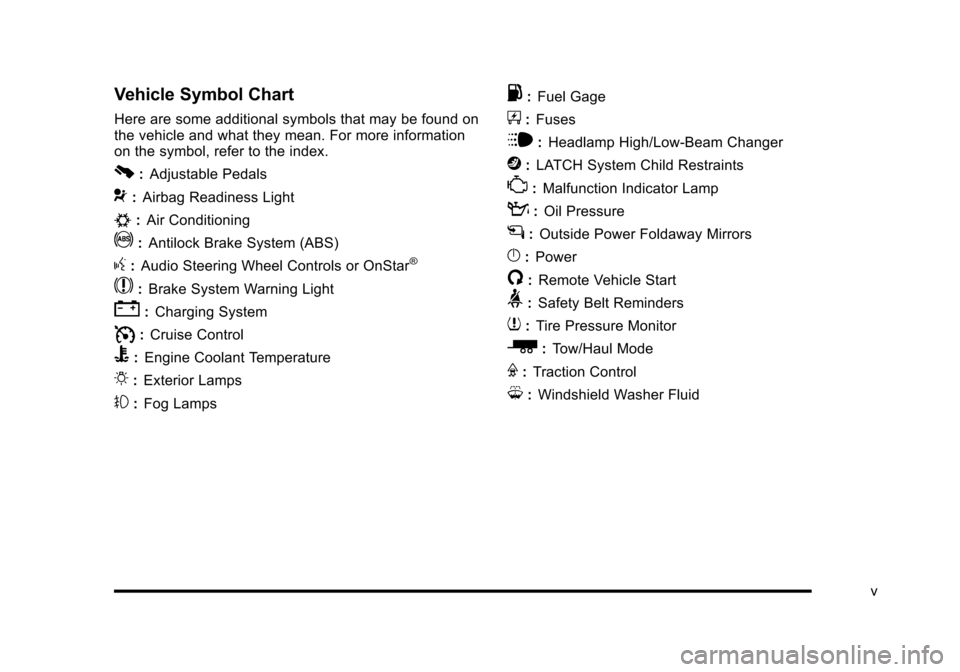
Vehicle Symbol Chart
Here are some additional symbols that may be found onthe vehicle and what they mean. For more informationon the symbol, refer to the index.
0:Adjustable Pedals
9:Airbag Readiness Light
#:Air Conditioning
!:Antilock Brake System (ABS)
g:Audio Steering Wheel Controls or OnStar®
$:Brake System Warning Light
":Charging System
I:Cruise Control
B:Engine Coolant Temperature
O:Exterior Lamps
#:Fog Lamps
.:Fuel Gage
+:Fuses
i:Headlamp High/Low-Beam Changer
j:LATCH System Child Restraints
*:Malfunction Indicator Lamp
::Oil Pressure
g:Outside Power Foldaway Mirrors
}:Power
/:Remote Vehicle Start
>:Safety Belt Reminders
7:Tire Pressure Monitor
_:Tow/Haul Mode
F:Traction Control
M:Windshield Washer Fluid
v
Page 7 of 616
Section 1 In Brief
Instrument Panel. . . . . . . . . . . . . . . . . . . . . . . . . . . . . . . . . . . 1-2
Initial Drive Information. . . . . . . . . . . . . . . . . . . . . . . . . . . 1-4Remote Keyless Entry (RKE) System . . . . . . . . . . . 1-4Remote Vehicle Start . . . . . . . . . . . . . . . . . . . . . . . . . . . 1-4Door Locks . . . . . . . . . . . . . . . . . . . . . . . . . . . . . . . . . . . . . 1-5Liftgate . . . . . . . . . . . . . . . . . . . . . . . . . . . . . . . . . . . . . . . . . . 1-6Windows . . . . . . . . . . . . . . . . . . . . . . . . . . . . . . . . . . . . . . . . 1-7Seat Adjustment . . . . . . . . . . . . . . . . . . . . . . . . . . . . . . . . 1-7Second Row Seats . . . . . . . . . . . . . . . . . . . . . . . . . . . . . 1-9Third Row Seats . . . . . . . . . . . . . . . . . . . . . . . . . . . . . . . . 1-9Heated Seats . . . . . . . . . . . . . . . . . . . . . . . . . . . . . . . . . . 1-10Head Restraint Adjustment . . . . . . . . . . . . . . . . . . . . 1-10Safety Belt . . . . . . . . . . . . . . . . . . . . . . . . . . . . . . . . . . . . . 1-11Sensing System for Passenger Airbag . . . . . . . . . 1-11Mirror Adjustment . . . . . . . . . . . . . . . . . . . . . . . . . . . . . . 1-12Steering Wheel Adjustment . . . . . . . . . . . . . . . . . . . . 1-13Interior Lighting . . . . . . . . . . . . . . . . . . . . . . . . . . . . . . . . 1-13Exterior Lighting . . . . . . . . . . . . . . . . . . . . . . . . . . . . . . . 1-14Windshield Wiper/Washer . . . . . . . . . . . . . . . . . . . . . . 1-15Climate Controls . . . . . . . . . . . . . . . . . . . . . . . . . . . . . . . 1-15Transmission . . . . . . . . . . . . . . . . . . . . . . . . . . . . . . . . . . 1-16
Vehicle Features. . . . . . . . . . . . . . . . . . . . . . . . . . . . . . . . . . 1-16Satellite Radio . . . . . . . . . . . . . . . . . . . . . . . . . . . . . . . . . 1-16Portable Audio Devices . . . . . . . . . . . . . . . . . . . . . . . . 1-17Steering Wheel Controls . . . . . . . . . . . . . . . . . . . . . . . 1-17Bluetooth®. . . . . . . . . . . . . . . . . . . . . . . . . . . . . . . . . . . . . 1-18Navigation System . . . . . . . . . . . . . . . . . . . . . . . . . . . . . 1-18Driver Information Center (DIC) . . . . . . . . . . . . . . . . 1-18Cruise Control . . . . . . . . . . . . . . . . . . . . . . . . . . . . . . . . . 1-20Side Blind Zone Alert (SBZA) . . . . . . . . . . . . . . . . . . 1-20Rear Vision Camera (RVC) . . . . . . . . . . . . . . . . . . . . 1-21Ultrasonic Parking Assist . . . . . . . . . . . . . . . . . . . . . . 1-21Power Outlets . . . . . . . . . . . . . . . . . . . . . . . . . . . . . . . . . 1-21Universal Remote System . . . . . . . . . . . . . . . . . . . . . 1-21
Performance and Maintenance. . . . . . . . . . . . . . . . . . 1-22StabiliTrak®. . . . . . . . . . . . . . . . . . . . . . . . . . . . . . . . . . . . 1-22Tire Pressure Monitor . . . . . . . . . . . . . . . . . . . . . . . . . . 1-22Engine Oil Life System . . . . . . . . . . . . . . . . . . . . . . . . 1-23Fuel E85 (85% Ethanol) . . . . . . . . . . . . . . . . . . . . . . . 1-23Driving for Better Fuel Economy . . . . . . . . . . . . . . . 1-23Roadside Service . . . . . . . . . . . . . . . . . . . . . . . . . . . . . . 1-24OnStar®. . . . . . . . . . . . . . . . . . . . . . . . . . . . . . . . . . . . . . . 1-24
1-1
Page 9 of 616
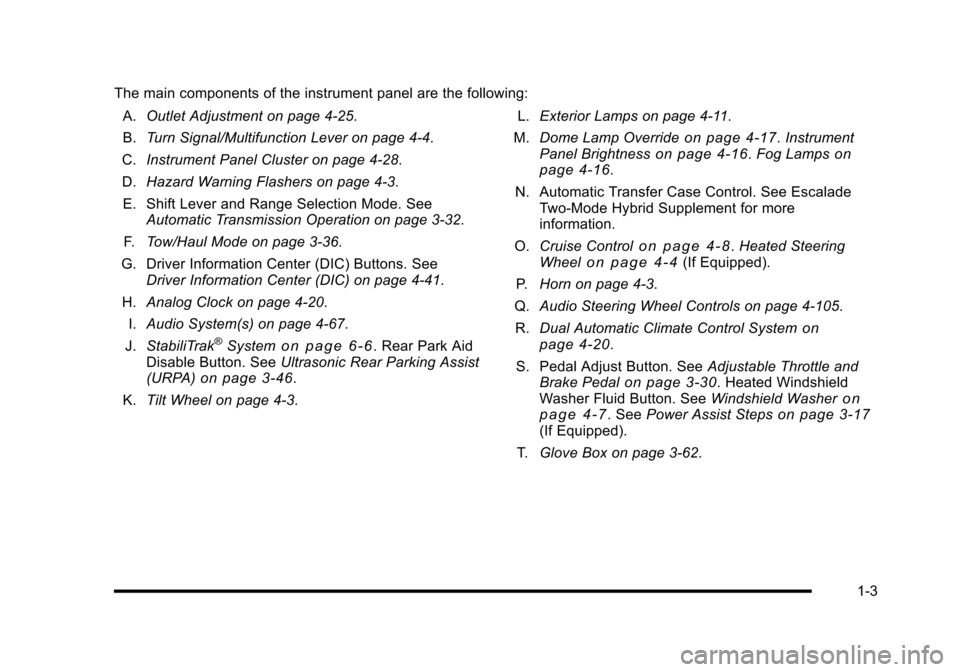
The main components of the instrument panel are the following:
A.Outlet Adjustment on page 4!25.
B.Turn Signal/Multifunction Lever on page 4!4.
C.Instrument Panel Cluster on page 4!28.
D.Hazard Warning Flashers on page 4!3.
E. Shift Lever and Range Selection Mode. SeeAutomatic Transmission Operation on page 3!32.
F.Tow/Haul Mode on page 3!36.
G. Driver Information Center (DIC) Buttons. SeeDriver Information Center (DIC) on page 4!41.
H.Analog Clock on page 4!20.
I.Audio System(s) on page 4!67.
J.StabiliTrak®Systemo n p a g e 6!6. Rear Park AidDisable Button. SeeUltrasonic Rear Parking Assist(URPA)on page 3!46.
K.Tilt Wheel on page 4!3.
L.Exterior Lamps on page 4!11.
M.Dome Lamp Overrideon page 4!17.InstrumentPanel Brightnesson page 4!16.Fog Lampsonpage 4!16.
N. Automatic Transfer Case Control. See EscaladeTwo!Mode Hybrid Supplement for moreinformation.
O.Cruise Controlo n p a g e 4!8.Heated SteeringWheelo n p a g e 4!4(If Equipped).
P.Horn on page 4!3.
Q.Audio Steering Wheel Controls on page 4!105.
R.Dual Automatic Climate Control Systemonpage 4!20.
S. Pedal Adjust Button. SeeAdjustable Throttle andBrake Pedalon page 3!30. Heated WindshieldWasher Fluid Button. SeeWindshield Washeronp a g e 4!7. SeePower Assist Stepson page 3!17(If Equipped).
T.Glove Box on page 3!62.
1-3
Page 16 of 616
Heated Seats
Front Seats
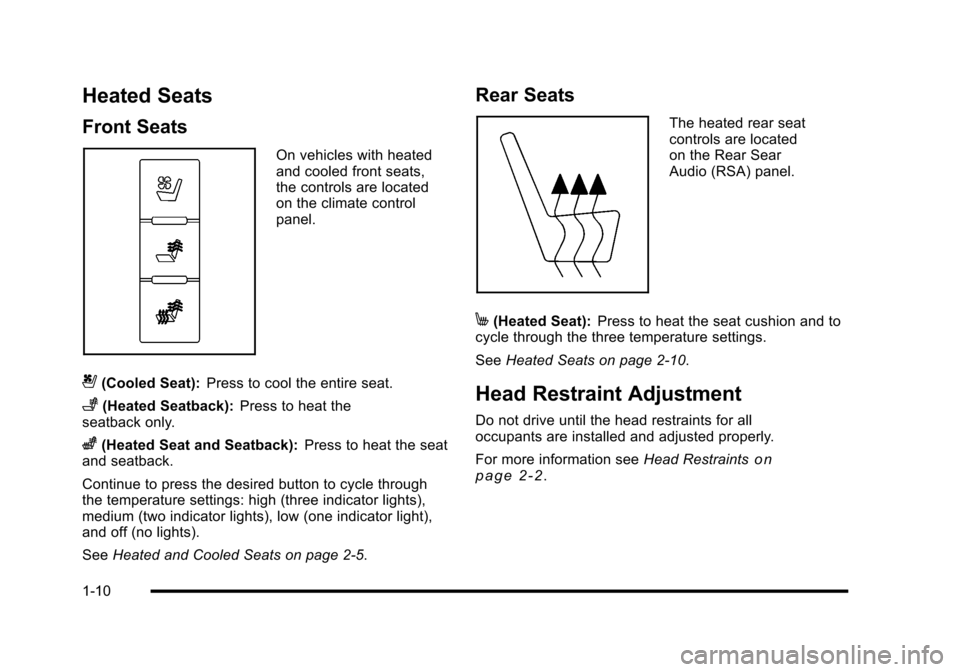
On vehicles with heatedand cooled front seats,the controls are locatedon the climate controlpanel.
{(Cooled Seat):Press to cool the entire seat.
+(Heated Seatback):Press to heat theseatback only.
z(Heated Seat and Seatback):Press to heat the seatand seatback.
Continue to press the desired button to cycle throughthe temperature settings: high (three indicator lights),medium (two indicator lights), low (one indicator light),and off (no lights).
SeeHeated and Cooled Seats on page 2!5.
Rear Seats
The heated rear seatcontrols are locatedon the Rear SearAudio (RSA) panel.
M(Heated Seat):Press to heat the seat cushion and tocycle through the three temperature settings.
SeeHeated Seats on page 2!10.
Head Restraint Adjustment
Do not drive until the head restraints for alloccupants are installed and adjusted properly.
For more information seeHead Restraintsonp a g e 2!2.
1-10
Page 23 of 616
Portable Audio Devices
This vehicle may have an auxilliary input, located on theaudio faceplate and a USB port located in the centerconsole. External devices such as iPod®, laptopcomputers, MP3 players, CD changers, USB storagedevice, etc. can be connected to the auxiliary port usinga 3.5 mm (1/8 in.) input jack or the USB port dependingon the audio system.
See“Using the Auxiliary Input Jack”and“Using theUSB Port”underAuxiliary Devices on page 5!85.
Steering Wheel Controls
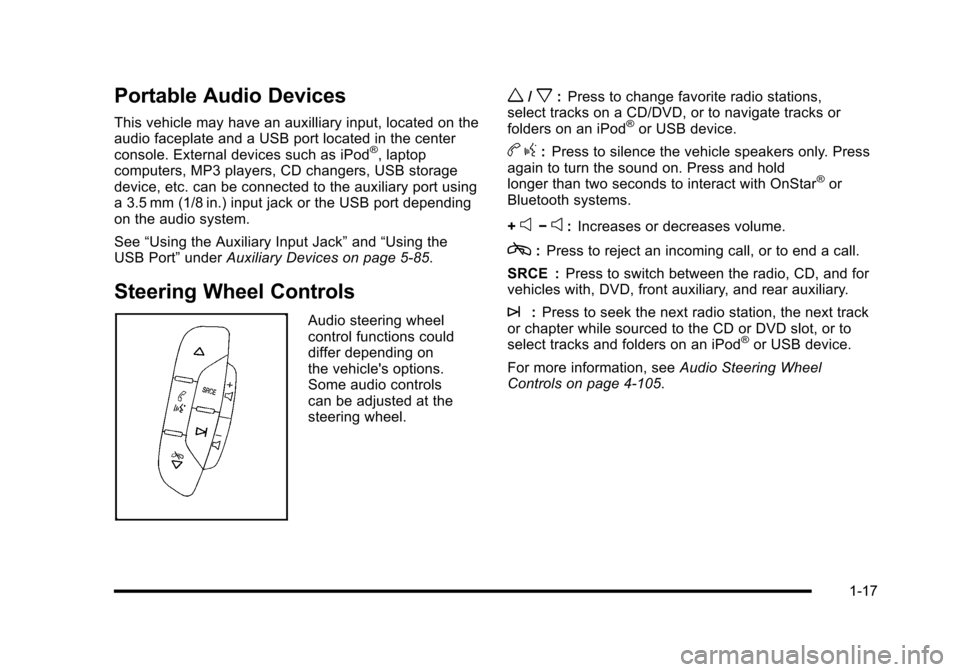
Audio steering wheelcontrol functions coulddiffer depending onthe vehicle's options.Some audio controlscan be adjusted at thesteering wheel.
w/x:Press to change favorite radio stations,select tracks on a CD/DVD, or to navigate tracks orfolders on an iPod®or USB device.
bg:Press to silence the vehicle speakers only. Pressagain to turn the sound on. Press and holdlonger than two seconds to interact with OnStar®orBluetooth systems.
+e!e:Increases or decreases volume.
c:Press to reject an incoming call, or to end a call.
SRCE :Press to switch between the radio, CD, and forvehicles with, DVD, front auxiliary, and rear auxiliary.
¨:Press to seek the next radio station, the next trackor chapter while sourced to the CD or DVD slot, or toselect tracks and folders on an iPod®or USB device.
For more information, seeAudio Steering WheelControls on page 4!105.
1-17
Page 24 of 616

Bluetooth®
For vehicles with an in-vehicle Bluetooth system, itallows users with a Bluetooth enabled cell phone tomake and receive hands-free calls using the vehicle’saudio system and controls.
The Bluetooth enabled cell phone must be paired withthe in-vehicle Bluetooth system before it can be usedin the vehicle. Not all phones will support all functions.For more information visit www.gm.com/bluetooth.
For more information, seeBluetooth®on page 4!67.
Navigation System
The vehicle's navigation system provides detailed mapsof most major freeways and roads throughout theUnited States and Canada. After a destination has beenset, the system provides turn-by-turn instructions forreaching the destination. In addition, the system canhelp locate a variety of points of interest (POI), such asbanks, airports, restaurants, and more.
See Navigation System in the owner's manual formore information.
Driver Information Center (DIC)
The DIC display is located at the bottom of theinstrument panel cluster. It shows the status of manyvehicle systems and enables access to thepersonalization menu.
The DIC buttons arelocated on the instrumentpanel, next to the steeringwheel.
3(Trip/Fuel):Press this button to display theodometer, trip odometer, fuel range, average economy,fuel used, timer, and transmission temperature. Thecompass and outside air temperature will also be shownin the display. The temperature will be shown in °F or°C depending on the units selected.
1-18
Page 27 of 616

Rear Vision Camera (RVC)
The rear vision camera displays a view of the areabehind the vehicle on the navigation screen when thevehicle is shifted into R (Reverse). Once shifted out ofR (Reverse), the navigation screen will go back to thelast screen that had been displayed, after a delay.
To clean the camera lens, located above the licenseplate, rinse it with water and wipe it with a soft cloth.
Ultrasonic Parking Assist
This feature uses sensors on the rear bumper to detectobjects while parking the vehicle. It operates at speedsless than 8 km/h (5 mph). URPA uses audio beeps toprovide distance and system information.
Keep the sensors on the vehicle's rear bumper clean toensure proper operation.
The system can be disabled by pressing the rear parkaid disable button located next to the radio.
SeeUltrasonic Rear Parking Assist (URPA)onpage 3!46for more information.
Power Outlets
The accessory power outlets let you plug in auxiliaryelectrical equipment, such as a cellular telephone.
The vehicle has three accessory power outlets located:
.Inside the floor console storage bin.
.On the rear of the floor console.
.In the rear cargo area on the passenger side.
The accessory power outlets are powered, even whenthe ignition is in LOCK/OFF. Continuing to use poweroutlets while the ignition is in LOCK/OFF may cause thevehicle's battery to run down.
Universal Remote System
The Universal Home Remote System allows for garagedoor openers, security systems, and home automationdevices to be programmed to work with these buttons inthe vehicle.
SeeUniversal Home Remote Systemon page 3!55.
1-21
Page 32 of 616
![CADILLAC ESCALADE 2010 3.G Owners Manual The OnStar system can record and transmit vehicleinformation. This information is automatically sent to an
OnStar call center whenQis pressed,]is pressed,
or if the airbags or ACR system deploy. This](/img/23/7913/w960_7913-31.png "CADILLAC ESCALADE 2010 3.G Owners Manual The OnStar system can record and transmit vehicleinformation. This information is automatically sent to an
OnStar call center whenQis pressed,]is pressed,
or if the airbags or ACR system deploy. This")
The OnStar system can record and transmit vehicleinformation. This information is automatically sent to an
OnStar call center whenQis pressed,]is pressed,
or if the airbags or ACR system deploy. This informationusually includes the vehicle's GPS location and, in theevent of a crash, additional information regarding thecrash that the vehicle was involved in (e.g. the directionfrom which the vehicle was hit). When the virtualadvisor feature of OnStar hands-free calling is used, thevehicle also sends OnStar the vehicle's GPS locationso they can provide services where it is located.
Location information about the vehicle is only availableif the GPS satellite signals are unobstructed andavailable.
The vehicle must have a working electrical system,including adequate battery power, for the OnStarequipment to operate. There are other problemsOnStar cannot control that may prevent OnStar fromproviding OnStar service at any particular time or place.Some examples are damage to important parts of thevehicle in a crash, hills, tall buildings, tunnels, weatheror wireless phone network congestion.
OnStar Steering Wheel Controls
This vehicle may have a Talk/Mute button that can beused to interact with OnStar hands-free calling. SeeAudio Steering Wheel Controlson page 4!105for moreinformation.
On some vehicles, the mute button can be used to dialnumbers into voice mail systems, or to dial phoneextensions. See the OnStar Owner's Guide for moreinformation.
Your Responsibility
Increase the volume of the radio if the OnStar advisorcannot be heard.
If the light next to the OnStar buttons is red, the system
may not be functioning properly. PressQand request a
vehicle diagnostic. If the light appears clear (no light isappearing), your OnStar subscription has expired and
all services have been deactivated. PressQto confirm
that the OnStar equipment is active.
1-26