center console CADILLAC ESCALADE 2020 Owner's Manual
[x] Cancel search | Manufacturer: CADILLAC, Model Year: 2020, Model line: ESCALADE, Model: CADILLAC ESCALADE 2020Pages: 392, PDF Size: 6.39 MB
Page 13 of 392
Cadillac Escalade Owner Manual (GMNA-Localizing-U.S./Canada/Mexico-
13566588) - 2020 - CRC - 4/24/19
12 KEYS, DOORS, AND WINDOWS
Keyless Liftglass Opening
Press the exterior liftglass button to
open the liftglass when all doors are
unlocked or when the transmitter is
within 1 m (3 ft).
Key Access
To access a vehicle with a weak
transmitter battery, seeDoor Locks
0 16.
Programming Transmitters to
the Vehicle
Only RKE transmitters programmed to
the vehicle will work. If a transmitter
is lost or stolen, a replacement can be
purchased and programmed through
your dealer. The vehicle can be
reprogrammed so that lost or stolen
transmitters no longer work. Each
vehicle can have up to eight
transmitters matched to it.
Programming with Recognized
Transmitters
A new transmitter can be programmed
to the vehicle when there are two
recognized transmitters. To program, the vehicle must be off
and all transmitters, both currently
recognized and new, must be
with you.
1. Remove the key from the recognized transmitter.
2. Place the two recognized transmitters in the cupholder or
on the passenger seat.
3. Remove the key lock cylinder cap on the driver door handle. See
Door Locks 016. Insert the
vehicle key into the key lock
cylinder on the driver door
handle; then turn the key
counterclockwise, to the unlock
position, five times within
10 seconds.
The DIC displays READY FOR
REMOTE #2, 3, 4, ETC.
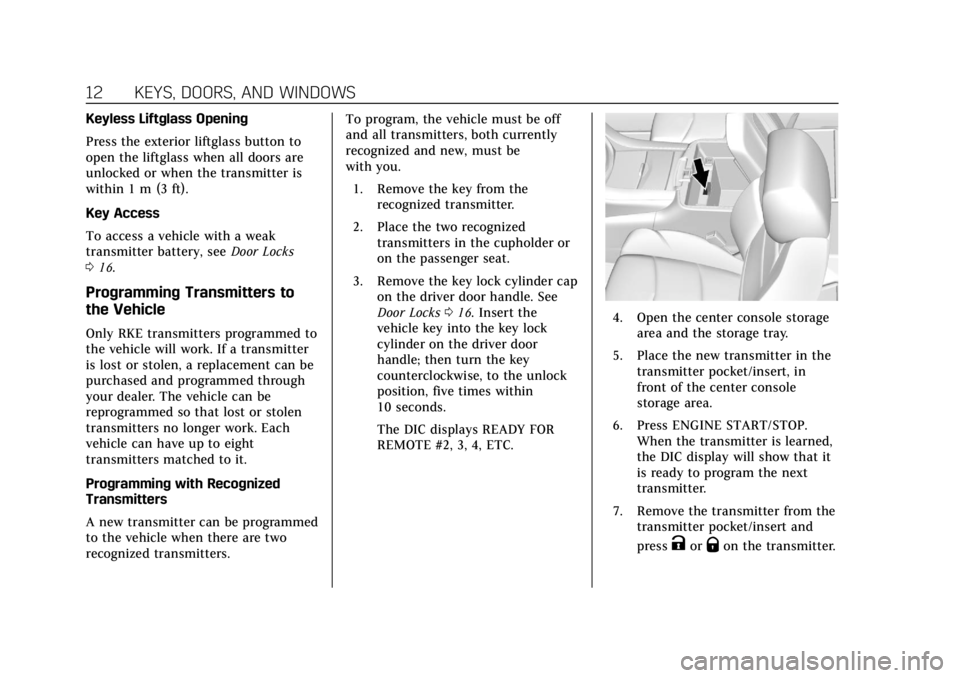
4. Open the center console storage
area and the storage tray.
5. Place the new transmitter in the transmitter pocket/insert, in
front of the center console
storage area.
6. Press ENGINE START/STOP. When the transmitter is learned,
the DIC display will show that it
is ready to program the next
transmitter.
7. Remove the transmitter from the transmitter pocket/insert and
press
KorQon the transmitter.
Page 14 of 392
Cadillac Escalade Owner Manual (GMNA-Localizing-U.S./Canada/Mexico-
13566588) - 2020 - CRC - 4/24/19
KEYS, DOORS, AND WINDOWS 13
To program additional
transmitters, repeat Steps 4–7.
When all additional transmitters
are programmed, press and hold
ENGINE START/STOP for
approximately 12 seconds to exit
programming mode.
8. Put the key back into the transmitter.
9. Replace the key lock cylinder cap. See Door Locks 016.
Programming without Recognized
Transmitters
If two currently recognized
transmitters are not available, follow
this procedure to program up to eight
transmitters. This feature is not
available in Canada. This procedure
will take approximately 30 minutes to
complete. The vehicle must be off and
all transmitters to be programmed
must be with you. 1. Remove the vehicle key from the transmitter.
2. Remove the key lock cylinder cap on the driver door handle. See
Door Locks 016. Insert the vehicle key into the key lock
cylinder on the driver door
handle; then turn the key
counterclockwise, to the unlock
position, five times within
10 seconds.
The DIC displays REMOTE
LEARN PENDING,
PLEASE WAIT.
3. Wait for 10 minutes until the DIC displays PRESS ENGINE
START BUTTON TO LEARN,
then press ENGINE
START/STOP.
The DIC will again display
REMOTE LEARN PENDING,
PLEASE WAIT.
4. Repeat Step 3 two additional times. After the third time all
previously known transmitters
will no longer work with the
vehicle. Remaining transmitters
can be relearned during the next
steps.
The DIC should now display
READY FOR REMOTE # 1.
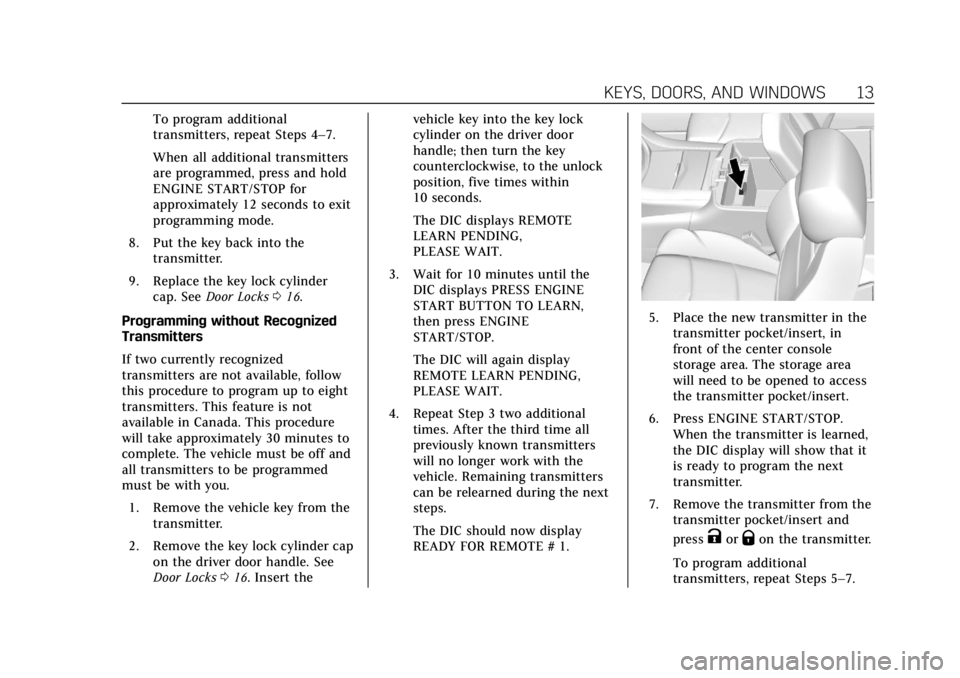
5. Place the new transmitter in thetransmitter pocket/insert, in
front of the center console
storage area. The storage area
will need to be opened to access
the transmitter pocket/insert.
6. Press ENGINE START/STOP. When the transmitter is learned,
the DIC display will show that it
is ready to program the next
transmitter.
7. Remove the transmitter from the transmitter pocket/insert and
press
KorQon the transmitter.
To program additional
transmitters, repeat Steps 5–7.
Page 15 of 392
Cadillac Escalade Owner Manual (GMNA-Localizing-U.S./Canada/Mexico-
13566588) - 2020 - CRC - 4/24/19
14 KEYS, DOORS, AND WINDOWS
When all additional transmitters
are programmed, press and hold
ENGINE START/STOP for
approximately 12 seconds to exit
programming mode.
8. Return the key back into the transmitter.
9. Replace the key lock cylinder cap. See Door Locks 016.
Starting the Vehicle with a Low
Transmitter Battery
If the transmitter battery is weak or if
there is interference with the signal,
the DIC may display NO REMOTE
DETECTED or NO REMOTE KEY WAS
DETECTED PLACE KEY IN
TRANSMITTER POCKET THEN
START YOUR VEHICLE when starting
the vehicle.
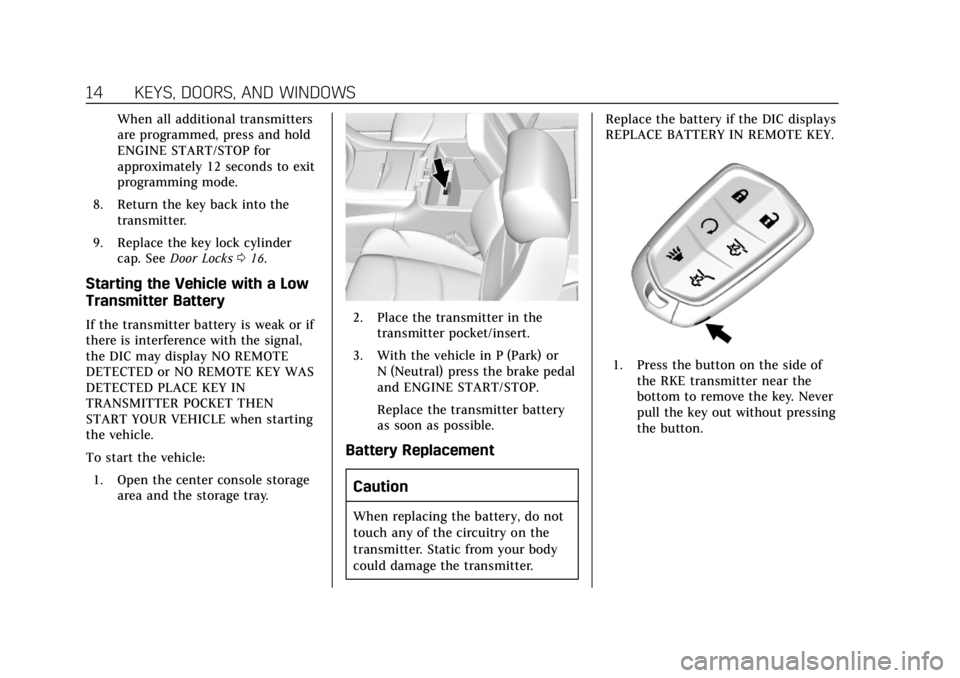
To start the vehicle:
1. Open the center console storage area and the storage tray.2. Place the transmitter in thetransmitter pocket/insert.
3. With the vehicle in P (Park) or N (Neutral) press the brake pedal
and ENGINE START/STOP.
Replace the transmitter battery
as soon as possible.
Battery Replacement
Caution
When replacing the battery, do not
touch any of the circuitry on the
transmitter. Static from your body
could damage the transmitter. Replace the battery if the DIC displays
REPLACE BATTERY IN REMOTE KEY.
1. Press the button on the side of
the RKE transmitter near the
bottom to remove the key. Never
pull the key out without pressing
the button.
Page 23 of 392
Cadillac Escalade Owner Manual (GMNA-Localizing-U.S./Canada/Mexico-
13566588) - 2020 - CRC - 4/24/19
22 KEYS, DOORS, AND WINDOWS
.Pressbtwice quickly on the RKE
transmitter until the liftgate
moves.
. Press
8on the overhead
console. The driver door must be
unlocked or locked without the
security armed.
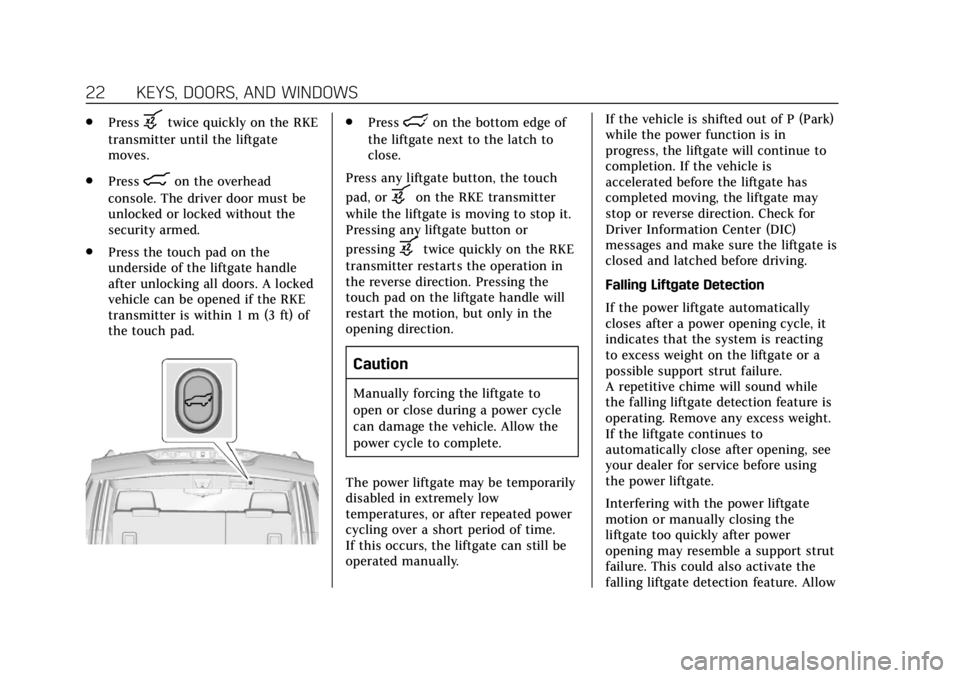
. Press the touch pad on the
underside of the liftgate handle
after unlocking all doors. A locked
vehicle can be opened if the RKE
transmitter is within 1 m (3 ft) of
the touch pad.
.Presslon the bottom edge of
the liftgate next to the latch to
close.
Press any liftgate button, the touch
pad, or
bon the RKE transmitter
while the liftgate is moving to stop it.
Pressing any liftgate button or
pressing
btwice quickly on the RKE
transmitter restarts the operation in
the reverse direction. Pressing the
touch pad on the liftgate handle will
restart the motion, but only in the
opening direction.
Caution
Manually forcing the liftgate to
open or close during a power cycle
can damage the vehicle. Allow the
power cycle to complete.
The power liftgate may be temporarily
disabled in extremely low
temperatures, or after repeated power
cycling over a short period of time.
If this occurs, the liftgate can still be
operated manually. If the vehicle is shifted out of P (Park)
while the power function is in
progress, the liftgate will continue to
completion. If the vehicle is
accelerated before the liftgate has
completed moving, the liftgate may
stop or reverse direction. Check for
Driver Information Center (DIC)
messages and make sure the liftgate is
closed and latched before driving.
Falling Liftgate Detection
If the power liftgate automatically
closes after a power opening cycle, it
indicates that the system is reacting
to excess weight on the liftgate or a
possible support strut failure.
A repetitive chime will sound while
the falling liftgate detection feature is
operating. Remove any excess weight.
If the liftgate continues to
automatically close after opening, see
your dealer for service before using
the power liftgate.
Interfering with the power liftgate
motion or manually closing the
liftgate too quickly after power
opening may resemble a support strut
failure. This could also activate the
falling liftgate detection feature. Allow
Page 31 of 392
Cadillac Escalade Owner Manual (GMNA-Localizing-U.S./Canada/Mexico-
13566588) - 2020 - CRC - 4/24/19
30 KEYS, DOORS, AND WINDOWS
The power sounder provides an
audible alarm which is distinct from
the vehicle’s horn. It has its own
power source, and can sound an alarm
if the vehicle’s battery is
compromised.
The inclination sensor can set off the
alarm if it senses movement of the
vehicle, such as a change in vehicle
orientation.
The intrusion sensor monitors the
vehicle interior, and can activate the
alarm if it senses unauthorized entry
into the vehicle’s interior. Do not
allow passengers or pets to remain in
the vehicle when the intrusion sensor
is activated.
Before arming the theft-deterrent
system and activating the intrusion
sensor:
.Make sure all doors and windows
are completely closed.
. Secure any loose items such as
sunshades.
. Make sure there are no
obstructions blocking the sensors
in the front overhead console. .
Close DVD screens before leaving
the vehicle.
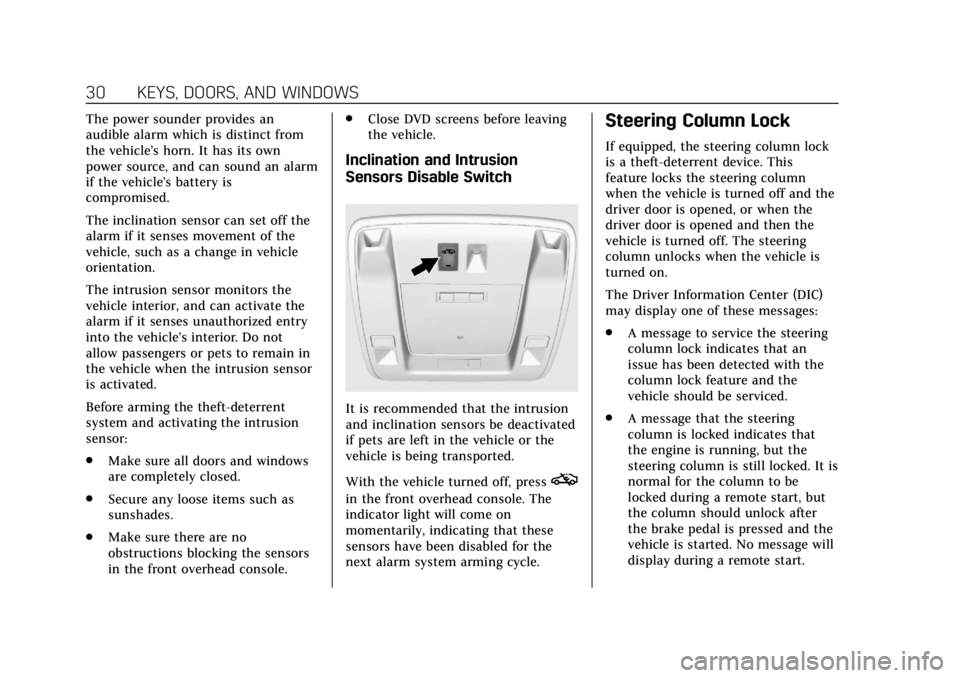
Inclination and Intrusion
Sensors Disable Switch
It is recommended that the intrusion
and inclination sensors be deactivated
if pets are left in the vehicle or the
vehicle is being transported.
With the vehicle turned off, press
o
in the front overhead console. The
indicator light will come on
momentarily, indicating that these
sensors have been disabled for the
next alarm system arming cycle.
Steering Column Lock
If equipped, the steering column lock
is a theft-deterrent device. This
feature locks the steering column
when the vehicle is turned off and the
driver door is opened, or when the
driver door is opened and then the
vehicle is turned off. The steering
column unlocks when the vehicle is
turned on.
The Driver Information Center (DIC)
may display one of these messages:
.A message to service the steering
column lock indicates that an
issue has been detected with the
column lock feature and the
vehicle should be serviced.
. A message that the steering
column is locked indicates that
the engine is running, but the
steering column is still locked. It is
normal for the column to be
locked during a remote start, but
the column should unlock after
the brake pedal is pressed and the
vehicle is started. No message will
display during a remote start.
Page 32 of 392
Cadillac Escalade Owner Manual (GMNA-Localizing-U.S./Canada/Mexico-
13566588) - 2020 - CRC - 4/24/19
KEYS, DOORS, AND WINDOWS 31
.A message that the steering wheel
must be turned and the vehicle
must be started again indicates
that the column lock mechanism
is bound, the column locking
device was unable to unlock the
steering column, and the vehicle
did not start. If this happens,
immediately turn the steering
wheel from side to side to unbind
the column lock. If this does not
unlock the steering column, turn
the vehicle off and open the driver
door to reset the system. Then
turn the vehicle on and
immediately turn the steering
wheel side to side for about
15 seconds. In some cases, it may
take significant force to unbind
the column.
To keep the steering column from
binding, straighten the front wheels
before turning off the vehicle.
Immobilizer
See Radio Frequency Statement 0366.
Immobilizer Operation
This vehicle has a passive
theft-deterrent system.
The system does not have to be
manually armed or disarmed.
The vehicle is automatically
immobilized when the vehicle is
turned off.
The immobilization system is
disarmed when the ignition is on and
a valid transmitter is found in the
vehicle.
The security light in the instrument
cluster comes on if there is a problem
with arming or disarming the
theft-deterrent system.
The system has one or more
transmitters matched to an
immobilizer control unit in the
vehicle. Only a correctly matched transmitter will start the vehicle.
If the transmitter is ever damaged,
you may not be able to start the
vehicle.
If the engine does not start and the
security light stays on, there is a
problem with the system. Turn the
vehicle off and try again.
If the RKE transmitter appears to be
undamaged, try another transmitter or
place the transmitter in the
transmitter pocket/insert next to the
center console storage area between
the driver and front passenger seats.
See
“Starting the Vehicle with a Low
Transmitter Battery” underRemote
Keyless Entry (RKE) System Operation
0 8.
If the engine does not start with the
other transmitter or when the
transmitter is in the pocket/insert, the
vehicle needs service. See your dealer
who can service the theft-deterrent
system and have a new transmitter
programmed to the vehicle.
Do not leave the transmitter or device
that disarms or deactivates the
theft-deterrent system in the vehicle.
Page 52 of 392
Cadillac Escalade Owner Manual (GMNA-Localizing-U.S./Canada/Mexico-
13566588) - 2020 - CRC - 4/24/19
SEATS AND RESTRAINTS 51
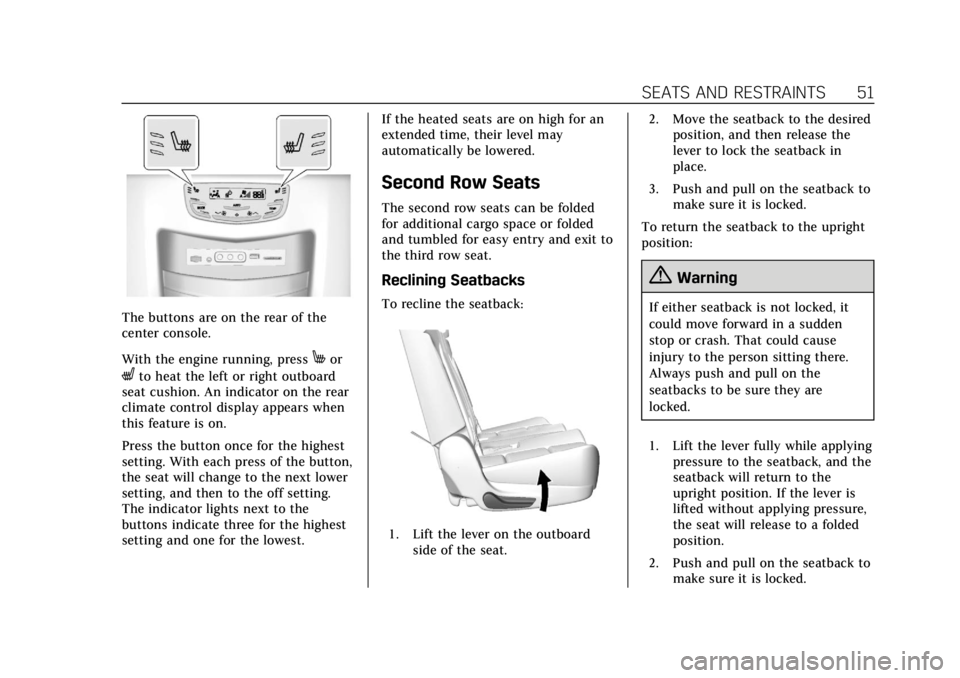
The buttons are on the rear of the
center console.
With the engine running, press
Mor
Lto heat the left or right outboard
seat cushion. An indicator on the rear
climate control display appears when
this feature is on.
Press the button once for the highest
setting. With each press of the button,
the seat will change to the next lower
setting, and then to the off setting.
The indicator lights next to the
buttons indicate three for the highest
setting and one for the lowest. If the heated seats are on high for an
extended time, their level may
automatically be lowered.
Second Row Seats
The second row seats can be folded
for additional cargo space or folded
and tumbled for easy entry and exit to
the third row seat.
Reclining Seatbacks
To recline the seatback:
1. Lift the lever on the outboard
side of the seat. 2. Move the seatback to the desired
position, and then release the
lever to lock the seatback in
place.
3. Push and pull on the seatback to make sure it is locked.
To return the seatback to the upright
position:
{Warning
If either seatback is not locked, it
could move forward in a sudden
stop or crash. That could cause
injury to the person sitting there.
Always push and pull on the
seatbacks to be sure they are
locked.
1. Lift the lever fully while applying pressure to the seatback, and the
seatback will return to the
upright position. If the lever is
lifted without applying pressure,
the seat will release to a folded
position.
2. Push and pull on the seatback to make sure it is locked.
Page 69 of 392
Cadillac Escalade Owner Manual (GMNA-Localizing-U.S./Canada/Mexico-
13566588) - 2020 - CRC - 4/24/19
68 SEATS AND RESTRAINTS
{Warning
You can be severely injured or
killed in a crash if you are not
wearing your seat belt, even with
airbags. Airbags are designed to
work with seat belts, not replace
them. Also, airbags are not designed
to inflate in every crash. In some
crashes seat belts are the only
restraint. SeeWhen Should an
Airbag Inflate? 070.
Wearing your seat belt during a
crash helps reduce your chance of
hitting things inside the vehicle or
being ejected from it. Airbags are
“supplemental restraints” to the
seat belts. Everyone in the vehicle
should wear a seat belt properly,
whether or not there is an airbag
for that person.
{Warning
Because airbags inflate with great
force and faster than the blink of an
eye, anyone who is up against,
or very close to any airbag when it
inflates can be seriously injured or
killed. Do not sit unnecessarily
close to any airbag, as you would be
if sitting on the edge of the seat or
leaning forward. Seat belts help
keep you in position before and
during a crash. Always wear a seat
belt, even with airbags. The driver
should sit as far back as possible
while still maintaining control of
the vehicle. The seat belts and the
front outboard passenger airbags
are most effective when you are
sitting well back and upright in the
seat with both feet on the floor.
Occupants should not lean on or
sleep against the front center
armrest or console in vehicles with
a front center airbag.
(Continued)
Warning (Continued)
Occupants should not lean on or
sleep against the door or side
windows in seating positions with
seat-mounted side impact airbags
and/or roof-rail airbags.
{Warning
Children who are up against,
or very close to, any airbag when it
inflates can be seriously injured or
killed. Always secure children
properly in the vehicle. To read
how, seeOlder Children 079 or
Infants and Young Children 081.
Page 71 of 392
Cadillac Escalade Owner Manual (GMNA-Localizing-U.S./Canada/Mexico-
13566588) - 2020 - CRC - 4/24/19
70 SEATS AND RESTRAINTS
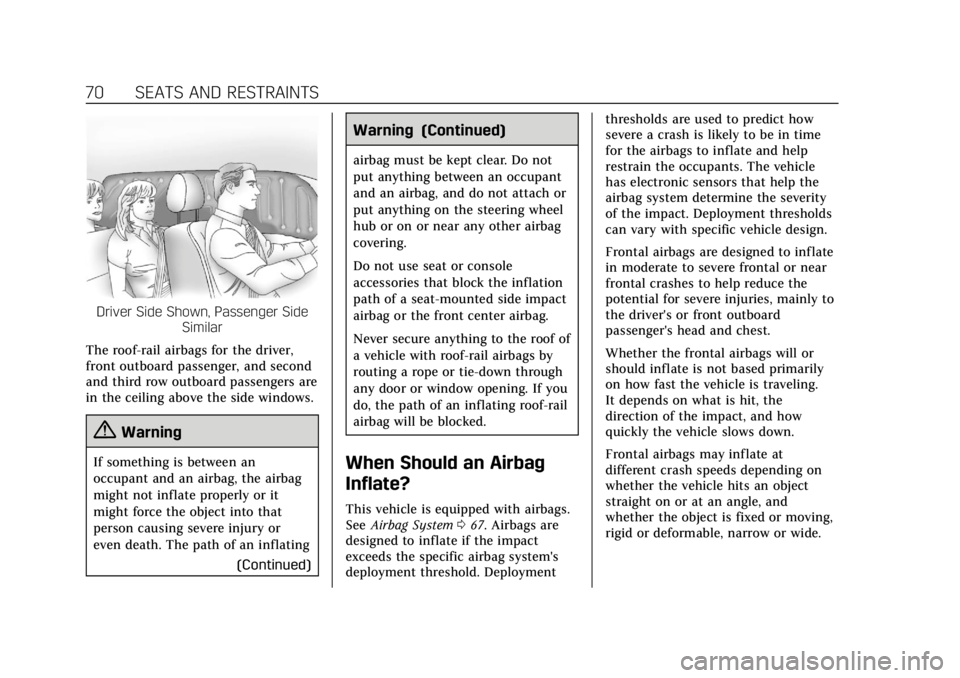
Driver Side Shown, Passenger SideSimilar
The roof-rail airbags for the driver,
front outboard passenger, and second
and third row outboard passengers are
in the ceiling above the side windows.
{Warning
If something is between an
occupant and an airbag, the airbag
might not inflate properly or it
might force the object into that
person causing severe injury or
even death. The path of an inflating (Continued)
Warning (Continued)
airbag must be kept clear. Do not
put anything between an occupant
and an airbag, and do not attach or
put anything on the steering wheel
hub or on or near any other airbag
covering.
Do not use seat or console
accessories that block the inflation
path of a seat-mounted side impact
airbag or the front center airbag.
Never secure anything to the roof of
a vehicle with roof-rail airbags by
routing a rope or tie-down through
any door or window opening. If you
do, the path of an inflating roof-rail
airbag will be blocked.
When Should an Airbag
Inflate?
This vehicle is equipped with airbags.
SeeAirbag System 067. Airbags are
designed to inflate if the impact
exceeds the specific airbag system's
deployment threshold. Deployment thresholds are used to predict how
severe a crash is likely to be in time
for the airbags to inflate and help
restrain the occupants. The vehicle
has electronic sensors that help the
airbag system determine the severity
of the impact. Deployment thresholds
can vary with specific vehicle design.
Frontal airbags are designed to inflate
in moderate to severe frontal or near
frontal crashes to help reduce the
potential for severe injuries, mainly to
the driver's or front outboard
passenger's head and chest.
Whether the frontal airbags will or
should inflate is not based primarily
on how fast the vehicle is traveling.
It depends on what is hit, the
direction of the impact, and how
quickly the vehicle slows down.
Frontal airbags may inflate at
different crash speeds depending on
whether the vehicle hits an object
straight on or at an angle, and
whether the object is fixed or moving,
rigid or deformable, narrow or wide.
Page 78 of 392
Cadillac Escalade Owner Manual (GMNA-Localizing-U.S./Canada/Mexico-
13566588) - 2020 - CRC - 4/24/19
SEATS AND RESTRAINTS 77
A thick layer of additional material,
such as a blanket or cushion,
or aftermarket equipment such as seat
covers, seat heaters, and seat
massagers can affect how well the
passenger sensing system operates.
We recommend that you not use seat
covers or other aftermarket equipment
except when approved by GM for your
specific vehicle. SeeAdding Equipment
to the Airbag-Equipped Vehicle 077 for
more information about modifications
that can affect how the system
operates.
The ON indicator may be lit if an
object, such as a briefcase, handbag,
grocery bag, laptop, or other electronic
device, is put on an unoccupied seat.
If this is not desired, remove the
object from the seat.
{Warning
Stowing articles under the
passenger seat or between the
passenger seat cushion and
seatback may interfere with the
proper operation of the passenger
sensing system.
Servicing the
Airbag-Equipped Vehicle
Airbags affect how the vehicle should
be serviced. There are parts of the
airbag system in several places around
the vehicle. Your dealer and the
service manual have information
about servicing the vehicle and the
airbag system. To purchase a service
manual, see Publication Ordering
Information 0365.
{Warning
For up to 10 seconds after the
vehicle is turned off and the battery
is disconnected, an airbag can still
inflate during improper service. You
can be injured if you are close to an
airbag when it inflates. Avoid
yellow connectors. They are
probably part of the airbag system.
Be sure to follow proper service
procedures, and make sure the
person performing work for you is
qualified to do so.
Adding Equipment to the
Airbag-Equipped Vehicle
Adding accessories that change the
vehicle's frame, bumper system,
height, front end, or side sheet metal
may keep the airbag system from
working properly.
The operation of the airbag system
can also be affected by changing,
including improperly repairing or
replacing, any parts of the following:
.
Airbag system, including airbag
modules, front or side impact
sensors, sensing and diagnostic
module, airbag wiring, or front
center console
. Front seats, including stitching,
seams or zippers
. Seat belts
. Steering wheel, instrument panel,
overhead console, ceiling trim,
or pillar garnish trim
. Inner door seals, including
speakers