maintenance CADILLAC ESCALADE 2022 User Guide
[x] Cancel search | Manufacturer: CADILLAC, Model Year: 2022, Model line: ESCALADE, Model: CADILLAC ESCALADE 2022Pages: 508, PDF Size: 9.18 MB
Page 234 of 508
Cadillac Escalade Owner Manual (GMNA-Localizing-U.S./Canada/Mexico-
15567102) - 2022 - CRC - 11/17/21
DRIVING AND OPERATING 233
(60 mph) travels 20 m (66 ft), which
could be a lot of distance in an
emergency.
Helpful braking tips to keep in mind
include:
.Keep enough distance between you
and the vehicle in front of you.
.Avoid needless heavy braking.
.Keep pace with traffic.
If the engine ever stops while the
vehicle is being driven, brake normally
but do not pump the brakes. Doing so
could make the pedal harder to push
down. If the engine stops, there will
be some power brake assist but it will
be used when the brake is applied.
Once the power assist is used up, it
can take longer to stop and the brake
pedal will be harder to push.
Steering
Caution
To avoid damage to the steering
system, do not drive over curbs,
parking barriers, or similar objects
at speeds greater than 3 km/h (Continued)
Caution (Continued)
(1 mph). Use care when driving over
other objects such as lane dividers
and speed bumps. Damage caused
by misuse of the vehicle is not
covered by the vehicle warranty.
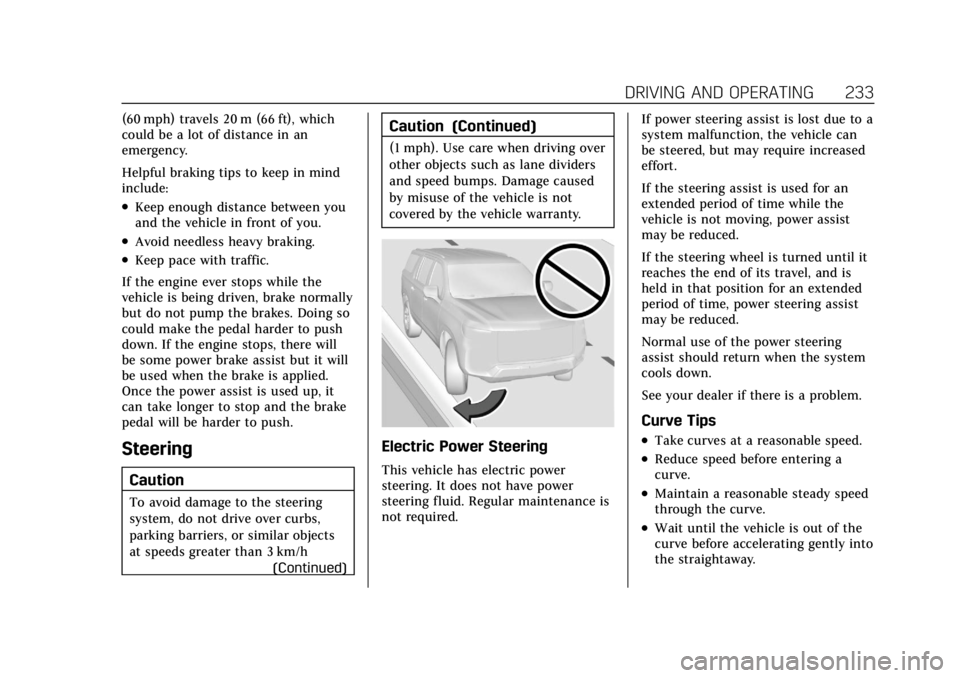
Electric Power Steering
This vehicle has electric power
steering. It does not have power
steering fluid. Regular maintenance is
not required. If power steering assist is lost due to a
system malfunction, the vehicle can
be steered, but may require increased
effort.
If the steering assist is used for an
extended period of time while the
vehicle is not moving, power assist
may be reduced.
If the steering wheel is turned until it
reaches the end of its travel, and is
held in that position for an extended
period of time, power steering assist
may be reduced.
Normal use of the power steering
assist should return when the system
cools down.
See your dealer if there is a problem.
Curve Tips
.Take curves at a reasonable speed.
.Reduce speed before entering a
curve.
.Maintain a reasonable steady speed
through the curve.
.Wait until the vehicle is out of the
curve before accelerating gently into
the straightaway.
Page 236 of 508
Cadillac Escalade Owner Manual (GMNA-Localizing-U.S./Canada/Mexico-
15567102) - 2022 - CRC - 11/17/21
DRIVING AND OPERATING 235
Remember: Antilock brakes help avoid
only the braking skid.
Off-Road Driving
Four-wheel-drive vehicles can be used
for off-road driving. Vehicles without
four-wheel drive and vehicles not
equipped with All Terrain (AT) or
On-Off Road (OOR) tires must not be
driven off-road except on a level, solid
surface. For contact information about
the original equipment tires, see the
warranty manual.
One of the best ways for successful
off-road driving is to control the
speed.
{Warning
When driving off-road, bouncing
and quick changes in direction can
easily throw you out of position.
This could cause you to lose control
and crash. You and your passengers
should always wear seat belts.
Before Driving Off-Road
.Have all necessary maintenance and
service work completed.
.Fuel the vehicle, fill fluid levels, and
check inflation pressure in all tires,
including the spare, if equipped.
.Read all the information about
four-wheel-drive vehicles in this
manual.
.Know the local laws that apply to
off-road driving.
Loading the Vehicle for Off-Road
Driving
{Warning
.Unsecured cargo on the load
floor can be tossed about when
driving over rough terrain. You or
your passengers can be struck by
flying objects. Secure the cargo
properly.
.Keep cargo in the cargo area as
far forward and as low as
possible. The heaviest things
should be on the floor, forward
of the rear axle.
.Heavy loads on the roof raise the
vehicle's center of gravity,
making it more likely to roll over.
You can be seriously or fatally(Continued)
Warning (Continued)
injured if the vehicle rolls over.
Put heavy loads inside the cargo
area, not on the roof.
For more information about loading
the vehicle, see Vehicle Load Limits
0 241 and
Tires 0402.
Environmental Concerns
.Always use established trails, roads,
and areas that have been set aside
for public off-road recreational
driving and obey all posted
regulations.
.Do not damage shrubs, flowers,
trees, or grasses or disturb wildlife.
.Do not park over things that burn.
See Parking over Things That Burn
0 251.
Driving on Hills
Driving safely on hills requires good
judgment and an understanding of
what the vehicle can and cannot do.
Page 239 of 508
Cadillac Escalade Owner Manual (GMNA-Localizing-U.S./Canada/Mexico-
15567102) - 2022 - CRC - 11/17/21
238 DRIVING AND OPERATING
Traction is reduced on hard packed
snow and ice and it is easy to lose
control. Reduce vehicle speed when
driving on hard packed snow and ice.
{Warning
Driving on frozen lakes, ponds,
or rivers can be dangerous. Ice
conditions vary greatly and the
vehicle could fall through the ice;
you and your passengers could
drown. Drive your vehicle on safe
surfaces only.
Driving in Water
{Warning
Driving through rushing water can
be dangerous. Deep water can
sweep your vehicle downstream and
you and your passengers could
drown. If it is only shallow water, it
can still wash away the ground
from under your tires. Traction
could be lost, and the vehicle could
roll over. Do not drive through
rushing water.
Caution
Do not drive through standing
water if it is deep enough to cover
the wheel hubs, axles, or exhaust
pipe. Deep water can damage the
axle and other vehicle parts.
If the standing water is not too deep,
drive through it slowly. At faster
speeds, water can get into the engine
and cause it to stall. Stalling can
occur if the exhaust pipe is under
water. Do not turn off the ignition
when driving through water. If the
exhaust pipe is under water, the
engine will not start. When going
through water, the brakes get wet and
it may take longer to stop. See
“Driving on Wet Roads ”later in this
section.
After Off-Road Driving
Remove any brush or debris that has
collected on the underbody or chassis,
or under the hood. These
accumulations can be a fire hazard.
After operation in mud or sand, have
the brake linings cleaned and checked.
These substances can cause glazing and uneven braking. Check the body
structure, driveline, steering,
suspension, wheels, tires, and exhaust
system for damage and check the fuel
lines and cooling system for any
leakage.
More frequent maintenance service is
required. See the
Maintenance Schedule
0 455.
Driving on Wet Roads
Rain and wet roads can reduce vehicle
traction and affect your ability to stop
and accelerate. Always drive slower in
these types of driving conditions and
avoid driving through large puddles
and deep-standing or flowing water.
{Warning
Wet brakes can cause crashes. They
might not work as well in a quick
stop and could cause pulling to one
side. You could lose control of the
vehicle.
(Continued)
Page 341 of 508
Cadillac Escalade Owner Manual (GMNA-Localizing-U.S./Canada/Mexico-
15567102) - 2022 - CRC - 11/17/21
340 DRIVING AND OPERATING
To back the trailer into the water:1. If equipped, place the vehicle in four-wheel-drive high.
2. Slowly back down the boat ramp until the boat is floating, but no
further than necessary.
3. Press and hold the brake pedal, but do not shift into P (Park) yet.
4. Have someone place chocks under the front wheels of the vehicle.
5. Gradually release the brake pedal to allow the chocks to absorb the
load of the trailer.
6. Reapply the brake pedal. Then apply the parking brake and shift
into P (Park).
7. Release the brake pedal.
Pulling the Trailer from the Water 1. Press and hold the brake pedal.
2. Start the engine and shift into a gear.
3. Release the parking brake.
4. Let up on the brake pedal.
5. Drive slowly until the tires are clear of the chocks. 6. Stop and have someone pick up
and store the chocks.
7. Slowly pull the trailer from the water.
8. Once the vehicle and trailer have been driven from the sloped part of
the boat ramp, the vehicle can be
shifted from four-wheel-drive high.
Shift into the drive mode that is
appropriate for the road conditions.
Caution
If the vehicle tires begin to spin and
the vehicle begins to slide toward
the water, remove your foot from
the accelerator pedal and apply the
brake pedal. Seek help to have the
vehicle towed up the ramp.
Maintenance when Trailer
Towing
The vehicle needs service more often
when used to tow trailers. See
Maintenance Schedule 0455. It is
especially important to check the
engine oil, axle lubricant, belts,
cooling system, and brake system
before and during each trip. Check periodically that all nuts and
bolts on the trailer hitch are tight.
Engine Cooling when Trailer
Towing
The cooling system may temporarily
overheat during severe operating
conditions. See
Engine Overheating
0 381.
Trailer Towing
Caution
Towing a trailer improperly can
damage the vehicle and result in
costly repairs not covered by the
vehicle warranty. To tow a trailer
correctly, follow the directions in
this section and see your dealer for
important information about
towing a trailer with the vehicle.
Trailering is different than just driving
the vehicle by itself. Trailering means
changes in handling, acceleration,
braking, durability, and fuel economy.
Successful, safe trailering takes correct
equipment, and it has to be used
properly.
Page 358 of 508

Cadillac Escalade Owner Manual (GMNA-Localizing-U.S./Canada/Mexico-
15567102) - 2022 - CRC - 11/17/21
DRIVING AND OPERATING 357
Pressure Monitoring System,
if equipped, maintenance reminders,
or towing assistance, if equipped.
Import a Trailer Profile
A trailer profile saved to an OnStar
account can be imported to the
vehicle.1. Touch + Add Trailer Profile in the Trailering App
2. Touch Import Profile on the pop-up.
3. Select a trailer profile from the list.
4. Touch IMPORT.
A pop-up will indicate the import was
successful. Touch OK to return to the
trailer list and select the trailer profile.
The Tow/Haul Mode reminder, Brake
Gain Setting and Trailer Tire Pressure
sensor learning, if equipped, do not
import.
Trailer Feature Setup
Tow/Haul Mode Reminder
To turn the Tow/Haul Mode Reminder
setting on, touch Yes. To turn it off,
touch No. Trailer Tire Pressure Setup
If the Trailer Tire Pressure Monitoring
System (TTPMS) is detected, touch
the Tire Pressure Monitoring icon to
set up tire pressure monitoring. Touch
Yes to set up the sensors or touch No
to return to the previous screen.
The trailer tire pressure sensors can
transmit up to 7 m (23 ft) from the
hitch receiver of the vehicle.
A trailer must be electrically
connected to the vehicle before
starting the sensor-to-vehicle learn
process.
After selecting Start from the Learn
Sensors screen, use the Tool Method
or the Manual Method (described
below) to learn each tire sensor,
during which the current tire number
will be highlighted.
Each sensor has a minimum of
two minutes to learn, shown by a
timer. After a sensor is learned, a
checkmark appears next to the tire,
the vehicle horn will sound, the
vehicle’s brake lamps will flash, and
all working trailer lamps will flash.
It then moves to the next sensor.To cancel the process touch Stop.
The recommended tire pressure must
be entered for the trailer tires. This
allows the vehicle to alert when the
tire pressure is high or low.
TTPMS must learn the location of the
installed tire sensors to show correct
air pressure and temperature for each
tire. To set up, use one of the
following options or see a tire or
trailer dealer for service. The learning
process must be repeated when the
trailer tires are rotated or replaced.
See
“Editing a Trailer Profile ”later in
this section for tire pressure sensor
relearn information.
Tool Method: A TTPMS activation tool
can be purchased separately to learn
the sensor locations.
Manual Method: Without the tool, the
air pressure can be increased or
decreased in each tire for 10 seconds.
Do not exceed the maximum inflation
pressure found on the tire sidewalls.
Make sure to re-adjust tire pressure to
the recommended level when the
process is complete.
Page 359 of 508

Cadillac Escalade Owner Manual (GMNA-Localizing-U.S./Canada/Mexico-
15567102) - 2022 - CRC - 11/17/21
358 DRIVING AND OPERATING
Sensor Learning Steps
To complete the sensor-to-vehicle
learn process:1. Touch Start on the Learn Sensors screen. The horn chirps twice and
the Learning Active screen appears
on the infotainment display.
2. Start with the driver side front trailer tire.
3. Activate the tool near the valve stem or adjust the air pressure of
this tire until the horn chirps and
all working vehicle and trailer
lights flash.
The process stops without saving
the sensor locations if this step
takes more than two minutes.
4. Move to the next tire and repeat Step 3 for each sensor. The horn
chirps twice when all sensors are
completed.
5. Return to the vehicle to complete the setup.
Maintenance Reminders
To set up maintenance reminders,
touch the Trailer Maintenance icon.
Select Yes to set up the maintenance reminders for the Trailer Profile.
Follow the on-screen prompts. The
maximum number of reminders is 50.
Select No to return to the previous
screen.
Towing Assistance
To set up towing assistance features,
if equipped, touch the Towing
Assistance icon.
Touch Yes to begin set up or touch No
to return to the previous screen.
1. Select the number of axles on the trailer.
2. Enter trailer dimensions
3. Follow the on-screen instructions to complete setup for available
features.
Rear Trailer Guidance Setup, If
Equipped
A rear trailer camera must be
mounted on the trailer and electrically
connected to the vehicle before rear
trailer guidance feature can be used.
See Assistance Systems for Parking or
Backing 0303. Trailer dimensions must be in range
to enable this feature.
Trailer Length: 300 cm (118.1 in)
–
1300 cm (511.8 in). Measure from
center of coupler to furthest rear point
on the trailer.
1. If trailer dimensions are out of range, this feature will be
unavailable.
2. Ensure rear trailer camera is connected.
3. Follow instructions to drive forward to complete calibration.
Trailer Length Indicator Setup
1. Follow instructions to driveforward to complete calibration.
Trailer Side Blind Zone Alert
Setup
Trailer dimensions must be in range
to enable this feature.
.Trailer Length: 300 cm (118.1 in) –
1200 cm (472.4 in). Measure from
center of coupler to furthest rear
point on the trailer.
If trailer dimensions are out of range,
this feature will be unavailable.
Page 360 of 508

Cadillac Escalade Owner Manual (GMNA-Localizing-U.S./Canada/Mexico-
15567102) - 2022 - CRC - 11/17/21
DRIVING AND OPERATING 359
Status View
The Status view shows:
.Vehicle
.Connections
.Tires
.Maintenance
.Cameras
Upon entry, the most recent items will
be shown.
Connections
1. Trailer Electrical Diagnostics
2. Light Test Start Button
Connections: OK
If a trailer connection is detected
without any faults, the view will
display NO FAULTS DETECTED.
Trailer Connections Status
When a trailer is connected, the
Trailering App System detects the
trailer connection using the Stop/Turn
Signal lighting circuits and alerts the
driver by requesting a trailer profile
setup through the Trailering App
System on the infotainment screen.
The Trailer Detection Alert setting
must be enabled for the alert to
display when a trailer is connected.
When a trailer is connected and the
ignition is off, the Trailering App
System will periodically pulse the
lighting circuits of the trailer to verify
it is still connected. The trailer lights
may periodically flash as a result of
this trailer connection detection.
These flashes may be more visible in
dark ambient light environments. The
flashing or flickering lights are a
normal condition and the Trailering
App System has built-in protections to
prevent the battery from draining. When Theft Alert is also enabled the
frequency and pattern of this flashing
will change.
If a connected trailer becomes
disconnected, a message about the
trailer disconnect will appear on the
DIC immediately (if vehicle is on) or
upon next ignition cycle (if trailer was
disconnected while vehicle is off).
Check your trailer connection if
needed.
Connection Problem
If any of the trailer connections are
lost, a message about the connection
issue will appear on the Driver
Information Center (DIC). The
infotainment display will also show
the connection issue in the
Connection Status view.
If a trailer connection is not detected,
the Trailering App will not display the
Connection Status screen.
Page 362 of 508
Cadillac Escalade Owner Manual (GMNA-Localizing-U.S./Canada/Mexico-
15567102) - 2022 - CRC - 11/17/21
DRIVING AND OPERATING 361
Tire Pressure Monitoring System”, the
vehicle needs to be taken to a dealer
for service.
Maintenance
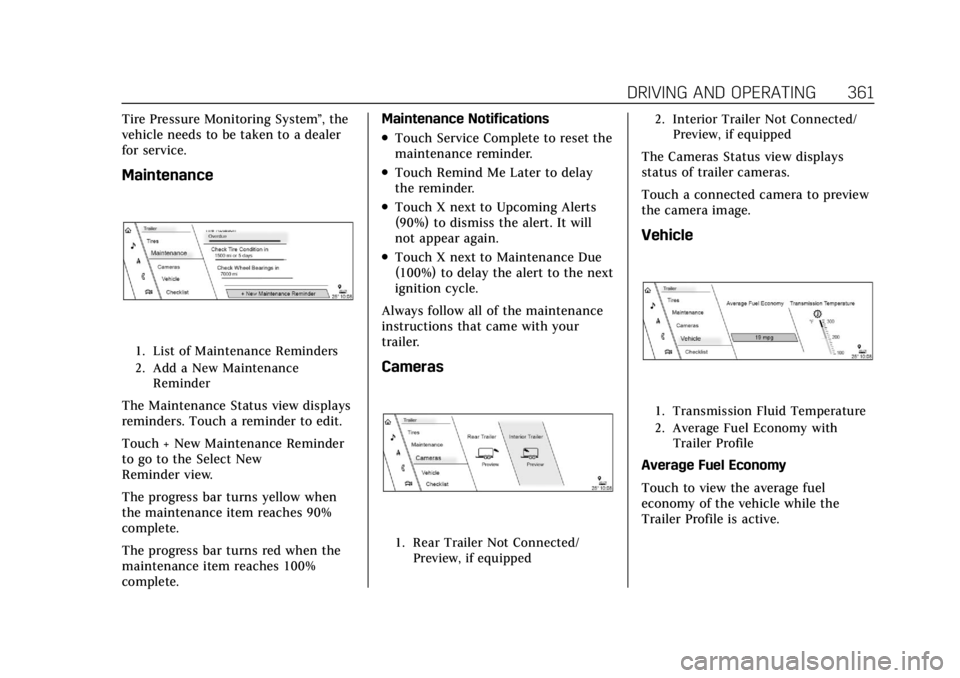
1. List of Maintenance Reminders
2. Add a New Maintenance Reminder
The Maintenance Status view displays
reminders. Touch a reminder to edit.
Touch + New Maintenance Reminder
to go to the Select New
Reminder view.
The progress bar turns yellow when
the maintenance item reaches 90%
complete.
The progress bar turns red when the
maintenance item reaches 100%
complete. Maintenance Notifications
.Touch Service Complete to reset the
maintenance reminder.
.Touch Remind Me Later to delay
the reminder.
.Touch X next to Upcoming Alerts
(90%) to dismiss the alert. It will
not appear again.
.Touch X next to Maintenance Due
(100%) to delay the alert to the next
ignition cycle.
Always follow all of the maintenance
instructions that came with your
trailer.
Cameras
1. Rear Trailer Not Connected/ Preview, if equipped 2. Interior Trailer Not Connected/
Preview, if equipped
The Cameras Status view displays
status of trailer cameras.
Touch a connected camera to preview
the camera image.
Vehicle
1. Transmission Fluid Temperature
2. Average Fuel Economy withTrailer Profile
Average Fuel Economy
Touch to view the average fuel
economy of the vehicle while the
Trailer Profile is active.
Page 364 of 508
Cadillac Escalade Owner Manual (GMNA-Localizing-U.S./Canada/Mexico-
15567102) - 2022 - CRC - 11/17/21
DRIVING AND OPERATING 363
All personalization features are based
on the settings for each driver in
vehicle personalization. The list of
Trailer Profiles is based on vehicle
personalization settings.
Guest Trailer
If the Guest Trailer Profile is the
active Trailer Profile, trailer detection,
connections status, theft, and the
Tow/Haul reminder alerts can be sent.
The system will not track total
mileage or fuel economy, but the
system will track trip mileage and fuel
economy if the Guest Trailer Profile is
active. The Trailer Tire Pressure
Monitoring System or maintenance
reminders cannot be set up for a
Guest Trailer Profile. The Guest Trailer
Profile cannot be edited.
Touch
pto learn more about the
Guest Trailer option.
Accessory/No Trailer
If the Accessory/No Trailer Profile is
active, alerts will not be sent and the
system will not track mileage or fuel
economy. The Trailer Tire Pressure
Monitoring System or maintenance
reminders cannot be set up for the Accessory/No Trailer Profile. The
Accessory/No Trailer profile cannot be
edited.
No Trailer Connected
When there is no trailer connected,
Trailer Profiles cannot be activated
but most options can be edited.
Trailer Brake Gain Memory
The system can memorize the brake
gain setting of a Trailer Profile or a
Guest Trailer Profile. When a Trailer
Profile or Guest Trailer Profile is
selected, and a brake gain setting is
set for that Trailer Profile, a quick
notice will appear to indicate that the
system has recalled that profile’s
brake gain setting.
If a Trailer Profile is already active
and the brake gain setting had been
set for that Trailer Profile, the quick
notice will trigger whenever the
ignition is turned on.
If there was an error in setting the
brake gain for a Trailer Profile, there
will be a notification. This pop-up will
not appear if the Guest Trailer Profile
is active or if there is no trailer
connected.Trailer brake gain should be set for a
specific trailering condition and must
be adjusted anytime vehicle loading,
trailer loading, or road surface
conditions change.
Editing a Trailer Profile
Trailer Profile View
Touch to edit any of the following
options in the Trailer Profile view:
.Trailer Name
.Towing Assistance Setup,
if equipped
.Tire Pressure Setup, if equipped
.Trailer Maintenance
.Edit Mileage
.Reset Average Fuel Economy
Touch Save to save the new value to
the Trailer Profile. Touching Back will
still save the previously entered
information.
Trailer Name
Touch to edit the Trailer Profile’s
name. Use at least one character and
no spaces. Touch Save.
Page 365 of 508

Cadillac Escalade Owner Manual (GMNA-Localizing-U.S./Canada/Mexico-
15567102) - 2022 - CRC - 11/17/21
364 DRIVING AND OPERATING
Towing Assistance Setup
A trailer should be connected to
complete this portion of profile setup.
Touch to set up towing assistance
features for the Trailer Profile. See
"Towing Assistance" for details on the
setup.
Tire Pressure Setup
Touch to set up the Trailer Tire
Pressure Monitoring System (TTPMS)
for the Trailer Profile. See“Trailer Tire
Pressure Setup ”previously in this
section for details on the setup. Also,
touch Tire Pressure Setup if the trailer
tires were rotated or if the tire
pressure sensors in the tires were
replaced for this Trailer Profile. The
vehicle will need to relearn the tire
sensors and their locations.
If TTPMS had been set up previously,
the Select Number of Sensors screen
will appear after touching Tire
Pressure Setup. If the number of
sensors has changed, select the
number and touch Next. If a new number of sensors is selected,
the Relearn Sensors pop-up will
appear. Touch Cancel to go back or
touch Relearn to overwrite the current
sensors and begin the relearning
process. See
“Trailer Tire Pressure
Setup ”previously in this section.
If number of sensors has not changed,
touch Next and the Learn sensors
screen will appear.
On the Learn Sensors screen. Touch
Relearn to overwrite the current
sensors and begin the relearning
process. See “Trailer Tire Pressure
Setup ”previously in this section.
On the Learn Sensors screen, touch
Next to go to the Edit Recommended
Tire Pressure screen.
On the Edit Recommended Tire
Pressure screen, touch a number on
the keypad to change the
recommended tire pressure for the
trailer’s tires. This will change the
number at which the vehicle displays
alerts related to trailer tire pressure.
Touch Done to return to the Trailer
Profile view.Trailer Maintenance
Touch to view a list of maintenance
reminders for the Trailer Profile.
Touch a reminder to view, reset,
delete, or edit it.
Reset Reminder
Touch Maintenance Complete in the
reminder view to reset the reminder.
On the pop-up, touch Reset to reset
the time and mileage values for the
reminder. Touch Cancel to return to
the previous view and nothing will
change.
Edit Reminder
Touch to edit the mileage or time
settings for the reminder. Touch Save
to save the new settings to the Trailer
Profile.
Delete Reminder
Touch to delete the maintenance
reminder. On the pop-up, touch Delete
to delete the reminder or touch Cancel
to return to the previous view and
nothing will change.