wheel CADILLAC ESCALADE 2022 Workshop Manual
[x] Cancel search | Manufacturer: CADILLAC, Model Year: 2022, Model line: ESCALADE, Model: CADILLAC ESCALADE 2022Pages: 508, PDF Size: 9.18 MB
Page 254 of 508

Cadillac Escalade Owner Manual (GMNA-Localizing-U.S./Canada/Mexico-
15567102) - 2022 - CRC - 11/17/21
DRIVING AND OPERATING 253
The shift lever always starts from a
center position, represented by an up/
down arrow on the shift pattern. After
releasing the shift lever, it will return
to the center position.
The transmission does not operate
when the vehicle is off.
If the vehicle is in ACC/ACCESSORY,
the transmission can be shifted into
P (Park).
If the vehicle is turned off while at a
relatively high vehicle speed, the
transmission will automatically shift
to N (Neutral). Once the vehicle is
stopped, P (Park) is automatically
selected.P :This position locks the drive
wheels. Use P (Park) when starting the
engine to prevent the vehicle from
moving easily.
{Warning
It is dangerous to get out of the
vehicle if the transmission is not in
P (Park) with the parking brake set.
The vehicle can roll.
Do not leave the vehicle when the
engine is running. If the engine has
been left running, the vehicle can
move suddenly. You or others could
be injured. To be sure the vehicle
will not move, even when on fairly
level ground, always set the parking
brake and place the transmission
into P (Park). See Shifting Into Park
0 250 and
Electric Parking Brake 0262.
This vehicle is equipped with an
electronic controlled transmission.
The shift lock release button is
designed to prevent inadvertent
shifting out of P (Park) unless the
ignition is on, the brake pedal is
applied, and the shift lock release
button is pressed.
When the vehicle is stopped, press
ENGINE START/STOP to turn off the
vehicle. The transmission will shift to
P (Park) automatically, unless the
vehicle is in N (Neutral). See “Car
Wash Mode ”later in this section.
The vehicle will not shift into P (Park)
if it is moving too fast. Stop the
vehicle and shift into P (Park).
Page 255 of 508

Cadillac Escalade Owner Manual (GMNA-Localizing-U.S./Canada/Mexico-
15567102) - 2022 - CRC - 11/17/21
254 DRIVING AND OPERATING
To shift in and out of P (Park), see
Shifting Into Park0250 and
Shifting out of Park 0251.
Service Shift Lever Message
If the message SERVICE SHIFTER SEE
OWNER’S MANUAL appears in the
Driver Information Center (DIC), the
shift lever needs service. Have the
vehicle serviced as soon as possible.
If the vehicle is automatically shifting
into P (Park), check to see if the
P (Park) button on top of the shift
lever is stuck. To operate the vehicle,
hold the shift lever in the desired gear,
R (Reverse) or D (Drive), until vehicle
speed exceeds 15 km/h (10 mph), then
release the shift lever.
R : Use this gear to back up.
If the vehicle is shifted from either
R (Reverse) to D (Drive) or L (Low),
or L (Low) or D (Drive) to R (Reverse)
while the speed is too high, the
vehicle will shift to N (Neutral).
Reduce the vehicle speed and try the
shift again. To shift into R (Reverse):
1. Bring the vehicle to a complete stop.
2. Press and hold shift lock release button on the side of the shift
lever.
3. From the center position, move the shift lever forward through the first
detent to the end of travel. R is
illuminated in red.
4. After releasing the shift lever, it will return to the center position.
To shift out of R (Reverse): 1. Bring the vehicle to a complete stop.
2. Shift to the desired gear.
3. After releasing the shift lever, it will return to the center position.
At low vehicle speeds, R (Reverse) can
be used to rock the vehicle back and
forth to get out of snow, ice, or sand
without damaging the transmission.
See If the Vehicle Is Stuck 0241.
N : In this position, the engine does
not connect with the wheels. To
restart the engine when the vehicle is
already moving, use N (Neutral) only.{Warning
Shifting into a drive gear while the
engine is running at high speed is
dangerous. Unless your foot is
firmly on the brake pedal, the
vehicle could move very rapidly.
You could lose control and hit
people or objects. Do not shift into
a drive gear while the engine is
running at high speed.
Caution
Shifting out of P (Park) or
N (Neutral) with the engine running
at high speed may damage the
transmission. The repairs would not
be covered by the vehicle warranty.
Be sure the engine is not running at
high speed when shifting the
vehicle.
The vehicle is not designed to stay in
N (Neutral) for more than
five minutes. It may automatically
shift into P (Park). N (Neutral) is not
Page 258 of 508
Cadillac Escalade Owner Manual (GMNA-Localizing-U.S./Canada/Mexico-
15567102) - 2022 - CRC - 11/17/21
DRIVING AND OPERATING 257
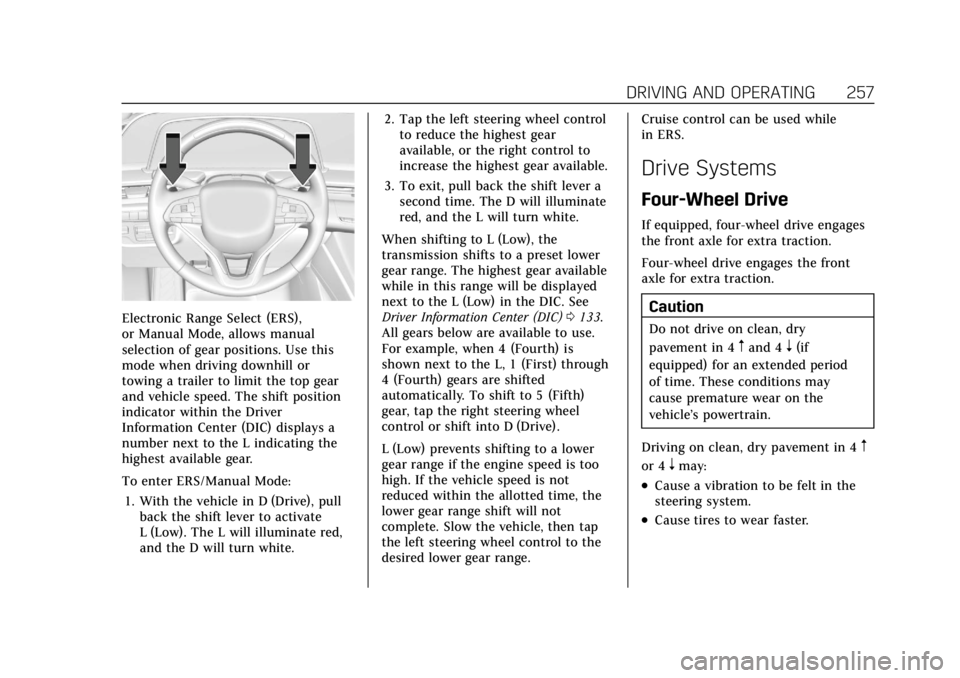
Electronic Range Select (ERS),
or Manual Mode, allows manual
selection of gear positions. Use this
mode when driving downhill or
towing a trailer to limit the top gear
and vehicle speed. The shift position
indicator within the Driver
Information Center (DIC) displays a
number next to the L indicating the
highest available gear.
To enter ERS/Manual Mode:1. With the vehicle in D (Drive), pull back the shift lever to activate
L (Low). The L will illuminate red,
and the D will turn white. 2. Tap the left steering wheel control
to reduce the highest gear
available, or the right control to
increase the highest gear available.
3. To exit, pull back the shift lever a second time. The D will illuminate
red, and the L will turn white.
When shifting to L (Low), the
transmission shifts to a preset lower
gear range. The highest gear available
while in this range will be displayed
next to the L (Low) in the DIC. See
Driver Information Center (DIC) 0133.
All gears below are available to use.
For example, when 4 (Fourth) is
shown next to the L, 1 (First) through
4 (Fourth) gears are shifted
automatically. To shift to 5 (Fifth)
gear, tap the right steering wheel
control or shift into D (Drive).
L (Low) prevents shifting to a lower
gear range if the engine speed is too
high. If the vehicle speed is not
reduced within the allotted time, the
lower gear range shift will not
complete. Slow the vehicle, then tap
the left steering wheel control to the
desired lower gear range. Cruise control can be used while
in ERS.
Drive Systems
Four-Wheel Drive
If equipped, four-wheel drive engages
the front axle for extra traction.
Four-wheel drive engages the front
axle for extra traction.
Caution
Do not drive on clean, dry
pavement in 4
mand 4n(if
equipped) for an extended period
of time. These conditions may
cause premature wear on the
vehicle’s powertrain.
Driving on clean, dry pavement in 4
m
or 4nmay:
.Cause a vibration to be felt in the
steering system.
.Cause tires to wear faster.
Page 259 of 508
Cadillac Escalade Owner Manual (GMNA-Localizing-U.S./Canada/Mexico-
15567102) - 2022 - CRC - 11/17/21
258 DRIVING AND OPERATING
{Warning
With four-wheel drive, the vehicle
will be free to roll if the transfer
case is in N (Neutral), even when
the shift lever is in P (Park). Be
sure the transfer case is in a drive
gear—2
m, 4m, or 4n—not in
N (Neutral). See Shifting Into Park
0 250.
Caution
Extended high-speed operation in
4
nmay damage or shorten the life
of the drivetrain.
An engagement noise and bump is
normal when shifting between 4
nand
4
mor N (Neutral), with the engine
running.
Shifting into 4
nwill turn Traction
Control and StabiliTrak/Electronic
Stability Control (ESC) off. See
Traction Control/Electronic Stability
Control 0265.
Automatic Transfer Case
Two-Speed Transfer Case
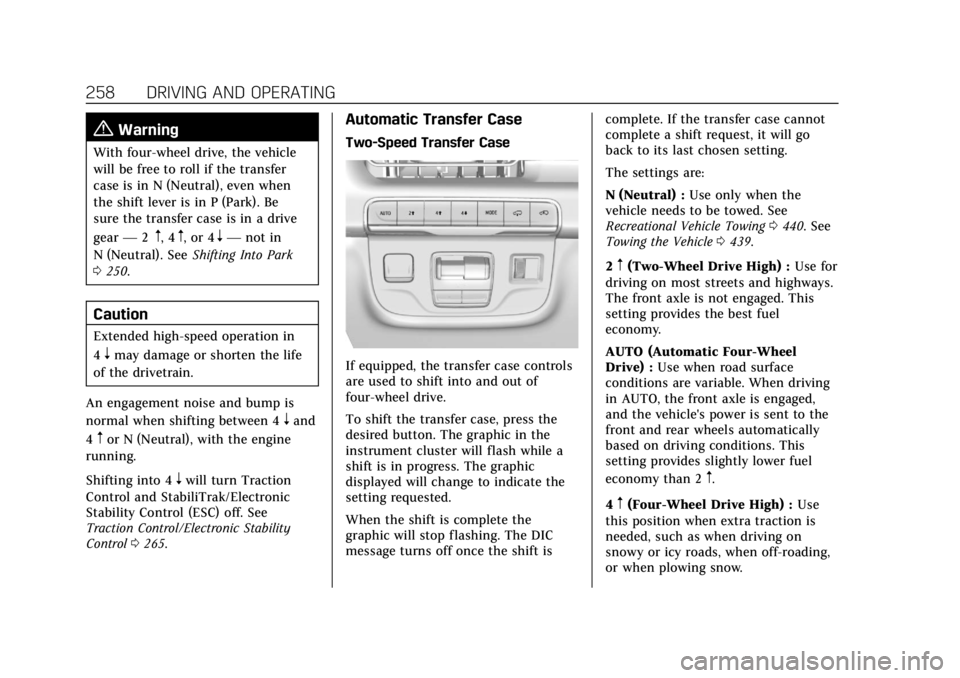
If equipped, the transfer case controls
are used to shift into and out of
four-wheel drive.
To shift the transfer case, press the
desired button. The graphic in the
instrument cluster will flash while a
shift is in progress. The graphic
displayed will change to indicate the
setting requested.
When the shift is complete the
graphic will stop flashing. The DIC
message turns off once the shift is complete. If the transfer case cannot
complete a shift request, it will go
back to its last chosen setting.
The settings are:
N (Neutral) :
Use only when the
vehicle needs to be towed. See
Recreational Vehicle Towing 0440. See
Towing the Vehicle 0439.
2
m(Two-Wheel Drive High) : Use for
driving on most streets and highways.
The front axle is not engaged. This
setting provides the best fuel
economy.
AUTO (Automatic Four-Wheel
Drive) : Use when road surface
conditions are variable. When driving
in AUTO, the front axle is engaged,
and the vehicle's power is sent to the
front and rear wheels automatically
based on driving conditions. This
setting provides slightly lower fuel
economy than 2
m.
4
m(Four-Wheel Drive High) : Use
this position when extra traction is
needed, such as when driving on
snowy or icy roads, when off-roading,
or when plowing snow.
Page 260 of 508
Cadillac Escalade Owner Manual (GMNA-Localizing-U.S./Canada/Mexico-
15567102) - 2022 - CRC - 11/17/21
DRIVING AND OPERATING 259
4n(Four-Wheel Drive Low) :This
setting engages the front axle and
delivers extra torque. Choose 4
nwhen
driving off-road in deep sand, deep
mud, or deep snow, and while
climbing or descending steep hills.
While driving in 4
n, keep vehicle
speed below 72 km/h (45 mph).
Shifting into 4
nwill turn Traction
Control and StabiliTrak/ESC off. See
Traction Control/Electronic Stability
Control 0265.
Shifts between 2
m, 4m, and AUTO
Any of these shifts can be made at
normal driving speed.
The actual 4x4 shift request is only
made after the button is released. The
4x4 graphic will remain flashing until
the shift request has completed. A DIC
message displays to indicate that the
4x4 transfer case has been requested
to shift to the new desired state.
Once the 4x4 shift has completed, the
DIC message disappears, the 4x4
graphic stops flashing, and the current
setting is indicated. When a shift to 2
mis completed
successfully while in P (Park), the
parking brake will engage. To resume
driving, shift the transmission to the
desired gear and manually release the
parking bake or press the accelerator
pedal to begin driving. See Electric
Parking Brake 0262.
If equipped, use 4
n, AUTO, or 4mto
provide additional traction when
parking on a steep grade with poor
traction such as ice, snow, mud,
or gravel.
Shifting Into 4
n
1. The ignition must be on and the vehicle must be stopped or moving
less than 5 km/h (3 mph) with the
transmission in N (Neutral). It is
best for the vehicle to be moving
1.6 to 3.2 km/h (1 to 2 mph).
2. Press 4
n. The actual 4x4 shift
request is only made after the
button is released. The 4x4 graphic
will remain flashing until the shift
request has completed. A DIC
message displays to indicate that the 4x4 transfer case has been
requested to shift to the new
desired state.
Once the 4x4 shift has completed,
the DIC message disappears, the
4x4 graphic stops flashing and the
current setting is indicated.
If vehicle speed is higher when shift
request occurs, a DIC message
displays. Reduce vehicle speed.
If the transmission is not in
N (Neutral) when shift request occurs,
a DIC message displays. The vehicle
will allow 20 seconds for the shift to
occur. After this time, a graphic in the
instrument cluster will indicate that
the transfer case is in 4
n.
Caution
Shifting the transmission into gear
before the requested mode indicator
light has stopped flashing could
damage the transfer case.
If the transmission is not shifted into
N (Neutral) or the vehicle has not
slowed to 5 km/h (3 mph) within
Page 262 of 508
Cadillac Escalade Owner Manual (GMNA-Localizing-U.S./Canada/Mexico-
15567102) - 2022 - CRC - 11/17/21
DRIVING AND OPERATING 261
3. Shift the transmission toN (Neutral).
4. Shift the transfer case to 2
m.
Transfer case shifts out of
N (Neutral) can only be made into
2
m. When the shift to 2mis
complete, the graphic in the
instrument cluster will stop
flashing. If the transfer case cannot
complete a shift, the graphic will
return to the previously selected
setting.
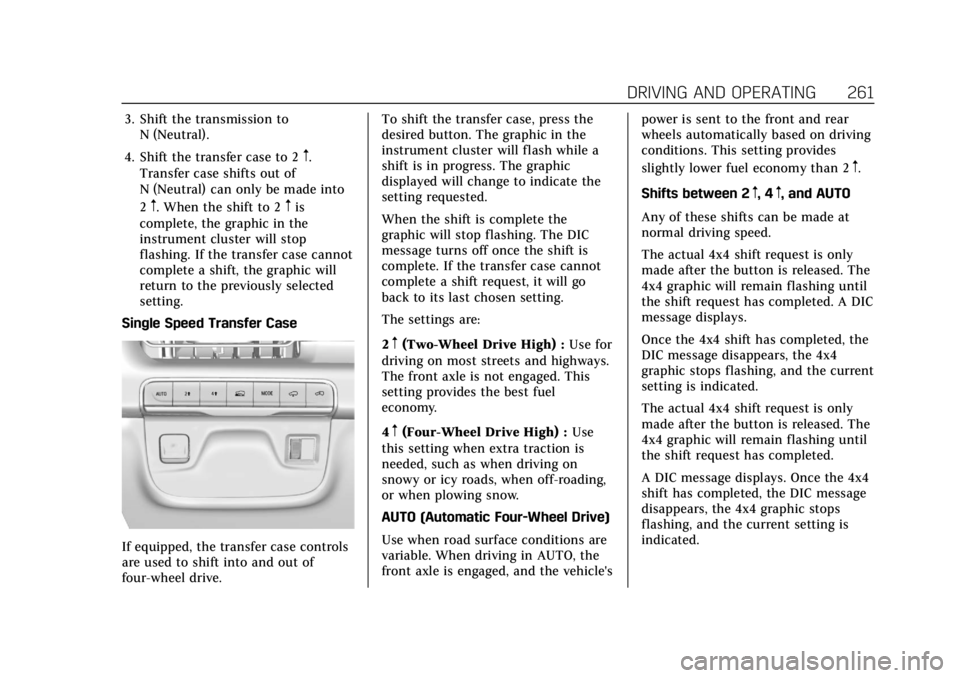
Single Speed Transfer Case
If equipped, the transfer case controls
are used to shift into and out of
four-wheel drive. To shift the transfer case, press the
desired button. The graphic in the
instrument cluster will flash while a
shift is in progress. The graphic
displayed will change to indicate the
setting requested.
When the shift is complete the
graphic will stop flashing. The DIC
message turns off once the shift is
complete. If the transfer case cannot
complete a shift request, it will go
back to its last chosen setting.
The settings are:
2
m(Two-Wheel Drive High) :
Use for
driving on most streets and highways.
The front axle is not engaged. This
setting provides the best fuel
economy.
4
m(Four-Wheel Drive High) : Use
this setting when extra traction is
needed, such as when driving on
snowy or icy roads, when off-roading,
or when plowing snow.
AUTO (Automatic Four-Wheel Drive)
Use when road surface conditions are
variable. When driving in AUTO, the
front axle is engaged, and the vehicle's power is sent to the front and rear
wheels automatically based on driving
conditions. This setting provides
slightly lower fuel economy than 2
m.
Shifts between 2
m, 4m, and AUTO
Any of these shifts can be made at
normal driving speed.
The actual 4x4 shift request is only
made after the button is released. The
4x4 graphic will remain flashing until
the shift request has completed. A DIC
message displays.
Once the 4x4 shift has completed, the
DIC message disappears, the 4x4
graphic stops flashing, and the current
setting is indicated.
The actual 4x4 shift request is only
made after the button is released. The
4x4 graphic will remain flashing until
the shift request has completed.
A DIC message displays. Once the 4x4
shift has completed, the DIC message
disappears, the 4x4 graphic stops
flashing, and the current setting is
indicated.
Page 264 of 508
Cadillac Escalade Owner Manual (GMNA-Localizing-U.S./Canada/Mexico-
15567102) - 2022 - CRC - 11/17/21
DRIVING AND OPERATING 263
Before leaving the vehicle, check the
red EPB status light to ensure that the
parking brake is applied.
If a message displays on the DIC
indicating the transmission is unable
to shift soon, the service electric
parking brake is on, and the EPB light
flashes at the same time, the system
must be reset. Start the vehicle, apply
the EPB, and then release it. The
message and light should turn off. See
Electric Parking Brake Light0125 and
Service Electric Parking Brake Light
0 126.
EPB Apply
To apply the EPB:
1. Be sure the vehicle is at a complete stop.
2. Press the EPB switch.
The red EPB status light will flash and
then stay on once the EPB is fully
applied. If the red EPB status light
flashes continuously, then the EPB is
only partially applied or there is a
problem with the EPB. A DIC message
will display. Release the EPB and try
to apply it again. If the light does not
come on, or keeps flashing, have the vehicle serviced. Do not drive the
vehicle if the red EPB status light is
flashing. See your dealer.
If the amber service EPB warning light
is on, press the EPB switch. Continue
to hold the switch until the red EPB
status light remains on. If the amber
service EPB warning light is on, see
your dealer.
If the EPB is applied while the vehicle
is moving, the vehicle will decelerate
as long as the switch is pressed. If the
switch is pressed until the vehicle
comes to a stop, the EPB will remain
applied.
The vehicle may automatically apply
the EPB in some situations when the
vehicle is not moving. This is normal,
and is done to periodically check the
correct operation of the EPB system,
or as required by other safety
functions that utilize the EPB.
If the EPB fails to apply, block the rear
wheels to prevent vehicle movement.
EPB Release
To release the EPB:
1. Turn the ignition on or to ACC/ACCESSORY.
2. Apply and hold the brake pedal.
3. Press the EPB switch momentarily.
The EPB is released when the red EPB
status light is off.
If the amber service EPB warning light
is on, release the EPB by pressing and
holding the EPB switch. Continue to
hold the switch until the red EPB
status light is off. If either light stays
on after release is attempted, see your
dealer.
Caution
Driving with the parking brake on
can overheat the brake system and
cause premature wear or damage to
brake system parts. Make sure that
the parking brake is fully released
and the brake warning light is off
before driving.
If you are towing a trailer and parking
on a hill, see Driving Characteristics
and Towing Tips 0336.
Page 266 of 508
Cadillac Escalade Owner Manual (GMNA-Localizing-U.S./Canada/Mexico-
15567102) - 2022 - CRC - 11/17/21
DRIVING AND OPERATING 265
When Automatic Vehicle Hold (AVH)
is turned on and the vehicle is braked
to a stop, AVH prevents the vehicle
from moving during the transition
from brake pedal release to accelerator
pedal apply. The brakes release when
the accelerator pedal is applied. The
brakes may also release under other
conditions. Do not rely on AVH to
hold the vehicle.
If the accelerator pedal is not applied
within a few minutes, the Electric
Parking Brake will apply. The parking
brake will also apply if the driver door
is opened or the driver seat belt is
unfastened while AVH is holding the
vehicle.
AVH can be turned on by pressing
AUTO HOLD. The indicator light on
the switch will come on. The AVH
light on the instrument panel will
come on while AVH is actively holding
the vehicle. SeeAutomatic Vehicle Hold
(AVH) Light 0126.Ride Control Systems
Traction Control/Electronic
Stability Control
System Operation
The vehicle has a Traction Control
System (TCS) and StabiliTrak/
Electronic Stability Control (ESC).
These systems help limit wheel spin
and assist the driver in maintaining
control, especially on slippery road
conditions.
TCS activates if it senses any of the
drive wheels are spinning or beginning
to lose traction. When this happens,
TCS applies the brakes to the spinning
wheels and reduces engine power to
limit wheel spin.
StabiliTrak/ESC activates when the
vehicle senses a difference between
the intended path and the direction
the vehicle is actually traveling.
StabiliTrak/ESC selectively applies
braking pressure to one or more of the
vehicle wheel brakes to assist the
driver in keeping the vehicle on the
intended path. Trailer Sway Control (TSC) is also on automatically when
the vehicle is started. See
Trailer Sway
Control (TSC) 0354.
If cruise control is being used and
traction control or StabiliTrak/ESC
begins to limit wheel spin, cruise
control will disengage. Cruise control
may be turned back on when road
conditions allow.
Both systems come on automatically
when the vehicle is started and begins
to move. The systems may be heard or
felt while they are operating or while
performing diagnostic checks. This is
normal and does not mean there is a
problem with the vehicle.
It is recommended to leave both
systems on for normal driving
conditions, but it may be necessary to
turn TCS off if the vehicle gets stuck
in sand, mud, ice, or snow. See If the
Vehicle Is Stuck 0241 and “Turning
the Systems Off and On ”later in this
section.
When the transfer case (if equipped)
is in Four-Wheel Drive Low, the TCS
and StabiliTrak/ESC are automatically
Page 267 of 508
Cadillac Escalade Owner Manual (GMNA-Localizing-U.S./Canada/Mexico-
15567102) - 2022 - CRC - 11/17/21
266 DRIVING AND OPERATING
disabled,gcomes on, and the
appropriate message will appear on
the Driver Information Center (DIC).
The indicator light for both systems is
to the right of the center stack and
below the screen. This light will:
.Flash when TCS is limiting
wheel spin
.Flash when StabiliTrak/ESC is
activated
.Turn on and stay on when either
system is not working
See Traction Control System (TCS)/
StabiliTrak Light 0128.
If either system fails to turn on or to
activate, a message displays in the
Driver Information Center (DIC), and
dcomes on and stays on to indicate
that the system is inactive and is not
assisting the driver in maintaining
control. Adjust driving accordingly. If
dcomes on and stays on:
1. Stop the vehicle.
2. Turn the engine off and wait 15 seconds.
3. Start the engine.
Drive the vehicle. If
dcomes on and
stays on, see your dealer as soon as
possible.
Turning the Systems Off and On
Caution
Do not repeatedly brake or
accelerate heavily when TCS is off.
The vehicle driveline could be
damaged.
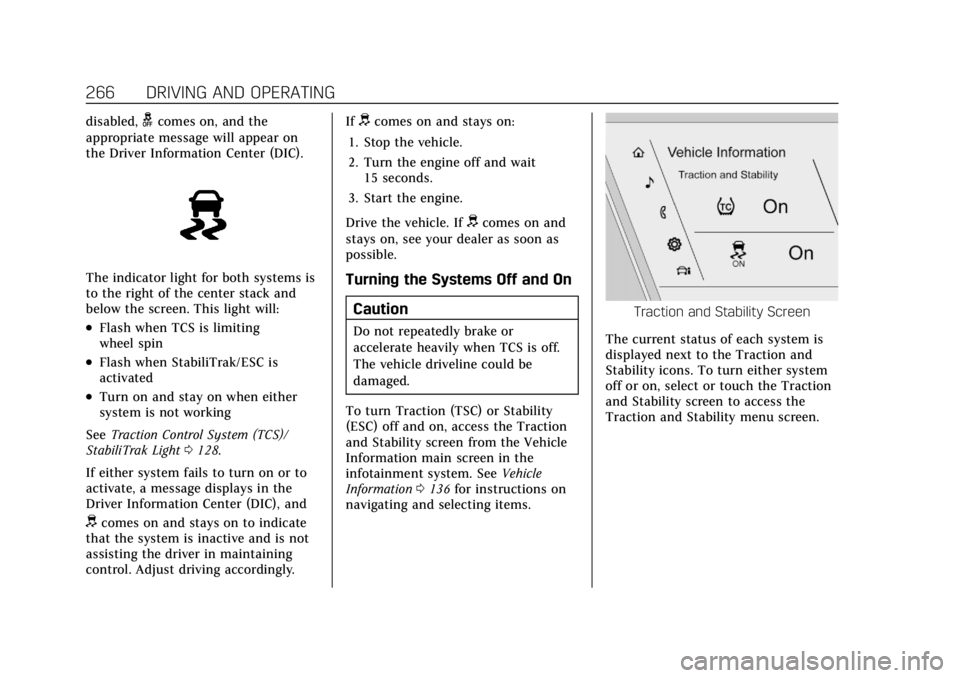
To turn Traction (TSC) or Stability
(ESC) off and on, access the Traction
and Stability screen from the Vehicle
Information main screen in the
infotainment system. See Vehicle
Information 0136 for instructions on
navigating and selecting items.
Traction and Stability Screen
The current status of each system is
displayed next to the Traction and
Stability icons. To turn either system
off or on, select or touch the Traction
and Stability screen to access the
Traction and Stability menu screen.
Page 268 of 508

Cadillac Escalade Owner Manual (GMNA-Localizing-U.S./Canada/Mexico-
15567102) - 2022 - CRC - 11/17/21
DRIVING AND OPERATING 267
Traction and Stability Menu
To turn off TCS, select or touch the
Traction virtual button on the screen.
The traction off light
idisplays in
the instrument cluster. See Traction
Off Light 0128.
If TCS is limiting wheel spin when
disabled, the system will not turn off
until the wheels stop spinning.
To turn TCS back on, select or touch
the Traction virtual button on the
screen. The traction off light
i
displayed in the instrument cluster
will turn off. To turn StabiliTrak/ESC off, first turn
off TCS to enable the Stability virtual
button on the screen, then select or
touch the Stability virtual button. The
StabiliTrak/ESC off light
gwill display
in the instrument cluster. See
StabiliTrak OFF Light 0128.
To turn StabiliTrak/ESC back on,
select or touch the Stability virtual
button on the screen. StabiliTrak/ESC
will turn on, but TCS will remain off.
TCS cannot be on when StabiliTrak/
ESC is off. If both systems are turned
off, selecting or touching the Traction
virtual button will turn both systems
back on.
StabiliTrak/ESC will automatically
turn on if the vehicle exceeds 56 km/h
(35 mph) and cannot be turned off
again until speed is reduced. Traction
control will remain off. Vehicles
equipped with the four corner air
suspension re-enable StabiliTrak/ESC
at 32 km/h (20 mph). The vehicle has a Trailer Sway Control
(TSC) feature and a Hill Start Assist
(HSA) feature. See
Trailer Sway Control
(TSC) 0354 or
Hill Start Assist (HSA) 0264.
Adding accessories can affect the
vehicle performance. See Accessories
and Modifications 0369.
Driver Mode Control
Driver Mode Control (DMC) allows the
driver to adjust the overall driving
experience to better suit preference by
adjusting multiple subsystems
simultaneously. Drive mode
availability and affected vehicle
subsystems are dependent upon
vehicle trim level, region, and optional
features.
Tour will be the default mode at every
ignition cycle. A unique and persistent
indicator will be displayed in the
instrument cluster for each mode.
Depending on trim level, Tour mode,
Sport mode, Snow/Ice mode, Off-Road
mode, Tow/Haul mode, Terrain mode,
and My mode may be available.