ignition CADILLAC ESCALADE ESV 2010 Workshop Manual
[x] Cancel search | Manufacturer: CADILLAC, Model Year: 2010, Model line: ESCALADE ESV, Model: CADILLAC ESCALADE ESV 2010Pages: 620, PDF Size: 7.4 MB
Page 260 of 620

Black plate (68,1)Cadillac Escalade/Escalade ESV Owner Manual - 2010
Audio System(s) Read the following pages to become familiar with the
audio system's features.
{ WARNING: Taking your eyes off the road for extended periods
could cause a crash resulting in injury or death to
you or others. Do not give extended attention to
entertainment tasks while driving.
This system provides access to many audio and non
audio listings.
To minimize taking your eyes off the road while driving,
do the following while the vehicle is parked: .
Become familiar with the operation and controls of
the audio system. .
Set up the tone, speaker adjustments, and preset
radio stations.
For more information, see Defensive Driving on
page 6 ‑ 2 .
This vehicle's audio system may be equipped with a
noise reduction system which can work improperly if the
audio amplifier, engine calibrations, exhaust system, microphones, radio, or speakers are modified or
replaced. This could result in more noticeable engine
noise at certain speeds.
Notice: Contact your dealer before adding any
equipment.
Adding audio or communication equipment could
interfere with the operation of the vehicle's engine,
radio, or other systems, and could damage them.
Follow federal rules covering mobile radio and
telephone equipment.
The vehicle has Retained Accessory Power (RAP). With
RAP, the audio system can be played even after the
ignition is turned off. See Retained Accessory Power
(RAP)
on page 3 ‑ 28 for more information.
Bluetooth ®
Vehicles with a Bluetooth system can use a
Bluetooth capable cell phone with a Hands Free
Profile to make and receive phone calls. The system
can be used while the key is in ON/RUN or ACC/
ACCESSORY position. The range of the Bluetooth
system can be up to 9.1 m (30 ft). Not all phones
support all functions, and not all phones are guaranteed
to work with the in-vehicle Bluetooth system.
See www.gm.com/bluetooth for more information
on compatible phones.
4-68
Page 278 of 620
Black plate (86,1)Cadillac Escalade/Escalade ESV Owner Manual - 2010
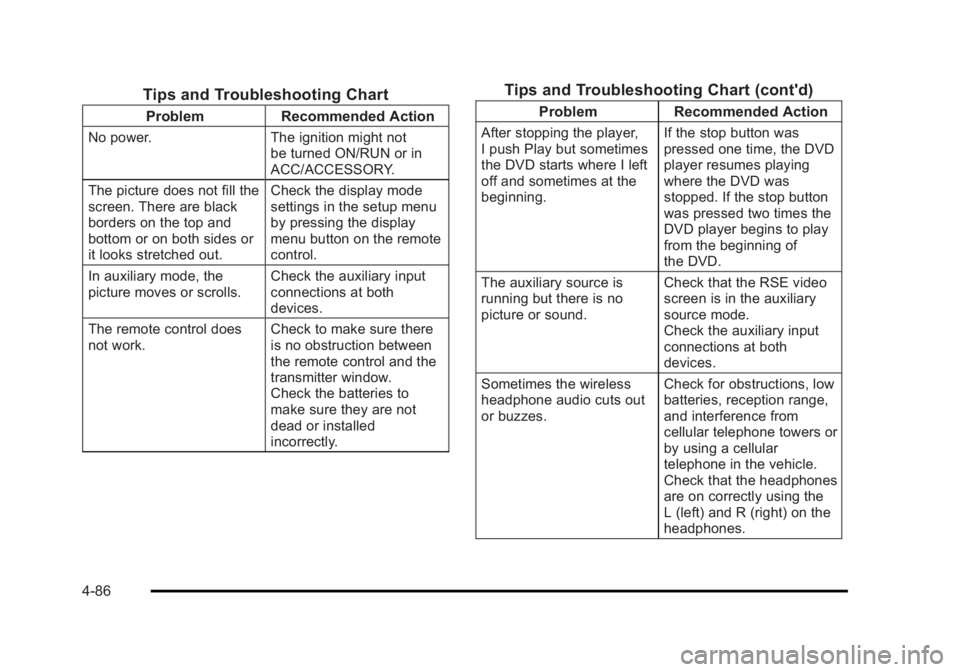
Tips and Troubleshooting Chart Problem Recommended Action
No power. The ignition might not
be turned ON/RUN or in
ACC/ACCESSORY.
The picture does not fill the
screen. There are black
borders on the top and
bottom or on both sides or
it looks stretched out. Check the display mode
settings in the setup menu
by pressing the display
menu button on the remote
control.
In auxiliary mode, the
picture moves or scrolls. Check the auxiliary input
connections at both
devices.
The remote control does
not work. Check to make sure there
is no obstruction between
the remote control and the
transmitter window.
Check the batteries to
make sure they are not
dead or installed
incorrectly. Tips and Troubleshooting Chart (cont'd) Problem Recommended Action
After stopping the player,
I push Play but sometimes
the DVD starts where I left
off and sometimes at the
beginning. If the stop button was
pressed one time, the DVD
player resumes playing
where the DVD was
stopped. If the stop button
was pressed two times the
DVD player begins to play
from the beginning of
the DVD.
The auxiliary source is
running but there is no
picture or sound. Check that the RSE video
screen is in the auxiliary
source mode.
Check the auxiliary input
connections at both
devices.
Sometimes the wireless
headphone audio cuts out
or buzzes. Check for obstructions, low
batteries, reception range,
and interference from
cellular telephone towers or
by using a cellular
telephone in the vehicle.
Check that the headphones
are on correctly using the
L (left) and R (right) on the
headphones.
4-86
Page 279 of 620
Black plate (87,1)Cadillac Escalade/Escalade ESV Owner Manual - 2010
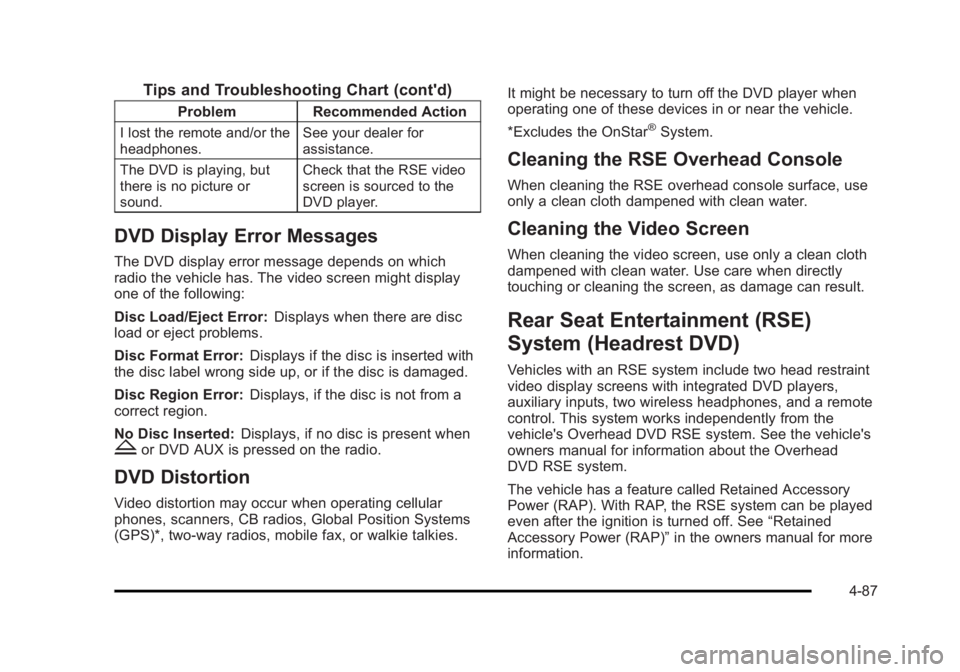
Tips and Troubleshooting Chart (cont'd) Problem Recommended Action
I lost the remote and/or the
headphones. See your dealer for
assistance.
The DVD is playing, but
there is no picture or
sound. Check that the RSE video
screen is sourced to the
DVD player.
DVD Display Error Messages The DVD display error message depends on which
radio the vehicle has. The video screen might display
one of the following:
Disc Load/Eject Error: Displays when there are disc
load or eject problems.
Disc Format Error: Displays if the disc is inserted with
the disc label wrong side up, or if the disc is damaged.
Disc Region Error: Displays, if the disc is not from a
correct region.
No Disc Inserted: Displays, if no disc is present when
Z or DVD AUX is pressed on the radio.
DVD Distortion Video distortion may occur when operating cellular
phones, scanners, CB radios, Global Position Systems
(GPS)*, two-way radios, mobile fax, or walkie talkies. It might be necessary to turn off the DVD player when
operating one of these devices in or near the vehicle.
*Excludes the OnStar ®
System.
Cleaning the RSE Overhead Console When cleaning the RSE overhead console surface, use
only a clean cloth dampened with clean water.
Cleaning the Video Screen When cleaning the video screen, use only a clean cloth
dampened with clean water. Use care when directly
touching or cleaning the screen, as damage can result.
Rear Seat Entertainment (RSE)
System (Headrest DVD) Vehicles with an RSE system include two head restraint
video display screens with integrated DVD players,
auxiliary inputs, two wireless headphones, and a remote
control. This system works independently from the
vehicle's Overhead DVD RSE system. See the vehicle's
owners manual for information about the Overhead
DVD RSE system.
The vehicle has a feature called Retained Accessory
Power (RAP). With RAP, the RSE system can be played
even after the ignition is turned off. See “ Retained
Accessory Power (RAP) ” in the owners manual for more
information.
4-87
Page 317 of 620
Black plate (15,1)Cadillac Escalade/Escalade ESV Owner Manual - 2010
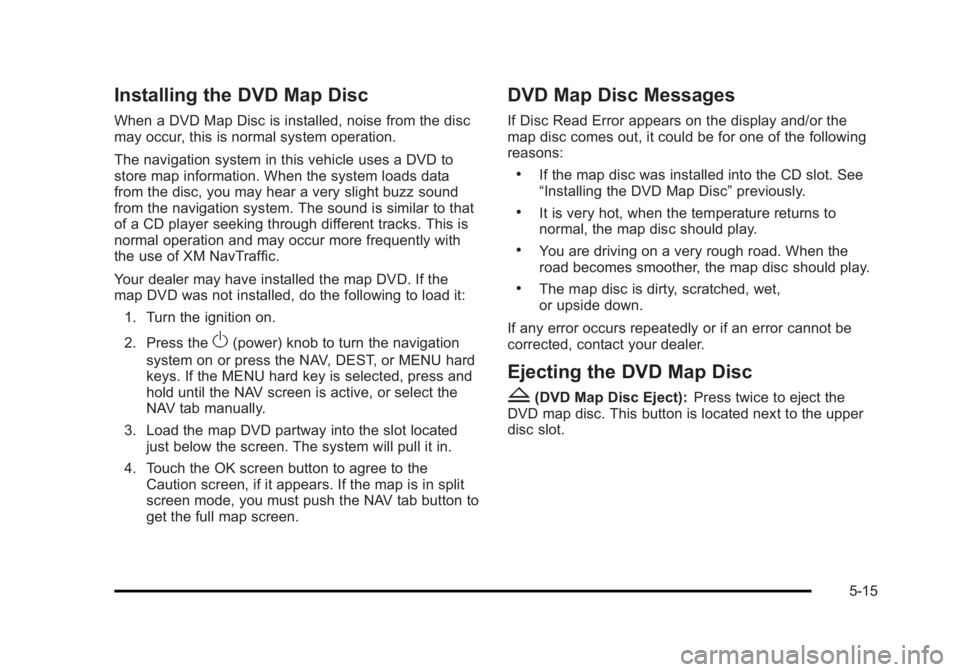
Installing the DVD Map Disc When a DVD Map Disc is installed, noise from the disc
may occur, this is normal system operation.
The navigation system in this vehicle uses a DVD to
store map information. When the system loads data
from the disc, you may hear a very slight buzz sound
from the navigation system. The sound is similar to that
of a CD player seeking through different tracks. This is
normal operation and may occur more frequently with
the use of XM NavTraffic.
Your dealer may have installed the map DVD. If the
map DVD was not installed, do the following to load it:
1. Turn the ignition on.
2. Press the
O (power) knob to turn the navigation
system on or press the NAV, DEST, or MENU hard
keys. If the MENU hard key is selected, press and
hold until the NAV screen is active, or select the
NAV tab manually.
3. Load the map DVD partway into the slot located
just below the screen. The system will pull it in.
4. Touch the OK screen button to agree to the
Caution screen, if it appears. If the map is in split
screen mode, you must push the NAV tab button to
get the full map screen. DVD Map Disc Messages If Disc Read Error appears on the display and/or the
map disc comes out, it could be for one of the following
reasons: .
If the map disc was installed into the CD slot. See
“ Installing the DVD Map Disc ” previously. .
It is very hot, when the temperature returns to
normal, the map disc should play. .
You are driving on a very rough road. When the
road becomes smoother, the map disc should play. .
The map disc is dirty, scratched, wet,
or upside down.
If any error occurs repeatedly or if an error cannot be
corrected, contact your dealer.
Ejecting the DVD Map Disc
Z (DVD Map Disc Eject): Press twice to eject the
DVD map disc. This button is located next to the upper
disc slot.
5-15
Page 370 of 620
Black plate (68,1)Cadillac Escalade/Escalade ESV Owner Manual - 2010
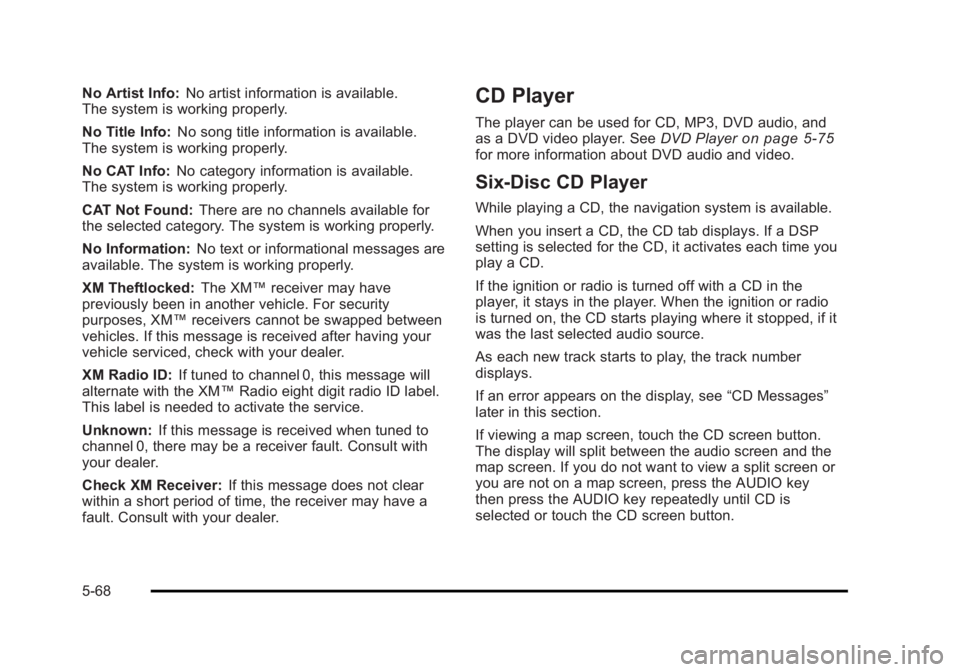
No Artist Info: No artist information is available.
The system is working properly.
No Title Info: No song title information is available.
The system is working properly.
No CAT Info: No category information is available.
The system is working properly.
CAT Not Found: There are no channels available for
the selected category. The system is working properly.
No Information: No text or informational messages are
available. The system is working properly.
XM Theftlocked: The XM ™ receiver may have
previously been in another vehicle. For security
purposes, XM ™ receivers cannot be swapped between
vehicles. If this message is received after having your
vehicle serviced, check with your dealer.
XM Radio ID: If tuned to channel 0, this message will
alternate with the XM ™ Radio eight digit radio ID label.
This label is needed to activate the service.
Unknown: If this message is received when tuned to
channel 0, there may be a receiver fault. Consult with
your dealer.
Check XM Receiver: If this message does not clear
within a short period of time, the receiver may have a
fault. Consult with your dealer. CD Player The player can be used for CD, MP3, DVD audio, and
as a DVD video player. See DVD Player on page 5 ‑ 75
for more information about DVD audio and video.
Six-Disc CD Player While playing a CD, the navigation system is available.
When you insert a CD, the CD tab displays. If a DSP
setting is selected for the CD, it activates each time you
play a CD.
If the ignition or radio is turned off with a CD in the
player, it stays in the player. When the ignition or radio
is turned on, the CD starts playing where it stopped, if it
was the last selected audio source.
As each new track starts to play, the track number
displays.
If an error appears on the display, see “ CD Messages ”
later in this section.
If viewing a map screen, touch the CD screen button.
The display will split between the audio screen and the
map screen. If you do not want to view a split screen or
you are not on a map screen, press the AUDIO key
then press the AUDIO key repeatedly until CD is
selected or touch the CD screen button.
5-68
Page 374 of 620
Black plate (72,1)Cadillac Escalade/Escalade ESV Owner Manual - 2010
Order of Play Play will begin from the first track under the root
directory. When all tracks from the root directory have
been played, play will continue from files according to
their numerical listing. After playing the last track from
the last folder, play will begin again at the first track of
the first folder or root directory.
When play enters a new folder, the display will not
automatically show the new folder name. The new track
name will appear on the display.
File System and Naming The song name that will display will be the song name
that is contained in the ID3 tag. If the song name is not
present in the ID3 tag, then the radio will display the file
name without the extension (such as .mp3) as the
track name.
Track names longer than 32 characters or four pages
will be shortened. The display will not show parts of
words on the last page of text and the extension of the
filename will not display.
Playing an MP3 While playing a CD, the navigation system is available.
When you insert a CD, the CD tab will display. If you
select a DSP setting for the CD, it will be activated each
time you play a CD. If you turn off the ignition or radio with a CD in the
player, it will stay in the player. When you turn on the
ignition or radio, the CD will start playing where it
stopped, if it was the last selected audio source.
As each new track starts to play, the track number will
appear on the display.
If an error appears on the display, see “ CD Messages ”
later in this section.
If viewing a map screen, touch the CD screen button.
The display will split between the audio screen and the
map screen. If you do not want to view a split screen or
you are not on a map screen, press the AUDIO key
then press the AUDIO key repeatedly until CD is
selected or touch the CD screen button.
M (Load): To load one disc, do the following:
1. Press the load hard key and follow the screen
message displayed.
2. When the system displays “ Insert Disc (number) ” ,
insert the disc partway into the slot, label side up.
The system will pull it into the first available slot
and start playing. The system will display the type
of disc inserted.
5-72
Page 388 of 620
Black plate (86,1)Cadillac Escalade/Escalade ESV Owner Manual - 2010
3. For the second row display select the Rear AUX
screen button next to Rear Display 1 and for the
third row display select the Rear AUX screen
button next to Rear Display 2. Each screen works
independently of the other. The second row screen
can watch a DVD while the third row screen can
use the auxiliary device.
The rear seat passengers can also use the remote
control to change the functions of the RSE. See Rear
Seat Entertainment (RSE) System (Overhead)
on
page 4 ‑ 78 or Rear Seat Entertainment (RSE) System
(Headrest DVD) on page 4 ‑ 87 for more information.
Voice Recognition The navigation system's voice recognition allows for
hands-free operation of the navigation system, audio
system, and OnStar ®
features. The DVD map disc
must be installed in the navigation system for voice
recognition to work. See “ Installing the DVD Map Disc ”
under Maps
on page 5 ‑ 14 for more information.
Voice recognition can be used when the ignition is on or
when Retained Accessory Power (RAP) is active. See
“ Retained Accessory Power (RAP) ” in the Index of your
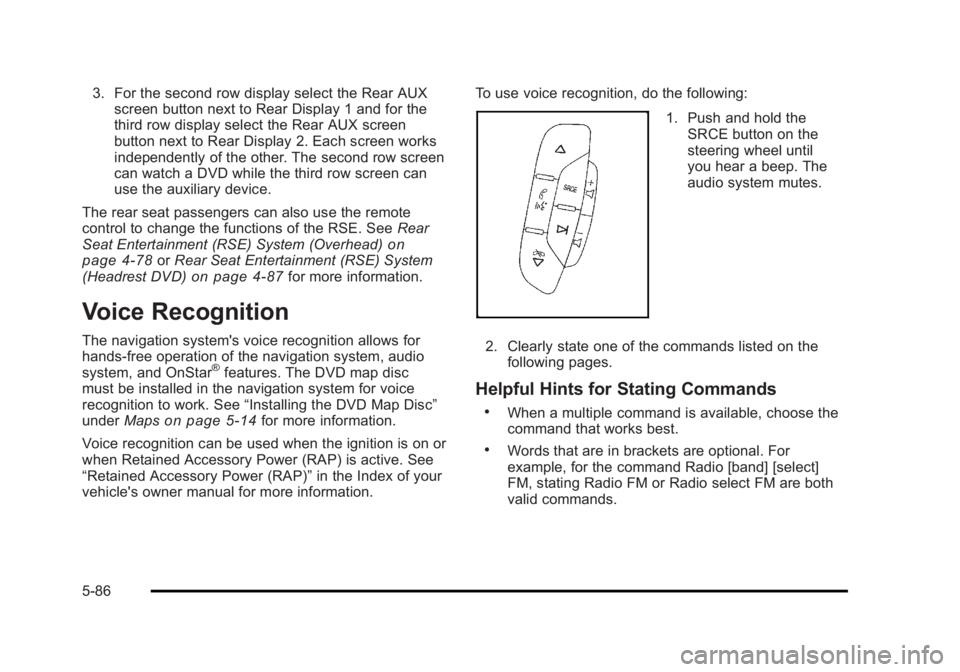
vehicle's owner manual for more information. To use voice recognition, do the following:
1. Push and hold the
SRCE button on the
steering wheel until
you hear a beep. The
audio system mutes.
2. Clearly state one of the commands listed on the
following pages.
Helpful Hints for Stating Commands .
When a multiple command is available, choose the
command that works best. .
Words that are in brackets are optional. For
example, for the command Radio [band] [select]
FM, stating Radio FM or Radio select FM are both
valid commands.
5-86
Page 397 of 620

Black plate (5,1)Cadillac Escalade/Escalade ESV Owner Manual - 2010
Antilock Brake System (ABS) This vehicle has the Antilock Brake System (ABS), an
advanced electronic braking system that helps prevent
a braking skid.
When the engine is started and the vehicle begins to
drive away, ABS checks itself. A momentary motor or
clicking noise might be heard while this test is going on.
This is normal.
If there is a problem with
ABS, this warning light
stays on. See Antilock
Brake System (ABS)
Warning Light on
page 4 ‑ 34 .
Along with ABS, the vehicle has a Dynamic Rear
Proportioning (DRP) system. If there is a DRP problem,
both the brake and ABS warning lights come on
accompanied by a 10 ‐ second chime. The lights and
chime will come on each time the ignition is turned on
until the problem is repaired. See your dealer for
service. Let us say the road is wet and you are driving safely.
Suddenly, an animal jumps out in front of you. You slam
on the brakes and continue braking. Here is what
happens with ABS:
A computer senses that the wheels are slowing down.
If one of the wheels is about to stop rolling, the
computer will separately work the brakes at each front
wheel and at both rear wheels.
ABS can change the brake pressure to each wheel, as
required, faster than any driver could. This can help the
driver steer around the obstacle while braking hard.
As the brakes are applied, the computer keeps
receiving updates on wheel speed and controls braking
pressure accordingly.
Remember: ABS does not change the time needed to
get a foot up to the brake pedal or always decrease
stopping distance. If you get too close to the vehicle in
front of you, there will not be enough time to apply the
brakes if that vehicle suddenly slows or stops. Always
leave enough room up ahead to stop, even with ABS.
6-5
Page 416 of 620

Black plate (24,1)Cadillac Escalade/Escalade ESV Owner Manual - 2010
Driving in Water
{ WARNING: Driving through rushing water can be dangerous.
Deep water can sweep your vehicle downstream
and you and your passengers could drown. If it is
only shallow water, it can still wash away the
ground from under your tires, and you could lose
traction and roll the vehicle over. Do not drive
through rushing water.
Heavy rain can mean flash flooding, and flood waters
demand extreme caution.
Find out how deep the water is before driving through it.
Do not try it if it is deep enough to cover the wheel
hubs, axles, or exhaust pipe — you probably will not get
through. Deep water can damage the axle and other
vehicle parts.
If the water is not too deep, drive slowly through it. At
faster speeds, water splashes on the ignition system
and the vehicle can stall. Stalling can also occur if you
get the tailpipe under water. If the tailpipe is under
water, you will never be able to start the engine. When
going through water, remember that when the brakes
get wet, it might take longer to stop. See Driving in Rain
and on Wet Roads on page 6 ‑ 25 . After Off-Road Driving Remove any brush or debris that has collected
on the underbody, chassis, or under the hood.
These accumulations can be a fire hazard.
After operation in mud or sand, have the brake linings
cleaned and checked. These substances can cause
glazing and uneven braking. Check the body structure,
steering, suspension, wheels, tires, and exhaust system
for damage and check the fuel lines and cooling system
for any leakage.
The vehicle requires more frequent service due to
off-road use. Refer to the Maintenance Schedule for
additional information.
Driving at Night Night driving is more dangerous than day driving
because some drivers are likely to be impaired — by
alcohol or drugs, with night vision problems, or by
fatigue.
Night driving tips include: .
Drive defensively. .
Do not drink and drive. .
Reduce headlamp glare by adjusting the inside
rearview mirror.
6-24
Page 419 of 620

Black plate (27,1)Cadillac Escalade/Escalade ESV Owner Manual - 2010
Hill and Mountain Roads Driving on steep hills or through mountains is different
than driving on flat or rolling terrain. Tips for driving in
these conditions include: .
Keep the vehicle serviced and in good shape. .
Check all fluid levels and brakes, tires, cooling
system, and transmission. .
Going down steep or long hills, shift to a
lower gear.
{ WARNING: If you do not shift down, the brakes could get so
hot that they would not work well. You would then
have poor braking or even none going down a hill.
You could crash. Shift down to let the engine
assist the brakes on a steep downhill slope. { WARNING: Coasting downhill in N (Neutral) or with the
ignition off is dangerous. The brakes will have to
do all the work of slowing down and they could
get so hot that they would not work well. You
would then have poor braking or even none going
down a hill. You could crash. Always have the
engine running and the vehicle in gear when
going downhill. .
Stay in your own lane. Do not swing wide or cut
across the center of the road. Drive at speeds that
let you stay in your own lane. .
Top of hills: Be alert — something could be in your
lane (stalled car, accident). .
Pay attention to special road signs (falling rocks
area, winding roads, long grades, passing or
no-passing zones) and take appropriate action.
See Off-Road Driving
on page 6 ‑ 13 for information
about driving off-road.
6-27