mirror CADILLAC ESCALADE EXT 2008 3.G Owners Manual
[x] Cancel search | Manufacturer: CADILLAC, Model Year: 2008, Model line: ESCALADE EXT, Model: CADILLAC ESCALADE EXT 2008 3.GPages: 496, PDF Size: 7.02 MB
Page 1 of 496
Seats and Restraint Systems........................... 1-1
Front Seats
............................................... 1-2
Rear Seats
..............................................1-10
Safety Belts
.............................................1-12
Child Restraints
.......................................1-32
Airbag System
.........................................1-56
Restraint System Check
............................1-72
Features and Controls..................................... 2-1
Keys
........................................................ 2-3
Doors and Locks
......................................2-10
Windows
.................................................2-24
Theft-Deterrent Systems
............................2-26
Starting and Operating Your Vehicle
...........2-30
Mirrors
....................................................2-46
Object Detection Systems
..........................2-54
OnStar
®System
......................................2-56
Universal Home Remote System
................2-60
Storage Areas
.........................................2-67
Sunroof
..................................................2-87
Instrument Panel............................................. 3-1
Instrument Panel Overview
.......................... 3-4
Climate Controls
......................................3-24
Warning Lights, Gages, and Indicators
........3-29
Driver Information Center (DIC)
..................3-45
Audio System(s)
.......................................3-66Driving Your Vehicle....................................... 4-1
Your Driving, the Road, and Your Vehicle
..... 4-2
Towing
...................................................4-42
Service and Appearance Care.......................... 5-1
Service
..................................................... 5-3
Fuel
......................................................... 5-5
Checking Things Under the Hood
...............5-10
All-Wheel Drive
........................................5-45
Rear Axle
...............................................5-46
Front Axle
...............................................5-47
Headlamp Aiming
.....................................5-48
Bulb Replacement
....................................5-51
Windshield Wiper Blade Replacement
.........5-53
Tires
......................................................5-54
Appearance Care
.....................................5-97
Vehicle Identication
...............................5-106
Electrical System
....................................5-107
Capacities and Specications
...................5-115
Maintenance Schedule..................................... 6-1
Maintenance Schedule
................................ 6-2
Customer Assistance Information.................... 7-1
Customer Assistance and Information
........... 7-2
Reporting Safety Defects
...........................7-14
Vehicle Data Recording and Privacy
...........7-16
Index................................................................ 1
2008 Cadillac Escalade EXT Owner ManualM
Page 5 of 496
Front Seats......................................................1-2
Power Seats..................................................1-2
Power Lumbar...............................................1-3
Heated Seats.................................................1-4
Heated and Cooled Seats................................1-5
Memory Seat, Mirrors, and Pedals....................1-6
Power Reclining Seatbacks..............................1-8
Head Restraints.............................................1-9
Rear Seats.....................................................1-10
Rear Seat Operation.....................................1-10
Safety Belts...................................................1-12
Safety Belts: They Are for Everyone................1-12
How to Wear Safety Belts Properly.................1-17
Lap-Shoulder Belt.........................................1-26
Safety Belt Use During Pregnancy..................1-31
Safety Belt Extender.....................................1-32
Child Restraints.............................................1-32
Older Children..............................................1-32
Infants and Young Children............................1-35
Child Restraint Systems.................................1-39
Where to Put the Restraint.............................1-42Lower Anchors and Tethers for
Children (LATCH)......................................1-43
Securing a Child Restraint in a
Rear Seat Position....................................1-50
Securing a Child Restraint in the
Right Front Seat Position............................1-53
Airbag System...............................................1-56
Where Are the Airbags?................................1-59
When Should an Airbag Inate?.....................1-61
What Makes an Airbag Inate?.......................1-63
How Does an Airbag Restrain?.......................1-63
What Will You See After an
Airbag Inates?.........................................1-64
Passenger Sensing System............................1-65
Servicing Your Airbag-Equipped Vehicle...........1-70
Adding Equipment to Your
Airbag-Equipped Vehicle.............................1-70
Restraint System Check..................................1-72
Checking the Restraint Systems......................1-72
Replacing Restraint System Parts
After a Crash............................................1-73
Section 1 Seats and Restraint Systems
1-1
Page 6 of 496

Front Seats
Power Seats
The power seat controls are located on the outboard
side of the front seats.
Move the seat forward or rearward by sliding the
control forward or rearward.
Raise or lower the front part of the seat cushion
by moving the front of the control up or down.
Raise or lower the rear part of the seat cushion
by moving the rear of the control up or down.
Raise or lower the entire seat by moving the
entire control up or down.
The power reclining seatback control is located behind
the power seat control on the outboard side of the
seats. SeePower Reclining Seatbacks on page 1-8.
Your vehicle has a memory function which allows
seat settings to be saved and recalled. SeeMemory
Seat, Mirrors, and Pedals on page 1-6.
Driver’s Seat with Power Seat Control,
Power Recline, and Power Lumbar shown
1-2
Page 7 of 496
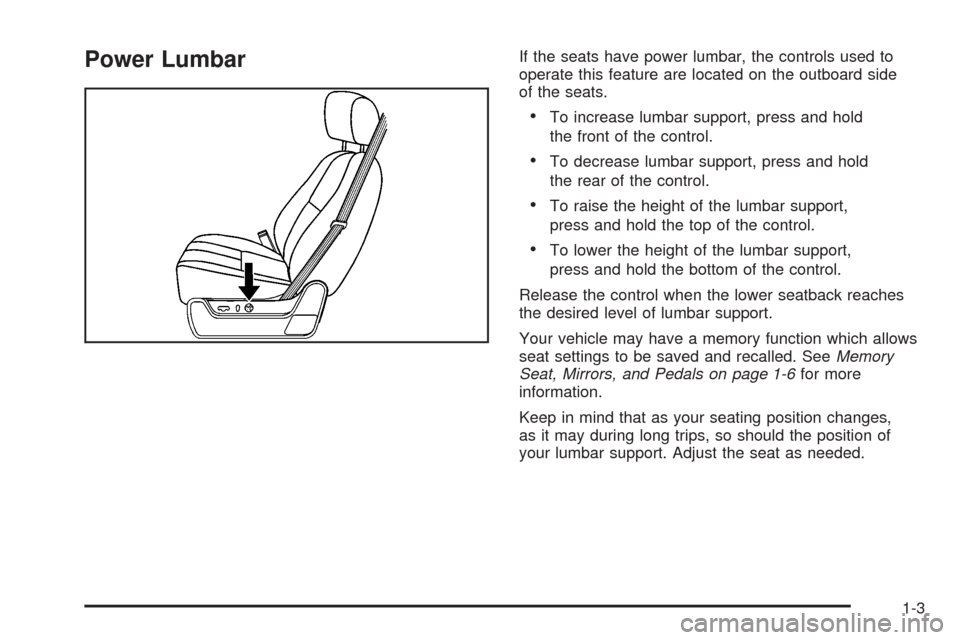
Power LumbarIf the seats have power lumbar, the controls used to
operate this feature are located on the outboard side
of the seats.
To increase lumbar support, press and hold
the front of the control.
To decrease lumbar support, press and hold
the rear of the control.
To raise the height of the lumbar support,
press and hold the top of the control.
To lower the height of the lumbar support,
press and hold the bottom of the control.
Release the control when the lower seatback reaches
the desired level of lumbar support.
Your vehicle may have a memory function which allows
seat settings to be saved and recalled. SeeMemory
Seat, Mirrors, and Pedals on page 1-6for more
information.
Keep in mind that as your seating position changes,
as it may during long trips, so should the position of
your lumbar support. Adjust the seat as needed.
1-3
Page 10 of 496
Memory Seat, Mirrors, and Pedals
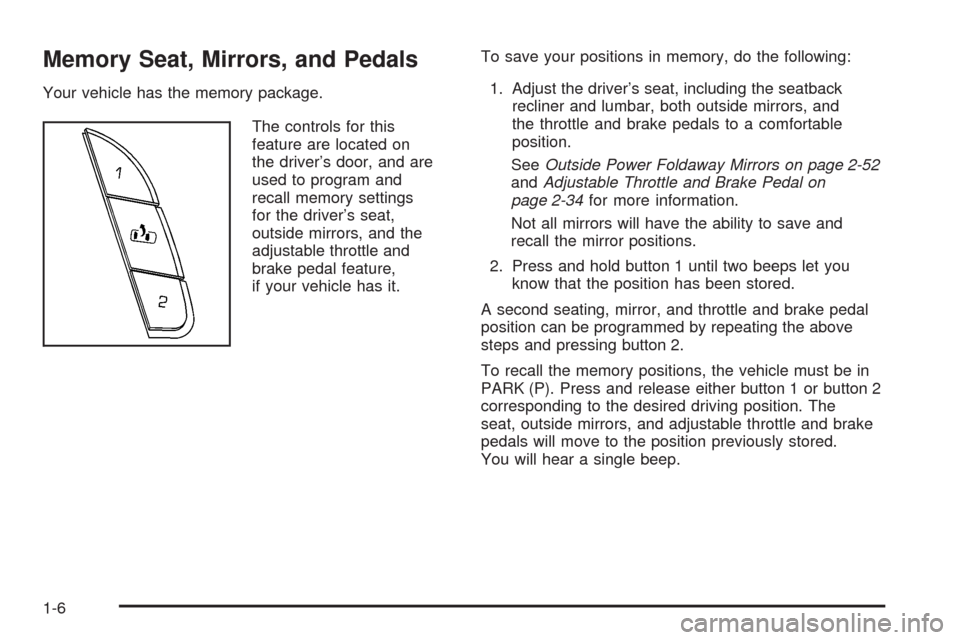
Your vehicle has the memory package.
The controls for this
feature are located on
the driver’s door, and are
used to program and
recall memory settings
for the driver’s seat,
outside mirrors, and the
adjustable throttle and
brake pedal feature,
if your vehicle has it.To save your positions in memory, do the following:
1. Adjust the driver’s seat, including the seatback
recliner and lumbar, both outside mirrors, and
the throttle and brake pedals to a comfortable
position.
SeeOutside Power Foldaway Mirrors on page 2-52
andAdjustable Throttle and Brake Pedal on
page 2-34for more information.
Not all mirrors will have the ability to save and
recall the mirror positions.
2. Press and hold button 1 until two beeps let you
know that the position has been stored.
A second seating, mirror, and throttle and brake pedal
position can be programmed by repeating the above
steps and pressing button 2.
To recall the memory positions, the vehicle must be in
PARK (P). Press and release either button 1 or button 2
corresponding to the desired driving position. The
seat, outside mirrors, and adjustable throttle and brake
pedals will move to the position previously stored.
You will hear a single beep.
1-6
Page 11 of 496
If you use the remote keyless entry transmitter to enter
your vehicle and the remote recall memory feature
is on, automatic seat, mirror, and adjustable pedal
movement will occur. See “MEMORY SEAT RECALL”
underDIC Vehicle Customization on page 3-57for
more information.
To stop recall movement of the memory feature at
any time, press one of the power seat controls,
memory buttons, power mirror buttons, or adjustable
pedal switch.
If something has blocked the driver’s seat and/or the
adjustable pedals while recalling a memory position,
the driver’s seat and/or the adjustable pedals recall
may stop working. If this happens, remove the
obstruction and press the appropriate function control
for two seconds. Then try recalling the memory
position again by pressing the appropriate memory
button. If the memory position is still not recalling,
see your dealer for service.Easy Exit Seat
The control for this feature is located on the driver’s
door between buttons 1 and 2.
With the vehicle in PARK (P), the exit position can
be recalled by pressing the exit button. You will hear
a single beep. The driver’s seat will move back.
If the easy exit seat feature is on in the Driver
Information Center (DIC), automatic seat movement
will occur when the key is removed from the ignition.
See “EASY EXIT SEAT” underDIC Vehicle
Customization on page 3-57for more information.
Further programming for the memory seat feature
can be done using the DIC. You can select the
automatic easy exit seat feature or the remote
memory seat recall feature.
For programming information, seeDIC Vehicle
Customization on page 3-57.
1-7
Page 13 of 496
{CAUTION:
Sitting in a reclined position when your vehicle
is in motion can be dangerous. Even if you
buckle up, your safety belts cannot do their
job when you are reclined like this.
The shoulder belt cannot do its job. In a crash,
you could go into it, receiving neck or other
injuries.
The lap belt cannot do its job either. In a crash
the belt could go up over your abdomen.
The belt forces would be there, not at your
pelvic bones. This could cause serious
internal injuries.
For proper protection when the vehicle is in
motion, have the seatback upright. Then sit
well back in the seat and wear your safety
belt properly.
Do not have a seatback reclined if your vehicle is moving.
Your vehicle has a memory function which allows
seat settings to be saved and recalled. SeeMemory
Seat, Mirrors, and Pedals on page 1-6.
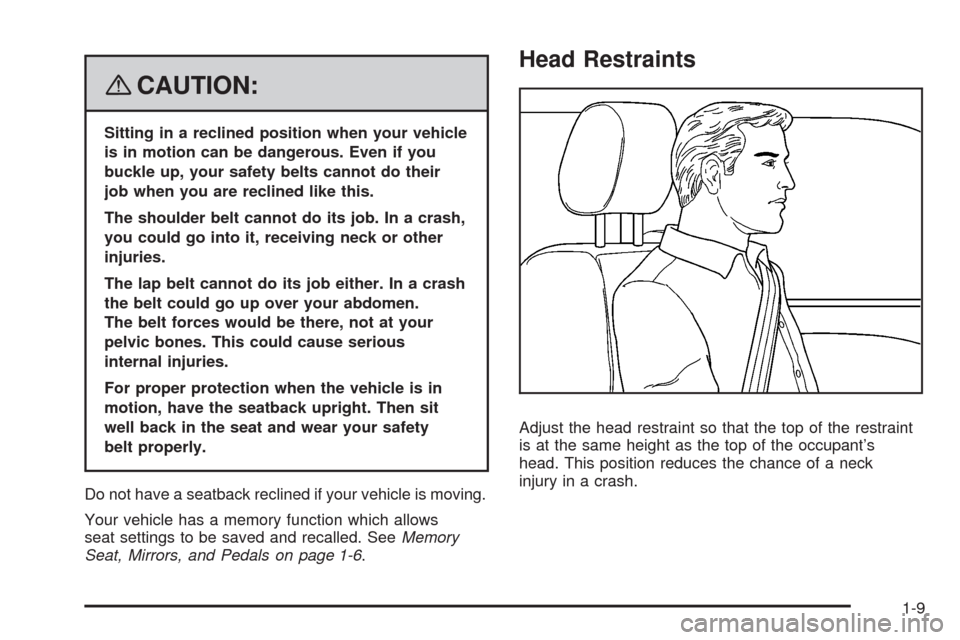
Head Restraints
Adjust the head restraint so that the top of the restraint
is at the same height as the top of the occupant’s
head. This position reduces the chance of a neck
injury in a crash.
1-9
Page 80 of 496
Mirrors...........................................................2-46
Automatic Dimming Rearview Mirror
with Intellibeam
®, OnStar®, Compass,
and Temperature Display............................2-46
Automatic Dimming Rearview Mirror
with OnStar
®, Compass and
Temperature Display..................................2-48
Outside Power Foldaway Mirrors.....................2-52
Object Detection Systems...............................2-54
Ultrasonic Rear Parking Assist (URPA)............2-54
OnStar
®System.............................................2-56
Universal Home Remote System......................2-60
Universal Home Remote System Operation
(With Three Round LED)............................2-60Storage Areas................................................2-67
Glove Box...................................................2-67
Cupholder(s)................................................2-67
Instrument Panel Storage...............................2-67
Center Console Storage.................................2-67
Luggage Carrier...........................................2-68
Rear Seat Armrest........................................2-69
Cargo Cover Panels......................................2-69
All-Weather Cargo Area.................................2-82
Top-Box Storage..........................................2-86
Sunroof.........................................................2-87
Section 2 Features and Controls
2-2
Page 104 of 496
Express-Down Windows
Windows with an express-down feature allow the
windows to be lowered without holding the switch.
Press down fully on the window switch, then release,
to activate the express-down mode. The express-down
mode can be canceled at any time by pulling up on
the front edge of the switch.
Window Lockout
o
(Window Lockout):The window lockout switch
is located with the power window switches on the
driver’s door armrest. This feature prevents the rear
passenger windows from operating, except from
the driver’s position. Press the switch to turn the
lockout feature on or off. An indicator light will come
on to show the lockout feature is on.
Sun Visors
Sun Visors with Slide Rod
Your vehicle may have this feature. Pull the sun visor
down to block glare. Detach the sun visor from the
center mount and slide it along the rod from side-to-side
to cover the driver or passenger side of the front
window. Swing the sun visor to the side to cover the
side window. It can also be moved along the rod from
side-to-side in this position.
Sun Visors with Fixed Rod and
Pull-out Extension
Your vehicle may have this feature. Pull the sun visor
down to block glare. Pull the sun visor extender out
for additional coverage. Detach the sun visor from
the center mount and swing it to the side to cover
the side window.
Lighted Visor Vanity Mirror
Your vehicle has lighted visor vanity mirrors on both
the driver’s and passenger’s sun visors. Pull the
sun visor down and lift the mirror cover to turn the
lamps on.
Theft-Deterrent Systems
Vehicle theft is big business, especially in some cities.
Although your vehicle has a number of theft-deterrent
features, we know that nothing we put on it can make
it impossible to steal.
Content Theft-Deterrent
Your vehicle has a content theft-deterrent alarm system.
2-26
Page 112 of 496
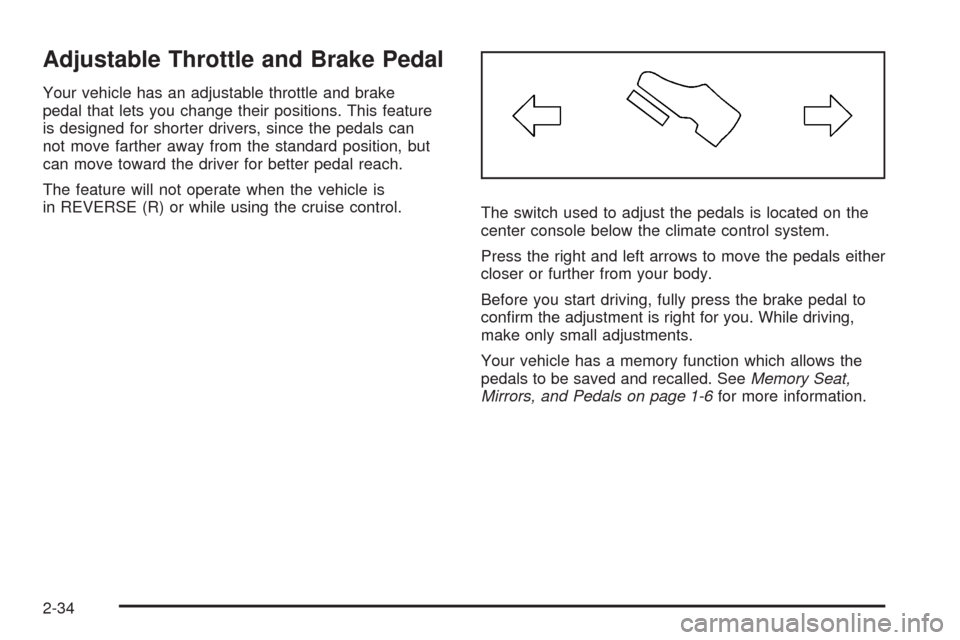
Adjustable Throttle and Brake Pedal
Your vehicle has an adjustable throttle and brake
pedal that lets you change their positions. This feature
is designed for shorter drivers, since the pedals can
not move farther away from the standard position, but
can move toward the driver for better pedal reach.
The feature will not operate when the vehicle is
in REVERSE (R) or while using the cruise control.
The switch used to adjust the pedals is located on the
center console below the climate control system.
Press the right and left arrows to move the pedals either
closer or further from your body.
Before you start driving, fully press the brake pedal to
conrm the adjustment is right for you. While driving,
make only small adjustments.
Your vehicle has a memory function which allows the
pedals to be saved and recalled. SeeMemory Seat,
Mirrors, and Pedals on page 1-6for more information.
2-34