light CADILLAC SEVILLE 2003 5.G User Guide
[x] Cancel search | Manufacturer: CADILLAC, Model Year: 2003, Model line: SEVILLE, Model: CADILLAC SEVILLE 2003 5.GPages: 408, PDF Size: 2.72 MB
Page 79 of 408

Theft-Deterrent Systems
Vehicle theft is a big business, especially in some cities.
Although your vehicle has a number of theft-deterrent
features, we know that nothing we put on it can make it
impossible to steal.
The SECURITY light is
located on the instrument
panel cluster.
If the ignition is off and any door is open, the SECURITY
light will ¯ash, reminding you to arm the system.
To arm the system, do the following:
1. Open the door.
2. Lock the door using the power door lock switch with
the door open or the remote keyless entry
transmitter. The SECURITY light should come on
and stay on.
3. Close all the doors. The SECURITY light should go
off within approximately 30 seconds.If a door or a trunk is opened without a key or a remote
keyless entry transmitter, the horn will sound and the
lamps will ¯ash for about 30 seconds.
Remember, the theft-deterrent system won't arm if you
lock the doors with a key or use the manual door
lock. It activates only if you use a power door lock with
the door open or the remote keyless entry transmitter.
To avoid activating the alarm by accident do the
following:
·The vehicle should be locked with the door key or
the manual door lock after the doors are closed if
you don't want to arm the theft-deterrent system.
·Always unlock a door with a key or use the remote
keyless entry transmitter. Pressing the unlock
button on the remote keyless entry transmitter
disables the theft-deterrent system. Unlocking a
door any other way will activate the alarm when a
door or the trunk is opened.
If you activate the alarm by accident, unlock the driver's
door with your key. You can also turn off the alarm
by using the unlock button on the remote keyless entry
transmitter, or by starting the car with a valid key.
Changes or modi®cations made to this system by other
than an authorized service facility could void
authorization to use the theft system.
2-19
Page 80 of 408
Testing the Alarm
1. From inside the vehicle, roll down the window, then
get out of the vehicle, keeping the door open.
2. From outside of the vehicle, with the door open,
lock the vehicle using the power door lock or the
remote keyless entry transmitter and close the
door. Wait 30 seconds until the SECURITY lamp
goes off.
3. Reach in and unlock the door using the manual
lock and open the door. The horn will sound and
the hazard lights will ¯ash.
You can turn off the alarm by unlocking the driver's door
with your key, using the unlock button on the remote
keyless entry transmitter or by starting the car with
a valid key.
If the alarm does not sound when it should, check to
see if the horn works. The horn fuse may be blown. To
replace the fuse, see
Fuses and Circuit Breakers on
page 5-93. If the fuse does not need to be replaced, you
may need to have your vehicle serviced.
To reduce the possibility of theft, always arm the
theft-deterrent system when leaving your vehicle.
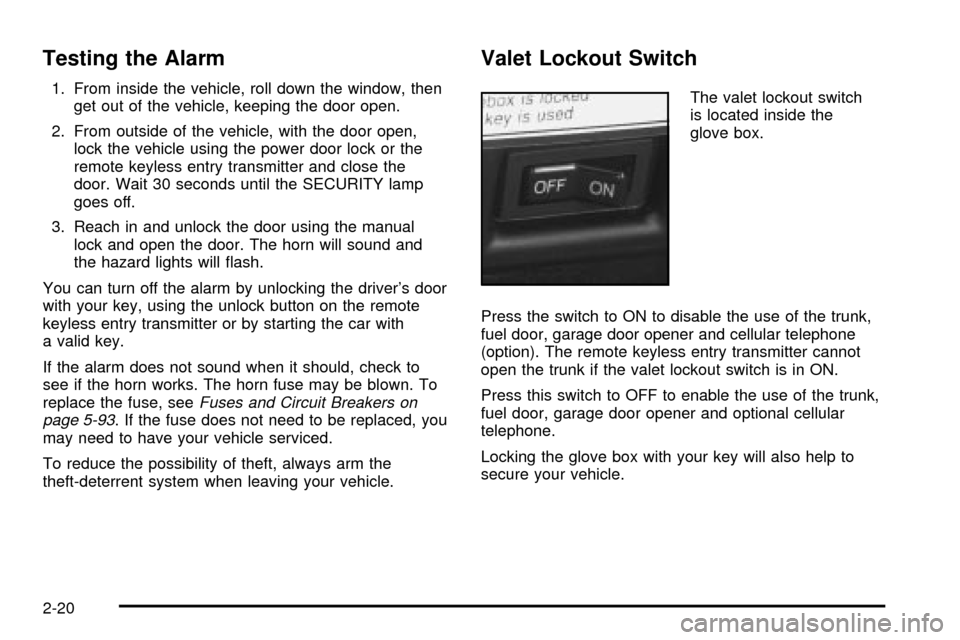
Valet Lockout Switch
The valet lockout switch
is located inside the
glove box.
Press the switch to ON to disable the use of the trunk,
fuel door, garage door opener and cellular telephone
(option). The remote keyless entry transmitter cannot
open the trunk if the valet lockout switch is in ON.
Press this switch to OFF to enable the use of the trunk,
fuel door, garage door opener and optional cellular
telephone.
Locking the glove box with your key will also help to
secure your vehicle.
2-20
Page 82 of 408

When trying to start the
vehicle, if the engine does
not start and the
SECURITY light comes on,
the key may have a
damaged transponder.
Turn the ignition off and
try again.
If the engine does not start, and the key appears to be
undamaged, try another ignition key. At this time,
you may also want to check the fuse. See
Fuses and
Circuit Breakers on page 5-93. If the engine still
does not start with the other key, your vehicle needs
service. If your vehicle does start, the ®rst key may be
faulty. See your dealer who can service the PASS-Key
ž
III to have a new key made.It is possible for the PASS-Key
žIII decoder to learn the
transponder value of a new or replacement key. Up
to 10 additional keys may be programmed for the
vehicle. This procedure is for learning additional
keys only.
Canadian Owners:If you lose or damage your keys,
only a GM dealer can service PASS-Key
žIII to
have new keys made. To program additional keys you
will require two current driver's keys (black in color). You
must add a step to the following procedure. After
Step 2, repeat Steps 1 and 2 with the second current
driver's key. Then continue with Step 3.
To program the new key do the following:
1. Verify that the new key has PK3 stamped on it.
2. Insert the current driver's key in the ignition
and start the engine. If the engine will not start see
your dealer for service.
3. After the engine has started, turn the key to OFF,
and remove the key.
4. Insert the key to be programmed and turn it to ON
within 10 seconds of removing the previous key.
2-22
Page 83 of 408

5. The SECURITY light will turn off once the key has
been programmed. It may not be apparent that the
SECURITY light went on due to how quickly the
key is programmed.
6. Repeat the Steps 1 through 4 if additional keys are
to be programmed.
If you are ever driving and the SECURITY light comes
on and stays on, you will be able to restart your
engine if you turn it off. Your PASS- Key
žIII system,
however, is not working properly and must be serviced
by your dealer. Your vehicle is not protected by the
PASS-Key
žIII system at this time.
If you lose or damage a PASS-Key
žIII key, contact
your dealer to have a new key made.
In an emergency, contact Cadillac Roadside Assistance.
See
Roadside Service on page 7-6.
Starting and Operating Your
Vehicle
New Vehicle Break-In
Notice:Your vehicle doesn't need an elaborate
ªbreak-in.º But it will perform better in the long run
if you follow these guidelines:
·Don't drive at any one speed Ð fast or
slow Ð for the ®rst 500 miles (805 km). Don't
make full-throttle starts.
·Avoid making hard stops for the ®rst 200 miles
(322 km) or so. During this time your new
brake linings aren't yet broken in. Hard stops
with new linings can mean premature wear and
earlier replacement. Follow this breaking-in
guideline every time you get new brake linings.
·Don't tow a trailer during break-in. See ªTowing
a Trailerº in the Index for more information.
2-23
Page 90 of 408

THIRD (3):This position is also used for normal driving,
however, it offers more power and lower fuel economy
than AUTOMATIC OVERDRIVE (
X).
Here are examples for using THIRD (3) instead of
AUTOMATIC OVERDRIVE (
X):
·When driving on hilly, winding roads.
·When going down a steep hill.
SECOND (2):This position gives you more power. You
can use SECOND (2) on hills. It can help control
your speed as you go down steep mountain roads, but
then you would also want to use your brakes off
and on.
Notice:Don't shift into SECOND (2) unless you are
going slower than 65 mph (105 km/h), or you can
damage your engine.
FIRST (1):This position gives you even more power
than SECOND (2). You can use it on very steep hills, or
in deep snow or mud.
If the traction control switch is off, your vehicle will not
go into FIRST (1) gear and the vehicle will accelerate
from stop more slowly. This can help in deep snow
or mud conditions. When the traction control is turned
off, a message will light up on the Driver Information
Center (DIC).
Notice:If your front wheels won't turn, don't try to
drive. This might happen if you were stuck in
very deep sand or mud or were up against a solid
object. You could damage your transaxle. Also,
if you stop when going uphill, don't hold your
vehicle there with only the accelerator pedal. This
could overheat and damage the transaxle. Use your
brakes to hold your vehicle in position on a hill.
Performance Shift Display (STS Only)
When your vehicle detects a change in driving
conditions, it will automatically initiate the appropriate
performance shift mode. When this occurs, the
gear display on the instrument panel cluster will change
to indicate that the transaxle has shifted to a different
gear. For example, the gear display on the cluster may
indicate D, 3, 2, or 1 even though the gearshift lever
is still in AUTOMATIC OVERDRIVE (
X). Once
the performance shift mode ends, the gear display on
the instrument panel cluster will return to normal.
2-30
Page 91 of 408
Parking Brake
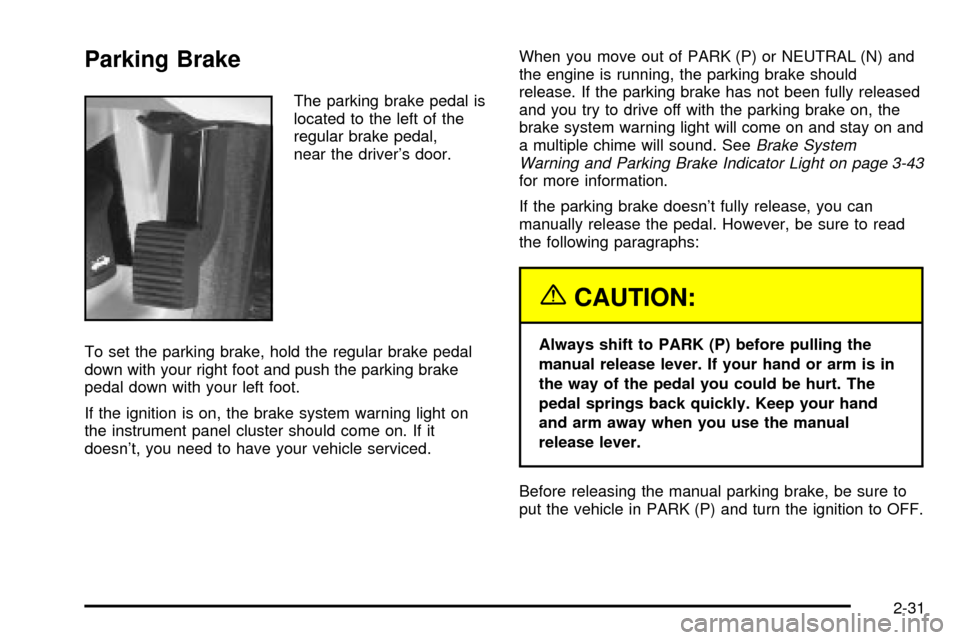
The parking brake pedal is
located to the left of the
regular brake pedal,
near the driver's door.
To set the parking brake, hold the regular brake pedal
down with your right foot and push the parking brake
pedal down with your left foot.
If the ignition is on, the brake system warning light on
the instrument panel cluster should come on. If it
doesn't, you need to have your vehicle serviced.When you move out of PARK (P) or NEUTRAL (N) and
the engine is running, the parking brake should
release. If the parking brake has not been fully released
and you try to drive off with the parking brake on, the
brake system warning light will come on and stay on and
a multiple chime will sound. See
Brake System
Warning and Parking Brake Indicator Light on page 3-43
for more information.
If the parking brake doesn't fully release, you can
manually release the pedal. However, be sure to read
the following paragraphs:
{CAUTION:
Always shift to PARK (P) before pulling the
manual release lever. If your hand or arm is in
the way of the pedal you could be hurt. The
pedal springs back quickly. Keep your hand
and arm away when you use the manual
release lever.
Before releasing the manual parking brake, be sure to
put the vehicle in PARK (P) and turn the ignition to OFF.
2-31
Page 97 of 408

Mirrors
Automatic Dimming Rearview Mirror
with OnStar
ž
Your vehicle may have an automatic dimming rearview
mirror with OnStaržsystem controls. For more
information about OnStarž, seeOnStaržSystem on
page 2-42.
When the automatic dimming feature is turned on, the
mirror automatically changes to reduce glare from
headlamps behind you. A photocell on the mirror senses
when it is becoming dark outside. Another photocell
built into the mirror face senses when headlamps
are behind you.
At night, when the glare is too bright, the mirror will
gradually darken to reduce glare. This change may take
a few seconds. The mirror will return to its clear,
daytime state when the glare is reduced.
Mirror Operation
O
(On/Off):This is the on/off button, located on the
lower left side of the mirror face.
To turn the automatic dimming feature on or off, press
the on/off button. The indicator light will be illuminated
when the automatic dimming feature is on.
Cleaning the Mirror
When cleaning the mirror, use a paper towel or similar
material dampened with glass cleaner. Do not spray
glass cleaner directly on the mirror as that may cause
the liquid cleaner to enter the mirror housing.
2-37
Page 98 of 408

Automatic Dimming Rearview Mirror
with OnStar
žand Compass
Your vehicle may have an automatic dimming rearview
mirror with a compass display. The mirror also
contains OnStar
žcontrols. For more information seeOnStaržSystem on page 2-42.
The automatic dimming feature functions the same as
that of the automatic dimming rearview mirror without a
compass. See
Automatic Dimming Rearview Mirror
with OnStaržon page 2-37.
The mirror also includes an eight-point compass display
in the upper right corner of the mirror face. When on,
the compass automatically calibrates as the vehicle
is driven.
Mirror Operation
O
(On/Off):The on/off button is located on the lower
left side of the mirror face for the automatic dimming and
compass functions of the rearview mirror.
To turn on the automatic dimming feature, press and
hold the on/off button for about three seconds. To turn
off automatic dimming, press and hold the on/off
button for about three seconds again. The indicator light
will illuminate when this feature is active. The automatic
dimming feature is active each time the vehicle is
started.
Compass Operation
Press the on/off button once to turn the compass
on or off.
When the ignition and the compass feature are on, the
compass will show two character boxes for about
two seconds. After two seconds, the mirror will display
the compass heading.
Compass Calibration
If after two seconds, the display does not show a
compass heading (for example, N for North), there may
be a strong magnetic ®eld interfering with the compass.
Such interference may be caused by a magnetic
antenna mount, magnetic note pad holder or a similar
magnetic item. If the letter C should ever appear in
the compass window, the compass may need
calibration.
The mirror can be calibrated by driving the vehicle in
circles at 5 mph (8 km/h) or less until the display reads a
direction.
The compass can be placed in calibration mode
manually by pressing and holding the on/off button until
a C is shown in the compass display.
2-38
Page 104 of 408
HomeLinkžTransmitter
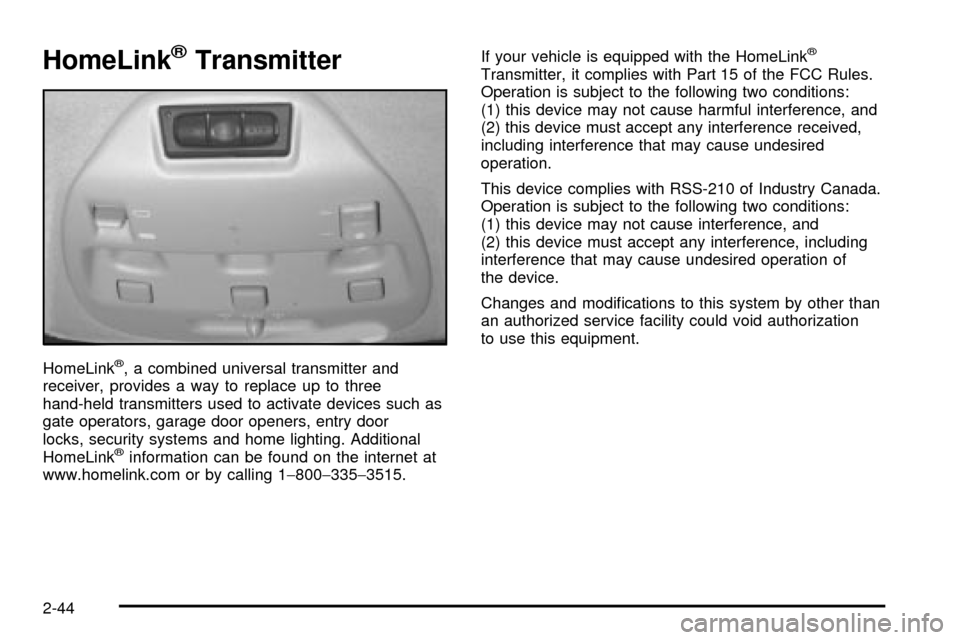
HomeLinkž, a combined universal transmitter and
receiver, provides a way to replace up to three
hand-held transmitters used to activate devices such as
gate operators, garage door openers, entry door
locks, security systems and home lighting. Additional
HomeLink
žinformation can be found on the internet at
www.homelink.com or by calling 1-800-335-3515.If your vehicle is equipped with the HomeLink
ž
Transmitter, it complies with Part 15 of the FCC Rules.
Operation is subject to the following two conditions:
(1) this device may not cause harmful interference, and
(2) this device must accept any interference received,
including interference that may cause undesired
operation.
This device complies with RSS-210 of Industry Canada.
Operation is subject to the following two conditions:
(1) this device may not cause interference, and
(2) this device must accept any interference, including
interference that may cause undesired operation of
the device.
Changes and modi®cations to this system by other than
an authorized service facility could void authorization
to use this equipment.
2-44
Page 105 of 408

Programming the HomeLinkž
Transmitter
Do not use the HomeLinkžTransmitter with any garage
door opener that does not have the ªstop and reverseº
feature. This includes any garage door opener model
manufactured before April 1, 1982. If you have a newer
garage door opener with rolling codes, please be
sure to follow steps 6 through 8 to complete the
programming of your HomeLink
žTransmitter.
Read the instructions completely before attempting to
program the HomeLink
žTransmitter. Because of
the steps involved, it may be helpful to have another
person available to assist you in programming the
transmitter.
Keep the original transmitter for use in other vehicles as
well as for future HomeLink
žprogramming. It is also
recommended that upon the sale of the vehicle,
the programmed HomeLink
žbuttons should be erased
for security purposes. Refer to ªErasing HomeLinkž
Buttonsº or, for assistance, contact HomeLinkžon the
internet at: www.homelink.com or by calling
1-800-355-3515.Be sure that people and objects are clear of the garage
door or gate operator you are programming. When
programming a garage door, it is advised to park outside
of the garage.
It is recommended that a new battery be installed in
your hand-held transmitter for quicker and more
accurate transmission of the radio frequency.
Your vehicle's engine should be turned off while
programming the transmitter. Follow these steps to
program up to three channels:
1. Press and hold down the two outside buttons,
releasing only when the indicator light begins to
¯ash, after 20 seconds. Do not hold down the
buttons for longer than 30 seconds and do not
repeat this step to program a second and/or third
transmitter to the remaining two HomeLink
žbuttons.
2. Position the end of your hand-held transmitter about
1 to 3 inches (3 to 8 cm) away from the HomeLink
ž
buttons while keeping the indicator light in view.
3. Simultaneously press and hold both the desired
button on HomeLink
žand the hand-held transmitter
button. Do not release the buttons until Step 4
has been completed.
Some entry gates and garage door openers may
require you to substitute Step 3 with the procedure
noted in ªGate Operator and Canadian
Programmingº later in this section.
2-45