clock CADILLAC SRX 2007 1.G Owners Manual
[x] Cancel search | Manufacturer: CADILLAC, Model Year: 2007, Model line: SRX, Model: CADILLAC SRX 2007 1.GPages: 522, PDF Size: 2.71 MB
Page 161 of 522
Instrument Panel Overview........................ 164
Hazard Warning Flashers.......................... 166
Other Warning Devices............................. 166
Horn.......................................................... 166
Tilt Wheel.................................................. 166
Turn Signal/Multifunction Lever.................. 167
Turn and Lane-Change Signals................. 168
Headlamp High/Low-Beam Changer.......... 169
Flash-to-Pass............................................ 169
Windshield Wipers..................................... 170
Windshield Washer.................................... 171
Rear Window Wiper/Washer...................... 172
Headlamp Washer..................................... 173
Cruise Control........................................... 174
Headlamps................................................ 178
Wiper Activated Headlamps....................... 178
Headlamps on Reminder........................... 179
Daytime Running Lamps (DRL)................. 179
Fog Lamps................................................ 181
Exterior Lighting Battery Saver.................. 181
Instrument Panel Brightness...................... 181
Entry Lighting............................................ 182Parade Dimming........................................ 182
Reading Lamps......................................... 182
Electric Power Management...................... 183
Ultrasonic Rear Parking
Assist (URPA)........................................ 184
Accessory Power Outlet(s)........................ 186
Ashtray(s) and Cigarette Lighter................ 187
Analog Clock............................................. 188
Climate Controls......................................... 189
Dual Climate Control System..................... 189
Outlet Adjustment...................................... 194
Rear Air Conditioning System.................... 195
Passenger Compartment Air Filter............. 195
Warning Lights, Gages, and Indicators..... 197
Instrument Panel Cluster........................... 198
Speedometer and Odometer...................... 199
Tachometer............................................... 199
Engine Speed Limiter................................ 199
Safety Belt Reminder Light........................ 200
Passenger Safety Belt Reminder Light....... 200
Airbag Readiness Light............................. 201
Section 3 Instrument Panel
161
Page 165 of 522
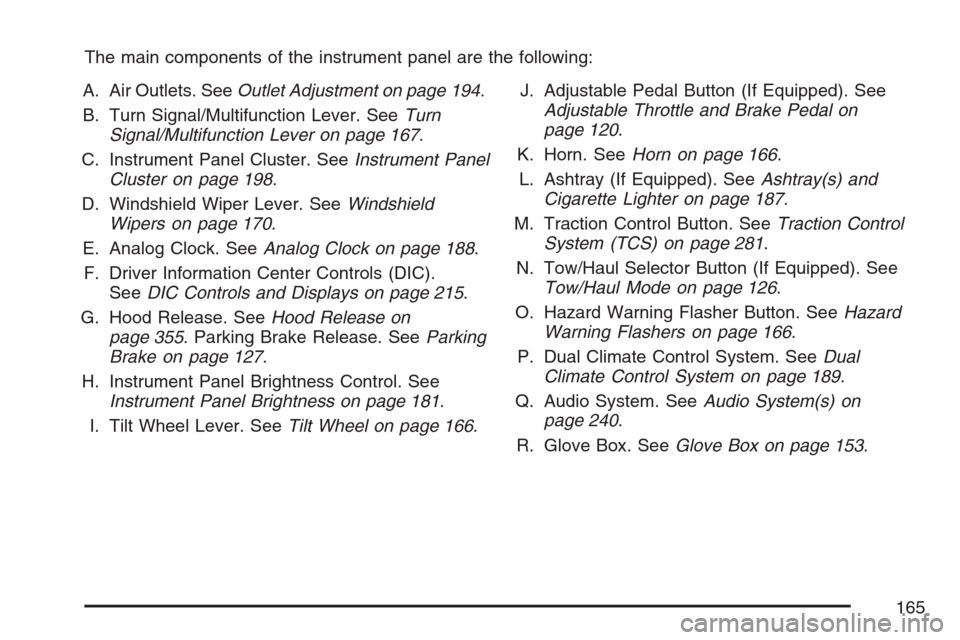
The main components of the instrument panel are the following:
A. Air Outlets. SeeOutlet Adjustment on page 194.
B. Turn Signal/Multifunction Lever. SeeTurn
Signal/Multifunction Lever on page 167.
C. Instrument Panel Cluster. SeeInstrument Panel
Cluster on page 198.
D. Windshield Wiper Lever. SeeWindshield
Wipers on page 170.
E. Analog Clock. SeeAnalog Clock on page 188.
F. Driver Information Center Controls (DIC).
SeeDIC Controls and Displays on page 215.
G. Hood Release. SeeHood Release on
page 355. Parking Brake Release. SeeParking
Brake on page 127.
H. Instrument Panel Brightness Control. See
Instrument Panel Brightness on page 181.
I. Tilt Wheel Lever. SeeTilt Wheel on page 166.J. Adjustable Pedal Button (If Equipped). See
Adjustable Throttle and Brake Pedal on
page 120.
K. Horn. SeeHorn on page 166.
L. Ashtray (If Equipped). SeeAshtray(s) and
Cigarette Lighter on page 187.
M. Traction Control Button. SeeTraction Control
System (TCS) on page 281.
N. Tow/Haul Selector Button (If Equipped). See
Tow/Haul Mode on page 126.
O. Hazard Warning Flasher Button. SeeHazard
Warning Flashers on page 166.
P. Dual Climate Control System. SeeDual
Climate Control System on page 189.
Q. Audio System. SeeAudio System(s) on
page 240.
R. Glove Box. SeeGlove Box on page 153.
165
Page 181 of 522
Fog Lamps
Use the fog lamps for better vision in foggy or
misty conditions.
The fog lamp controls are located on the turn
signal/multifunction lever.
-(Fog Lamps):The band with this symbol is
used to turn the fog lamps on and off.
The parking lamps must be on for the fog lamps
to work.
To turn the fog lamps on, turn the fog lamp band
on the lever up to the dot and release it. The
band will return to its original position.
To turn the fog lamps off, turn the fog lamp band
up to the dot and release it. The band will
return to its original position, and the fog lamps
will turn off. If the high-beam headlamps are turned
on, the fog lamps will also turn off. They will turn
back on again when you switch back to low-beam
headlamps.
Some localities have laws that require the
headlamps to be on along with the fog lamps.
Exterior Lighting Battery Saver
If the parking lamps or headlamps have been left
on, the exterior lamps will turn off about 10 minutes
after the ignition is turned to OFF. This protects
against draining the battery in case the headlamps
or parking lamps have been left on. The battery
saver does not work if the headlamps are turned on
after the ignition is turned to OFF.
If you need to leave the lamps on for more than
10 minutes, use the exterior lamp control to
turn the lamps back on.
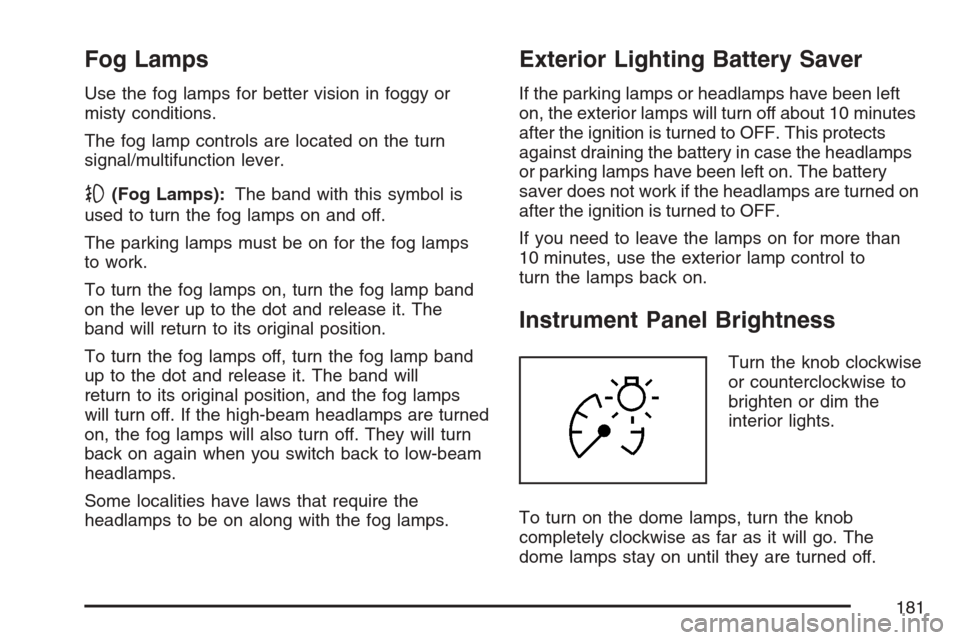
Instrument Panel Brightness
Turn the knob clockwise
or counterclockwise to
brighten or dim the
interior lights.
To turn on the dome lamps, turn the knob
completely clockwise as far as it will go. The
dome lamps stay on until they are turned off.
181
Page 188 of 522
Cigarette Lighter
Notice:Holding a cigarette lighter in while it
is heating does not let the lighter back
away from the heating element when it is hot.
Damage from overheating can occur to the
lighter or heating element, or a fuse could be
blown. Do not hold a cigarette lighter in while it
is heating.
The cigarette lighter is located next to the ashtray.
The vehicle does not have any cigarette lighters
for the rear seat passengers.
To activate the cigarette lighter, push it into the
heating element and let go. When the lighter
is ready it will pop back out by itself.
Analog Clock
The analog clock is located on the instrument
panel above the radio. The clock is not connected
with any other vehicle system and runs by
itself. To adjust the clock, do the following:
1. Locate the adjustment button directly below
the clock face.
2. Push and hold the adjustment button to
advance the clock hands. Holding the
button down will cause the clock to advance
faster. Release the buttonbeforeyou get
to the desired time.
3. Push and release the button to increase the
time by one minute increments until the
desired time is reached.
188
Page 242 of 522
Setting the Time (Radio with Single
CD Player)
Enabling/Disabling the Digital Radio Clock
Your vehicle has an analog clock as well as
the digital radio clock. At the time of new vehicle
delivery, the digital radio clock display should
be disabled. If you decide to use the digital radio
clock as well as the analog clock, you can
change the setting to enable the radio clock
display.
Turn the radio clock display on or off by following
these steps:
1. Turn the radio on.
2. Press the clock button until the clock and date
setting menus appear.
3. Press the pushbutton located under the
forward arrow label until the menu for
default clock and date settings appear.4. Press the pushbutton located under the
currently displayed status of either ON or OFF.
The ON display indicates the radio clock
display is disabled and the OFF display
indicates the radio clock display is enabled.
Press this pushbutton to toggle the radio clock
display on or off.
If the radio clock display is turned on, the
screen displays Radio Clock ON for
10 seconds, then returns to the original clock
display menu.
If the radio clock display is turned off, the
screen displays Radio Clock OFF for
10 seconds. The menus for clock and date
settings are removed, and ON displays
as a current status indicating that the clock
display can be turned on, if desired.
The radio clock and analog clock are not
synchronized. Occasionally you might need to set
the digital radio clock using the procedure
below to synchronize both clocks.
242
Page 243 of 522
Setting the Time and Date on the Digital
Radio Clock
If your vehicle has a radio with a single CD player,
it has a clock button for setting the time and
date. To set the time and date, do the following:
1. Turn the radio on.
2. Press the clock button and HR, MIN, MM, DD,
YYYY (hour, minute, month, day, and year)
displays.
3. Press the pushbutton located under each one
of the labels that you want to change. Every
time the pushbutton is pressed again, the time
or the date if selected, increases by one.
Another way to increase the time or date, is
to press the right SEEK arrow or the FWD
(forward) button.
4. To decrease the time or date, press the left
SEEK arrow or the REV (reverse) button.
You can also turn the tune knob, located on
the upper right side of the radio faceplate,
to adjust the selected setting.
Changing the Time and Date Default
Setting
To change the time and date default setting, do
the following:
1. Change the time default setting from 12 hour
to 24 hour or the date default setting from
month/day/year to day/month/year, by
pressing the clock button.
2. Once the clock and date settings display
along with the forward arrow, press the
pushbutton located under the forward arrow
until the time 12H and 24H, and the date
MM/DD/YYYY (month, day, and year)
and DD/MM/YYYY (day, month, and year)
displays.
3. Press the pushbutton located under the
desired option, then press the clock button
again to apply the selected default, or let the
screen time out.
243
Page 244 of 522
Setting the Time (Radio with
Six-Disc CD Player)
Enabling/Disabling the Digital Radio Clock
Your vehicle has an analog clock as well as
the digital radio clock. At the time of new vehicle
delivery, the digital radio clock display should
be disabled. If you decide to use the digital radio
clock as well as the analog clock, you can
change the setting to enable the radio clock
display.
Turn the radio clock display on or off by following
these steps:
1. Turn the radio on.
2. Press the MENU button until the clock label
display appears.
3. Press the pushbutton located under the clock
label until the clock and date settings appear.
4. Press the pushbutton located under the
forward arrow label until the menu for
default clock and date settings appear.5. Press the pushbutton located under the
currently displayed status of either ON or OFF.
The ON display indicates the radio clock
display is disabled and the OFF display
indicates the radio clock display is enabled.
Press this pushbutton to toggle the radio clock
display on or off.
If the radio clock display is turned on, the
screen displays Radio Clock ON for
10 seconds, then returns to the original clock
display menu.
If the radio clock display is turned off, the
screen displays Radio Clock OFF for
10 seconds. The menus for clock and date
settings are removed, and ON displays
as a current status indicating that the clock
display can be turned on, if desired.
The radio clock and analog clock are not
synchronized. Occasionally you might need to set
the digital radio clock using the procedure
below to synchronize both clocks.
244
Page 245 of 522
Setting the Time and Date on the Digital
Radio Clock
If your vehicle has a radio with a six-disc CD
player, it has a MENU button for setting the time
and date. To set the time and date, do the
following:
1. Turn the radio on.
2. Press the MENU button until the clock option
is displayed.
3. Press the pushbutton located under the clock
label and the HR, MIN, MM, DD, YYYY (hour,
minute, month, day, and year) displays.
4. Press the pushbutton located under each one
of the labels that you want to change. Every
time the pushbutton is pressed again, the time
or the date if selected, increases by one.
Another way to increase the time or date, is
to press the right SEEK arrow or the FWD
(forward) button.
5. To decrease the time or date, press the left
SEEK arrow or the REV (reverse) button.
You can also turn the tune knob, located on
the upper right side of the radio faceplate,
to adjust the selected setting.
Changing the Time and Date Default
Setting
To change the time and date default setting, do
the following:
1. Change the time default setting from 12 hour
to 24 hour or the date default setting from
month/day/year to day/month/year, by
pressing the MENU button.
2. Once the clock symbol displays, press the
pushbutton located under that symbol until
the time and date settings display along with a
forward arrow.
3. Press the pushbutton located under the
forward arrow until the time 12H and 24H, and
the date MM/DD/YYYY (month, day, and
year) and DD/MM/YYYY (day, month,
and year) displays.
4. Press the pushbutton located under the
desired option, then press the MENU
button again to apply the selected default, or
let the screen time out.
245
Page 247 of 522
Playing the Radio
O
(Power/Volume):Press this knob to turn the
system on and off.
Turn this knob clockwise or counterclockwise to
increase or decrease the volume.
Speed Compensated Volume (SCV):The radio
also has Speed Compensated Volume (SCV).
While SCV is on, the radio volume automatically
adjusts to compensate for road and wind noise as
driving speed changes. That way, the volume
level should sound about the same as you drive.
To activate SCV:
1. Set the radio volume to the desired level.
2. Press the MENU button to display the radio
setup menu.
3. Press the pushbutton under the AUTO
VOLUM (volume) label on the radio display.
4. Press the pushbutton under the desired Speed
Compensated Volume setting (OFF, Low, Med
(medium), or High) to select the level of radio
volume compensation. The display times out
after approximately 10 seconds. Each higher
setting allows for more radio volume
compensation at faster vehicle speeds.
Finding a Station
BAND:Press this button to switch between AM,
FM, or XM™ (if equipped). The display shows
the selection.
a(Tune):Turn this knob to select radio stations.
©SEEK¨:Press the right or left SEEK
arrow to go to the next or to the previous station
and stay there.
To scan stations, press and hold either SEEK
arrow for three seconds until a beep sounds. The
radio goes to a station, plays for a few seconds,
then goes to the next station. Press either
SEEK arrow again to stop scanning.
The radio only seeks and scan stations with a
strong signal that are in the selected band.
247
Page 249 of 522
The number of favorites pages can be setup using
the MENU button. To setup the number of
favorites pages, perform the following steps:
1. Press the MENU button to display the radio
setup menu.
2. Press the pushbutton located below the
FAV 1-6 label.
3. Select the desired number of favorites pages
by pressing the pushbutton located below the
displayed page numbers.
4. Press the FAV button, or let the menu time
out, to return to the original main radio
screen showing the radio station frequency
labels and to begin the process of
programming your favorites for the chosen
amount of numbered pages.Setting the Tone
(Bass/Midrange/Treble)
BASS/MID/TREB (Bass, Midrange, or Treble):
To adjust bass, midrange, or treble, press the tune
knob until the tone control labels display.
Continue pressing to highlight the desired label, or
press the pushbutton positioned under the
desired label. Turn the tune knob clockwise or
counterclockwise to adjust the highlighted setting.
The highlighted setting can also be adjusted by
pressing either the SEEK, FWD (forward), or REV
(reverse) button until the desired levels are
obtained. If a station’s frequency is weak, or if
there is static, decrease the treble.
To quickly adjust bass, midrange, or treble to the
middle position, press the tune knob for more
than two seconds. A beep sounds and the level
adjusts to the middle position. Pressing the
tune knob for more than two seconds will also
center the fade and balance settings to the factory
default positions.
249