ignition CADILLAC SRX 2008 1.G Owner's Manual
[x] Cancel search | Manufacturer: CADILLAC, Model Year: 2008, Model line: SRX, Model: CADILLAC SRX 2008 1.GPages: 448, PDF Size: 5.61 MB
Page 120 of 448
Compass Operation
Press the on/off button once to turn the compass on or off.
When the ignition and the compass feature are on, the
compass will show two character boxes for approximately
two seconds. After two seconds, the mirror will display
the current compass direction.
Compass Calibration
If after two seconds the display does not show a
compass direction, (N for North for example), there may
be a strong magnetic eld interfering with the compass.
Such interference may be caused by a magnetic antenna
mount, note pad holder, or similar object. If the letter C
appears in the compass window, the compass may need
to be reset or calibrated.
The mirror can be calibrated by driving the vehicle in
circles at 5 mph (8 km/h) or less until the display reads
a direction.
The compass can be calibrated by pressing and holding
the on/off button until a C is shown in the compass
display.
Compass Variance
Compass variance is the difference between earth’s
magnetic north and true geographic north. If the mirror
is not adjusted for compass variance, the compass
could give false readings.The mirror is set in zone eight upon leaving the factory.
It will be necessary to adjust the compass to compensate
for compass variance if the vehicle is driven outside
zone eight. Under certain circumstances, such as a long
distance, cross-country trip, it will be necessary to adjust
the compass variance.
To adjust for compass variance, do the following:
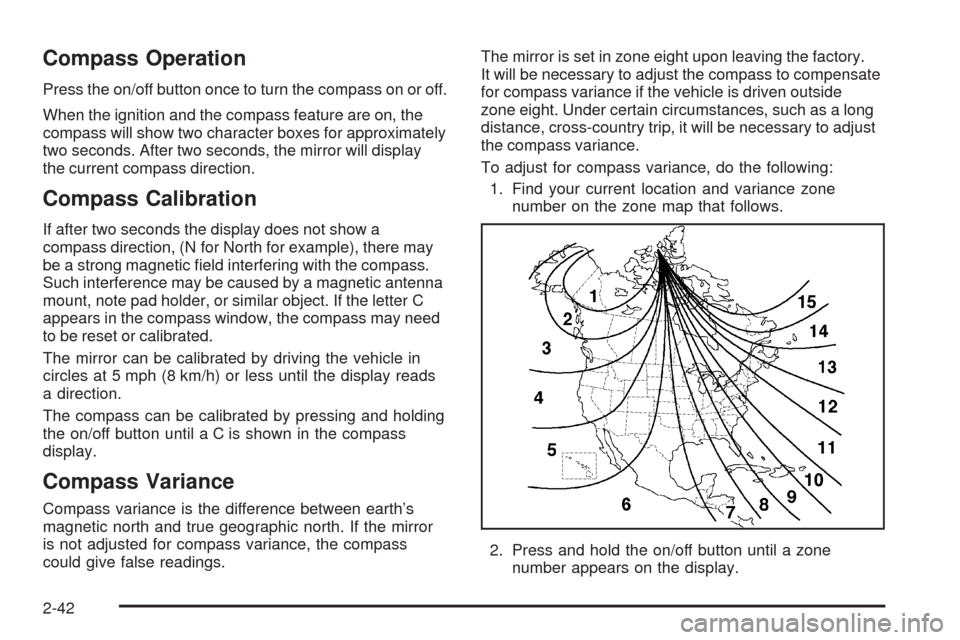
1. Find your current location and variance zone
number on the zone map that follows.
2. Press and hold the on/off button until a zone
number appears on the display.
2-42
Page 137 of 448
Cargo Cover
If your vehicle has a cargo cover, you can use it to
cover items in the rear of the vehicle. Pull the cover
from the passenger’s side to the driver’s side and slide
the ends into the slots to secure it. When it is not in
use, take the ends out of the slots and allow the cover
to roll back up.
Cargo Management System
Your vehicle may have a cargo management system.
It provides extra storage space for the rear of the
vehicle.
The cargo management system has three
compartments. The one closest to the front of the
vehicle opens from behind the second row. The center
compartment has a divider. The compartment closest
to the rear of the vehicle has a removable storage bin.
Sunroof
Sunroof (Ultra View)
{CAUTION:
People who are in a crash and not wearing a
safety belt properly can suffer much worse
injuries. They can hit things inside the vehicle
or be ejected from it, and be seriously injured
or killed. This is true for any vehicle occupant,
in any motor vehicle. In a rollover or other
crash, the Ultra View
®roof can be damaged
or destroyed. People who are unbelted would be
at risk of being ejected from the vehicle. Always
fasten your safety belt, and check that your
passengers’ belts are fastened properly too.
Your vehicle may have an Ultra View
®sunroof over
the rst two rows of seats. The ignition must be turned
to ON/RUN, ACC/ACCESSORY, or the Retained
Accessory Power (RAP) must be active to operate it.
SeeRetained Accessory Power (RAP) on page 2-26.
2-59
Page 139 of 448
Sunroof (Ultra View Plus)
{CAUTION:
People who are in a crash and not wearing a
safety belt properly can suffer much worse
injuries. They can hit things inside the vehicle
or be ejected from it, and be seriously injured
or killed. This is true for any vehicle occupant,
in any motor vehicle. In a rollover or other
crash, the Ultra View
®roof can be damaged or
destroyed. People who are unbelted would be at
risk of being ejected from the vehicle. Always
fasten your safety belt, and check that your
passengers’ belts are fastened properly too.
Your vehicle may have an Ultra View
®sunroof over the
rst two rows of seats and a smaller sunroof over
the third row seat. Both have sunshades, but the back
sunroof does not open. The ignition must be turned
to ON/RUN, ACC/ACCESSORY, or the Retained
Accessory Power (RAP) must be active to operate it.
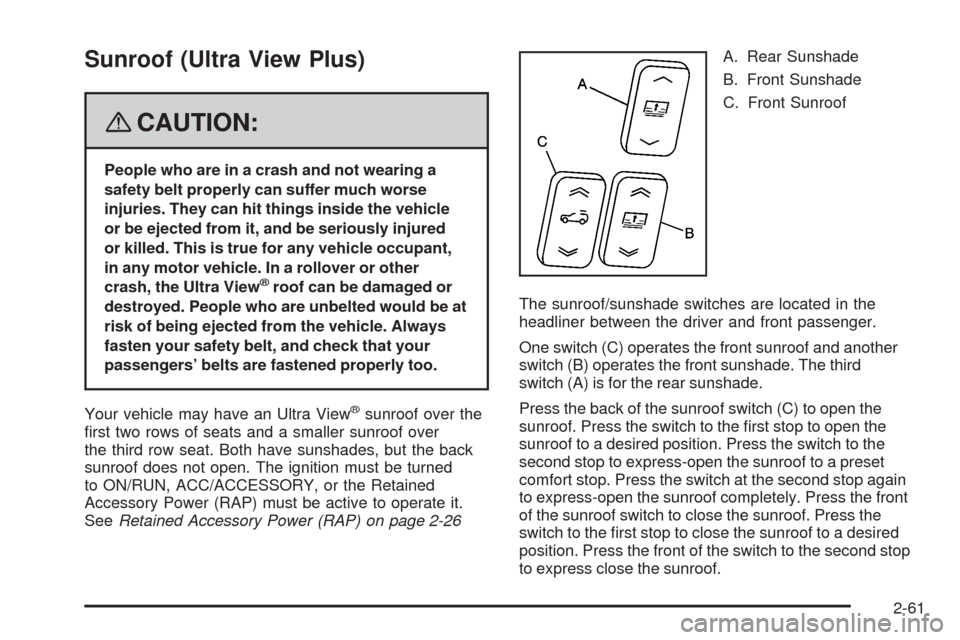
SeeRetained Accessory Power (RAP) on page 2-26A. Rear Sunshade
B. Front Sunshade
C. Front Sunroof
The sunroof/sunshade switches are located in the
headliner between the driver and front passenger.
One switch (C) operates the front sunroof and another
switch (B) operates the front sunshade. The third
switch (A) is for the rear sunshade.
Press the back of the sunroof switch (C) to open the
sunroof. Press the switch to the rst stop to open the
sunroof to a desired position. Press the switch to the
second stop to express-open the sunroof to a preset
comfort stop. Press the switch at the second stop again
to express-open the sunroof completely. Press the front
of the sunroof switch to close the sunroof. Press the
switch to the rst stop to close the sunroof to a desired
position. Press the front of the switch to the second stop
to express close the sunroof.
2-61
Page 146 of 448
Hazard Warning Flashers
The hazard warning ashers let you warn the police
and others that you have a problem. The front and
rear turn signal lamps will ash on and off.
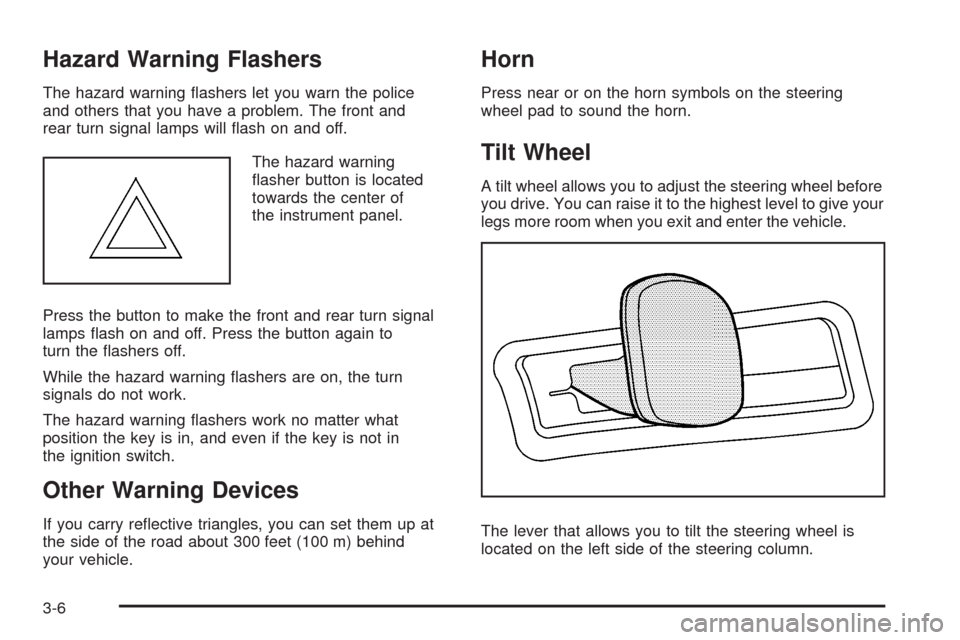
The hazard warning
asher button is located
towards the center of
the instrument panel.
Press the button to make the front and rear turn signal
lamps ash on and off. Press the button again to
turn the ashers off.
While the hazard warning ashers are on, the turn
signals do not work.
The hazard warning ashers work no matter what
position the key is in, and even if the key is not in
the ignition switch.
Other Warning Devices
If you carry reective triangles, you can set them up at
the side of the road about 300 feet (100 m) behind
your vehicle.
Horn
Press near or on the horn symbols on the steering
wheel pad to sound the horn.
Tilt Wheel
A tilt wheel allows you to adjust the steering wheel before
you drive. You can raise it to the highest level to give your
legs more room when you exit and enter the vehicle.
The lever that allows you to tilt the steering wheel is
located on the left side of the steering column.
3-6
Page 155 of 448
Reducing Speed While Using Cruise
Control
To reduce the vehicle speed while using cruise control:
Press and hold the SET– button on the steering
wheel until the desired lower speed is reached,
and then release the button.
To slow down in very small amounts, press
the SET– button on the steering wheel briey.
Each time this is done, the vehicle goes about
1 mph (1.6 km/h) slower.
Passing Another Vehicle While Using
Cruise Control
Use the accelerator pedal to increase your speed.
When you take your foot off the pedal, your vehicle
slows down to the cruise control speed that was
set earlier.
Using Cruise Control on Hills
How well your cruise control will work on hills depends
upon your speed, load, and the steepness of the hills.
When going up steep hills, you might have to step on the
accelerator pedal to maintain the vehicle speed. When
going downhill, you might have to brake or shift to a lower
gear to keep the vehicle speed down. If the brake is
applied the cruise control is disengaged. Many drivers
nd this to be too much trouble and do not use cruise
control on steep hills.
Ending Cruise Control
There are three ways to end cruise control:
Step lightly on the brake pedal.
Press the[button on the steering wheel.
Press theTbutton on the steering wheel.
Erasing Speed Memory
When the cruise control or the ignition is turned off,
the cruise control set speed memory is erased.
3-15
Page 156 of 448
Headlamps
The exterior lamp control is located in the middle of the
turn signal/multifunction lever.
O(Exterior Lamp Control):Turn the control with this
symbol on it to operate the exterior lamps.
The exterior lamp control has four positions:
O(Off):Turn the control to this position to turn off all
lamps, except the Daytime Running Lamps (DRL).
AUTO (Automatic):Turn the control to this position to
put the headlamps in automatic mode. AUTO mode
will turn the exterior lamps on and off depending upon
how much light is available outside of the vehicle.
;(Parking Lamps):Turn the control to this position to
turn on the parking lamps together with the following:
Sidemarker Lamps
Taillamps
License Plate Lamps
Instrument Panel Lights
5(Headlamps):Turn the control to this position to
turn on the headlamps, together with the previously
listed lamps and lights.
Wiper Activated Headlamps
This feature activates the headlamps and parking lamps
after the windshield wipers have been in use for about
six seconds. For this feature to work, the exterior lamp
control must be in AUTO.
The wiper-activated headlamps immediately turn off,
when the ignition is turned to LOCK/OFF or the
windshield wiper control is turned off.
Headlamps on Reminder
A warning chime will sound if the exterior lamp control
is left on in either the headlamp or parking lamp position
and the driver’s door is opened with the ignition off.
SeeLights On Reminder on page 3-46for additional
information.
3-16
Page 157 of 448
Daytime Running Lamps (DRL)
Daytime Running Lamps (DRL) can make it easier
for others to see the front of your vehicle during the day.
DRL can be helpful in many different driving conditions,
but they can be especially helpful in the short periods
after dawn and before sunset. Fully functional daytime
running lamps are required on all vehicles rst sold
in Canada.
The DRL system will make the turn signal lamps come
on when the following conditions are met:
It is daylight and the ignition is in the ON/RUN
position.
The exterior lamp control is in the off or AUTO
position and the headlamps are off.
The automatic transmission is not in PARK (P).
When DRL are on, only the front turn signal lamps
will be on. No other exterior lamps will be on. The
instrument panel cluster will not be lit up either.When the exterior lamp control is in AUTO and it is dark
enough outside, the DRL will turn off and the low-beam
headlamps will turn on. When it is bright enough outside,
the low-beam headlamps will go off, and the DRL will turn
back on. If the vehicle is started in a dark garage, the
automatic headlamp system comes on immediately.
Once you leave the garage, it takes about one minute for
the automatic headlamp system to change to DRL if it is
light outside. During that delay, the instrument panel
cluster may not be as bright as usual. Make sure the
instrument panel brightness lever is in the full bright
position. SeeInstrument Panel Brightness on page 3-19.
To drive the vehicle with the DRL off, turn the exterior
lamp control off. Then turn on the fog lamps or parking
lamps, and the DRL will turn off. This will work regardless
of gear position and whether or not the parking brake
is set.
As with any vehicle, the regular headlamp system
should be turned on when needed.
3-17
Page 158 of 448
Light Sensor
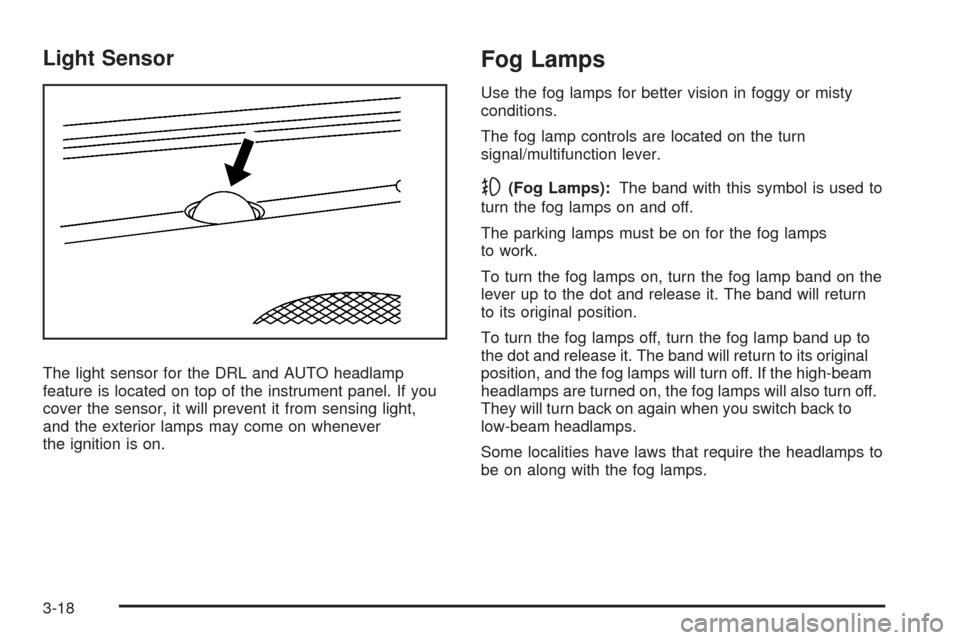
The light sensor for the DRL and AUTO headlamp
feature is located on top of the instrument panel. If you
cover the sensor, it will prevent it from sensing light,
and the exterior lamps may come on whenever
the ignition is on.
Fog Lamps
Use the fog lamps for better vision in foggy or misty
conditions.
The fog lamp controls are located on the turn
signal/multifunction lever.
-(Fog Lamps):The band with this symbol is used to
turn the fog lamps on and off.
The parking lamps must be on for the fog lamps
to work.
To turn the fog lamps on, turn the fog lamp band on the
lever up to the dot and release it. The band will return
to its original position.
To turn the fog lamps off, turn the fog lamp band up to
the dot and release it. The band will return to its original
position, and the fog lamps will turn off. If the high-beam
headlamps are turned on, the fog lamps will also turn off.
They will turn back on again when you switch back to
low-beam headlamps.
Some localities have laws that require the headlamps to
be on along with the fog lamps.
3-18
Page 159 of 448
Exterior Lighting Battery Saver
The exterior lamps turn off about 10 minutes after the
ignition is turned to LOCK/OFF, if the parking lamps or
headlamps have been left on. This protects against
draining the battery. The battery saver does not work if
the headlamps are turned on after the ignition is turned
to LOCK/OFF.
To keep the lamps on for more than 10 minutes, turn
the lamps back on with the exterior lamp control.
Instrument Panel Brightness
Turn the knob clockwise
or counterclockwise to
brighten or dim the
interior lights.
To turn on the dome lamps, turn the knob completely
clockwise as far as it will go. The dome lamps stay
on until they are turned off.
Entry Lighting
The entry lighting system turns on the reading and dome
lamps and the backlighting to the exterior lamp control,
when a door is opened or if the Remote Keyless Entry
(RKE) transmitter unlock button is pressed. If activated
by the RKE, the lighting stays on for about 25 seconds.
The entry lighting system uses the light sensor on the
instrument panel; so it must be dark outside in order for
the lamps to turn on. The lamps turn off about 25 seconds
after the last door is closed. They dim then turn off if the
ignition key is turned to ON/RUN. They immediately turn
off if the power locks are used.
Parade Dimming
This feature does not let the instrument panel
backlight dim during daylight hours while the key is in
the ignition and the headlamps are on. Parade dimming
automatically works with the light sensor, located on top
of the dashboard. If it is dark enough outside and the
parking lamps are on, the backlight on the instrument
panel can be adjusted by turning the instrument panel
brightness knob clockwise or counterclockwise to
brighten or dim the lighting. SeeInstrument Panel
Brightness on page 3-19.
3-19
Page 160 of 448
Reading Lamps
The reading lamps are located on the overhead console.
These lamps come on automatically when any door is
opened.
For manual operation, press the button next to each
lamp to turn it on or off.
If the reading lamps are left on, they automatically shut
off 10 minutes after the ignition has been turned off.
Electric Power Management
The vehicle has Electric Power Management (EPM)
that estimates the battery’s temperature and state
of charge. It then adjusts the voltage for best
performance and extended life of the battery.
When the battery’s state of charge is low, the voltage is
raised slightly to quickly put the charge back in. When the
state of charge is high, the voltage is lowered slightly to
prevent overcharging. If the vehicle has a voltmeter gage
or a voltage display on the Driver Information Center
(DIC), you may see the voltage move up or down. This is
normal. If there is a problem, an alert will be displayed.The battery can be discharged at idle if the electrical
loads are very high. This is true for all vehicles.
This is because the generator (alternator) may not be
spinning fast enough at idle to produce all the power that
is needed for very high electrical loads.
A high electrical load occurs when several of the
following loads are on: headlamps, high beams, fog
lamps, rear window defogger, climate control fan at
high speed, heated seats, engine cooling fans, trailer
loads, and loads plugged into accessory power outlets.
EPM works to prevent excessive discharge of the
battery. It does this by balancing the generator’s output
and the vehicle’s electrical needs. It can increase engine
idle speed to generate more power, whenever needed.
It can temporarily reduce the power demands of some
accessories.
Normally, these actions occur in steps or levels, without
being noticeable. In rare cases at the highest levels of
corrective action, this action may be noticeable to the
driver. If so, a Driver Information Center (DIC) message
might be displayed, such as Battery Saver Active or
Service Battery Charging System. If this message is
displayed, it is recommended that the driver reduce the
electrical loads as much as possible. SeeDIC Warnings
and Messages on page 3-53.
3-20