key CADILLAC XLR 2008 1.G Owner's Manual
[x] Cancel search | Manufacturer: CADILLAC, Model Year: 2008, Model line: XLR, Model: CADILLAC XLR 2008 1.GPages: 470, PDF Size: 8.39 MB
Page 83 of 470

Starting and Operating
Your Vehicle
New Vehicle Break-In
Notice:Your vehicle does not need an elaborate
break-in. But it will perform better in the long run if
you follow these guidelines:
Keep your speed at 55 mph (88 km/h) or less for
the rst 500 miles (805 km).
Do not drive at any one constant speed, fast or
slow, for the rst 500 miles (805 km). Do not
make full-throttle starts. Avoid downshifting to
brake or slow the vehicle.
Avoid making hard stops for the rst 200 miles
(322 km) or so. During this time the new brake
linings are not yet broken in. Hard stops
with new linings can mean premature wear and
earlier replacement. Follow this breaking-in
guideline every time you get new brake linings.
Following break-in, engine speed and load can be
gradually increased.
Ignition Positions
Your vehicle has an
electronic keyless ignition
with pushbutton start.
In order to shift out of PARK (P), the vehicle must be
running or in ACCESSORY mode and the regular brake
pedal must be applied.
/(START):Press this button while your foot is on
the brake to start the engine. The shifter must be
in PARK (P) or NEUTRAL (N) to start the engine and
the keyless access transmitter must be in the vehicle
for the ignition to work.
2-23
Page 84 of 470
9Acc. (OFF/ACCESSORY):When this button is
pressed, the engine will turn off even if the shifter is not in
PARK (P). If the shifter is in PARK (P), the ignition mode
will change to Retained Accessory Power (RAP), if all
doors are closed. The ignition mode will change to off, if a
front door is opened. SeeRetained Accessory Power
(RAP) on page 2-24for more information. If the shifter is
not in PARK (P), the ignition mode will change to Acc..
SeeShifting Into PARK (P) on page 2-32.
When the engine is off, press this button to place the
vehicle in accessory mode. ACCESSORY MODE ON will
display on the Driver Information Center (DIC). This mode
allows you to use things like the radio and the windshield
wipers while the engine is off. Use accessory mode if you
must have your vehicle in motion while the engine is off,
for example, if your vehicle is being towed. If the door is
open while in accessory mode, the key in reminder chime
will sound continuously.
If the push-button start is not working, your vehicle
may be near a strong radio antenna signal causing
interference to the keyless access system. SeeDIC
Warnings and Messages on page 3-63for more
information.
After being in ACCESSORY mode for about 20 minutes,
the vehicle will automatically enter RAP or will turn off,
depending on if the doors are opened or closed.Retained Accessory Power (RAP)
These vehicle accessories can be used for up to
10 minutes after the engine is turned off:
Audio System
Audio Steering Wheel Controls
Power Windows
Power to these accessories continues to work for up to
10 minutes or until a door is opened. For additional
10 minutes of operation, close all the doors and press
the Acc. button to place the vehicle in accessory mode.
Press the button again to return to RAP.
Starting the Engine
To place the transmission in the proper gear:
Move the shift lever to PARK (P) or NEUTRAL (N). To
restart when you are already moving, use NEUTRAL (N).
Notice:Do not try to shift to PARK (P) if your
vehicle is moving. If you do, you could damage the
transmission. Shift to PARK (P) only when your
vehicle is stopped.
The keyless access transmitter must be inside the
vehicle for the ignition to work.
2-24
Page 85 of 470

Cell phone chargers can interfere with the operation of
the Keyless Access System. Battery chargers should
not be plugged in when starting or turning off the engine.
To start you vehicle, do the following:
Starting Procedure
1. With your foot on the brake pedal, press the
START button located on the instrument panel.
If there is not a keyless access transmitter in
the vehicle or if there is something causing
interference with it, the DIC will display NO FOBS
DETECTED. SeeDIC Warnings and Messages
on page 3-63for more information.
2. When the engine begins cranking, let go of the
button and the engine cranks automatically until
it starts. If the battery in the keyless access
transmitter is weak, the DIC displays KEY FOB
BATTERY LOW. You can still drive the vehicle.
See “Battery Replacement” underKeyless Access
System Operation on page 2-6for more information.
If the fob battery is dead, you need to insert the
fob into the fob slot to enable engine starting.
See “No Fobs Detected” underDIC Warnings and
Messages on page 3-63.3. Do not race the engine immediately after starting it.
Operate the engine and transmission gently until
the oil warms up and lubricates all moving parts.
4. If the engine does not start and no DIC message is
displayed, wait 15 seconds before trying again to let
the cranking motor cool down.
If the engine does not start after 5-10 seconds,
especially in very cold weather (below 0°F or−18°C),
it could be ooded with too much gasoline. Try
pushing the accelerator pedal all the way to the oor
while cranking for up to 15 seconds maximum. Wait
at least 15 seconds between each try, to allow the
cranking motor to cool down. When the engine starts,
let go of the accelerator. If the vehicle starts briey
but then stops again, do the same thing. This clears
the extra gasoline from the engine.
Notice:Cranking the engine for long periods of
time, by pressing the START button immediately
after cranking has ended, can overheat and damage
the cranking motor, and drain the battery. Wait at
least 15 seconds between each try, to allow the
cranking motor to cool down.
2-25
Page 86 of 470

Your vehicle has a Computer-Controlled Cranking
System. This feature assists in starting the engine and
protects components. Once cranking has been initiated,
the engine continues cranking for a few seconds or until
the vehicle starts. If the engine does not start, cranking
automatically stops after 15 seconds to prevent cranking
motor damage. To prevent gear damage, this system
also prevents cranking if the engine is already running.
Notice:The engine is designed to work with the
electronics in your vehicle. If you add electrical parts
or accessories, you could change the way the engine
operates. Before adding electrical equipment, check
with your dealer/retailer. If you do not, your engine
might not perform properly. Any resulting damage
would not be covered by your vehicle’s warranty.
Stopping Your Engine
Move the shift lever to PARK (P) and press the Acc.
button located on the instrument panel. If the shifter is
not in PARK (P), the engine shuts off and the vehicle
goes into the Accessory Mode. The DIC displays SHIFT
TO PARK. Once the shifter is moved to PARK (P),
the vehicle turns off.
The DIC displays NO FOB, OFF OR RUN?, if the
keyless access transmitter is not detected inside the
vehicle when it is turned off.
SeeDIC Warnings and Messages on page 3-63for
more information.
Automatic Transmission Operation
There are several different positions for the shift lever.
PARK (P):This position locks the rear wheels. It is
the best position to use when you starting the engine
because your vehicle cannot move easily.
2-26
Page 101 of 470
OnStar®System
OnStar uses several innovative technologies and live
advisors to provide you with a wide range of safety,
security, information, and convenience services. If your
airbags deploy, the system is designed to make an
automatic call to OnStar Emergency advisors who can
request emergency services be sent to your location.
If you lock your keys in the vehicle, call OnStar at
1-888-4-ONSTAR and they can send a signal to unlock
your doors. If you need roadside assistance, press
the OnStar button and they can contact Roadside
Service for you.OnStar service is provided to you subject to the
OnStar Terms and Conditions. You may cancel your
OnStar service at any time by contacting OnStar.
A complete OnStar Owner’s Guide and the OnStar
Terms and Conditions are included in the vehicle’s
OnStar Subscriber glove box literature. For more
information, visit onstar.com or onstar.ca, contact
OnStar at 1-888-4-ONSTAR (1-888-466-7827) or
TTY 1-877-248-2080, or press the OnStar button
to speak with an OnStar advisor 24 hours a day,
7 days a week.
Not all OnStar features are available on all vehicles.
To check if your vehicle is equipped to provide the
services described below, or for a full description
of OnStar services and system limitations, see the
OnStar Owner’s Guide in your glove box or visit
onstar.com.
2-41
Page 112 of 470

Storage Areas
Glove Box
To open, lift the handle up. Use the key to lock
and unlock.
Cupholder(s)
The cupholders are located under a lid in the front
console to the right of the shift lever. Press the
left side of the lid and it will open automatically.
Center Console Storage
There is a center console storage area located between
the seats. To open this storage area, push the latch
button and lift the lid.
There is also an upright center console storage area
between the seatbacks. To open the storage area, press
and release the button near the top so it extends out.
Then, turn the button in either direction to unlatch the lid
and pull the console lid down. After you close the lid,
press the release button back in.
Floor Mats
The driver’s side oor mat is held in place by two snaps
and the passenger’s side is held in place by one.
To remove the oor mats, pull up on the rear of the
mat to disconnect from the snaps. To reinstall the oor
mats, line up the openings in the oor mat over the
snaps and push down into place.
Be sure that the driver’s side oor mat is properly
placed on the oor so that it does not block the
movement of the accelerator pedal.
2-52
Page 116 of 470

After the top is fully raised, release the retractable
hardtop button. If you press the button again within
ve seconds, the windows will automatically close.
If your radio is on, you may notice a brief mute in
sound. This is normal and due to a new audio system
equalization being loaded for the vehicle with the
top raised.
Under certain conditions, the Driver Information
Center (DIC) may display messages regarding the
retractable hardtop. SeeDIC Warnings and Messages
on page 3-63for more information.
If the retractable hardtop does not operate, and there
are no messages displayed on the Driver Information
Center (DIC), then perform the “Power Window Initialize”
steps underPower Windows on page 2-17.Manually Raising the Retractable Hardtop
If your vehicle has a power loss, such as a dead battery,
you can still raise the top manually by doing the following:
1. Lower both sun visors and open both doors.
2. Use the key to open the trunk. SeeKeys on
page 2-3andTrunk on page 2-13for more
information.
3. Raise the trunk by hand.
4. Find the hydraulic
pump under the
carpet on the rear
driver’s side of
the trunk. Open the
valve by turning
it counterclockwise
with your hand
until it stops.
Notice:Pressing the retractable hardtop button
when the hydraulic pump valve is open could
damage the pump. Always close the hydraulic pump
valve after the retractable hardtop has been closed
manually.
2-56
Page 178 of 470

Emissions Inspection and
Maintenance Programs
Some state/provincial and local governments have
or might begin programs to inspect the emission
control equipment on your vehicle. Failure to pass
this inspection could prevent you from getting a
vehicle registration.
Here are some things you need to know to help
your vehicle pass an inspection:
Your vehicle will not pass this inspection if the check
engine light is on or not working properly.
To perform a check engine light bulb check with the
keyless ignition, make sure the transmitter fob is
in the passenger compartment. SeeIgnition Positions
on page 2-23. Press the bottom of the Acc. button
on the instrument panel and hold the button down for
ve seconds. The instrument panel, including the check
engine light, will light up and the ignition will be on,but the engine will not start — if you press the bottom
of the Acc. button only briey, less than ve seconds,
the accessory power mode will be turned on, but not
the ignition. After the bulb check, be sure to press and
release the Acc. button again to turn the ignition off
and avoid draining the vehicle’s battery.
Your vehicle will not pass this inspection if the
OBD (on-board diagnostic) system determines that
critical emission control systems have not been
completely diagnosed by the system. The vehicle would
be considered not ready for inspection. This can
happen if you have recently replaced the battery or
if the battery has run down. The diagnostic system is
designed to evaluate critical emission control systems
during normal driving. This may take several days
of routine driving. If you have done this and your
vehicle still does not pass the inspection for lack of
OBD system readiness, your dealer/retailer can prepare
the vehicle for inspection.
3-56
Page 190 of 470

LOW WASHER FLUID
This message displays when the windshield washer
uid is low. Fill the windshield washer uid reservoir as
soon as possible. SeeEngine Compartment Overview
on page 6-12for the location of the windshield
washer uid reservoir. Also, seeWindshield Washer
Fluid on page 6-36for more information.
MAX (Maximum) SPEED
XX MPH (XX KM/H)
This message displays when a failure in the magnetic
ride control system has occurred. The Powertrain
Control Module (PCM) determines the speed to which
your vehicle is limited. Have your vehicle serviced
by your dealer/retailer if this message appears.
NO FOB DETECTED
This message displays if the vehicle does not detect the
presence of a keyless access transmitter when you
have attempted to start the vehicle or a vehicle door has
just closed. The following conditions may cause this
message to appear:
Driver-added equipment plugged into the accessory
power outlet on the center console is causing
interference. Examples of these devices are cell
phones and cell phone chargers, two-way radios,
power inverters, or similar items. Try moving the
keyless access transmitter away from these devices
when starting the vehicle. In addition, PDA devices
and remote garage and gate openers may also
generate Electromagnetic Interference (EMI) that
may interfere with the keyless access transmitter.
Do not carry the keyless access transmitter in the
same pocket or bag as these devices.
The vehicle is experiencing Electromagnetic
Interference (EMI). Some locations, such as airports,
automatic toll booths, and some gas stations, have
EMI elds which may interfere with your keyless
access transmitter.
3-68
Page 191 of 470
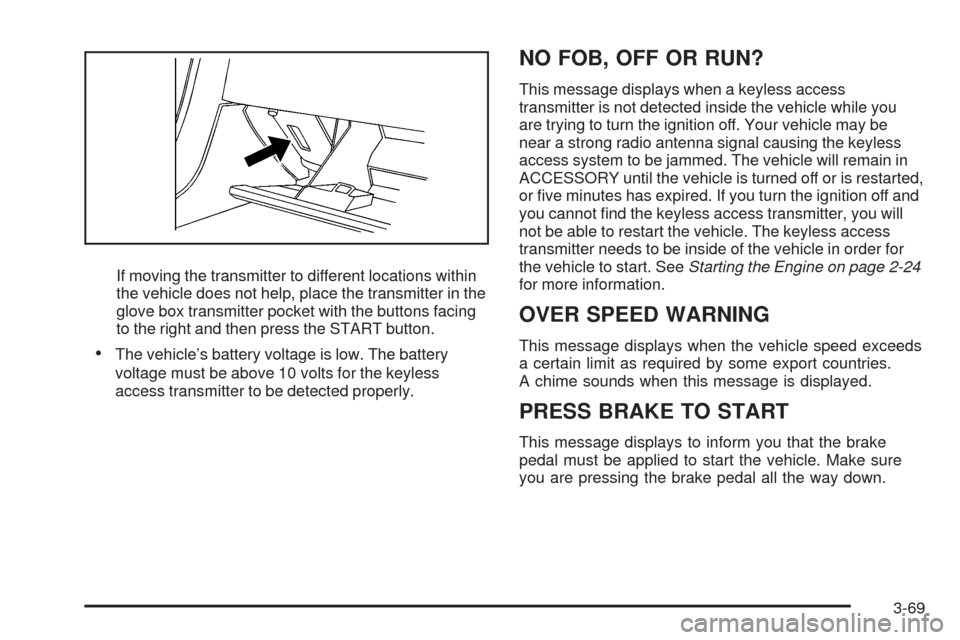
If moving the transmitter to different locations within
the vehicle does not help, place the transmitter in the
glove box transmitter pocket with the buttons facing
to the right and then press the START button.
The vehicle’s battery voltage is low. The battery
voltage must be above 10 volts for the keyless
access transmitter to be detected properly.
NO FOB, OFF OR RUN?
This message displays when a keyless access
transmitter is not detected inside the vehicle while you
are trying to turn the ignition off. Your vehicle may be
near a strong radio antenna signal causing the keyless
access system to be jammed. The vehicle will remain in
ACCESSORY until the vehicle is turned off or is restarted,
or ve minutes has expired. If you turn the ignition off and
you cannot nd the keyless access transmitter, you will
not be able to restart the vehicle. The keyless access
transmitter needs to be inside of the vehicle in order for
the vehicle to start. SeeStarting the Engine on page 2-24
for more information.
OVER SPEED WARNING
This message displays when the vehicle speed exceeds
a certain limit as required by some export countries.
A chime sounds when this message is displayed.
PRESS BRAKE TO START
This message displays to inform you that the brake
pedal must be applied to start the vehicle. Make sure
you are pressing the brake pedal all the way down.
3-69