key CADILLAC XLR 2008 1.G Workshop Manual
[x] Cancel search | Manufacturer: CADILLAC, Model Year: 2008, Model line: XLR, Model: CADILLAC XLR 2008 1.GPages: 470, PDF Size: 8.39 MB
Page 230 of 470
Adjusting a Memory Point
To relocate a memory point’s location, do the following:
1. Select the category of the memory point.
2. Select the memory point you want to edit.
3. Touch POSITION. A map screen with the position
of this memory point will appear.
4. Touch anywhere on the screen to activate the scroll
feature and relocate the memory point. SeeMaps
on page 4-39.
5. Touch Enter to save the memory point’s new
location.
6. Touch Return to go back to the previous screen.
Changing the Phone Number of a
Memory Point
To edit or add the phone number of a memory point,
do the following:
1. Select the category of the memory point.
2. Select the memory point you want to edit.
3. Touch PHONE and use the numeric keypad to edit
or add the number.
4. Touch the RETURN button to take you back to the
previous screen when you have nished.
Deleting Single Memory Points
To delete a single memory point, do the following:
1. Press the ROUTE key.
2. Touch EDIT MEMORY POINT.
3. Select the category of the memory point.
4. Touch DELETE.
5. Select the memory point you want to delete.
A conrmation window will appear.
6. Touch YES to delete the memory point or NO
to return to the previous menu.
7. Touch Return to go back to the previous screen.
Deleting All Memory Points
To delete all of the memory points in a category, do the
following:
1. Press the ROUTE key.
2. Touch EDIT MEMORY POINT.
3. Select the desired category.
4. Touch the DELETE ALL screen button.
A conrmation window will appear.
5. Touch YES to delete the memory points or NO
to return to the previous menu.
6. Touch Return to go back to the previous screen.
4-22
Page 231 of 470

Edit Category
To edit the name of a category, do the following:
1. Press the ROUTE key.
2. Touch EDIT MEMORY POINT.
3. Select the category you want to edit.
4. Touch the EDIT CATEGORY screen button and
use the alpha keypad to edit the category name.
The name can consist of up to 15 alpha and/or
numeric characters.
5. Touch Return to go back to the previous screen.
Marked Point
A marked point is a memory point which has been
stored by selecting the MARK screen button while
traveling on a planned route. You can also use the scroll
feature to plan a destination on the map after reaching
the destination, or by moving a memory point to a
marked point category. See “Editing Memory Points”
earlier in this section for more information.
Previous Destination Memory
Each time you select Start from the map screen, that
destination will be stored as a memory point under
PREVIOUS DESTINATION. This category will store
up to 10 destinations.
When the Previous Destination category contains
more than 10 destinations, the system will remove the
oldest destination stored and add the most recent
one selected to the list.
If you do not want a previous destination to be lost,
you must move the destination into a memory
point category. See “Moving Memory Points” earlier
in this section for more information.
Home Memory
This memory point is stored by selecting Home from
the EDIT MEMORY POINT screen. See “Registering
Memory Points” earlier in this section and “Home”
underEnter Destination on page 4-28for more
information.
4-23
Page 232 of 470

Edit Waypoint
Waypoints are destinations you can set along the way
to your nal destination. This feature allows you to
add, edit, and delete waypoints.
You may set up to ve waypoints on the way to your
nal destination.
To access the WAYPOINT menu, do the following:
1. Press the ROUTE key.
2. Touch Edit Waypoint.
Adding a Waypoint
To add a waypoint to your route, do the following:
1. Touch Add Waypoint.
2. Enter a destination. SeeEnter Destination on
page 4-28.
A map will appear showing the location of the
waypoint.
3. Touch Enter to add your waypoint.
4. Touch the ADD screen button to insert the waypoint
in the desired order.
5. The system will display the ROUTE INFORMATION
screen. From this screen, several options are
available.
4-24
Page 233 of 470

List:Touch List to view the waypoint on the map or to
change the order of the waypoints and nal destination.
To change the order, touch CHG ORDER, then touch
the blank screen button next to the destination to
select the order of the waypoints and nal destination.
Press the MAP key to view the destination and
waypoints on the map screen.Delete:Touch Delete to delete a waypoint or the nal
destination. A conrmation window will appear.
Touch YES to delete the point or NO to return to the
previous screen.
Delete All:Touch Delete All to delete all of the
waypoints and the nal destination. A conrmation
window will appear. Touch YES to delete all waypoints
or NO to return to the previous screen.
Change:Touch Change to change the nal destination.
Enter a destination. SeeEnter Destination on
page 4-28.
Add:Touch Add to add additional waypoints. Refer to
the steps for adding a waypoint listed previously in
this section.
Calculate:Touch Calculate to begin route calculation.
This feature will only be available if the nal destination
has been set.
4-25
Page 234 of 470

Editing a Waypoint
This feature allows you to edit waypoints that have
already been set. To edit a waypoint, do the following:
1. Touch Edit Waypoint.
2. Touch the MAP key to view the destination location
on the map screen.
3. Touch CHANGE ORDER to change the order of the
waypoints and the nal destination.
You can also use the map scroll to change a
waypoint from one location to another.
Deleting a Waypoint
To delete a waypoint from your route, do the following:
1. Touch Delete Waypoint.
2. Select the waypoint you want to delete.
A conrmation window will appear.
3. Touch YES to delete the waypoint or NO to
return to the previous menu.
Edit Avoid Point/Area
From this menu you can register, edit, and delete an
area to be avoided while planning a route. These areas
can also be saved so the system can automatically
avoid them when planning a route.
To access the AVOID POINT/AREA menu, do the
following:
1. Press the ROUTE key.
2. Touch Edit Avoid Point/Area.
4-26
Page 237 of 470

Easy Planning Route
With this destination entry method, you can select a
destination using the scroll symbol on the map screen.
SeeMaps on page 4-39.
To use this destination entry method, do the following:
1. Press the MAP key.
2. Touch the map screen twice for the scroll symbol to
appear. Touch the map or drag the scroll symbol
toward your destination.3. Touch the map screen continuously to scroll
through the map faster. The address of the location
on the map will appear at the top of the screen.
If needed, use the zoom feature to locate your
destination. See “Map Scales” underMaps
on page 4-39for more information.
4. Touch ENT DEST to set this location as your
destination. You may also touch MARK to store this
location as a memory point.
5. Touch Enter to plan your route.
4-29
Page 238 of 470

Address
This destination entry method allows you to input an
address by providing the system with a house number,
street name, and city. Select Street to begin entering
the desired address.
To use this destination entry method, do the following:
1. Enter the street name using the alpha keypad.
See “Alpha-Numeric Keypad” underUsing the
Navigation System on page 4-11for more
information.Do not include name extensions such as N. or Drive.
For example, the street name N. Civic Center Drive
should be entered as Civic Center. As information is
entered, the system will automatically search for
available names, and List will become available.
2. Touch List to view name choices or continue to
spell the street name to further reduce the number
of available items. Select a street name.
3. If the street name you entered exists in more than
one city on the DVD database, a list of cities will
appear. You can select a city from the list, or enter
the city name by selecting City. As you begin to
enter the city name, you can select the desired city
from the list which will appear, or continue to
spell the city name to further reduce the number of
available items.
4. Once the city name has been selected, enter the
house number using the numeric keypad.
The system will list the house number range that is
available for the street.
5. When you have nished entering all of the address
information, touch Enter to plan your route.
4-30
Page 239 of 470
All Points of Interest
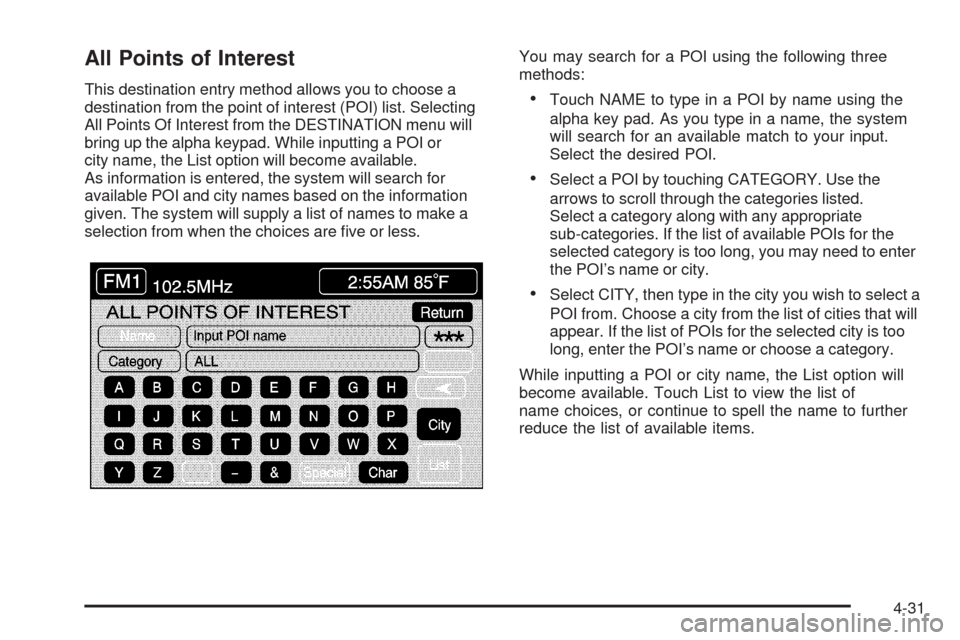
This destination entry method allows you to choose a
destination from the point of interest (POI) list. Selecting
All Points Of Interest from the DESTINATION menu will
bring up the alpha keypad. While inputting a POI or
city name, the List option will become available.
As information is entered, the system will search for
available POI and city names based on the information
given. The system will supply a list of names to make a
selection from when the choices are ve or less.You may search for a POI using the following three
methods:Touch NAME to type in a POI by name using the
alpha key pad. As you type in a name, the system
will search for an available match to your input.
Select the desired POI.
Select a POI by touching CATEGORY. Use the
arrows to scroll through the categories listed.
Select a category along with any appropriate
sub-categories. If the list of available POIs for the
selected category is too long, you may need to enter
the POI’s name or city.
Select CITY, then type in the city you wish to select a
POI from. Choose a city from the list of cities that will
appear. If the list of POIs for the selected city is too
long, enter the POI’s name or choose a category.
While inputting a POI or city name, the List option will
become available. Touch List to view the list of
name choices, or continue to spell the name to further
reduce the list of available items.
4-31
Page 243 of 470
Freeway Entrance/Exit
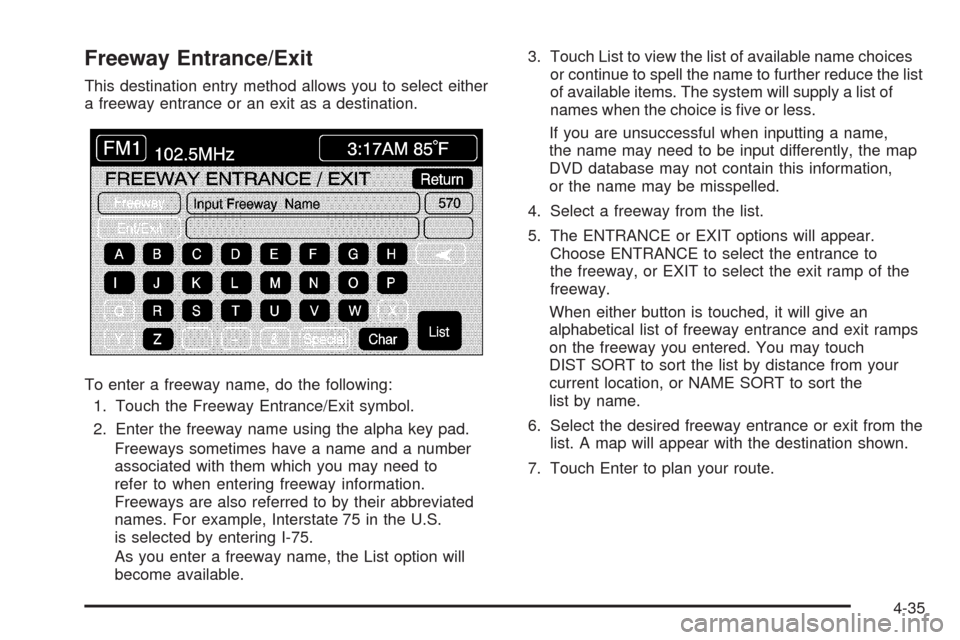
This destination entry method allows you to select either
a freeway entrance or an exit as a destination.
To enter a freeway name, do the following:
1. Touch the Freeway Entrance/Exit symbol.
2. Enter the freeway name using the alpha key pad.
Freeways sometimes have a name and a number
associated with them which you may need to
refer to when entering freeway information.
Freeways are also referred to by their abbreviated
names. For example, Interstate 75 in the U.S.
is selected by entering I-75.
As you enter a freeway name, the List option will
become available.3. Touch List to view the list of available name choices
or continue to spell the name to further reduce the list
of available items. The system will supply a list of
names when the choice is ve or less.
If you are unsuccessful when inputting a name,
the name may need to be input differently, the map
DVD database may not contain this information,
or the name may be misspelled.
4. Select a freeway from the list.
5. The ENTRANCE or EXIT options will appear.
Choose ENTRANCE to select the entrance to
the freeway, or EXIT to select the exit ramp of the
freeway.
When either button is touched, it will give an
alphabetical list of freeway entrance and exit ramps
on the freeway you entered. You may touch
DIST SORT to sort the list by distance from your
current location, or NAME SORT to sort the
list by name.
6. Select the desired freeway entrance or exit from the
list. A map will appear with the destination shown.
7. Touch Enter to plan your route.
4-35
Page 244 of 470
Intersection
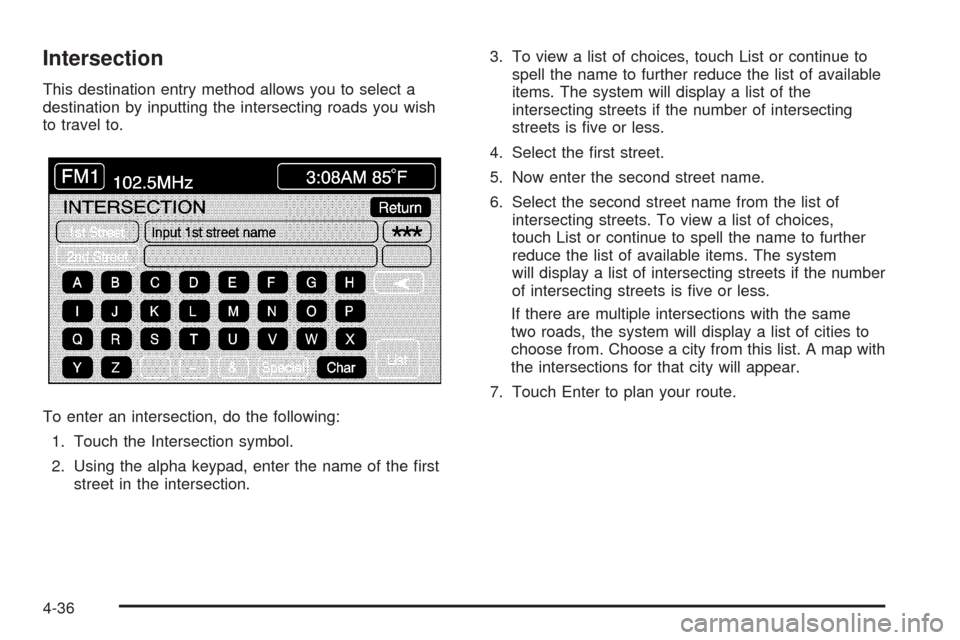
This destination entry method allows you to select a
destination by inputting the intersecting roads you wish
to travel to.
To enter an intersection, do the following:
1. Touch the Intersection symbol.
2. Using the alpha keypad, enter the name of the rst
street in the intersection.3. To view a list of choices, touch List or continue to
spell the name to further reduce the list of available
items. The system will display a list of the
intersecting streets if the number of intersecting
streets is ve or less.
4. Select the rst street.
5. Now enter the second street name.
6. Select the second street name from the list of
intersecting streets. To view a list of choices,
touch List or continue to spell the name to further
reduce the list of available items. The system
will display a list of intersecting streets if the number
of intersecting streets is ve or less.
If there are multiple intersections with the same
two roads, the system will display a list of cities to
choose from. Choose a city from this list. A map with
the intersections for that city will appear.
7. Touch Enter to plan your route.
4-36