key CADILLAC XLR 2009 1.G Owner's Manual
[x] Cancel search | Manufacturer: CADILLAC, Model Year: 2009, Model line: XLR, Model: CADILLAC XLR 2009 1.GPages: 462, PDF Size: 3.72 MB
Page 84 of 462
Starting the Engine
To place the transmission in the proper gear:
Move the shift lever to P (Park) or N (Neutral). To restart
the engine when the vehicle is already moving, use
N (Neutral).
Notice:Do not try to shift to P (Park) if the
vehicle is moving. If you do, you could damage
the transmission. Shift to P (Park) only when
the vehicle is stopped.
The keyless access transmitter must be inside the
vehicle for the ignition to work.
Cell phone chargers can interfere with the operation of
the Keyless Access System. Battery chargers should
not be plugged in when starting or turning off the engine.
To start the vehicle, do the following:
Starting Procedure
1. With your foot on the brake pedal, press the
START button located on the instrument panel.
If there is not a keyless access transmitter in
the vehicle or if there is something causing
interference with it, the DIC will display NO FOBS
DETECTED. SeeDIC Warnings and Messages
on page 3-60for more information.2. When the engine begins cranking, let go of the
button and the engine cranks automatically until
it starts. If the battery in the keyless access
transmitter is weak, the DIC displays KEY FOB
BATTERY LOW. You can still drive the vehicle.
See “Battery Replacement” underKeyless Access
System Operation on page 2-5for more information.
If the fob battery is dead, you need to insert the
fob into the fob slot to enable engine starting.
See “No Fobs Detected” underDIC Warnings and
Messages on page 3-60.
3. Do not race the engine immediately after starting it.
Operate the engine and transmission gently until
the oil warms up and lubricates all moving parts.
4. If the engine does not start and no DIC message is
displayed, wait 15 seconds before trying again to let
the cranking motor cool down.
If the engine does not start after 5-10 seconds,
especially in very cold weather (below
0°F or−18°C), it could be ooded with too much
gasoline. Try pushing the accelerator pedal all the
way to the oor while cranking for up to 15 seconds
maximum.
2-26
Page 85 of 462

Notice:Cranking the engine for long periods of
time, by pressing the START button immediately
after cranking has ended, can overheat and damage
the cranking motor, and drain the battery. Wait at
least 15 seconds between each try, to allow the
cranking motor to cool down.
When the engine starts, let go of the accelerator. If the
vehicle starts briey but then stops again, do the same
thing. This clears the extra gasoline from the engine.
The vehicle has a Computer-Controlled Cranking
System. This feature assists in starting the engine
and protects components. Once cranking has been
initiated, the engine continues cranking for a few
seconds or until the vehicle starts. If the engine does
not start, cranking automatically stops after 15 seconds
to prevent cranking motor damage. To prevent gear
damage, this system also prevents cranking if the
engine is already running.Notice:The engine is designed to work with the
electronics in the vehicle. If you add electrical parts
or accessories, you could change the way the engine
operates. Before adding electrical equipment, check
with your dealer/retailer. If you do not, the engine
might not perform properly. Any resulting damage
would not be covered by the vehicle warranty.
Stopping the Engine
Move the shift lever to P (Park) and press the Acc. button
located on the instrument panel. If the shifter is not in
P (Park), the engine shuts off and the vehicle goes into
the Accessory Mode. The DIC displays SHIFT TO PARK.
Once the shifter is moved to P (Park), the vehicle
turns off.
The DIC displays NO FOB, OFF OR RUN?, if the
keyless access transmitter is not detected inside the
vehicle when it is turned off.
SeeDIC Warnings and Messages on page 3-60for
more information.
2-27
Page 100 of 462
OnStar®System
OnStar uses several innovative technologies and live
advisors to provide a wide range of safety, security,
information, and convenience services. If the airbags
deploy, the system is designed to make an automatic
call to OnStar Emergency advisors who can request
emergency services be sent to your location. If the keys
are locked in the vehicle, call OnStar at 1-888-4-ONSTAR
to have a signal sent to unlock the doors. OnStar
Hands-Free Calling, including 30 trial minutes good
for 60 days, is available on most vehicles. OnStar
Turn-by-Turn Navigation service, with one trial route, is
available on most vehicles. Press the OnStar button to
have an OnStar advisor contact Roadside Service.OnStar service is provided subject to the OnStar Terms
and Conditions included in the OnStar Subscriber
glove box literature.
Some services such as Remote Door Unlock or Stolen
Vehicle Location Assistance may not be available until
the owner of the vehicle registers with OnStar. After the
rst prepaid year, contact OnStar to select a monthly or
annual subscription payment plan. If a payment plan is
not selected, the OnStar system and all services,
including airbag notication and emergency services,
may be deactivated and no longer available. For more
information visit onstar.com (U.S.) or onstar.ca (Canada),
or press the OnStar button to speak with an advisor.
Not all OnStar services are available on all vehicles.
To check if this vehicle is able to provide the services
described below, or for a full description of OnStar
services and system limitations, see the OnStar Owner’s
Guide in the glove box or visit onstar.com (U.S.) or
onstar.ca (Canada), contact OnStar at 1-888-4-ONSTAR
(1-888-466-7827) or TTY 1-877-248-2080, or press the
OnStar button to speak with an OnStar advisor 24 hours
a day, 7 days a week.
2-42
Page 111 of 462
Storage Areas
Glove Box
Lift the glovebox handle up to open it. Use the key to
lock and unlock the glovebox.
Cupholders
The cupholders are located under a lid in the front
console to the right of the shift lever. Press the left side
of the lid and it will open automatically.
Center Console Storage
There is a center console storage area located between
the seats. To open this storage area, push the latch
button and lift the lid.There is also an upright center console storage area
between the seatbacks. To open the storage area, press
and release the button near the top so it extends out.
Then, turn the button in either direction to unlatch the lid
and pull the console lid down. After closing the lid,
press the release button back in.
Floor Mats
The driver side oor mat is held in place by two snaps
and the passenger side is held in place by one.
To remove the oor mats, pull up on the rear of the
mat to disconnect from the snaps. To reinstall, line up
the openings in the oor mat over the snaps and push
down into place.
Be sure that the driver side oor mat is properly placed
on the oor so that it does not block the movement
of the accelerator pedal.
2-53
Page 115 of 462
If the retractable hardtop does not operate, and there
are no messages displayed on the Driver Information
Center (DIC), then perform the “Power Window Initialize”
steps underPower Windows on page 2-18.
Manually Raising the Retractable Hardtop
If the vehicle has a power loss, such as a dead
battery, you can still raise the top manually by doing the
following:
1. Lower both sun visors and open both doors.
2. Use the key to open the trunk. SeeKeys on
page 2-3andTrunk on page 2-14for more
information.
3. Raise the trunk by hand.
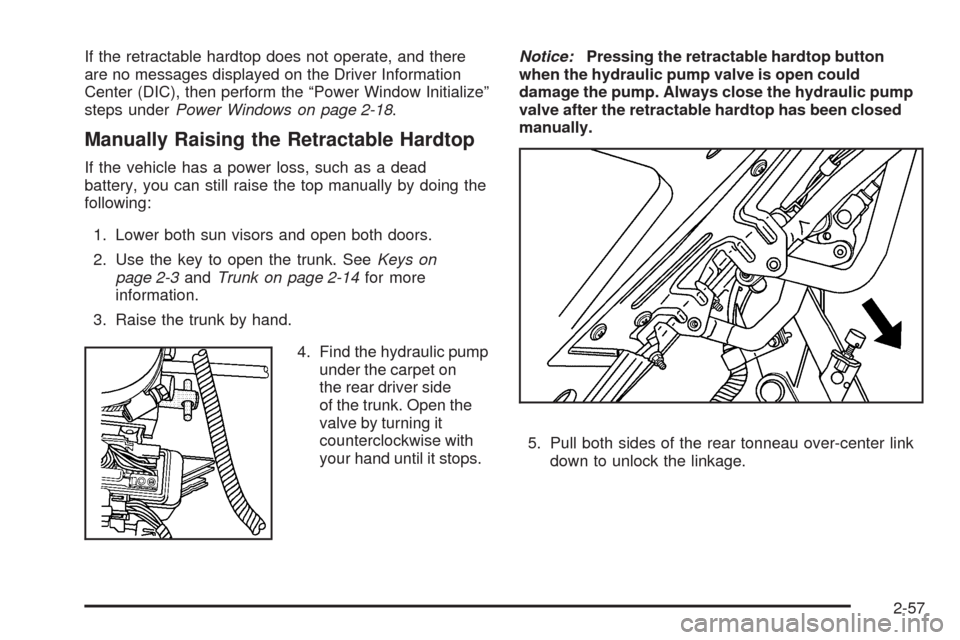
4. Find the hydraulic pump
under the carpet on
the rear driver side
of the trunk. Open the
valve by turning it
counterclockwise with
your hand until it stops.Notice:Pressing the retractable hardtop button
when the hydraulic pump valve is open could
damage the pump. Always close the hydraulic pump
valve after the retractable hardtop has been closed
manually.
5. Pull both sides of the rear tonneau over-center link
down to unlock the linkage.
2-57
Page 168 of 462
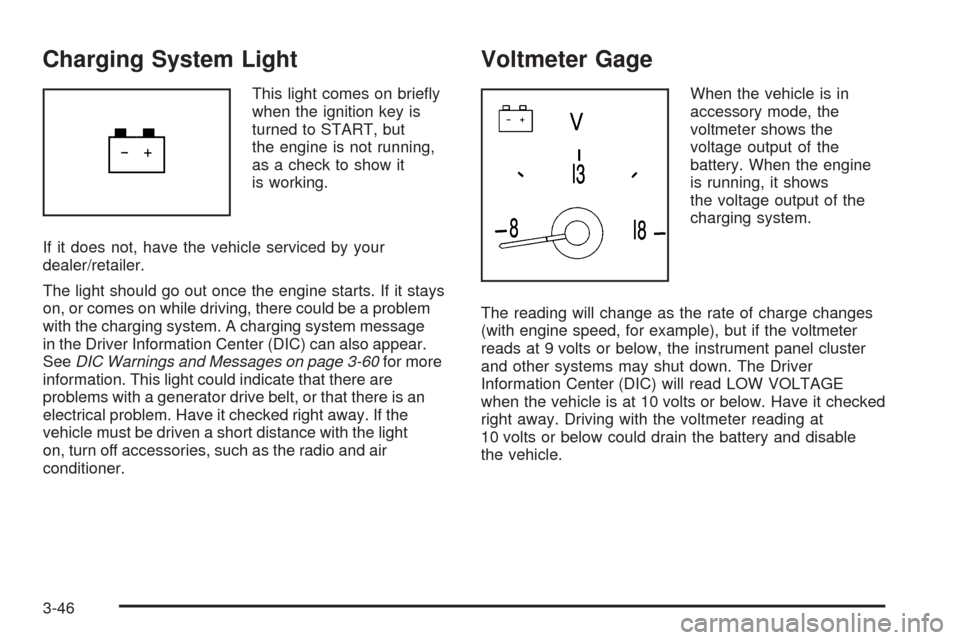
Charging System Light
This light comes on briey
when the ignition key is
turned to START, but
the engine is not running,
as a check to show it
is working.
If it does not, have the vehicle serviced by your
dealer/retailer.
The light should go out once the engine starts. If it stays
on, or comes on while driving, there could be a problem
with the charging system. A charging system message
in the Driver Information Center (DIC) can also appear.
SeeDIC Warnings and Messages on page 3-60for more
information. This light could indicate that there are
problems with a generator drive belt, or that there is an
electrical problem. Have it checked right away. If the
vehicle must be driven a short distance with the light
on, turn off accessories, such as the radio and air
conditioner.
Voltmeter Gage
When the vehicle is in
accessory mode, the
voltmeter shows the
voltage output of the
battery. When the engine
is running, it shows
the voltage output of the
charging system.
The reading will change as the rate of charge changes
(with engine speed, for example), but if the voltmeter
reads at 9 volts or below, the instrument panel cluster
and other systems may shut down. The Driver
Information Center (DIC) will read LOW VOLTAGE
when the vehicle is at 10 volts or below. Have it checked
right away. Driving with the voltmeter reading at
10 volts or below could drain the battery and disable
the vehicle.
3-46
Page 173 of 462

Malfunctions often are indicated by the system before
any problem is apparent. Being aware of the light
can prevent more serious damage to the vehicle.
This system assists the service technician in correctly
diagnosing any malfunction.
Notice:If the vehicle is continually driven with this
light on, after a while, the emission controls
might not work as well, the vehicle’s fuel economy
might not be as good, and the engine might not
run as smoothly. This could lead to costly repairs
that might not be covered by the vehicle warranty.
Notice:Modications made to the engine,
transmission, exhaust, intake, or fuel system
of the vehicle or the replacement of the original
tires with other than those of the same Tire
Performance Criteria (TPC) can affect the vehicle’s
emission controls and can cause this light to come
on. Modications to these systems could lead to
costly repairs not covered by the vehicle warranty.
This could also result in a failure to pass a required
Emission Inspection/Maintenance test. See
Accessories and Modifications on page 6-3.This light comes on during a malfunction in one of
two ways:
Light Flashing:A misre condition has been detected.
A misre increases vehicle emissions and could
damage the emission control system on the vehicle.
Diagnosis and service might be required.
The following can prevent more serious damage to
the vehicle:
Reduce vehicle speed.
Avoid hard accelerations.
Avoid steep uphill grades.
If the light continues to ash, when it is safe to do so,
stop the vehicle. Find a safe place to park the vehicle.
Turn the key off, wait at least 10 seconds, and restart
the engine. If the light is still ashing, follow the previous
steps and see your dealer/retailer for service as soon
as possible.
3-51
Page 175 of 462

Emissions Inspection and
Maintenance Programs
Some state/provincial and local governments have or
might begin programs to inspect the emission control
equipment on the vehicle. Failure to pass this inspection
could prevent getting a vehicle registration.
Here are some things to know to help the vehicle pass
an inspection:
The vehicle will not pass this inspection if the check
engine light is on with the engine running.
To perform a check engine light bulb check with the
keyless ignition, make sure the transmitter fob is in
the passenger compartment. SeeIgnition Positions
on page 2-24. Press the bottom of the Acc. button on
the instrument panel and hold the button down for
ve seconds. The instrument panel, including the
check engine light, will light up and the ignition will be
on, but the engine will not start — press the bottom
of the Acc. button only briey, less than ve seconds,
the accessory power mode will be turned on, but not
the ignition. After the bulb check, press and release
the Acc. button again to turn the ignition off and avoid
draining the vehicle’s battery.
The vehicle will not pass this inspection if the
OBD II (on-board diagnostic) system determines
that critical emission control systems have not
been completely diagnosed by the system.
The vehicle would be considered not ready for
inspection. This can happen if the battery has
recently been replaced or if the battery has run down.
The diagnostic system is designed to evaluate critical
emission control systems during normal driving.
This can take several days of routine driving. If this
has been done and the vehicle still does not pass the
inspection for lack of OBD II system readiness, your
dealer/retailer can prepare the vehicle for inspection.
3-53
Page 187 of 462
NO FOB DETECTED
This message displays if the vehicle does not detect the
presence of a keyless access transmitter when you
have attempted to start the vehicle or a vehicle door has
just closed. The following conditions may cause this
message to appear:
Driver-added equipment plugged into the accessory
power outlet on the center console is causing
interference. Examples of these devices are cell
phones and cell phone chargers, two-way radios,
power inverters, or similar items. Try moving
the keyless access transmitter away from these
devices when starting the vehicle. In addition,
PDA devices and remote garage and gate openers
may also generate Electromagnetic Interference
(EMI) that may interfere with the keyless access
transmitter. Do not carry the keyless access
transmitter in the same pocket or bag as these
devices.
The vehicle is experiencing Electromagnetic
Interference (EMI). Some locations, such as
airports, automatic toll booths, and some gas
stations, have EMI elds which may interfere with
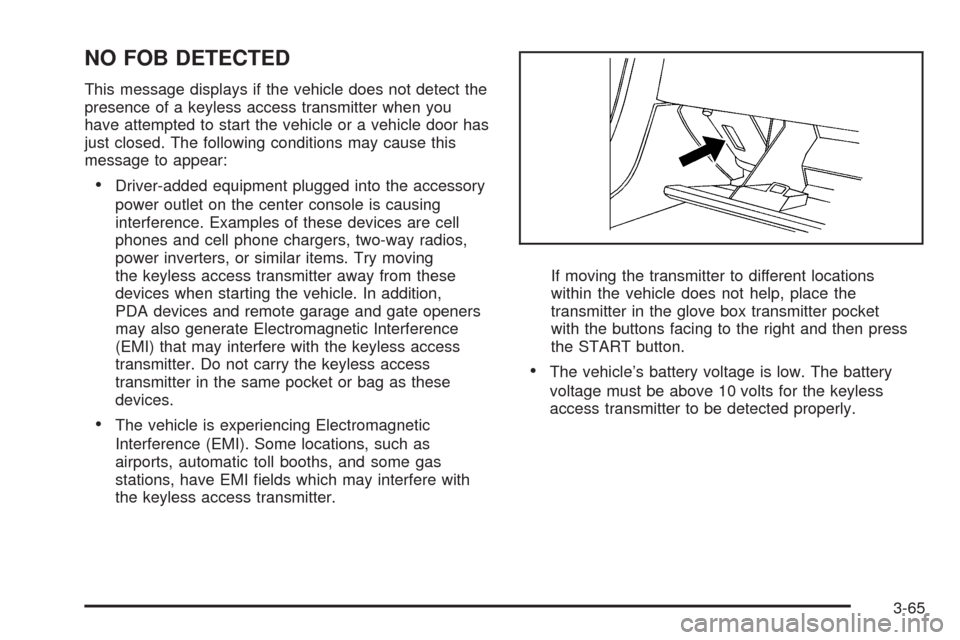
the keyless access transmitter.If moving the transmitter to different locations
within the vehicle does not help, place the
transmitter in the glove box transmitter pocket
with the buttons facing to the right and then press
the START button.
The vehicle’s battery voltage is low. The battery
voltage must be above 10 volts for the keyless
access transmitter to be detected properly.
3-65
Page 188 of 462
NO FOB, OFF OR RUN?
This message displays when a keyless access
transmitter is not detected inside the vehicle while
you are trying to turn the ignition off. The vehicle may
be near a strong radio antenna signal causing the
keyless access system to be jammed. The vehicle will
remain in ACCESSORY until the vehicle is turned off or
is restarted, or ve minutes has expired. If you turn
the ignition off and you cannot nd the keyless access
transmitter, you will not be able to restart the vehicle.
The keyless access transmitter needs to be inside of the
vehicle in order for the vehicle to start. SeeStarting
the Engine on page 2-26for more information.
OVER SPEED WARNING
This message displays when the vehicle speed exceeds
a certain limit as required by some export countries.
A chime sounds when this message is displayed.
PRESS BRAKE TO START
This message displays to inform you that the brake
pedal must be applied to start the vehicle. Make sure
you are pressing the brake pedal all the way down.
REDUCED ENGINE POWER
This message displays when the vehicle is reducing
engine power because the transmission is being placed
in gear under conditions that may cause damage to the
vehicle’s engine, transmission, or ability to accelerate.
Reduced engine power can affect the vehicle’s ability to
accelerate. If this message is on, but there is no reduction
in performance, proceed to your destination. The
performance may be reduced the next time the vehicle is
driven. The vehicle may be driven at a reduced speed
while this message is on, but acceleration and speed may
be reduced. Anytime this message stays on, the vehicle
should be taken to your dealer/retailer for service as soon
as possible.
RIGHT DOOR AJAR
This message displays anytime the engine is running,
the transmission is not in P (Park), and the passenger
door is open or ajar. A chime sounds if the vehicle’s
speed is greater than 3 mph (5 km/h).
SERVICE A/C
This message displays when the electronic sensors that
control the air conditioning and heating systems are
no longer working. Have the climate control system
serviced by your dealer/retailer if you notice a drop in
heating and air conditioning efficiency.
3-66