display CADILLAC XLR 2009 1.G Manual Online
[x] Cancel search | Manufacturer: CADILLAC, Model Year: 2009, Model line: XLR, Model: CADILLAC XLR 2009 1.GPages: 462, PDF Size: 3.72 MB
Page 260 of 462

With these options, the following can be done:
Dest (Destination) Map:This option allows viewing of
the nal destination location. The destination’s name
or address displays on the map screen. Touch Return
when nished.Whole:This option allows viewing of the entire planned
route. The distance to destination displays on the map
screen. Touch Return when nished.
4-46
Page 262 of 462

Traveling Across Regions
If driving across several states, the selected region
might have to be changed to represent the destination.
There are two ways to plan a destination when
traveling across regions.
The following method is suggested and provides the
most route guidance and map display functions:
1. Change the selected search area region as you get
closer to the destination. See “Setting the Search
Area” underMaps on page 4-38.
2. Enter the destination and route settings. SeeEnter
Destination on page 4-27for more information.
If not using the rst method, keep the currently
selected search area region and enter the destination.
This method allows a destination selection from the
easy planning route method or from the All Points of
Interest (POI) categories with the “All Search Areas”
comment for US Only. For example, Tourist is a category
that features this comment. SeeEnter Destination on
page 4-27for more information.If traveling in or to Canada and the regional border is
crossed, the only map scale views available are 4 mi,
8 mi, 31 mi, and 128 mi (8 km, 16 km, 64 km and
256 km). Change the selected search area region when
you get closer to the destination. See “Setting the Search
Area” underMaps on page 4-38for more information.
Keyless Access System
When the engine is started, Driver 1 or Driver 2 displays
on the screen. A message will not appear on the
screen if the driver is unknown. The number on the back
of the transmitter corresponds to driver 1 or driver 2.
The navigation system can store memory points for
drivers 1 and 2 individually. SeeKeyless Access System
Operation on page 2-5for more information.
OnStar®System
When using the OnStar®system, the audio system
mutes and the navigation voice prompts become
disabled during the call. The volume of the OnStar call
can be adjusted by using the steering wheel volume
controls. SeeOnStar
®System on page 2-42for
more information.
4-48
Page 265 of 462

Problems with Route Guidance
Inappropriate route guidance may occur under one or
more of the following conditions:
You have not turned onto the road indicated.
Route guidance may not be available when using
automatic rerouting for the next right or left turn.
The route may not be changed when using
automatic rerouting.
There is no route guidance when turning at an
intersection.
Plural names of places may be announced
occasionally.
It may take a long time to operate automatic
rerouting during high-speed driving.
Automatic rerouting may display a route returning to
the set waypoint if you are heading for a destination
without passing through a set waypoint.
The route prohibits the entry of a vehicle due to a
regulation by time or season or any other regulation
which may be given.
Some routes may not be searched.
The route to the destination may not be shown if
there are new roads, if roads have recently
changed, or if certain roads are not listed on the
map DVD. SeeOrdering Map DVDs on page 4-52.
To recalibrate the vehicle’s position on the map, see
“Adjust Vehicle Position” underSetup Menu on
page 4-12to calibrate the system.
If the System Needs Service
If the navigation system needs service and the steps
listed here have been followed but there are still
problems, see your dealer/retailer for assistance.
4-51
Page 267 of 462
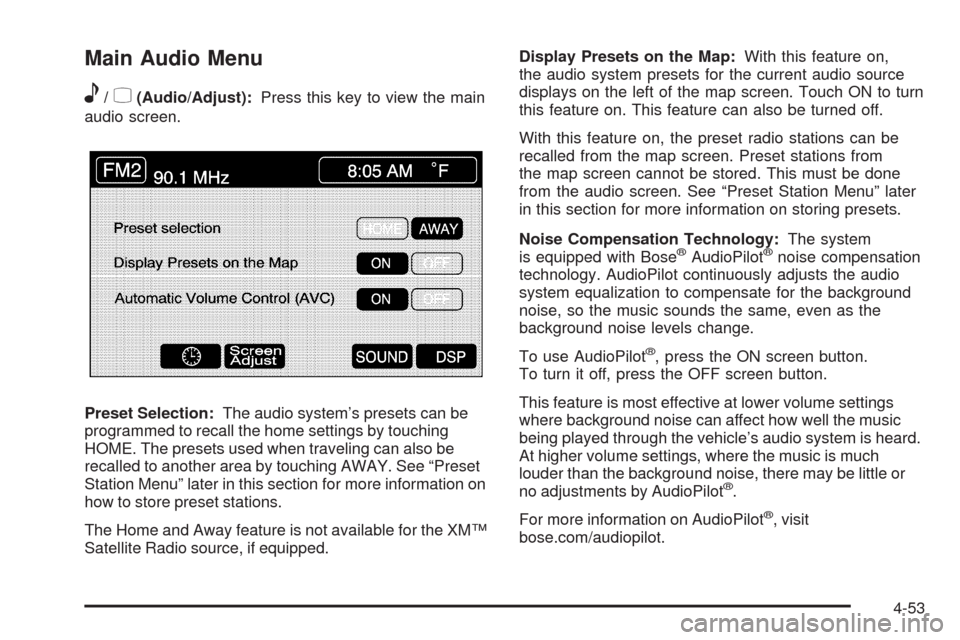
Main Audio Menu
e
/z(Audio/Adjust):Press this key to view the main
audio screen.
Preset Selection:The audio system’s presets can be
programmed to recall the home settings by touching
HOME. The presets used when traveling can also be
recalled to another area by touching AWAY. See “Preset
Station Menu” later in this section for more information on
how to store preset stations.
The Home and Away feature is not available for the XM™
Satellite Radio source, if equipped.Display Presets on the Map:With this feature on,
the audio system presets for the current audio source
displays on the left of the map screen. Touch ON to turn
this feature on. This feature can also be turned off.
With this feature on, the preset radio stations can be
recalled from the map screen. Preset stations from
the map screen cannot be stored. This must be done
from the audio screen. See “Preset Station Menu” later
in this section for more information on storing presets.
Noise Compensation Technology:The system
is equipped with Bose
®AudioPilot®noise compensation
technology. AudioPilot continuously adjusts the audio
system equalization to compensate for the background
noise, so the music sounds the same, even as the
background noise levels change.
To use AudioPilot
®, press the ON screen button.
To turn it off, press the OFF screen button.
This feature is most effective at lower volume settings
where background noise can affect how well the music
being played through the vehicle’s audio system is heard.
At higher volume settings, where the music is much
louder than the background noise, there may be little or
no adjustments by AudioPilot
®.
For more information on AudioPilot
®, visit
bose.com/audiopilot.
4-53
Page 268 of 462
8(Clock):Touch this screen button to get to the
CLOCK ADJUST menu. See “Clock Adjust Menu” later
in this section for more information.
SCREEN ADJUST:To adjust the brightness or contrast
of the screen, touch SCREEN ADJUST to display the
screen adjust menu. See “Screen Adjust Menu” later in
this section for more information.
SOUND:Touch this screen button to access the Sound
menu. See “Sound Menu” later in this section for more
information.
DSP (Digital Signal Processing):Touch this screen
button to access the DSP menu. See “Adjusting
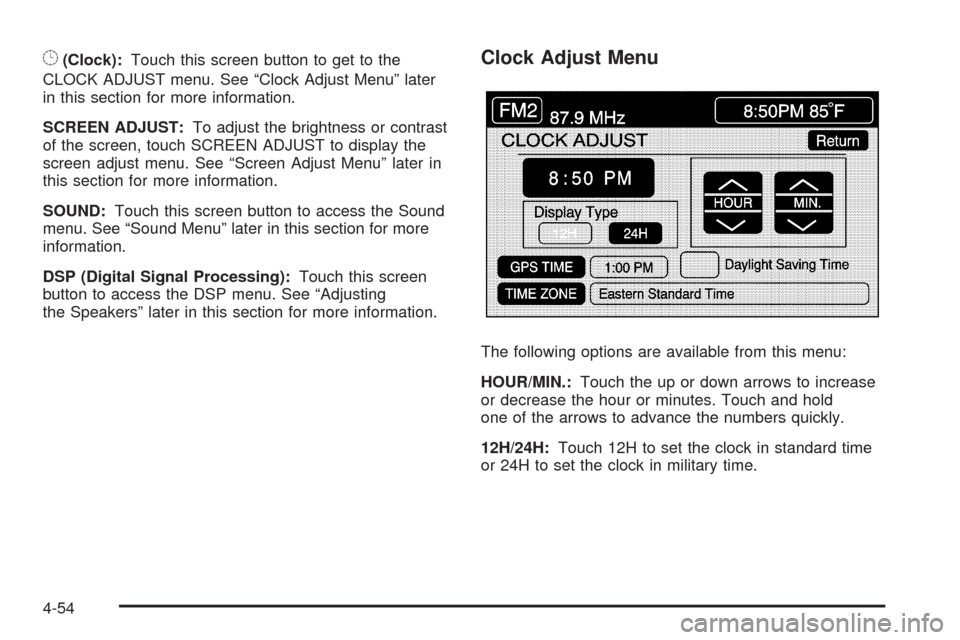
the Speakers” later in this section for more information.Clock Adjust Menu
The following options are available from this menu:
HOUR/MIN.:Touch the up or down arrows to increase
or decrease the hour or minutes. Touch and hold
one of the arrows to advance the numbers quickly.
12H/24H:Touch 12H to set the clock in standard time
or 24H to set the clock in military time.
4-54
Page 269 of 462
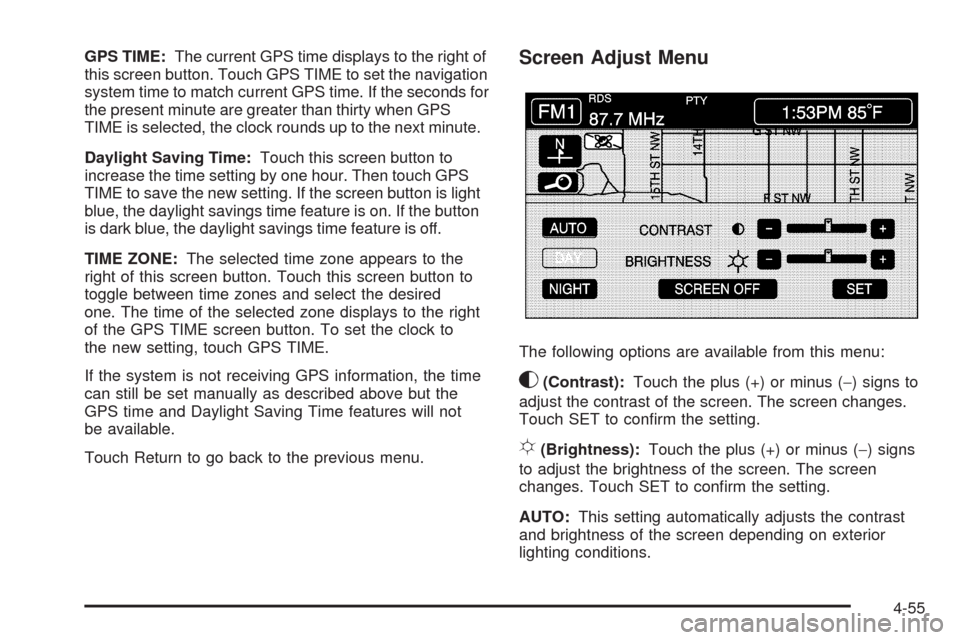
GPS TIME:The current GPS time displays to the right of
this screen button. Touch GPS TIME to set the navigation
system time to match current GPS time. If the seconds for
the present minute are greater than thirty when GPS
TIME is selected, the clock rounds up to the next minute.
Daylight Saving Time:Touch this screen button to
increase the time setting by one hour. Then touch GPS
TIME to save the new setting. If the screen button is light
blue, the daylight savings time feature is on. If the button
is dark blue, the daylight savings time feature is off.
TIME ZONE:The selected time zone appears to the
right of this screen button. Touch this screen button to
toggle between time zones and select the desired
one. The time of the selected zone displays to the right
of the GPS TIME screen button. To set the clock to
the new setting, touch GPS TIME.
If the system is not receiving GPS information, the time
can still be set manually as described above but the
GPS time and Daylight Saving Time features will not
be available.
Touch Return to go back to the previous menu.Screen Adjust Menu
The following options are available from this menu:
K(Contrast):Touch the plus (+) or minus (−) signs to
adjust the contrast of the screen. The screen changes.
Touch SET to conrm the setting.
!(Brightness):Touch the plus (+) or minus (−) signs
to adjust the brightness of the screen. The screen
changes. Touch SET to conrm the setting.
AUTO:This setting automatically adjusts the contrast
and brightness of the screen depending on exterior
lighting conditions.
4-55
Page 271 of 462
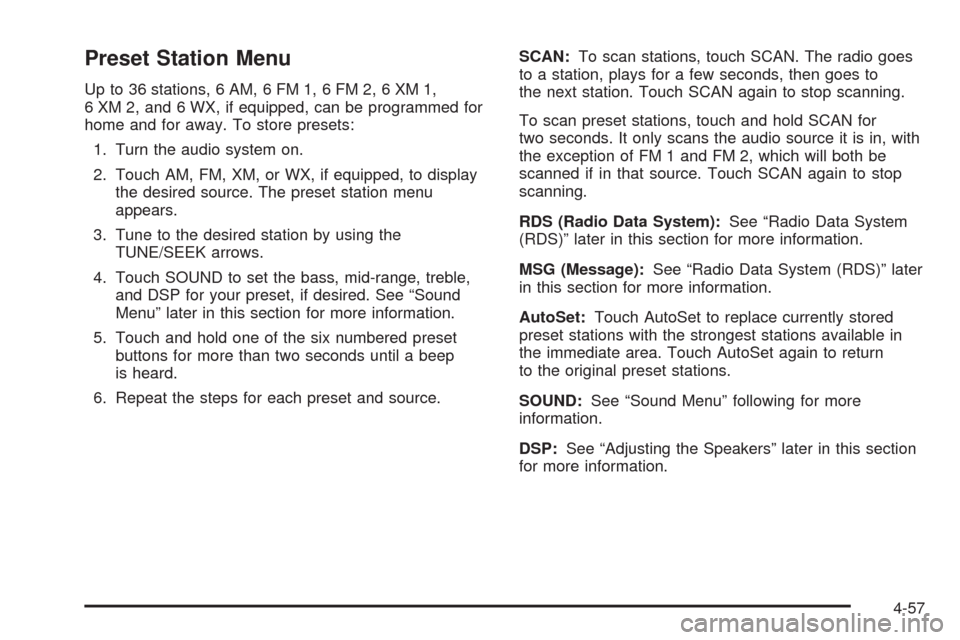
Preset Station Menu
Up to 36 stations, 6 AM, 6 FM 1, 6 FM 2, 6 XM 1,
6 XM 2, and 6 WX, if equipped, can be programmed for
home and for away. To store presets:
1. Turn the audio system on.
2. Touch AM, FM, XM, or WX, if equipped, to display
the desired source. The preset station menu
appears.
3. Tune to the desired station by using the
TUNE/SEEK arrows.
4. Touch SOUND to set the bass, mid-range, treble,
and DSP for your preset, if desired. See “Sound
Menu” later in this section for more information.
5. Touch and hold one of the six numbered preset
buttons for more than two seconds until a beep
is heard.
6. Repeat the steps for each preset and source.SCAN:To scan stations, touch SCAN. The radio goes
to a station, plays for a few seconds, then goes to
the next station. Touch SCAN again to stop scanning.
To scan preset stations, touch and hold SCAN for
two seconds. It only scans the audio source it is in, with
the exception of FM 1 and FM 2, which will both be
scanned if in that source. Touch SCAN again to stop
scanning.
RDS (Radio Data System):See “Radio Data System
(RDS)” later in this section for more information.
MSG (Message):See “Radio Data System (RDS)” later
in this section for more information.
AutoSet:Touch AutoSet to replace currently stored
preset stations with the strongest stations available in
the immediate area. Touch AutoSet again to return
to the original preset stations.
SOUND:See “Sound Menu” following for more
information.
DSP:See “Adjusting the Speakers” later in this section
for more information.
4-57
Page 274 of 462
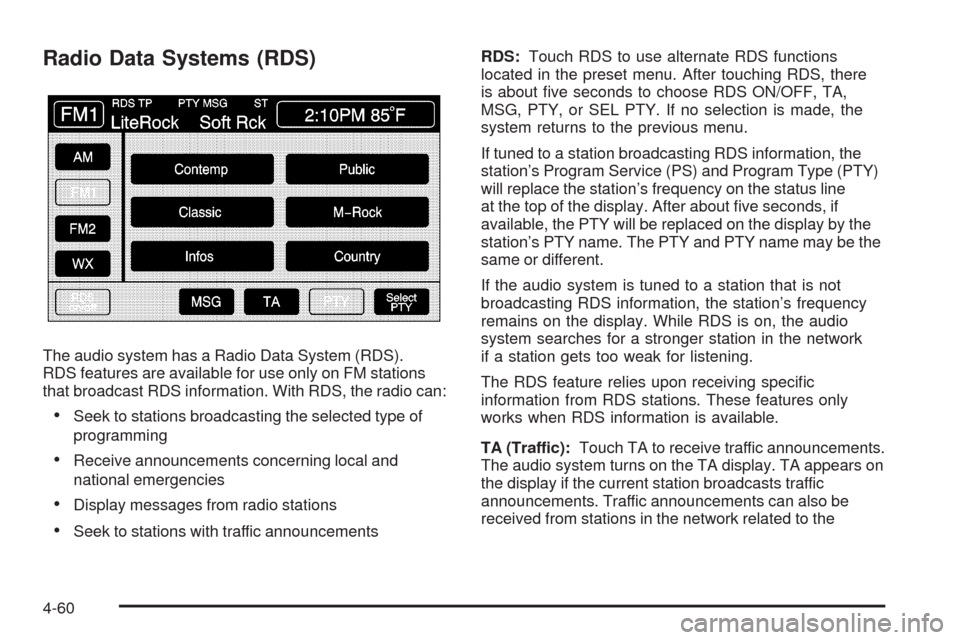
Radio Data Systems (RDS)
The audio system has a Radio Data System (RDS).
RDS features are available for use only on FM stations
that broadcast RDS information. With RDS, the radio can:
Seek to stations broadcasting the selected type of
programming
Receive announcements concerning local and
national emergencies
Display messages from radio stations
Seek to stations with traffic announcementsRDS:Touch RDS to use alternate RDS functions
located in the preset menu. After touching RDS, there
is about ve seconds to choose RDS ON/OFF, TA,
MSG, PTY, or SEL PTY. If no selection is made, the
system returns to the previous menu.
If tuned to a station broadcasting RDS information, the
station’s Program Service (PS) and Program Type (PTY)
will replace the station’s frequency on the status line
at the top of the display. After about ve seconds, if
available, the PTY will be replaced on the display by the
station’s PTY name. The PTY and PTY name may be the
same or different.
If the audio system is tuned to a station that is not
broadcasting RDS information, the station’s frequency
remains on the display. While RDS is on, the audio
system searches for a stronger station in the network
if a station gets too weak for listening.
The RDS feature relies upon receiving specic
information from RDS stations. These features only
works when RDS information is available.
TA (Traffic):Touch TA to receive traffic announcements.
The audio system turns on the TA display. TA appears on
the display if the current station broadcasts traffic
announcements. Traffic announcements can also be
received from stations in the network related to the
4-60
Page 275 of 462
current station. If the current station does not broadcast
traffic announcements, the audio system seeks to a
station which will. When the audio system nds a station
which broadcasts traffic announcements, it will stop.
If no station is found, TA will turn off.
While a traffic announcement plays, the audio system
uses TA volume. To increase TA volume, touch the VOL
button on the steering wheel or use the VOL up or down
buttons during the announcement. See “Voice Guidance
Volume Settings” underSetup Menu on page 4-12for
more information.
When a traffic announcement comes on the current radio
station or a related network station, it will be heard even
if the volume is muted or a CD is playing. If the audio
system tunes to a related network station for a traffic
announcement, it returns to the original station when the
announcement is nished. If the CD player was being
used, the CD will stay in the player and resume play at
the point where it stopped.
Touch RDS followed by TA again to turn TA off.
SG (Message):When RDS is on, if the current station
has a message, MSG displays. Touch MSG from the
preset menu to view the message. If the whole message
does not appear on the display, parts of the message
appears every three seconds until the message iscompleted. Once the complete message has been
displayed, MSG disappears from the display until another
new message is received. MSG remains available
allowing the entire message to be displayed again.
PTY:PTY seeks only to stations with desired types of
programming. This button is used to turn on and off
Program Type (PTY) features.
With RDS on, touch RDS, followed by PTY. The PTY
display turns on. Touch RDS followed by this button
again to turn the PTY display off.
Select PTY (Select Program Type):With RDS and
PTY on, touch RDS, then SEL PTY. The PTY menu
appears. Use the up and down arrows to select a PTY.
Touch the PTY selection and the system returns to
the screen with the preset stations shown. See Steps 1
through 7 under “Preset Station Menu” to store the
selected PTYs. The selected PTY is then stored on the
preset. Touch the PTY preset to recall your settings.
When the PTY display is on, press TUNE/SEEK
and SCAN to nd radio stations of the PTY selected.
The last PTY selected is used for seek and scan modes.
If a station with the selected PTY is not found, NONE
FOUND appears on the display. If both PTY and TA
are on, the audio system searches for stations with
traffic announcements and the selected PTY.
4-61
Page 276 of 462
PTY (Program Type) Presets:The six presets let you
return to favorite PTYs. These presets have factory
PTY preset stations. See “RDS Program Type (PTY)
Selections” later in this section. Up to 12 PTYs, 6 FM 1
and 6 FM2 can be set. To save a PTY preset:
1. Touch FM1 or FM2.
2. Touch RDS to enter the RDS menu.
3. Touch RDS ON/OFF to turn RDS on.
4. Touch PTY.
5. Touch SEL PTY and select the desired PTY from
the list.
6. Touch and hold one of the six presets for more
than two seconds until a beep is heard. Whenever
that numbered preset is touched for less than
two seconds, the PTY that was set, returns.
7. Repeat the steps for each preset.
Once a PTY is stored for each of the preset stations, a
PTY preset can be recalled by touching the preset station
for less than two seconds. Then use TUNE/SEEK or
SCAN to locate a station for that PTY selection.ALERT:This type of announcement warns of national
or local emergencies. Alert announcements cannot
be turned off. Alert announcements come on even if
RDS mode is turned off. ALERT appears on the display
when an alert announcement plays. The audio system
uses TA volume during these announcements.
To increase volume, touch the VOL button on the
steering wheel or use the VOL up and down buttons
during the announcement. See “Voice Guidance Volume
Settings” underSetup Menu on page 4-12for more
information. When an alert announcement comes on the
tuned radio station or a related network station, it will
be heard even if the volume is muted or a CD is playing.
If the audio system tunes to a related network station
for an alert announcement, it returns to the original
station when the announcement is nished. If the CD
player is playing, the player stops for the announcement
and resume when the announcement is nished.
4-62