ECU CADILLAC XTS 2017 1.G Owner's Manual
[x] Cancel search | Manufacturer: CADILLAC, Model Year: 2017, Model line: XTS, Model: CADILLAC XTS 2017 1.GPages: 314, PDF Size: 3.71 MB
Page 94 of 314
Cadillac XTS Owner Manual (GMNA-Localizing-MidEast-10292881) - 2017 -
crc - 7/1/16
SEATS AND RESTRAINTS 93
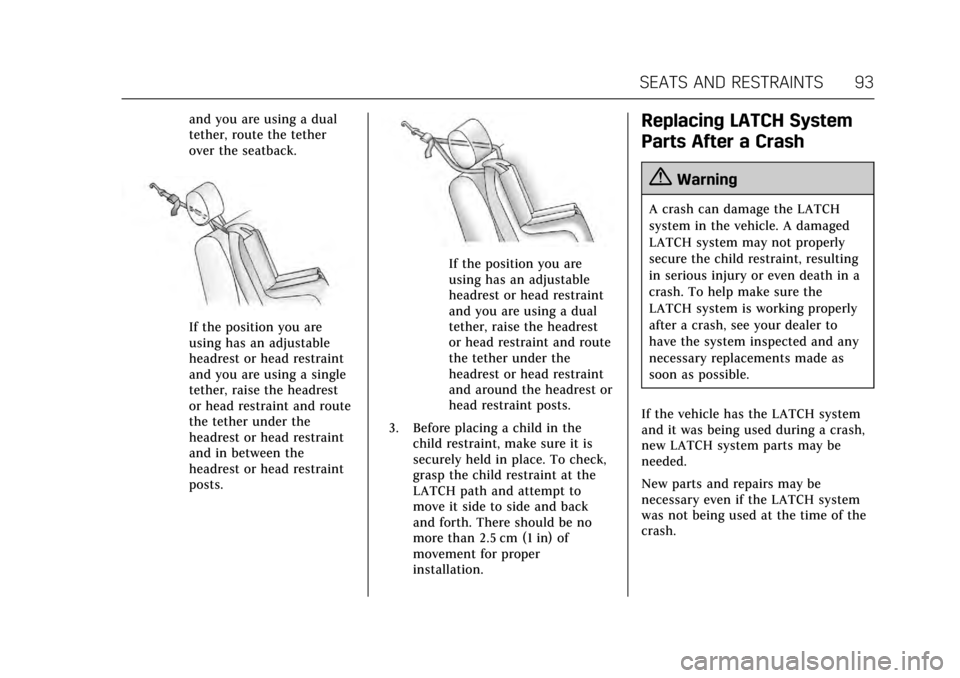
and you are using a dual
tether, route the tether
over the seatback.
If the position you are
using has an adjustable
headrest or head restraint
and you are using a single
tether, raise the headrest
or head restraint and route
the tether under the
headrest or head restraint
and in between the
headrest or head restraint
posts.
If the position you are
using has an adjustable
headrest or head restraint
and you are using a dual
tether, raise the headrest
or head restraint and route
the tether under the
headrest or head restraint
and around the headrest or
head restraint posts.
3. Before placing a child in the child restraint, make sure it is
securely held in place. To check,
grasp the child restraint at the
LATCH path and attempt to
move it side to side and back
and forth. There should be no
more than 2.5 cm (1 in) of
movement for proper
installation.
Replacing LATCH System
Parts After a Crash
{Warning
A crash can damage the LATCH
system in the vehicle. A damaged
LATCH system may not properly
secure the child restraint, resulting
in serious injury or even death in a
crash. To help make sure the
LATCH system is working properly
after a crash, see your dealer to
have the system inspected and any
necessary replacements made as
soon as possible.
If the vehicle has the LATCH system
and it was being used during a crash,
new LATCH system parts may be
needed.
New parts and repairs may be
necessary even if the LATCH system
was not being used at the time of the
crash.
Page 95 of 314
Cadillac XTS Owner Manual (GMNA-Localizing-MidEast-10292881) - 2017 -
crc - 7/1/16
94 SEATS AND RESTRAINTS
Securing Child Restraints
(With the Safety Belt in the
Rear Seat)
When securing a child restraint in a
rear seating position, study the
instructions that came with the child
restraint to make sure it is compatible
with this vehicle.
If the child restraint has the LATCH
system, seeLower Anchors and Tethers
for Children (LATCH System) 087 for
how and where to install your child
restraint using LATCH. If a child
restraint is secured in the vehicle
using a safety belt and it uses a top
tether, see Lower Anchors and Tethers
for Children (LATCH System) 087 for
top tether anchor locations.
Do not secure a child restraint in a
position without a top tether anchor if
a national or local law requires that
the top tether be anchored, or if the
instructions that come with the child
restraint say that the top strap must
be anchored.
If the child restraint or vehicle seat
position does not have the LATCH
system, you will be using the safety belt to secure the child restraint in
this position. Be sure to follow the
instructions that came with the child
restraint.
If more than one child restraint needs
to be installed in the rear seat, be sure
to read
Where to Put the Restraint 086.
1. Put the child restraint on the seat.
For outboard rear seat positions,
put the head restraint in the
upright position. See Head
Restraints 050.
2. Pick up the latch plate, and run the lap and shoulder portions of
the vehicle's safety belt through
or around the restraint. The child
restraint instructions will show
you how.
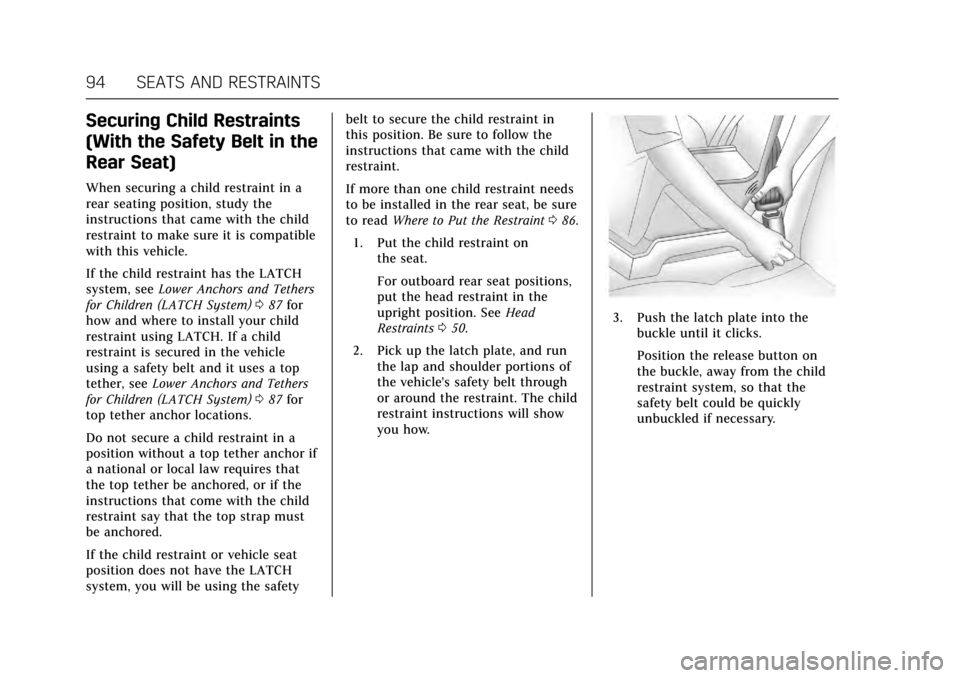
3. Push the latch plate into thebuckle until it clicks.
Position the release button on
the buckle, away from the child
restraint system, so that the
safety belt could be quickly
unbuckled if necessary.
Page 96 of 314
Cadillac XTS Owner Manual (GMNA-Localizing-MidEast-10292881) - 2017 -
crc - 7/1/16
SEATS AND RESTRAINTS 95
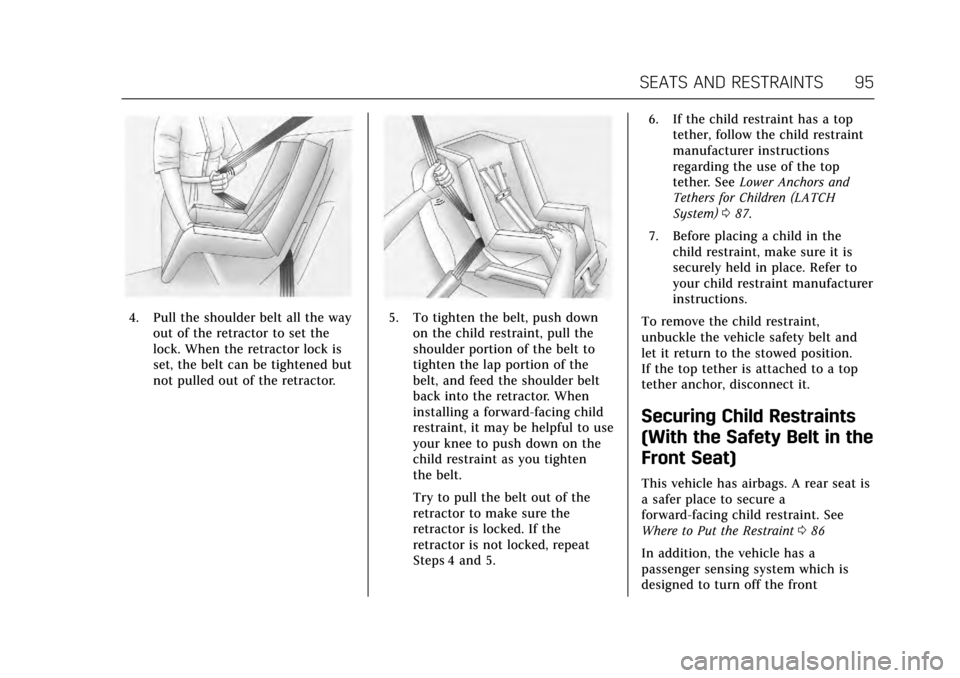
4. Pull the shoulder belt all the wayout of the retractor to set the
lock. When the retractor lock is
set, the belt can be tightened but
not pulled out of the retractor.5. To tighten the belt, push downon the child restraint, pull the
shoulder portion of the belt to
tighten the lap portion of the
belt, and feed the shoulder belt
back into the retractor. When
installing a forward-facing child
restraint, it may be helpful to use
your knee to push down on the
child restraint as you tighten
the belt.
Try to pull the belt out of the
retractor to make sure the
retractor is locked. If the
retractor is not locked, repeat
Steps 4 and 5. 6. If the child restraint has a top
tether, follow the child restraint
manufacturer instructions
regarding the use of the top
tether. See Lower Anchors and
Tethers for Children (LATCH
System) 087.
7. Before placing a child in the child restraint, make sure it is
securely held in place. Refer to
your child restraint manufacturer
instructions.
To remove the child restraint,
unbuckle the vehicle safety belt and
let it return to the stowed position.
If the top tether is attached to a top
tether anchor, disconnect it.
Securing Child Restraints
(With the Safety Belt in the
Front Seat)
This vehicle has airbags. A rear seat is
a safer place to secure a
forward-facing child restraint. See
Where to Put the Restraint 086
In addition, the vehicle has a
passenger sensing system which is
designed to turn off the front
Page 97 of 314
Cadillac XTS Owner Manual (GMNA-Localizing-MidEast-10292881) - 2017 -
crc - 7/1/16
96 SEATS AND RESTRAINTS
passenger frontal airbag and
passenger knee airbag under certain
conditions. SeePassenger Sensing
System 075 and Passenger Airbag
Status Indicator 0119 for more
information, including important
safety information.
Never put a rear-facing child seat in
the front. This is because the risk to
the rear-facing child is so great, if the
airbag deploys.
{Warning
A child in a rear-facing child
restraint can be seriously injured or
killed if the front outboard
passenger frontal airbag inflates.
This is because the back of the
rear-facing child restraint would be
very close to the inflating airbag.
A child in a forward-facing child
restraint can be seriously injured or
killed if the front outboard
passenger frontal airbag inflates
and the passenger seat is in a
forward position.
(Continued)
Warning (Continued)
Even if the passenger sensing
system has turned off the front
outboard passenger frontal airbag,
no system is fail-safe. No one can
guarantee that an airbag will not
deploy under some unusual
circumstance, even though it is
turned off.
Secure rear-facing child restraints
in a rear seat, even if the airbag is
off. If you secure a forward-facing
child restraint in the front outboard
passenger seat, always move the
seat as far back as it will go. It is
better to secure the child restraint
in a rear seat.
SeePassenger Sensing System 075
for additional information.
If the child restraint uses a top tether,
see Lower Anchors and Tethers for
Children (LATCH System) 087 for top
tether anchor locations. Do not secure a child seat in a
position without a top tether anchor if
a national or local law requires that
the top tether be anchored, or if the
instructions that come with the child
restraint say that the top strap must
be anchored.
When using the lap-shoulder belt to
secure the child restraint in this
position, follow the instructions that
came with the child restraint and the
following instructions:
1. Move the seat as far back as it will go before securing the
forward-facing child restraint.
Move the seat upward or the
seatback to an upright position,
if needed, to get a tight
installation of the child restraint.
When the passenger sensing
system has turned off the front
passenger frontal airbag and
passenger knee airbag, the off
indicator on the passenger airbag
status indicator should light and
stay lit when the vehicle is
started. See Passenger Airbag
Status Indicator 0119.
Page 99 of 314
Cadillac XTS Owner Manual (GMNA-Localizing-MidEast-10292881) - 2017 -
crc - 7/1/16
98 SEATS AND RESTRAINTS
7. Before placing a child in thechild restraint, make sure it is
securely held in place. Push and
pull the child restraint in
different directions to be sure it
is secure.
If the airbags are off, the off indicator
in the passenger airbag status
indicator will come on and stay on
when the vehicle is started.
If a child restraint has been installed
and the on indicator is lit, see “If the
On Indicator is Lit for a Child
Restraint ”under Passenger Sensing
System 075 for more information.
To remove the child restraint,
unbuckle the vehicle safety belt and
let it return to the stowed position.
Page 102 of 314
Cadillac XTS Owner Manual (GMNA-Localizing-MidEast-10292881) - 2017 -
crc - 7/1/16
STORAGE 101
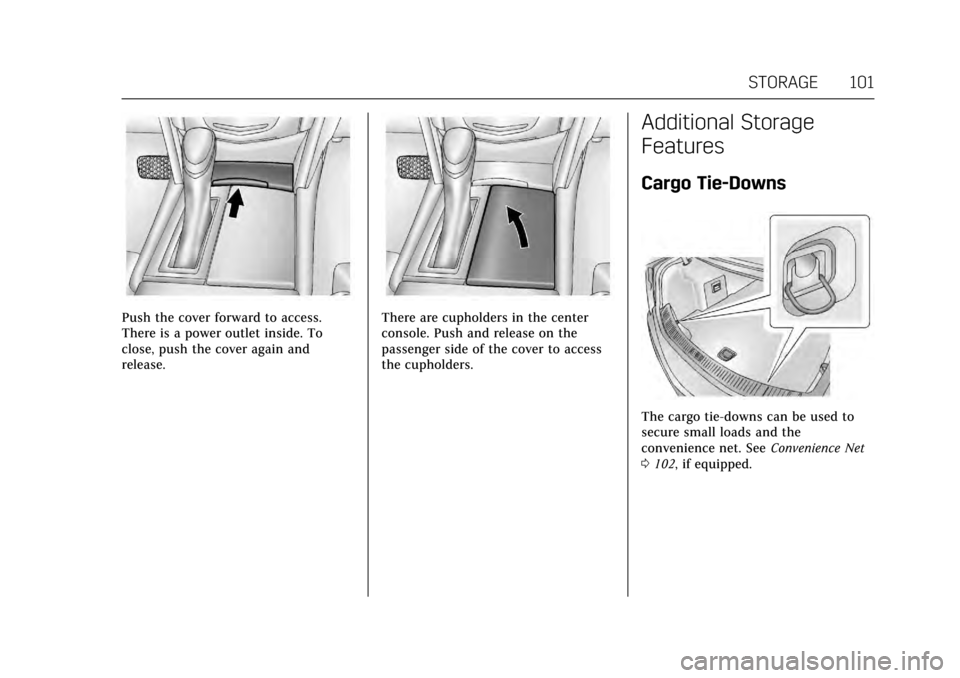
Push the cover forward to access.
There is a power outlet inside. To
close, push the cover again and
release.There are cupholders in the center
console. Push and release on the
passenger side of the cover to access
the cupholders.
Additional Storage
Features
Cargo Tie-Downs
The cargo tie-downs can be used to
secure small loads and the
convenience net. SeeConvenience Net
0 102, if equipped.
Page 104 of 314
Cadillac XTS Owner Manual (GMNA-Localizing-MidEast-10292881) - 2017 -
crc - 7/1/16
INSTRUMENTS AND CONTROLS 103
Instruments and
Controls
Controls
Steering Wheel Adjustment . . . . . 104
Steering Wheel Controls . . . . . . . . . 104
Heated Steering Wheel . . . . . . . . . . 104
Horn . . . . . . . . . . . . . . . . . . . . . . . . . . . . . . . 104
Windshield Wiper/Washer . . . . . . . 105
Compass . . . . . . . . . . . . . . . . . . . . . . . . . . 106
Clock . . . . . . . . . . . . . . . . . . . . . . . . . . . . . . 106
Power Outlets . . . . . . . . . . . . . . . . . . . . . 107
Wireless Charging . . . . . . . . . . . . . . . . 108
Cigarette Lighter . . . . . . . . . . . . . . . . . . 110
Ashtrays . . . . . . . . . . . . . . . . . . . . . . . . . . 110
Warning Lights, Gauges, and
Indicators
Warning Lights, Gauges, andIndicators . . . . . . . . . . . . . . . . . . . . . . . 111
Instrument Cluster . . . . . . . . . . . . . . . 112
Speedometer . . . . . . . . . . . . . . . . . . . . . . 115
Odometer . . . . . . . . . . . . . . . . . . . . . . . . . 116
Trip Odometer . . . . . . . . . . . . . . . . . . . . 116
Tachometer . . . . . . . . . . . . . . . . . . . . . . . 116
Fuel Gauge . . . . . . . . . . . . . . . . . . . . . . . . 116
Engine Coolant Temperature
Gauge . . . . . . . . . . . . . . . . . . . . . . . . . . . . 117
Safety Belt Reminders . . . . . . . . . . . . 118 Airbag Readiness Light . . . . . . . . . . 119
Passenger Airbag Status
Indicator . . . . . . . . . . . . . . . . . . . . . . . . . 119
Charging System Light . . . . . . . . . . . 120
Malfunction Indicator Lamp (Check Engine Light) . . . . . . . . . . . 120
Brake System Warning Light . . . . 122
Electric Parking Brake Light . . . . . 122
Service Electric Parking Brake Light . . . . . . . . . . . . . . . . . . . . . . . . . . . . . 123
Antilock Brake System (ABS) Warning Light . . . . . . . . . . . . . . . . . . 123
Lane Departure Warning (LDW) Light . . . . . . . . . . . . . . . . . . . . . . . . . . . . . 123
Vehicle Ahead Indicator . . . . . . . . . 124
Traction Off Light . . . . . . . . . . . . . . . . 124
StabiliTrak
®OFF Light . . . . . . . . . . . 124
Traction Control System (TCS)/ StabiliTrak
®Light . . . . . . . . . . . . . . 125
Engine Coolant Temperature Warning Light . . . . . . . . . . . . . . . . . . 125
Tire Pressure Light . . . . . . . . . . . . . . . 125
Engine Oil Pressure Light . . . . . . . . 126
Low Fuel Warning Light . . . . . . . . . 126
Security Light . . . . . . . . . . . . . . . . . . . . . 126
High-Beam On Light . . . . . . . . . . . . . 127
Adaptive Forward Lighting (AFL) Light . . . . . . . . . . . . . . . . . . . . . . . . . . . . . 127
Lamps On Reminder . . . . . . . . . . . . . 127
Cruise Control Light . . . . . . . . . . . . . . 127
Door Ajar Light . . . . . . . . . . . . . . . . . . . 128
Information Displays
Driver Information Center (DIC) . . . . . . . . . . . . . . . . . . . . . 128
Head-Up Display (HUD) . . . . . . . . . 131
Vehicle Messages
Vehicle Messages . . . . . . . . . . . . . . . . . 134
Battery Voltage and Charging Messages . . . . . . . . . . . . . . . . . . . . . . . . 134
Brake System Messages . . . . . . . . . . 135
Compass Messages . . . . . . . . . . . . . . . 135
Cruise Control Messages . . . . . . . . . 135
Door Ajar Messages . . . . . . . . . . . . . . 136
Engine Cooling System Messages . . . . . . . . . . . . . . . . . . . . . . . . 136
Engine Oil Messages . . . . . . . . . . . . . 137
Engine Power Messages . . . . . . . . . . 137
Fuel System Messages . . . . . . . . . . . 137
Key and Lock Messages . . . . . . . . . . 137
Lamp Messages . . . . . . . . . . . . . . . . . . . 138
Object Detection System Messages . . . . . . . . . . . . . . . . . . . . . . . . 138
Ride Control System Messages . . . . . . . . . . . . . . . . . . . . . . . . 141
Airbag System Messages . . . . . . . . . 141
Security Messages . . . . . . . . . . . . . . . . 141
Service Vehicle Messages . . . . . . . . 142
Starting the Vehicle Messages . . . 142
Tire Messages . . . . . . . . . . . . . . . . . . . . 142
Transmission Messages . . . . . . . . . . 142
Vehicle Reminder Messages . . . . . 143
Page 127 of 314
Cadillac XTS Owner Manual (GMNA-Localizing-MidEast-10292881) - 2017 -
crc - 7/1/16
126 INSTRUMENTS AND CONTROLS
When the Light Is On Steady
This indicates that one or more of the
tires are significantly underinflated.
A Driver Information Center (DIC) tire
pressure message may also display.
SeeTire Messages 0142. Stop as soon
as possible, and inflate the tires to the
pressure value shown on the Tire and
Loading Information label. See Tire
Pressure 0256.
When the Light Flashes First and
Then Is On Steady
If the light flashes for about a minute
and then stays on, there may be a
problem with the TPMS. If the
problem is not corrected, the light will
come on at every ignition cycle. See
Tire Pressure Monitor Operation 0259.
Engine Oil Pressure Light
Caution
Lack of proper engine oil
maintenance can damage the
engine. Driving with the engine oil
low can also damage the engine.
(Continued)
Caution (Continued)
The repairs would not be covered
by the vehicle warranty. Check the
oil level as soon as possible. Add oil
if required, but if the oil level is
within the operating range and the
oil pressure is still low, have the
vehicle serviced. Always follow the
maintenance schedule for changing
engine oil.
This light should come on briefly as
the engine is started. If it does not
come on, have the vehicle serviced by
your dealer.
If the light comes on and stays on, it
means that oil is not flowing through
the engine properly. The vehicle could
be low on oil and might have some
other system problem. See your dealer.
Low Fuel Warning Light
This light is near the fuel gauge and
comes on briefly when the ignition is
turned on as a check to show it is
working. For vehicles with a
reconfigurable cluster, this light is in
the display area and may not come on
when the ignition is turned on.
It also comes on when the fuel tank is
low on fuel. The light turns off when
fuel is added. If it does not, have the
vehicle serviced.
Security Light
Page 129 of 314
Cadillac XTS Owner Manual (GMNA-Localizing-MidEast-10292881) - 2017 -
crc - 7/1/16
128 INSTRUMENTS AND CONTROLS
The cruise control light is white when
the cruise control is on and ready, and
turns green when the cruise control is
set and active.
SeeCruise Control 0191.
Adaptive Cruise Control Light
This light is white when the Adaptive
Cruise Control (ACC, if equipped) is on
and ready, and turns green when the
ACC is set and active. See Adaptive
Cruise Control 0194.
Door Ajar Light
For vehicles equipped with this light,
it comes on when a door is open or
not securely latched. Before driving,
check that all doors are properly
closed. See Door Ajar Messages 0136
for more information.
Information Displays
Driver Information
Center (DIC)
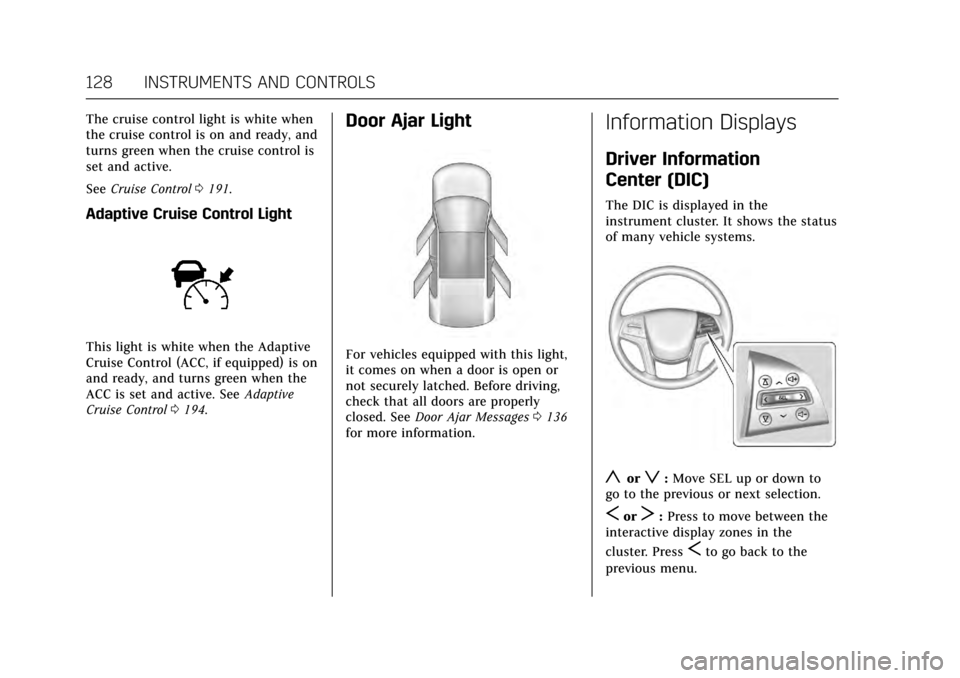
The DIC is displayed in the
instrument cluster. It shows the status
of many vehicle systems.
yorz: Move SEL up or down to
go to the previous or next selection.
SorT: Press to move between the
interactive display zones in the
cluster. Press
Sto go back to the
previous menu.
Page 142 of 314
Cadillac XTS Owner Manual (GMNA-Localizing-MidEast-10292881) - 2017 -
crc - 7/1/16
INSTRUMENTS AND CONTROLS 141
Ride Control System
Messages
SERVICE ALL WHEEL DRIVE
This message displays when there is a
problem with the AWD system. This
message could be set by a number of
issues. Some may require service of
the AWD system. The vehicle will run
in normal two-wheel-drive mode when
this message has been set. This could
be caused by:
.A vehicle or an AWD system
electronics problem.
. Various vehicle electrical issues.
. Worn out or overheated clutch
plates.
. Loss of fluids.
If this message appears, stop when it
is safe to do so and turn off the
ignition for 30 seconds. Restart the
vehicle and check for the message on
the DIC display. If the message does
not appear, it is not necessary to take
your vehicle to the dealer. If the
message still displays or appears again
when you begin driving, the system
needs service. See your dealer.
SERVICE LEVELING SYSTEM
This message displays when there is a
problem with the automatic rear level
control. See Automatic Level Control
0 191. Have the vehicle serviced by
your dealer.
SERVICE STABILITRAK
This message displays if there is a
problem with the StabiliTrak system.
See Traction Control/Electronic Stability
Control 0188.
SERVICE SUSPENSION SYSTEM
This message displays when there is a
problem with the Magnetic Ride
Control system. See Magnetic Ride
Control 0190. Have the vehicle
serviced by your dealer.
SERVICE TRACTION CONTROL
This message displays when there is a
problem with the Traction Control
System (TCS). See Traction Control/
Electronic Stability Control 0188.
TRACTION CONTROL OFF
This message displays when the
Traction Control System (TCS) has
been turned off. See Traction Control/
Electronic Stability Control 0188.
TRACTION CONTROL ON
This message displays when the
Traction Control System (TCS) has
been turned on. See Traction Control/
Electronic Stability Control 0188.
Airbag System Messages
SERVICE AIRBAG
This message displays if there is a
problem with the airbag system. See
your dealer for service.
Security Messages
THEFT ATTEMPTED
This message displays if the vehicle
detects a tamper condition.