lock CHEVROLET CAMARO 1982 Repair Guide
[x] Cancel search | Manufacturer: CHEVROLET, Model Year: 1982, Model line: CAMARO, Model: CHEVROLET CAMARO 1982Pages: 875, PDF Size: 88.64 MB
Page 134 of 875
GM – CAMARO 1982-1992 – Repair Guide (Checked by WxMax) 134
CONNECTORS
Three types of connectors
are commonly used in automotive applications -
weatherproof, molded and hard shell.
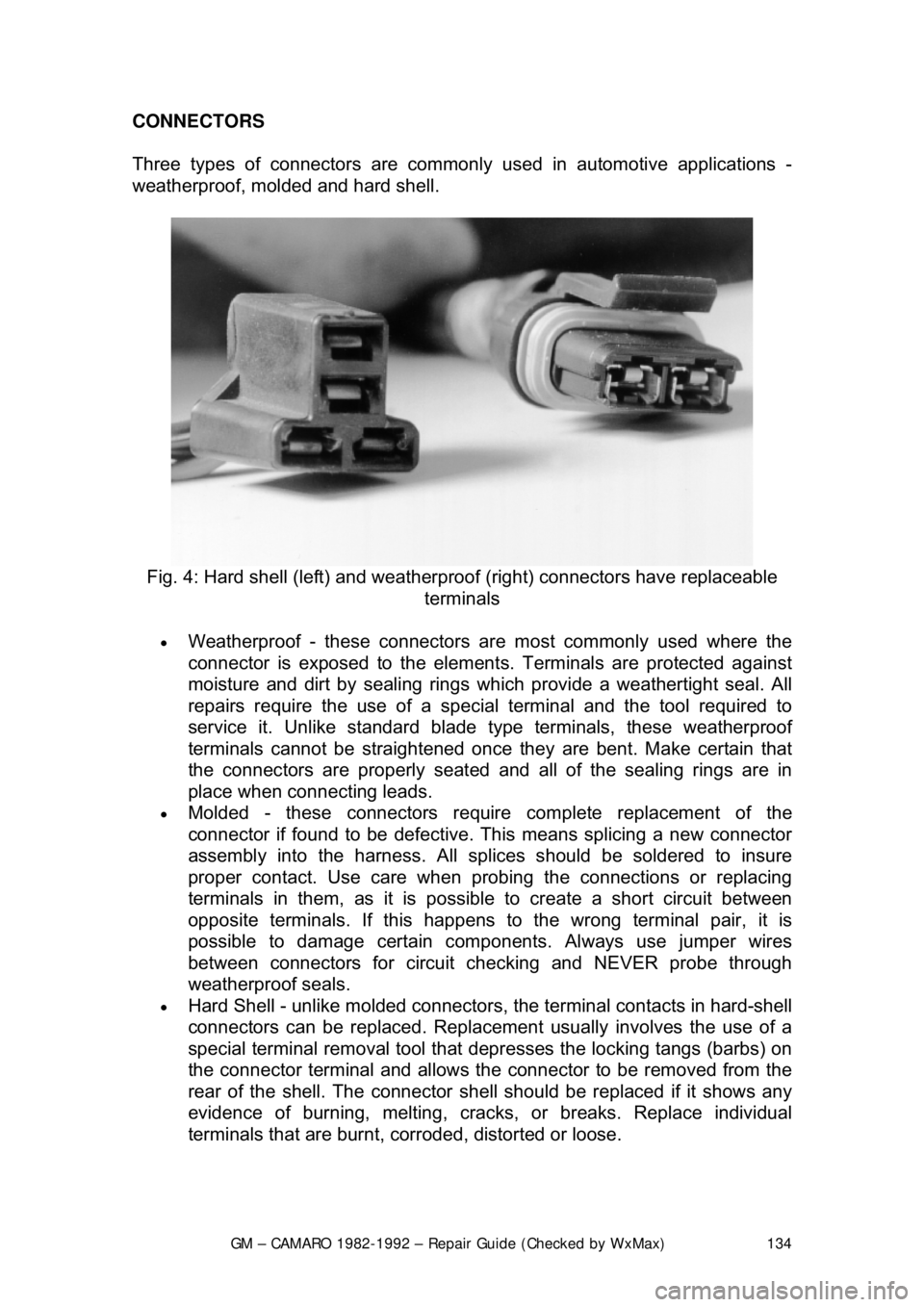
Fig. 4: Hard shell (left) and weather proof (right) connectors have replaceable
terminals
• Weatherproof - these connectors ar e most commonly used where the
connector is exposed to the element s. Terminals are protected against
moisture and dirt by sealing rings wh ich provide a weathertight seal. All
repairs require the use of a specia l terminal and the tool required to
service it. Unlike standard blade ty pe terminals, these weatherproof
terminals cannot be straightened once they are bent. Make certain that
the connectors are properly seated and all of the sealing rings are in
place when connecting leads.
• Molded - these connectors require complete replacement of the
connector if found to be defective. This means splicing a new connector
assembly into the harness. All sp lices should be soldered to insure
proper contact. Use care when probi ng the connections or replacing
terminals in them, as it is possibl e to create a short circuit between
opposite terminals. If this happens to the wrong terminal pair, it is
possible to damage certain com ponents. Always use jumper wires
between connectors for circuit c hecking and NEVER probe through
weatherproof seals.
• Hard Shell - unlike molded connectors, the terminal contacts in hard-shell
connectors can be replaced. Replacement usually involves the use of a
special terminal removal tool that depresses the locking tangs (barbs)\
on
the connector terminal and allows the connector to be removed from the
rear of the shell. The connector she ll should be replaced if it shows any
evidence of burning, melting, cracks, or breaks. Replace individual
terminals that are burnt, corroded, distorted or loose.
Page 145 of 875

GM – CAMARO 1982-1992 – Repair Guide (Checked by WxMax) 145
When the battery cable(s) are reconnecte
d (negative cable last), be sure to
check that your lights, windshield wipers and other electrically operated safety
components are all working correctly. If your vehicle contains an Electronically
Tuned Radio (ETR), don't forget to also reset your radio stations. Ditto for the
clock.
Page 149 of 875
GM – CAMARO 1982-1992 – Repair Guide (Checked by WxMax) 149
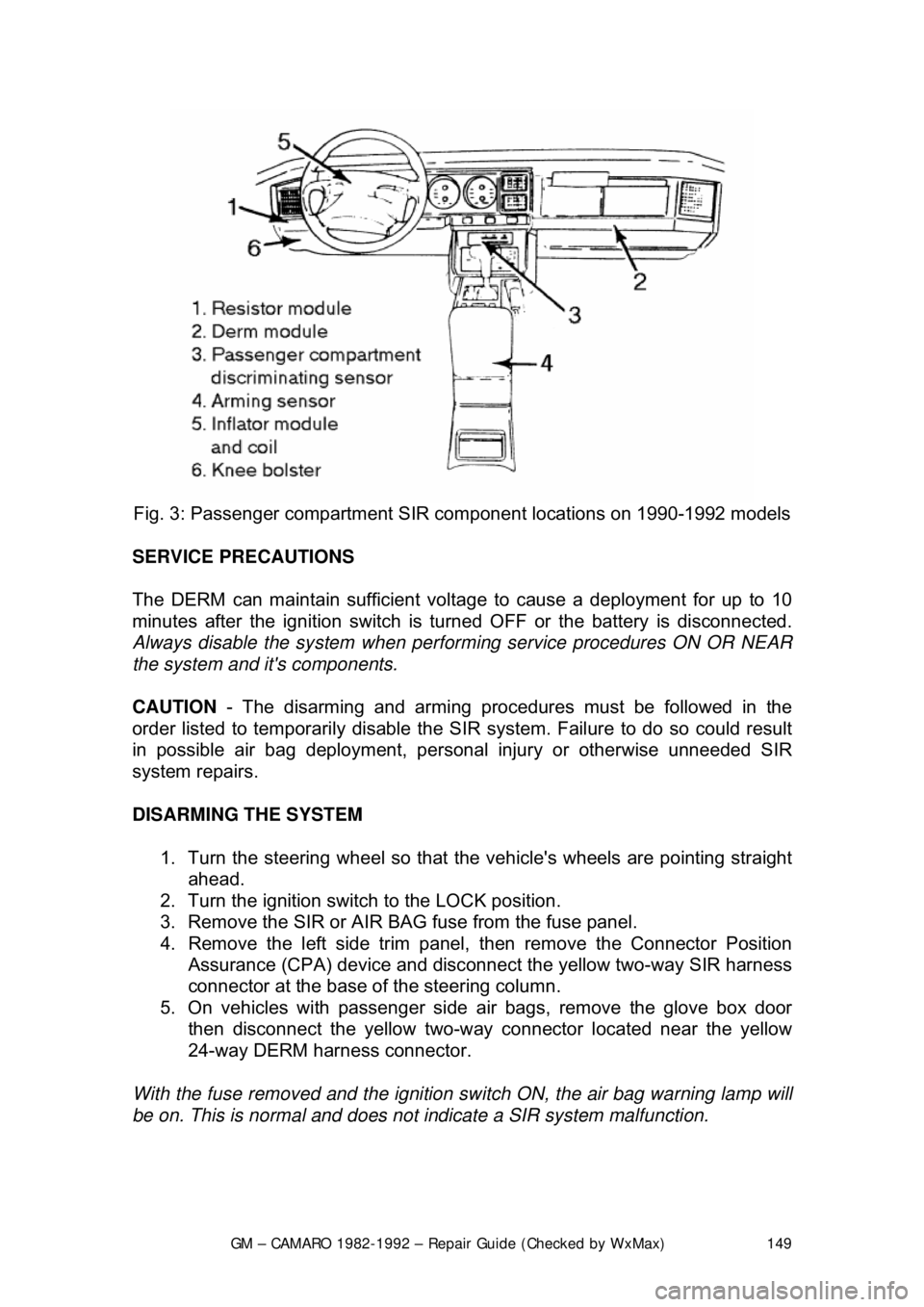
Fig. 3: Passenger com partment SIR component lo cations on 1990-1992 models
SERVICE PRECAUTIONS
The DERM can maintain sufficient volt age to cause a deployment for up to 10
minutes after the ignition switch is tur ned OFF or the battery is disconnected.
Always disable the system when perfo rming service procedures ON OR NEAR
the system and it's components.
CAUTION - The disarming and arming procedures must be followed in the
order listed to temporarily disable the SI R system. Failure to do so could result
in possible air bag deployment, pers onal injury or otherwise unneeded SIR
system repairs.
DISARMING THE SYSTEM
1. Turn the steering wheel so that t he vehicle's wheels are pointing straight
ahead.
2. Turn the ignition switch to the LOCK position.
3. Remove the SIR or AIR BAG fuse from the fuse panel.
4. Remove the left side trim panel, t hen remove the Connector Position
Assurance (CPA) device and disconnec t the yellow two-way SIR harness
connector at the base of the steering column.
5. On vehicles with passenger side air bags, remove the glove box door
then disconnect the yellow two-way c onnector located near the yellow
24-way DERM harness connector.
With the fuse removed and the ignition sw itch ON, the air bag warning lamp will
be on. This is normal and does not indicate a SIR system malfunction.
Page 151 of 875

GM – CAMARO 1982-1992 – Repair Guide (Checked by WxMax) 151
ARMING THE SYSTEM
1. Turn the ignition key to the LO CK position and remove the key.
2. On vehicles with a passenger side ai r bag, reconnect the yellow two-way
connector assembly located near the yellow 24-way DERM harness
connector. Install the glov e box door assembly.
3. Connect the yellow two-way connector assembly at the base of the
steering column.
Always be sure to reinstall the Connec tor Position Assurance (CPA) device.
4. Install the left side trim panel and rein stall the fuse in the fuse block.
5. Turn the ignition key to the RUN posit ion and verify that the warning lamp
flashes seven to nine times and then turn s OFF. If it does not operate as
described, have the system repair ed by a qualified technician.
HEATING AND AIR CONDITIONING
BLOWER MOTOR
REMOVAL & INSTALLATION 1. Disconnect the negative battery cable. If necessary, remove the diagonal
fender brace at the right rear corner of the engine compartment to gain
access to the blower motor.
2. Disconnect the electrical wiring fr om the blower motor. If equipped with
air conditioning, remove the blower relay and bracket as an assembly
and swing them aside.
3. Remove the blower motor cooling tube.
4. Remove the blower mo tor retaining screws.
5. Remove the blower motor and fan as an assembly from the case.
To install: 6. Position the blower motor into pl ace and install the retaining screws.
7. Install the blower motor cooling tube.
8. Connect all the electrical connections.
9. Connect the negative battery cable.
Page 182 of 875

GM – CAMARO 1982-1992 – Repair Guide (Checked by WxMax) 182
ANTENNA
REMOVAL & INSTALLATION
Placement of tape on the right inner door edge will help prevent scratches
during the antenna removal an
d installation procedure.
1. Disconnect the negative battery terminal.
2. Remove the right side lower in strument panel sound insulator and
disconnect the antenna connection from the radio.
3. Raise and safely support the vehicle.
4. Disconnect the instrument panel harness from the radio.
5. Disconnect the power antenna lead, if equipped.
6. Disconnect the power antenna wire from the relay, if equipped.
7. Remove the right fender wheelhouse.
8. Loosen the fender-to-body attaching bolts and block the fender out.
9. Remove the antenna bezel and nut.
10. Remove the antenna assembly mounting screws.
11. Remove the grommet from the bul khead and pull the harness from the
vehicle interior.
12. Remove the antenna assembly from the vehicle.
In some cases, if the vehicle is equipped with a power antenna, it may be
repaired. Seek a profe ssional radio shop for pr oper repair of the antenna
assembly.
To install: 13. Install the antenna assembly into the vehicle.
14. Install the grommet and the harne ss into the vehicle interior.
15. Install the antenna assembly mounting screws.
16. Install the antenna bezel and nut.
17. Remove the fender block, tighten the fender-to-body attaching bolts.
Ensure any shims for the fender are reinstalled.
18. Install the right fender wheelhouse.
19. Lower the vehicle.
20. Connect the power antenna wire to the relay, if equipped.
21. Connect the power ant enna lead, if equipped.
22. Connect the instrument panel harness to the radio.
23. Connect the antenna connection to the r adio. Install the right side lower
instrument panel sound insulator
24. Connect the negative battery cable.
Page 185 of 875
GM – CAMARO 1982-1992 – Repair Guide (Checked by WxMax) 185
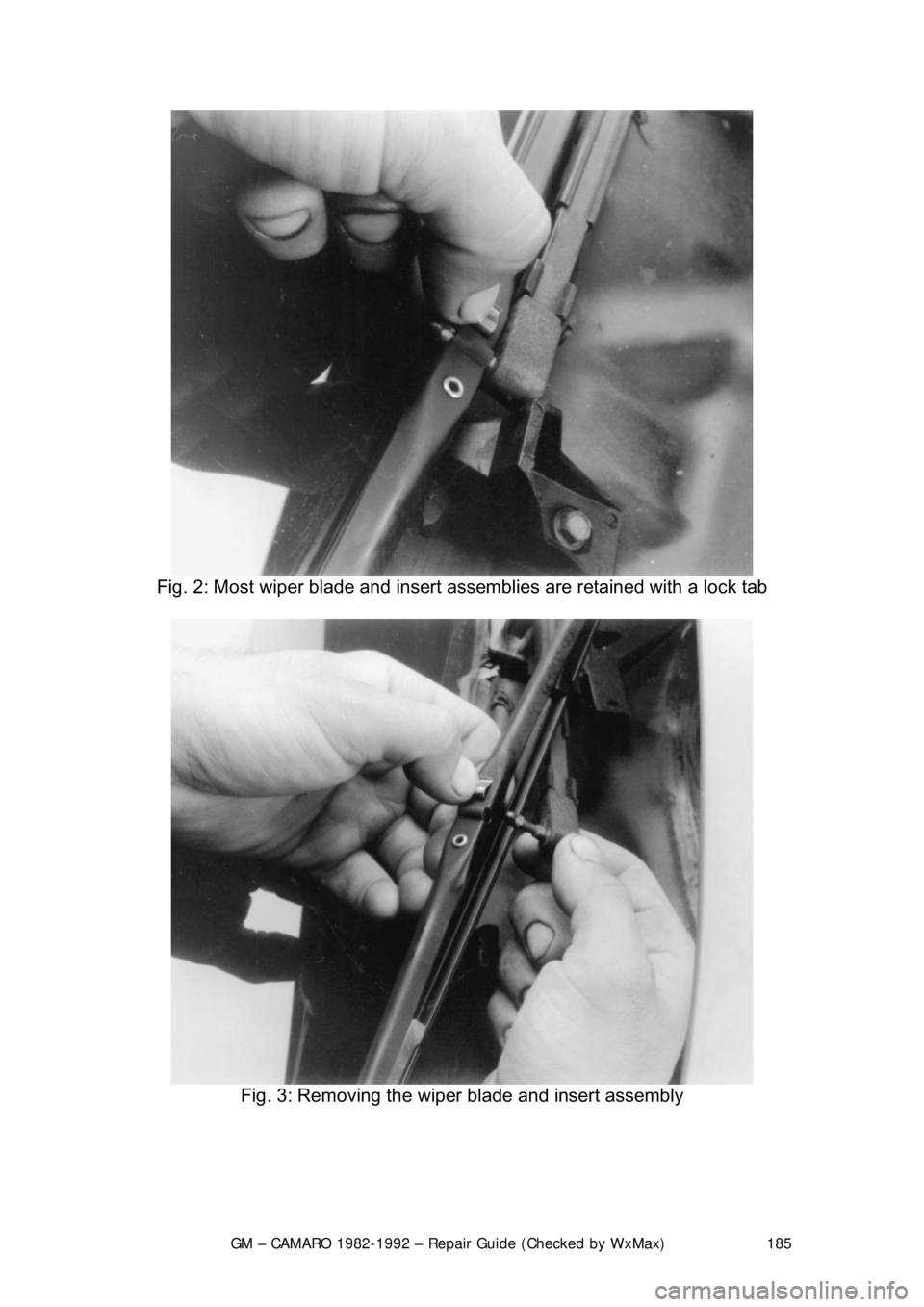
Fig. 2: Most wiper blade and insert assemblies are retained with a lock tab
Fig. 3: Removing the wiper blade and insert assembly
Page 186 of 875
GM – CAMARO 1982-1992 – Repair Guide (Checked by WxMax) 186
ARM
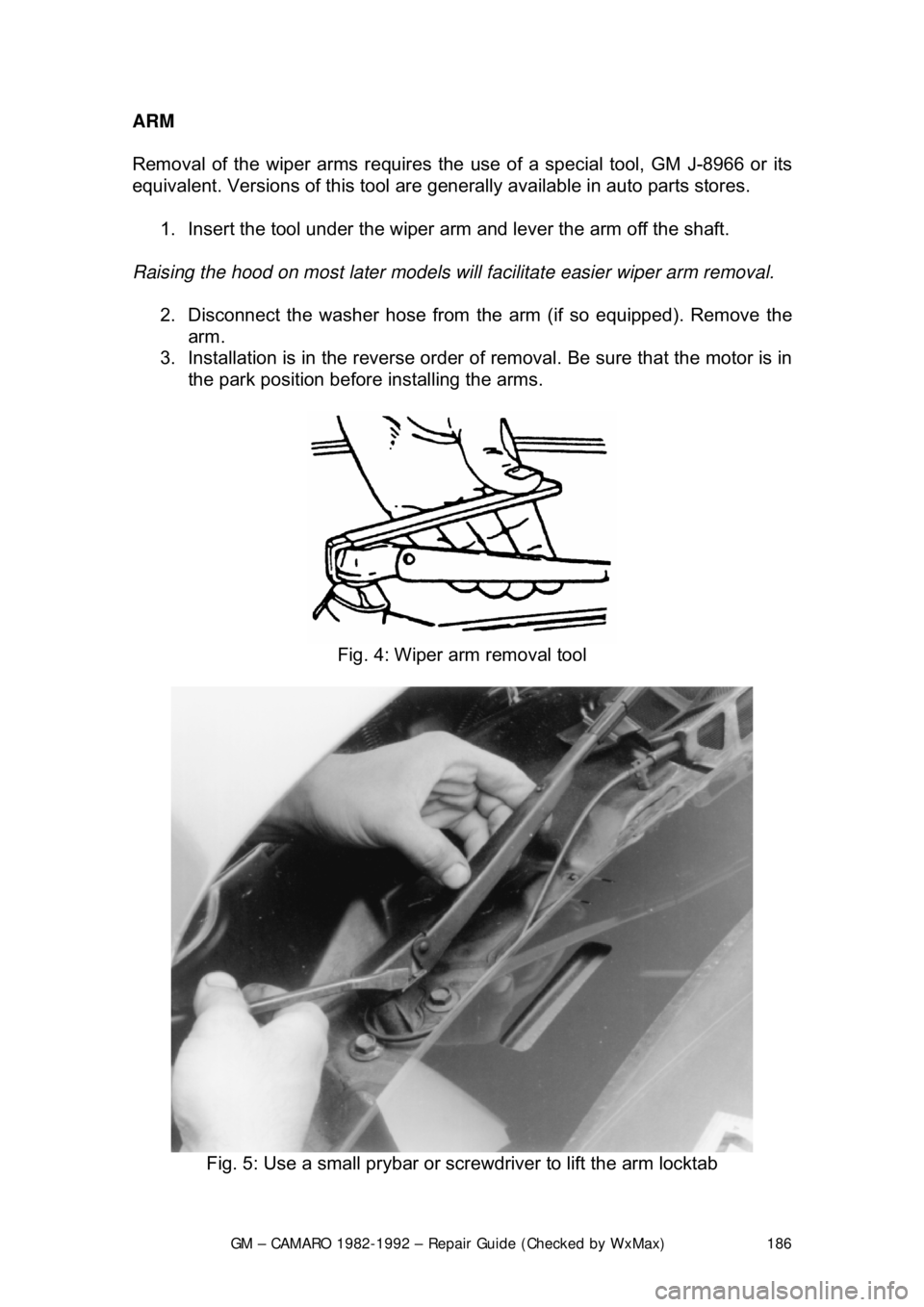
Removal of the wiper arms requires the
use of a special tool, GM J-8966 or its
equivalent. Versions of this tool are gener ally available in auto parts stores.
1. Insert the tool under the wiper a rm and lever the arm off the shaft.
Raising the hood on most later models will facilitate easier wiper arm removal.
2. Disconnect the washer hose from the arm (if so equipped). Remove the
arm.
3. Installation is in the reverse order of removal. Be sure that the motor is in
the park position before installing the arms.
Fig. 4: Wiper arm removal tool
Fig. 5: Use a small prybar or screwdriver to lift the arm locktab
Page 200 of 875

GM – CAMARO 1982-1992 – Repair Guide (Checked by WxMax) 200
9. Lubricate the speedometer cable
with an appropriate lubricant, being
sure to cover the lower thirds of the cable.
10. Insert the cable into the casi ng, then connect the cable and casing
assembly to the speedometer.
11. Install the instrument cluster, then install the cluster attaching screws.
12. Install the instrument cluster trim plate.
13. On models without cruise control, connect the speedometer cable strap
at the power brake booste r. On models with cruise control, connect the
speedometer cable at the cr uise control transducer.
14. Connect the negative battery cable at the battery.
WIPER SWITCH
REMOVAL & INSTALLATION
The wiper switch is part of the multi-function lever, located on the steering
wheel column.
1. Disconnect the electrical connector of the multi-function lever, located
under the instrument panel.
2. Remove the protective cover from the wire.
3. Grasp the lever firmly, twist and pull (the tang on the lever must align
with the socket) the lever straight out.
4. Pull the wire through the steering column.
To install: 5. Slide a music wire tool through the steering column and connect the
lever wire to the tool wire; pull t he wire through the steering column.
6. Push the control lever into the sp ring loaded socket (be sure to align the
tang).
7. Install the protective cover to the wire.
8. Connect the electrical connector of the multi-function lever.
HEADLIGHT SWITCH
REMOVAL & INSTALLATION 1. Disconnect the negative batte ry cable at the battery.
2. Remove the four screws from insi de the defroster duct (instrument panel
pad securing screws).
3. Remove the screws which are under the lip of the instrument panel pad.
4. Remove the instrument panel pad.
5. On models equipped with air condition ing, remove the instrument panel
cluster bezel and the cluster.
6. Remove the radio speaker bracket.
7. Pull the headlamp switch knob to the ON position, depress the locking
button for the knob and shaft (locat ed on the switch), and remove the
knob and shaft.
8. Remove the switch bezel (retainer).
Page 209 of 875
GM – CAMARO 1982-1992 – Repair Guide (Checked by WxMax) 209
SIGNAL AND MARKER LIGHTS
REMOVAL & INSTALLATION
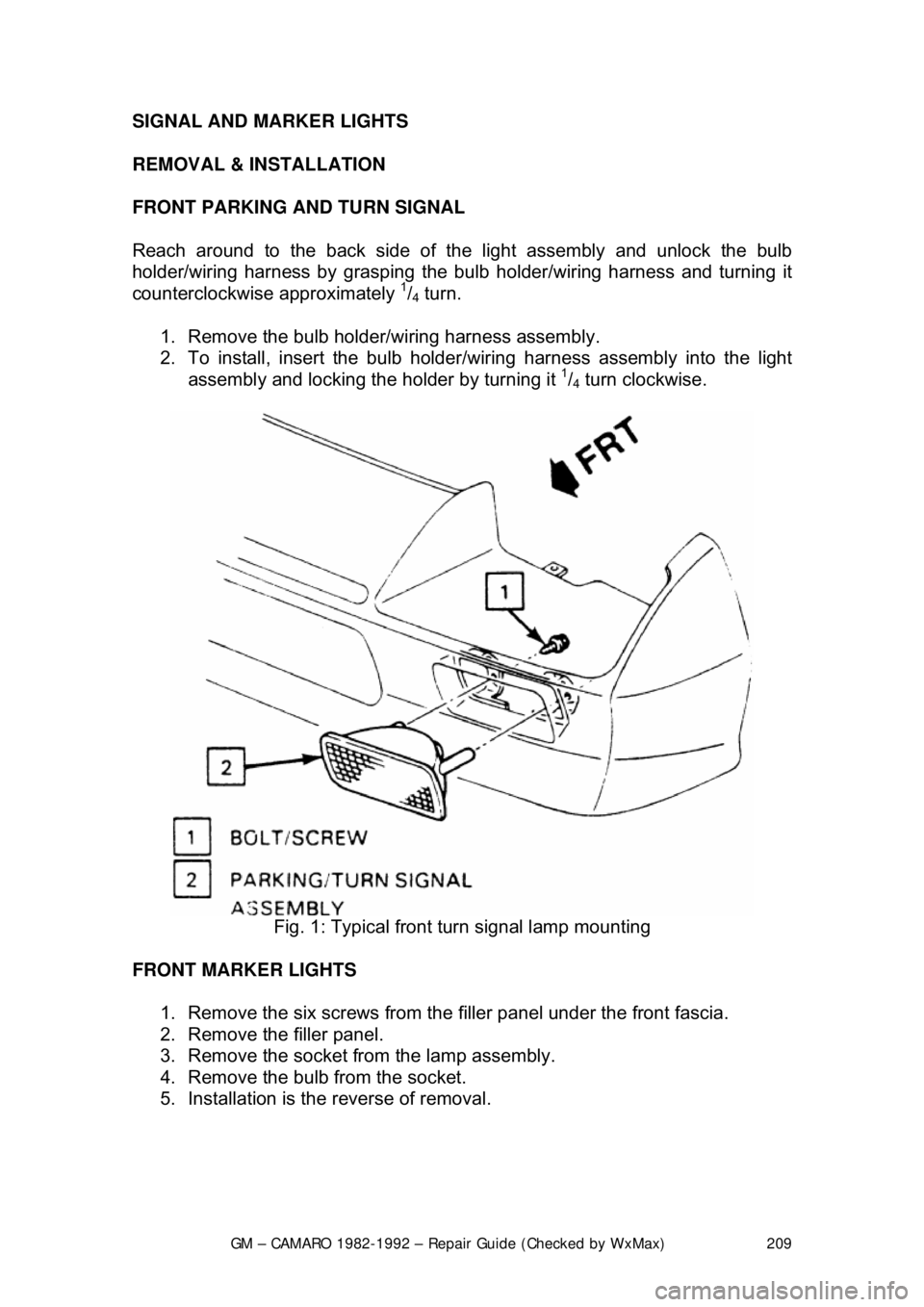
FRONT PARKING AND TURN SIGNAL
Reach around to the back side of t
he light assembly and unlock the bulb
holder/wiring harness by grasping the bul b holder/wiring harness and turning it
counterclockwise approximately
1/4 turn.
1. Remove the bulb holder/wiring harness assembly.
2. To install, insert the bulb holder /wiring harness assembly into the light
assembly and locking the holder by turning it
1/4 turn clockwise.
Fig. 1: Typical front turn signal lamp mounting
FRONT MARKER LIGHTS 1. Remove the six screws from the filler panel under the front fascia.
2. Remove the filler panel.
3. Remove the socket from the lamp assembly.
4. Remove the bulb from the socket.
5. Installation is the reverse of removal.
Page 213 of 875
GM – CAMARO 1982-1992 – Repair Guide (Checked by WxMax) 213
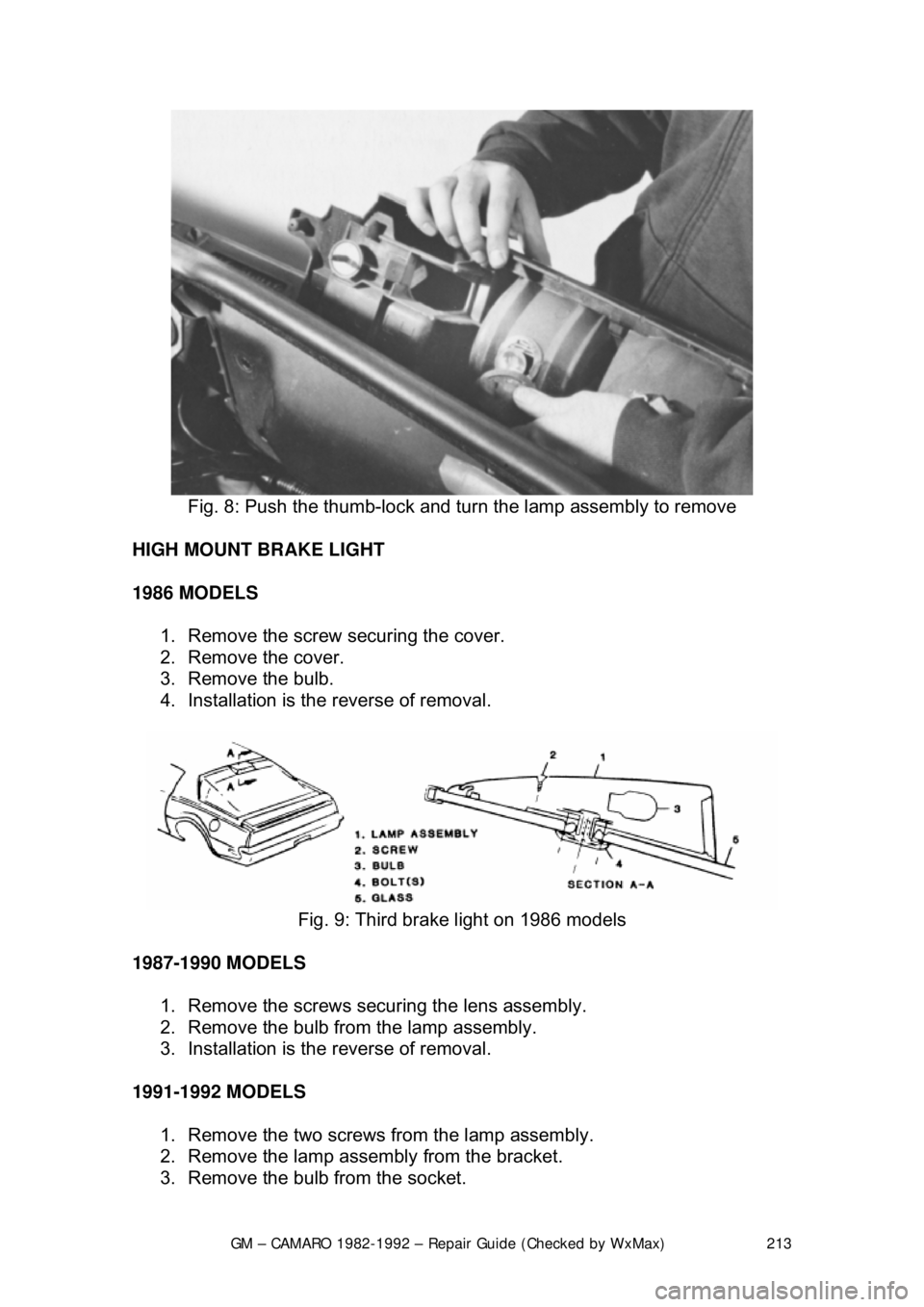
Fig. 8: Push the thumb-lock and turn the lamp assembly to remove
HIGH MOUNT BRAKE LIGHT
1986 MODELS 1. Remove the screw securing the cover.
2. Remove the cover.
3. Remove the bulb.
4. Installation is the reverse of removal.
Fig. 9: Third brake light on 1986 models
1987-1990 MODELS 1. Remove the screws securing the lens assembly.
2. Remove the bulb from the lamp assembly.
3. Installation is the reverse of removal.
1991-1992 MODELS 1. Remove the two screws fr om the lamp assembly.
2. Remove the lamp assembly from the bracket.
3. Remove the bulb from the socket.