ECU CHEVROLET CAPTIVA SPORT 2013 Owners Manual
[x] Cancel search | Manufacturer: CHEVROLET, Model Year: 2013, Model line: CAPTIVA SPORT, Model: CHEVROLET CAPTIVA SPORT 2013Pages: 374, PDF Size: 6.66 MB
Page 1 of 374
Black plate (1,1)Chevrolet Captiva Sport Owner Manual - 2013 - crc - 11/12/12
2013 Chevrolet Captiva Sport Owner Manual MIn Brief . . . . . . . . . . . . . . . . . . . . . . . . 1-1
Instrument Panel . . . . . . . . . . . . . . 1-2
Initial Drive Information . . . . . . . . 1-4
Vehicle Features . . . . . . . . . . . . . 1-16
Performance and
Maintenance . . . . . . . . . . . . . . . . 1-19
Keys, Doors, and
Windows . . . . . . . . . . . . . . . . . . . . 2-1
Keys and Locks . . . . . . . . . . . . . . . 2-1
Doors . . . . . . . . . . . . . . . . . . . . . . . . . . 2-8
Vehicle Security . . . . . . . . . . . . . . . . 2-9
Exterior Mirrors . . . . . . . . . . . . . . . 2-12
Interior Mirrors . . . . . . . . . . . . . . . . 2-13
Windows . . . . . . . . . . . . . . . . . . . . . 2-14
Roof . . . . . . . . . . . . . . . . . . . . . . . . . . 2-15
Seats and Restraints . . . . . . . . . 3-1
Head Restraints . . . . . . . . . . . . . . . 3-2
Front Seats . . . . . . . . . . . . . . . . . . . . 3-3
Rear Seats . . . . . . . . . . . . . . . . . . . . 3-8
Safety Belts . . . . . . . . . . . . . . . . . . . . 3-9
Airbag System . . . . . . . . . . . . . . . . 3-17
Child Restraints . . . . . . . . . . . . . . 3-32 Storage . . . . . . . . . . . . . . . . . . . . . . . 4-1
Storage Compartments . . . . . . . . 4-1
Additional Storage Features . . . 4-2
Roof Rack System . . . . . . . . . . . . . 4-3
Instruments and Controls . . . . 5-1
Controls . . . . . . . . . . . . . . . . . . . . . . . 5-2
Warning Lights, Gauges, and
Indicators . . . . . . . . . . . . . . . . . . . . 5-8
Information Displays . . . . . . . . . . 5-23
Vehicle Messages . . . . . . . . . . . . 5-28
Vehicle Personalization . . . . . . . 5-36
Universal Remote System . . . . 5-41
Lighting . . . . . . . . . . . . . . . . . . . . . . . 6-1
Exterior Lighting . . . . . . . . . . . . . . . 6-1
Interior Lighting . . . . . . . . . . . . . . . . 6-4
Lighting Features . . . . . . . . . . . . . . 6-6
Infotainment System . . . . . . . . . 7-1
Introduction . . . . . . . . . . . . . . . . . . . . 7-1
Radio . . . . . . . . . . . . . . . . . . . . . . . . . . 7-5
Audio Players . . . . . . . . . . . . . . . . 7-10
Phone . . . . . . . . . . . . . . . . . . . . . . . . 7-23 Climate Controls . . . . . . . . . . . . . 8-1
Climate Control Systems . . . . . . 8-1
Air Vents . . . . . . . . . . . . . . . . . . . . . . . 8-8
Maintenance . . . . . . . . . . . . . . . . . . . 8-8
Driving and Operating . . . . . . . . 9-1
Driving Information . . . . . . . . . . . . . 9-2
Starting and Operating . . . . . . . 9-14
Engine Exhaust . . . . . . . . . . . . . . 9-19
Automatic Transmission . . . . . . 9-20
Drive Systems . . . . . . . . . . . . . . . . 9-24
Brakes . . . . . . . . . . . . . . . . . . . . . . . 9-24
Ride Control Systems . . . . . . . . 9-27
Cruise Control . . . . . . . . . . . . . . . . 9-29
Object Detection Systems . . . . 9-31
Fuel . . . . . . . . . . . . . . . . . . . . . . . . . . 9-35
Towing . . . . . . . . . . . . . . . . . . . . . . . 9-39
Conversions and Add-Ons . . . 9-45
Vehicle Care . . . . . . . . . . . . . . . . . 10-1
General Information . . . . . . . . . . 10-2
Vehicle Checks . . . . . . . . . . . . . . . 10-3
Headlamp Aiming . . . . . . . . . . . 10-26
Bulb Replacement . . . . . . . . . . 10-26
Page 9 of 374
Black plate (5,1)Chevrolet Captiva Sport Owner Manual - 2013 - crc - 11/12/12
In Brief 1-5When the vehicle starts, the parking
lamps will turn on and remain on as
long as the engine is running. The
doors will be locked and the climate
control system will operate at the
same setting as when the vehicle
was last turned off.
After entering the vehicle during a
remote start, insert and turn the key
to the ON/RUN position to drive the
vehicle.
If the vehicle is left running, it
automatically shuts off after
10 minutes unless a time extension
has been done.
Shutting the Engine Off After a
Remote Start To manually shut off a remote start: .
Aim the RKE transmitter at the
vehicle and press
/ until the
parking lamps turn off. .
Turn on the hazard warning
flashers. .
Turn the ignition switch on and
then off.
See Remote Vehicle Start on
page 2 ‑ 4 .
Door Locks From the outside, lock or unlock the
door using the key or the Remote
Keyless Entry (RKE) transmitter.
See Remote Keyless Entry (RKE)
System Operation on page 2 ‑ 2 .
From the inside, push or pull the
manual door lock on each door.
Use the power door lock switch on
the front doors.
Q : Press to lock the doors.
K : Press to unlock the doors.
See Door Locks on page 2 ‑ 6 and
Power Door Locks on page 2 ‑ 6 .
Safety Locks
The vehicle has rear door security
locks to prevent passengers from
opening the rear doors from the
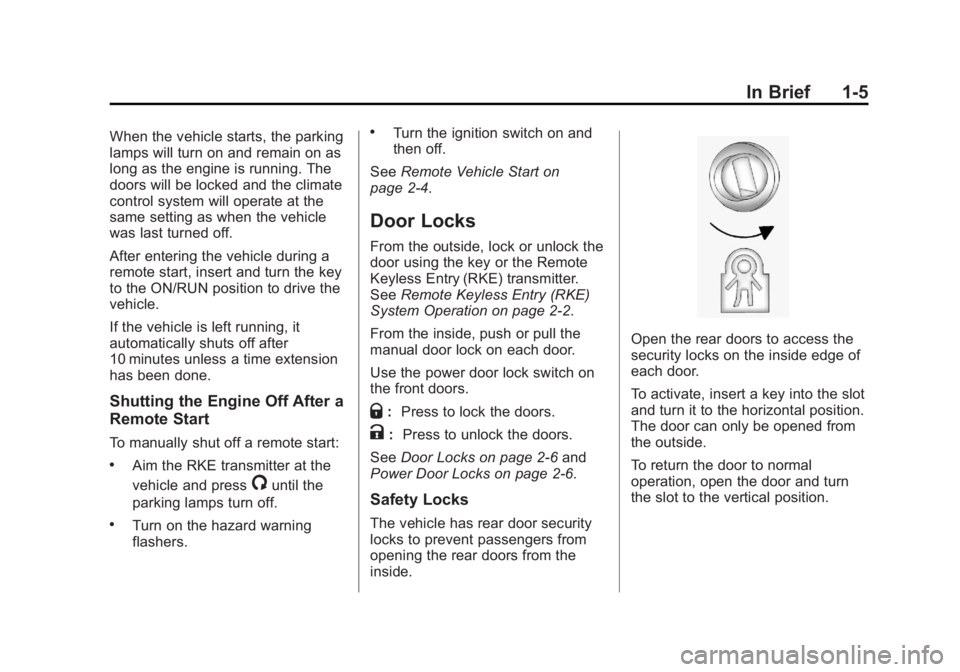
inside. Open the rear doors to access the
security locks on the inside edge of
each door.
To activate, insert a key into the slot
and turn it to the horizontal position.
The door can only be opened from
the outside.
To return the door to normal
operation, open the door and turn
the slot to the vertical position.
Page 23 of 374
Black plate (19,1)Chevrolet Captiva Sport Owner Manual - 2013 - crc - 11/12/12
In Brief 1-19Keep the sensors on the vehicle's
rear bumper clean to ensure proper
operation.
See Ultrasonic Parking Assist on
page 9 ‑ 31 .
Power Outlets The accessory power outlets can be
used to plug in electrical equipment,
such as a cell phone or MP3 player.
The power outlets are located inside
the center floor console, on the rear
of the center floor console, and in
the rear cargo compartment.
Remove the cover to access and
replace when not in use.
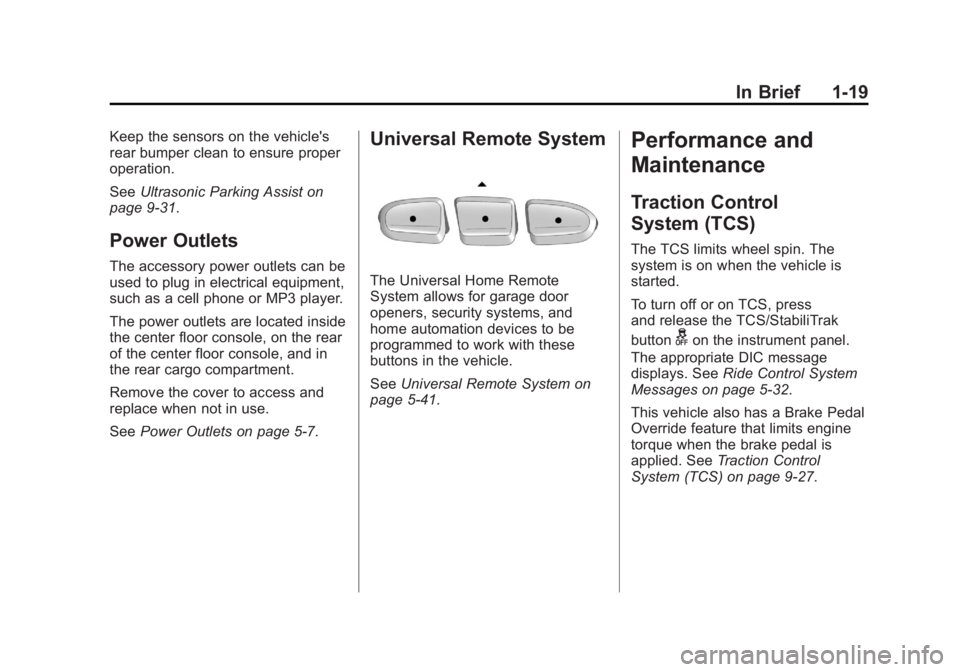
See Power Outlets on page 5 ‑ 7 .Universal Remote System
The Universal Home Remote
System allows for garage door
openers, security systems, and
home automation devices to be
programmed to work with these
buttons in the vehicle.
See Universal Remote System on
page 5 ‑ 41 .Performance and
Maintenance Traction Control
System (TCS) The TCS limits wheel spin. The
system is on when the vehicle is
started.
To turn off or on TCS, press
and release the TCS/StabiliTrak
button
g on the instrument panel.
The appropriate DIC message
displays. See Ride Control System
Messages on page 5 ‑ 32 .
This vehicle also has a Brake Pedal
Override feature that limits engine
torque when the brake pedal is
applied. See Traction Control
System (TCS) on page 9 ‑ 27 .
Page 26 of 374
Black plate (22,1)Chevrolet Captiva Sport Owner Manual - 2013 - crc - 11/12/12
1-22 In Brief See Roadside Assistance Program
(Mexico) on page 13 ‑ 7 or Roadside
Assistance Program (U.S. and
Canada) on page 13 ‑ 11 .
OnStar ®
If equipped, this vehicle has a
comprehensive, in-vehicle system
that can connect to a live Advisor
for Emergency, Security, Navigation,
Connection, and Diagnostic
Services. See OnStar Overview on
page 14 ‑ 1 .
Page 27 of 374
Black plate (1,1)Chevrolet Captiva Sport Owner Manual - 2013 - crc - 11/12/12
Keys, Doors, and Windows 2-1
Keys, Doors, and
Windows Keys and Locks Keys . . . . . . . . . . . . . . . . . . . . . . . . . . 2-1
Remote Keyless Entry (RKE)
System . . . . . . . . . . . . . . . . . . . . . . 2-2
Remote Keyless Entry (RKE)
System Operation . . . . . . . . . . . 2-2
Remote Vehicle Start . . . . . . . . . 2-4
Door Locks . . . . . . . . . . . . . . . . . . . 2-6
Power Door Locks . . . . . . . . . . . . 2-6
Delayed Locking . . . . . . . . . . . . . . 2-6
Automatic Door Locks . . . . . . . . . 2-6
Lockout Protection . . . . . . . . . . . . 2-7
Safety Locks . . . . . . . . . . . . . . . . . . 2-7
Doors Liftgate . . . . . . . . . . . . . . . . . . . . . . . . 2-8 Vehicle Security Vehicle Security . . . . . . . . . . . . . . . 2-9
Vehicle Alarm System . . . . . . . . . 2-9
Immobilizer . . . . . . . . . . . . . . . . . . 2-10
Immobilizer Operation . . . . . . . 2-10
Exterior Mirrors Convex Mirrors . . . . . . . . . . . . . . 2-12
Power Mirrors . . . . . . . . . . . . . . . . 2-12
Folding Mirrors . . . . . . . . . . . . . . . 2-12
Heated Mirrors . . . . . . . . . . . . . . . 2-13
Interior Mirrors Manual Rearview Mirror . . . . . . 2-13
Automatic Dimming Rearview
Mirror . . . . . . . . . . . . . . . . . . . . . . . 2-13
Windows Windows . . . . . . . . . . . . . . . . . . . . . 2-14
Power Windows . . . . . . . . . . . . . 2-14
Sun Visors . . . . . . . . . . . . . . . . . . . 2-15
Roof Sunroof . . . . . . . . . . . . . . . . . . . . . . 2-15 Keys and Locks Keys
{ WARNINGLeaving children in a vehicle with
the ignition key is dangerous and
children or others could be
seriously injured or killed. They
could operate the power windows
or other controls or make the
vehicle move. The windows will
function with the keys in the
ignition, and children or others
could be caught in the path of a
closing window. Do not leave
children in a vehicle with the
ignition key.
Page 33 of 374
Black plate (7,1)Chevrolet Captiva Sport Owner Manual - 2013 - crc - 11/12/12
Keys, Doors, and Windows 2-7Automatic Door Unlock The doors can be programmed to
automatically unlock when the shift
lever is moved into P (Park). See
“ Auto Door Unlock ” in Vehicle
Personalization on page 5 ‑ 36 .
Lockout Protection When the power door lock switch is
pressed with the key in the ignition,
and any door is open, all the doors
lock and the driver door unlocks.
When doors are closed with the key
in the ignition, the horn will sound
as a reminder.
If the doors are locked with the
Remote Keyless Entry (RKE)
transmitter, and the key is in the
ignition, a chime sounds and all
except the driver door lock.
The lockout protection feature can
be overridden by holding the power
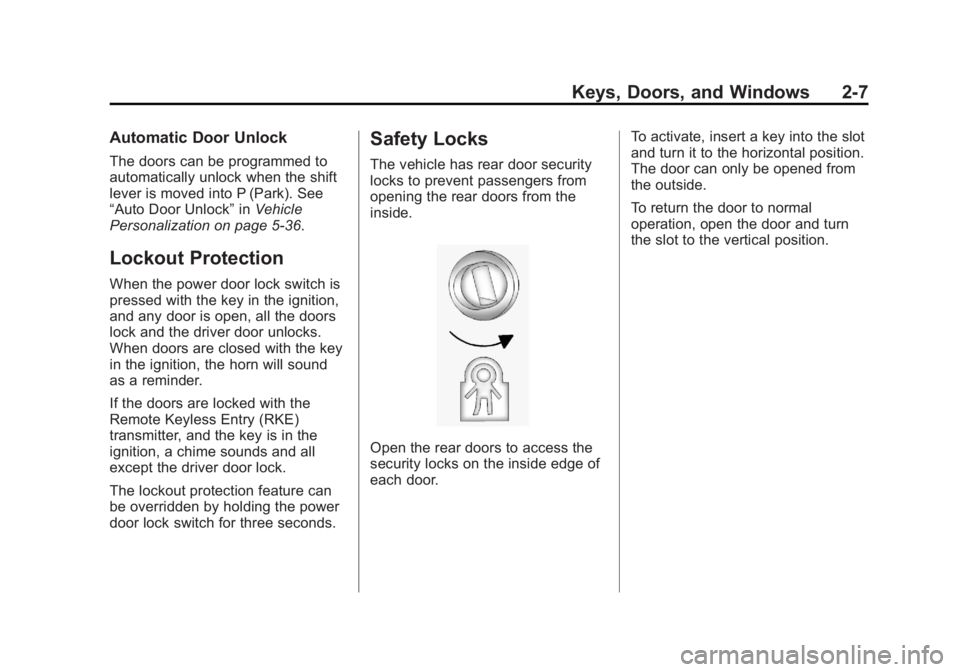
door lock switch for three seconds. Safety Locks The vehicle has rear door security
locks to prevent passengers from
opening the rear doors from the
inside.
Open the rear doors to access the
security locks on the inside edge of
each door. To activate, insert a key into the slot
and turn it to the horizontal position.
The door can only be opened from
the outside.
To return the door to normal
operation, open the door and turn
the slot to the vertical position.
Page 35 of 374
Black plate (9,1)Chevrolet Captiva Sport Owner Manual - 2013 - crc - 11/12/12
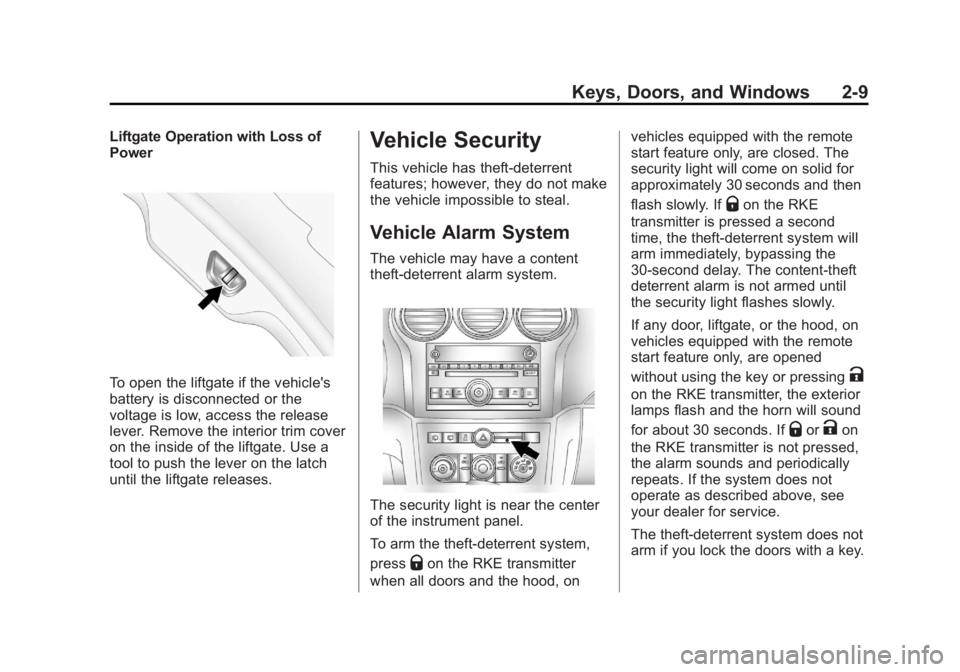
Keys, Doors, and Windows 2-9Liftgate Operation with Loss of
Power
To open the liftgate if the vehicle's
battery is disconnected or the
voltage is low, access the release
lever. Remove the interior trim cover
on the inside of the liftgate. Use a
tool to push the lever on the latch
until the liftgate releases. Vehicle Security This vehicle has theft-deterrent
features; however, they do not make
the vehicle impossible to steal.
Vehicle Alarm System The vehicle may have a content
theft-deterrent alarm system.
The security light is near the center
of the instrument panel.
To arm the theft-deterrent system,
press
Q on the RKE transmitter
when all doors and the hood, on vehicles equipped with the remote
start feature only, are closed. The
security light will come on solid for
approximately 30 seconds and then
flash slowly. If
Q on the RKE
transmitter is pressed a second
time, the theft-deterrent system will
arm immediately, bypassing the
30-second delay. The content-theft
deterrent alarm is not armed until
the security light flashes slowly.
If any door, liftgate, or the hood, on
vehicles equipped with the remote
start feature only, are opened
without using the key or pressing
Kon the RKE transmitter, the exterior
lamps flash and the horn will sound
for about 30 seconds. If
Q or
K on
the RKE transmitter is not pressed,
the alarm sounds and periodically
repeats. If the system does not
operate as described above, see
your dealer for service.
The theft-deterrent system does not
arm if you lock the doors with a key.
Page 36 of 374
Black plate (10,1)Chevrolet Captiva Sport Owner Manual - 2013 - crc - 11/12/12
2-10 Keys, Doors, and Windows To avoid setting off the alarm by
accident, always unlock a door with
the RKE transmitter or a key.
Unlocking a door any other way will
set off the alarm if the system has
been armed.
If you set off the alarm by accident,
turn off the alarm by pressing
Q or
K on the RKE transmitter or by
placing the key in the ignition and
turning it to START.
Testing the Alarm To test the alarm:
1. From inside the vehicle, lower
the driver window and open the
driver door.
2. Get out of the vehicle, close the
door, and activate the system by
locking the doors with the RKE
transmitter.
3. Wait for the security light to flash
slowly. 4. Reach in through the window,
unlock the door with the manual
door lock, and open the door.
This should set off the alarm.
If the alarm does not sound when it
should, but the vehicle's headlamps
flash, check to see if the horn
works. The horn fuse may be blown.
To replace the fuse, see Fuses and
Circuit Breakers on page 10 ‑ 30 .
If the alarm does not sound or the
vehicle's headlamps do not flash,
see your dealer for service.
Immobilizer See Radio Frequency Statement on
page 13 ‑ 20 for information
regarding Part 15 of the Federal
Communications Commission (FCC)
rules and Industry Canada
Standards RSS-GEN/210/220/310. Immobilizer Operation This vehicle has PASS-Key ®
III+
(Personalized Automotive Security
System) theft-deterrent system.
PASS-Key III+ is a passive
theft-deterrent system.
The system is automatically armed
when the key is removed from the
ignition.
You do not have to manually arm or
disarm the system.
The security light comes on if there
is a problem with the theft-deterrent
system operation.
When the PASS-Key III+ system
senses that someone is using the
wrong key, it prevents the vehicle
from starting. Anyone using a
trial-and-error method to start the
vehicle will be discouraged because
of the high number of electrical key
codes.
Page 37 of 374
Black plate (11,1)Chevrolet Captiva Sport Owner Manual - 2013 - crc - 11/12/12
Keys, Doors, and Windows 2-11When trying to start the vehicle if
the engine does not start and the
security light on the instrument
cluster comes on, there may be a
problem with the theft-deterrent
system. Turn the ignition off and try
again.
If the engine still does not start, and
the key does not appear to be
damaged, wait about five minutes
and try another ignition key and
check the fuse. See Fuses and
Circuit Breakers on page 10 ‑ 30 .
If the engine still does not start with
the other key, the vehicle needs
service. If the vehicle does start, the
first key may be faulty. See your
dealer who can service the
PASS-Key III+ to have a new
key made.
It is possible for the PASS-Key III+
decoder to “ learn ” the transponder
value of a new or replacement key. Up to 10 keys may be programmed
for the vehicle. The following
procedure is for programming
additional keys only. If all the
currently programmed keys are lost
or do not operate, you must see
your dealer or a locksmith who can
service PASS-Key III+ to have keys
made and programmed to the
system.
See your dealer or a locksmith who
can service PASS-Key III+ to get a
new key blank that is cut exactly as
the ignition key that operates the
system.
To program the new key:
1. Verify that the new key has
1stamped on it.
2. Insert the already programmed
key in the ignition and start the
engine. If the engine does not
start, see your dealer for service. 3. After the engine has started, turn
the key to LOCK/OFF, and
remove the key.
4. Insert the key to be programmed
and turn it to the ON/RUN
position within five seconds of
the original key being turned to
the LOCK/OFF position.
The security light turns off once
the key has been programmed.
5. Repeat Steps 1 – 4 if additional
keys are to be programmed.
If the PASS-Key III+ key is lost or
damaged, see your dealer or a
locksmith to have a new key made.
Do not leave the key or device that
disarms or deactivates the
theft-deterrent system in the vehicle.
Page 43 of 374
Black plate (1,1)Chevrolet Captiva Sport Owner Manual - 2013 - crc - 11/12/12
Seats and Restraints 3-1
Seats and
Restraints Head Restraints Head Restraints . . . . . . . . . . . . . . . 3-2
Active Head Restraints . . . . . . . . 3-3
Front Seats Seat Adjustment . . . . . . . . . . . . . . 3-3
Power Seat Adjustment . . . . . . . 3-4
Lumbar Adjustment . . . . . . . . . . . 3-4
Reclining Seatbacks . . . . . . . . . . 3-5
Heated Front Seats . . . . . . . . . . . 3-6
Folding Seatback . . . . . . . . . . . . . 3-7
Rear Seats Rear Seats . . . . . . . . . . . . . . . . . . . . 3-8
Safety Belts Safety Belts . . . . . . . . . . . . . . . . . . . 3-9
How to Wear Safety Belts
Properly . . . . . . . . . . . . . . . . . . . . 3-11 Lap-Shoulder Belt . . . . . . . . . . . 3-12
Safety Belt Use During
Pregnancy . . . . . . . . . . . . . . . . . . 3-15
Safety Belt Extender . . . . . . . . . 3-16
Safety System Check . . . . . . . . 3-16
Safety Belt Care . . . . . . . . . . . . . 3-16
Replacing Safety Belt System
Parts after a Crash . . . . . . . . . 3-17
Airbag System Airbag System . . . . . . . . . . . . . . . 3-17
Where Are the Airbags? . . . . . 3-20
When Should an Airbag
Inflate? . . . . . . . . . . . . . . . . . . . . . 3-21
What Makes an Airbag
Inflate? . . . . . . . . . . . . . . . . . . . . . 3-23
How Does an Airbag
Restrain? . . . . . . . . . . . . . . . . . . . 3-23
What Will You See after an
Airbag Inflates? . . . . . . . . . . . . 3-23
Passenger Sensing System
(United States) . . . . . . . . . . . . . 3-25 Servicing the Airbag-Equipped
Vehicle . . . . . . . . . . . . . . . . . . . . . 3-29
Adding Equipment to the
Airbag-Equipped Vehicle . . . 3-29
Airbag System Check . . . . . . . . 3-31
Replacing Airbag System
Parts after a Crash . . . . . . . . . 3-31
Child Restraints Older Children . . . . . . . . . . . . . . . 3-32
Infants and Young
Children . . . . . . . . . . . . . . . . . . . . 3-34
Child Restraint Systems . . . . . 3-36
Where to Put the Restraint . . . 3-37
Lower Anchors and Tethers
for Children (LATCH
System) . . . . . . . . . . . . . . . . . . . . 3-39
Replacing LATCH System
Parts After a Crash . . . . . . . . . 3-44
Securing Child Restraints
(Rear Seat) . . . . . . . . . . . . . . . . . 3-44
Securing Child Restraints
(Front Passenger Seat) . . . . 3-46