ignition CHEVROLET CITY EXPRESS 2018 Workshop Manual
[x] Cancel search | Manufacturer: CHEVROLET, Model Year: 2018, Model line: CITY EXPRESS, Model: CHEVROLET CITY EXPRESS 2018Pages: 287, PDF Size: 4.19 MB
Page 157 of 287
Chevrolet City Express Owner Manual (GMNA-Localizing-U.S./Canada-
11683523) - 2018 - CRC - 7/10/17
156 Driving and Operating
ABS can change the brake pressure
to each wheel, as required, faster
than any driver could. This can help
you steer around the obstacle while
braking hard.
As the brakes are applied, the
computer keeps receiving updates
on wheel speed and controls
braking pressure accordingly.
Remember: ABS does not change
the time needed to get a foot up to
the brake pedal or always decrease
stopping distance. If you get too
close to the vehicle in front of you,
there will not be enough time to
apply the brakes if that vehicle
suddenly slows or stops. Always
leave enough room up ahead to
stop, even with ABS.
Using ABS
Do not pump the brakes. Just hold
the brake pedal down firmly and let
ABS work. You may hear the ABS
pump or motor operating and feel
the brake pedal pulsate. This is
normal.
Braking in Emergencies
ABS allows you to steer and brake
at the same time. In many
emergencies, steering can help
more than even the very best
braking.
Brake Force Distribution
During braking while driving through
turns, the system optimizes the
distribution of force to each of the
four wheels depending on the radius
of the turn.
Parking Brake
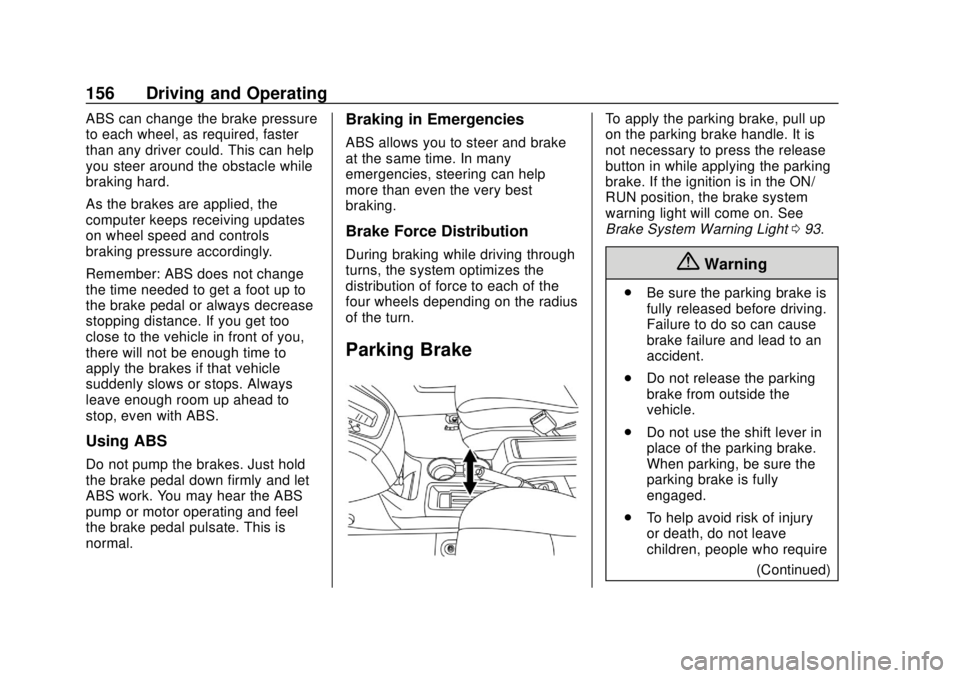
To apply the parking brake, pull up
on the parking brake handle. It is
not necessary to press the release
button in while applying the parking
brake. If the ignition is in the ON/
RUN position, the brake system
warning light will come on. See
Brake System Warning Light093.
{Warning
.
Be sure the parking brake is
fully released before driving.
Failure to do so can cause
brake failure and lead to an
accident.
. Do not release the parking
brake from outside the
vehicle.
. Do not use the shift lever in
place of the parking brake.
When parking, be sure the
parking brake is fully
engaged.
. To help avoid risk of injury
or death, do not leave
children, people who require
(Continued)
Page 161 of 287
Chevrolet City Express Owner Manual (GMNA-Localizing-U.S./Canada-
11683523) - 2018 - CRC - 7/10/17
160 Driving and Operating
dindicator flashes if this occurs. All
other functions are off and the
d
indicator will not flash.
The TCS and Electronic Stability
Control systems are automatically
reset to on when the ignition is
placed in the OFF position then
back to the ON position.
The systems have a built in
diagnostic feature that test the
systems each time the engine is
started and the vehicle moved
forward or in reverse at a slow
speed. When the test occurs a clunk
noise may be heard and/or a
pulsation in the brake pedal may be
felt. This is normal and is not an
indication of a malfunction.
Adding accessories can affect the
vehicle performance. See
Accessories and Modifications
0 178.
{Warning
.
The Traction Control
System (TCS) and
Electronic Stability Control
(ESC) system are designed
to help the driver maintain
stability but do not prevent
accidents due to abrupt
steering operation at high
speeds or by careless or
dangerous driving
techniques. Reduce vehicle
speed and be especially
careful when driving and
cornering on slippery
surfaces and always drive
carefully.
. Do not modify the vehicle’ s
suspension. If suspension
parts such as shock
absorbers, struts, springs,
stabilizer bars, bushings,
and wheels are not
recommended for your
vehicle or are extremely
deteriorated, the TCS and
(Continued)
Warning (Continued)
ESC systems may not
operate properly. This could
adversely affect vehicle
handling performance, and
the
dindicator may flash or
the
dindicator light may
illuminate.
. If brake related parts such
as brake pads, rotors, and
calipers are not
recommended or are
extremely deteriorated, the
TCS and ESC systems may
not operate properly and the
dindicator light may
illuminate.
. If engine control related
parts are not recommended
or are extremely
deteriorated, the
dindicator
light may illuminate.
. When driving on extremely
inclined surfaces such as
higher banked corners, the
(Continued)
Page 170 of 287
Chevrolet City Express Owner Manual (GMNA-Localizing-U.S./Canada-
11683523) - 2018 - CRC - 7/10/17
Driving and Operating 169
wipe off the wax with a clean
cloth dampened with mild
detergent diluted with water.
Parking Assist
{Warning
.Always turn and look back
before backing up. The RPA
is not a substitute for proper
backing procedures.
. Read and understand the
limitations of the rear
parking assist system as
(Continued)
Warning (Continued)
contained in this section.
Inclement weather may
affect the function of the
RPA; this may include
reduced performance or a
false activation.
. This system is not designed
to prevent contact with small
or moving objects.
. The system is designed as
a aid to the driver in
detecting large stationary
objects to help avoid
damaging the vehicle. The
system will not detect small
objects below the bumper,
and may not detect objects
close to the bumper or on
the ground.
. If your vehicle sustains
damage to the rear bumper
fascia, leaving it misaligned
or bent, the sensing zone
may be altered causing
inaccurate measurement of
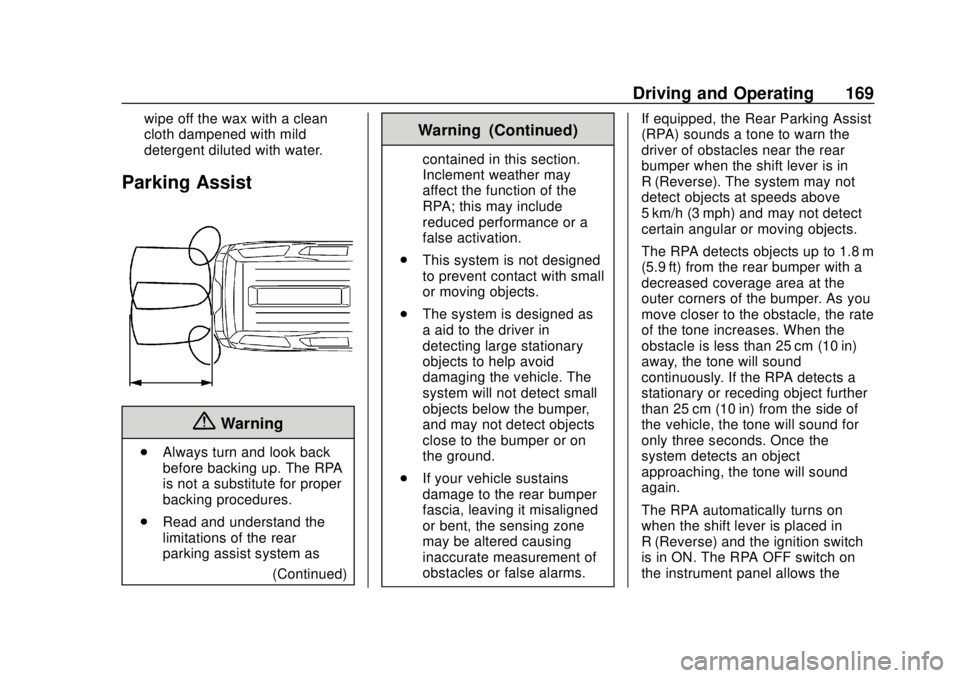
obstacles or false alarms. If equipped, the Rear Parking Assist
(RPA) sounds a tone to warn the
driver of obstacles near the rear
bumper when the shift lever is in
R (Reverse). The system may not
detect objects at speeds above
5 km/h (3 mph) and may not detect
certain angular or moving objects.
The RPA detects objects up to 1.8 m
(5.9 ft) from the rear bumper with a
decreased coverage area at the
outer corners of the bumper. As you
move closer to the obstacle, the rate
of the tone increases. When the
obstacle is less than 25 cm (10 in)
away, the tone will sound
continuously. If the RPA detects a
stationary or receding object further
than 25 cm (10 in) from the side of
the vehicle, the tone will sound for
only three seconds. Once the
system detects an object
approaching, the tone will sound
again.
The RPA automatically turns on
when the shift lever is placed in
R (Reverse) and the ignition switch
is in ON. The RPA OFF switch on
the instrument panel allows the
Page 171 of 287

Chevrolet City Express Owner Manual (GMNA-Localizing-U.S./Canada-
11683523) - 2018 - CRC - 7/10/17
170 Driving and Operating
driver to turn the RPA on and off. To
turn the RPA off, the ignition switch
must be placed in ON. An indicator
light on the switch will illuminate
when the system is turned off. If the
indicator light illuminates when the
RPA is not turned off, it may indicate
a malfunction in the RPA.
Keep the RPA sensors, located on
the rear bumper, free from snow,
ice, and large accumulations of dirt.
Do not clean the sensors with sharp
objects. If the sensors are covered,
it will affect the accuracy of
the RPA.Fuel
GM recommends the use of TOP
TIER detergent gasoline to keep the
engine cleaner and reduce engine
deposits. See www.toptiergas.com
for a list of TOP TIER detergent
gasoline marketers and applicable
countries.
Use regular unleaded gasoline
meeting ASTM specification D4814
with a posted octane rating of 87 or
higher. Do not use gasoline with an
octane rating below 87, as it may
cause engine damage and will lower
fuel economy.Use of Seasonal Fuels
Use summer and winter fuels in the
appropriate season. The fuels
industry automatically modifies the
fuel for the appropriate season.
If fuel is left in the vehicle tank for
long periods of time, driving or
starting could be affected. Drive the
vehicle until the fuel is at one-half
tank or less, then refuel with the
current seasonal fuel.
Prohibited Fuels
Gasolines containing oxygenates
such as ethers and ethanol, as well
as reformulated gasolines, are
available in some cities. If these
gasolines comply with the
previously described specification,
then they are acceptable to use.{Warning
.
Using a fuel other than what
is specified could adversely
affect the emission control
system, and may also affect
the warranty coverage.
(Continued)
Page 196 of 287
Chevrolet City Express Owner Manual (GMNA-Localizing-U.S./Canada-
11683523) - 2018 - CRC - 7/10/17
Vehicle Care 195
Vehicle Storage
{Warning
Batteries have acid that can burn
you and gas that can explode.
You can be badly hurt if you are
not careful. SeeJump Starting -
North America 0227 for tips on
working around a battery without
getting hurt.
Extended Storage Switch
If any electrical equipment does not
operate, remove the extended
storage switch and check for an
open fuse.
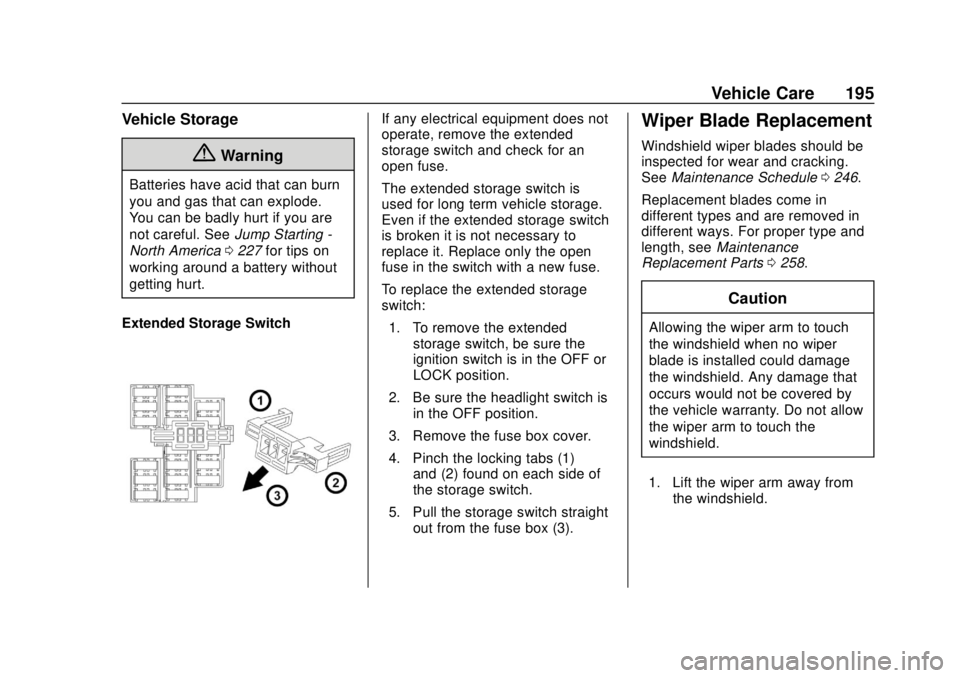
The extended storage switch is
used for long term vehicle storage.
Even if the extended storage switch
is broken it is not necessary to
replace it. Replace only the open
fuse in the switch with a new fuse.
To replace the extended storage
switch: 1. To remove the extended storage switch, be sure the
ignition switch is in the OFF or
LOCK position.
2. Be sure the headlight switch is in the OFF position.
3. Remove the fuse box cover.
4. Pinch the locking tabs (1) and (2) found on each side of
the storage switch.
5. Pull the storage switch straight out from the fuse box (3).Wiper Blade Replacement
Windshield wiper blades should be
inspected for wear and cracking.
See Maintenance Schedule 0246.
Replacement blades come in
different types and are removed in
different ways. For proper type and
length, see Maintenance
Replacement Parts 0258.
Caution
Allowing the wiper arm to touch
the windshield when no wiper
blade is installed could damage
the windshield. Any damage that
occurs would not be covered by
the vehicle warranty. Do not allow
the wiper arm to touch the
windshield.
1. Lift the wiper arm away from the windshield.
Page 212 of 287
Chevrolet City Express Owner Manual (GMNA-Localizing-U.S./Canada-
11683523) - 2018 - CRC - 7/10/17
Vehicle Care 211
Tire Pressure Monitor
Operation
This vehicle may have a Tire
Pressure Monitor System (TPMS).
The TPMS is designed to warn the
driver when a low tire pressure
condition exists. TPMS sensors are
mounted onto each tire and wheel
assembly, excluding the spare tire
and wheel assembly. The TPMS
sensors monitor the air pressure in
the tires and transmit the tire
pressure readings to a receiver
located in the vehicle.
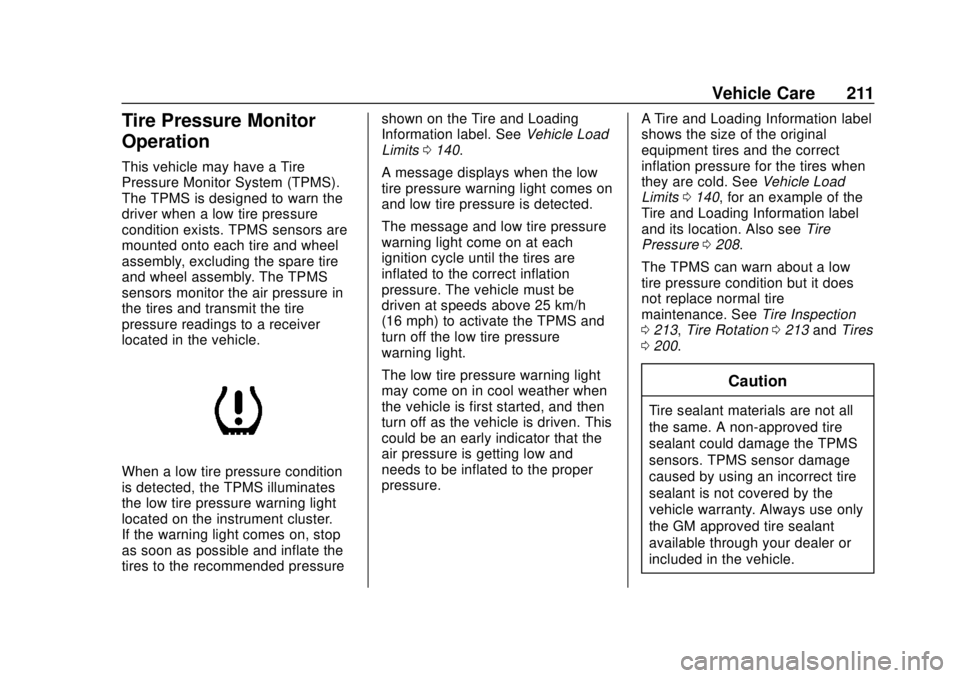
When a low tire pressure condition
is detected, the TPMS illuminates
the low tire pressure warning light
located on the instrument cluster.
If the warning light comes on, stop
as soon as possible and inflate the
tires to the recommended pressureshown on the Tire and Loading
Information label. See
Vehicle Load
Limits 0140.
A message displays when the low
tire pressure warning light comes on
and low tire pressure is detected.
The message and low tire pressure
warning light come on at each
ignition cycle until the tires are
inflated to the correct inflation
pressure. The vehicle must be
driven at speeds above 25 km/h
(16 mph) to activate the TPMS and
turn off the low tire pressure
warning light.
The low tire pressure warning light
may come on in cool weather when
the vehicle is first started, and then
turn off as the vehicle is driven. This
could be an early indicator that the
air pressure is getting low and
needs to be inflated to the proper
pressure. A Tire and Loading Information label
shows the size of the original
equipment tires and the correct
inflation pressure for the tires when
they are cold. See
Vehicle Load
Limits 0140, for an example of the
Tire and Loading Information label
and its location. Also see Tire
Pressure 0208.
The TPMS can warn about a low
tire pressure condition but it does
not replace normal tire
maintenance. See Tire Inspection
0 213, Tire Rotation 0213 andTires
0 200.
Caution
Tire sealant materials are not all
the same. A non-approved tire
sealant could damage the TPMS
sensors. TPMS sensor damage
caused by using an incorrect tire
sealant is not covered by the
vehicle warranty. Always use only
the GM approved tire sealant
available through your dealer or
included in the vehicle.
Page 213 of 287
Chevrolet City Express Owner Manual (GMNA-Localizing-U.S./Canada-
11683523) - 2018 - CRC - 7/10/17
212 Vehicle Care
TPMS Malfunction Light and
Message
The TPMS will not function properly
if one or more of the TPMS sensors
are missing or inoperable. When the
system detects a malfunction, the
low tire pressure warning light
flashes for about one minute and
then stays on for the remainder of
the ignition cycle. The malfunction
light comes on at each ignition cycle
until the problem is corrected. Some
of the conditions that can cause
these to come on are:
.One of the road tires has been
replaced with the spare tire. The
spare tire does not have a
TPMS sensor. The malfunction
light should go off after the road
tire is replaced and the sensor
matching process is performed
successfully. See "TPMS Sensor
Matching Process" later in this
section.
. The TPMS sensor matching
process was not done or not
completed successfully after
rotating the tires. The
malfunction light should go off after successfully completing the
sensor matching process. See
"TPMS Sensor Matching
Process" later in this section.
. One or more TPMS sensors are
missing or damaged. The
malfunction light should go off
when the TPMS sensors are
installed and the sensor
matching process is performed
successfully. See your dealer for
service.
. Replacement tires or wheels do
not match the original equipment
tires or wheels. Tires and wheels
other than those recommended
could prevent the TPMS from
functioning properly. See Buying
New Tires 0215.
. Operating electronic devices or
being near facilities using radio
wave frequencies similar to the
TPMS could cause the TPMS
sensors to malfunction. If the TPMS is not functioning
properly, it cannot detect or signal a
low tire condition. See your dealer
for service if the TPMS malfunction
light comes on and stays on.
TPMS Sensor Matching
Process
Each TPMS sensor has a unique
identification code. The identification
code needs to be matched to a new
tire/wheel position after rotating the
vehicle’s tires or replacing one or
more of the TPMS sensors. Also,
the TPMS sensor matching process
should be performed after replacing
a spare tire with a road tire
containing the TPMS sensor. The
malfunction light will go off when the
vehicle is driven at speeds above
25 km/h (16 mph) after the next
ignition cycle.
See your dealer to perform the
TPMS sensor matching process.
Page 230 of 287
Chevrolet City Express Owner Manual (GMNA-Localizing-U.S./Canada-
11683523) - 2018 - CRC - 7/10/17
Vehicle Care 229
Caution
If any accessories are left on or
plugged in during the jump
starting procedure, they could be
damaged. The repairs would not
be covered by the vehicle
warranty. Whenever possible, turn
off or unplug all accessories on
either vehicle when jump starting.
3. Turn off the ignition on both vehicles. Unplug unnecessary
accessories from the cigarette
lighter or the accessory power
outlet. Turn off the radio and all
lamps that are not needed.
This will avoid sparks and help
save both batteries. And it
could save the radio!
4. Open the hoods and locate the positive (+) and negative (−)
terminal locations of the other
vehicle.
{Warning
Using a match near a battery can
cause battery gas to explode.
People have been hurt doing this,
and some have been blinded.
Use a flashlight if you need more
light.
Battery fluid contains acid that
can burn you. Do not get it on
you. If you accidentally get it in
your eyes or on your skin, flush
the place with water and get
medical help immediately.
{Warning
Fans or other moving engine
parts can injure you badly. Keep
your hands away from moving
parts once the engine is running. 5. Check that the jumper cables
do not have loose or missing
insulation. If they do, you could
get a shock. The vehicles
could be damaged too.
Before you connect the cables,
here are some basic things you
should know. Positive (+) will
go to positive (+) or to a remote
positive (+) terminal if
equipped. Negative (−) will go
to an unpainted metal part or to
a remote negative (−) terminal
if equipped.
Do not connect positive (+) to
negative (−) or you will get a
short that would damage the
battery and possibly other parts
too. Do not connect the
negative (−) cable to the
negative (−) terminal on the
dead battery because this can
cause sparks.
6. Connect the red positive (+) cable to the positive (+)
terminal (1) of the dead battery.
Use a remote positive (+)
terminal if equipped. Do not let
the other end touch metal.
Page 242 of 287
Chevrolet City Express Owner Manual (GMNA-Localizing-U.S./Canada-
11683523) - 2018 - CRC - 7/10/17
Vehicle Care 241
.Use only a single floor mat on
the driver side.
. Do not place one floor mat on
top of another.
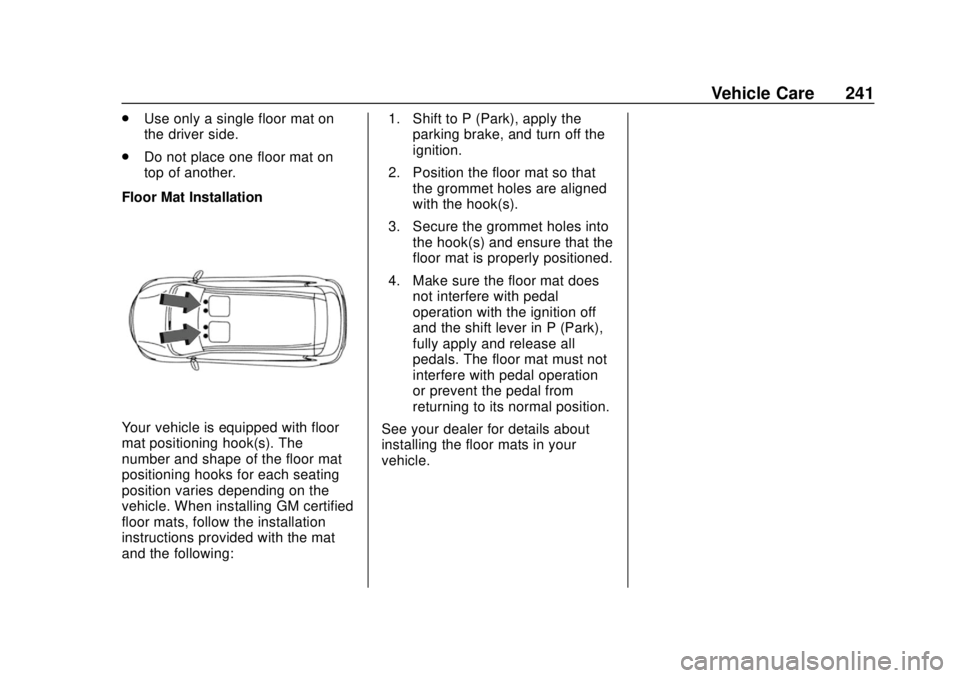
Floor Mat Installation
Your vehicle is equipped with floor
mat positioning hook(s). The
number and shape of the floor mat
positioning hooks for each seating
position varies depending on the
vehicle. When installing GM certified
floor mats, follow the installation
instructions provided with the mat
and the following: 1. Shift to P (Park), apply the
parking brake, and turn off the
ignition.
2. Position the floor mat so that the grommet holes are aligned
with the hook(s).
3. Secure the grommet holes into the hook(s) and ensure that the
floor mat is properly positioned.
4. Make sure the floor mat does not interfere with pedal
operation with the ignition off
and the shift lever in P (Park),
fully apply and release all
pedals. The floor mat must not
interfere with pedal operation
or prevent the pedal from
returning to its normal position.
See your dealer for details about
installing the floor mats in your
vehicle.
Page 282 of 287

Chevrolet City Express Owner Manual (GMNA-Localizing-U.S./Canada-
11683523) - 2018 - CRC - 7/10/17
Index 281
Hill and Mountain Roads . . . . . . . . 138
Hill Start Assist (HSA) . . . . . . . . . . 157
Hood . . . . . . . . . . . . . . . . . . . . . . . . . . . 179
Horn . . . . . . . . . . . . . . . . . . . . . . . . . . . . . 83
How to Wear Seat BeltsProperly . . . . . . . . . . . . . . . . . . . . . . . . 44
HVAC . . . . . . . . . . . . . . . . . . . . . . . . . . . 129
I
Ignition Positions . . . . . . . . . . . . . . . 145
Immobilizer . . . . . . . . . . . . . . . . . . . . . . 32
Infants and Young Children,
Restraints . . . . . . . . . . . . . . . . . . . . . . 65
Infotainment . . . . . . . . . . . . . . . . . . . . 108
Infotainment System . . . . . . . . . . . . 276
Instrument Cluster . . . . . . . . . . . . . . . 87
Interior Rearview Mirrors . . . . . . . . . 34
Introduction . . . . . . . . . . . . . . . . . . . . . . . 2
J
Jack Auxiliary . . . . . . . . . . . . . . . . . . . . . . .118
Jump Starting - North America . . . . . . . . . . . . . . . . . . . . . . . 227
K
Keyless EntryRemote (RKE) System . . . . . . . . . 23
Keys . . . . . . . . . . . . . . . . . . . . . . . . . . . . . 21
L
Labeling, Tire Sidewall . . . . . . . . . . 202
Lamps Cargo . . . . . . . . . . . . . . . . . . . . . . . . . 105
Daytime Running (DRL) . . . . . . 104
Dome . . . . . . . . . . . . . . . . . . . . . . . . . 106
Exterior Controls . . . . . . . . . . . . . . 103
Exterior Lamps OffReminder . . . . . . . . . . . . . . . . . . . 103
Exterior Lighting Battery
Saver . . . . . . . . . . . . . . . . . . . . . . . 107
Headlamps, Front Turn Signal, and Parking
Lamps . . . . . . . . . . . . . . . . . . . . . . 198
Malfunction Indicator (Check Engine) . . . . . . . . . . . . . . . . . . . . . . . 91
Reading . . . . . . . . . . . . . . . . . . . . . . 106
Lap-Shoulder Belt . . . . . . . . . . . . . . . 45
LATCH System Replacing Parts after aCrash . . . . . . . . . . . . . . . . . . . . . . . . . 75
LATCH, Lower Anchors and Tethers for Children . . . . . . . . . . . . 71
Lighter, Cigarette . . . . . . . . . . . . . . . . 85
Lighting
Illumination Control . . . . . . . . . . . 105
Lights Airbag Readiness . . . . . . . . . . . . . . . 89 Lights (cont'd)
Antilock Brake System
(ABS) Warning . . . . . . . . . . . . . . . . 94
Brake System Warning . . . . . . . . . 93
Charging System . . . . . . . . . . . . . . . 91
Check Engine (Malfunction
Indicator) . . . . . . . . . . . . . . . . . . . . . . 91
Cruise Control . . . . . . . . . . . . . . . . . . 98
Door Ajar . . . . . . . . . . . . . . . . . . . . . . . 98
Electronic Stability Control (ESC), Off . . . . . . . . . . . . . . . . . . . . . 96
Engine Coolant Temperature Warning . . . . . . . . . . . . . . . . . . . . . . . 96
Engine Oil Pressure . . . . . . . . . . . . 97
Flash-to-Pass . . . . . . . . . . . . . . . . . 104
High-Beam On . . . . . . . . . . . . . . . . . . 98
High/Low Beam Changer . . . . . 103
Low Fuel Warning . . . . . . . . . . . . . . 97
Low Washer Fluid Warning . . . . . 98
Overdrive Off . . . . . . . . . . . . . . . . . . . 94
Seat Belt Reminders . . . . . . . . . . . . 89
Security . . . . . . . . . . . . . . . . . . . . . . . . 97
Tire Pressure . . . . . . . . . . . . . . . . . . . 96
Warning, Power Steering . . . . . . . 95
Locks Automatic Door . . . . . . . . . . . . . . . . . 27
Door . . . . . . . . . . . . . . . . . . . . . . . . . . . . 25
Lockout Protection . . . . . . . . . . . . . . 27