service CHEVROLET COLORADO 2021 Duramax Diesel Supplement
[x] Cancel search | Manufacturer: CHEVROLET, Model Year: 2021, Model line: COLORADO, Model: CHEVROLET COLORADO 2021Pages: 89, PDF Size: 1.9 MB
Page 32 of 89
Chevrolet/GMC 2.8L Duramax Diesel Engine Supplement (GMNA-Localizing-
U.S./Canada-14465442) - 2021 - CRC - 2/3/20
Driving and Operating 31
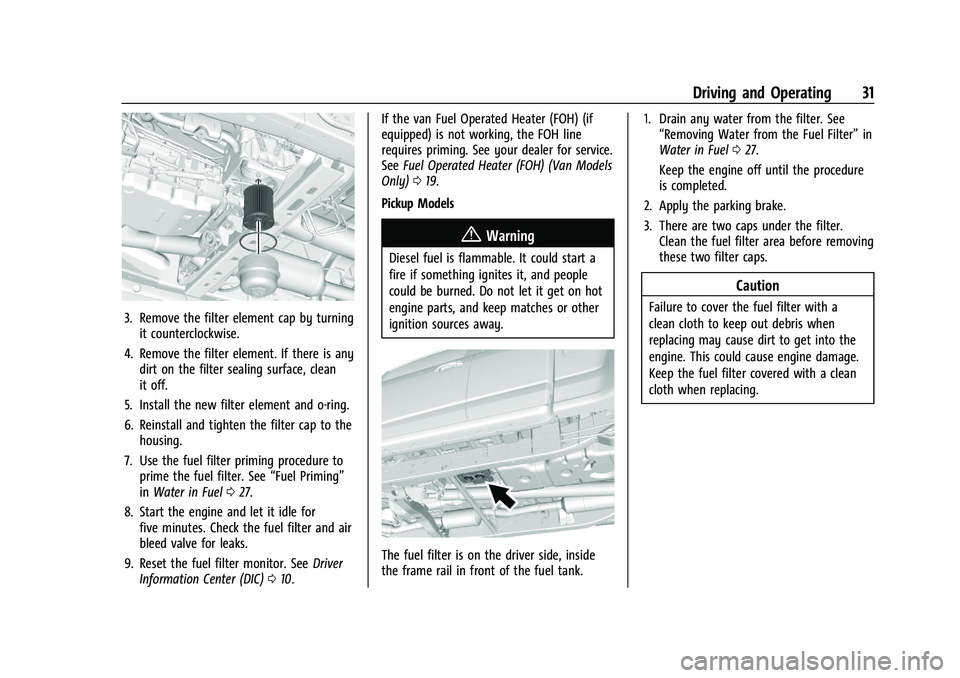
3. Remove the filter element cap by turningit counterclockwise.
4. Remove the filter element. If there is any dirt on the filter sealing surface, clean
it off.
5. Install the new filter element and o-ring.
6. Reinstall and tighten the filter cap to the housing.
7. Use the fuel filter priming procedure to prime the fuel filter. See “Fuel Priming”
in Water in Fuel 027.
8. Start the engine and let it idle for five minutes. Check the fuel filter and air
bleed valve for leaks.
9. Reset the fuel filter monitor. See Driver
Information Center (DIC) 010. If the van Fuel Operated Heater (FOH) (if
equipped) is not working, the FOH line
requires priming. See your dealer for service.
See
Fuel Operated Heater (FOH) (Van Models
Only) 019.
Pickup Models
{Warning
Diesel fuel is flammable. It could start a
fire if something ignites it, and people
could be burned. Do not let it get on hot
engine parts, and keep matches or other
ignition sources away.
The fuel filter is on the driver side, inside
the frame rail in front of the fuel tank. 1. Drain any water from the filter. See
“Removing Water from the Fuel Filter” in
Water in Fuel 027.
Keep the engine off until the procedure
is completed.
2. Apply the parking brake.
3. There are two caps under the filter. Clean the fuel filter area before removing
these two filter caps.
Caution
Failure to cover the fuel filter with a
clean cloth to keep out debris when
replacing may cause dirt to get into the
engine. This could cause engine damage.
Keep the fuel filter covered with a clean
cloth when replacing.
Page 34 of 89
Chevrolet/GMC 2.8L Duramax Diesel Engine Supplement (GMNA-Localizing-
U.S./Canada-14465442) - 2021 - CRC - 2/3/20
Driving and Operating 33
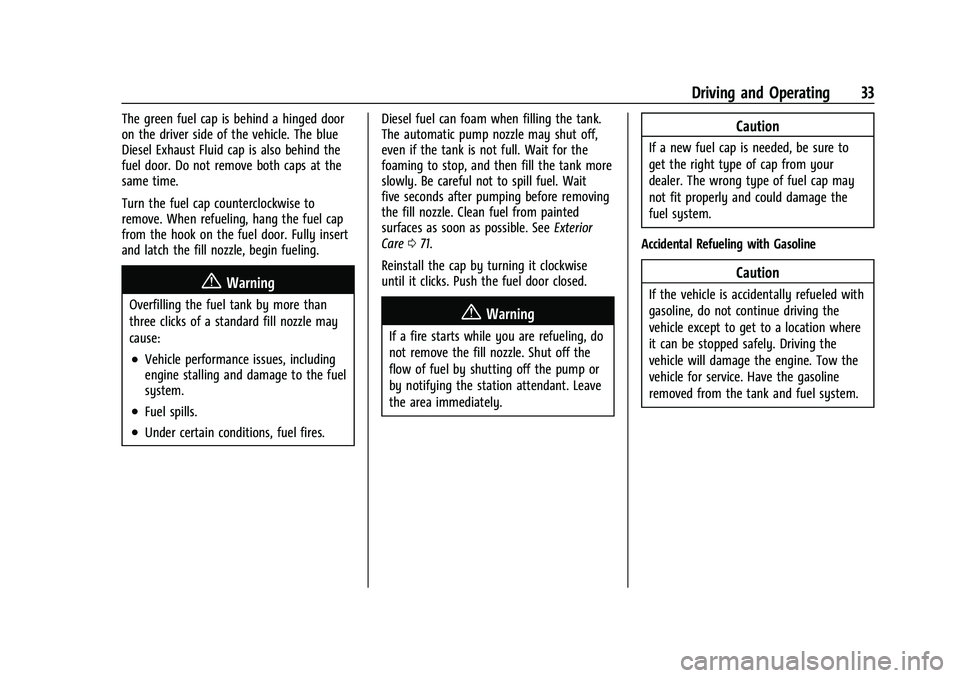
The green fuel cap is behind a hinged door
on the driver side of the vehicle. The blue
Diesel Exhaust Fluid cap is also behind the
fuel door. Do not remove both caps at the
same time.
Turn the fuel cap counterclockwise to
remove. When refueling, hang the fuel cap
from the hook on the fuel door. Fully insert
and latch the fill nozzle, begin fueling.
{Warning
Overfilling the fuel tank by more than
three clicks of a standard fill nozzle may
cause:
.Vehicle performance issues, including
engine stalling and damage to the fuel
system.
.Fuel spills.
.Under certain conditions, fuel fires.Diesel fuel can foam when filling the tank.
The automatic pump nozzle may shut off,
even if the tank is not full. Wait for the
foaming to stop, and then fill the tank more
slowly. Be careful not to spill fuel. Wait
five seconds after pumping before removing
the fill nozzle. Clean fuel from painted
surfaces as soon as possible. See
Exterior
Care 071.
Reinstall the cap by turning it clockwise
until it clicks. Push the fuel door closed.
{Warning
If a fire starts while you are refueling, do
not remove the fill nozzle. Shut off the
flow of fuel by shutting off the pump or
by notifying the station attendant. Leave
the area immediately.
Caution
If a new fuel cap is needed, be sure to
get the right type of cap from your
dealer. The wrong type of fuel cap may
not fit properly and could damage the
fuel system.
Accidental Refueling with Gasoline
Caution
If the vehicle is accidentally refueled with
gasoline, do not continue driving the
vehicle except to get to a location where
it can be stopped safely. Driving the
vehicle will damage the engine. Tow the
vehicle for service. Have the gasoline
removed from the tank and fuel system.
Page 38 of 89
Chevrolet/GMC 2.8L Duramax Diesel Engine Supplement (GMNA-Localizing-
U.S./Canada-14465442) - 2021 - CRC - 2/3/20
Driving and Operating 37
See“Trailer Towing” in the owner’s manual
for kingpin weight and trailer tongue weight
information.
Weight of the Trailer Tongue
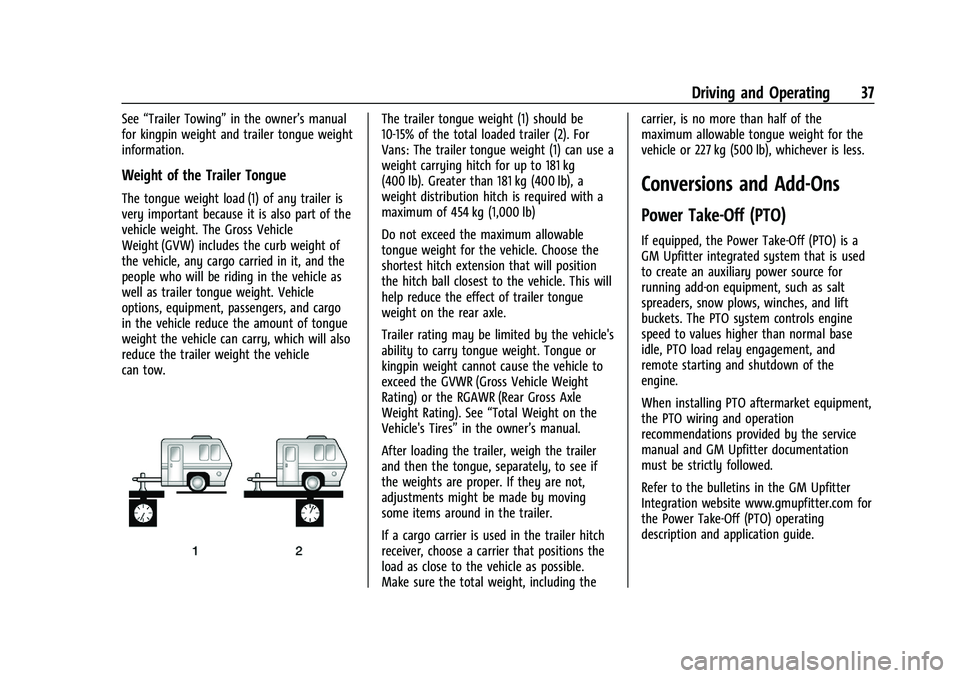
The tongue weight load (1) of any trailer is
very important because it is also part of the
vehicle weight. The Gross Vehicle
Weight (GVW) includes the curb weight of
the vehicle, any cargo carried in it, and the
people who will be riding in the vehicle as
well as trailer tongue weight. Vehicle
options, equipment, passengers, and cargo
in the vehicle reduce the amount of tongue
weight the vehicle can carry, which will also
reduce the trailer weight the vehicle
can tow.
The trailer tongue weight (1) should be
10-15% of the total loaded trailer (2). For
Vans: The trailer tongue weight (1) can use a
weight carrying hitch for up to 181 kg
(400 lb). Greater than 181 kg (400 lb), a
weight distribution hitch is required with a
maximum of 454 kg (1,000 lb)
Do not exceed the maximum allowable
tongue weight for the vehicle. Choose the
shortest hitch extension that will position
the hitch ball closest to the vehicle. This will
help reduce the effect of trailer tongue
weight on the rear axle.
Trailer rating may be limited by the vehicle's
ability to carry tongue weight. Tongue or
kingpin weight cannot cause the vehicle to
exceed the GVWR (Gross Vehicle Weight
Rating) or the RGAWR (Rear Gross Axle
Weight Rating). See “Total Weight on the
Vehicle's Tires” in the owner’s manual.
After loading the trailer, weigh the trailer
and then the tongue, separately, to see if
the weights are proper. If they are not,
adjustments might be made by moving
some items around in the trailer.
If a cargo carrier is used in the trailer hitch
receiver, choose a carrier that positions the
load as close to the vehicle as possible.
Make sure the total weight, including the carrier, is no more than half of the
maximum allowable tongue weight for the
vehicle or 227 kg (500 lb), whichever is less.
Conversions and Add-Ons
Power Take-Off (PTO)
If equipped, the Power Take-Off (PTO) is a
GM Upfitter integrated system that is used
to create an auxiliary power source for
running add-on equipment, such as salt
spreaders, snow plows, winches, and lift
buckets. The PTO system controls engine
speed to values higher than normal base
idle, PTO load relay engagement, and
remote starting and shutdown of the
engine.
When installing PTO aftermarket equipment,
the PTO wiring and operation
recommendations provided by the service
manual and GM Upfitter documentation
must be strictly followed.
Refer to the bulletins in the GM Upfitter
Integration website www.gmupfitter.com for
the Power Take-Off (PTO) operating
description and application guide.
Page 39 of 89
Chevrolet/GMC 2.8L Duramax Diesel Engine Supplement (GMNA-Localizing-
U.S./Canada-14465442) - 2021 - CRC - 2/3/20
38 Driving and Operating
{Warning
Engine exhaust contains Carbon
Monoxide (CO), which cannot be seen or
smelled. Exposure to CO can cause
unconsciousness or even death. Never
operate PTO in an enclosed area such as
a garage or building that has no fresh air
ventilation. See“Engine Exhaust” in the
owner’s manual.
Caution
If the key is in the ignition during
Remote PTO operation, the vehicle can be
shifted out of P (Park). Even though PTO
will be disengaged, depending on PTO
Upfitter application, personal injury or
property damage may result from vehicle
movement. Always remove the key from
the ignition before operating
Remote PTO.
Primary PTO Operating Modes
PTO modes of operation are:
.Preset
Stationary operation only: In-cab control
is standard, remote control is available.
.Variable
Stationary operation only: In-cab control
is standard, remote control is available.
.Mobile
In-cab control only.
.Operator Selectable In-Cab Mode (OSIM)
OSIM is for in-cab operation only.
OSIM is for vehicles that require both
stationary and mobile modes. OSIM is
available via the GM Service Tool only.
During the configuration of OSIM, two
modes must be paired. The options for
pairing are: stationary preset and mobile,
or stationary variable and mobile. During
activation of OSIM, the operator must
select one of the two modes within the
pre-configured pairing. If an OSIM mode is
not selected, PTO will not operate.
OSIM modes of operation are:
‐ Stationary
For stationary mode, the configuration
may be stationary preset or stationary
variable.
‐ Mobile
For mobile mode, the configuration is
variable only. Selection between OSIM pairings is not
available.
Remote modes are not available.
The factory default programming enables
in-cab control. For stationary modes, a GM
Service Tool can reprogram the system to
allow for remote control and disable the
in-cab control.
All PTO modes provide for engine rpm
control and PTO load relay control.
All PTO modes provide for safety interlocks
for PTO load disengagement.
Remote PTO modes provide for remote
engine starting and shutdown.
Stationary in-cab and Remote PTO modes
provide for engine shutdown due to critical
engine conditions, as well as a timed engine
shutdown feature.
Preset PTO
Preset Enable Conditions –In-Cab Operation
To enable PTO: 1. With the engine running, shift the vehicle into P (Park) and set the parking
brake. Do not press the brake pedal.
2. Confirm that cruise control is off.
Page 40 of 89
Chevrolet/GMC 2.8L Duramax Diesel Engine Supplement (GMNA-Localizing-
U.S./Canada-14465442) - 2021 - CRC - 2/3/20
Driving and Operating 39
3. Press and release the PTO in-cab switchbelow the climate controls in the center
stack. The PTO indicator light will blink
rapidly until the PTO load relay becomes
engaged and will then be on steady. The
engine will advance to the PTO Standby
Speed.
4. Once the PTO Standby Speed is reached, use SET− and +RES on the cruise control
to reach the Set 1 or Set 2 PTO engine
speeds.
The accelerator pedal is disabled and
cannot be used to override the PTO
preset speeds.
Factory Default PTO Engine Speeds
Standby 900 rpm
Set 1 (SET−) 1200 rpm
Set 2 (+RES) 1900 rpm
The first time a vehicle is used for PTO: 1. The PTO Control setting on the GM Service Tool is programmed to Interior
Mode PTO Switch.
2. Check the correct operation of the default PTO preset stationary mode to
observe the three idle up speeds. The
PTO function should be confirmed before any wiring modifications are done or any
reprogramming is attempted. See your
dealer if the default presets are not
functioning properly.
3. The PTO indicator light will not initially reflect the status of the PTO load until
the PTO load relay is wired into the
system. The PTO load relay output is
enabled as a factory default. When the
PTO indicator light is either blinking or
on solid, the PTO relay output will be
activated.
Preset Enable Conditions –Remote
Operation
This requires programming with the GM
Service Tool and remote switch panel
provided by GM Upfitter.
1. Confirm that cruise control is off.
2. Set the parking brake and shift the transmission into P (Park).
3. Turn the engine off. Remove or place the key in the ignition off position. Lock the
vehicle, if desired.
4. Confirm the hood is closed.
5. From outside the vehicle, press and release the Remote PTO Arm switch. 6. Within five seconds, open and close the
Remote PTO Engine Start/Shutdown
switch.
7. The horn will chirp, and then engine starting will be automatically initiated.
The PTO system will then elevate engine
rpm to PTO Standby Speed and engage
the PTO load relay.
8. The Remote PTO Set switch can now be used to accomplish the PTO Set 1 and
Set 2 engine speeds.
The accelerator pedal is disabled when
Remote PTO operation is selected.
Preset Enable Conditions –Remote
Operation In-Cab Enable
This requires programming with the GM
Service Tool and remote switch panel
provided by GM Upfitter.
Starting remote operation in-cab:
1. With the engine running, shift the vehicle into P (Park), release the brake
pedal, and set the parking brake.
2. Confirm that cruise control is off.
3. Confirm the hood is closed.
4. Press and release the in-cab PTO switch.
Page 41 of 89
Chevrolet/GMC 2.8L Duramax Diesel Engine Supplement (GMNA-Localizing-
U.S./Canada-14465442) - 2021 - CRC - 2/3/20
40 Driving and Operating
5. The horn will chirp, the PTO load relaywill engage, and the engine will advance
to the PTO Standby Speed.
6. The Remote PTO Set switch may be used to select PTO Set 1 and Set 2 engine
speeds.
The accelerator pedal is disabled when
Remote PTO operation is selected.
The operator may exit the vehicle.
{Warning
If the key is in the ignition during
Remote PTO operation, the vehicle can be
shifted out of P (Park) by an
unauthorized operator. Even though PTO
will be disengaged, depending on PTO
Upfitter application, personal injury or
property damage may result from vehicle
movement. The operator must ensure
that the vehicle is secured against
unauthorized access during Remote PTO
operation.
Remote PTO operation may be ended by
pressing the brake pedal at which time the
PTO load relay disengages and the engine returns to base idle speed. The operator
may drive the vehicle after releasing the
parking brake.
Preset Enable Conditions
–Operator
Selectable In-Cab Mode (OSIM)
This requires programming with the GM
Service Tool and requires pairing OSIM
stationary preset with OSIM mobile mode.
If OSIM pairing has been configured, initiate
OSIM preset operation:
1. With the engine running, shift the vehicle into P (Park) and release the
brake pedal, and set the parking brake.
2. Confirm cruise control is off.
3. Confirm the hood is closed.
4. Press and release the in-cab PTO switch. The PTO indicator light will blink slowly.
5. Within 10 seconds, press and release SET −on the cruise control.
6. The PTO indicator light will change to solid when the PTO load relay becomes
engaged. The engine speed will advance
to the PTO Standby Speed. Press and
release SET− on the cruise control to
select the PTO Set 1 speed. Press and
release +RES on the cruise control to
select the PTO Set 2 speed.
.The PTO load relay engages immediately
when the PTO operation is initiated by
the switch input. The transmission torque
converter is unlocked. The torque
converter will lock upon reaching stable
PTO Standby Speed (default = 900 rpm)
so maximum power is available.
.The first elevated engine speed, PTO
Standby Speed, is not intended as a
working speed but as a verification that
the system is active and ready to go to a
working speed. This speed can be
modified to a working speed with the GM
Service Tool. The upper limit for PTO
Standby Speed is 1500 rpm.
.The remote switches and relay
connections are made at the PTO Upfitter
Connector located on the chassis frame
behind the cab.
.The PTO Control setting on the Service
Tool must be programmed to Remote
PTO Mode Switch before the remote
switches can be used.
.The PTO relay is programmed to be
enabled in the factory default
configuration.
Page 42 of 89
Chevrolet/GMC 2.8L Duramax Diesel Engine Supplement (GMNA-Localizing-
U.S./Canada-14465442) - 2021 - CRC - 2/3/20
Driving and Operating 41
.Refer to the service manual or go to the
GM Upfitter Integration website
www.gmupfitter.com for details, advanced
programming features, and usage with a
removable pendant.
Variable PTO
Variable Enable Conditions–In-Cab
Operation
To enable PTO:
1. With the engine running, shift the vehicle into P (Park) and set the parking
brake. Do not press the brake pedal.
2. Press and release the PTO in-cab switch below the climate controls in the center
stack. The PTO indicator light will blink
rapidly until the PTO load relay becomes
engaged and will then be on steady. The
engine will advance to the PTO Standby
Speed.
3. Once PTO Standby Speed is reached, SET −and +RES on the cruise control can be
used to tap up and tap down the engine
speed. Factory setting for the tap step is
100 rpm and the setting for the ramp
rate is 150 rpm/sec. The GM Service Tool
can enable the capability to change the
default value for tap step via the Radio
Customization menu. The default values for both tap step and ramp rate can be
changed with the GM Service Tool. The
accelerator pedal is disabled, and cannot
be used to control PTO engine speed.
Variable Enable Conditions –Remote
Operation
This requires programming with the GM
Service Tool and the appropriate remote
switch panel provided by GM Upfitter.
1. Confirm that cruise control is off.
2. Set the parking brake and shift the transmission into P (Park).
3. Turn the engine off. Remove or place the key in the ignition off position. Lock the
vehicle, if desired.
4. The hood must be closed.
5. From outside the vehicle, press and release the Remote PTO Arm switch.
6. Within five seconds, open and close the Remote PTO Engine Start/Shutdown
switch.
7. The horn will chirp, and then engine starting will be automatically initiated.
The PTO system will then elevate engine
rpm to PTO Standby Speed and engage
the PTO load relay. Variable Enable Conditions
–Remote
Operation In-Cab Enable Starting Remote
Operation from In-Cab
This requires programming with the GM
Service Tool and remote switch panel
provided by GM Upfitter.
1. With the engine running, shift the vehicle into P (Park), release the brake
pedal, and set the parking brake.
2. Confirm cruise control is off.
3. Confirm the hood is closed.
4. Press and release the PTO in-cab switch.
5. The horn will chirp, the PTO load relay will engage, and the engine will advance
to the PTO Standby Speed.
The operator may exit the vehicle.
{Warning
If the key is in the ignition during
Remote PTO operation, the vehicle can be
shifted out of P (Park) by an
unauthorized operator. Even though PTO
will be disengaged, depending on PTO
Upfitter application, personal injury or
property damage may result from vehicle
movement. The operator must ensure (Continued)
Page 43 of 89
Chevrolet/GMC 2.8L Duramax Diesel Engine Supplement (GMNA-Localizing-
U.S./Canada-14465442) - 2021 - CRC - 2/3/20
42 Driving and Operating
Warning (Continued)
that the vehicle is secured against
unauthorized access during Remote PTO
operation.
The accelerator pedal is disabled when
Remote PTO operation is selected.
Remote PTO operation can be ended by
pressing the brake pedal. The PTO load relay
disengages and the engine returns to base
idle speed. The operator may drive the
vehicle after releasing the parking brake.
.The desired engine operating speed can
now be accomplished. Two versions of
engine rpm control are available, switches
or potentiometer, depending on which
one was installed.
‐ Switches –the Remote PTO Set and
Resume switches can be used to tap up
and tap down to the desired engine
speed.
‐ Potentiometer –a Remote PTO Throttle
Potentiometer can be used as a
continuous variable throttle control to
dial in the desired engine speed. Variable Enable Conditions
–OSIM
This requires programming with the GM
Service Tool and specific pairing of
stationary variable and mobile modes.
Remote operation is not available.
If OSIM pairing has been configured, initiate
OSIM stationary variable operation: 1. With the engine running, shift the vehicle into P (Park), release the brake
pedal, and set the parking brake.
2. Confirm cruise control is off.
3. Confirm the hood is closed.
4. Press and release the PTO in-cab switch. The PTO indicator light will blink slowly.
5. Within 10 seconds, press and release SET− on the cruise control. The PTO load
relay will engage and the PTO indicator
light will change to solid. The engine
speed will advance to the PTO Standby
Speed.
6. The desired operating speed may be achieved by tapping up and down with
+RES and SET− on the cruise control.
.The PTO load relay engages immediately
when the PTO operation is initiated by
the switch input. The transmission torque
converter is unlocked. The torque converter will lock upon reaching stable
PTO Standby Speed (default = 900 rpm)
so maximum power is available.
.The first elevated engine speed, PTO
Standby Speed, is not intended as a
working speed but as a verification that
the system is active and ready to go to a
working speed.
.The relay connections are made at the
PTO Upfitter Connector located on the
chassis frame behind the cab.
.The engine speeds can be adjusted
between the low of PTO Standby Speed
and the high of PTO Max Engine speed
limits. Both values can be modified from
the factory default settings with the GM
Service Tool. Based on the value chosen
for PTO Max Engine Speed, the PTO menu
in the center stack may show speeds that
are not available.
.Factory setting for the tap step is 100
rpm and the setting for ramp rate is 150
rpm/sec. The default value for tap step
can be modified via the Radio
Customization menu. The default values
for both tap step and ramp rate can be
changed with the GM Service Tool.
.The PTO load relay is enabled as the
factory default programmed setting.
Page 44 of 89
Chevrolet/GMC 2.8L Duramax Diesel Engine Supplement (GMNA-Localizing-
U.S./Canada-14465442) - 2021 - CRC - 2/3/20
Driving and Operating 43
.Refer to the service manual or go to the
GM Upfitter Integration website
www.gmupfitter.com for details.
Mobile PTO
Mobile Enable Conditions–In-Cab
Operation Only
This requires programming with the GM
Service Tool.
1. The engine must be running.
2. The parking brake must be released.
3. Confirm that cruise control is off.
4. Engine rpm must be less than 1500 rpm.
5. Shift the transmission to M1, M2, or M3.
6. Tap the brake pedal and then do not press the brake pedal.
7. Keep the driver door closed. The driver door can be kept open if reconfigured
using the GM Service Tool. See
www.gmupfitter.com.
8. Press and release the PTO in-cab switch below the climate controls in the center
stack. Then within 10 seconds press and
release +RES on the cruise control. The
PTO indicator light will blink slowly
between presses. The PTO indicator light
will then blink rapidly until the PTO load
becomes engaged, and then come on steady. The engine speed will remain at
the current throttle setting or advance to
PTO Standby Speed, whichever value is
greater. If the engine rpm is above 1500
rpm, the PTO relay will not engage until
the engine rpm drops below 1500 rpm.
9. Once engaged, if additional engine speed is desired, use either the cruise control
or the accelerator pedal to temporarily
adjust the engine speed.
‐+RES on the cruise control can be used
to tap up, or if continuously held to
ramp up, to the desired operating
speed. SET− on the cruise control can
be used to tap down or coast down if
continuously held to the desired
engine speed. Top limit is PTO Max
Engine Speed, default 2100 rpm and
programmable to 2900 rpm. Lower
limit is PTO Standby Speed, default
900 rpm with program range from
base idle to 900 rpm.
‐ The accelerator pedal can be used to
achieve the desired speed. When the
desired speed is reached, SET− on the
cruise control would be used to
capture and maintain that speed.
Normal tap up and tap down can then
be used to fine tune the setting. In Mobile PTO mode, the vehicle speed
achieved is the result of the current engine
speed requested and the transmission gear
range selected. When the vehicle is placed in
M2 or M3, the vehicle will upshift according
to engine rpm set point, and vehicle speed
will increase. To prevent upshifts and
maintain lower vehicle speeds, place the
vehicle in M1.
Mobile Enable Conditions
–Operator
Selectable In-Cab Mode (OSIM)
This requires programming with the GM
Service Tool and specific pairing mobile
mode with either stationary preset or
variable. Remote operation is not available.
See “Mobile PTO” previously in this section.
PTO System Disengage Conditions
Preset or Variable Stationary Modes –
In-Cab Operation
To disengage PTO, do one of the following:
.Press the brake pedal. The engine returns
to base idle, but the PTO load relay
remains engaged. The PTO indicator light
will blink slowly indicating that a PTO set
speed is still stored in memory. Upon
releasing the brake, the factory default
programming is for the engine speed to
Page 46 of 89
Chevrolet/GMC 2.8L Duramax Diesel Engine Supplement (GMNA-Localizing-
U.S./Canada-14465442) - 2021 - CRC - 2/3/20
Driving and Operating 45
.Press the Remote PTO Engine Start/
Shutdown switch.
.Press the PTO in-cab switch (only if the
PTO in-cab Remote Start/Stop feature is
enabled). This requires programming with
the GM Service Tool.
.Press5on the cruise control.
.Release the parking brake.
Mobile Mode
To disengage PTO:
.Press the brake pedal. The PTO system
releases control of engine speed, but the
PTO load relay remains engaged. The
engine will return to base idle unless the
accelerator pedal is pressed. The PTO load
relay remains engaged. The PTO indicator
light will blink slowly indicating that a
PTO set speed is still stored in memory.
Upon releasing the brake, the factory
default programming is for the engine
speed to remain at curb idle awaiting an
input from +RES on the cruise control to
restore engine rpm to the last PTO set
speed. The system can also be
programmed to return engine rpm to the
PTO Standby Speed setting.
.Press*on the cruise control. The engine
returns to base idle, but the PTO load
relay remains engaged. The PTO indicator
light will blink slowly indicating that a
PTO set speed is still stored in memory.
Pressing +RES on the cruise control will
restore engine rpm to the last PTO set
speed.
.Press the PTO in-cab switch. Load relay
disengages and the engine returns to
base idle. The PTO indicator light will turn
off, indicating the PTO load relay is
disengaged and the stored set speed has
been cleared from memory.
Mobile Mode will also disengage if:
.PTO feedback input is lost. The engine
speed is returned to the PTO Standby
speed setting and the load is still
engaged. This is configurable with the GM
Service Tool.
.Vehicle Speed exceeds Max Vehicle Speed.
Factory default setting = 94 km/h
(58 mph). PTO relay will re-engage and
advance to the last engine speed stored
in memory when both the Vehicle Speed
is reduced below 94 km/h (58 mph) and
the engine speed ramps down below the
maximum PTO engagement speed (1500
rpm factory default setting).
.Engine Speed exceeds Max Engine Speed
for more than 15 seconds. Factory default
setting = 2100 rpm.
.5on the cruise control is pressed.
.The parking brake is applied.
.The shift lever is moved out of manual
shift selection, M1, M2, or M3.
Resume memory speed is cleared for the
above actions.
Although the PTO system attempts to limit
accelerator and PTO switch inputs to comply
with maximum speed and/or rpm
parameters, some vehicle operating
conditions such as downhill acceleration can
cause the vehicle speed or engine rpm to
exceed these limits. In those cases, the PTO
system may disengage.
Operator Selectable In-Cab Mode (OSIM)
To disable OSIM Stationary PTO:
.Press and release the PTO in-cab switch.
To disable OSIM Mobile PTO:
.Press and release the PTO in-cab switch.
Prolonged or Extended PTO Operation
When operating the vehicle in stationary
PTO mode, the Diesel Particulate Filter (DPF)
will continue to filter the exhaust and