trunk CHEVROLET DYNASTY 1993 User Guide
[x] Cancel search | Manufacturer: CHEVROLET, Model Year: 1993, Model line: DYNASTY, Model: CHEVROLET DYNASTY 1993Pages: 2438, PDF Size: 74.98 MB
Page 494 of 2438
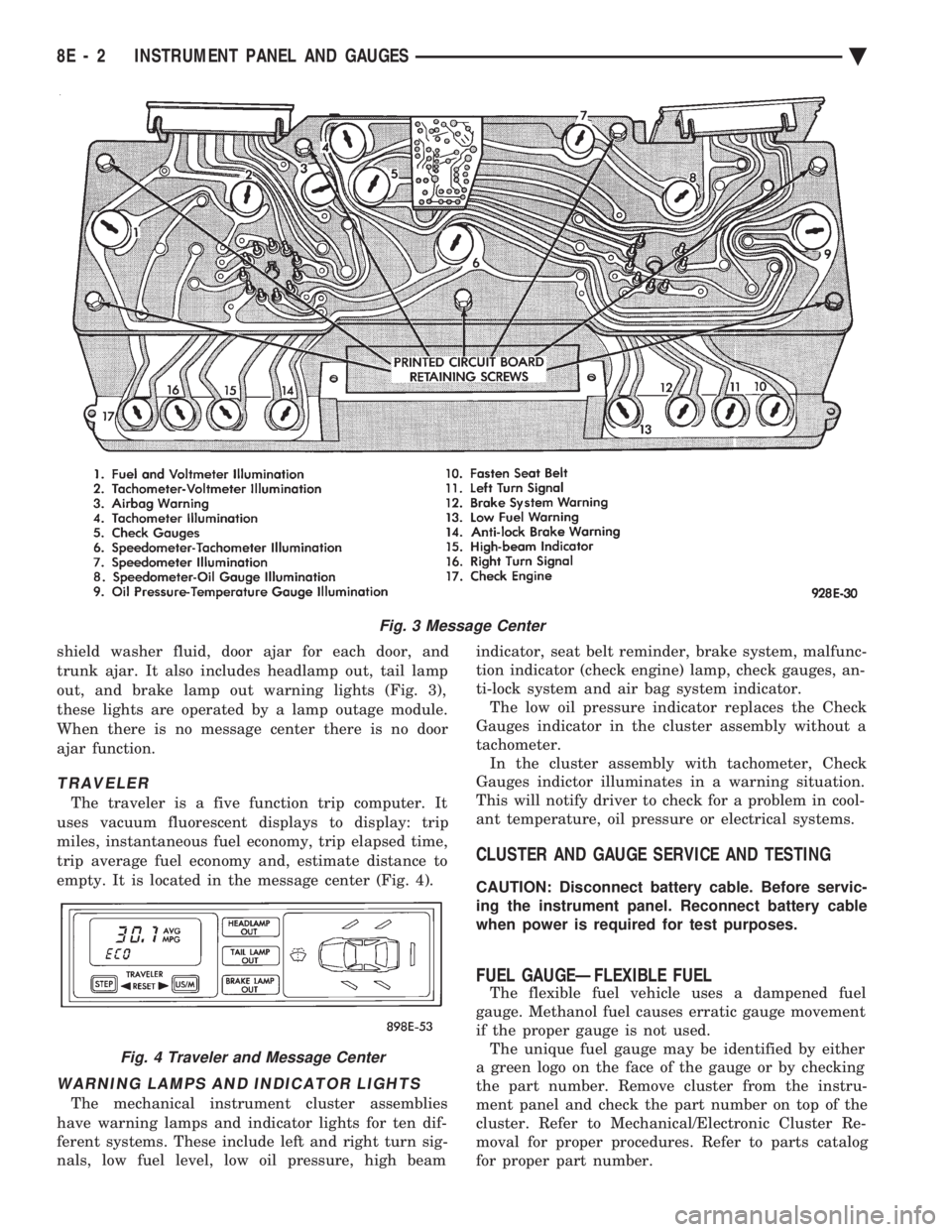
shield washer fluid, door ajar for each door, and
trunk ajar. It also includes headlamp out, tail lamp
out, and brake lamp out warning lights (Fig. 3),
these lights are operated by a lamp outage module.
When there is no message center there is no door
ajar function.
TRAVELER
The traveler is a five function trip computer. It
uses vacuum fluorescent displays to display: trip
miles, instantaneous fuel economy, trip elapsed time,
trip average fuel economy and, estimate distance to
empty. It is located in the message center (Fig. 4).
WARNING LAMPS AND INDICATOR LIGHTS
The mechanical instrument cluster assemblies
have warning lamps and indicator lights for ten dif-
ferent systems. These include left and right turn sig-
nals, low fuel level, low oil pressure, high beam indicator, seat belt reminder, brake system, malfunc-
tion indicator (check engine) lamp, check gauges, an-
ti-lock system and air bag system indicator. The low oil pressure indicator replaces the Check
Gauges indicator in the cluster assembly without a
tachometer. In the cluster assembly with tachometer, Check
Gauges indictor illuminates in a warning situation.
This will notify driver to check for a problem in cool-
ant temperature, oil pressure or electrical systems.
CLUSTER AND GAUGE SERVICE AND TESTING
CAUTION: Disconnect battery cable. Before servic-
ing the instrument panel. Reconnect battery cable
when power is required for test purposes.
FUEL GAUGEÐFLEXIBLE FUEL
The flexible fuel vehicle uses a dampened fuel
gauge. Methanol fuel causes erratic gauge movement
if the proper gauge is not used. The unique fuel gauge may be identified by either
a green logo on the face of the gauge or by checking
the part number. Remove cluster from the instru-
ment panel and check the part number on top of the
cluster. Refer to Mechanical/Electronic Cluster Re-
moval for proper procedures. Refer to parts catalog
for proper part number.
Fig. 3 Message Center
Fig. 4 Traveler and Message Center
8E - 2 INSTRUMENT PANEL AND GAUGES Ä
Page 514 of 2438
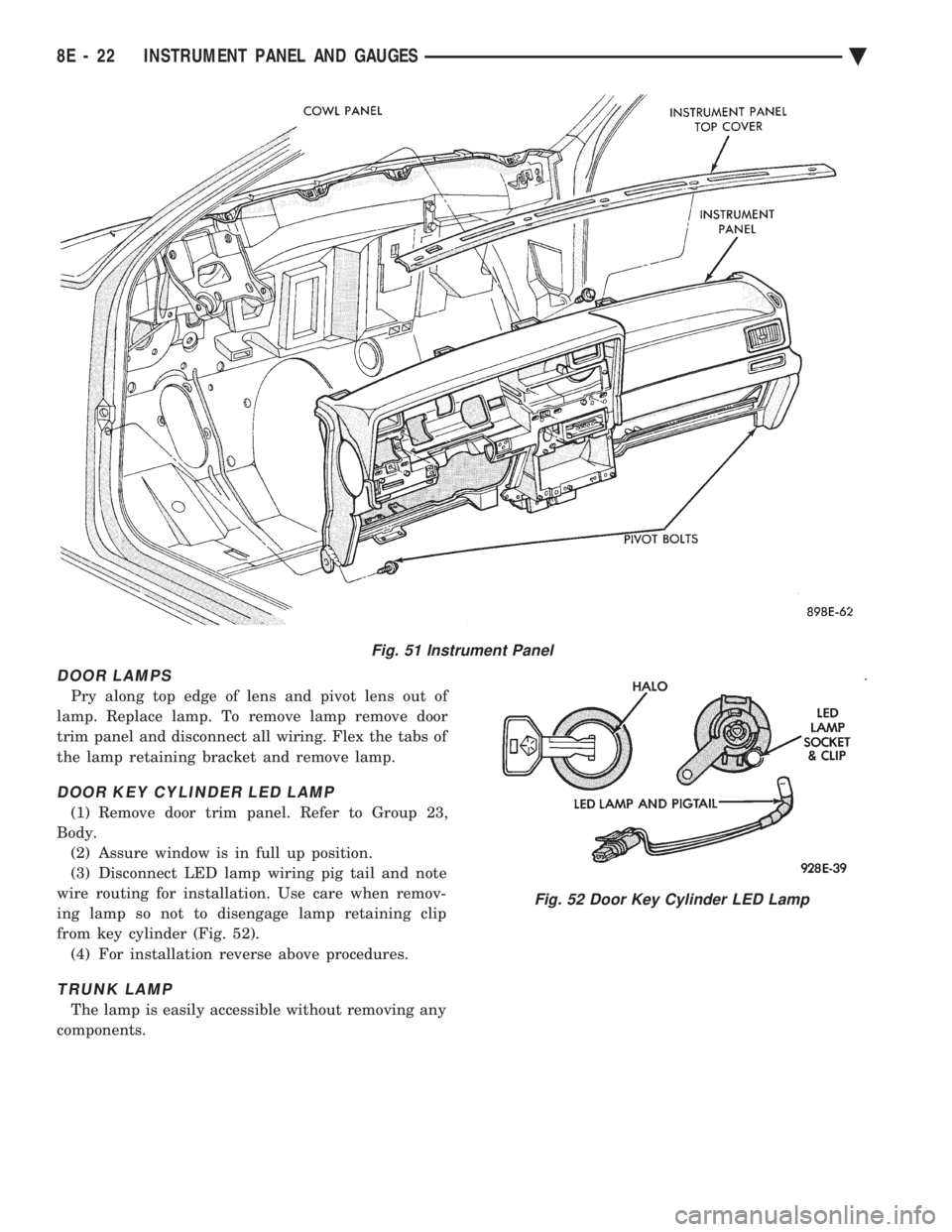
DOOR LAMPS
Pry along top edge of lens and pivot lens out of
lamp. Replace lamp. To remove lamp remove door
trim panel and disconnect all wiring. Flex the tabs of
the lamp retaining bracket and remove lamp.
DOOR KEY CYLINDER LED LAMP
(1) Remove door trim panel. Refer to Group 23,
Body. (2) Assure window is in full up position.
(3) Disconnect LED lamp wiring pig tail and note
wire routing for installation. Use care when remov-
ing lamp so not to disengage lamp retaining clip
from key cylinder (Fig. 52). (4) For installation reverse above procedures.
TRUNK LAMP
The lamp is easily accessible without removing any
components.
Fig. 51 Instrument Panel
Fig. 52 Door Key Cylinder LED Lamp
8E - 22 INSTRUMENT PANEL AND GAUGES Ä
Page 533 of 2438
(4) Remove panel top cover by pushing forward
and prying up, using a straight edge to assist in the
removal. (5) Disconnect bulkhead connector at brace under
instrument panel at left side. (6) Remove glovebox/ash receiver module and right
instrument panel silencer. (7) Remove center panel support brace and air bag
diagnostic module assembly. (8) Disconnect wiring to airbag module.
(9) Remove upper and lower cluster bezels.
(10) Remove steering column cover.
(11) Remove steering column mounting nuts and
lower steering column. (12) Unhook shift indicator cable eyelet from steer-
ing column actuator. (13) Unlatch lock tab in shift indicator column in-
sert and squeeze legs together to remove from steer-
ing column. (14) Remove cluster assembly while guiding trans-
mission range indicator guide tube through access
hole in the base panel. (15) Remove instrument panel steering column
opening support/hood release handle assembly. (16) Remove two steering column upper studs and
loosen side cowl tie-down bolts. (17) Remove steering column tilt lever.
(18) Remove upper and lower lock housing shroud.
(19) Remove lower fixed shroud.
(20) Remove upper fixed shroud (snaps in place).
(21) Disconnect airbag pigtail, ignition switch and
halo light/key buzzer switch wiring. (22) Disconnect Multi-function switch by loosening
connector jack screw and pulling connector from
switch. (23) Disconnect airbag pigtail from wiring trough
housing by pulling two push fasteners. (24) Remove wiring trough from steering column.
(25) Remove defroster ducts.
(26) Remove five screws along fence line and roll
panel down, attach a hook to hold in position. (27) Open hood and remove plenum grill.
(28) Disconnect washer bottle, resistor block and
under hood lamp wiring. Washer bottle must be re-
moved to gain access. (29) Remove grommet and pull plenum wiring into
vehicle through plenum panel. (30) Disconnect right demister hose from instru-
ment panel. (31) Disconnect antenna cable.
(32) Disconnect right and left 25 way body wiring
connectors. (33) Disconnect A/C heater control cables, wiring
connectors and vacuum harness. (34) Remove right side panel ground wire.
(35) Disconnect body controller wiring.
(36) Remove instrument panel assembly from vehi-
cle. (37) For installation reverse above procedures.
INTERIOR LAMP REPLACEMENT
The reading, overhead console and door lamps op-
erate when the doors are open or headlamp switch is
placed in courtesy position. Front overhead lamps re-
fer to Group 8C, Overhead Console.
TRUNK LAMP
The lamp has easily accessible without removing
components.
DOOR LAMP
Pry along the forward edge of the lens and pivot
lens out of the door trim panel. Remove lamp. To re-
move lamp housing, remove door trim panel. Refer to
Group 23, Body. Disconnect all wiring. Remove
screws, if so equipped securing lamp housing to trim
panel, and replace housing.
CÐPILLAR READING/COURTESY LAMP
Pry along the rearward edge of the lamp and pivot
lamp out from quarter trim panel. Disconnect wiring
and remove lamp cover. Replace lamp. The lamp operates when the doors are open or the
headlamp switch is turned to the courtesy mode. The
lamp will function as a reading lamp when the doors
are closed and the button switch on the lamp is de-
pressed.
ROOF RAIL READING
Pry along the bottom edge of the lens and pivot
lens out. Replace lamp. To remove the lamp, remove
the screw which retains the coat hook. Remove the
garnish molding. Disconnect the wiring harness. Re-
move the two clips which retain the lamp to the
molding. Replace lamp. The lamp operates like the
C-pillar reading/courtesy lamp.
Ä INSTRUMENT PANEL AND GAUGES 8E - 41
Page 549 of 2438
(11) Remove two screws from fuse block and lower
fuse block. (12) Remove three screws from hood release and
lower hood release handle. (13) Remove flasher relay from bracket on center
distribution duct. (14) Remove screw from ATC sensor motor assem-
bly and unhook from bracket if equipped. (15) Remove the radio ground screw above flasher
relay mount. (16) Remove center distribution duct screw from
left instrument panel lower brace, then remove four
screws to remove left lower brace.
(17) Remove five nuts on steering column and drop
column, then remove two upper column attaching studs.
(18) Remove two screws and pull out compact disc
player or cubby box, disconnect Co-Axial cable from
compact disc player. (19) Remove Electronic Vehicle Information Center
(E.V.I.C.) or Traveler from vehicle. (20) Remove radio.
(21) Remove A.T.C., A/C or heater controls. (22) Squeeze latches on side of Rear Window defog-
ger switch and remove. (23) Snap off cluster lower trim bezel, switch pod
vent grille, speaker grilles and defroster grilles. (24) Remove switch pod assembly.
(25) Remove cluster assembly.
(26) Remove dash speakers.
(27) Snap out bezel with or without message center
and disconnect wiring. (28) Open glovebox door, squeeze sides and roll
glovebox completely open. Remove glovebox light
switch, and disconnect wires. (29) Loosen right cowl side pivot bolt through
glovebox opening then close glovebox. (30) Loosen left cowl side pivot.
(31) Remove four screw attachments at top of in-
strument panel and roll panel out. (32) Pull wiring, antenna cable, A/C cable and vac-
uum lines out of instrument panel. Disconnect demis-
ter hose and remove instrument panel with ducts
attached. (33) Transfer ducts and brackets onto new panel.
(34) For instrument panel roll up, reverse
above procedures.
INTERIOR LAMP REMOVAL
The Dome, Floor Console and Door Lamps operate
when the doors are open or headlamp switch is
placed in courtesy position.
DOME LAMP
(1) Pry either the forward or rearward edge of the
dome lamp to free it from retaining bracket. (2) Pry either the forward or rearward edge of the
lens away from the bezel and replace lamp. (3) For installation reverse above procedures.
FRONT HEADER READING LAMP
Pull lamp from headliner. Disconnect wiring and
replace lamp.
FLOOR CONSOLE LAMP
Pry along top edge of lamp and pivot lamp out of
floor console, the lens does not remove. Remove lamp
and twist out lamp socket. Replace lamp.
DOOR LAMPS
Pry along bottom edge of lamp and pivot lamp out
of door trim panel, the lens does not remove. Remove
lamp and twist out lamp socket. Replace lamp.
DOOR REFLECTORS
Pry reflector away from the door trim panel, and
replace.
TRUNK LAMP
Remove lens by prying lens out of trunk trim panel
and replace bulb.
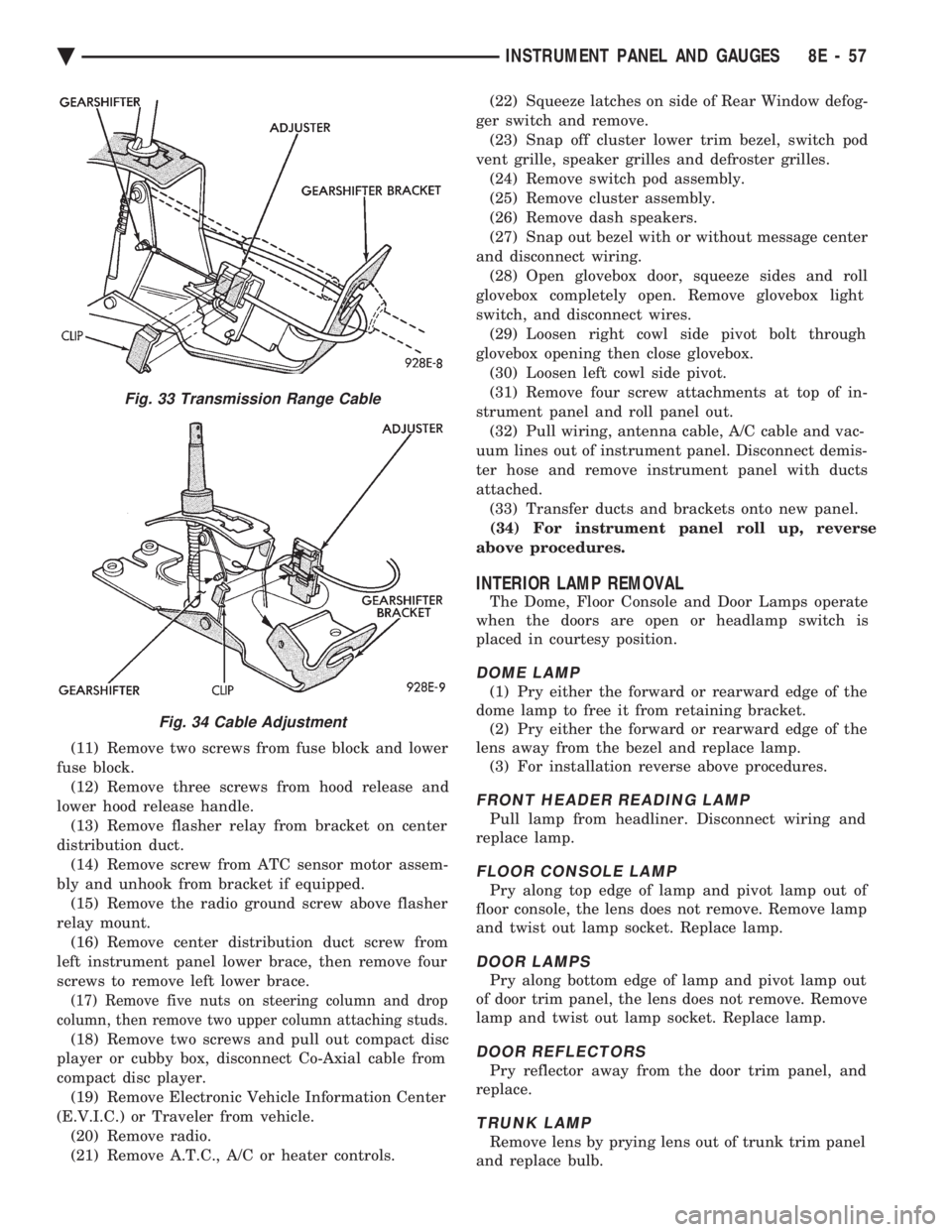
Fig. 33 Transmission Range Cable
Fig. 34 Cable Adjustment
Ä INSTRUMENT PANEL AND GAUGES 8E - 57
Page 565 of 2438
(24) Disconnect antenna cable.
(25) Disconnect left and right demister hoses from
demister outlets on the panel. (26) Remove instrument panel from vehicle.
(27) For installation reverse above procedures.
INTERIOR LAMP REPLACEMENT
The Dome Lamp operates when the doors are open
or headlamp switch is placed in courtesy position.
DOME LAMP
(1) Pry the forward or rearward edge of the dome
lamp to free it from the retaining bracket. (2) Pry either the forward or rearward edge of the
lens away from the bezel and replace lamp. (3) For installation, snap lens into bezel and then
bezel into bracket.
TRUNK LAMP
Pry along rearward portion of lens and pivot out of
trunk trim panel. Remove lens and replace lamp. For installation, snap lens into trunk trim panel.
Ä INSTRUMENT PANEL AND GAUGES 8E - 73
Page 594 of 2438
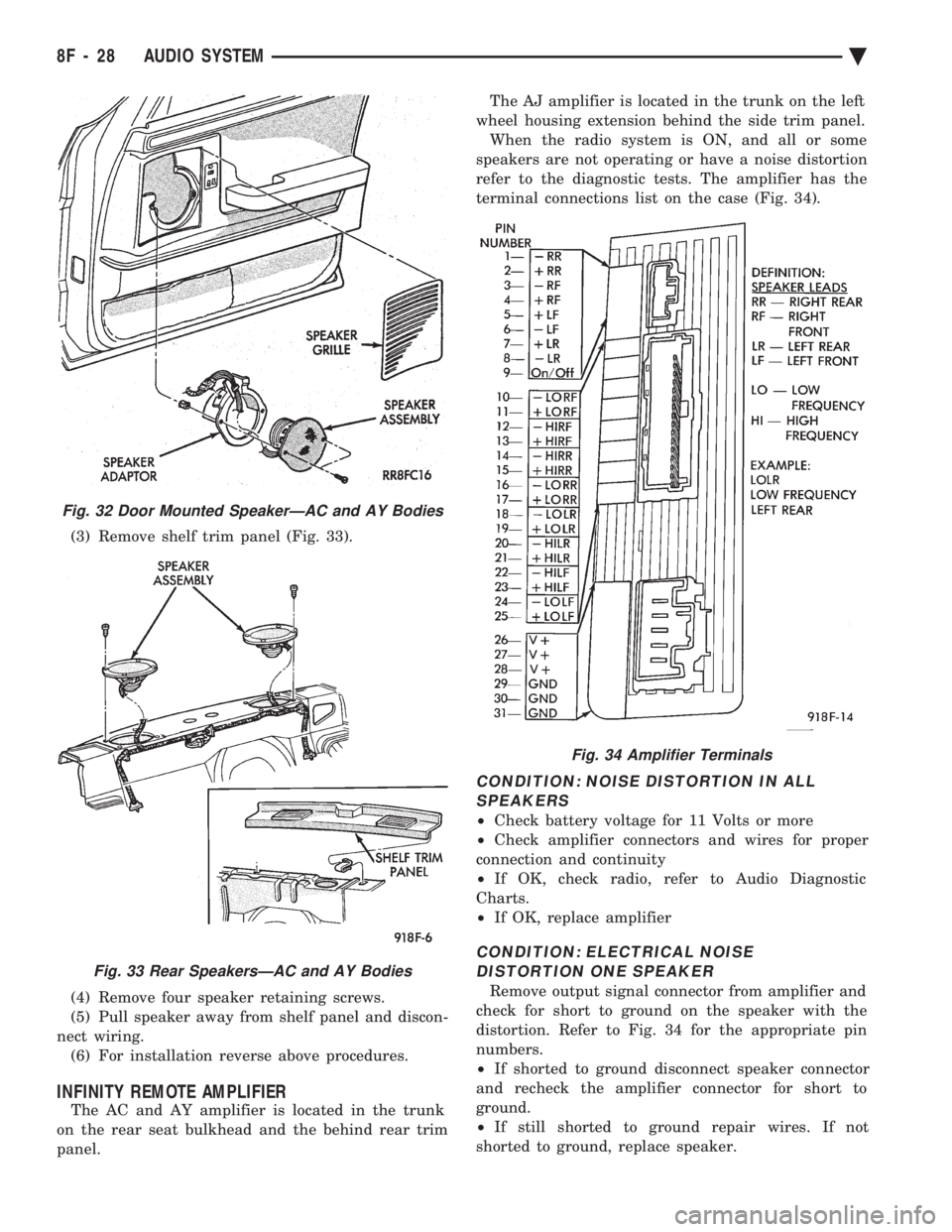
(3) Remove shelf trim panel (Fig. 33).
(4) Remove four speaker retaining screws.
(5) Pull speaker away from shelf panel and discon-
nect wiring. (6) For installation reverse above procedures.
INFINITY REMOTE AMPLIFIER
The AC and AY amplifier is located in the trunk
on the rear seat bulkhead and the behind rear trim
panel. The AJ amplifier is located in the trunk on the left
wheel housing extension behind the side trim panel. When the radio system is ON, and all or some
speakers are not operating or have a noise distortion
refer to the diagnostic tests. The amplifier has the
terminal connections list on the case (Fig. 34).
CONDITION: NOISE DISTORTION IN ALL SPEAKERS
² Check battery voltage for 11 Volts or more
² Check amplifier connectors and wires for proper
connection and continuity
² If OK, check radio, refer to Audio Diagnostic
Charts.
² If OK, replace amplifier
CONDITION: ELECTRICAL NOISE
DISTORTION ONE SPEAKER
Remove output signal connector from amplifier and
check for short to ground on the speaker with the
distortion. Refer to Fig. 34 for the appropriate pin
numbers.
² If shorted to ground disconnect speaker connector
and recheck the amplifier connector for short to
ground.
² If still shorted to ground repair wires. If not
shorted to ground, replace speaker.
Fig. 32 Door Mounted SpeakerÐAC and AY Bodies
Fig. 33 Rear SpeakersÐAC and AY Bodies
Fig. 34 Amplifier Terminals
8F - 28 AUDIO SYSTEM Ä
Page 654 of 2438
INSTALLATION
Reverse the preceding operation.
FRONT SIDE MARKER BULBÐAC/C-BODY
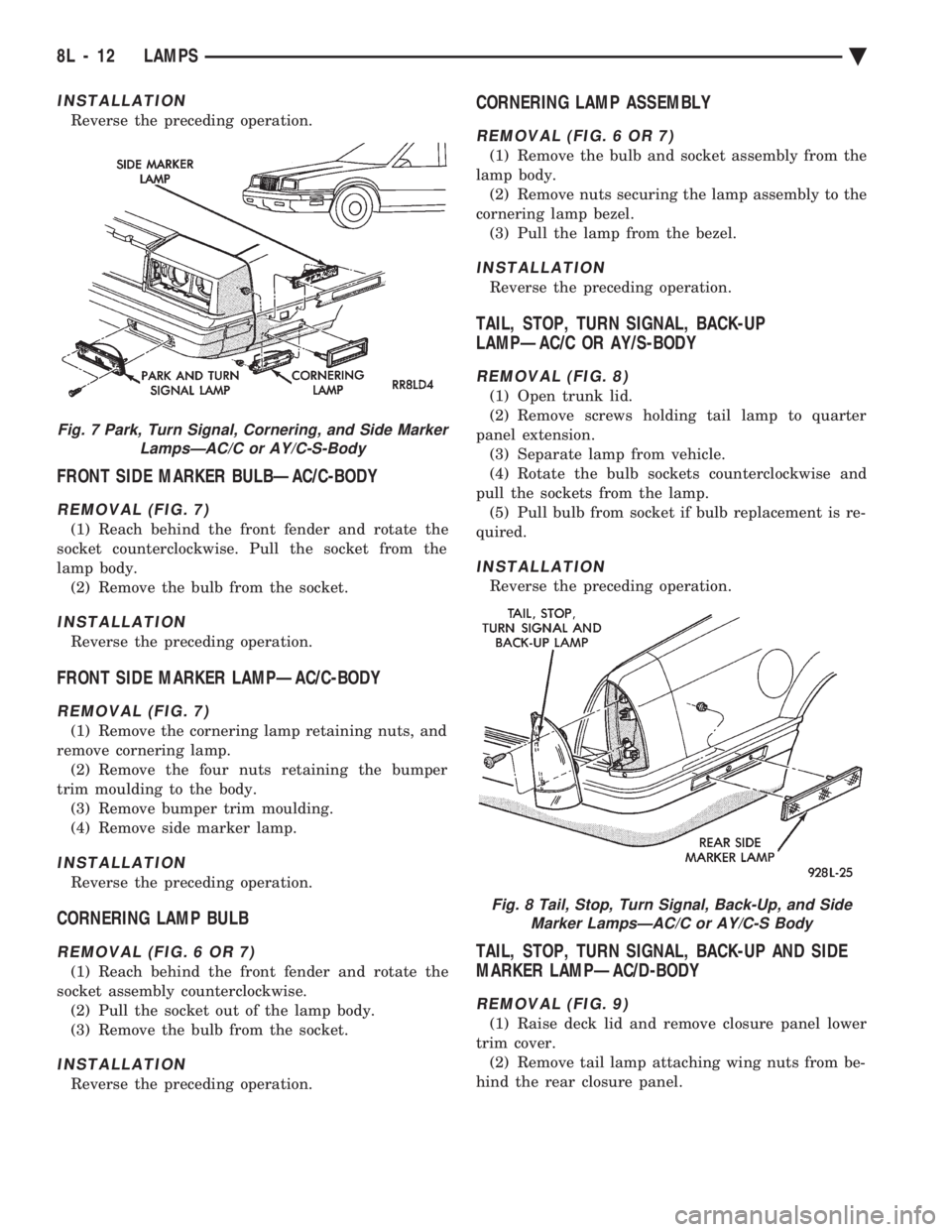
REMOVAL (FIG. 7)
(1) Reach behind the front fender and rotate the
socket counterclockwise. Pull the socket from the
lamp body. (2) Remove the bulb from the socket.
INSTALLATION
Reverse the preceding operation.
FRONT SIDE MARKER LAMPÐAC/C-BODY
REMOVAL (FIG. 7)
(1) Remove the cornering lamp retaining nuts, and
remove cornering lamp. (2) Remove the four nuts retaining the bumper
trim moulding to the body. (3) Remove bumper trim moulding.
(4) Remove side marker lamp.
INSTALLATION
Reverse the preceding operation.
CORNERING LAMP BULB
REMOVAL (FIG. 6 OR 7)
(1) Reach behind the front fender and rotate the
socket assembly counterclockwise. (2) Pull the socket out of the lamp body.
(3) Remove the bulb from the socket.
INSTALLATION
Reverse the preceding operation.
CORNERING LAMP ASSEMBLY
REMOVAL (FIG. 6 OR 7)
(1) Remove the bulb and socket assembly from the
lamp body. (2) Remove nuts securing the lamp assembly to the
cornering lamp bezel. (3) Pull the lamp from the bezel.
INSTALLATION
Reverse the preceding operation.
TAIL, STOP, TURN SIGNAL, BACK-UP
LAMPÐAC/C OR AY/S-BODY
REMOVAL (FIG. 8)
(1) Open trunk lid.
(2) Remove screws holding tail lamp to quarter
panel extension. (3) Separate lamp from vehicle.
(4) Rotate the bulb sockets counterclockwise and
pull the sockets from the lamp. (5) Pull bulb from socket if bulb replacement is re-
quired.
INSTALLATION
Reverse the preceding operation.
TAIL, STOP, TURN SIGNAL, BACK-UP AND SIDE
MARKER LAMPÐAC/D-BODY
REMOVAL (FIG. 9)
(1) Raise deck lid and remove closure panel lower
trim cover. (2) Remove tail lamp attaching wing nuts from be-
hind the rear closure panel.
Fig. 7 Park, Turn Signal, Cornering, and Side Marker LampsÐAC/C or AY/C-S-Body
Fig. 8 Tail, Stop, Turn Signal, Back-Up, and SideMarker LampsÐAC/C or AY/C-S Body
8L - 12 LAMPS Ä
Page 655 of 2438
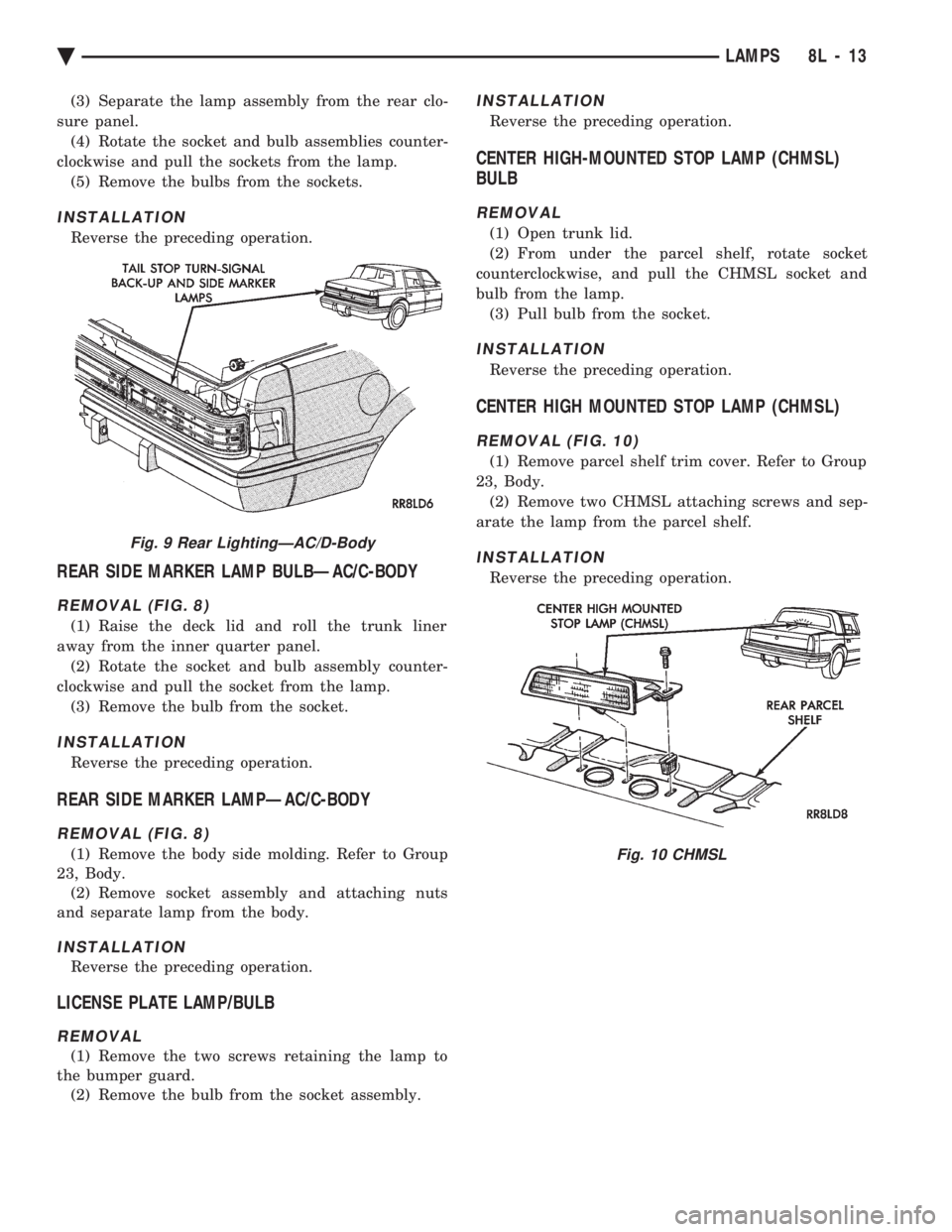
(3) Separate the lamp assembly from the rear clo-
sure panel. (4) Rotate the socket and bulb assemblies counter-
clockwise and pull the sockets from the lamp. (5) Remove the bulbs from the sockets.
INSTALLATION
Reverse the preceding operation.
REAR SIDE MARKER LAMP BULBÐAC/C-BODY
REMOVAL (FIG. 8)
(1) Raise the deck lid and roll the trunk liner
away from the inner quarter panel. (2) Rotate the socket and bulb assembly counter-
clockwise and pull the socket from the lamp. (3) Remove the bulb from the socket.
INSTALLATION
Reverse the preceding operation.
REAR SIDE MARKER LAMPÐAC/C-BODY
REMOVAL (FIG. 8)
(1) Remove the body side molding. Refer to Group
23, Body. (2) Remove socket assembly and attaching nuts
and separate lamp from the body.
INSTALLATION
Reverse the preceding operation.
LICENSE PLATE LAMP/BULB
REMOVAL
(1) Remove the two screws retaining the lamp to
the bumper guard. (2) Remove the bulb from the socket assembly.
INSTALLATION
Reverse the preceding operation.
CENTER HIGH-MOUNTED STOP LAMP (CHMSL)
BULB
REMOVAL
(1) Open trunk lid.
(2) From under the parcel shelf, rotate socket
counterclockwise, and pull the CHMSL socket and
bulb from the lamp. (3) Pull bulb from the socket.
INSTALLATION
Reverse the preceding operation.
CENTER HIGH MOUNTED STOP LAMP (CHMSL)
REMOVAL (FIG. 10)
(1) Remove parcel shelf trim cover. Refer to Group
23, Body. (2) Remove two CHMSL attaching screws and sep-
arate the lamp from the parcel shelf.
INSTALLATION
Reverse the preceding operation.
Fig. 9 Rear LightingÐAC/D-Body
Fig. 10 CHMSL
Ä LAMPS 8L - 13
Page 658 of 2438
EXTERIOR LAMPSÐAJ BODY INDEX
page page
Back-Up Lamp .......................... 17
Back-Up Lamp Bulb ...................... 17
Center High Mounted Stop Lamp (CHMSL) Bulb . 18
Center High-Mounted Stop Lamp Assembly (CHMSL) ............................. 18
Cornering Lamp or Bulb ................... 16
Front Side Marker Lamp ................... 16
Front Side Marker Lamp Bulb ............... 16
Headlamp Module and Bulb ................ 16 Headlamps
............................. 16
License Plate Lamp or Bulb ................ 17
Park and Turn Signal Lamp or Bulb .......... 16
Rear Side Marker Lamp ................... 17
Rear Side Marker Lamp Bulb ............... 17
Tail, Stop, Turn Signal Bulb or Lamp ......... 17
Trunk Lid Tail Lamp ...................... 17
Trunk Lid Tail Lamp Bulb .................. 17
HEADLAMPS
HEADLAMP MODULE AND BULB
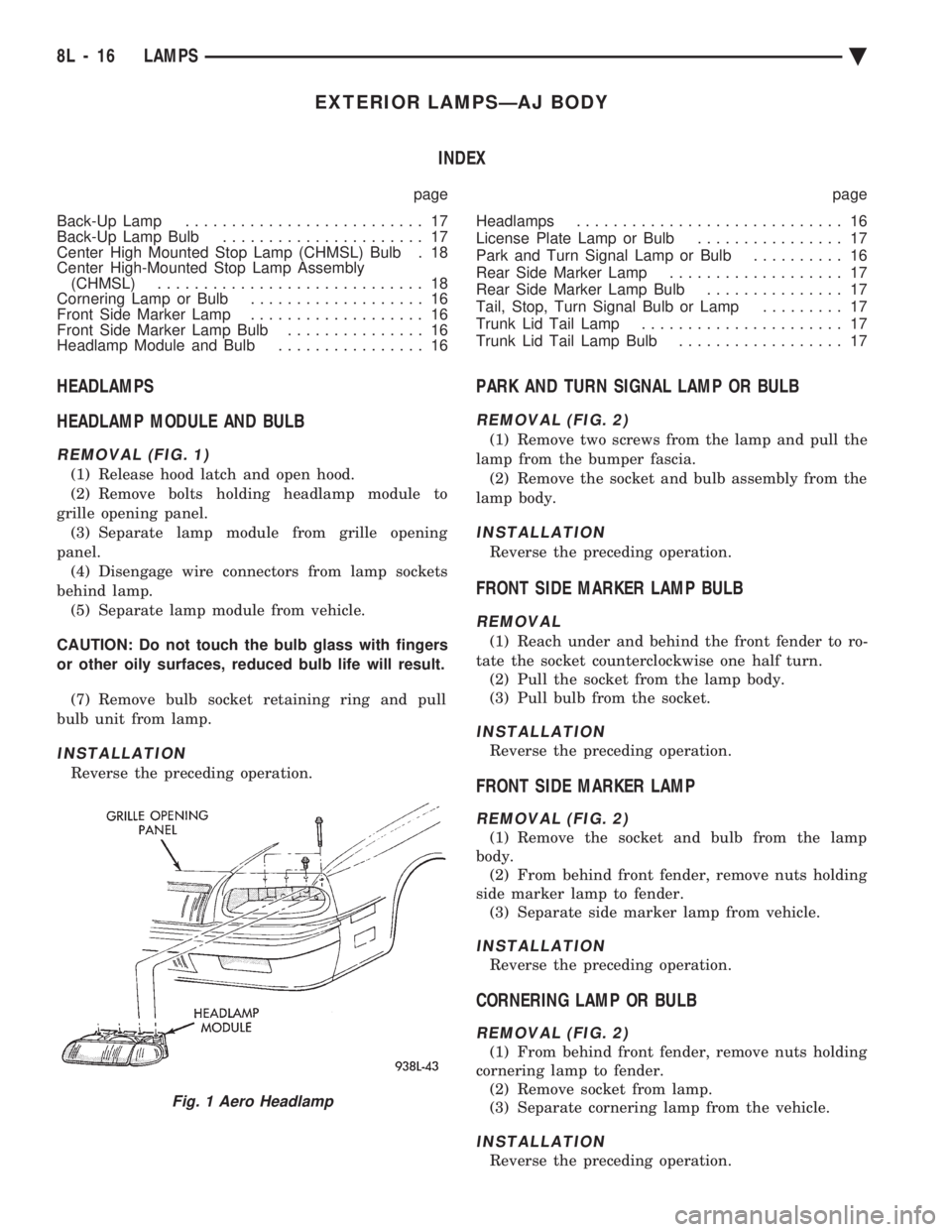
REMOVAL (FIG. 1)
(1) Release hood latch and open hood.
(2) Remove bolts holding headlamp module to
grille opening panel. (3) Separate lamp module from grille opening
panel. (4) Disengage wire connectors from lamp sockets
behind lamp. (5) Separate lamp module from vehicle.
CAUTION: Do not touch the bulb glass with fingers
or other oily surfaces, reduced bulb life will result. (7) Remove bulb socket retaining ring and pull
bulb unit from lamp.
INSTALLATION
Reverse the preceding operation.
PARK AND TURN SIGNAL LAMP OR BULB
REMOVAL (FIG. 2)
(1) Remove two screws from the lamp and pull the
lamp from the bumper fascia. (2) Remove the socket and bulb assembly from the
lamp body.
INSTALLATION
Reverse the preceding operation.
FRONT SIDE MARKER LAMP BULB
REMOVAL
(1) Reach under and behind the front fender to ro-
tate the socket counterclockwise one half turn. (2) Pull the socket from the lamp body.
(3) Pull bulb from the socket.
INSTALLATION
Reverse the preceding operation.
FRONT SIDE MARKER LAMP
REMOVAL (FIG. 2)
(1) Remove the socket and bulb from the lamp
body. (2) From behind front fender, remove nuts holding
side marker lamp to fender. (3) Separate side marker lamp from vehicle.
INSTALLATION
Reverse the preceding operation.
CORNERING LAMP OR BULB
REMOVAL (FIG. 2)
(1) From behind front fender, remove nuts holding
cornering lamp to fender. (2) Remove socket from lamp.
(3) Separate cornering lamp from the vehicle.
INSTALLATION
Reverse the preceding operation.
Fig. 1 Aero Headlamp
8L - 16 LAMPS Ä
Page 659 of 2438
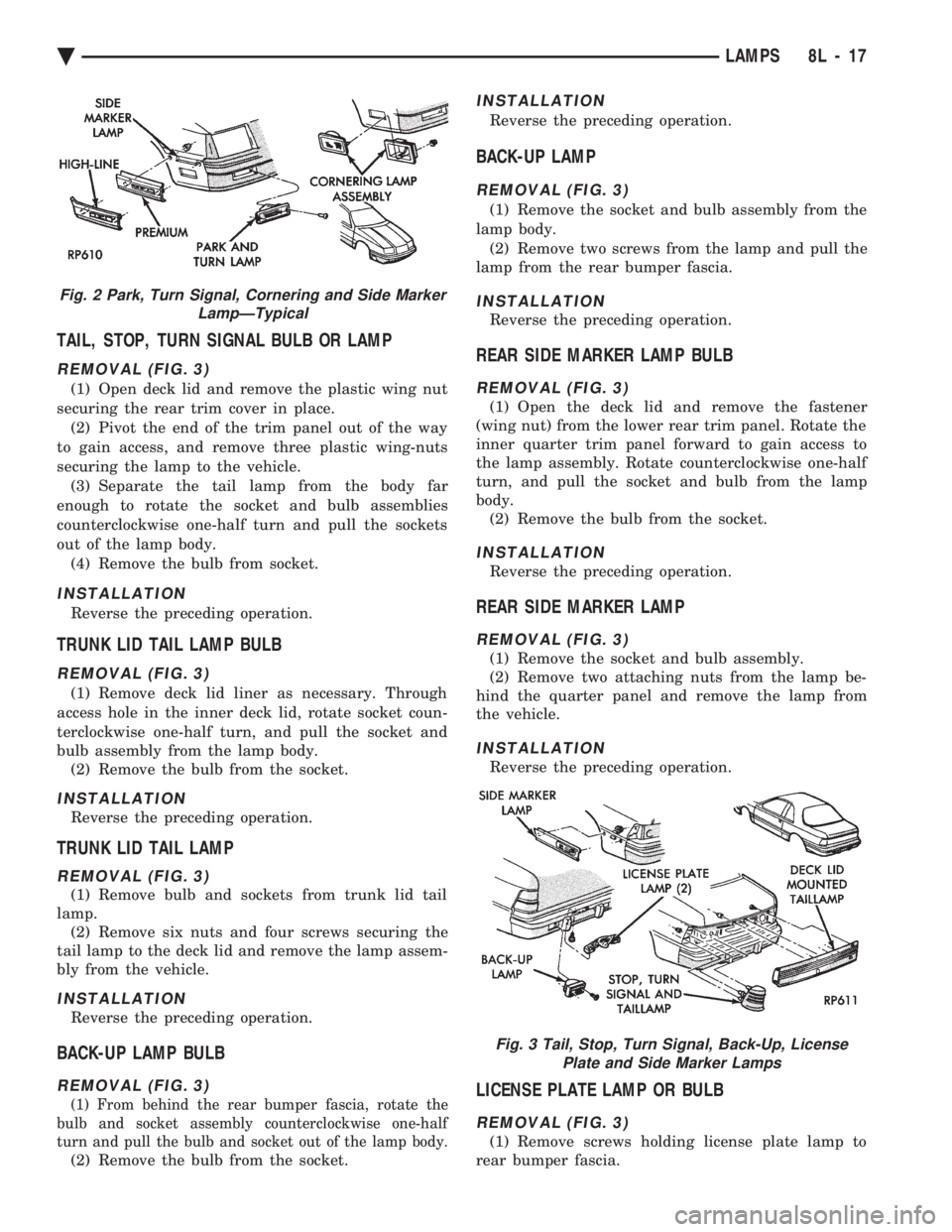
TAIL, STOP, TURN SIGNAL BULB OR LAMP
REMOVAL (FIG. 3)
(1) Open deck lid and remove the plastic wing nut
securing the rear trim cover in place. (2) Pivot the end of the trim panel out of the way
to gain access, and remove three plastic wing-nuts
securing the lamp to the vehicle. (3) Separate the tail lamp from the body far
enough to rotate the socket and bulb assemblies
counterclockwise one-half turn and pull the sockets
out of the lamp body. (4) Remove the bulb from socket.
INSTALLATION
Reverse the preceding operation.
TRUNK LID TAIL LAMP BULB
REMOVAL (FIG. 3)
(1) Remove deck lid liner as necessary. Through
access hole in the inner deck lid, rotate socket coun-
terclockwise one-half turn, and pull the socket and
bulb assembly from the lamp body. (2) Remove the bulb from the socket.
INSTALLATION
Reverse the preceding operation.
TRUNK LID TAIL LAMP
REMOVAL (FIG. 3)
(1) Remove bulb and sockets from trunk lid tail
lamp. (2) Remove six nuts and four screws securing the
tail lamp to the deck lid and remove the lamp assem-
bly from the vehicle.
INSTALLATION
Reverse the preceding operation.
BACK-UP LAMP BULB
REMOVAL (FIG. 3)
(1) From behind the rear bumper fascia, rotate the
bulb and socket assembly counterclockwise one-half
turn and pull the bulb and socket out of the lamp body.
(2) Remove the bulb from the socket.
INSTALLATION
Reverse the preceding operation.
BACK-UP LAMP
REMOVAL (FIG. 3)
(1) Remove the socket and bulb assembly from the
lamp body. (2) Remove two screws from the lamp and pull the
lamp from the rear bumper fascia.
INSTALLATION
Reverse the preceding operation.
REAR SIDE MARKER LAMP BULB
REMOVAL (FIG. 3)
(1) Open the deck lid and remove the fastener
(wing nut) from the lower rear trim panel. Rotate the
inner quarter trim panel forward to gain access to
the lamp assembly. Rotate counterclockwise one-half
turn, and pull the socket and bulb from the lamp
body. (2) Remove the bulb from the socket.
INSTALLATION
Reverse the preceding operation.
REAR SIDE MARKER LAMP
REMOVAL (FIG. 3)
(1) Remove the socket and bulb assembly.
(2) Remove two attaching nuts from the lamp be-
hind the quarter panel and remove the lamp from
the vehicle.
INSTALLATION
Reverse the preceding operation.
LICENSE PLATE LAMP OR BULB
REMOVAL (FIG. 3)
(1) Remove screws holding license plate lamp to
rear bumper fascia.
Fig. 2 Park, Turn Signal, Cornering and Side Marker LampÐTypical
Fig. 3 Tail, Stop, Turn Signal, Back-Up, LicensePlate and Side Marker Lamps
Ä LAMPS 8L - 17