torque CHEVROLET DYNASTY 1993 Service Manual
[x] Cancel search | Manufacturer: CHEVROLET, Model Year: 1993, Model line: DYNASTY, Model: CHEVROLET DYNASTY 1993Pages: 2438, PDF Size: 74.98 MB
Page 2060 of 2438
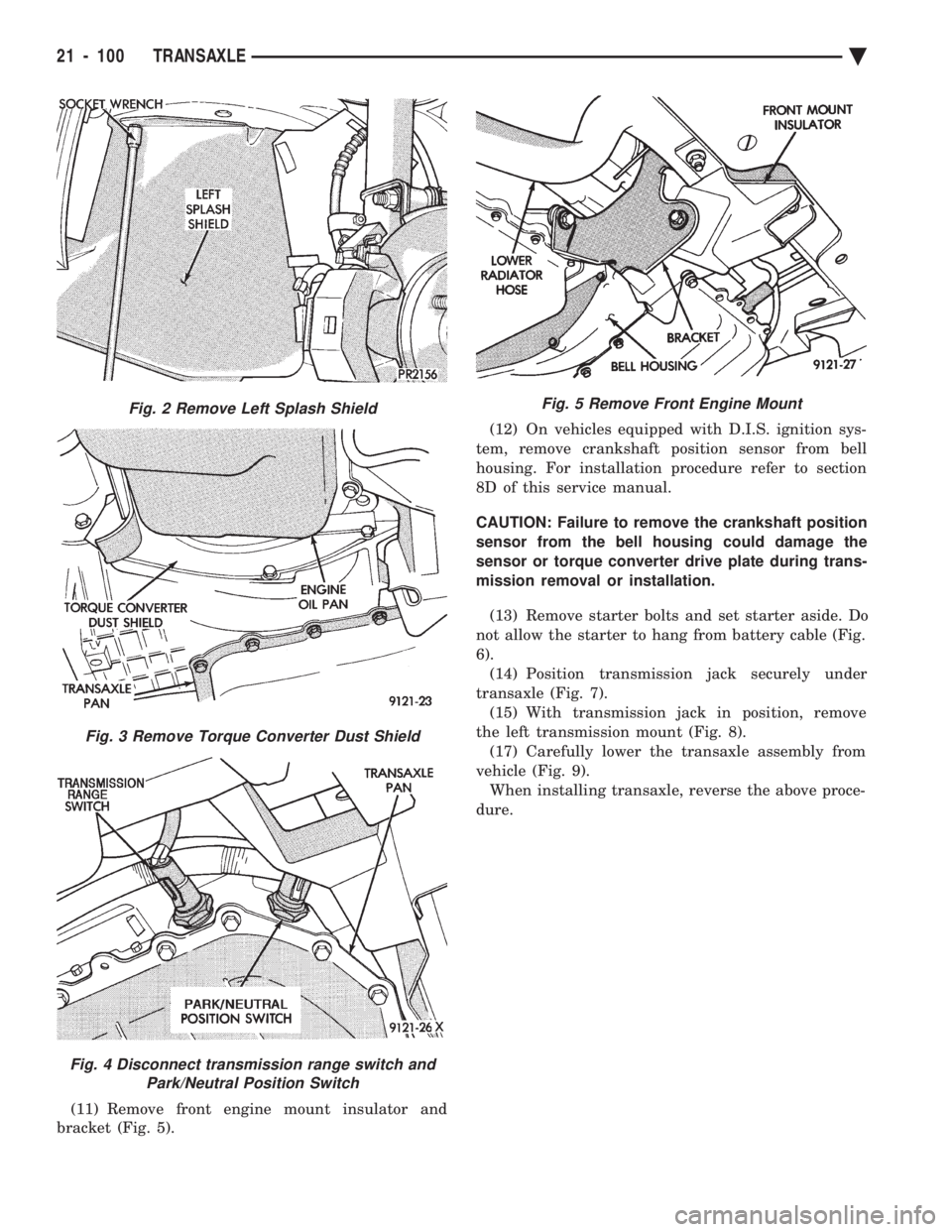
(11) Remove front engine mount insulator and
bracket (Fig. 5). (12) On vehicles equipped with D.I.S. ignition sys-
tem, remove crankshaft position sensor from bell
housing. For installation procedure refer to section
8D of this service manual.
CAUTION: Failure to remove the crankshaft position
sensor from the bell housing could damage the
sensor or torque converter drive plate during trans-
mission removal or installation.
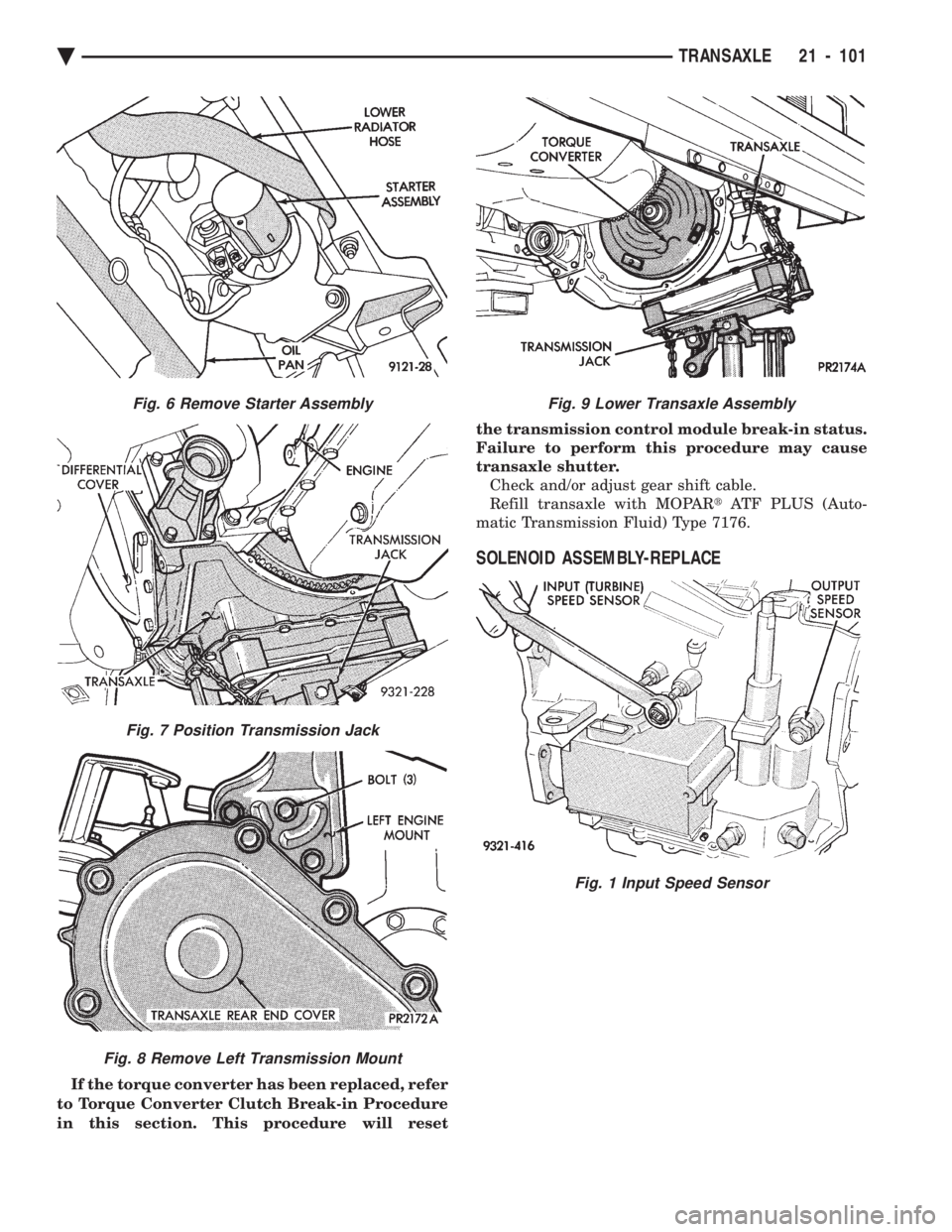
(13) Remove starter bolts and set starter aside. Do
not allow the starter to hang from battery cable (Fig.
6). (14) Position transmission jack securely under
transaxle (Fig. 7). (15) With transmission jack in position, remove
the left transmission mount (Fig. 8). (17) Carefully lower the transaxle assembly from
vehicle (Fig. 9). When installing transaxle, reverse the above proce-
dure.
Fig. 2 Remove Left Splash Shield
Fig. 3 Remove Torque Converter Dust Shield
Fig. 4 Disconnect transmission range switch and Park/Neutral Position Switch
Fig. 5 Remove Front Engine Mount
21 - 100 TRANSAXLE Ä
Page 2061 of 2438
If the torque converter has been replaced, refer
to Torque Converter Clutch Break-in Procedure
in this section. This procedure will reset the transmission control module break-in status.
Failure to perform this procedure may cause
transaxle shutter. Check and/or adjust gear shift cable.
Refill transaxle with MOPAR tATF PLUS (Auto-
matic Transmission Fluid) Type 7176.
SOLENOID ASSEMBLY-REPLACE
Fig. 9 Lower Transaxle Assembly
Fig. 1 Input Speed Sensor
Fig. 6 Remove Starter Assembly
Fig. 7 Position Transmission Jack
Fig. 8 Remove Left Transmission Mount
Ä TRANSAXLE 21 - 101
Page 2063 of 2438
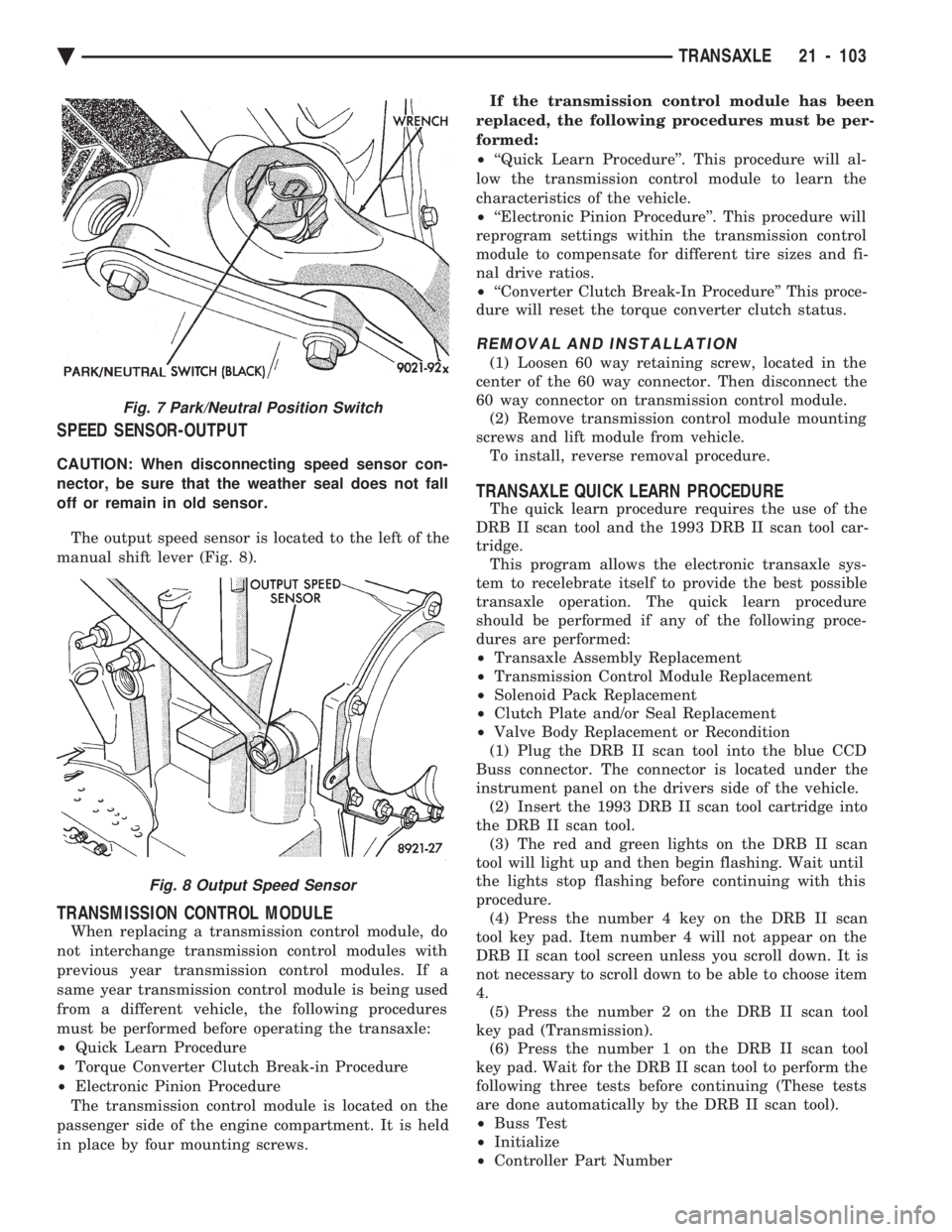
SPEED SENSOR-OUTPUT
CAUTION: When disconnecting speed sensor con-
nector, be sure that the weather seal does not fall
off or remain in old sensor. The output speed sensor is located to the left of the
manual shift lever (Fig. 8).
TRANSMISSION CONTROL MODULE
When replacing a transmission control module, do
not interchange transmission control modules with
previous year transmission control modules. If a
same year transmission control module is being used
from a different vehicle, the following procedures
must be performed before operating the transaxle:
² Quick Learn Procedure
² Torque Converter Clutch Break-in Procedure
² Electronic Pinion Procedure
The transmission control module is located on the
passenger side of the engine compartment. It is held
in place by four mounting screws. If the transmission control module has been
replaced, the following procedures must be per-
formed:
² ``Quick Learn Procedure''. This procedure will al-
low the transmission control module to learn the
characteristics of the vehicle.
² ``Electronic Pinion Procedure''. This procedure will
reprogram settings within the transmission control
module to compensate for different tire sizes and fi-
nal drive ratios.
² ``Converter Clutch Break-In Procedure'' This proce-
dure will reset the torque converter clutch status.
REMOVAL AND INSTALLATION
(1) Loosen 60 way retaining screw, located in the
center of the 60 way connector. Then disconnect the
60 way connector on transmission control module. (2) Remove transmission control module mounting
screws and lift module from vehicle. To install, reverse removal procedure.
TRANSAXLE QUICK LEARN PROCEDURE
The quick learn procedure requires the use of the
DRB II scan tool and the 1993 DRB II scan tool car-
tridge. This program allows the electronic transaxle sys-
tem to recelebrate itself to provide the best possible
transaxle operation. The quick learn procedure
should be performed if any of the following proce-
dures are performed:
² Transaxle Assembly Replacement
² Transmission Control Module Replacement
² Solenoid Pack Replacement
² Clutch Plate and/or Seal Replacement
² Valve Body Replacement or Recondition
(1) Plug the DRB II scan tool into the blue CCD
Buss connector. The connector is located under the
instrument panel on the drivers side of the vehicle. (2) Insert the 1993 DRB II scan tool cartridge into
the DRB II scan tool. (3) The red and green lights on the DRB II scan
tool will light up and then begin flashing. Wait until
the lights stop flashing before continuing with this
procedure. (4) Press the number 4 key on the DRB II scan
tool key pad. Item number 4 will not appear on the
DRB II scan tool screen unless you scroll down. It is
not necessary to scroll down to be able to choose item
4. (5) Press the number 2 on the DRB II scan tool
key pad (Transmission). (6) Press the number 1 on the DRB II scan tool
key pad. Wait for the DRB II scan tool to perform the
following three tests before continuing (These tests
are done automatically by the DRB II scan tool).
² Buss Test
² Initialize
² Controller Part Number
Fig. 7 Park/Neutral Position Switch
Fig. 8 Output Speed Sensor
Ä TRANSAXLE 21 - 103
Page 2064 of 2438
(7) Press the number 5 on the DRB II scan tool
key pad (Adjustments). (8) Press the number 3 on the DRB II scan tool
key pad (Quick Learn). Then follow the instructions
on the DRB II scan tool screen.
PINION FACTOR PROCEDURE
The vehicle speed readings for the speedometer are
taken from the output speed sensor. Because of dif-
ferent tire sizes and final drive ratios, the transmis-
sion control module must be calibrated to reflect the
different combinations of equipment. A procedure has
been developed called Pinion Factor. It allows the
technician to set the transmission control module ini-
tial setting so that the speedometer readings will be
correct. Failure to perform this procedure will cause a ``No
Speedometer Operation'' condition. This procedure must be performed if the transmis-
sion control module has been replaced. To properly read or reset the Pinion Factor, it is
necessary to use a DRB II scan tool. Perform the fol-
lowing steps with the DRB II scan tool to read or re-
set the Pinion Factor: (1) Plug the DRB II scan tool into the blue CCD
Bus connector. The connector is located under the in-
strument panel on the drivers side of the vehicle. (2) Insert the 1993 DRB II scan tool cartridge into
the DRB II scan tool. (3) The red and green lights on the DRB II scan
tool will light up and then begin flashing. Wait until
the lights stop flashing before continuing with this
procedure. (4) Press the number 4 key (Select System) on the
DRB II scan tool key pad. Item number 4 will not ap-
pear on the DRB II scan tool screen unless you scroll
down. It is not necessary to scroll down to be able to
choose item 4. (5) Press the number 2 on the DRB II scan tool
key pad (Transmission). (6) Press the number 1 on the DRB II scan tool
key pad. Wait for the DRB II scan tool to perform the
following three tests before continuing (These tests
are done automatically by the DRB II scan tool).
² Bus Test
² Initialize
² Transmission Control Module Part Number
(7) Press the number 5 on the DRB II scan tool
key pad (Adjustments). (8) Press the number 2 on the DRB II scan tool
key pad (Pinion Factor). Then follow the instructions
on the DRB II scan tool screen.
TORQUE CONVERTER CLUTCH BREAK-IN
PROCEDURE
A torque converter clutch break-in program is be-
ing used on all models with a 41TE. This program
will properly condition the torque converter clutch. This will eliminate shudder during partial torque
converter clutch operation on a new torque converter.
If the torque converter is replaced, the new clutch
within the torque converter will require break-in.
The current break-in status stored in the transmis-
sion control module will have to be reset to the start
of break-in with the DRB II scan tool. If a new transmission control module is put on the
vehicle, the status will be at the start of break-in.
This status is acceptable regardless of the mileage on
the torque converter. No modification of the break-in
status is required. To properly service these vehicles, it is necessary to
use a DRB II scan tool to read or reset the break-in
status. Perform the following steps with the DRB II
scan tool to reset the break-in status: (1) Plug the DRB II scan tool into the blue CCD
Bus connector. The connector is located under the in-
strument panel on the drivers side of the vehicle. (2) Insert the 1993 DRB II scan tool cartridge into
the DRB II scan tool. (3) The red and green lights on the DRB II scan
tool will light up and then begin flashing. Wait until
the lights stop flashing before continuing with this
procedure. (4) Press the number 4 key (Select System) on the
DRB II scan tool key pad. Item number 4 will not ap-
pear on the DRB II scan tool screen unless you scroll
down. It is not necessary to scroll down to be able to
choose item 4. (5) Press the number 2 on the DRB II scan tool
key pad (Transmission). (6) Press the number 1 on the DRB II scan tool
key pad. Wait for the DRB II scan tool to perform the
following three tests before continuing (These tests
are done automatically by the DRB II scan tool).
² Bus Test
² Initialize
² Transmission Control Module Part Number
(7) Press the number 5 on the DRB II scan tool
key pad (Adjustments). (8) Press the number 1 on the DRB II scan tool
key pad (Reset LU Clutch). The DRB II scan tool will
display one of three screens. (a) LU Clutch Break-in Status: Start
(b) LU Clutch Break-in Status: In-progress
Press ENTER to Reset Break-in status (c) LU Clutch Break-in Status: CompletePress
ENTER to Reset Break-in status
If screen (a) appears, the transmission control mod-
ule is at the beginning of its break-in program. No
further action is required. If screen (b) appears, the transmission control mod-
ule is in the middle of a its break-in program. Press
the enter key on the DRB II scan tool key pad to re-
turn the status to the start of break-in.
21 - 104 TRANSAXLE Ä
Page 2079 of 2438
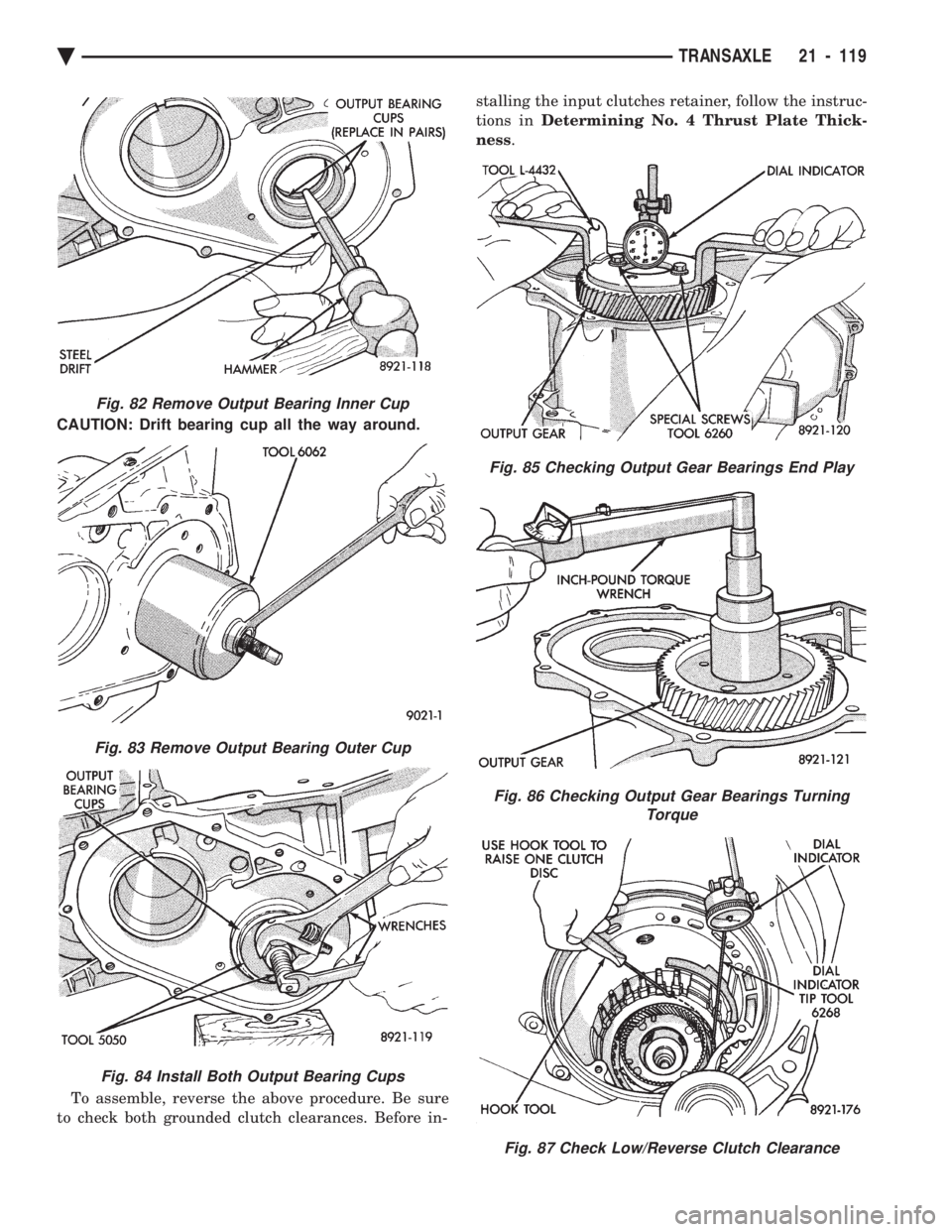
CAUTION: Drift bearing cup all the way around. To assemble, reverse the above procedure. Be sure
to check both grounded clutch clearances. Before in- stalling the input clutches retainer, follow the instruc-
tions in Determining No. 4 Thrust Plate Thick-
ness .
Fig. 82 Remove Output Bearing Inner Cup
Fig. 83 Remove Output Bearing Outer Cup
Fig. 84 Install Both Output Bearing Cups
Fig. 85 Checking Output Gear Bearings End Play
Fig. 86 Checking Output Gear Bearings Turning
Torque
Fig. 87 Check Low/Reverse Clutch Clearance
Ä TRANSAXLE 21 - 119
Page 2096 of 2438
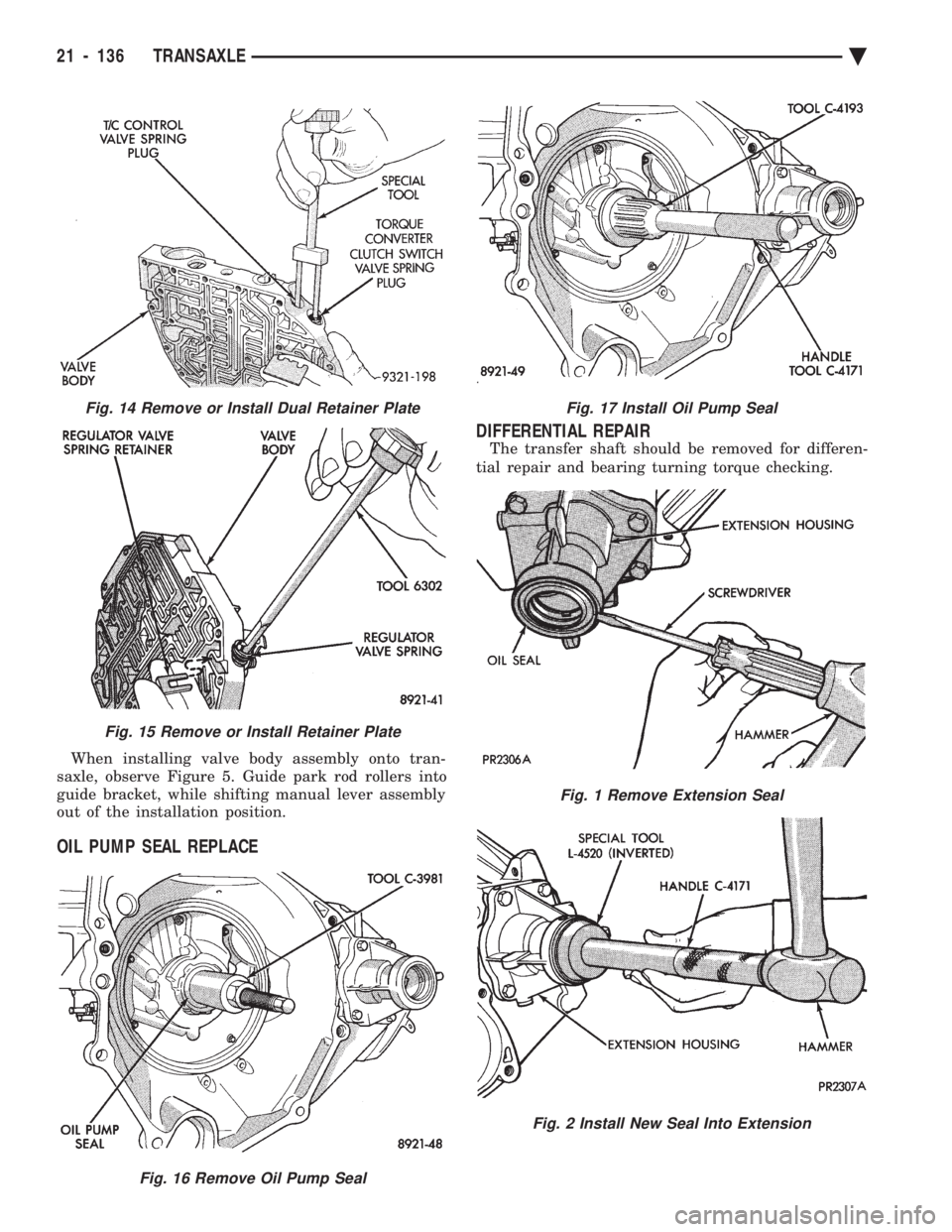
When installing valve body assembly onto tran-
saxle, observe Figure 5. Guide park rod rollers into
guide bracket, while shifting manual lever assembly
out of the installation position.
OIL PUMP SEAL REPLACE DIFFERENTIAL REPAIR
The transfer shaft should be removed for differen-
tial repair and bearing turning torque checking.
Fig. 16 Remove Oil Pump Seal
Fig. 17 Install Oil Pump Seal
Fig. 1 Remove Extension Seal
Fig. 2 Install New Seal Into Extension
Fig. 14 Remove or Install Dual Retainer Plate
Fig. 15 Remove or Install Retainer Plate
21 - 136 TRANSAXLE Ä
Page 2099 of 2438
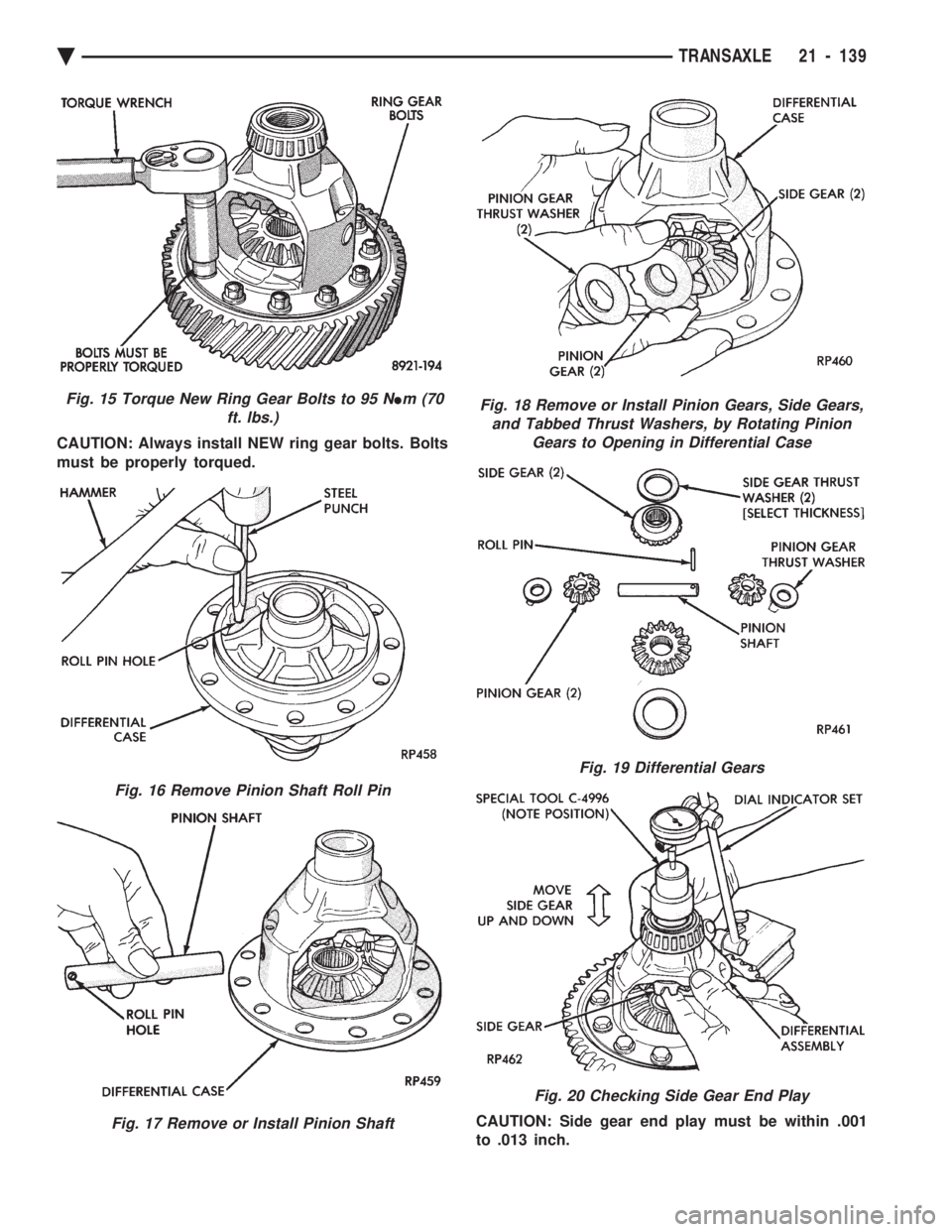
CAUTION: Always install NEW ring gear bolts. Bolts
must be properly torqued. CAUTION: Side gear end play must be within .001
to .013 inch.
Fig. 15 Torque New Ring Gear Bolts to 95 NIm (70
ft. lbs.)
Fig. 16 Remove Pinion Shaft Roll Pin
Fig. 17 Remove or Install Pinion Shaft
Fig. 18 Remove or Install Pinion Gears, Side Gears, and Tabbed Thrust Washers, by Rotating Pinion Gears to Opening in Differential Case
Fig. 19 Differential Gears
Fig. 20 Checking Side Gear End Play
Ä TRANSAXLE 21 - 139
Page 2100 of 2438
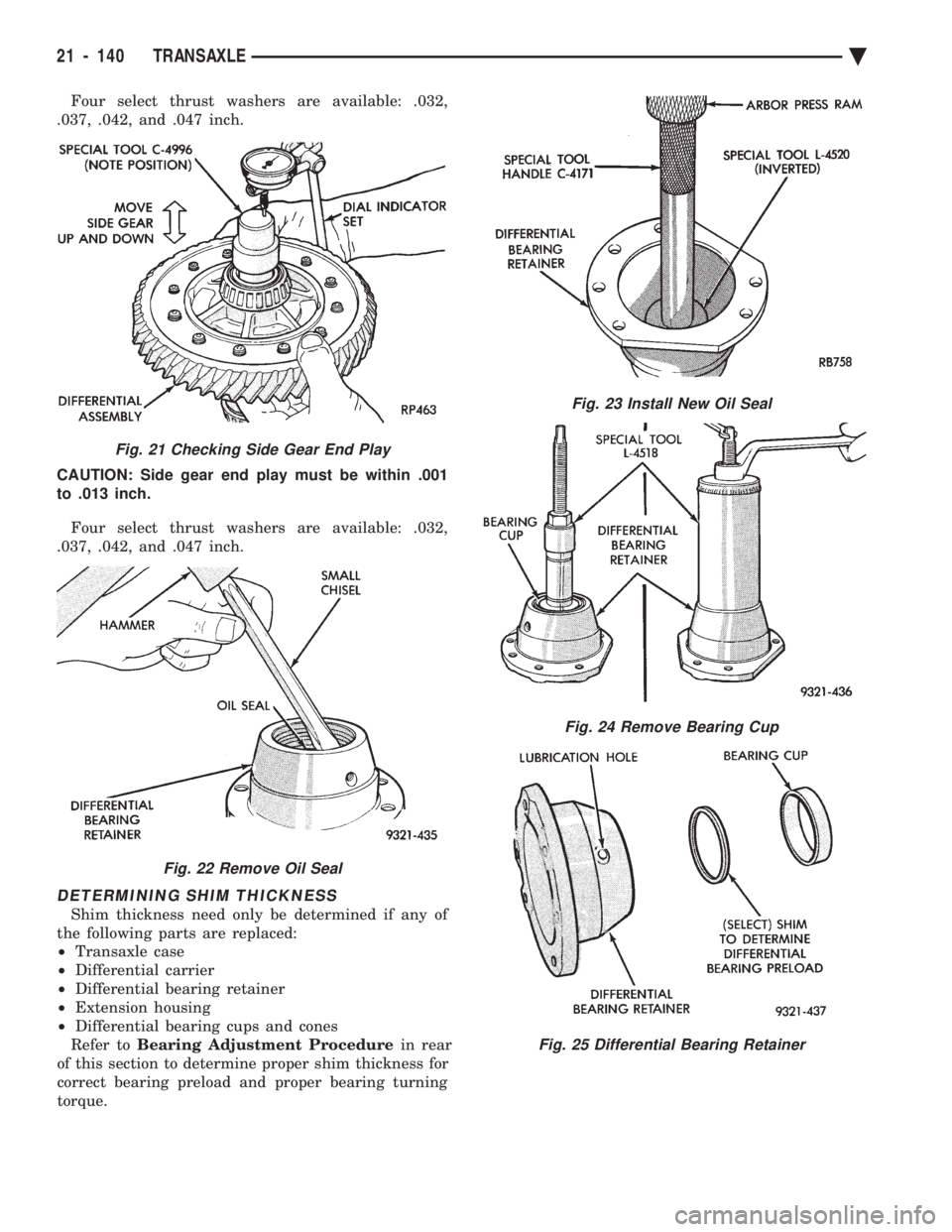
Four select thrust washers are available: .032,
.037, .042, and .047 inch.
CAUTION: Side gear end play must be within .001
to .013 inch.
Four select thrust washers are available: .032,
.037, .042, and .047 inch.
DETERMINING SHIM THICKNESS
Shim thickness need only be determined if any of
the following parts are replaced:
² Transaxle case
² Differential carrier
² Differential bearing retainer
² Extension housing
² Differential bearing cups and cones
Refer to Bearing Adjustment Procedure in rear
of this section to determine proper shim thickness for
correct bearing preload and proper bearing turning
torque.
Fig. 21 Checking Side Gear End Play
Fig. 22 Remove Oil Seal
Fig. 23 Install New Oil Seal
Fig. 24 Remove Bearing Cup
Fig. 25 Differential Bearing Retainer
21 - 140 TRANSAXLE Ä
Page 2101 of 2438
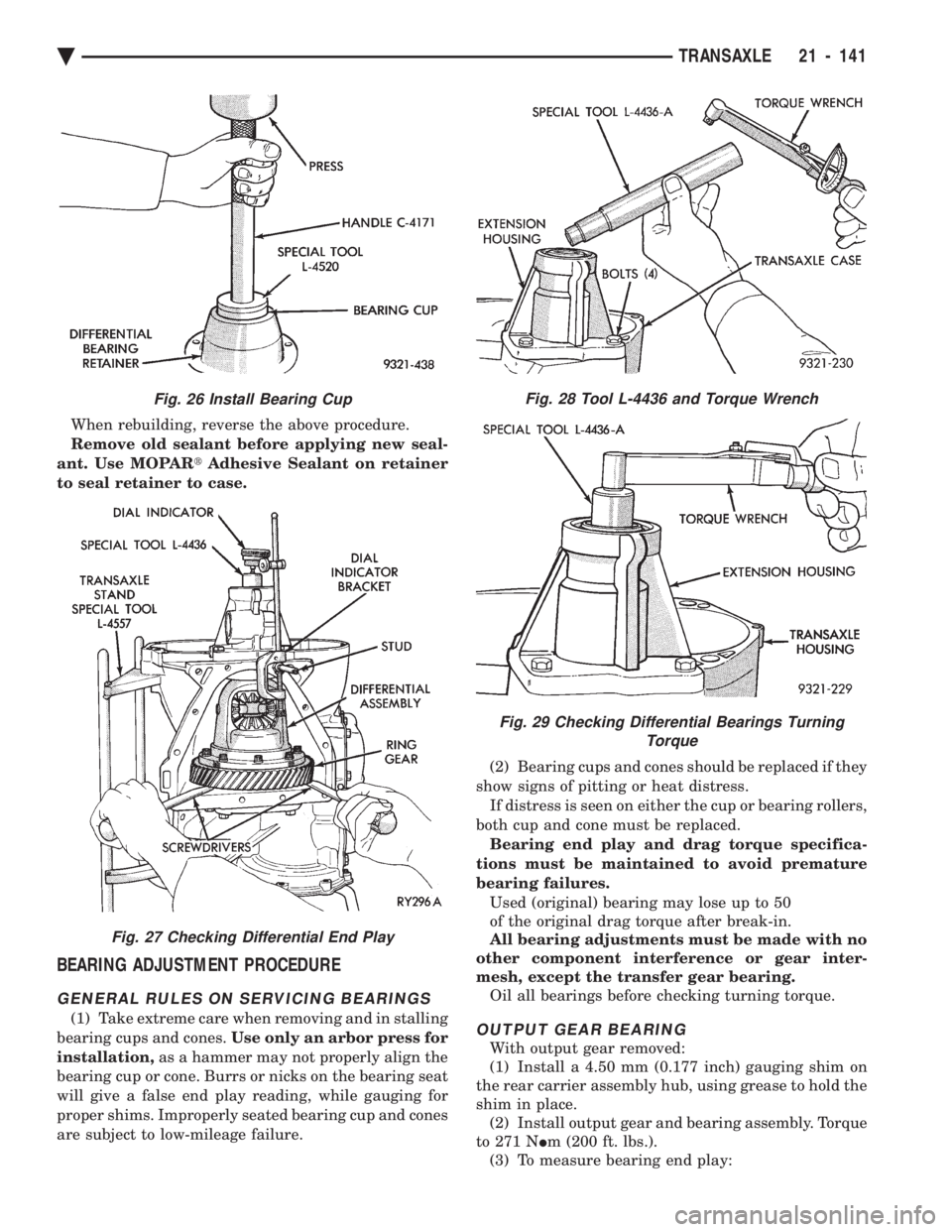
When rebuilding, reverse the above procedure.
Remove old sealant before applying new seal-
ant. Use MOPAR tAdhesive Sealant on retainer
to seal retainer to case.
BEARING ADJUSTMENT PROCEDURE
GENERAL RULES ON SERVICING BEARINGS
(1) Take extreme care when removing and in stalling
bearing cups and cones. Use only an arbor press for
installation, as a hammer may not properly align the
bearing cup or cone. Burrs or nicks on the bearing seat
will give a false end play reading, while gauging for
proper shims. Improperly seated bearing cup and cones
are subject to low-mileage failure. (2) Bearing cups and cones should be replaced if they
show signs of pitting or heat distress. If distress is seen on either the cup or bearing rollers,
both cup and cone must be replaced. Bearing end play and drag torque specifica-
tions must be maintained to avoid premature
bearing failures. Used (original) bearing may lose up to 50
of the original drag torque after break-in.
All bearing adjustments must be made with no
other component interference or gear inter-
mesh, except the transfer gear bearing. Oil all bearings before checking turning torque.OUTPUT GEAR BEARING
With output gear removed:
(1) Install a 4.50 mm (0.177 inch) gauging shim on
the rear carrier assembly hub, using grease to hold the
shim in place. (2) Install output gear and bearing assembly. Torque
to 271 N Im (200 ft. lbs.).
(3) To measure bearing end play:
Fig. 26 Install Bearing Cup
Fig. 27 Checking Differential End Play
Fig. 28 Tool L-4436 and Torque Wrench
Fig. 29 Checking Differential Bearings Turning Torque
Ä TRANSAXLE 21 - 141
Page 2102 of 2438
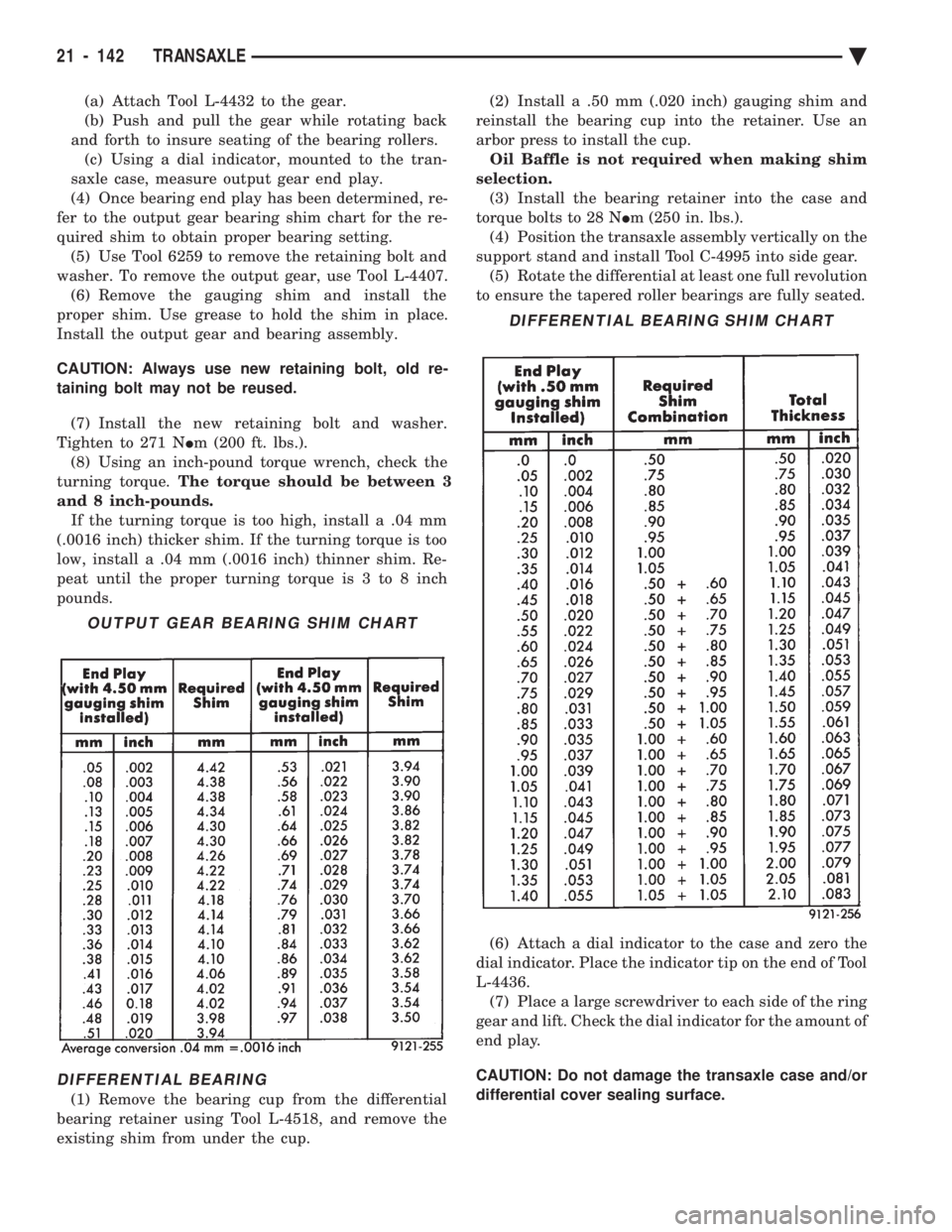
(a) Attach Tool L-4432 to the gear.
(b) Push and pull the gear while rotating back
and forth to insure seating of the bearing rollers. (c) Using a dial indicator, mounted to the tran-
saxle case, measure output gear end play.
(4) Once bearing end play has been determined, re-
fer to the output gear bearing shim chart for the re-
quired shim to obtain proper bearing setting. (5) Use Tool 6259 to remove the retaining bolt and
washer. To remove the output gear, use Tool L-4407. (6) Remove the gauging shim and install the
proper shim. Use grease to hold the shim in place.
Install the output gear and bearing assembly.
CAUTION: Always use new retaining bolt, old re-
taining bolt may not be reused.
(7) Install the new retaining bolt and washer.
Tighten to 271 N Im (200 ft. lbs.).
(8) Using an inch-pound torque wrench, check the
turning torque. The torque should be between 3
and 8 inch-pounds. If the turning torque is too high, install a .04 mm
(.0016 inch) thicker shim. If the turning torque is too
low, install a .04 mm (.0016 inch) thinner shim. Re-
peat until the proper turning torque is 3 to 8 inch
pounds.
DIFFERENTIAL BEARING
(1) Remove the bearing cup from the differential
bearing retainer using Tool L-4518, and remove the
existing shim from under the cup. (2) Install a .50 mm (.020 inch) gauging shim and
reinstall the bearing cup into the retainer. Use an
arbor press to install the cup. Oil Baffle is not required when making shim
selection. (3) Install the bearing retainer into the case and
torque bolts to 28 N Im (250 in. lbs.).
(4) Position the transaxle assembly vertically on the
support stand and install Tool C-4995 into side gear. (5) Rotate the differential at least one full revolution
to ensure the tapered roller bearings are fully seated.
(6) Attach a dial indicator to the case and zero the
dial indicator. Place the indicator tip on the end of Tool
L-4436. (7) Place a large screwdriver to each side of the ring
gear and lift. Check the dial indicator for the amount of
end play.
CAUTION: Do not damage the transaxle case and/or
differential cover sealing surface.
OUTPUT GEAR BEARING SHIM CHART
DIFFERENTIAL BEARING SHIM CHART
21 - 142 TRANSAXLE Ä