ignition CHEVROLET HHR 2008 1.G User Guide
[x] Cancel search | Manufacturer: CHEVROLET, Model Year: 2008, Model line: HHR, Model: CHEVROLET HHR 2008 1.GPages: 430, PDF Size: 5.63 MB
Page 96 of 430
Theft-Deterrent Systems
Vehicle theft is big business, especially in some cities.
Although your vehicle has a number of theft-deterrent
features, we know that nothing we put on it can make it
impossible to steal.
Content Theft-Deterrent
Your vehicle may have a
content theft-deterrent
alarm system. If your
vehicle has Remote
Keyless Entry (RKE), then
it has content
theft-deterrent.
Arming the System
With the ignition off, you can arm the system by:
Pressing the RKE transmitter lock button.
Pressing the power door lock switch while the
driver’s door is open.The system will arm after either of these things occur:
Thirty seconds after all the doors are closed.
Sixty seconds with any door open.
If you press the lock button on the transmitter a second
time while all the doors are closed, the system will
arm immediately. The system will still arm in 60 seconds
if a door is open. When the open door is closed, it will
also become armed.
The security light will turn on to indicate that arming has
been initiated. Once the system is armed, the security
light will ash once every three seconds.
If the security light is ashing twice per second, this
means that a door is open.
If you do not want to arm the system, you may lock the
car with the manual lock knobs on the doors.
Disarming the System
To disarm the system:
Press the RKE transmitter unlock button.
Turn the ignition on.
Once the system is disarmed, the security light will stop
ashing.
2-18
Page 97 of 430
How the System Alarm is Activated
If the system is armed, it can be activated by either:
Opening the driver’s door or tailgate. This will cause
a ten second pre-alarm chirp followed by a
thirty second full alarm of horn and lights.
Opening any other door. This will immediately cause
a full alarm of horn and lights for thirty seconds.
When an alarm event has nished, the system will
re-arm itself automatically.
How to Turn Off the System Alarm
To turn off the system alarm:
Press the lock button on the RKE transmitter. The
system will then re-arm itself.
Press the unlock button on the RKE transmitter.
This will also disarm the system.
Insert the key in the ignition and turn it on. This will
also disarm the system.
How to Detect a Tamper Condition
If you hear three chirps when you press the unlock or lock
buttons on the RKE transmitter, it means that the content
theft security system alarm was previously activated.
PASS-Key®III+
The PASS-Key®III+ system operates on a radio
frequency subject to Federal Communications
Commission (FCC) Rules and with Industry Canada.
This device complies with Part 15 of the FCC Rules.
Operation is subject to the following two conditions:
1. This device may not cause harmful interference.
2. This device must accept any interference received,
including interference that may cause undesired
operation.
This device complies with RSS-210 of Industry Canada.
Operation is subject to the following two conditions:
1. This device may not cause interference.
2. This device must accept any interference received,
including interference that may cause undesired
operation of the device.
Changes or modications to this system by other than
an authorized service facility could void authorization to
use this equipment.
PASS-Key
®III+ uses a radio frequency transponder in
the key that matches a decoder in your vehicle.
2-19
Page 98 of 430
PASS-Key®III+ Operation
Your vehicle has PASS-Key®III+ (Personalized
Automotive Security System) theft-deterrent system.
PASS-Key
®III+ is a passive theft-deterrent system.
The system is automatically armed when the key
is removed from the ignition.
You do not have to manually arm or disarm the system.
The security light will come on if there is a problem
with arming or disarming the theft-deterrent system.
When the PASS-Key
®III+ system senses that someone
is using the wrong key, it prevents the vehicle from
starting. Anyone using a trial-and-error method to start
the vehicle will be discouraged because of the high
number of electrical key codes.
When trying to start the vehicle if the engine does not
start and the security light comes on, there may be
a problem with your theft-deterrent system. Turn
the ignition off and try again.
If the engine still does not start, and the key appears to be
undamaged, try another ignition key. At this time, you
may also want to check the fuse, seeFuses and Circuit
Breakers on page 5-119. If the engine still does not start
with the other key, your vehicle needs service.If your vehicle does start, the rst key may be faulty. See
your dealer/retailer who can service the PASS-Key
®III+
to have a new key made. In an emergency, contact
Roadside Assistance. SeeRoadside Assistance Program
on page 7-6, for more information.
It may be possible for the PASS-Key
®III+ decoder to
“learn” the transponder value of a new or replacement
key. Up to 10 keys may be programmed for the vehicle.
The following procedure is for programming additional
keys only. If all the currently programmed keys are
lost or do not operate, you must see your dealer/retailer
or a locksmith who can service PASS-Key
®III+ to
have keys made and programmed to the system.
See your dealer/retailer or a locksmith who can service
PASS-Key
®III+ to get a new key blank that is cut
exactly as the ignition key that operates the system.
To program the new key:
1. Verify that the new key has a
1stamped on it.
2. Insert the already programmed key in the ignition
and start the engine. If the engine will not start, see
your dealer/retailer for service.
3. After the engine has started, turn the key to
LOCK/OFF, and remove the key.
2-20
Page 100 of 430
Ignition Positions
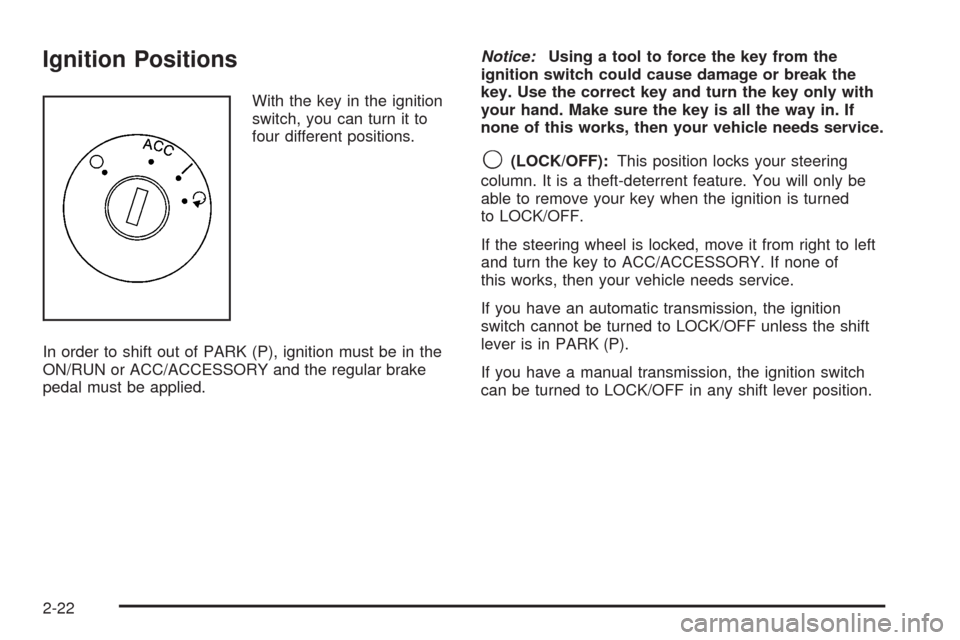
With the key in the ignition
switch, you can turn it to
four different positions.
In order to shift out of PARK (P), ignition must be in the
ON/RUN or ACC/ACCESSORY and the regular brake
pedal must be applied.Notice:Using a tool to force the key from the
ignition switch could cause damage or break the
key. Use the correct key and turn the key only with
your hand. Make sure the key is all the way in. If
none of this works, then your vehicle needs service.
9(LOCK/OFF):This position locks your steering
column. It is a theft-deterrent feature. You will only be
able to remove your key when the ignition is turned
to LOCK/OFF.
If the steering wheel is locked, move it from right to left
and turn the key to ACC/ACCESSORY. If none of
this works, then your vehicle needs service.
If you have an automatic transmission, the ignition
switch cannot be turned to LOCK/OFF unless the shift
lever is in PARK (P).
If you have a manual transmission, the ignition switch
can be turned to LOCK/OFF in any shift lever position.
2-22
Page 101 of 430
{CAUTION:
If you have a manual transmission removing
the key from the ignition switch will lock the
steering column and result in a loss of ability
to steer the vehicle. This could cause a
collision. If you need to turn the engine off
while the vehicle is moving, turn the key to
ACC/ACCESSORY.
ACC (ACC/ACCESSORY):This position operates
some of your electrical accessories. It unlocks the
steering wheel and ignition.
R(ON/RUN):This is the position the switch returns to
after you start your engine and release the switch.
The switch stays in the ON/RUN position when
the engine is running. But even when the ignition is not
running, you can use ON/RUN to operate your
electrical accessories and to display some warning and
indicator lights.The battery could be drained if you leave the key in the
ACC/ACCESSORY or ON/RUN position with the engine
off. You may not be able to start your vehicle if the battery
is allowed to drain for an extended period of time.
/(START):This position starts the engine. When the
engine starts, release the key. The ignition switch
will return to ON/RUN for normal driving.
A warning tone will sound if you open the driver’s door
while in LOCK/OFF or ACC/ACCESSORY, when
the key has not been removed from the ignition.
Key In the Ignition
Never leave your vehicle with the keys inside, as it is an
easy target for joy riders or thieves. If you leave the
key in the ignition and park your vehicle, a chime
will sound, when you open the driver’s door. Always
remember to remove your key from the ignition and take
it with you. This will lock your ignition and transmission.
Also, always remember to lock the doors.
The battery could be drained if you leave the key in the
ignition while your vehicle is parked. You may not be
able to start your vehicle after it has been parked for an
extended period of time.
2-23
Page 102 of 430
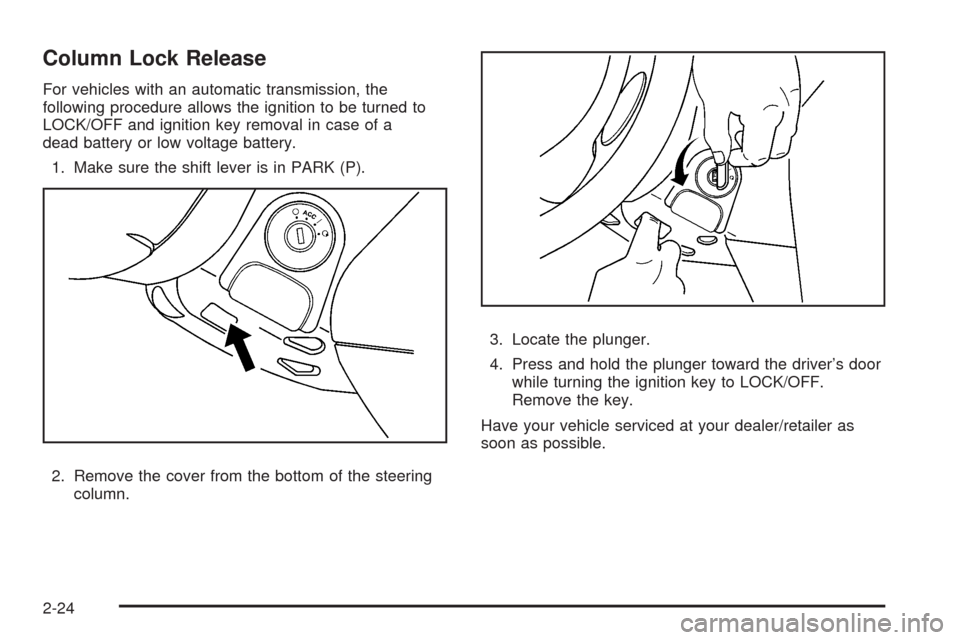
Column Lock Release
For vehicles with an automatic transmission, the
following procedure allows the ignition to be turned to
LOCK/OFF and ignition key removal in case of a
dead battery or low voltage battery.
1. Make sure the shift lever is in PARK (P).
2. Remove the cover from the bottom of the steering
column.3. Locate the plunger.
4. Press and hold the plunger toward the driver’s door
while turning the ignition key to LOCK/OFF.
Remove the key.
Have your vehicle serviced at your dealer/retailer as
soon as possible.
2-24
Page 104 of 430
Starting Procedure
1. With your foot off the accelerator pedal, turn the
ignition key to START. When the engine starts,
let go of the key. The idle speed will go down as
your engine gets warm. Do not race the engine
immediately after starting it. Operate the engine and
transmission gently to allow the oil to warm up
and lubricate all moving parts.
Your vehicle has a Computer-Controlled Cranking
System. This feature assists in starting the
engine and protects components. If the ignition key
is turned to the START position, and then
released when the engine begins cranking, the
engine will continue cranking for a few seconds or
until the vehicle starts. If the engine does not
start and the key is held in START for many
seconds, cranking will be stopped after 15 seconds
to prevent cranking motor damage. To prevent
gear damage, this system also prevents cranking if
the engine is already running. Engine cranking
can be stopped by turning the ignition switch
to ACC/ACCESSORY or LOCK/OFF.
Notice:Cranking the engine for long periods of
time, by returning the key to the START position
immediately after cranking has ended, can overheat
and damage the cranking motor, and drain the
battery. Wait at least 15 seconds between each try,
to let the cranking motor cool down.2. If the engine does not start after 5-10 seconds,
especially in very cold weather (below 0°F or−18°C),
it could be ooded with too much gasoline. Try
pushing the accelerator pedal all the way to the oor
and holding it there as you hold the key in START for
up to a maximum of 15 seconds. Wait at least
15 seconds between each try, to allow the cranking
motor to cool down. When the engine starts, let go of
the key and accelerator. If the vehicle starts briey
but then stops again, do the same thing. This clears
the extra gasoline from the engine. Do not race the
engine immediately after starting it. Operate the
engine and transmission gently until the oil warms up
and lubricates all moving parts.
Notice:The engine is designed to work with the
electronics in your vehicle. If you add electrical
parts or accessories, you could change the way the
engine operates. Before adding electrical equipment,
check with your dealer/retailer. If you do not, your
engine might not perform properly. Any resulting
damage would not be covered by your vehicle’s
warranty.
2-26
Page 107 of 430
Make sure the shift lever is fully in PARK (P) before
starting the engine. Your vehicle has an automatic
transaxle shift lock control system. You have to fully
apply your regular brakes rst and then press the shift
lever button before you can shift from PARK (P)
when the ignition key is in RUN. If you cannot shift out
of PARK (P), ease pressure on the shift lever and
push the shift lever all the way into PARK (P) as you
maintain brake application. Then press the shift
lever button and then move the shift lever into another
gear. SeeShifting Out of PARK (P) (Automatic
Transmission) on page 2-36.
REVERSE (R):Use this gear to back up.
Notice:Shifting to REVERSE (R) while your vehicle
is moving forward could damage the transmission.
The repairs would not be covered by your warranty.
Shift to REVERSE (R) only after your vehicle is
stopped.
To rock your vehicle back and forth to get out of snow,
ice, or sand without damaging your transmission,
seeIf Your Vehicle is Stuck in Sand, Mud, Ice, or Snow
on page 4-26.NEUTRAL (N):In this position, your engine does not
connect with the wheels. To restart when you are
already moving, use NEUTRAL (N) only. Also, use
NEUTRAL (N) when your vehicle is being towed.
{CAUTION:
Shifting into a drive gear while the engine is
running at high speed is dangerous. Unless
your foot is rmly on the brake pedal, your
vehicle could move very rapidly. You could
lose control and hit people or objects. Do not
shift into a drive gear while your engine is
running at high speed.
Notice:Shifting out of PARK (P) or NEUTRAL (N)
with the engine running at high speed may damage
the transmission. The repairs would not be
covered by your warranty. Be sure the engine is not
running at high speed when shifting your vehicle.
2-29
Page 111 of 430
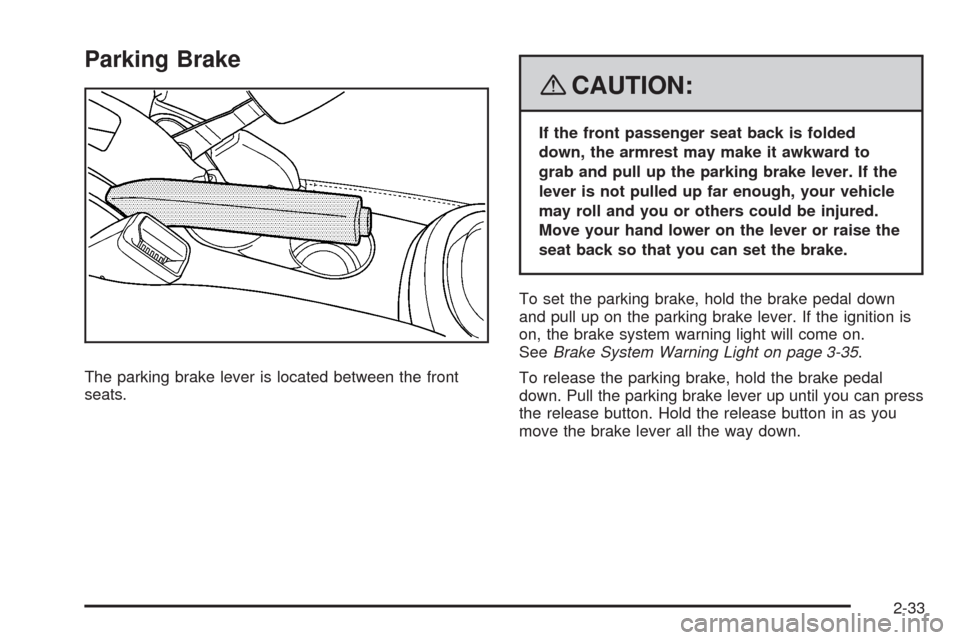
Parking Brake
The parking brake lever is located between the front
seats.
{CAUTION:
If the front passenger seat back is folded
down, the armrest may make it awkward to
grab and pull up the parking brake lever. If the
lever is not pulled up far enough, your vehicle
may roll and you or others could be injured.
Move your hand lower on the lever or raise the
seat back so that you can set the brake.
To set the parking brake, hold the brake pedal down
and pull up on the parking brake lever. If the ignition is
on, the brake system warning light will come on.
SeeBrake System Warning Light on page 3-35.
To release the parking brake, hold the brake pedal
down. Pull the parking brake lever up until you can press
the release button. Hold the release button in as you
move the brake lever all the way down.
2-33
Page 112 of 430
If you forget to release your parking brake, a chime will
sound and a warning message will be displayed
when the parking brake is applied and the vehicle is
moving faster than 5 mph (8 kph). SeeDIC Warnings
and Messages on page 3-48.
Notice:Driving with the parking brake on can
overheat the brake system and cause premature
wear or damage to brake system parts. Make sure
that the parking brake is fully released and the brake
warning light is off before driving.
Shifting Into PARK (P) (Automatic
Transmission)
{CAUTION:
It can be dangerous to get out of your vehicle
if the shift lever is not fully in PARK (P) with
the parking brake rmly set. Your vehicle can
roll. If you have left the engine running, the
vehicle can move suddenly.
CAUTION: (Continued)
CAUTION: (Continued)
You or others could be injured. To be sure
your vehicle will not move, even when you are
on fairly level ground, use the steps that
follow. If you are pulling a trailer, seeTowing a
Trailer (Manual Transaxle) on page 4-34or
Towing a Trailer (Automatic Transaxle) on
page 4-34.
To shift into PARK (P), do the following:
1. Hold the brake pedal down with your right foot and
set the parking brake. SeeParking Brake on
page 2-33for more information.
2. Move the shift lever into PARK (P) by holding in the
button on the shift lever and pushing the lever all
the way toward the front of the vehicle.
3. Turn the ignition key to LOCK/OFF.
4. Remove the key and take it with you. If you can
leave your vehicle with the key in your hand, your
vehicle is in PARK (P).
2-34