four CHEVROLET KODIAK 2007 User Guide
[x] Cancel search | Manufacturer: CHEVROLET, Model Year: 2007, Model line: KODIAK, Model: CHEVROLET KODIAK 2007Pages: 430, PDF Size: 6.06 MB
Page 123 of 430
Shifting Out of Four-Wheel Low
To shift from Four-Wheel Low to Four-Wheel High
or Two-Wheel High, your vehicle must be
stopped or moving less than 3 mph (5 km/h) with
the transmission in NEUTRAL (N) and the
engine running. The preferred method for shifting
out of Four-Wheel Low is to have your vehicle
moving 1 or 2 mph (1.6 to 3.2 km/h). Turn the knob
to Four-Wheel High or Two-Wheel High. You
must wait for the Four-Wheel High or Two-Wheel
High indicator light to stop flashing and remain
on before shifting the transmission into gear.
Notice:Shifting the transmission into gear
before the Four-Wheel High or Two-Wheel High
indicator light has stopped ashing could
damage the transfer case. To help avoid
damaging your vehicle, always wait for the
Four-Wheel High or Two-Wheel High indicator
light to stop ashing before shifting the
transmission into gear.
If the knob is turned to Four-Wheel High or
Two-Wheel High while your vehicle is in gear and/or
moving, the Four-Wheel High or Two-Wheel high
indicator light flashes for 30 seconds. It will not
complete the shift unless your vehicle is moving
less than 3 mph (5 km/h) with the transmission in
NEUTRAL (N).
Shifting Into NEUTRAL
Before shifting the transfer case to NEUTRAL, first
make sure the vehicle is parked so that it will
not roll.
1. Set the parking brake.
2. Start the vehicle.
3. Put the transmission in NEUTRAL (N).
4. Shift the transfer case to Two-Wheel High.
5. Turn the transfer case knob all of the way past
Four-Wheel Low and hold it there for a
minimum of 10 seconds. The NEUTRAL
indicator light comes on.
6. Shift the transmission to REVERSE (R) for
one second, then shift the transmission to
DRIVE (D) for one second.
7. Turn the ignition to OFF.
8. Place the transmission shift lever in
PARK. (P).
9. Turn the ignition to LOCK.
123
Page 124 of 430
Shifting Out of NEUTRAL
To shift the transfer case out of NEUTRAL, do the
following:
1. Set the parking brake and apply the regular
brake pedal.
2. Turn the ignition to RUN with the engine off.
3. Put the transmission in NEUTRAL (N).
4. Turn the transfer case knob to the desired
shift position (Two-Wheel High, Four-Wheel
High, Four-Wheel Low).
5. After the transfer case has shifted out of
NEUTRAL, the indicator light goes out.Notice:Driving with the parking brake on can
overheat the brake system and cause
premature wear or damage to brake system
parts. Verify that the parking brake is fully
released and the brake warning light is
off before driving.
6. Release the parking brake.
7. Start the engine and shift the transmission
lever to the desired position.
Excessively shifting the transfer case into or out of
the different modes can cause the transfer case
to enter the shift protection mode. This protects the
transfer case from possible damage and only
allows the transfer case to respond to one shift per
10 seconds. The transfer case can stay in this
mode for up to three minutes.
124
Page 141 of 430
A. Air Outlets. SeeOutlet Adjustment on
page 160.
B. Instrument Panel Cluster. SeeInstrument
Panel Cluster on page 162.
C. Shift Lever. SeeAutomatic Transmission
Operation on page 115orManual Transmission
Operation on page 116.
D. Air Brake Controls. SeeParking Brake (With
Hydraulic Brakes) on page 125orParking
Brake (with Air Brakes) on page 126.
E. Transfer Case Controls (If Equipped). See
Four-Wheel Drive on page 119. Air Filter Gage
(If Equipped). SeeAir Filter Restriction
Indicator on page 182.
F. Auxiliary Gages. SeeWarning Lights, Gages,
and Indicators on page 161.
G. Exterior Lamp Control. SeeExterior Lamps on
page 150.H. Turn Signal/Multifunction Lever. SeeTurn
Signal/Multifunction Lever on page 143.
I. Hazard Warning Flashers Button. SeeHazard
Warning Flashers on page 142.
J. Audio System(s). SeeAudio System(s) on
page 184.
K. Climate Controls. SeeClimate Control System
on page 157.
L. Instrument Panel Switchbank. SeeInstrument
Panel Switchbank on page 154.
M. Airbag Off Switch. SeeAirbag Off Switch on
page 76.
N. Accessory Power Outlets. SeeAccessory
Power Outlet(s) on page 156.
141
Page 149 of 430
Passing Another Vehicle While Using
Cruise Control
Use the accelerator pedal to increase your speed.
When you take your foot off the pedal, your
vehicle will slow down to the cruise control speed
you set earlier.
Using Cruise Control on Hills
How well your cruise control will work on hills
depends upon your speed, load and the steepness
of the hills. When going up steep hills, you may
want to step on the accelerator pedal to maintain
your speed. When going downhill, you may
have to brake or shift to a lower gear to keep your
speed down. Of course, applying the brake or
clutch takes you out of cruise control. Many drivers
find this to be too much trouble and don’t use
cruise control on steep hills.
If your vehicle is equipped with the exhaust brake
option and the exhaust brake is turned on, the
exhaust brake may come on and try to slow down
the vehicle to the set cruise control speed if the
vehicle has accelerated past the set cruise control
speed while going downhill.
Ending Cruise Control
There are four different ways to turn off the
cruise control:
•Step lightly on the brake pedal (manual and
automatic transmissions).
•Press the clutch pedal to the floor (manual
transmissions).
•Move the cruise switch to off, or
•Shift the transmission to NEUTRAL (N).
Erasing Speed Memory
When you turn off the ignition, your cruise control
set speed memory is erased.
149
Page 154 of 430
Entry Lighting
The delayed illumination feature will allow you to
enter or exit your vehicle with the lights on for
about 20 seconds, after the door is closed or the
ignition is cycled.
Reading Lamps
If your vehicle has reading lamps, press the button
next to the lamp to turn the lamp on or off.
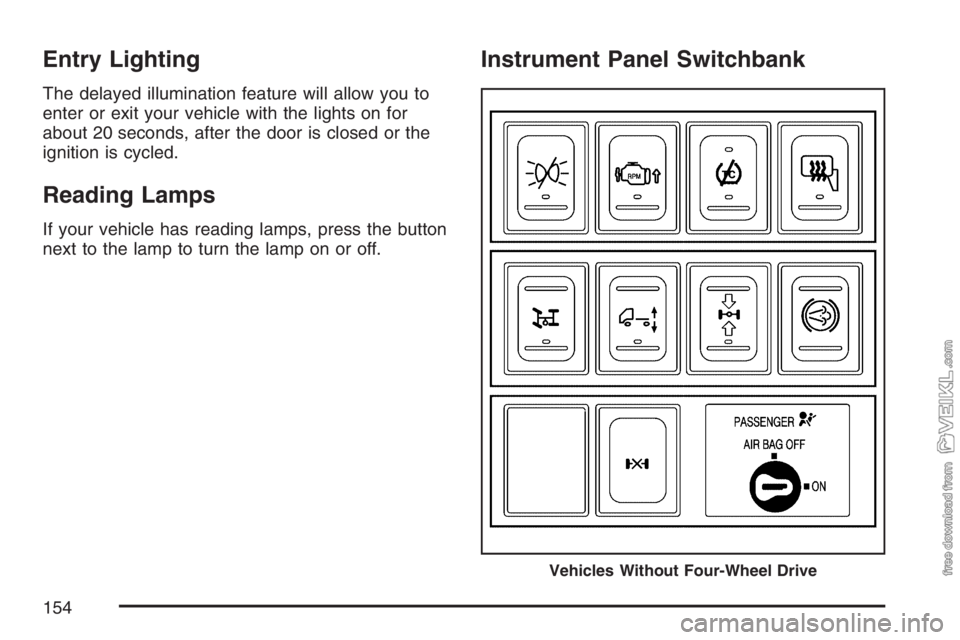
Instrument Panel Switchbank
Vehicles Without Four-Wheel Drive
154
Page 181 of 430
Fuel Gage
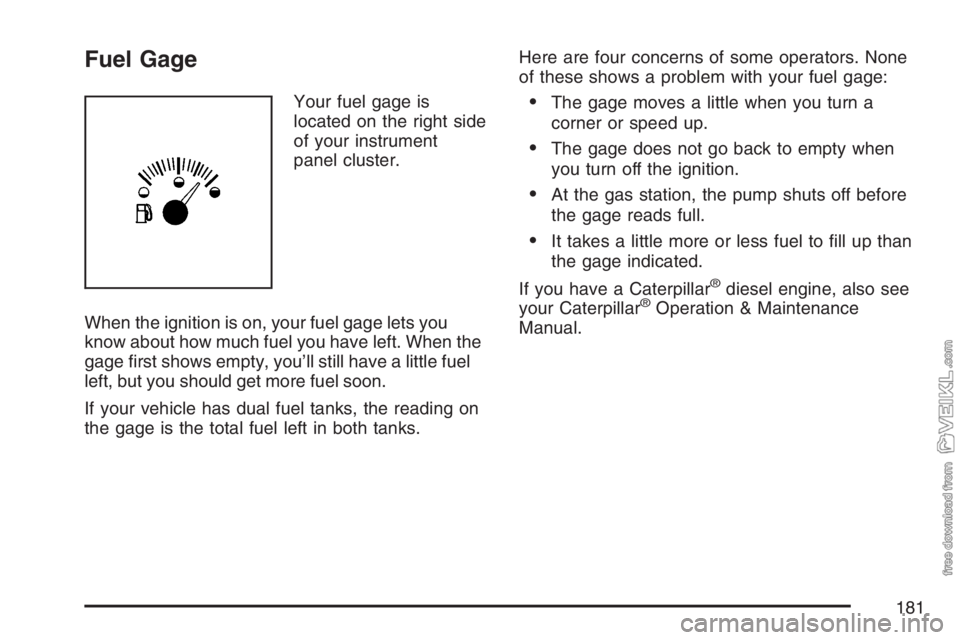
Your fuel gage is
located on the right side
of your instrument
panel cluster.
When the ignition is on, your fuel gage lets you
know about how much fuel you have left. When the
gage first shows empty, you’ll still have a little fuel
left, but you should get more fuel soon.
If your vehicle has dual fuel tanks, the reading on
the gage is the total fuel left in both tanks.Here are four concerns of some operators. None
of these shows a problem with your fuel gage:•The gage moves a little when you turn a
corner or speed up.
•The gage does not go back to empty when
you turn off the ignition.
•At the gas station, the pump shuts off before
the gage reads full.
•It takes a little more or less fuel to fill up than
the gage indicated.
If you have a Caterpillar
®diesel engine, also see
your Caterpillar®Operation & Maintenance
Manual.
181
Page 183 of 430
Air Pressure Gage
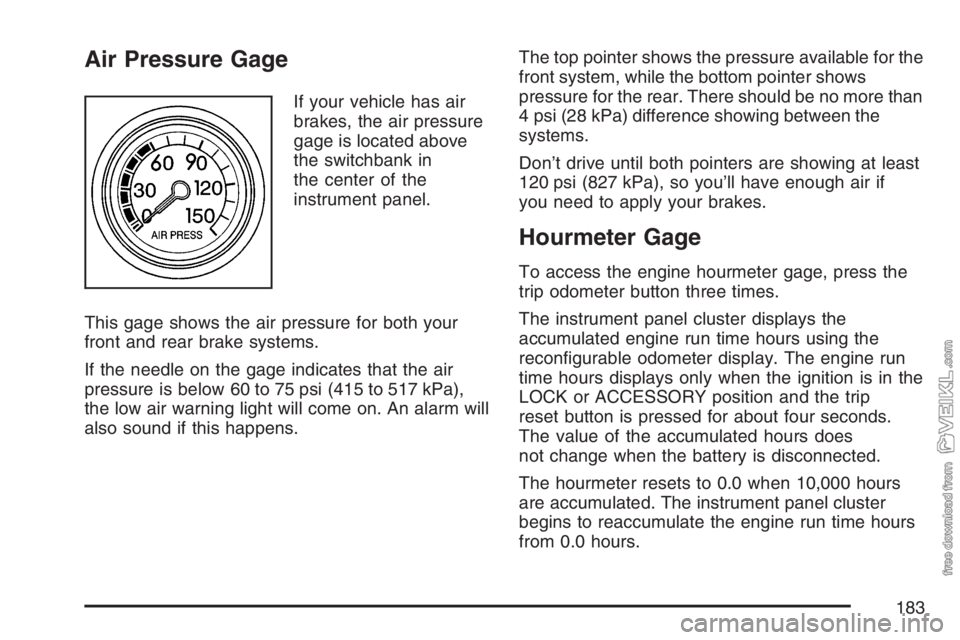
If your vehicle has air
brakes, the air pressure
gage is located above
the switchbank in
the center of the
instrument panel.
This gage shows the air pressure for both your
front and rear brake systems.
If the needle on the gage indicates that the air
pressure is below 60 to 75 psi (415 to 517 kPa),
the low air warning light will come on. An alarm will
also sound if this happens.The top pointer shows the pressure available for the
front system, while the bottom pointer shows
pressure for the rear. There should be no more than
4 psi (28 kPa) difference showing between the
systems.
Don’t drive until both pointers are showing at least
120 psi (827 kPa), so you’ll have enough air if
you need to apply your brakes.
Hourmeter Gage
To access the engine hourmeter gage, press the
trip odometer button three times.
The instrument panel cluster displays the
accumulated engine run time hours using the
reconfigurable odometer display. The engine run
time hours displays only when the ignition is in the
LOCK or ACCESSORY position and the trip
reset button is pressed for about four seconds.
The value of the accumulated hours does
not change when the battery is disconnected.
The hourmeter resets to 0.0 when 10,000 hours
are accumulated. The instrument panel cluster
begins to reaccumulate the engine run time hours
from 0.0 hours.
183
Page 186 of 430
AM-FM Radio
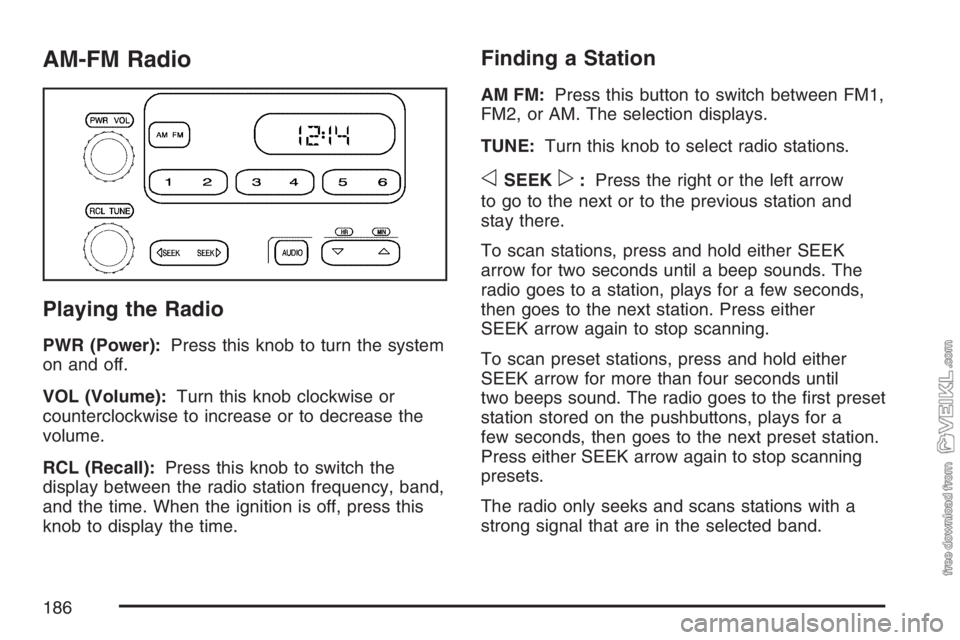
Playing the Radio
PWR (Power):Press this knob to turn the system
on and off.
VOL (Volume):Turn this knob clockwise or
counterclockwise to increase or to decrease the
volume.
RCL (Recall):Press this knob to switch the
display between the radio station frequency, band,
and the time. When the ignition is off, press this
knob to display the time.
Finding a Station
AM FM:Press this button to switch between FM1,
FM2, or AM. The selection displays.
TUNE:Turn this knob to select radio stations.
oSEEKp:Press the right or the left arrow
to go to the next or to the previous station and
stay there.
To scan stations, press and hold either SEEK
arrow for two seconds until a beep sounds. The
radio goes to a station, plays for a few seconds,
then goes to the next station. Press either
SEEK arrow again to stop scanning.
To scan preset stations, press and hold either
SEEK arrow for more than four seconds until
two beeps sound. The radio goes to the first preset
station stored on the pushbuttons, plays for a
few seconds, then goes to the next preset station.
Press either SEEK arrow again to stop scanning
presets.
The radio only seeks and scans stations with a
strong signal that are in the selected band.
186
Page 189 of 430
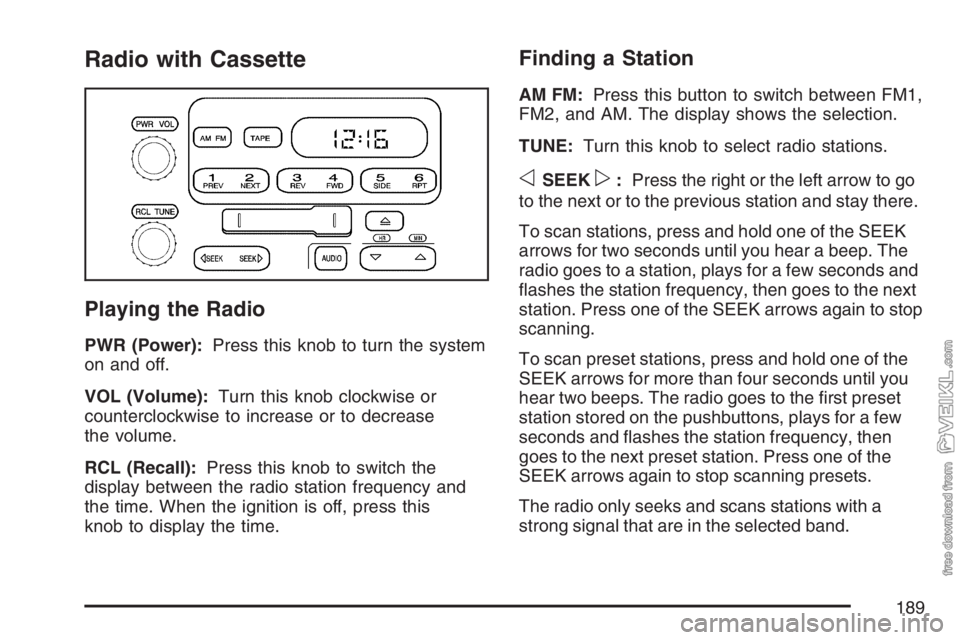
Radio with Cassette
Playing the Radio
PWR (Power):Press this knob to turn the system
on and off.
VOL (Volume):Turn this knob clockwise or
counterclockwise to increase or to decrease
the volume.
RCL (Recall):Press this knob to switch the
display between the radio station frequency and
the time. When the ignition is off, press this
knob to display the time.
Finding a Station
AM FM:Press this button to switch between FM1,
FM2, and AM. The display shows the selection.
TUNE:Turn this knob to select radio stations.
oSEEKp:Press the right or the left arrow to go
to the next or to the previous station and stay there.
To scan stations, press and hold one of the SEEK
arrows for two seconds until you hear a beep. The
radio goes to a station, plays for a few seconds and
flashes the station frequency, then goes to the next
station. Press one of the SEEK arrows again to stop
scanning.
To scan preset stations, press and hold one of the
SEEK arrows for more than four seconds until you
hear two beeps. The radio goes to the first preset
station stored on the pushbuttons, plays for a few
seconds and flashes the station frequency, then
goes to the next preset station. Press one of the
SEEK arrows again to stop scanning presets.
The radio only seeks and scans stations with a
strong signal that are in the selected band.
189
Page 195 of 430
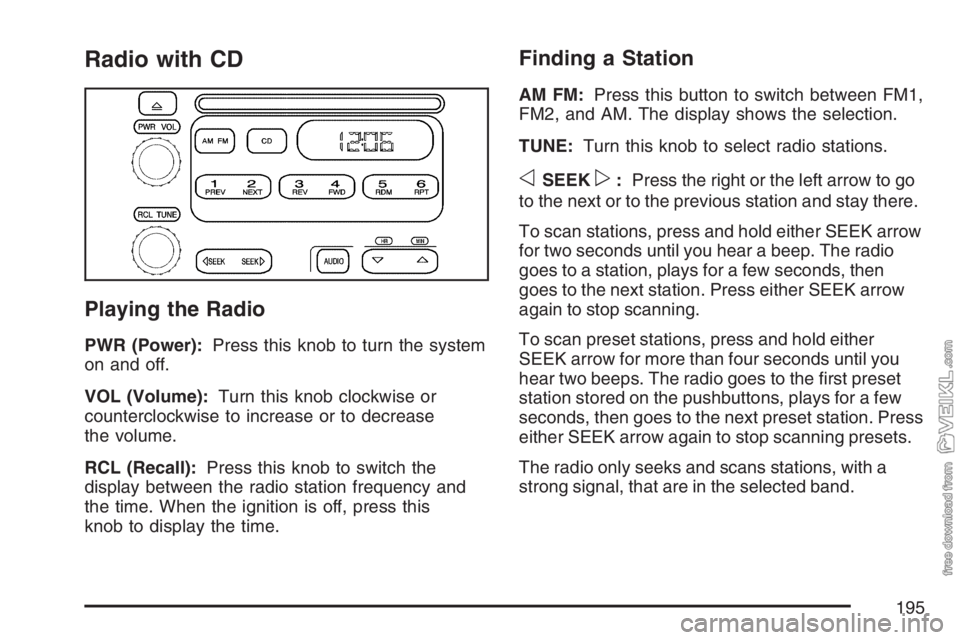
Radio with CD
Playing the Radio
PWR (Power):Press this knob to turn the system
on and off.
VOL (Volume):Turn this knob clockwise or
counterclockwise to increase or to decrease
the volume.
RCL (Recall):Press this knob to switch the
display between the radio station frequency and
the time. When the ignition is off, press this
knob to display the time.
Finding a Station
AM FM:Press this button to switch between FM1,
FM2, and AM. The display shows the selection.
TUNE:Turn this knob to select radio stations.
oSEEKp:Press the right or the left arrow to go
to the next or to the previous station and stay there.
To scan stations, press and hold either SEEK arrow
for two seconds until you hear a beep. The radio
goes to a station, plays for a few seconds, then
goes to the next station. Press either SEEK arrow
again to stop scanning.
To scan preset stations, press and hold either
SEEK arrow for more than four seconds until you
hear two beeps. The radio goes to the first preset
station stored on the pushbuttons, plays for a few
seconds, then goes to the next preset station. Press
either SEEK arrow again to stop scanning presets.
The radio only seeks and scans stations, with a
strong signal, that are in the selected band.
195