Stop CHEVROLET MALIBU 2017 9.G Owner's Guide
[x] Cancel search | Manufacturer: CHEVROLET, Model Year: 2017, Model line: MALIBU, Model: CHEVROLET MALIBU 2017 9.GPages: 419, PDF Size: 7.81 MB
Page 140 of 419
Chevrolet Malibu Owner Manual (GMNA-Localizing-U.S./Canada/Mexico-10122664) - 2017 - crc - 5/23/16
Instruments and Controls 139
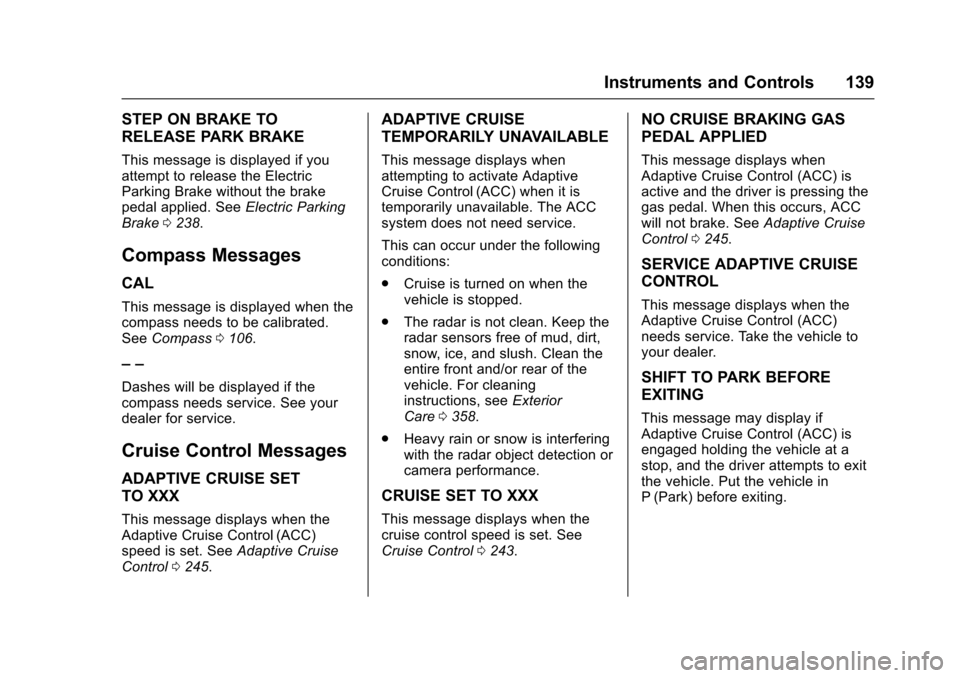
STEP ON BRAKE TO
RELEASE PARK BRAKE
This message is displayed if youattempt to release the ElectricParking Brake without the brakepedal applied. SeeElectric ParkingBrake0238.
Compass Messages
CAL
This message is displayed when thecompass needs to be calibrated.SeeCompass0106.
––
Dashes will be displayed if thecompass needs service. See yourdealer for service.
Cruise Control Messages
ADAPTIVE CRUISE SET
TO XXX
This message displays when theAdaptive Cruise Control (ACC)speed is set. SeeAdaptive CruiseControl0245.
ADAPTIVE CRUISE
TEMPORARILY UNAVAILABLE
This message displays whenattempting to activate AdaptiveCruise Control (ACC) when it istemporarily unavailable. The ACCsystem does not need service.
This can occur under the followingconditions:
.Cruise is turned on when thevehicle is stopped.
.The radar is not clean. Keep theradar sensors free of mud, dirt,snow, ice, and slush. Clean theentire front and/or rear of thevehicle. For cleaninginstructions, seeExteriorCare0358.
.Heavy rain or snow is interferingwith the radar object detection orcamera performance.
CRUISE SET TO XXX
This message displays when thecruise control speed is set. SeeCruise Control0243.
NO CRUISE BRAKING GAS
PEDAL APPLIED
This message displays whenAdaptive Cruise Control (ACC) isactive and the driver is pressing thegas pedal. When this occurs, ACCwill not brake. SeeAdaptive CruiseControl0245.
SERVICE ADAPTIVE CRUISE
CONTROL
This message displays when theAdaptive Cruise Control (ACC)needs service. Take the vehicle toyour dealer.
SHIFT TO PARK BEFORE
EXITING
This message may display ifAdaptive Cruise Control (ACC) isengaged holding the vehicle at astop, and the driver attempts to exitthe vehicle. Put the vehicle inP(Park) before exiting.
Page 141 of 419
Chevrolet Malibu Owner Manual (GMNA-Localizing-U.S./Canada/Mexico-10122664) - 2017 - crc - 5/23/16
140 Instruments and Controls
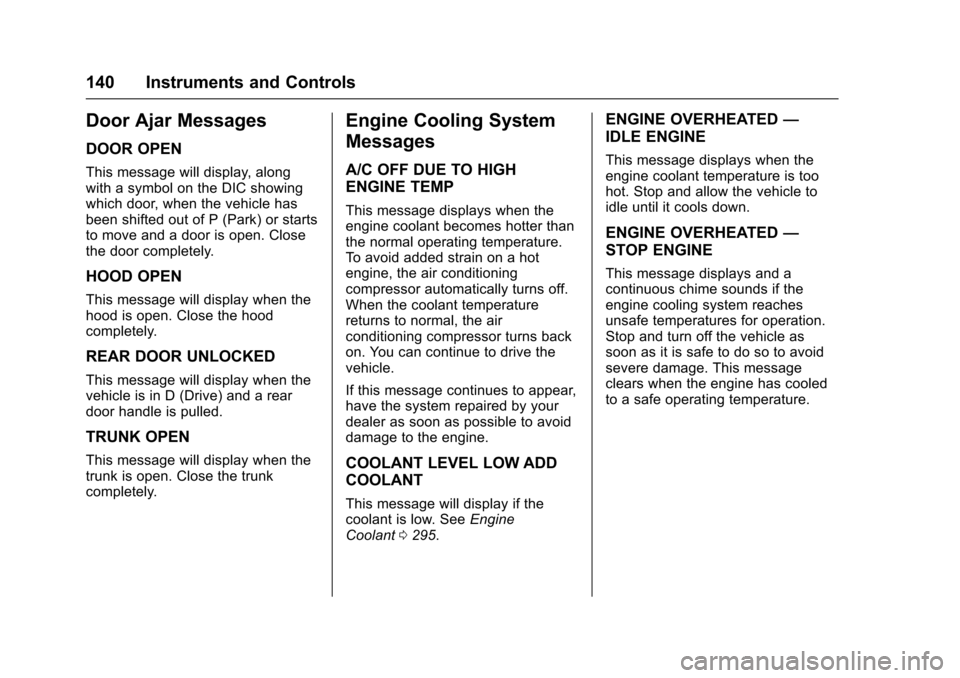
Door Ajar Messages
DOOR OPEN
This message will display, alongwith a symbol on the DIC showingwhich door, when the vehicle hasbeen shifted out of P (Park) or startsto move and a door is open. Closethe door completely.
HOOD OPEN
This message will display when thehood is open. Close the hoodcompletely.
REAR DOOR UNLOCKED
This message will display when thevehicle is in D (Drive) and a reardoor handle is pulled.
TRUNK OPEN
This message will display when thetrunk is open. Close the trunkcompletely.
Engine Cooling System
Messages
A/C OFF DUE TO HIGH
ENGINE TEMP
This message displays when theengine coolant becomes hotter thanthe normal operating temperature.To a v o i d a d d e d s t r a i n o n a h o tengine, the air conditioningcompressor automatically turns off.When the coolant temperaturereturns to normal, the airconditioning compressor turns backon. You can continue to drive thevehicle.
If this message continues to appear,have the system repaired by yourdealer as soon as possible to avoiddamage to the engine.
COOLANT LEVEL LOW ADD
COOLANT
This message will display if thecoolant is low. SeeEngineCoolant0295.
ENGINE OVERHEATED—
IDLE ENGINE
This message displays when theengine coolant temperature is toohot. Stop and allow the vehicle toidle until it cools down.
ENGINE OVERHEATED—
STOP ENGINE
This message displays and acontinuous chime sounds if theengine cooling system reachesunsafe temperatures for operation.Stop and turn off the vehicle assoon as it is safe to do so to avoidsevere damage. This messageclears when the engine has cooledto a safe operating temperature.
Page 142 of 419
Chevrolet Malibu Owner Manual (GMNA-Localizing-U.S./Canada/Mexico-10122664) - 2017 - crc - 5/23/16
Instruments and Controls 141
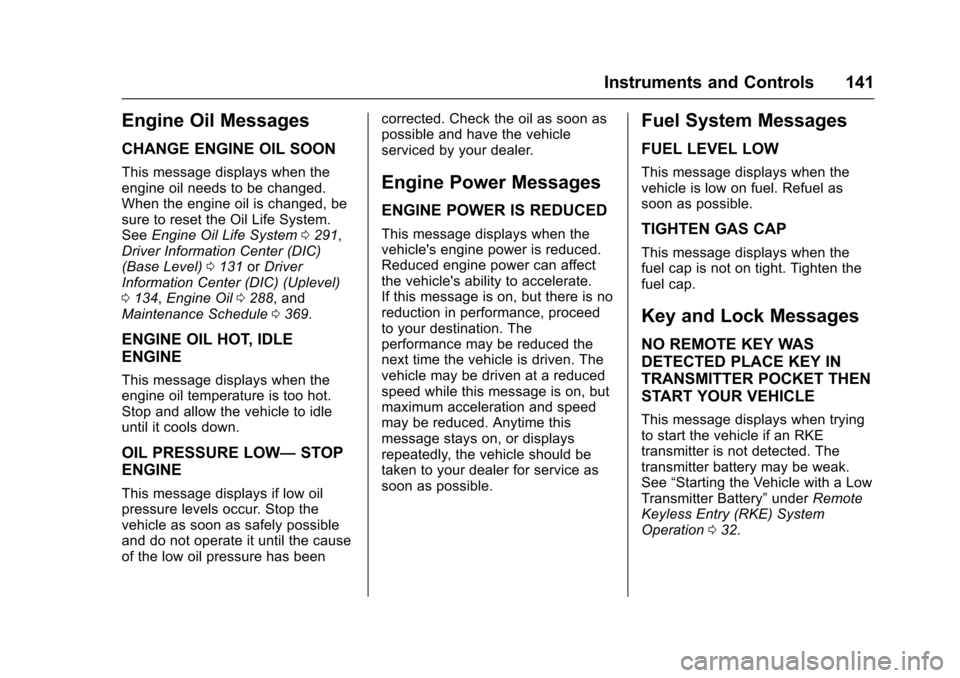
Engine Oil Messages
CHANGE ENGINE OIL SOON
This message displays when theengine oil needs to be changed.When the engine oil is changed, besure to reset the Oil Life System.SeeEngine Oil Life System0291,Driver Information Center (DIC)(Base Level)0131orDriverInformation Center (DIC) (Uplevel)0134,Engine Oil0288,andMaintenance Schedule0369.
ENGINE OIL HOT, IDLE
ENGINE
This message displays when theengine oil temperature is too hot.Stop and allow the vehicle to idleuntil it cools down.
OIL PRESSURE LOW—STOP
ENGINE
This message displays if low oilpressure levels occur. Stop thevehicle as soon as safely possibleand do not operate it until the causeof the low oil pressure has been
corrected. Check the oil as soon aspossible and have the vehicleserviced by your dealer.
Engine Power Messages
ENGINE POWER IS REDUCED
This message displays when thevehicle's engine power is reduced.Reduced engine power can affectthe vehicle's ability to accelerate.If this message is on, but there is noreduction in performance, proceedto your destination. Theperformance may be reduced thenext time the vehicle is driven. Thevehicle may be driven at a reducedspeed while this message is on, butmaximum acceleration and speedmay be reduced. Anytime thismessage stays on, or displaysrepeatedly, the vehicle should betaken to your dealer for service assoon as possible.
Fuel System Messages
FUEL LEVEL LOW
This message displays when thevehicle is low on fuel. Refuel assoon as possible.
TIGHTEN GAS CAP
This message displays when thefuel cap is not on tight. Tighten thefuel cap.
Key and Lock Messages
NO REMOTE KEY WAS
DETECTED PLACE KEY IN
TRANSMITTER POCKET THEN
START YOUR VEHICLE
This message displays when tryingto start the vehicle if an RKEtransmitter is not detected. Thetransmitter battery may be weak.See“Starting the Vehicle with a LowTransmitter Battery”underRemoteKeyless Entry (RKE) SystemOperation032.
Page 143 of 419
Chevrolet Malibu Owner Manual (GMNA-Localizing-U.S./Canada/Mexico-10122664) - 2017 - crc - 5/23/16
142 Instruments and Controls
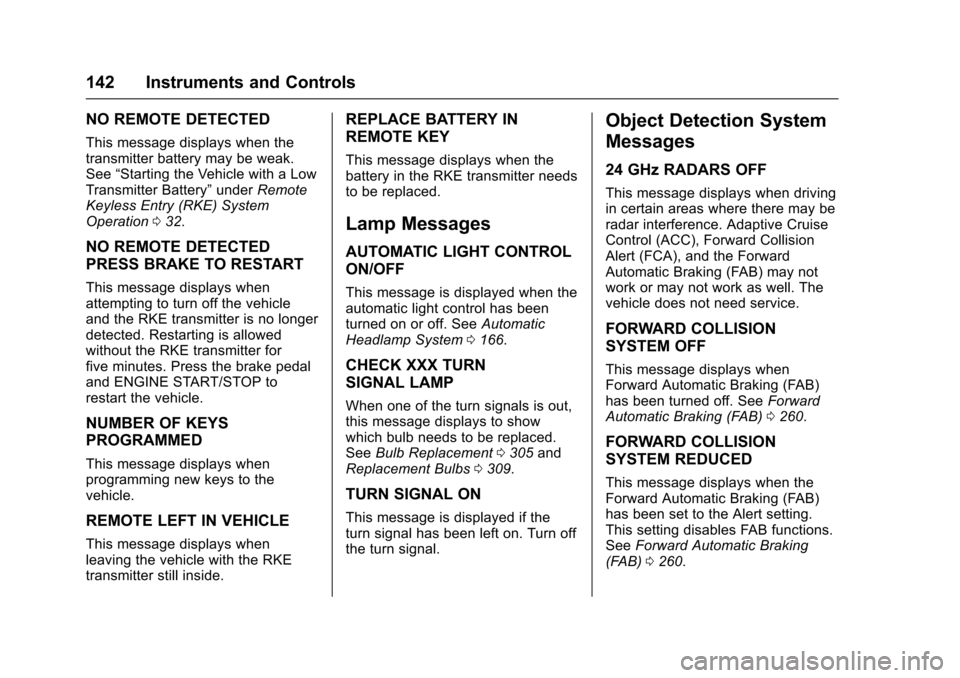
NO REMOTE DETECTED
This message displays when thetransmitter battery may be weak.See“Starting the Vehicle with a LowTransmitter Battery”underRemoteKeyless Entry (RKE) SystemOperation032.
NO REMOTE DETECTED
PRESS BRAKE TO RESTART
This message displays whenattempting to turn off the vehicleand the RKE transmitter is no longerdetected. Restarting is allowedwithout the RKE transmitter forfive minutes. Press the brake pedaland ENGINE START/STOP torestart the vehicle.
NUMBER OF KEYS
PROGRAMMED
This message displays whenprogramming new keys to thevehicle.
REMOTE LEFT IN VEHICLE
This message displays whenleaving the vehicle with the RKEtransmitter still inside.
REPLACE BATTERY IN
REMOTE KEY
This message displays when thebattery in the RKE transmitter needsto be replaced.
Lamp Messages
AUTOMATIC LIGHT CONTROL
ON/OFF
This message is displayed when theautomatic light control has beenturned on or off. SeeAutomaticHeadlamp System0166.
CHECK XXX TURN
SIGNAL LAMP
When one of the turn signals is out,this message displays to showwhich bulb needs to be replaced.SeeBulb Replacement0305andReplacement Bulbs0309.
TURN SIGNAL ON
This message is displayed if theturn signal has been left on. Turn offthe turn signal.
Object Detection System
Messages
24 GHz RADARS OFF
This message displays when drivingin certain areas where there may beradar interference. Adaptive CruiseControl (ACC), Forward CollisionAlert (FCA), and the ForwardAutomatic Braking (FAB) may notwork or may not work as well. Thevehicle does not need service.
FORWARD COLLISION
SYSTEM OFF
This message displays whenForward Automatic Braking (FAB)has been turned off. SeeForwardAutomatic Braking (FAB)0260.
FORWARD COLLISION
SYSTEM REDUCED
This message displays when theForward Automatic Braking (FAB)has been set to the Alert setting.This setting disables FAB functions.SeeForward Automatic Braking(FAB)0260.
Page 146 of 419
Chevrolet Malibu Owner Manual (GMNA-Localizing-U.S./Canada/Mexico-10122664) - 2017 - crc - 5/23/16
Instruments and Controls 145
stays on when the malfunctionindicator lamp is on, the vehicleshould be taken to your dealer forservice as soon as possible.
Ride Control System
Messages
SERVICE TRACTION
CONTROL
This message displays when thereis a problem with the TractionControl System (TCS). When thismessage is displayed, the systemwill not limit wheel spin. Adjust yourdriving accordingly. See your dealerfor service.
SERVICE STABILITRAK
This message displays if there is aproblem with the StabiliTrak system.If this message appears, try to resetthe system. Stop; turn off the enginefor at least 15 seconds; then startthe engine again. If this messagestill comes on, it means there is aproblem. See your dealer forservice. The vehicle is safe to drive;
however, you do not have thebenefit of StabiliTrak, so reduceyour speed and drive accordingly.
Airbag System Messages
SERVICE AIRBAG
This message displays if there is aproblem with the airbag system. Seeyour dealer for service.
Security Messages
THEFT ATTEMPTED
This message displays if the vehicledetects a tamper condition.
Service Vehicle Messages
SERVICE AC SYSTEM
This message displays if there is aproblem with the air conditioningsystem. Take the vehicle to yourdealer for service.
SERVICE KEYLESS START
SYSTEM
This message is displayed if there isaproblemwiththepushbuttonstartsystem. Take the vehicle to yourdealer for service.
SERVICE VEHICLE SOON
This message displays if there is aproblem with the vehicle. Take thevehicle to your dealer for service.
Steering System
Messages
SERVICE POWER STEERING
This message displays and a chimemay sound when there may be aproblem with the power steeringsystem. If this message displaysand a reduction in steeringperformance or loss of powersteering assistance is noticed, seeyour dealer.
Page 148 of 419
Chevrolet Malibu Owner Manual (GMNA-Localizing-U.S./Canada/Mexico-10122664) - 2017 - crc - 5/23/16
Instruments and Controls 147
SHIFT FROM NEUTRAL
(Hybrid)
This message displays when thevehicle should be shifted fromN(Neutral). If the vehicle is notshifted from N (Neutral) after sometime, the vehicle will shut off andrequire a restart. While inN(Neutral),thevehiclewillnotbeable to charge the high voltagebattery.
SHIFT TO PARK
This message displays when thetransmission needs to be shifted toP(Park). This may appear whenturning the ignition off or removingthe key from the vehicle if thevehicle is not in P (Park).
TRANSMISSION HOT—IDLE
ENGINE
This message displays and a chimesounds if the transmission fluid inthe vehicle gets hot. Driving with thetransmission fluid temperature highcan cause damage to the vehicle.Stop the vehicle and let it idle to
allow the transmission to cool. Thismessage clears when the fluidtemperature reaches a safe level.
Vehicle Reminder
Messages
ICE POSSIBLE DRIVE
WITH CARE
This message displays when iceconditions are possible.
Window Messages
OPEN, THEN CLOSE DRIVER
WINDOW
This message is displayed when thewindow needs to be reprogrammed.If the vehicle's battery has beenrecharged or disconnected, you willneed to reprogram the front windowfor the express-up feature to work.SeePower Windows050.
Vehicle
Personalization
Personalization Menu (Radio
without Touchscreen)
The audio system controls are usedto access the personalizationmenus for customizing vehiclefeatures.
The following are all possiblepersonalization features. Dependingon the vehicle, some may not beavailable.
MENU :Turn to scroll through themenus or setup items. Press toenter the menus and select themenu items.
BACK :Press to exit or return tothe previous screen or menu.
To a c c e s s a m e n u :
1. Press MENU.
2. Turn MENU to thedesired menu.
3. Press MENU to select.
Menus and functions may varydepending on vehicle options.
Page 155 of 419
Chevrolet Malibu Owner Manual (GMNA-Localizing-U.S./Canada/Mexico-10122664) - 2017 - crc - 5/23/16
154 Instruments and Controls
Climate and Air Quality
Select and the following maydisplay:
.Auto Fan Speed
.Auto Defog
.Auto Rear Defog
Auto Fan Speed
This feature will set the maximumauto fan speed.
Select Low, Medium, or High.
Auto Defog
This allows the climate controlsystem to prevent fog on the insideof the windows. See“Auto Defog”inDual Automatic Climate ControlSystem0208.
Select Off or On.
Auto Rear Defog
This allows the rear windowdefogger to turn on automaticallywhen the interior temperature is coldand the outside temperature isabout 7 °C (44 °F) and below. See
“Rear Window Defogger”inDualAutomatic Climate ControlSystem0208.
Select Off or On.
Collision/Detection Systems
Select and the following maydisplay:
.Forward Collision System
.Front Pedestrian Detection
.Park Assist
.Rear Cross Traffic Alert
.Go Notifier
.Lane Change Alert
Forward Collision System
This feature will turn on or off theForward Collision Alert (FCA) andForward Automatic Braking (FAB).The Off setting disables all FCA andFA B f u n c t i o n s . W i t h t h e A l e r t a n dBrake setting, both FCA and FABare available. The Alert settingdisables FAB. SeeForwardAutomatic Braking (FAB)0260.
Select Off, Alert, or Alert and Brake.
Front Pedestrian Detection
This feature may help avoid orreduce the harm caused byfront-end crashes with nearbypedestrians.
SeeFront Pedestrian Braking (FPB)System0261.
Select Off, Alert, or Alert and Brake.
Park Assist
This allows the feature to be turnedon or off. SeeAssistance Systemsfor Parking or Backing0253.
Select Off or On.
Rear Cross Traffic Alert
This allows the feature to be turnedon or off. SeeAssistance Systemsfor Parking or Backing0253.
Select Off or On.
Go Notifier
This feature will give a reminder thatAdaptive Cruise Control provideswhen it has brought the vehicle to acomplete stop behind another
Page 156 of 419
Chevrolet Malibu Owner Manual (GMNA-Localizing-U.S./Canada/Mexico-10122664) - 2017 - crc - 5/23/16
Instruments and Controls 155
stopping vehicle, and then thatvehicle drives on. SeeAdaptiveCruise Control0245.
Select Off or On.
Lane Change Alert
This allows the feature to be turnedon or off. SeeLane Change Alert(LCA)0264.
Select Off or On.
Comfort and Convenience
Select and the following maydisplay:
.Auto Memory Recall
.Easy Exit Options
.Chime Volume
.Reverse Tilt Mirror
.Extended Hill Start Assist
Auto Memory Recall
This feature automatically recallsthe current driver’spreviouslystored1or2buttonpositionswhentheignition is changed from off to ON/RUN or ACC/ACCESSORY. SeeMemory Seats059.
Select Off or On.
Easy Exit Options
This feature automatically recallsthe current driver’spreviouslystoredexit button position when exiting thevehicle. SeeMemory Seats059.
Select Off or On.
Chime Volume
Select to set the chime volumelevel.
Select Normal or High.
Reverse Tilt Mirror
When on, both the driver andpassenger outside mirrors will tiltdownward when the vehicle isshifted to R (Reverse) to improvevisibility of the ground near the rearwheels. They will return to theirprevious driving position when thevehicle is shifted out of R (Reverse)or the engine is turned off. SeeReverse Tilt Mirrors049.
Select Off, On - Driver andPassenger, On - Driver, or On -Passenger.
Extended Hill Start Assist
This allows the duration of the HillStart Assist to be changed. See“Extended Hill Start Assist (EHSA)”inHill Start Assist (HSA)0240.
Select Extended Hold orStandard Hold.
Lighting
Select and the following maydisplay:
.Vehicle Locator Lights
.Exit Lighting
Vehicle Locator Lights
This feature will flash the exteriorlamps and allows the headlamps,parking lamps, taillamps, and mostof the interior lamps to turn on
briefly whenKon the Remote
Keyless Entry (RKE) transmitter ispressed to locate the vehicle.
Select Off or On.
Page 161 of 419
Chevrolet Malibu Owner Manual (GMNA-Localizing-U.S./Canada/Mexico-10122664) - 2017 - crc - 5/23/16
160 Instruments and Controls
instructions refer to a garage dooropener, but can be used for otherdevices.
Do not use the Universal Remotesystem with any garage door openerthat does not have the stop andreverse feature. This includes anygarage door opener modelmanufactured before April 1, 1982.
Read these instructions completelybefore programming the UniversalRemote system. It may help to haveanother person assist with theprogramming process.
Keep the original hand-heldtransmitter for use in other vehiclesas well as for future programming.Erase the programming whenvehicle ownership is terminated.See“Erasing Universal RemoteSystem Buttons”later in thissection.
To p r o g r a m a g a r a g e d o o r o p e n e r ,park outside directly in line with andfacing the garage door openerreceiver. Clear all people andobjects near the garage door.
Make sure the hand-held transmitterhas a new battery for quick andaccurate transmission of theradio-frequency signal.
Programming the Universal
Remote System
For questions or help programmingthe Universal Remote system, call1-800-355-3515 or seewww.homelink.com.
Programming involvestime-sensitive actions, and may timeout causing the procedure to berepeated.
To p r o g r a m u p t o t h r e e d e v i c e s :
1. Hold the end of the hand-heldtransmitter about 3 to 8 cm (1to 3 in) away from theUniversal Remote systembuttons with the indicator lightin view. The hand-heldtransmitter was supplied by themanufacturer of the garagedoor opener receiver.
2. At the same time, press andhold both the hand-heldtransmitter button and one ofthe three Universal Remote
system buttons to be used tooperate the garage door. Donot release either button untilthe indicator light changes fromaslowtoarapidflash.Thenrelease both buttons.
Some garage door openersmay require substitution ofStep 2 with the procedureunder“Radio Signals forCanada and Some GateOperators”later in this section.
3. Press and hold the newlyprogrammed Universal Remotesystem button for five secondswhile watching the indicatorlight and garage dooractivation.
.If the indicator light stays oncontinuously or the garagedoor moves when thebutton is pressed, thenprogramming is complete.There is no need tocomplete Steps 4–6.
.If the indicator light doesnot come on or the garagedoor does not move, asecond button press may
Page 180 of 419
Chevrolet Malibu Owner Manual (GMNA-Localizing-U.S./Canada/Mexico-10122664) - 2017 - crc - 5/23/16
Infotainment System 179
Radio Data System (RDS)
RDS is a service by FM stationsthat makes it easier to find radiostations with fault-free reception.
RDS stations are indicated by theprogram service name withbroadcasting frequency.
Selecting a Band
Press RADIO to choose AM or FM.The last station that was playingstarts playing again.
Selecting an Auxiliary Device
Press MEDIA to select a connectedauxiliary device.
Selecting a Station
Seek Tuning
If the radio station is not known:
Press7or6to automatically
search for available radio stations.
Press and hold7or6to change
the radio stations as desired, thenrelease to stop at the next availablestation.
Favorites List
There are two ways to select astation from the Favorites List:
.Press FAV repeatedly, until thedesired FAV page is displayed,then press the preset button ofthe desired FAV station.
.Press FAV, turn MENU until thedesired FAV station ishighlighted, then press MENU toselect the desired FAV station.
Stations List
1. From AM or FM, turn MENU toselect Stations List, then pressto select.
2. Turn MENU to move to thedesired station from theStations List, then press toreceive the station.
Category List
Most stations that broadcast anRDS program type code specify thetype of programming transmitted.Some stations change the programtype code depending on the
content. The system stores the RDSstations sorted by program type inthe FM category list.
To s e a r c h f o r a p r o g r a m m i n g t y p edetermined by station:
1. From the FM menu, turn MENUto select FM Category List,then press MENU.
2. Turn MENU to move to thedesired station, then pressMENU to receive the selectedbroadcasting channel.
Update Stations List
From AM or FM, press MENU, turnMENU to Update Stations List, thenpress MENU.
During the AM or FM broadcastinglist update, press the preset buttonunder Cancel or BACK to stop theupdates.
Storing a Station as a Favorite
Stations from all bands can bestored in any order in the favoritepages.
Up to four stations can be stored ineach favorite page.