warning CHEVROLET SILVERADO 2017 3.G Manual PDF
[x] Cancel search | Manufacturer: CHEVROLET, Model Year: 2017, Model line: SILVERADO, Model: CHEVROLET SILVERADO 2017 3.GPages: 509, PDF Size: 8.87 MB
Page 156 of 509
Chevrolet Silverado Owner Manual (GMNA-Localizing-U.S./Canada/Mexico-9956065) - 2017 - CRC - 4/29/16
Instruments and Controls 155
STABILITRAK INITIALIZING
This message may come on if theStabiliTrak system has not fullyinitialized because of roadconditions or the incorrect tire size.When the StabiliTrak system is fullyinitialized, the message will turn off.SeeTr a c t i o n C o n t r o l / E l e c t r o n i cStability Control0295.Ifthismessage continues to be displayedfor multiple ignition cycles and ondifferent road surfaces, see yourdealer for service.
TRACTION CONTROL OFF
This message displays when thetraction control has been turned off.SeeTr a c t i o n C o n t r o l / E l e c t r o n i cStability Control0295.
TRACTION CONTROL ON
This message displays when thetraction control is active. SeeTr a c t i o n C o n t r o l / E l e c t r o n i c S t a b i l i t yControl0295.
STABILITRAK OFF
This message displays when theStabiliTrak system has been turnedoff. Adjust your driving accordingly.
To l i m i t w h e e l s p i n a n d r e a l i z e t h efull benefits of the stabilityenhancement system, you shouldnormally leave StabiliTrak on. SeeTr a c t i o n C o n t r o l / E l e c t r o n i c S t a b i l i t yControl0295.
STABILITRAK OFF may alsodisplay when the stability controlhas been automatically disabled.The following conditions can causethis message to appear:
.The system is overheating,which could occur if StabiliTrakactivates continuously for anextended period of time.
.The brake system warning lightis on. SeeBrake SystemWarning Light0140.
.The stability system takes longerthan usual to complete itsdiagnostic checks due to drivingconditions.
.An engine or vehicle-relatedproblem has been detected andthe vehicle needs service. Seeyour dealer.
.The transfer case is inFour-Wheel Drive Low.
The message turns off as soon asthe conditions that caused themessage to be displayed are nolonger present.
Airbag System Messages
SERVICE AIRBAG
This message displays if there is aproblem with the airbag system.Ta k e t h e v e h i c l e t o y o u r d e a l e r f o rservice.
Safety Belt Messages
SHIFTER LOCKED. BUCKLE
SEATBELT
This message displays if the vehicleis equipped with the Safety BeltAssurance System and the driverand front outboard passenger,if present, safety belts are notbuckled. The vehicle will not shiftout of P (Park). Buckle the safetybelt(s) to unlock the shift lever.
This system may not allow thevehicle to shift out of P (Park) if anobject—such as a briefcase,handbag, grocery bag, laptop,
Page 158 of 509
Chevrolet Silverado Owner Manual (GMNA-Localizing-U.S./Canada/Mexico-9956065) - 2017 - CRC - 4/29/16
Instruments and Controls 157
Tire Messages
SERVICE TIRE MONITOR
SYSTEM
If equipped with the Tire PressureMonitor System (TPMS), thismessage displays if a part on thesystem is not working properly. Thetire pressure light also flashes andthen remains on during the sameignition cycle. SeeTire PressureLight0143.Severalconditionsmaycause this message to appear. SeeTire Pressure Monitor Operation0408.Ifthewarningcomesonandstays on, there may be a problemwith the TPMS. See your dealer.
TIRE LEARNING ACTIVE
If equipped with the Tire PressureMonitor System (TPMS), thismessage displays when the systemis relearning the tire positions onyour vehicle. The tire positions mustbe relearned after rotating the tiresor after replacing a tire or sensor.SeeTire Inspection0411,TireRotation0412,Tire PressureMonitor System0407,andTirePressure0405.
TIRE PRESSURE LOW ADD
AIR TO TIRE
If equipped with the Tire PressureMonitor System (TPMS), thismessage displays when thepressure in one or more of thevehicle's tires is low. This messagealso displays with a vehicle pictureto indicate the location of the lowtire. The low tire pressure warninglight will also come on. SeeTirePressure Light0143.Youcanreceive more than one tire pressuremessage at a time. If a tire pressuremessage appears on the DIC, stopas soon as you can. Have the tirepressures checked and set to thoseshown on the Tire and LoadingInformation label. SeeTires0397,Vehicle Load Limits0259,andTirePressure0405.TheDICalsoshows the tire pressure values. SeeDriver Information Center (DIC)(Base Level)0145orDriverInformation Center (DIC)(Uplevel)0147.
Transmission Messages
4WD OFF
If equipped with four-wheel drive,this message displays when thefour-wheel-drive system istemporarily disabled due to anoverheated condition. The vehiclewill run in two-wheel drive when thismessage is present. Once thefour-wheel-drive system cools down,the message turns off and thefour-wheel-drive system returns tonormal operation.
4WD SHIFT IN PROGRESS
This message will display while thefour-wheel-drive system is shifting.
FOR 4WD LOW SHIFT TO
NEUTRAL
If a four-wheel drive shift into 4nis
requested, and the vehicle speed iscorrect, but the transmission is notin N (Neutral), this message willdisplay until the transmission isshifted to N (Neutral).
Page 164 of 509
Chevrolet Silverado Owner Manual (GMNA-Localizing-U.S./Canada/Mexico-9956065) - 2017 - CRC - 4/29/16
Instruments and Controls 163
Climate and Air Quality
Select and the following maydisplay:
.Auto Fan Max Speed
.Auto Rear Defog
Auto Fan Max Speed
This feature will set the maximumauto fan speed.
Select Low, Medium, or High.
Auto Rear Defog
This feature will automatically turnon the rear defogger when it is coldoutside.
Select Off or On.
Collision/Detection Systems
Select and the following maydisplay:
.Alert Type
.Park Assist
Alert Type
This feature will set crash alerts tobeeps or seat vibrations. Thissetting affects all crash alerts
including Forward Collision, LaneDeparture Warning, and Park Assistalerts.
Select Beeps or Safety Alert Seat.
Park Assist
If equipped, this feature can assistin backing up and parking thevehicle. SeeAssistance Systems forParking or Backing0302.
Select Off, On, or On with Towbar.
Comfort and Convenience
Select and the following maydisplay:
.Auto Memory Recall
.Easy Exit Options
.Chime Volume
.Reverse Tilt Mirror
.Auto Mirror Folding
Auto Memory Recall
This feature automatically recallsthe current driver’spreviouslystored1or2buttonpositionswhenentering the vehicle. SeeMemorySeats061.
Select On or Off.
Easy Exit Options
This feature moves the seatrearward automatically allowing thedriver more room to exit the vehicle.SeeMemory Seats061.
Select On or Off.
Chime Volume
This allows the selection of thechime volume level.
Turn the MENU knob, touch + or✓to adjust the volume, or selectNormal or High.
Reverse Tilt Mirror
When on, the driver and/orpassenger mirrors will tilt downwardwhen the vehicle is shifted toR(Reverse)toimprovevisibilityofthe ground near the rear wheels.
Select Off, On - Driver andPassenger, On - Driver, or On -Passenger.
Page 172 of 509
Chevrolet Silverado Owner Manual (GMNA-Localizing-U.S./Canada/Mexico-9956065) - 2017 - CRC - 4/29/16
Lighting 171
Lighting
Exterior Lighting
Exterior Lamp Controls . . . . . . . 171Exterior Lamps OffReminder . . . . . . . . . . . . . . . . . . . 173Headlamp High/Low-BeamChanger . . . . . . . . . . . . . . . . . . . . 173Flash-to-Pass . . . . . . . . . . . . . . . . 174Daytime RunningLamps (DRL) . . . . . . . . . . . . . . . 174Automatic HeadlampSystem . . . . . . . . . . . . . . . . . . . . . . 174Hazard Warning Flashers . . . . . 175Turn and Lane-ChangeSignals . . . . . . . . . . . . . . . . . . . . . . 175Fog Lamps . . . . . . . . . . . . . . . . . . . 176AuxiliaryRoof-Mounted Lamp . . . . . . . . 176
Interior Lighting
Instrument Panel IlluminationControl . . . . . . . . . . . . . . . . . . . . . . 177Cargo Lamp . . . . . . . . . . . . . . . . . . 177Dome Lamps . . . . . . . . . . . . . . . . . 178Reading Lamps . . . . . . . . . . . . . . 178
Lighting Features
Entry Lighting . . . . . . . . . . . . . . . . 179Exit Lighting . . . . . . . . . . . . . . . . . . 179Battery Load Management . . . 179Battery Power Protection . . . . . 180
Exterior Lighting
Exterior Lamp Controls
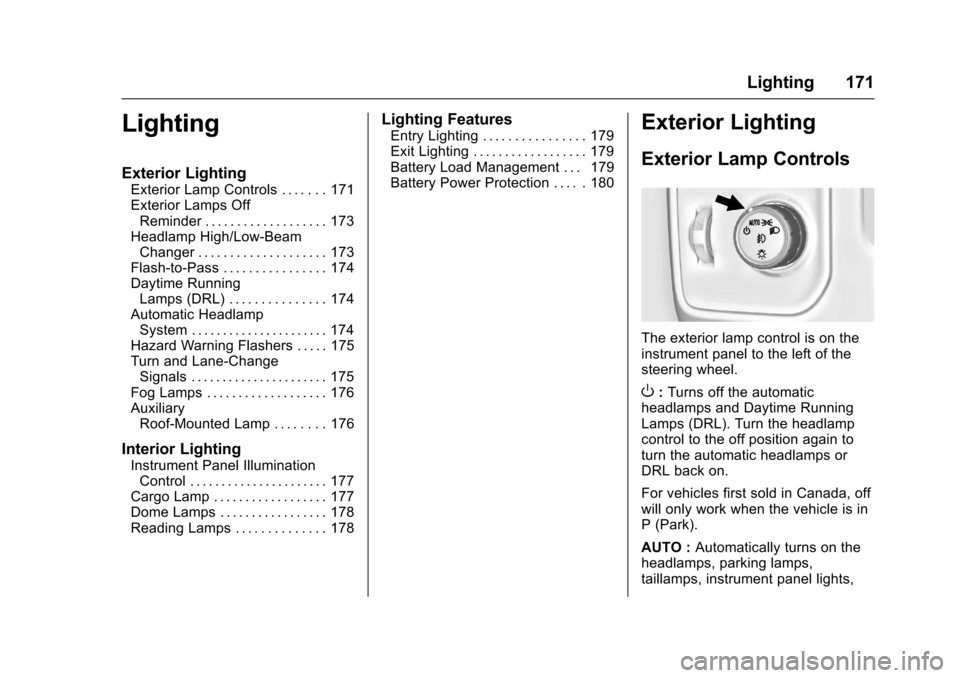
The exterior lamp control is on theinstrument panel to the left of thesteering wheel.
O:Turns off the automaticheadlamps and Daytime RunningLamps (DRL). Turn the headlampcontrol to the off position again toturn the automatic headlamps orDRL back on.
For vehicles first sold in Canada, offwill only work when the vehicle is inP(Park).
AUTO :Automatically turns on theheadlamps, parking lamps,taillamps, instrument panel lights,
Page 176 of 509
Chevrolet Silverado Owner Manual (GMNA-Localizing-U.S./Canada/Mexico-9956065) - 2017 - CRC - 4/29/16
Lighting 175
leaves the garage, there is a slightdelay before the automaticheadlamp system changes to theDRL. During that delay, theinstrument cluster may not be asbright as usual. Make sure theinstrument panel brightness controlis in the full bright position. SeeInstrument Panel IlluminationControl0177.
When it is bright enough outside,the headlamps will turn off or maychange to Daytime RunningLamps (DRL).
The automatic headlamp systemturns off when the exterior lamp
control is turned toOor the ignition
is off.
Lights On with Wipers
If the windshield wipers areactivated in daylight with the engineon, and the exterior lamp control isin AUTO, the headlamps, parkinglamps, and other exterior lampscome on. The transition time for thelamps coming on varies based onwiper speed. When the wipers are
not operating, these lamps turn off.
Move the exterior lamp control toO
or;to disable this feature.
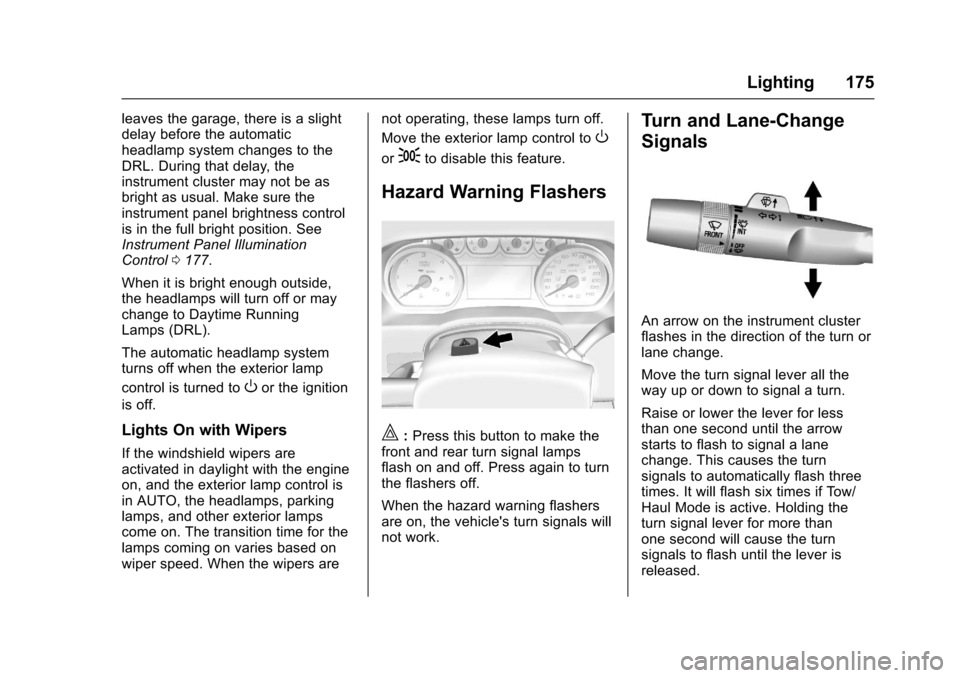
Hazard Warning Flashers
|:Press this button to make thefront and rear turn signal lampsflash on and off. Press again to turnthe flashers off.
When the hazard warning flashersare on, the vehicle's turn signals willnot work.
Turn and Lane-Change
Signals
An arrow on the instrument clusterflashes in the direction of the turn orlane change.
Move the turn signal lever all theway up or down to signal a turn.
Raise or lower the lever for lessthan one second until the arrowstarts to flash to signal a lanechange. This causes the turnsignals to automatically flash threetimes. It will flash six times if Tow/Haul Mode is active. Holding theturn signal lever for more thanone second will cause the turnsignals to flash until the lever isreleased.
Page 182 of 509
Chevrolet Silverado Owner Manual (GMNA-Localizing-U.S./Canada/Mexico-9956065) - 2017 - CRC - 4/29/16
Infotainment System 181
Infotainment
System
Introduction
Infotainment . . . . . . . . . . . . . . . . . . 181Theft-Deterrent Feature . . . . . . 182Overview (Base Radio withTo u c h s c r e e n ) . . . . . . . . . . . . . . . 1 8 3Overview (Base Radio) . . . . . . . 184Home Page (Base Radio) . . . . 186Home Page (Base Radio withTo u c h s c r e e n ) . . . . . . . . . . . . . . . 1 8 8Software Updates . . . . . . . . . . . . 189
Radio
AM-FM Radio (BaseRadio) . . . . . . . . . . . . . . . . . . . . . . 189AM-FM Radio (Base Radiowith Touchscreen) . . . . . . . . . . . 191Satellite Radio (BaseRadio) . . . . . . . . . . . . . . . . . . . . . . 193Satellite Radio (Base Radiowith Touchscreen) . . . . . . . . . . . 193Radio Reception . . . . . . . . . . . . . . 195Fixed Mast Antenna . . . . . . . . . . 195Multi-Band Antenna . . . . . . . . . . 196
Audio Players
Avoiding Untrusted MediaDevices . . . . . . . . . . . . . . . . . . . . . 196CD Player . . . . . . . . . . . . . . . . . . . . 196USB Port (Base Radio) . . . . . . . 199USB Port (Base Radio withTo u c h s c r e e n ) . . . . . . . . . . . . . . . 2 0 1Auxiliary Jack . . . . . . . . . . . . . . . . 207Bluetooth Audio . . . . . . . . . . . . . . 208
Voice Recognition
Voice Recognition . . . . . . . . . . . . 209
Phone
Bluetooth (Overview) . . . . . . . . . 216Bluetooth (InfotainmentControls - Base Radio) . . . . . . 217Bluetooth (Voice Recognition -Base Radio) . . . . . . . . . . . . . . . . 221Bluetooth (InfotainmentControls - Base Radio withTo u c h s c r e e n ) . . . . . . . . . . . . . . . 2 2 6Apple CarPlay andAndroid Auto . . . . . . . . . . . . . . . . 230
Trademarks and License
Agreements
Trademarks and LicenseAgreements . . . . . . . . . . . . . . . . . 231
Introduction
Infotainment
Base radio information is included inthis manual. See the infotainmentmanual for information on otheravailable infotainment systems.
Read the following pages tobecome familiar with the BaseRadio features.
{Warning
Ta k i n g y o u r e y e s o f f t h e r o a d f o r
too long or too often while using
any infotainment feature can
cause a crash. You or others
could be injured or killed. Do not
give extended attention to
infotainment tasks while driving.
Limit your glances at the vehicle
displays and focus your attention
on driving. Use voice commands
whenever possible.
Page 217 of 509
Chevrolet Silverado Owner Manual (GMNA-Localizing-U.S./Canada/Mexico-9956065) - 2017 - CRC - 4/29/16
216 Infotainment System
Phone
Bluetooth (Overview)
Instructions for using the cell phonemay differ between infotainmentsystems. The base radio and baseradio with touchscreen instructionsare included in this manual. See theinfotainment manual for instructionson the uplevel radios.
Bluetooth-capable systems caninteract with many cell phones,allowing:
.Placement and receipt of calls inahands-freemode.
.Sharing of the cell phone’saddress book or contact list withthe vehicle.
To m i n i m i z e d r i v e r d i s t r a c t i o n ,before driving, and with the vehicleparked:
.Become familiar with thefeatures of the cell phone.Organize the phone book andcontact lists clearly and delete
duplicate or rarely used entries.If possible, program speed dialor other shortcuts.
.Review the controls andoperation of the infotainmentsystem.
.Pair cell phone(s) to the vehicle.The system may not work withall cell phones. See“Pairing”inthis section.
.If the cell phone has voicedialing capability, learn to usethat feature to access theaddress book or contact list.
.See“Deleting a Paired Phone”and/or“Deleting a BluetoothDevice”in this section.
{Warning
When using a cell phone, it can
be distracting to look too long or
too often at the screen of the
phone or the infotainment system.
Ta k i n g y o u r e y e s o f f t h e r o a d t o o
long or too often could cause a
crash resulting in injury or death.
Focus your attention on driving.
Vehicles with a Bluetooth systemcan use a Bluetooth-capable cellphone with a Hands-Free Profile tomake and receive phone calls. Theinfotainment system and voicerecognition are used to control thesystem. The system can be usedwhile in ON/RUN or ACC/ACCESSORY. The range of theBluetooth system can be up to 9.1 m(30 ft). Not all phones support allfunctions and not all phones workwith the Bluetooth system. For U.S.and Canada only, see www.gm.com/bluetooth for more information aboutcompatible phones.
Bluetooth Controls
Use the buttons on the instrumentpanel, faceplate, and the steeringwheel to operate the Bluetoothsystem.
Steering Wheel Controls
g:Press to answer incoming calls,confirm system information, andstart voice recognition.
Page 247 of 509
Chevrolet Silverado Owner Manual (GMNA-Localizing-U.S./Canada/Mexico-9956065) - 2017 - CRC - 4/29/16
246 Driving and Operating
Driving and
Operating
Driving Information
Distracted Driving . . . . . . . . . . . . 247Defensive Driving . . . . . . . . . . . . . 248Drunk Driving . . . . . . . . . . . . . . . . . 248Control of a Vehicle . . . . . . . . . . . 248Braking . . . . . . . . . . . . . . . . . . . . . . . 248Steering . . . . . . . . . . . . . . . . . . . . . . 249Off-Road Recovery . . . . . . . . . . . 250Loss of Control . . . . . . . . . . . . . . . 250Off-Road Driving . . . . . . . . . . . . . 251Driving on Wet Roads . . . . . . . . 255Hill and Mountain Roads . . . . . 256Winter Driving . . . . . . . . . . . . . . . . 257If the Vehicle Is Stuck . . . . . . . . 258Vehicle Load Limits . . . . . . . . . . . 259Truck-Camper LoadingInformation . . . . . . . . . . . . . . . . . . 265
Starting and Operating
New Vehicle Break-In . . . . . . . . . 267Adjustable Throttle and BrakePedal . . . . . . . . . . . . . . . . . . . . . . . 267Ignition Positions . . . . . . . . . . . . . 268Starting the Engine . . . . . . . . . . . 269Fast Idle System . . . . . . . . . . . . . 271
Retained AccessoryPower (RAP) . . . . . . . . . . . . . . . . 271Engine Coolant Heater . . . . . . . 272Shifting Into Park . . . . . . . . . . . . . 273Shifting out of Park . . . . . . . . . . . 275Parking (ManualTransmission) . . . . . . . . . . . . . . . 275Parking over ThingsThat Burn . . . . . . . . . . . . . . . . . . . 275Active Fuel Management®.... 275
Engine Exhaust
Engine Exhaust . . . . . . . . . . . . . . 276Running the Vehicle WhileParked . . . . . . . . . . . . . . . . . . . . . . 277
Automatic Transmission
Automatic Transmission . . . . . . 277Manual Mode . . . . . . . . . . . . . . . . . 280To w / H a u l M o d e . . . . . . . . . . . . . . . 2 8 2
Manual Transmission
Manual Transmission . . . . . . . . . 283
Drive Systems
Four-Wheel Drive . . . . . . . . . . . . . 284
Brakes
Antilock BrakeSystem (ABS) . . . . . . . . . . . . . . . 292Parking Brake . . . . . . . . . . . . . . . . 293Brake Assist . . . . . . . . . . . . . . . . . . 294
Hill Start Assist (HSA) . . . . . . . . 294
Ride Control Systems
Traction Control/ElectronicStability Control . . . . . . . . . . . . . 295Hill Descent Control (HDC) . . . 297Locking Rear Axle . . . . . . . . . . . . 298
Cruise Control
Cruise Control . . . . . . . . . . . . . . . . 298
Driver Assistance Systems
Driver Assistance Systems . . . 301Assistance Systems forParking or Backing . . . . . . . . . . 302Assistance Systems forDriving . . . . . . . . . . . . . . . . . . . . . . 304Forward Collision Alert (FCA)System . . . . . . . . . . . . . . . . . . . . . . 304Forward AutomaticBraking (FAB) . . . . . . . . . . . . . . . 306Lane Departure Warning(LDW) (2500/3500Series) . . . . . . . . . . . . . . . . . . . . . . 307Lane Keep Assist (LKA) (1500Series) . . . . . . . . . . . . . . . . . . . . . . 309
Fuel
Fuel . . . . . . . . . . . . . . . . . . . . . . . . . . 311California FuelRequirements . . . . . . . . . . . . . . . 312Fuels in Foreign Countries . . . 312
Page 248 of 509
Chevrolet Silverado Owner Manual (GMNA-Localizing-U.S./Canada/Mexico-9956065) - 2017 - CRC - 4/29/16
Driving and Operating 247
Fuel Additives . . . . . . . . . . . . . . . . 312E85 or FlexFuel . . . . . . . . . . . . . . 312Filling the Tank . . . . . . . . . . . . . . . 313Filling a Portable FuelContainer . . . . . . . . . . . . . . . . . . . 315
Trailer Towing
General TowingInformation . . . . . . . . . . . . . . . . . . 315Driving Characteristics andTo w i n g T i p s . . . . . . . . . . . . . . . . . 3 1 5Trailer Towing . . . . . . . . . . . . . . . . 318To w i n g E q u i p m e n t . . . . . . . . . . . . 3 3 5Trailer Sway Control (TSC) . . . 344
Conversions and Add-Ons
Add-On ElectricalEquipment . . . . . . . . . . . . . . . . . . 345Adding a Snow Plow or SimilarEquipment . . . . . . . . . . . . . . . . . . 345Pickup Conversion toChassis Cab . . . . . . . . . . . . . . . . 349
Driving Information
Distracted Driving
Distraction comes in many formsand can take your focus from thetask of driving. Exercise goodjudgment and do not let otheractivities divert your attention awayfrom the road. Many localgovernments have enacted lawsregarding driver distraction. Becomefamiliar with the local laws inyour area.
To a v o i d d i s t r a c t e d d r i v i n g , k e e pyour eyes on the road, keep yourhands on the steering wheel, andfocus your attention on driving.
.Do not use a phone indemanding driving situations.Use a hands-free method toplace or receive necessaryphone calls.
.Watch the road. Do not read,take notes, or look upinformation on phones or otherelectronic devices.
.Designate a front seatpassenger to handle potentialdistractions.
.Become familiar with vehiclefeatures before driving, such asprogramming favorite radiostations and adjusting climatecontrol and seat settings.Program all trip information intoany navigation device prior todriving.
.Wait until the vehicle is parkedto retrieve items that have fallento the floor.
.Stop or park the vehicle to tendto children.
.Keep pets in an appropriatecarrier or restraint.
.Avoid stressful conversationswhile driving, whether with apassenger or on a cell phone.
{Warning
Ta k i n g y o u r e y e s o f f t h e r o a d t o o
long or too often could cause a
crash resulting in injury or death.
Focus your attention on driving.
Page 249 of 509
Chevrolet Silverado Owner Manual (GMNA-Localizing-U.S./Canada/Mexico-9956065) - 2017 - CRC - 4/29/16
248 Driving and Operating
Refer to the infotainment section formore information on using thatsystem and the navigation system,if equipped, including pairing andusing a cell phone.
Defensive Driving
Defensive driving means“alwaysexpect the unexpected.”The firststep in driving defensively is to wearthe safety belt. SeeSafetyBelts066.
.Assume that other road users(pedestrians, bicyclists, andother drivers) are going to becareless and make mistakes.Anticipate what they might doand be ready.
.Allow enough following distancebetween you and the driver infront of you.
.Focus on the task of driving.
Drunk Driving
Death and injury associated withdrinking and driving is a globaltragedy.
{Warning
Drinking and then driving is very
dangerous. Your reflexes,
perceptions, attentiveness, and
judgment can be affected by even
asmallamountofalcohol.You
can have a serious—or even
fatal—collision if you drive after
drinking.
Do not drink and drive or ride with
adriverwhohasbeendrinking.
Ride home in a cab; or if you are
with a group, designate a driver
who will not drink.
Control of a Vehicle
Braking, steering, and acceleratingare important factors in helping tocontrol a vehicle while driving.
Braking
Braking action involves perceptiontime and reaction time. Deciding topush the brake pedal is perceptiontime. Actually doing it isreaction time.
Average driver reaction time isabout three-quarters of a second. Inthat time, a vehicle moving at100 km/h (60 mph) travels 20 m(66 ft), which could be a lot ofdistance in an emergency.
Helpful braking tips to keep in mindinclude:
.Keep enough distance betweenyou and the vehicle in frontof you.
.Avoid needless heavy braking.
.Keep pace with traffic.
If the engine ever stops while thevehicle is being driven, brakenormally but do not pump thebrakes. Doing so could make thepedal harder to push down. If theengine stops, there will be somepower brake assist but it will beused when the brake is applied.Once the power assist is used up, itcan take longer to stop and thebrake pedal will be harder to push.