lock CHEVROLET TRACKER 1994 Owner's Manual
[x] Cancel search | Manufacturer: CHEVROLET, Model Year: 1994, Model line: TRACKER, Model: CHEVROLET TRACKER 1994Pages: 258, PDF Size: 14.43 MB
Page 45 of 258
Features and Controls
L (Low Gear)
This position gives you even more power
(but lower fuel economy) than
“2.” You
can use it on very steep hills, or
in deep
snow
or mud. If the selector lever is put il
“L,” the transmission won’t shift into low
gear until the vehicle is going slowly
enough.
n
NOTICE:
Don’t shift into “L,” (Low) at speeds
above 40 mph
(65 km/h) with the
transfer case
in “4L,” or you can
damage your transmission.
NOTICE:
If your rear wheels can’t rotate, don’t
try to drive. This might happen if you
were stuck in very deep sand or mud
or were up against
a solid object. You
could damage your transmission.
Also, if you stop when going uphill,
don’t hold your vehicle there
with
only the accelerator pedal. This could
overheat and damage the
transmission. Use your brakes to hold
your vehicle
in position on a hill.
F
Manual Transmission
ive-Speed
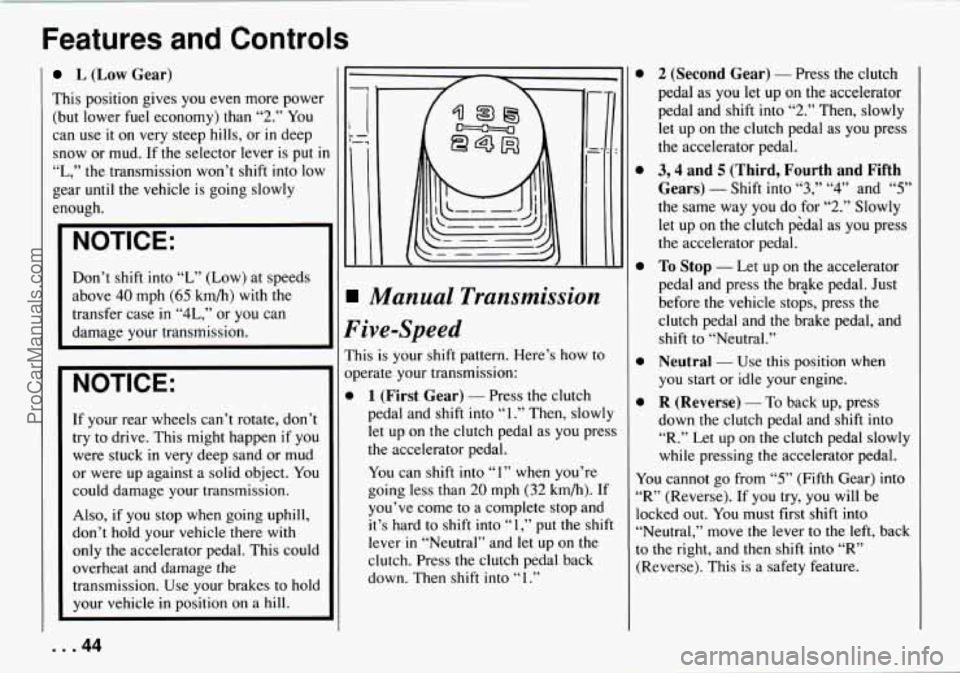
is is your shift pattern. Here’s how to
erate your transmission:
1 (First Gear) - Press the clutch
pedal and shift into
“1.” Then, slowly
let up on
the clutch pedal as you press
the accelerator pedal.
You can shift into
“I” when you’re
going less than
20 mph (32 km/h). If
you’ve come to a complete stop and
it’s hard to shift into
“1,” put the shift
lever
in “Neutral” and let up on the
clutch. Press the clutch pedal back
down. Then shift into
“ 1 .”
0
0
0
0
0
2 (Second Gear) - Press the clutch
pedal as
you let up on the accelerator
pedal and shift into
“2.” Then, slowly
let up on the clutch pedal as you press
the accelerator pedal.
3,4 and 5 (Third, Fourth and Fifth
Gears)
- Shift into “3,” “4” and “5”
the same way you do for “2.” Slowly
let up on the clutch p6dal as you press
the accelerator pedal.
To Stop - Let up on the accelerator
pedal and press the brGke pedal. Just
before
the vehicle stops, press the
clutch pedal and the brake pedal, and
shift to “Neutral.”
Neutral - Use this position when
you start or idle your engine.
R (Reverse) - To back up, press
down the clutch pedal and shift into
“R.” Let up on the clutch pedal slowly
while pressing the accelerator pedal.
You cannot go from
“5” (Fifth Gear) into
“R” (Reverse). If you try, you will be
locked out. You must first shift into
“Neutral,” move the lever to
the left, back
to the right, and then shift into
“R”
(Reverse). This is a safety feature.
... 44
ProCarManuals.com
Page 47 of 258
Features and Controls
Four-wheel Drive
If your vehicle has four-wheel drive, you
can send your engine's driving power
to
all four wheels for extra traction. To shift
out of two-wheel drive and into
four-wheel drive, lock the freewheeling
hubs and move the transfer case shift
lever
to "4H" or "4L" (see the following).
You should use
"2H" for most normal
driving.
Rear wheel anti-lock brakes do
not work
when
you shift into four-wheel drive.
Your regular brakes will still work. When
you shift back into two-wheel drive, your
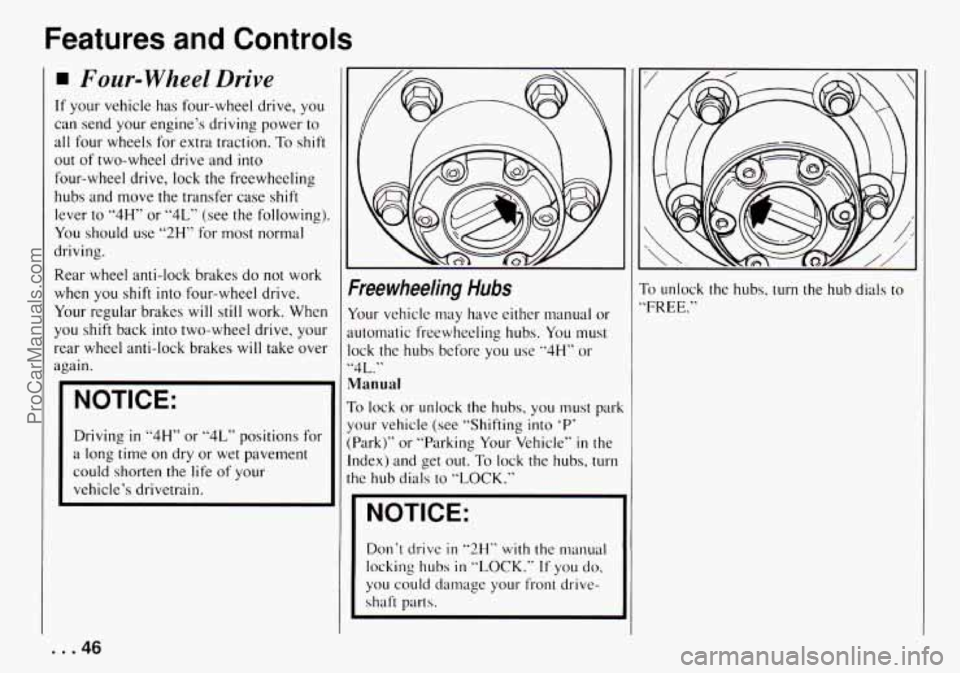
Freewheeling Hubs
Your vehicle may have either manual or
automatic freewheeling hubs. You must
NOTICE:
Manual
To lock or unlock the hubs, you must park
Driving
in "4H" or "4L" positions for
a long time
on dry or wet pavement
could shorten
the life of your
vehicle's drivetrain. your vehicle
(see "Shifting into
'P'
(Park)" or "Parking Your Vehicle" in the
Index) and get
out. To lock the hubs, turn
the hub dials to "LOCK."
I '
I NOTICE:
Don't drive in "2H" with the manual
locking
hubs in "LOCK." If you do.
you could damage your front drive-
shaft parts.
To unlock the hubs, turn the hub dials to
'FREE."
... 46
ProCarManuals.com
Page 48 of 258
Automatic
With automatic freewheeling hubs, you
don’t have to get out of the vehicle to lock
or unlock the hubs.
To lock the hubs:
1. Stop your vehicle.
2. Shift the transfer case to “4H’ or
“4L.”
3. Drive slowly forward and the hubs
will lock.
To unlock the hubs:
1. Stop your vehicle.
2. Drive seven feet (two meters) in the
direction opposite to the direction you
were driving before you stopped.
3. Then, press the clutch if you have a
manual transmission, and shift the
transfer case to
“2H.” The hubs will
unlock.
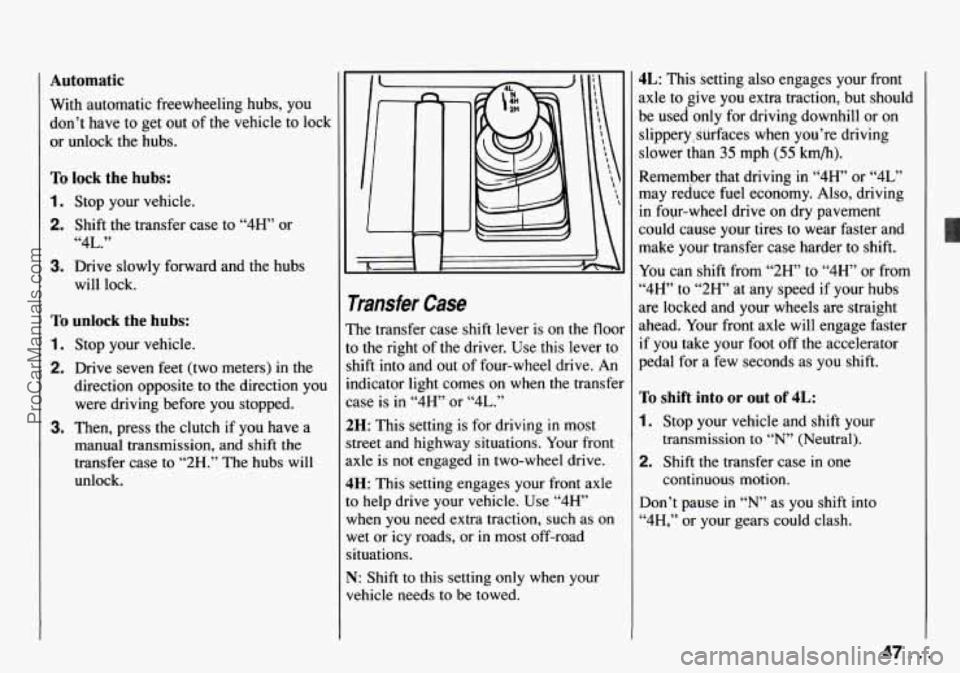
rransfer Case
?he transfer case shift lever is on the floor
o the right of the driver. Use this lever to
hift into and out of four-wheel drive. An
ndicator light comes on when the transfer
:ase is in
“4H’ or “4L.”
!H: This setting is for driving in most
treet and highway situations. Your front
.xle is not engaged in two-wheel drive.
IH: This setting engages your front axle
o help drive your vehicle. Use “4”’
vhen you need extra traction, such as on
vet or
icy roads, or in most off-road
ituations.
q: Shift to this setting only when your
rehicle needs to
be towed.
4L: This setting also engages your front
axle to give you extra traction, but should
be used only for driving downhill or on
slippery, surfaces when you’re driving
slower than
35 mph (55 km/h).
Remember that driving in
“4H” or “4L”
may reduce fuel economy. Also, driving
in four-wheel drive on dry pavement
could cause your tires to wear faster and
make your transfer case harder to shift.
You can shift from
“2H” to “4H’ or from
“4W’ to “2H” at any speed if your hubs
are locked and your wheels are straight
ahead. Your front axle will engage faster
if you take your foot off the accelerator
pedal for a few seconds as you shift.
To shift into or out of 4L:
1. Stop your vehicle and shift your
transmission to
“N” (Neutral).
2. Shift the transfer case in one
continuous motion.
Don’t pause in
“N’ as you shift into
“4H,” or your gears could clash.
ProCarManuals.com
Page 50 of 258

1. Hold the brake pedal down with your
right foot and set the parking brake.
2. Move the shift lever into “P” (Park)
position like this:
0 Hold in the button on the lever,
and push the lever all
the way
toward the front of your vehicle.
3. If you have four-wheel drive, be sure
the transfer case is
in a drive gear -
not in “N” (Neutral).
4. Move the key to “LOCK.”
5. Remove the key and take it with you.
If you can walk away from your
vehicle
with the key in your hand,
your vehicle is
in “P” (Park).
Leaving Your Vehicle with the
Engine Running
(AUTOMATIC TRANSMISSION)
A CAUTION:
Xt can be dangerous to leave your
vehicle with the engine running. Your
vehicle could move suddenly if the
shift lever is not fully in “P” (Park)
with the parking brake firmly set.
I€ YOU have four-wheel drive and
your transfer case is in “N” (Neutral),
your vehicle
will be free to roll, even
if your shift lever
is in “F‘” (Park). So
be sure the transfer case is in a drive
gear
- not in “N’ (Neutral).
And, if you leave the vehicle with the
engine running, it
could overheat and
even catch
fie. You or others could
be injured. Don’t leave your vehicle
with the engine running unless
you
have to.
Torque Lock
(AUTOMATIC TRANSMISSION)
If you are parking on a hill and you don’t
shift your transmission into “P” (Park)
properly, the weight
of the vehicle may
put too much force
on the parking pawl in
the transmission. You may find it difficult
to pull the shift lever out of “P” (Park).
This is called ”torque lock.” To prevent
torque lock, set the parking brake and
then shift into “P“ (Park) properly before
you leave the driver‘s seat. To find out
how, see “Shifting into ’P7 (Park)’‘ in the
Index.
When you are ready
to drive, move the
shift lever
out of “P?’ (Park) BEFORE you
release the parking brake.
If “torque lock” does occur, you may
need
to have another vehicle push yours a
little uphill
to take some of the pressure
from
the transmission, so you can pull the
shift lever out of ’bP’’ (Park).
Shifting out of P (Park)
(AUTOMATIC TRANSMISSION)
Your Geo has a brake-transmission shift
interlock. You have
to fully apply your
regular brake before
you can shift from
.‘P’’ (Park) when the ignition is in the
49 ... ProCarManuals.com
Page 55 of 258
Features and Controls
~~ ~ ~~~~
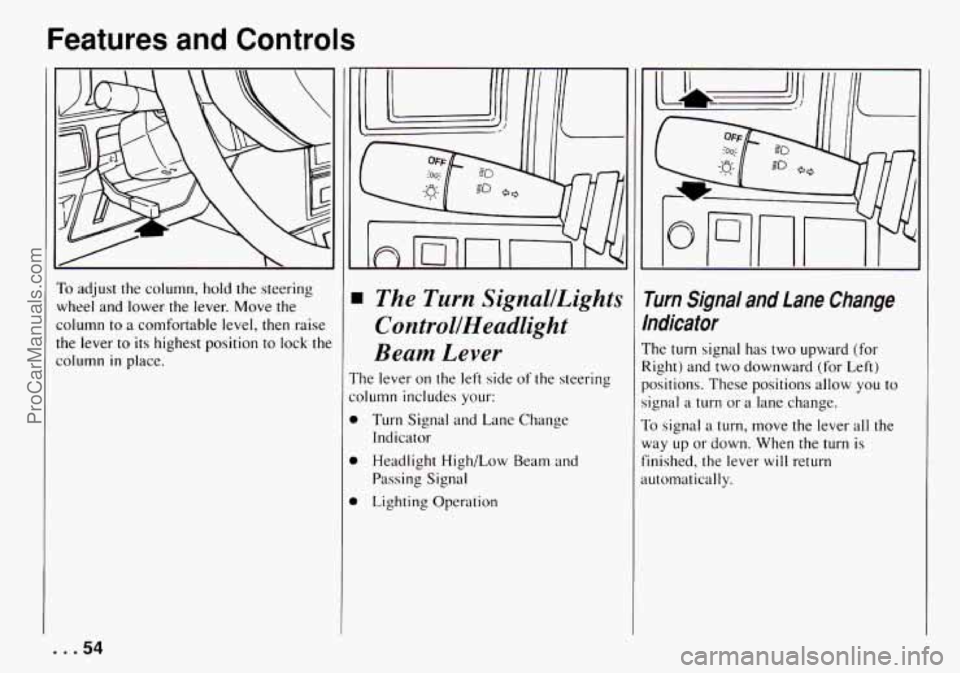
To adjust the column, hold the steering
wheel and lower
the lever. Move the
column to a comfortable level, then raise
the lever to its highest position to lock the
column
in place.
The Turn SignallLights
ControllHeadlight
Beam Lever
'he lever on the left side of the steering
olumn includes your:
1 Turn Signal and Lane Change
1 Headlight High/Low Beam and
1 Lighting Operation Indicator
Passing Signal
i rum Signal and Lane Change
ndicafor
'he turn signal has two upward (for
!ight) and two downward (for Left)
lositions. These positions allow
you to
ignal a turn or a lane change.
b signal a turn, move the lever all the
lay up or down. When the turn is
inished, the lever will return
utomatically.
. . .54
ProCarManuals.com
Page 61 of 258

Features and Controls
3utside Manual Adjust Mirrors
The mirrors should be adjusted by hand
io that you can just see the side of your
Iehicle, when you are sitting in a
:omfortable position.
Storage and
Compartments
Glove Box
To open the glove box, pull the latch
toward you. Use
your key to lock and
unlock the glove
box.
loor Storage Compartments
lach door has a storage compartment.
... 60
ProCarManuals.com
Page 62 of 258
--- -_________- ----
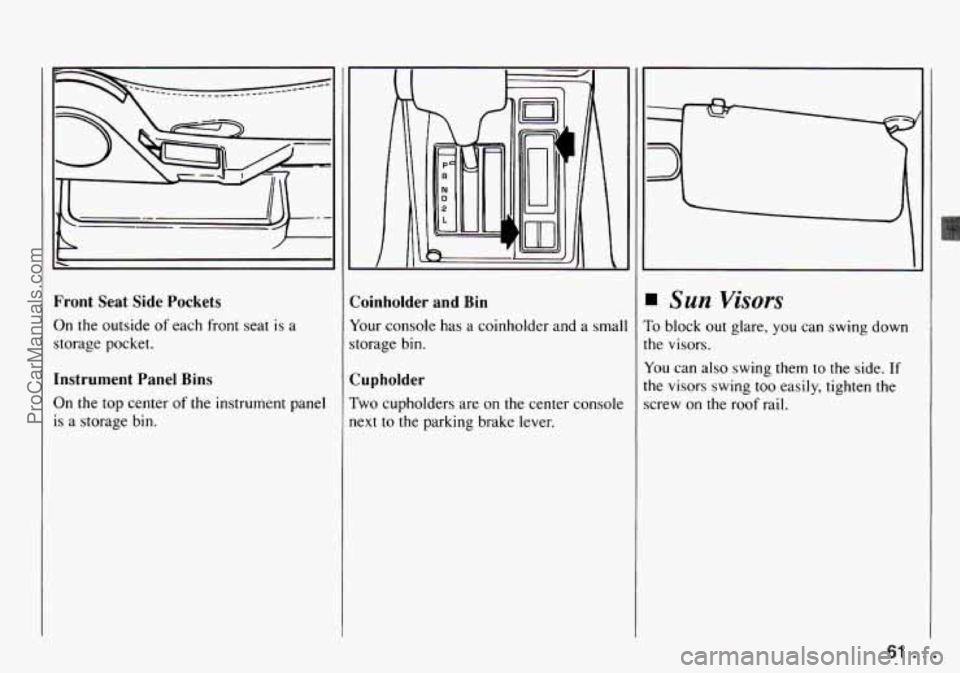
Front Seat Side Pockets
On the outside
of each front seat is a
storage pocket.
Instrument Panel Bins
On
the top center of the instrument panel
is a storage bin. Coinholder
and Bin
Your console
has a coinholder and a smal
storage bin.
Cupholder
Two cupholders are on the center console
next to the parking brake lever.
Sun Visors
To block out glare, you can swing down
the visors.
You can also swing them to the side.
If
the visors swing too easily, tighten the
screw on the roof rail.
61 ...
ProCarManuals.com
Page 66 of 258

Instrument Panel
1. Air Vent
2. Side Defroster Vent
3. Turn Signalbights Control/Headlight
4. Instrument Cluster
5. Hazard Warning Flasher
6. Windshield Wipermasher Lever
7. Rear Window Wiper Switch
8. Comfort Controls
Beam
Lever
9. Audio System
10. Lighter
11. Assist Grip
12. Glove Box
13. Transmission Shift Lever
14. Coinholder and Bin
15. Transfer Case Shift Lever
16. Parking Brake Lever
17. Ashtray
18. Rear Window Washer Switch
19. Ignition Switch
20. Horn
21. Fuse Block
22. Rear Window Defogger Switch
23. Brightness Control
65 ...
ProCarManuals.com
Page 70 of 258

1s I FUELONLY UNLEADED [I
UNLEADED-
J
FUEL ONLY
Fuel Gage
Your fuel gage shows about how much
fuel is in your tank. When the gage first
indicates “E,” you still have a little fuel
left (about one or two gallons), but you
need to get more right away.
Here are four concerns some owners have
had about the fuel gage. All these
situations are normal and do not indicate
that anything is wrong with the
fuel gage,
At the gas station, the fuel pump shuts
off before the gage reads
“F.”
It takes more (or less) fuel to fill up
than
the gage reads. For example, the
gage reads half full, but it took more
(or less) than half
of the tank’s
capacity to fill it.
J
0
0
The gage moves a little when you
turn, stop
or speed up.
When you turn the engine
off, the
gage doesn’t go back to “E.”
~~
Brake System Warning Light
four Geo’s hydraulic brake system is
livided into two parts. If one part isn’t
vorking, the other part can still work and
;top you. For good braking, though, you
leed both parts working well.
four vehicle also has rear-wheel anti-lock
)rakes. If the warning light comes on,
here could be a brake problem with eithel
[our regular or rear-wheel anti-lock
)rakes, or both. Have your brake system
nspected right away.
rhis light should come on as you start the
lehicle.
If it doesn’t come on then, have ii
ixed
so it will be ready to warn you if
here’s a problem.
r
69 ...
ProCarManuals.com
Page 81 of 258
Features and Controls
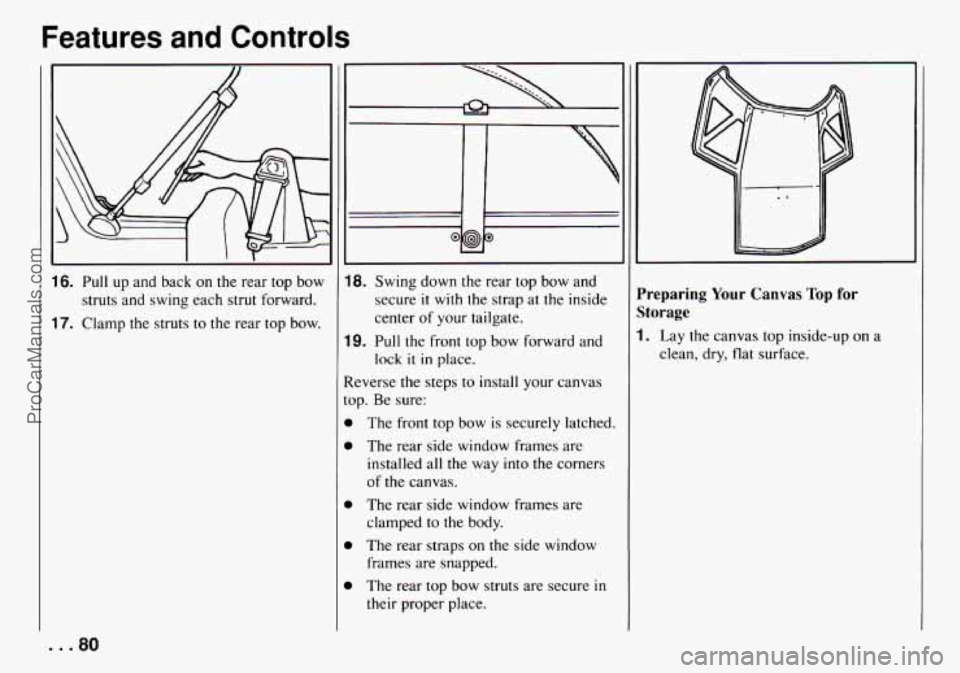
16. Pull up and back on the rear top bow
struts and swing each strut forward.
17. Clamp the struts to the rear top bow.
~~ ~
18. Swing down the rear top bow and
secure
it with the strap at the inside
center
of your tailgate.
lock
it in place.
19. Pull the front top bow forward and
teverse the steps to install your canvas
op. Be sure:
b
b
b
The front top bow is securely latched.
The rear side window frames are
installed all the way into
the corners
of the canvas.
The rear side window frames are
clamped to the body.
The rear straps on the side window
frames are snapped.
The rear top bow struts are secure
in
their proper place.
I
'reparing Your Canvas Top for
;torage
. Lay the canvas top inside-up on a
clean, dry, flat surface.
... 80
ProCarManuals.com