lock CHRYSLER 300 2005 1.G Service Manual
[x] Cancel search | Manufacturer: CHRYSLER, Model Year: 2005, Model line: 300, Model: CHRYSLER 300 2005 1.GPages: 374, PDF Size: 6.8 MB
Page 118 of 374

OVERHEAD CONSOLE Ð IF EQUIPPED
The overhead console contains courtesy/reading lights,
an optional universal garage door opener (HomeLinkt),
storage for sunglasses, and optional power sunroof
switches.
Courtesy/Reading Lights
At the forward end of the console are two courtesy/
reading lights.
Press the lens to turn these lights on. Press a second time
to turn the lights off.
The lights also turn on when a front door or rear door is
opened. The lights will also turn on when the unlock
button on the remote keyless entry transmitter is pressed.
Sunglasses Storage
At the rear of the console a compartment is provided for
the storage of a pair of sunglasses.
The storage compartment access is a9push/push9design.
Push the finger depression on the overhead console to
open. Push the finger depression to close.
Overhead Console
118 UNDERSTANDING THE FEATURES OF YOUR VEHICLE
Page 123 of 374

3. Continue to press and hold the HomeLink button
while youpress and release every two seconds(9cycle9)
your hand-held transmitter until the frequency signal has
successfully been accepted by HomeLink. The EVIC
display will show ªChannel X Trainedº (where X is
Channel 1, 2, or 3). Proceed with9Programming9step
four to complete.
Using HomeLink
To operate, simply press and release the programmed
HomeLink button. Activation will now occur for the
trained device (i.e. garage door opener, gate operator,
security system, entry door lock, home/office lighting,
etc.). For convenience, the hand-held transmitter of the
device may also be used at any time. In the event that
there are still programming difficulties or questions,
contact HomeLink at:www.homelink.com or 1-800-355-
3515.
Erasing HomeLink Buttons
To erase programming from the three buttons (individual
buttons cannot be erased but can be9reprogrammed9-
note below), follow the step noted:
²Press and hold the two outer HomeLink buttons and
release only when the EVIC display shows ªChannels
Clearedº (after 20 seconds). Release both buttons. Do
not hold for longer that 30 seconds. HomeLink is now
in the train (or learning) mode and can be pro-
grammed at any time beginning with9Programming9
- step 2.
Reprogramming a Single HomeLink Button
To program a device to HomeLink using a HomeLink
button previously trained, follow these steps:
1. Press and hold the desired HomeLink button.Do
NOTrelease the button.
2. The EVIC display will show ªChannel X Transmitº
(where X is Channel 1, 2, or 3) for 20 seconds and then
change to ªChannel X Trainingº. Without releasing the
HomeLink button, proceed with9Programming9step 2.
For questions or comments, contact HomeLink at:
www.homelink.com or 1-800-355-3515.
UNDERSTANDING THE FEATURES OF YOUR VEHICLE 123
3
Page 127 of 374
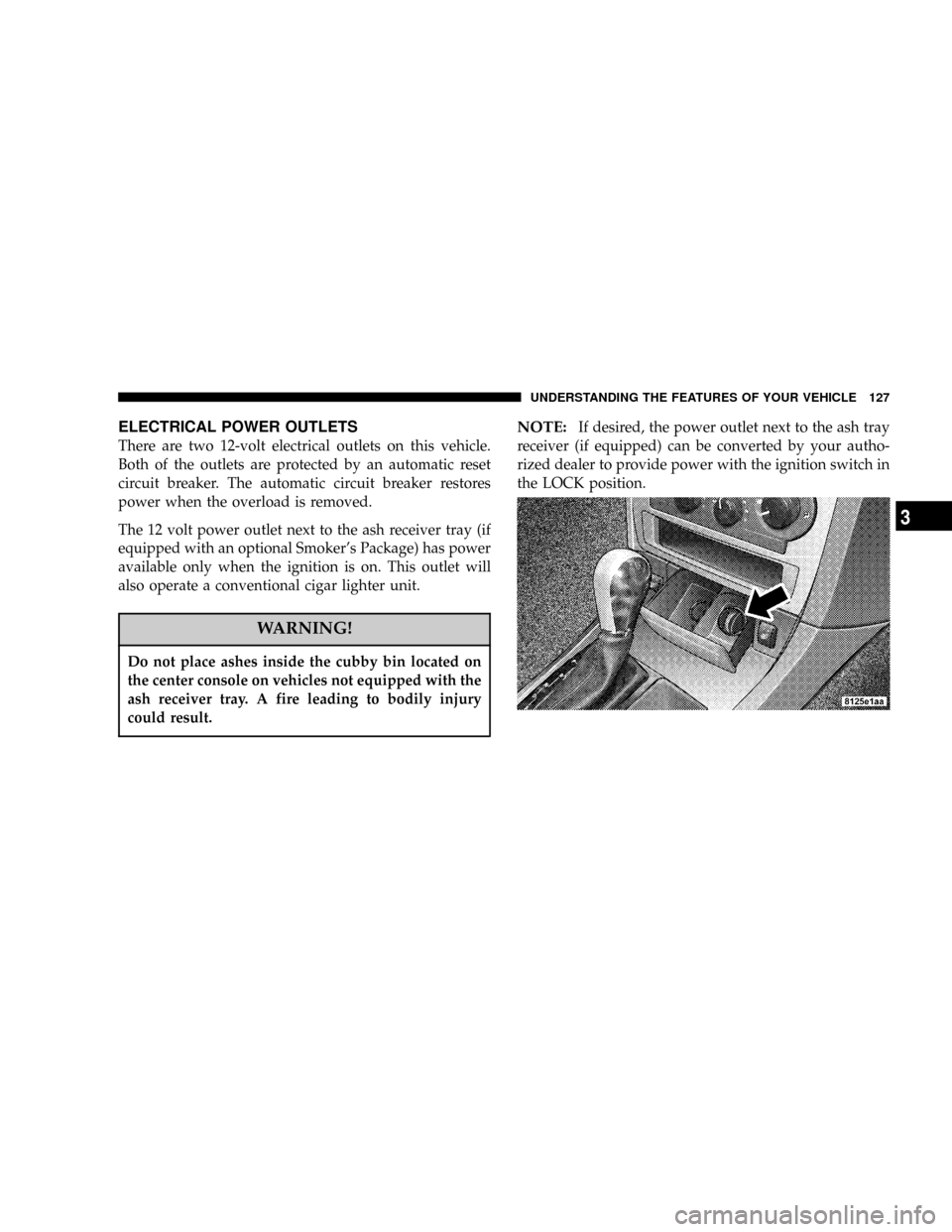
ELECTRICAL POWER OUTLETS
There are two 12-volt electrical outlets on this vehicle.
Both of the outlets are protected by an automatic reset
circuit breaker. The automatic circuit breaker restores
power when the overload is removed.
The 12 volt power outlet next to the ash receiver tray (if
equipped with an optional Smoker's Package) has power
available only when the ignition is on. This outlet will
also operate a conventional cigar lighter unit.
WARNING!
Do not place ashes inside the cubby bin located on
the center console on vehicles not equipped with the
ash receiver tray. A fire leading to bodily injury
could result.
NOTE:If desired, the power outlet next to the ash tray
receiver (if equipped) can be converted by your autho-
rized dealer to provide power with the ignition switch in
the LOCK position.
UNDERSTANDING THE FEATURES OF YOUR VEHICLE 127
3
Page 133 of 374

UNDERSTANDING YOUR INSTRUMENT PANEL
CONTENTS
mInstruments And Controls................137
mStandard Instrument Cluster..............138
mPremium Instrument Cluster..............139
mInstrument Cluster Descriptions...........140
mElectronic Vehicle Information Center (EVIC)±
If Equipped
..........................147
NTrip Functions.......................149
NCompass Display.....................150
NTelephone Ð If Equipped...............152
NNavigation Ð If Equipped...............154NPersonal Settings (Customer Programmable
Features)...........................154
mSetting The Analog Clock................158
mSales Code REF Ð AM/FM/CD (Single Disc)
Radio With Optional Satellite Radio And
Hands Free Phone Capability
.............159
NOperating Instructions - Radio Mode.......159
NOperation Instructions - CD Mode.........162
NOperating Instructions - Hands Free Phone Ð
If Equipped.........................164
NOperating Instructions - Satellite Radio Ð
If Equipped.........................164
4
Page 141 of 374

7. Tachometer
The red segments indicate the maximum permissible
engine revolutions-per-minute (r.p.m. x 1000) for each
gear range. Before reaching the red area, ease up on the
accelerator.
8. Engine Temperature Warning Light
This light illuminates, and will be accompanied
by a single chime to warn of an overheated
engine condition. The engine temperature is
critically hot, and the vehicle should be turned off
immediately. The vehicle should be serviced as soon
as possible.
9. Anti-Lock Brake Light
This light monitors the Anti-Lock Brake System.
The light will turn on when the ignition switch
is turned to the ON position and may stay on for as
long as four seconds.
If the ABS light remains on or turns on while driving, it
indicates that the Anti-Lock portion of the brake system
is not functioning and that service is required. However,
the conventional brake system will continue to operate
normally if the BRAKE warning light is not on.If the ABS light is on, the brake system should be serviced
as soon as possible to restore the benefits of Anti-Lock
brakes. If the ABS light does not turn on when the
Ignition switch is turned to the ON position, have the
light inspected by an authorized dealer.
10. Brake Assist System (BAS) Warning
Light/Electronic Stability Program (ESP) Warning
Light Ð If Equipped
The yellow Brake Assist System (BAS) mal-
function indicator light in the instrument
cluster comes on with the key in the ignition
switch turned to the ªONº position. The
light should go out with the engine running. If the
BAS malfunction indicator light comes on continu-
ously with the engine running, a malfunction has been
detected in either the BAS, or the Electronic Stability
Program (ESP) system. If this light stays illuminated,
have the BAS and ESP checked at your authorized
dealer as soon as possible.
The yellow malfunction indicator lamp for
the ESP is combined with the BAS on some
models. The yellow BAS malfunction indica-
tor light and the yellow ESP warning light in
UNDERSTANDING YOUR INSTRUMENT PANEL 141
4
Page 142 of 374
the instrument cluster both come on with the key in
the ignition switch turned to the ªONº position. They
should go out with the engine running. If the BAS/
ESP malfunction indicator light comes on continu-
ously with the engine running, a malfunction has been
detected in either the BAS or the ESP system. If this
light stays illuminated, have the BAS and ESP checked
at your authorized dealer as soon as possible.
11. Airbag Light
This light turns on and remains on for 6 to 8
seconds as a bulb check when the ignition
switch is first turned ON. If the light is not
on during starting, stays on, or turns on
while driving, have the system inspected by an autho-
rized dealer as soon as possible.
12. Brake System Warning Light
This light monitors various brake functions,
including brake fluid level and parking
brake application. If the brake light turns on,
it may indicate that the parking brake is
applied, there is a low brake fluid level or there is a
problem with the anti-lock brake system.The dual brake system provides a reserve braking capac-
ity in the event of a failure to a portion of the hydraulic
system. Failure of either half of the dual brake system is
indicated by the Brake Warning Light which will turn on
when the brake fluid level in the master cylinder has
dropped below a specified level.
The light will remain on until the cause is corrected.
NOTE:The light may flash momentarily during sharp
cornering maneuvers which change fluid level condi-
tions. The vehicle should have service performed, and
the brake fluid level checked.
If brake failure is indicated, immediate repair is neces-
sary.
WARNING!
Driving a vehicle with the brake light on is danger-
ous. Part of the brake system may have failed. It will
take longer to stop the vehicle. You could have an
accident. Have the vehicle checked immediately.
142 UNDERSTANDING YOUR INSTRUMENT PANEL
Page 143 of 374

Vehicles equipped with Anti-Lock brakes (ABS), are also
equipped with Electronic Brake Force Distribution (EBD).
In the event of an EBD failure, the Brake Warning Light
will turn on along with the ABS Light. Immediate repair
to the ABS system is required.
The operation of the Brake Warning Light can be checked
by turning the ignition switch from the OFF position to
the ON position. The light should illuminate for approxi-
mately two seconds. The light should then turn off unless
the parking brake is applied or a brake fault is detected.
If the light does not illuminate, have the light inspected
by an authorized dealer.
The light also will turn on when the parking brake is
applied with the ignition switch in the ON position.
NOTE:This light shows only that the parking brake is
applied. It does not show the degree of brake application.
13. Electronic Stability Program (ESP) Indicator
Light/Traction Control System (TCS) Indicator Light
Ð If Equipped
If this indicator light flashes during accelera-
tion, apply as little throttle as possible. While
driving, ease up on the accelerator. Adapt
your speed and driving to the prevailing
road conditions, and do not switch off the ESP, or TCS
Ð if equipped.
14. Temperature Gauge
The temperature gauge shows engine coolant tempera-
ture. Any reading within the normal range indicates that
the engine cooling system is operating satisfactorily.
The gauge pointer will likely indicate a higher tempera-
ture when driving in hot weather, up mountain grades,
or when towing a trailer. It should not be allowed to
exceed the upper limits of the normal operating range.
UNDERSTANDING YOUR INSTRUMENT PANEL 143
4
Page 155 of 374

functions and navigation system. Pressing the FUNC-
TION SELECT button while in this display selects En-
glish, Espanol, Deutsch, Italiano, or Francais. As you
continue the displayed information will be shown in the
selected language.
Display English or Metric
The EVIC, odometer, and navigation system units can be
changed between English and Metric.
Press and release the FUNCTION SELECT button when
in this display until ªUSº or ªMETRICº appears to make
your selection.
Lock Doors Automatically at 15 MPH (24 Km/h)
When ON is selected all doors lock automatically when
the speed of the vehicle reaches 15 mph (24 km/h). Press
and release the FUNCTION SELECT button when in this
display until ªONº or ªOFFº appears to make your
selection.
Auto Unlock On Exit
When ON is selected all the vehicle's doors will unlock
when the driver's door is opened if the vehicle is stopped
and the transmission is in P (Park) or N (Neutral)position. Press and release the FUNCTION SELECT
button when in this display until ªONº or ªOFFº appears
to make your selection.
Remote Unlock Driver's Door 1st
WhenDRIVER'S DOOR 1STis selected only the driv-
er's door will unlock on the first press of the remote
keyless entry unlock button and require a second press to
unlock the remaining locked doors. WhenREMOTE
UNLOCK ALL DOORSis selected all of the doors will
unlock at the first press of the remote keyless entry
unlock button. Press and release the FUNCTION SE-
LECT button when in this display until ªDRIVER'S
DOOR 1STº or ªALL DOORSº appears to make your
selection.
Recall Memory with Remote Key Unlock
(Available with Memory Seat Only)
When ON is selected the memory seat, mirror, and radio
settings will return to the memory set position when the
remote keyless entry ªUnlockº button is pressed. If this
feature is not selected then the memory seat, mirror, and
radio settings can only return to the memory set position
using the door mounted switch. Press and release the
UNDERSTANDING YOUR INSTRUMENT PANEL 155
4
Page 156 of 374

FUNCTION SELECT button when in this display until
ªONº or ªOFFº appears to make your selection.
Sound Horn with Remote Key Lock
When ON is selected a short horn sound will occur when
the remote keyless entry ªLockº button is pressed. This
feature may be selected with or without the flash lights
on lock/unlock feature. Press and release the FUNC-
TION SELECT button when in this display until ªONº or
ªOFFº appears to make your selection.
Flash Lights with Remote Key Lock
When ON is selected, the front and rear turn signals will
flash when the doors are locked or unlocked using the
remote keyless entry transmitter. This feature may be
selected with or without the sound horn on lock feature
selected. Press and release the FUNCTION SELECT
button when in this display until ªONº or ªOFFº appears
to make your selection.
Delay Turning Headlamps Off
When this feature is selected the driver can choose to
have the headlamps remain on for 0, 30, 60, or 90 secondswhen exiting the vehicle. Press and release the FUNC-
TION SELECT button when in this display until 0, 30, 60,
or 90 appears to make your selection.
Headlamps On With Wipers (Available with Auto
Headlights Only)
When ON is selected and the headlight switch is in the
AUTO position, the headlights will turn on approxi-
mately 10 seconds after the wipers are turned on. The
headlights will also turn off when the wipers are turned
off if they were turned on by this feature. Press and
release the FUNCTION SELECT button when in this
display until ªONº or ªOFFº appears to make your
selection.
NOTE:Turning the headlights on during the daytime
causes the instrument panel lights to dim. To increase the
brightness, refer to ªLightsº in this section.
Rain Sensing Intermittent Wipers Ð If Equipped
When ON is selected the system senses moisture on the
windshield and automatically activates the wipers for the
driver. Press and release the FUNCTION SELECT button
156 UNDERSTANDING YOUR INSTRUMENT PANEL
Page 157 of 374

when in this display until ªONº or ªOFFº appears to
make your selection. When OFF the system reverts to
standard intermittent wiper operation.
Delay Power Off to Accessories Until Exit
When this feature is selected, the power window
switches, radio, hands±free system, DVD video system,
power sunroof, and power outlets will remain active for
up to 60 minutes after the ignition switch has been turned
off. Opening a vehicle door will cancel this feature. Press
and release the FUNCTION SELECT button when in this
display until ªOffº, ª45 sec.º, ª5 min.º, ª10 min.º, ª30
min.º, or ª60 min.º appears to make your selection.
Turn Headlamps on with Remote Key Unlock
When this feature is selected the headlamps will activate
and remain on for up to 90 seconds when the doors are
unlocked using the remote keyless entry transmitter.
Press and release the FUNCTION SELECT button when
in this display until ªOFFº, ª30 sec.º, ª60 sec.º, or ª90
sec.º appears to make your selection.
Tilt Mirrors Down on Reverse Ð If Equipped
When ON is selected the outside rearview mirrors will
tilt down when the vehicle is shifted into REVERSE withthe ignition switch in the RUN position. The mirrors
move back to their previous position when the vehicle is
shifted out of REVERSE. Press and release the FUNC-
TION SELECT button when in this display until ªONº or
ªOFFº appears to make your selection.
Park Assist System Ð If Equipped
When ON is selected and the driver places the gear
selector in Reverse or Neutral the system will scan for
objects behind the vehicle. Press and release the FUNC-
TION SELECT button when in this display until ªONº or
ªOFFº appears to make your selection.
Confirmation of Voice Commands Ð If Equipped
When ON is selected all voice commands from the
U-Connect system are confirmed. Press and release the
FUNCTION SELECT button when in this display until
ªONº or ªOFFº appears to make your selection.
Turn by Turn Navigation Ð If Equipped
When ON is selected the Turn-by-Turn directions will
appear in the display as the vehicle approaches a desig-
nated turn within a programmed route. Press and release
the FUNCTION SELECT button when in this display
until ªONº or ªOFFº appears to make your selection.
UNDERSTANDING YOUR INSTRUMENT PANEL 157
4